23248 comments found.

Have the same issue with this blocked ip nonsense! Can’t update theme!
And of course I have to use the theme in two different servers, because it is never 100% safe to make all Wordpress and its plugins updates in the server, where the actual live webshop is situated. Can’t afford to mess something up for customers, so I have to test the updates before in the different server. So it is kind of disturbing, when you block IP just like that every time I need to test my e-shop before going live with updates in the right server.
Hello, @DonAndrez,
I have found and whitelisted your IP, Please try again now, I am sure you will not finds this issue anymore.
Regards, P-THEMES.
Hi, For all of my products I have used woocommerce variations and everything seems to work fine except the “Default Form Values: ” option.
I have selected a default form value and when I go to the actual product page, that value I selected is not automatically picked. In fact, no variation is selected and the customer has to choose a variation manually each time.
How can this be fixed so that the default form value option for variations is working?
Thanks in advance.
Hello, @ashp123,
I have just tested it at my end, on my test site with the very latest version of the Theme and Plugins and it is working perfectly fine for me, you can check it here too on my test site: https://hubdatasolutions.com/pearl/porto/wpbakerydemo-for-aizaz/product/blue-gentle-shoes/
Please make sure that you are using the very latest version of the Theme and Plugins and check back after deactivating all the third-party plugins.
And if the issue will still persist then remain all the third-party plugins deactivated on your site and share your site WP-Admin Login details with us via our support system so that we will check it for you on your site.
Regards, P-THEMES.
I’m having trouble with account functionality. When I create one or even log in. When I am redirected to the account page, and when I click on the menus, My Orders and Change Address, for example, nothing happens. And finally, when I click to leave, it doesn’t work. The site is stuck with my logged in account. Could you help me, please.
Hello, @bezerrarodrigo,
Please follow the below listed debugging processes one by one and check which one helps you in finding the cause of the issue.
|.   Make sure you have everything up to date (Theme, Plugins, Translations files)
||.  Remember to reset ALL cache etc after a plugin or theme update.
|||. Disable all plugins except WooCommerce and recheck if the issue persists
|V.  Check the browser dev console on errors (F12, on most if not all browsers)
V.   Double-check your own Custom CSS, or Custom Snippets in function.php is causing it
V|.  Can you please check once by activating the WP default Theme Twenty Twenty, If the issue will still persist with the default WP Theme then it will make clear that the issue is not from Porto WordPress Theme and then you have to contact the WP and WooCommerce support for fixing it with the default WP Theme and once it will fix with the default WP Theme, It will automatically work with Porto WordPress Theme as well.
And also could you please purchase a support extension to get further support? Your 6 months of support period is expired from 11/12/2020. According to Envato’s support policy, renewing support is required for further support.
Thanks for your understand.
Hi, Under theme options, single product, I am able to add a global custom tab which is great. However, for the option “Global Product Custom Tab Block”, where I need to input a block slug name I am stuck. Since I cannot find any place on the backend where I can create custom blocks and generate the slug name. Where do i go to create a custom block?
All I want is this custom tab to display an image I have uploaded.
Thanks
Hello, @ashp123,
You have to go to Porto >> Template Builder >> Blocks and create a new Block and set as per your requirements.
Now, quick edit the block and copy the block slug name and paste it under Theme Options >> WooCommerce >> Single Product, it will work for you.
Regards, P-THEMES.
Hello, there is a problem with the theme..
I have done a lot of testing and when a product has the affiliate option, the “bag” icon is not visible. When the product is normal, the icon is displayed without problems.
https://ibb.co/30hncDxHow can I request it? Greetings
Hello, @retroregalos,
I tested same thing by creating an affiliate product on my test site. You can check in this video https://jmp.sh/kyHC1j1 . You can see there is no issue with add to cart icon on product archive page. Affiliate product showing icon perfectly fine.
So it must be the cache or some sort of third party plugin issue on your site, please deactivate all the third party plugins and check back after removing the server, site and browser cache and if still the issue presist then remain all the third party plugins deactivated on your site and share your site WP Admin Login details with us via our support system so that we will check it for you on your site.
Regards, P-THEMES.
Hello, I have your theme installed and on the category view it is not displaying the full product title but shortening it at the end by just displaying ”...” to fit into the container so it looks neat.
However for my purpose, I need the full title to show as it is missing some crucial information this way. How can I stop the title from shortening like this?
Hello, @ashp123,
Please copy and paste the below-given CSS code to Appearance >> Theme Options >> Skin >> Custom CSS and check your site after removing the browser cache.
ul.products li.product-col .woocommerce-loop-product__title {
    white-space: normal !important;
}
ul.product_list_widget li .product-details a, .widget ul.product_list_widget li .product-details a{
    white-space: normal !important;
}
Regards, P-THEMES.
Thanks
You’re Most Welcome!!
how to change icon on menu into white? I dont find it. I need hearth, account, cart, search in white but dont find were to change it been 14 min looking and changing and no luck.
Hello, @Maytar,
Please copy and paste the below given CSS code to Porto >> Theme Options >> Skin >> Custom CSS and check back your site after removing the browser cache.
#header .my-wishlist, #header .my-account {
    color: #000 !important;
}
#mini-cart .cart-icon i.minicart-icon.porto-icon-shopping-cart {
    color: #000 !important;
}
Regards, P-THEMES.
What is your recommendation in case of web page builder: wpbakery vs elementor vs VC vs gutenberg? The most important for me is web performance.
Hello, @kafebiwa,
The oldest one with our Theme is WP Bakery so obeviously it has more options and functionalities, and you can choose any of the page builder which better meets your requirements, all have the different options and functionality.
And also could you please purchase support extension to get further support? Your 6 months of support period is expired from 21/08/2019. According to Envato support policy, renewing support is required for further support.
Thanks for your understand.
Hi 
I just built a built a shop page with template builder and Porto Product Category element. It all looks really great except for the star rating, the star image is broken and looks like a rectangle.
Can you advise? Thanks!
Hello, @PharmaSpa,
Can you please share the screenshot of your issue and your site Live URL so that I’ll check and help you out in solving your issue.
You can also share via our support system as well.
Regards, P-THEMES.
Thanks, I just opened a ticket.
Hello, @PharmaSpa,
You’re Welcome!, Now please be patience, once your support ticket will be resolved you will get the reply of your support ticket.
Our business hours are Monday to Saturday – from 12:00 AM to 08:00 AM EST
Regards, P-THEMES.
ASAP!! How to change the content on the toggle sidebar menu. Right now it shows main menu so have it repeated.. which is not what is needed. I have it on the top just on home and called instead “all departments” “Options” and need to have it toggle the menu of tracking info and other links
Hello, @Maytar,
You can change the “All Departments” Title of the Toggle Menu from Porto >> Theme Options >> Menu as showing below as per your requirements.
And you can show the Sidebar Menu and Main Menu as per your requirements from Appearance >> Menu.
Regards, P-THEMES.
hello guysss, are u finee? look, how can I desable “back to top” button? thankss
Hello, @sandruhill,
Please copy and paste the below-given CSS code to Porto >> Theme Options >> Skin >> Custom CSS and check back your site after removing the browser cache.
html #topcontrol {
    display: none !important;
}
And also could you please purchase a support extension to get further support? Your 6 months of support period is expired from 29/08/2018. According to Envato’s support policy, renewing support is required for further support.
Thanks for your understand.
i am using the haeader builder and the wpml plugin. I need to translate an string into a html block in the header.
how can do it?
regeards
Hello, @iontics,
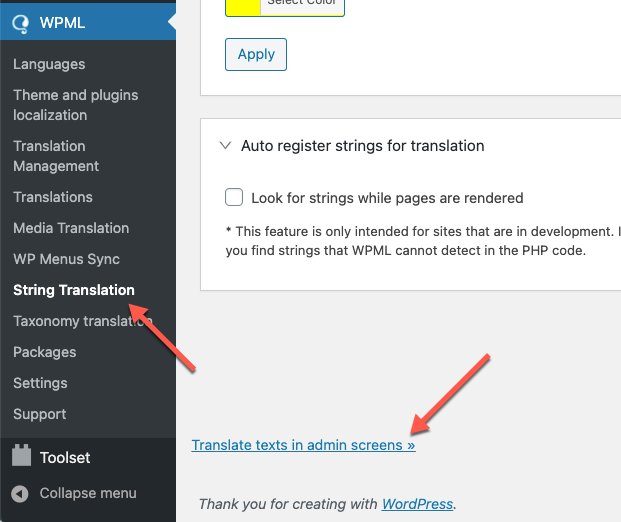
Please go to WPML >> String Translation >> Click the scroll to the bottom of the page and click the Translate texts in admin screens link. https://cdn.wpml.org/wp-content/uploads/2021/03/translate-texts-in-admin-screens.png This will take you to a searchable list of admin strings. Find the Words that you have added in the Header Builder HTML and then select those words and add it to the string Translation then you will go to the WPML >> String Translation >> then find and translate them into other languages.
And also could you please purchase support extension to get further support? Your 6 months of support period is expired from 22/03/2019. According to Envato support policy, renewing support is required for further support.
Thanks for your understand.
Perfect!!!
Thank you very much…
Merhabalar https://decoletto.com/ sitemde temanızı kullanıyorum. Crawl araçlarında yapılan sepet aramaları url olarak gozukuyor ve bunkar 404 sayfasına donusuyor. Bu sorunun nedeni ne olabilir
Hello, @adacreative,
Can you please provide me the steps to duplicate the issue or the small video clip which elaborate your issue more clearly for my better understanding.
Regards, P-THEMES.
Hello, how to insert my own icons? For example from fontello or icomoon
Best regards
Hello, @net_daniele,
Sorry to say that but with Menu Items you can only use the FontAwesome Icons, This is the default functionality of the Theme and you can not change it except Customization.
Regards, P-THEMES.
Hello, sorry. I meant: how to insert custom icon to use in visual composer? For example with the “Porto info list item”. With this element it’s possible to use a wide range of icon but what if i need to use my own icon? Does the theme give the possibility to upload custom icon (created with fontello or icomoon) to use into the visual composer elements? Please, let me know
Best regards
Hello, @net_daniele,
You can try with Icon Type, you have to select “Icon Type as Icon Image” and upload your own image, and set it as per your requirements.
Regards, P-THEMES.
There seems to be some significant problems with Fontawsome not showing up which can’t be figured out because there are no bad requests
Hello, @empx,
Which FontAwesome Icon are you talking about? Can you please share the screenshot of the issue and also your Live site URL so that I’ll check it for you and also if you are using any of the cache plugins then deactivate it for a while as well including the FVM plugin.
And also could you please purchase a support extension to get further support? Your 6 months of support period is expired from 12/07/2018. According to Envato’s support policy, renewing support is required for further support.
Thanks for your understand.
Your ip address is blocked as spam!!!
I have a problem updating the template. “Error: Your ip address is blocked as spam!!! ”
Thanks for fixing the problem.
Hello, @laclippers,
I have found and whitelisted your IP, Please try again now, I am sure you will not finds this issue anymore.
Regards, P-THEMES.
Hi there, i have a problem with the activation/update of the theme. I get the message: Your ip address is blocked as spam! Please help.
Hello, @ValeritoCadena,
I have found and whitelisted your IP, Please try again now, I am sure you will not finds this issue anymore.
Regards, P-THEMES.
on products how to have sticky buy info on the bottom like in demos?
Hello, @Maytar,
You can turn ON/OFF the sticky bottom or sticky top add to cart on single product page from Porto >> Theme Options >> WooCommerce >> Single Product as showing below as per your requirements.
Regards, P-THEMES.
beautiful!!
You’re Most Welcome!!
beautiful ti works great
Thank you so much
in your demo when customer click like on item it shows 1,2,3 at the top on the hearth like when you add your items on the cart. we love that action but this is not happening in our site. can you help us figure out what I am missing to show that like your shop16 demo?
Hello, @Maytar,
Can you please share the screenshot that which action you are talking about? so that I’ll check and help you out in solving your issue.
Regards, P-THEMES.
hey . my home page its disapper i dont know whats happen can you help me (https://ibdizayn.com/ ) i solved in pc but still the problem in phone and ipad
Hello, @ebawadikji,
Please follow the below listed debugging processes one by one, I am sure it will help you in solving your issue.
|.   Make sure you have everything up to date (Theme, Plugins, Translations files)
||.  Remember to reset ALL cache etc after a plugin or theme update.
|||. Disable all plugins except WooCommerce and recheck if the issue persists
|V.  Check the browser dev console on errors (F12, on most if not all browsers)
V.   Double-check your own Custom CSS, or Custom Snippets in function.php is causing it
V|.  Can you please check once by activating the WP default Theme Twenty Twenty, If the issue will still persist with the default WP Theme then it will make clear that the issue is not from Porto WordPress Theme and then you have to contact the WP and WooCommerce support for fixing it with the default WP Theme and once it will fix with the default WP Theme, It will automatically work with Porto WordPress Theme as well.
Regards, P-THEMES.