23248 comments found.

Hello. https://prnt.sc/13mppip The telephone is working like a link and its working ok. The problem that i have is when i open it with iphones only(android device its ok) the link change color to orange and because the background its also orange its not visible. Is there any way to change the color for iphone to stay white?
Hello, @parisalex,
Can you please contact us via our support system with your site WP-Admin Login details so that we will check it for you on your site and provide you the best possible solution for it.
Regards, P-THEMES.
Hi, is there a chance to put a “read more” button which opens a toggle and shows the complete text in the same page? Thank you!
Hello, @palomavallhonrat,
You can try with the third party plugin but at your own risk, the plugins are listed below:
https://wordpress.org/plugins/read-more/
https://wordpress.org/plugins/read-more-without-refresh/
https://wordpress.org/plugins/expand-maker/
https://wordpress.org/plugins/gosign-readmore-toggle-text-block/
Regards, P-THEMES.
Hi, in woocommerce order invoice email the data in email is duplicate and woocommerce support said the problem in theme I used could you please help me
Hello, @samann_h_mikhael,
There is no such issue with our Theme, but this might be the issue on your site with your Child Theme Customization, if you are using it, or any third party plugin confliction issue, so please follow the below listed debugging processes one by one, I am sure it will help you in finding the cause of the issue, otherwise, please contact us via our support system with your site WP Admin Login details so that we will check it for you on your site.
|.   Make sure you have everything up to date (Theme, Plugins, Translations files)
||.  Remember to reset ALL cache etc after a plugin or theme update.
|||. Disable all plugins except WooCommerce and recheck if the issue persists
|V.  Check the browser dev console on errors (F12, on most if not all browsers)
V.   Double-check your own Custom CSS, or Custom Snippets in function.php is causing it
V|.  Can you please check once by activating the WP default Theme Twenty Twenty, If the issue will still presist with default WP Theme then it will make clear that the issue is not from Porto WordPress Theme and then you have to contact the WP and WooCommerce support for fixing it with the default WP Theme and once it will fix with the default WP Theme, It will automatically work with Porto WordPress Theme as well.
Regards, P-THEMES.
Hi,
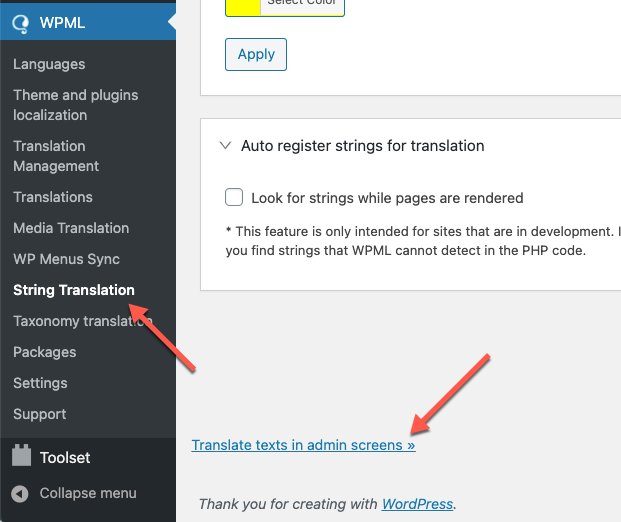
I am trying find Quick View in WPML string translation but I can’t find it.
Thank You
Hello, @cloud-tech,
Please go to WPML >> String Translation >> Click the scroll to the bottom of the page and click the Translate texts in admin screens link. https://cdn.wpml.org/wp-content/uploads/2021/03/translate-texts-in-admin-screens.png This will take you to a searchable list of admin strings. Find the Words that you want to translate from Quick View and then select those words and add it to the string Translation then you will go to the WPML >> String Translation >> then find and translate them into other languages.
And also could you please purchase a support extension to get further support? Your 6 months of support period is expired from 05/02/2021. According to Envato support policy, renewing support is required for further support.
Thanks for your understand.
Hello
I am the owner of 3 “PORTO” licenses
My IP address is blocked to enter a license Please unblock my IP 195.78.66.97
Thank you 
Hello, @troper,
I have just checked into our database and finds that your provided IP is already whitelisted, can you please check once again after removing your browser cache.
Regards, P-THEMES.
Thank You
You’re Most Welcome!!
Hi, how to add images in porto carousel instead of background , when I add images didn’t appear in the carousel
Hello, @samann_h_mikhael,
Please watch and follow the instructions showing in this video: https://streamable.com/ga7pm6 I hope it helps…
Regards, P-THEMES.
Hi, thanks for helping but the video explain edit carousel in web bakery page builder but I’m using elementor could you please help me
Hello, @samann_h_mikhael,
Please watch and follow the instructions showing in the below given videos:
https://youtu.be/Xxr_-gLZtjU
https://youtu.be/bptjJOERxMY
Regards, P-THEMES.
Hi, thanks for helping but my question was how to use images in carousel not as background to container I mean If I can use the images as items for carousel not as background .
Hello, @samann_h_mikhael,
No this is not possible with that, you can try with the Image carousel element, I have created another video of that element for you: https://streamable.com/rulrsk
Regards, P-THEMES.
Hello,
While installing the theme it says that your IP is blocked.
Could you please help me in this. My primary domain is voobal.com
Thanks in advance!
Hello, @Brandcapitals,
I have found and whitelisted your IP, Please try again now, I am sure you will not finds this issue anymore.
Regards, P-THEMES.
Yes, it started working,
Thanks a ton!
You’re Most Welcome!!
if I purchase this can I use it on all 3 of my websites? or is it one license one website. Many thanks
Hello, @Justmeok,
First of all, thanks for showing your interest in Porto WordPress
One license for one site/domain/IP only, this is Envato policy and you may wish to confirm from them as well.
Regards, P-THEMES.
I updated the theme and it threw me this error: /wp-content/themes/porto/vc_templates/vc_btn.php on line 100
Hello, @dcmweb,
Please run the backup of your site again and then follow the instructions written in the below-given article to update the Theme on your site and after that, you have to update the Theme required/recommended plugins as well.
https://ptheme.zendesk.com/hc/en-us/articles/360020667197--24-Update-Porto-Theme-Manually-without-Loosing-any-Data-
And also could you please purchase a support extension to get further support? Your 6 months of support period is expired from 03/12/2019. According to Envato support policy, renewing support is required for further support.
Thanks for your understand.
Thank you so much for this amazing theme, I just had one problem with my sticky header I’m using Elementor to build the header, when I enable the sticky and scroll down the header size changes and become smaller, I don’t want it to resize I need it to be the same size as the normal header, thank you!
Hello, @moshalawa,
I have just checked your site now and it is working perfectly fine at my end, please see the below-given screenshots, both headers size are the same and it must be the cache issue at your end nothing else.
https://postimg.cc/s1GJZ4hQ
https://postimg.cc/r03CPKvw
And also could you please purchase a support extension to get further support? Your 6 months of support period is expired from 01/03/2020. According to Envato support policy, renewing support is required for further support.
Thanks for your understand.
Hi, thanks for the reply but it is not the same size also on your images you can see the logo squeeze to top and resize the header..
Hello, @moshalawa,
You have to set it using Custom CSS only.
Regards, P-THEMES.
How do I add more than two slides to the slider on the homepage?
And so that the changes in the theme do not disappear during the update, do I need to use a child theme WP, or are there any other methods?
Hello, @max_z1,
1. If you edit your home page, you will find Porto Carousel element and Porto Ultimate Content Box element set under it, so you have to duplicate the Porto Ultimate Content Box element and edit and change the image and content as per your requirements, it will work for you, please watch this video I have created for you: https://streamable.com/ga7pm6
2. Child Theme is used for Custom Code, If you are using Custom Code, then you can use the Child Theme for avoiding any inconviniance when updating the Theme on your site.
Regards, P-THEMES.
My Theme Options settings not working i do any changes in theme is not working & also i install demo content is not install properly
Hello, @gouravgraphics123456,
I have just checked your site now and it is working perfectly fine at my end, please see this screenshot: https://postimg.cc/23XcRtFt it must be the cache issue at your end nothing else. and for the Theme Options changes not reflecting on your site, please read and follow the instructions written in this article: https://ptheme.zendesk.com/hc/en-us/articles/360020799098--35-Unable-to-change-color-settings-or-Setting-from-Theme-Options-Cache-Problem
Regards, P-THEMES.
Thank You , Now it’s working properly
Sound’s Good!! & You’re Most Welcome!!
I just purchased Porto.
Hello, @sinin,
Missing style sheet error when installing the theme
A common issue that can occur with users new to installing WordPress themes is a “Broken theme and/or stylesheets missing” error message being displayed when trying to upload or activate the theme. This error message does not mean that the theme you have purchased is broken, it simply means it has been uploaded incorrectly. Luckily, there is a very easy fix.
OR
Please watch and follow the instructions showing in this video: https://www.portotheme.com/wordpress/porto/documentation/installation-video/
Regards, P-THEMES.
Hi, shouldn’t the yith filters take the styles of the theme? I have configured them and I get the yith style by default without any design.
Hello, @castillovox,
Can you please share the screenshots of the Filters and also the page URL on which those Filters have been applied so that I’ll check and help you out with a proper solution if possible.
Regards, P-THEMES.
I would like that in the site I am building, the filters look with that design, as you see in this demo, but I am not using DEMOS, I am using the theme to inherit styles in pages built with elementor pro, everything has been inherited, except the styles for yith filters, how do I get those filters, which one did you use for the demo this one for example? https://www.portotheme.com/wordpress/porto/shop41/product-category/frozen/
Hello, @castillovox,
You have to set those styles using Custom CSS, there is no option in our Theme for it.
Regards, P-THEMES.
Could you please share the original code that is used on the header announcement: “Get Up to 40% OFF New-Season Styles”
Hello, @antanast,
You have to copy and paste the below given Code to Porto >> Theme Options >> General >> HTML Block as showing below:
<div class="background-color-dark text-center text-color-light position-relative py-3 d-none"><div class="container">Get Up to <b>40% OFF</b> New Furniture Deals <small>* Limited time only.</small></div></div>
And you have to copy and paste the JS code under Porto >> Theme Options >> Skin >> Custom JS as showing below:
if ('off' === jQuery.cookie('porto_ads_status')) {

} else {
    jQuery('.porto-block-html-top > div').removeClass('d-none').append('<button class="mfp-close"></button>');
}
jQuery('body').on('click', '.porto-block-html-top .mfp-close', function() {
   jQuery(this).parent().fadeOut();
   jQuery.cookie('porto_ads_status', 'off', { expires : 7 });
});
And also could you please purchase a support extension to get further support? Your 6 months of support period is expired from 22/10/2020. According to Envato support policy, renewing support is required for further support.
Thanks for your understand.
Hi , I have tried downloading many demo , but no demo is being imported properly . is there any problem , in porto files ??
Hello, @manishchahal,
This is not our Theme issue but this is your site SSL certificate issue: https://postimg.cc/XpJZBVHW please read and follow the instructions written in the below-given article: https://www.portotheme.com/wordpress/porto/documentation/faq/site-distort-because-of-mixed-content-ssl-certificate-issue/
Regards, P-THEMES.
Hi, we are trying to upgrade the theme from 5.4.1 to 6.x version. After downloading the code, it still says “This theme requires the following plugin: Porto Functionality.”. Auto update is not an option cause we blocked FTP. How to make it updated to 6.x?
Hello, @ekkljs,
If you are using the very latest version of the Theme then please go to Porto >> Dashboard and deactivate the Theme from there, and then again activate the Theme with the same purchase code and then go to Appearance >> Install Plugins and try to update the plugin from there, I am sure it will solve your issue.
Regards, P-THEMES.
Hi, As I said currently I’m using 5.4.1 and trying to upgrade to 6.1.0 directly. After following your steps, it asks FTP account info on setup wizard/appearance. FTP is not working on our server so please let me know how to upgrade without using FTP. Thank you.
Hello, @ekkljs,
That is the FTP restriction on your site from your server end, and this is not our Theme issue and nor our Theme has any influence on it.
You have to contact your hosting provider on this issue and ask to remove the FTP restrictions from your site and then try to update the Theme
OR
Try with the steps listed in this article: https://ptheme.zendesk.com/hc/en-us/articles/360020667197--24-Update-Porto-Theme-Manually-without-Loosing-any-Data-
And also could you please purchase a support extension to get further support? Your 6 months of support period is expired from 30/11/2020. According to Envato support policy, renewing support is required for further support.
Thanks for your understand.
OK. We enabled FTP and verified that it’s working by updating other plugs via FTP. Followed your instructions and still it is failed to install Porto Functionality plugin. Doesn’t it support FTP passive mode? We see FTP log and login was successful but there was no actual file transfer and setup wizard panel simply said “failed”.
Hello, @ekkljs,
If it is not working then it means it’s not supporting the FTP passive mode, you have to turn the FTP passive mode OFF and then try to update the plugin.
Regards, P-THEMES.
OK. We turned off FTP passive mode and tried to update the plugin. Still failed. We also tested other plugins and they were all OK in no FTP passive mode. What now?
Hello, @ekkljs,
Now, please contact us via our emaiil newsmartwave@gmail.com with this comment URL and with your site WP Admin login details so that we will check and solve it for you on your site.
Regards, P-THEMES.
hello, i have problem here with header Suddenly the header and some css disappeared my site : simplefurniture.store
Hello, @Assisnal,
I have just checked your site now, and it is working perfectly fine at my end, please see this screenshot: https://postimg.cc/s1LnZLnB it must be the cache issue at your end nothing else.
And also could you please purchase support extension to get further support? Your 6 months of support period is expired from 18/01/2021. According to Envato support policy, renewing support is required for further support.
Thanks for your understand.
Hello how are you?
Is there any snippet to be able to sort Categories search form by Slug? By default it is being organized by ID.
I refer to this header search form: https://ibb.co/ckfvwvcHello, @therus,
Sorry to say that but this is not possible, as there is no such option to sorting these categories in the Theme.
Regards, P-THEMES.
Hello, i have bought multiple times your theme for clients. One of these times i had installed it on a test domain kechaidis.site and a few months ago i moved it to the live domain kechaidis.gr. Could you please reset the registration code in order to proceed with the updates?
Hello, @frtcyprus,
I have reset your purchase code, now you can use the same purchase code for registration of your theme.
Regards, P-THEMES.