385 comments found.

Is the Last Update date correct? 10 September 2021…
Hi there,
Yes, you can check the last update in the changelog for this theme. Please note that our developers are constantly working on updates for all our themes. At the moment we don’t have any ETA when new update will come out but we hope it will be released soon.
Support
Edge Portfolio part of
Qode Interactive
Don’t forget to sign up for our newsletter and be the first to find out all the latest news.
Is the Interactive Links Showcase font customizeable? When I change site font the Interactive Links Showcase does not update.
Hi there,
We would appreciate if you could submit a ticket to our Help Center, include your website URL, and one of our support agents will assist you. To submit a ticket please follow instructions from this article.
Support
Edge Portfolio part of
Qode Interactive
Don’t forget to sign up for our newsletter and be the first to find out all the latest news.
Yes I can do this. But the question is general. Is the interactive links showcase a customizable font?
Hi there,
You will be able to change and adjust that page by your needs. For some you will be able to change through theme options and for some you will have to add some additional CSS code. Please contact our support if you need an further assistance.
Support
Edge Portfolio part of
Qode Interactive
Don’t forget to sign up for our newsletter and be the first to find out all the latest news.
Hei There, I will maybe buy your themes a third time. It is quiet great and easy to use. But, on the horizontal portfolio, could it be possible to have a second row? Is there a possibility for that? Cheers
Hi there,
Thank you for such kind words
Support
Edge Portfolio part of
Qode Interactive
Don’t forget to sign up for our newsletter and be the first to find out all the latest news.
Pre sales question: There is the possibility of you (I’ll pay for that of course) customize one small aspect of the theme for me? Changing those circle animais to water drops shapes instead (my project logo is a water drop). Just change the CSS animais on the background on the slider and bottom, as well the hover cusor to make the shape of the water drop instead making the circle!
Hi there,
Please take a look at the following article to see what comes in support scope for our themes.
Regarding the circle in slider revolution, this is added as an image so you will be able to change that under Slider Revolution. Unfortunately, we can not assist you when it comes to modifying theme files, we can point you to the right file path where you can try to change the code.
Support
Edge Portfolio part of
Qode Interactive
Don’t forget to sign up for our newsletter and be the first to find out all the latest news.
Hi, I have the #edgtf-manon-loading-title set for every page of my site, but I would like that div to load only once per session on each page. Meaning user would see each page animations only once, and the second time they go to the same page they had been before, the animation would not appear anymore. Is that possible to be done by just changing the function on child theme? Thank you so much!
Hello,
Since author’s dashboard is meant for general inquiries and pre-sale questions, we would appreciate if you could please submit a ticket to our Help Center, include your website URL, and one of our support agents will check this and assist you. To submit a ticket please follow instructions from this article – How To Submit A Ticket.
Support
Edge Portfolio part of
Qode Interactive
Don’t forget to sign up for our newsletter and be the first to find out all the latest news.
Can I buy HTML theme, don’t want to use Wordpress.
Hello,
Thank you for taking interest in our theme!
Unfortunately we don’t have HTML versions of our themes. We are focused on creating WordPress themes that offer you easy management of dynamic content, which is why we are not creating static HTML files.
Support
Edge Portfolio part of
Qode Interactive
Don’t forget to sign up for our newsletter and be the first to find out all the latest news.
Hi there,
Since the author’s dashboard is meant for general inquiries and pre-sale questions we would appreciate it if you could submit a ticket to our Help Center, include your website URL, and one of our support agents will assist you. To submit a ticket please follow instructions from this article.
Support
Edge Portfolio part of
Qode Interactive
Don’t forget to sign up for our newsletter and be the first to find out all the latest news.
How does this code: https://share.getcloudapp.com/YEuB7Bd7
translate to the layout of that page. I see no shortcodes, etc. Hope you can assist. Thank you.
Hi there,
You should enable using WPBakery page builder for Portfolio post types. Please navigate to WPBakery page builder > Role Manager and set the Post types to Custom, then check the post types for which you want to use builder, like in the following screenshot.
If you need any further assistance we would appreciate it if you could submit a ticket to our Help Center and include your website URL and one of our support agents will assist you.
Support
Edge Portfolio part of
Qode Interactive
Don’t forget to sign up for our newsletter and be the first to find out all the latest news.
- – I wanted to use Elementor for this project not WPBakery as I feel that code is very bloated.
- – The client had to postpone development while they dealt with COVID (then catch up on other work after recovery) , so the support period expired.
Hi there,
Our Manon demo comes with two different versions, one created with WPBakery and one with Elementor. If you imported Manon WPBakery that would explain why you are unable to edit any content with Elementor. Manon WPBakery demo pages can be edited only with WPBakery and Manon Elementor only with Elementor page builder.
Support
Edge Portfolio part of
Qode Interactive
Don’t forget to sign up for our newsletter and be the first to find out all the latest news.
Quick question: I purchased two licenses of Manon and I installed one with Elementor and the other one with WPBakery… Now that I can compare both, I like the Elementor one better, so I’m thinking on switching the WPBakery one to Elementor… Is this recommended? is it easy? I have tons of info already loaded in the site. Your feedback is greatly appreciated.
Hello,
Thank you for writing in!
Unfortunately Elementor and WPBakery are not interchangeable. Since you already have a website that was built using the WPBakery Page Builder, we do not recommend switching to Elementor, as you will not be able to edit any content that was built using the WPBakery.
If you have any additional questions we would kindly ask you to submit a request at our help center and our support team will be happy to help.
Support
Edge Portfolio part of
Qode Interactive
Don’t forget to sign up for our newsletter and be the first to find out all the latest news.
Hi, I cannot edit the title text (MANON) on the Landing Page in Slider Revolution. When I open the module to edit the “MANON” text in “Landing-top” module in Slider Revolution, it does not show anything for the title, only has ‘Slide BG Animation’, ‘Hello World’ (a small text) and a button and another ‘Hello World’ small text. I’ve looked through the Slide BG Animation, but still cannot find how to change it? HOW can I change this text for a different word? I’ve looked through the images to see if it’s an image, but there is none for it, have checked the Background in the Slide Options, but still cannot find how to change this word. Can you please tell me how I can change the word “MANON” to whatever I want?
Hi there,
Thank you for reaching us!
Since the author’s dashboard is meant for general inquiries and pre-sale questions, we would appreciate it if you could submit a ticket to our Help Center and one of our support agents will assist you.
Thanks.
Support
Edge Portfolio part of
Qode Interactive
Don’t forget to sign up for our newsletter and be the first to find out all the latest news.
Hello
For the single portfolio page external links: Is there a way to have them open in a new window or tab please?
Thank you
Hi there,
By default the external link that is set on a portfolio single, will open in new tab on the portfolio list while you click on that item. Is this what you refer to?
If we somehow misunderstood you please let us know.
Support
Edge Portfolio part of
Qode Interactive
Don’t forget to sign up for our newsletter and be the first to find out all the latest news.
https://equitycoin.io/artist/manuel-acevedo/
The Website/Click Here, Additional Links/Vimeo we would like to open in a new window or tab. If the email address [between Website and Additional Links] could be hyperlinked (new tab or window) that would be great as well.
Thanks for the quick reply
Hi there,
You can try to add this code to Manon Core Options > General > Custom Js
jQuery(document).ready( function(){
jQuery('.edgtf-ps-info-item.edgtf-ps-custom-field
a').attr('target','_blank');
})
We hope this helped and if you need any further assistance we would appreciate if you could submit a ticket to our help center https://helpcenter.qodeinteractive.com/hc/en-us/articles/360010949598-How-To-Submit-A-Ticket and include your website URL and one of our support agents will assist you.
Thank you.
Support
Edge Portfolio part of
Qode Interactive
Don’t forget to sign up for our newsletter and be the first to find out all the latest news.
Thanks.
Tried the custom code but it did not work:
https://share.getcloudapp.com/d5uN6JPr
Will message support. Thank you.
Hi there,
Please try once again with this one, there was a space that was not supposed to be present:
jQuery(document).ready( function(){
jQuery('.edgtf-ps-info-item.edgtf-ps-custom-field a').attr('target','_blank');
})
Support
Edge Portfolio part of
Qode Interactive
Don’t forget to sign up for our newsletter and be the first to find out all the latest news.
The new code worked fine. Thank you for following up with me, I appreciate it.
Hi there,
You’re welcome!
Support
Edge Portfolio part of
Qode Interactive
Don’t forget to sign up for our newsletter and be the first to find out all the latest news.
Hello, if I use a own footer template in Elementor pro the Header of the theme is not shown. What can I do?
Hi there,
Thank you for reaching us!
We haven’t tested the theme with Elementor Pro. Please note that even if the Headers and Footers are included in the Elementor Pro version, our theme is using the free Elementor version and header and footers in our demo site are created with our header/footer options, so unfortunately, we didn’t test the Elementor-pro header and footer feature with our theme.
Support
Edge Portfolio part of
Qode Interactive
Don’t forget to sign up for our newsletter and be the first to find out all the latest news.
Hi, I have a problem with the license code of your template, my license code is valid until April 2022 but a warning appears in my WP CMS indicating that it has expired, can you tell me what the problem is? Thanks
Hi there,
By the regular license you can only have the theme registered on one domain. So please check if you want to register it on some additional domain, and if you need assistance with deregistration please send us a mail to our help center providing your purchase code in it and our team will check this on your end.
Thanks.
Support
Edge Portfolio part of
Qode Interactive
Don’t forget to sign up for our newsletter and be the first to find out all the latest news.
Hi again, I have use it only in one web site
Hi there,
Please check if you have updated the latest version of the theme and its plugins. If you need instructions on how to update the theme and included plugins, you can refer to the following article: How To Update A WordPress Theme And Plugins.
This error usually occurs if you missed updating the Core plugin.
And as we already mentioned please send us a mail to our help center providing your purchase code in it and our team will check this on your end.
Thanks.
Support
Edge Portfolio part of
Qode Interactive
Don’t forget to sign up for our newsletter and be the first to find out all the latest news.
Hi there,
I know my support has run out but I have noticed a bug which I need a fix for, which shouldn’t require me to have an extended support packaged. When I go to edit the URL https://unilive.co/portfolio-item/separate-ways/ the backend editor is neither Elementor or WP Bakery Page builder. So the editing abilities are limited to short code or HTML and I am not a developer. Please could you tell me how to fix this so these portfolio pages are editable just like regular pages.
Thanks
Hi there,
This is a portfolio item, so please check if you have enabled Manon Portfolio in Elementor > Settings > Post Types. Once it is enabled you will be able to edit the portfolio item with Elementor.
You should also know that we do have our Portfolio templates that you can choose once you click on Edit portfolio. This will generate a specific template for the portfolio. However, you will be able to choose a custom layout and then build your portfolio item with the page builder you have choosen.
We hope this helped.
Support
Edge Portfolio part of
Qode Interactive
Don’t forget to sign up for our newsletter and be the first to find out all the latest news.
That worked, thank you so much!
Hi there,
Glad to hear this!
Support
Edge Portfolio part of
Qode Interactive
Don’t forget to sign up for our newsletter and be the first to find out all the latest news.
I know my support has run out but I have noticed another bug which I need a fix for, which shouldn’t require me to have an extended support packaged. On my portfolio pages, the little grid at the bottom doesn’t go back to the portfolio landing page when clicked, it instead goes to the about page. (example https://unilive.co/case-studies/crafty-brew/) And I can’t find anywhere in the backend to change where that grid icon directs to.
Hi,
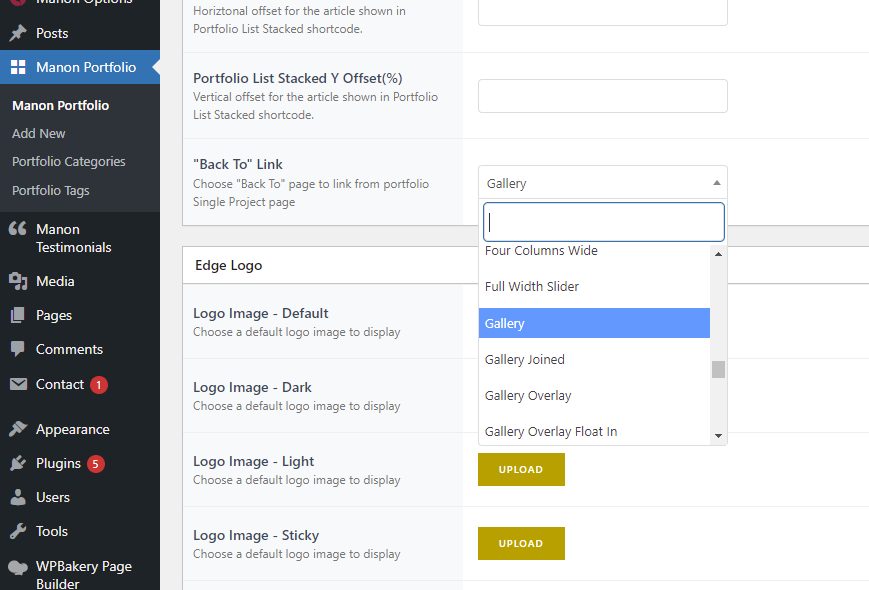
You can change “Back to” Link in Edge Portfolio Settings on the portfolio single pages as shown in screenshot.
Support
Edge Portfolio part of
Qode Interactive
Don’t forget to sign up for our newsletter and be the first to find out all the latest news.
Hey, thanks for getting back to me. However, I don’t have that option in the backend.
Hi,
Once you click on “Edit” for a portfolio single page (please see screenshot), scroll down to Edge Portfolio Settings and “Back to” Link option should be listed as last option in Edge Portfolio Settings section.
Support
Edge Portfolio part of
Qode Interactive
Don’t forget to sign up for our newsletter and be the first to find out all the latest news.
Thank you so much, that worked a treat!
Support
Edge Portfolio part of
Qode Interactive
Don’t forget to sign up for our newsletter and be the first to find out all the latest news.
Hello, me again.
Some stakeholders of my client have contacted me to let me know the homepage hero section doesn’t display properly for them. They can see it fine in the back end and on Mac but for some reason on Chrome and Edge it looks like the attached. The page in question is https://unilive.co/ and see here for what they’re seeing in the front end their side: https://unilive.co/wp-content/uploads/2022/02/thumbnail_image003.png
Hi,
We would appreciate if you could please submit a ticket to our Help Center, include your website URL, and one of our support agents will check this and assist you. To submit a ticket please follow instructions from this article – How To Submit A Ticket.
Support
Edge Portfolio part of
Qode Interactive
Don’t forget to sign up for our newsletter and be the first to find out all the latest news.
Hi there, unfortunately my support has ran out. But seeing as this seems to be a bug, I was wondering if you would be so kind as to help out on this occasion. Thanks.
Hi,
Please contact us through this email, include your purchase code in the email, and our support agents will check this and assist you.
Support
Edge Portfolio part of
Qode Interactive
Don’t forget to sign up for our newsletter and be the first to find out all the latest news.
Thank you
Support
Edge Portfolio part of
Qode Interactive
Don’t forget to sign up for our newsletter and be the first to find out all the latest news.
Hey, Header is not working only on homepage with Stacked portfolio list, What can be causing that issue? I’m looking forward to hearing from you!
Hi there,
Thank you for reaching us!
We’ve checked this on our live demo and menus on Stacked Portfolio homepage and Stacked Portfolio page are working correctly.
If you are perhaps experiencing this behavior on your installation, please submit a ticket to our Help Center, include your website URL, and one of our support agents will check this and assist you. To submit a ticket please follow instructions from this article – How To Submit A Ticket.
Support
Edge Portfolio part of
Qode Interactive
Don’t forget to sign up for our newsletter and be the first to find out all the latest news.
Hello! I recently updated my manon theme and I keep receiving a notification stating I need to activate the theme on the Manon Dashboard page. However, when I navigate to that page my theme is registered with my purchase code. Please provide some assistance.
Hi there,
Please check if you have updated the latest version of the theme and its plugins. If you need instructions on how to update the theme and included plugins, you can refer to the following article: How To Update A WordPress Theme And Plugins.
This error usually occurs if you missed updating the Core plugin.
Support
Edge Portfolio part of
Qode Interactive
Don’t forget to sign up for our newsletter and be the first to find out all the latest news.
Hi,
I have a question about typesetting in Manon. I have a manon portfolio. There is an area called Edge additional portfolio sidebar items. The default format is a list of several input fields. My question is how can I break the line to have a bullet list in the input field. I’ve tried to use HTML tag
in it. Yet, it seems that each field is a string that cannot insert an HTML tag. I look forward to hearing from you. Thank you for you time!
Hello,
Thank you for reaching us!
Since author’s dashboard is meant for general inquiries and pre-sale questions, we would appreciate if you could submit a ticket to our Help Center and include your website URL and one of our support agents will assist you.
Support
Edge Portfolio part of
Qode Interactive
Don’t forget to sign up for our newsletter and be the first to find out all the latest news.
How to replace svg vertoical menu opener.
Hello, I tried to place the question in the support, but I have purchased te theme more than one year ago and I’m not supported officially anymore, however I must sort this out: I’d liket o replace the dots on top right,where we click to reveal the side menu. I see that under Manon options> Header>Vertical Right Opener Style there is the option of putting another svg. I did so (in the official support I could show via screenshots) but nothing. What would you suggest me to do?
Thank you in advance, Evita
Hello,
Thank you for reaching us!
You should upload your own SVG path to Manon Options > Side Area (see this screenshot).
Hope this helps.
Support
Edge Portfolio part of
Qode Interactive
Don’t forget to sign up for our newsletter and be the first to find out all the latest news.
Hi There Do you have some hosting Errors? I can not register the Theme neighter make a request. Kind regards
Hi there,
Thank you for reaching us!
If you are perhaps getting the “Please Wait” message when registering theme please try the suggestions from this article – How To Fix The Please Wait Error During Registration Process.
To submit a ticket please follow instructions from this article – How To Submit A Ticket.When you log in at our Help Center, click on the “Submit a Request” link in header, and fill in the form shown in screenshot. First enter your purchase code, then select the profile (in this case Edge) and then theme.
Support
Edge Portfolio part of
Qode Interactive
Don’t forget to sign up for our newsletter and be the first to find out all the latest news.
Hello, When i try to edit any page of the theme with elementor i get an error 500 and i cant update the changes. The error that i get is the following: AH01071: Got error ‘PHP message: PHP Fatal error: Cannot redeclare manon_edge_str_split_unicode() (previously declared in …...../wp-content/themes/manon/functions.php:776) in ….../wp-content/themes/manon/functions.php on line 776’, referer: ........./wp-admin/post.php?post=121&action=elementor
Hi there,
Thank you for reaching us!
Since the author’s dashboard is meant for general inquiries and pre-sale questions, we would appreciate it if you could submit a ticket to our Help Center and one of our support agents will assist you.
Thanks.
Support
Edge Portfolio part of
Qode Interactive
Don’t forget to sign up for our newsletter and be the first to find out all the latest news.