218 comments found.

HI There, I would like to know what plugins you recommend for a mega menu that will not interfere with the look of the theme?
Hi there,
Thanks for taking an interest in our theme!  Mega menu is a third party plugin that we can not guaranty compatibility with our theme as it has not been tested. However, you can build wide menu within our themes options, so please check our article about it here.
Support
Select Portfolio part of
Qode Interactive
Don’t forget to sign up for our newsletter and be the first to find out all the latest news.
While we tried to have a Five Columns Wide view to our website it appears that the thumbnails are squeezed on the left place. (Architects Portfolio) If you click on “Show All” seems to fix it. But when you click on “Projects” and backwards the issue remains. I’m attaching a screenshot to understand.
Hello,
As we do not have enough information in order to help you, and since author’s dashboard is meant for general inquiries and pre-sale questions, we would appreciate if you could please submit a ticket at our Help Center, include URL of your site, and one of our support agents will check this and assist you further. Thank you.
Support
Select Portfolio part of
Qode Interactive
Don’t forget to sign up for our newsletter and be the first to find out all the latest news.
Hi guys. I am looking for the option to enable Passepartout to my individual products to keep the styling consistent throughout. As you can see here https://zooidesign.com.au/shop-2/ Passepartout has been enabled however when you go onto the product the Passepartout is removed as seen here: https://zooidesign.com.au/product/product-1/ . Also is there an option to click through to the product via the image instead of showing the cart icon on hover? Cheers for the awesome theme
Hello there,
You can use the following CSS code that you can paste under Appearance > Customize > Additional CSS:
.qodef-paspartu-enabled .qodef-wrapper {
    background-color: #1e73be;
    padding: 50px;
}
Support
Select Portfolio part of
Qode Interactive
Don’t forget to sign up for our newsletter and be the first to find out all the latest news.
Thanks – I tried that but it looks broken: https://zooidesign.com.au/product/product-1/ What are your thoughts? Thanks again
Hi there,
As we do not have enough information in order to help you, and since author’s dashboard is meant for general inquiries and pre-sale questions, we would appreciate if you could please submit a ticket at our Help Center or contact us through this email, include your purchase code and URL of your site in the email, and one of our support agents will check this and assist you further. Thank you.
Support
Select Portfolio part of
Qode Interactive
Don’t forget to sign up for our newsletter and be the first to find out all the latest news.
Hello, before purchasing I would like to know when will be the next theme update? Also, is it possible to have the horizontal showcase slider work on top of any other page? For example – to use that slider on top of your main home page.
Hi there,
Please note that our developers are constantly working on updates for all our themes. We are always working on our new theme updates, where we are including the latest versions of included plugins or implementing some fixes, or adding new features but we can’t tell exactly when it is going to be released, but we hope that update will be available soon.
Regarding the Horizontal Showcase slider, it can be added to any page but please note that this element is designed to be the only element on the page.
Do let us know if you have any additional questions.
Support
Select Portfolio part of
Qode Interactive
Don’t forget to sign up for our newsletter and be the first to find out all the latest news.
Goodnight
I bought the theme but I can’t locate the magnifying glass or search engine that appears next to the menu, where I can activate it in the theme’s tools, I attach an image so you can see what I mean
My installation does not appear in the browser http://prntscr.com/26rpkey
Theme that has been purchased http://prntscr.com/26rpoev
Hello,
Thank you for choosing our theme!
Since author’s dashboard is meant for general inquiries and pre-sale questions, we would appreciate if you could please submit a ticket to our Help Center, include your website URL, and one of our support agents will assist you. To submit a ticket please follow instructions from this article – How To Submit A Ticket.
Support
Select Portfolio part of
Qode Interactive
Don’t forget to sign up for our newsletter and be the first to find out all the latest news.
Hi! If you check https://arujakothari.com/portfolio-item/skatepark/ all the portfolio items product titles are in white eg: (ASHLAND SKATE PARK) it was in black before but I don’t understand how it got converted to white.
Also the Icon under any portfolio item page is your logo currently which links back to about me page which can be changed but how to change that logo I can’t find that in settings.
One last thing the animated icon in the beginning when the website opens I want my logo in that, how to replace that?
Help me with this!
Hi there,
There seem to be a custom css added for h3 which sets color to white (please see screenshot).
Since author’s dashboard is meant for general inquiries and pre-sale questions, we would appreciate if you could please submit a ticket to our Help Center and include your website URL and one of our support agents will assist you. Thank you.
Support
Select Portfolio part of
Qode Interactive
Don’t forget to sign up for our newsletter and be the first to find out all the latest news.
We just started our website last week only & we purchased theme few months back. It’s showing your support is expired. Can you help us with that & sort our 2-3 errors?
Hi,
We see that titles are now being shown correctly.
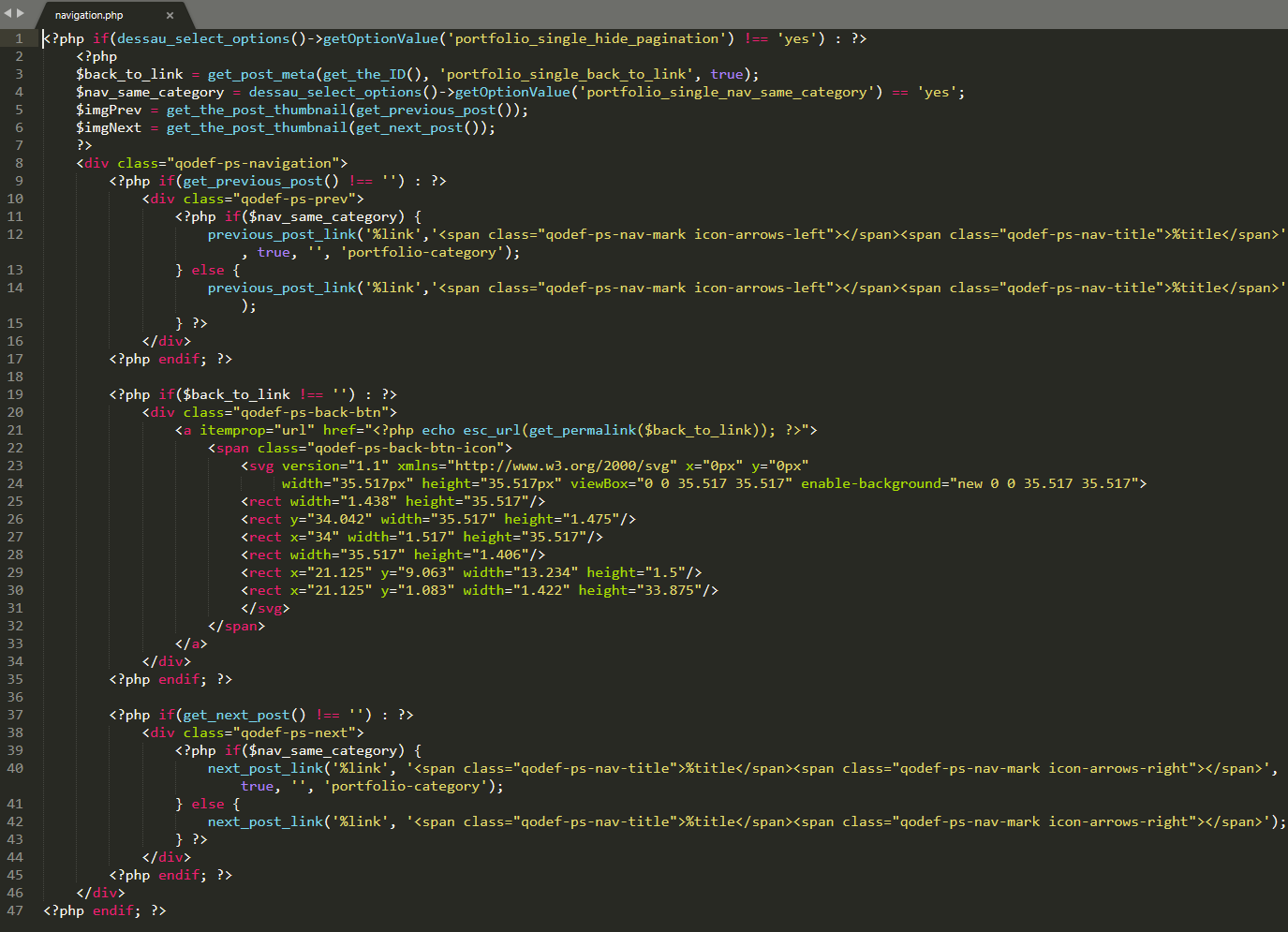
“Back To” icon in portfolio navigation unfortunately cannot be changed through theme options. To change this icon it would be necessary to edit navigation.php file located on this path wp-content\plugins\dessau-core\post-types\portfolio\templates\single\parts\navigation.php (please see screenshot).
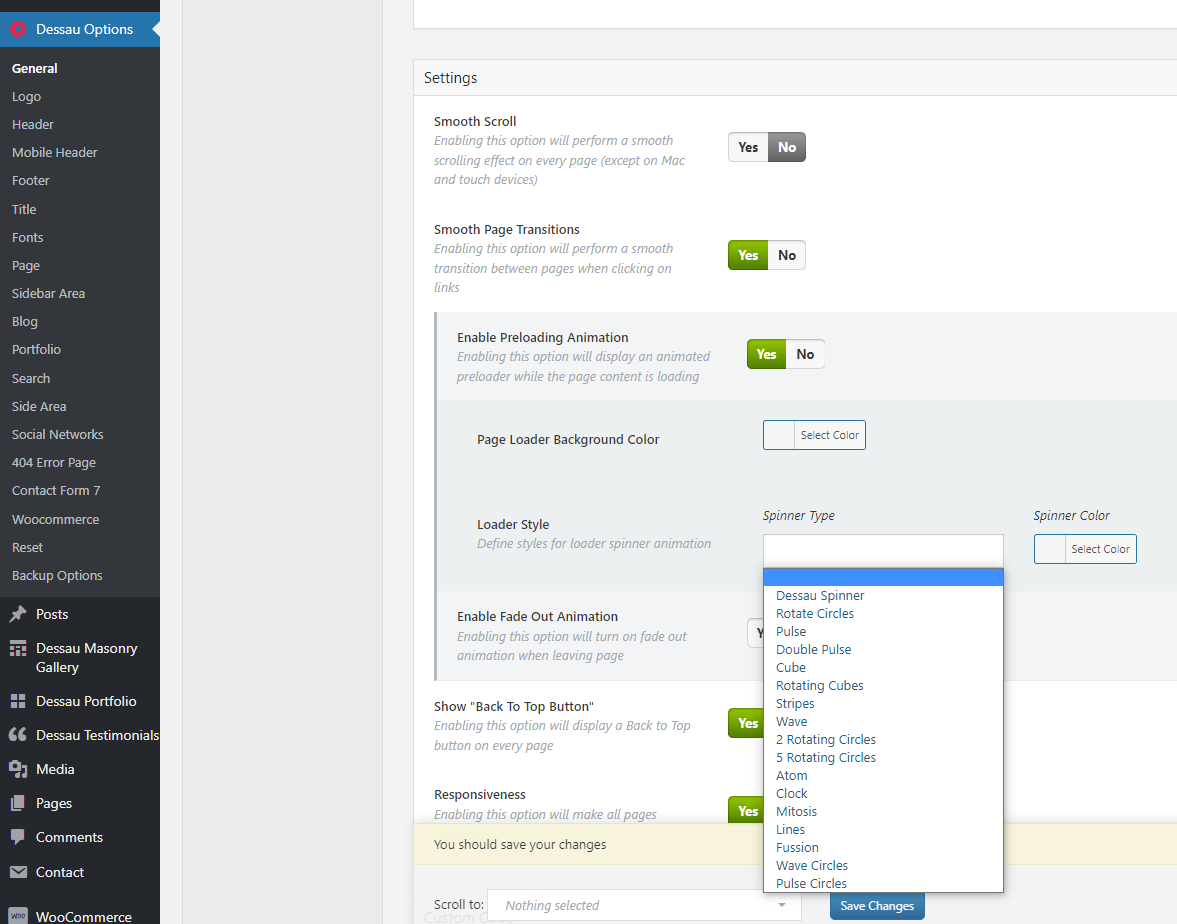
Loader Style can be changed in Dessau Options > General only to one of the options listed in the dropdown as shown in screenshot.
Supported item includes a 6 month support period from the purchase date, however you can also extend it and you can find more info in this link.
Support
Select Portfolio part of
Qode Interactive
Don’t forget to sign up for our newsletter and be the first to find out all the latest news.
Hi, the back to icon screenshot isn’t working.
Hi.
Please check this screenshot.
Support
Select Portfolio part of
Qode Interactive
Don’t forget to sign up for our newsletter and be the first to find out all the latest news.
Hi mostly everything is done. Just one last help. if you check arujakothari.com the ashland skatepark is not aligned center like the others down below. Can’t find that setting.
HI there,
The image that you uploaded is rather large, 2565×1204 px so please consider uploading a smaller image. Also the Elements holder padding is set to be 700px so you can change that in order to position the image correctly
padding: 261px 0px;would be ok for your current size of the image.
If you need any further assistance we would kindly ask you to submit a request at our help center and our support team will be happy to help.
Thanks.
Support
Select Portfolio part of
Qode Interactive
Don’t forget to sign up for our newsletter and be the first to find out all the latest news.
Hello purchased the theme a while back and all of a sudden the portfolio pages are garbage. They look extremely boxed and no images display. Only thing done is regular updates. Haven’t even added any new content in a year.
Hello,
As we do not have enough information in order to help you, and since author’s dashboard is meant for general inquiries and pre-sale questions, we would appreciate if you could submit a ticket to our Help Center and include your website URL and one of our support agents will assist you.
Support
Select Portfolio part of
Qode Interactive
Don’t forget to sign up for our newsletter and be the first to find out all the latest news.
Hi, I just ordered and paid for a support renewal but still receive the message: “Support for “Dessau – Contemporary Theme for Architects and Interior Designers” item has expired.”, when trying to open a ticket…
Update: After trying several times (without changing anything) it worked.
Hi there,
We’re glad to hear this is resolved!
If you have any further questions, please submit a ticket to our Help Center and one of our support agents will assist you.
Support
Select Portfolio part of
Qode Interactive
Don’t forget to sign up for our newsletter and be the first to find out all the latest news.
Hello, I cannot save templates on WPBakery since the save option is greyed out. Am I missing something?
Hi there,
Please submit a request on our helpcenter and one of our agents will provide you with the latest version of WPBakery. They fixed this issue in the latest plugin version. https://helpcenter.qodeinteractive.com/hc/en-us/articles/360010949598-How-To-Submit-A-Ticket
Support
Select Portfolio part of
Qode Interactive
Don’t forget to sign up for our newsletter and be the first to find out all the latest news.
Hi, My support has ended for this theme as the client has taken forever.
Hopefully you can help as I can’t log a ticket.
On my category pages the product images aren’t clickable like on the theme. Is this a setting? The add to cart button works and clicking on the product title goes to the product just not clicking on the image.
Hopefully you can assist. Thank you
Hi there,
Could you please provide us with your website URL at least so we can check a bit closer. Thanks.
Support
Select Portfolio part of
Qode Interactive
Don’t forget to sign up for our newsletter and be the first to find out all the latest news.
I tried to update the theme and it broke – let me get it sorted and I’ll tell you when its back up. thanks
Hi there,
Please check ig you have updated the Core plugin as well as all the required plugins, if you need instructions on how to update the theme and included plugins, you can refer to the following article: How To Update A WordPress Theme And Plugins.
Also check if you have after the update activated all your plugins.
Support
Select Portfolio part of
Qode Interactive
Don’t forget to sign up for our newsletter and be the first to find out all the latest news.
Hi, I’ve updated to 1.6 but still having this issue:
On my category pages the product images aren’t clickable like on the theme. Is this a setting? The add to cart button works and clicking on the product title goes to the product just not clicking on the image https://africaninterior.devlabs.co.za/product-category/east-africa-dreaming/Also – the update doesn’t appear to have the latest wpbakery. Could you please supply that.
thanks
Hi again,
Please send us a mail and include your purchase code and one of our agents will assist you and provide you with the latest version of WPBakery.
Support
Select Portfolio part of
Qode Interactive
Don’t forget to sign up for our newsletter and be the first to find out all the latest news.
Hello, widget area doesnt work??? How to solve this issue?
Hi there,
We haven’t tested WP 5.8 yet. You can try using this plugin as a temporary solution until we release an official update. https://wordpress.org/plugins/classic-widgets/
Support
Select Portfolio part of
Qode Interactive
Don’t forget to sign up for our newsletter and be the first to find out all the latest news.
Hi, I’m trying to submit a support ticket but my purchase code is invalid. I don’t understand why because I paid for it and I have a purchase code number shown at the item on my ThemeForest profile. What should I do? Also, I can’t choose the theme I bought in the Theme options. I bought Dessau. Thank you.
Hello there,
Thank you for reaching us!
Make sure that you’ve select the right profile for the Dessau theme (which is Select).
Here’s a helpful guide on How to Submit a Ticket, please follow all the steps.
Support
Select Portfolio part of
Qode Interactive
Don’t forget to sign up for our newsletter and be the first to find out all the latest news.
Hello, I am interested in buying the theme. Does it support WPML? Thank you in advance.
Hello,
Thank you for taking interest in our theme!
This theme is compatible with the WPML plugin https://prnt.sc/1iycaal.
You’ll find more info on how to create a multi-language website in this article.
Please let us know if you have more questions
Support
Select Portfolio part of
Qode Interactive
Don’t forget to sign up for our newsletter and be the first to find out all the latest news.
Hello
I liked your template and am interested in buying it, and I will make my site in both Arabic and English, so before buying this template I want to make sure that the (RTL) feature is supported. I didn’t see it in this template, will you add it soon?
Or if I add it myself, will it affect the appearance of the template and cause problems with it?Please reply as soon as possible, thanks .hi there,
Please read this article: https://helpcenter.qodeinteractive.com/hc/en-us/articles/360002367198-Do-Qode-Interactive-Themes-Support-RTL-Right-To-Left-Text-Let us know if you have any additional questions.
Support
Select Portfolio part of
Qode Interactive
Don’t forget to sign up for our newsletter and be the first to find out all the latest news.
Hi, after the update to 1.6 the mobile header logo is not respecting the settings. Please see ajcarchitects.com using a mobile device.
Ended up resolving this by re-entering the mobile settings and clearing cache.
Hi there,
We’re glad you could resolve this on your own
Support
Select Portfolio part of
Qode Interactive
Don’t forget to sign up for our newsletter and be the first to find out all the latest news.
Hi,
I would like to purchase this theme. It seems though that it has been left behind for a long period. Last update is Oct 2020.
When (approximately) will this theme get an update?
Thanks
Hi there,
We see that you already bought our theme.
We can’t tell exactly when it is going to be released, but our developers are working hard on preparing updates for all our themes, and we will release them one by one. We hope that update will be available soon.
Support
Select Portfolio part of
Qode Interactive
Don’t forget to sign up for our newsletter and be the first to find out all the latest news.
Good morning. We are interested in buying your theme. I would like to ask you if the theme & the plugins are compatible with the latest wordpress version (currently 5.7) ? Also are there any upcoming updates to the theme? Do you still support it?
Hello there,
Thank you for taking interest in our theme.
The theme is supported and our dev team is working hard at the moment on updating all our themes. We don’t have any ETA when this update will come out, however, we can say that the theme is compatible with the latest version of WordPress and you can always check the article in this link.
If you have any additional questions please let us know.
Support
Select Portfolio part of
Qode Interactive
Don’t forget to sign up for our newsletter and be the first to find out all the latest news.
Help me! The interface is missing style.css stylesheet
Hello there,
Thank you for reaching us!
In case that you are getting the following message “The package could not be installed. The theme is missing the style.css stylesheet.” this usually means that the wrong file is being uploaded. Check to make sure that you’re uploading the correct ZIP file. Here is Envato Article where this error is explained.
In case you need further assistance please submit a ticket at our Help Center and one of our support agents will gladly help you.
Support
Select Portfolio part of
Qode Interactive
Don’t forget to sign up for our newsletter and be the first to find out all the latest news.
Thanks you! I solved it
Support
Select Portfolio part of
Qode Interactive
Don’t forget to sign up for our newsletter and be the first to find out all the latest news.
Hi I would like to ask If you add Motion Gallery to the page and add some more content above or under, how well does it work ? is it possible? thank you
Hello there,
Thank you for reaching us!
You can add more content above and under the Portfolio Motion Category element. However, to scroll down to the content below the Portfolio Motion Category element it is necessary to move the cursor away from the list.
If you have any additional questions please let us know.
Support
Select Portfolio part of
Qode Interactive
Don’t forget to sign up for our newsletter and be the first to find out all the latest news.
Hi there,
I have a presale question:
I’m wondering if there is a filter feature available for the masonry portfolio (https://dessau.qodeinteractive.com/portfolio/masonry/) like there is for the standard portfolio (https://dessau.qodeinteractive.com/portfolio/standard/) in your theme?
Thank you!
Hi there,
Yes, you can enable the category filter for the masonry layout.
Let us know if you have any additional questions.
Support
Select Portfolio part of
Qode Interactive
Don’t forget to sign up for our newsletter and be the first to find out all the latest news.