26707 comments found.
my blog page is a mess: https://frederiquebros.com/blog/ the whole site is up to date and i didn’t change anything, I had the same issue last year and one of your team helped to fix it, I deactivated a couple of plugins but nothing works. Also I noticed on the backend of Wordpress there is no options for elementor or wpbakery for this page, please help thanks
Hi there,
Could you please send us a mail to our help center providing your purchase code in it and our team will check this on your end.
Thanks.Don’t forget to sign up for our newsletter and be the first to find out all the latest news.

Hello,
We read that you do support staging sites. Just wanted to confirm that Blog Vault was supported with regular license. We want to be able to test updates before implementing on our production site.
Also, how would it work for a staging site that is not through a plugin. We have a domain that we use for testing when we need to test features that are not supported in a staging environment. For example BlogVault does not support Cron functions. So when we want to test features using cron or troubleshoot we will use a domain of ours. Can we get a temporary license through the Help Center?
Thanks,
Hi there,
Thanks for taking an interest! You can always test the theme on a local installation as well as a dev site would be alright to use for testing purpose. Our team can help you with this.
Do let us know if you have any additional questions.Don’t forget to sign up for our newsletter and be the first to find out all the latest news.
Hi. Is this theme compatible with woocommerce 6.0? Thank you for your reply.
Hi there,
Thanks for writing in! Yes it is. If you need any further assistance we would appreciate it if you could submit a ticket to our Help Center and one of our support agents will assist you.
Thanks.
Don’t forget to sign up for our newsletter and be the first to find out all the latest news.
Hi do I remove clearfix between menu and slideshow?
https://bit.ly/3310Si6Hi there,
Thank you for reaching us!
Since the author’s dashboard is meant for general inquiries and pre-sale questions, we would appreciate it if you could submit a ticket to our Help Center and one of our support agents will assist you.
Thanks.
Don’t forget to sign up for our newsletter and be the first to find out all the latest news.
Hi Qode, I wanted to log in to my account on your support Page but it say “Your account has not been verified yet. Please check your email in order to verify your account and complete the registration.” But I didn’t get an email. What can I do?
Hi there,
Thanks for writing in! Sometimes it might happen that the verification email ends up in spam folder, however we managed to locate your user and did verify it manually just in case. So you will be able to submit a request at our help center.
Thank you for your patience.Don’t forget to sign up for our newsletter and be the first to find out all the latest news.
Hello, I need to deactivate the license to use the theme I purchased, however, your website will not permit me to do so without purchasing support.
Your policies have changed since I purchased my theme.
Hi there,
Please note that that you should have deregistered the theme prior to installing it to a new installation, you can read more about it here.
So in your case now we would kindly ask you to send us a mail providing your purchase code in it and our team will help you with this.
Thanks.Don’t forget to sign up for our newsletter and be the first to find out all the latest news.
Hi, I have a question before buying. Is it possible to have a simple column, or a portfolio container, where the image changes on hover and is replaced with a different one? or the same thing with a video? Thank you.
Sorry, maybe I explained myself badly. Is it possible to add a featured image and when you move the mouse over the video starts?
Thank you.
Hi there,
Thanks for taking an interest! Portfolio list does not have this kind of option unfortunately within our Bridge theme.
Do let us know if you have any additional questions.Don’t forget to sign up for our newsletter and be the first to find out all the latest news.
Hello,
I want to activate my Licence on new domain, but it says that the Licence is already activated. Previously about a year ago the theme was activated on another domain, but I never used it and I don’t have that domain anymore. So could you please tell me how I can activate my Licence on new domain?
Thank you. I will be waiting for your response.
Kind Regards, G.R.
Hi there,
Thank you for reaching us!
In case you’ve used your purchase code to register one installation, you are required to deregister in order to use the purchase code on a different installation.
You can now easily deregister your purchase code via our Help Center by following instructions from this article – Deregister Qode Interactive themes via the Help Center. If you are unsure about the domain, you can enter any url, and in the error message correct url will be written.Don’t forget to sign up for our newsletter and be the first to find out all the latest news.
Hi, I bought this theme months ago. I was testing it on a subdomain, but never activated it for real view. Now I want to use it, but when indicate the purchase number, it shows me that it is registered for another domain, and it does not allow me to install it.
But this purchase number is not installed on any website. How can I install it?
Thanks in advance
Hi there,
Thank you for reaching us!
In case you’ve used your purchase code to register one installation, you are required to deregister in order to use the purchase code on a different installation.
You can now easily deregister your purchase code via our Help Center by following instructions from this article – Deregister Qode Interactive themes via the Help Center.If you are unsure about the domain, you can enter any url, and in the error message correct url will be written.
Don’t forget to sign up for our newsletter and be the first to find out all the latest news.
Would like to get help with my Bridge installation. I was going to submit a ticket in qode support but it’s saying my purchase code is invalid but I still have support for 3 months. The issue I am experiencing is, when viewing the site in mobile display and tried clicking on a parent menu in the header area, it shows up the sub menus but closes up right away.
Hi there,
Thank you for reaching us!
In case you have purchased multiple licenses you should submit tickets for each theme individually. When you log in at our Help Center, click on the “Submit a Request” link in header, and fill in the form shown in screenshot. First enter your purchase code, then select the profile (in this case Qode) and then theme.
You can also contact us through this email, include your purchase code and url of your site in the email, and our support agent will check this and assist you.Don’t forget to sign up for our newsletter and be the first to find out all the latest news.
Hi,
I would like to build a unique website for web hosting, domain registrar, vps and cloud server provider.
1. Is your theme suitable for my purposes?
2. Does it support multi-lingual plugin like Polylang or WPML? -do I need to by either of them separately?
3. Does it have WHMCS integration for domain registration, web hosing and server provision management? – do I need to buy WHMCS separately?
4. Do you have demo so that I could see what they look like?
Please tell me more about how I can use your theme to build such a website?
Thanks
Hi there,
Thank you for taking interest in our theme!
1. Once you install the theme and import desired demo content you will get all the pages and settings which you can adjust to your needs. Demos can also be combined and you can find more info in this article – How to Combine Pages from Different Demos of the Bridge WordPress Theme.
2. Theme is compatible with WPML, however this plugin is not included with the theme, and if you wish to use it, it is necessary to purchase it separately. You may also find this article helpful – Build multilingual WordPress websites using Bridge theme and WPML.
3. If you want to run themes from Theme Forest, you need to purchase hosting plan from some hosting company, but also you can get some hosting suggestions, here on Envato Market, too in this link.
4. You can check all of our demos here https://bridgelanding.qodeinteractive.com/ and for web hosting you can check these two demos https://bridge194.qodeinteractive.com/ , https://bridge65.qodeinteractive.com/
We do believe that the theme is well documented, and you can find our themes documentation here as well as many great articles, and video tutorials that might help you on the way developing your website.
Once you purchase any of our themes you will get 6 months free support period and you should know that you can always turn to our support team and you are more than welcome to submit a request at our help center and our support team will be happy to help.
If you have any additional questions please let us know.Don’t forget to sign up for our newsletter and be the first to find out all the latest news.
thank you for responding to my questions. WHMCS is too expensive for Startup business, and I want to use BoxBilling instead. Is your theme compatible with it?
Thanks
You are welcome.
Our theme is a WordPress theme and this will depend if BoxBilling offers installation of WordPress as option. As this is a 3rd party service we recommend checking this with them.Don’t forget to sign up for our newsletter and be the first to find out all the latest news.
I bought this theme years ago and finally used it. After installing the demo I realized that the Slider for 443 New Demo 443 is unavailable for manual import and never uploaded on the import. What should I do?
Hi there,
Thank you for reaching us!
This demo doesn’t have sliders created with Slider Revolution. Slider on homepage is created using the “Post Slider 1” shortcode.
In case you need further assistance please submit a ticket at our Help Center and one of our support agents will gladly help you.Don’t forget to sign up for our newsletter and be the first to find out all the latest news.
Hi
I bought through theme forrest a license for Bridge wordpress AGES ago, and Ive had it running on a site. I havent updated that install for years but it still works.
Im now being told by my hoster that the version of PHP is old and they wont support it. If I install the latest update will that fix the version of PHP to the latest so they will support it fine again?
And I also am considering making another site and using Bridge of course. But I realise I will need to buy another license. I dont understand something on this though, the extra site/license is another full ammount of money, not a reduced rate for a second site or multi site? Also, is this new license for lifetime, like the original license was? So I will have to have two entirely different purchase code for each site, or will I use the same code for both… effectively changing the original order/license to a two site lifetime purchase?
Have I understood it correctly?  Regards Phil
Hi there,
Thank you for reaching us!
Latest version of Bridge is compatible with PHP8 (please see change log). To update theme and bundled plugins please follow instructions from this article – How To Update The Bridge WordPress Theme And Bundled Plugins. After you update theme all of the bundled plugins with available update should be listed in Appearance > Install Plugins.
When you purchase a WordPress theme, it’s important to note that you also receive a license for using the theme – and each installation requires a separate license. Therefore, with the Regular license you purchase with our theme, you can use the said theme only on a single website or a domain.By purchasing the Regular License you will be able to use our theme for an unlimited period of time, you’ll be able to update your theme every time we release a new theme version, and you’ll also have the option to get all the latest versions of the plugins that come bundled with our theme.
You can find more info regarding Regular license in this link.
Don’t forget to sign up for our newsletter and be the first to find out all the latest news.
Thank you for the quick response, however a few points were missed, can I list them here please and ask for a response:
Is the extra site/license at the full amount of money, not a reduced rate for a second site or multi site?
Also, is this new license for lifetime, like the original license was?
So will I have to have two entirely different purchase code for each site, or will I use the same code for both?
If each site uses a separate purchase code / license key, is this somehow entered into the install of Bridge at my end, and if I needed to, whereabouts and how do I change an old license key entry to the new key which will be given by you?
Regards Phil
Hi,
Single license you purchase with our theme can be used only on a single website or a domain and each license needs to be purchased separately. Unfortunately there are no such options as discount for second purchase or a multisite license.
By purchasing the Regular License you will be able to use our theme for an unlimited period of time.
Each theme should be registered with it’s purchase code and you can find more info in this article – How to Register the Bridge WordPress Theme and Prepare for Demo Import.
In case you need further assistance please submit a ticket at our Help Center and one of our support agents will gladly help you.Don’t forget to sign up for our newsletter and be the first to find out all the latest news.
Hi, I have your brilliant theme working on a website and I would like to use it on a subdomain as well.
From our exprerience with the Envato licence policy, I know as a fact that in cases like this only one licence is needed. I have also found a confirmation of this in the “discussion on Bridge” on your Envato page where you guys wrote in a similar case: “From this conversation (the guy had had with the Envato team and that he had copied and pasted in the discussion) we can conclude that you’re required to use only one license on your site as you’re using subdomains and not a new domain.”
However, when I entered the purchase code in the subdomain’s dashboard, I got the error message: Code is already registered for other domain This is not true: the purchase code is used for the very same domain.
I need help to activate the same purchase code on the subdomain. How can it be done? I tried to send this message through your support system but it failed: my support for this license has expired. However, I guess this request for support has very little to do with my installation and something to be done on your side. Thank you so much in advance and may compliments again for your incredible work.
Hi there,
Thanks for writing in! Envato has its own licenses and we can’t offer any different buying options beyond their rules. At the moment, they don’t offer multisite license and you can choose only a Regular or Extended license (extended license is no longer available as our themes are now GPL compliant) but as you can see here > https://helpcenter.qodeinteractive.com/hc/en-us/articles/360002249858-Regular-License-And-Extended-License both licensees allow installing the theme only within a single app. By our understanding of both licenses, you can only install the theme on one installation and one domain.
From recently our themes did switch our theme to be GPPL compliant which means that the source code is open and you can modify the source code, however if you still intend to use the theme as it is, the regular license is still valid and it has always been like this.
So, as you already know, currently Envato is probably one of the biggest sellers of digital products, and any product from their market can be used only for one single app, and in this case, that is one theme installation within only one domain.
So we could approve a use of subdomain, as our understanding of the regular Envato license, related subdomains are referring to the content it self so that it is related to one unique single app installation.
So for example dev.yourdomain.com, blog.yourdomain.com or shop.yourdomain.com is ok.
Anyway you are more than welcome to send us a mail to our help center providing your purchase code in it and our team will check this and help you.
Thanks.
Don’t forget to sign up for our newsletter and be the first to find out all the latest news.
Hi! I am not able to login in to support. I have two licenses of the theme. Can you please help?
Hi there,
Thanks for writing in! That is strange, as the help center is working perfectly fine once we try to access it. Please check if you have entered the correct profile, purchase code and Theme when you try to submit a request.
Also just in case you are more that welcome to send us a mail to our help center providing your purchase code in it and our team will check this and help you.
Thanks.
Don’t forget to sign up for our newsletter and be the first to find out all the latest news.
Hello there, I’m interested in this theme, just wanted to ask something before purchasing. I would like to build my website almost like that demo: https://bridge397.qodeinteractive.com/# Just would it be possible to have a transparent header instead of black and the logo in the middle and not left? Thank you very much Elisa
Hi there,
Thanks for taking an interest! You can set the header transparency within our theme options however the logo for the minimal header type can only be on the left side as it is presented on our demo. You do have an option to set Header type to Fixed Minimal and within this header type you do have an option to center your logo like in this screenshot.
We hope this helped and let us know if you have any additional questions.Don’t forget to sign up for our newsletter and be the first to find out all the latest news.
Thank you, the option shown in the screenshot looks great! But can I deactivate the social media icons and the search & shopping icons then? I would only like to have a menu icon and logo in the header space.
Hi there,
Yes you can remove the social media icons, shopping cart and search for sure.
We are here if you have any additional questions.Don’t forget to sign up for our newsletter and be the first to find out all the latest news.
Hi,
i have two purchase codes but on both sites i get a pop up saying: ‘Your copy of the theme has not been activated. Please navigate to Bridge Dashboard where you can input your purchase code and activate your copy of the theme so you can have access to all the theme features, elements & options.’
I already registered both, but when I go to the dashboard, deregister, register again nothing changes. What can I do? Or can you only register when you have bought support?
Thanks. Deborah
Hi there,
Thank you for reaching us!
Please navigate to Appearance > Install Plugins and check if you’ve updated Bridge Core plugin to the latest version. After the theme update all of the bundled plugins with available update should be listed in Appearance > Install Plugins.Don’t forget to sign up for our newsletter and be the first to find out all the latest news.
Worked. Thanks!!!
Don’t forget to sign up for our newsletter and be the first to find out all the latest news.
Hi! Can you help? How do I edit LayerSlider sliders in Theme 331?
https://bridge331.qodeinteractive.com/?_ga=2.135913777.1683825520.1640208744-915873693.1640208744Hi there,
Thank you for reaching us!
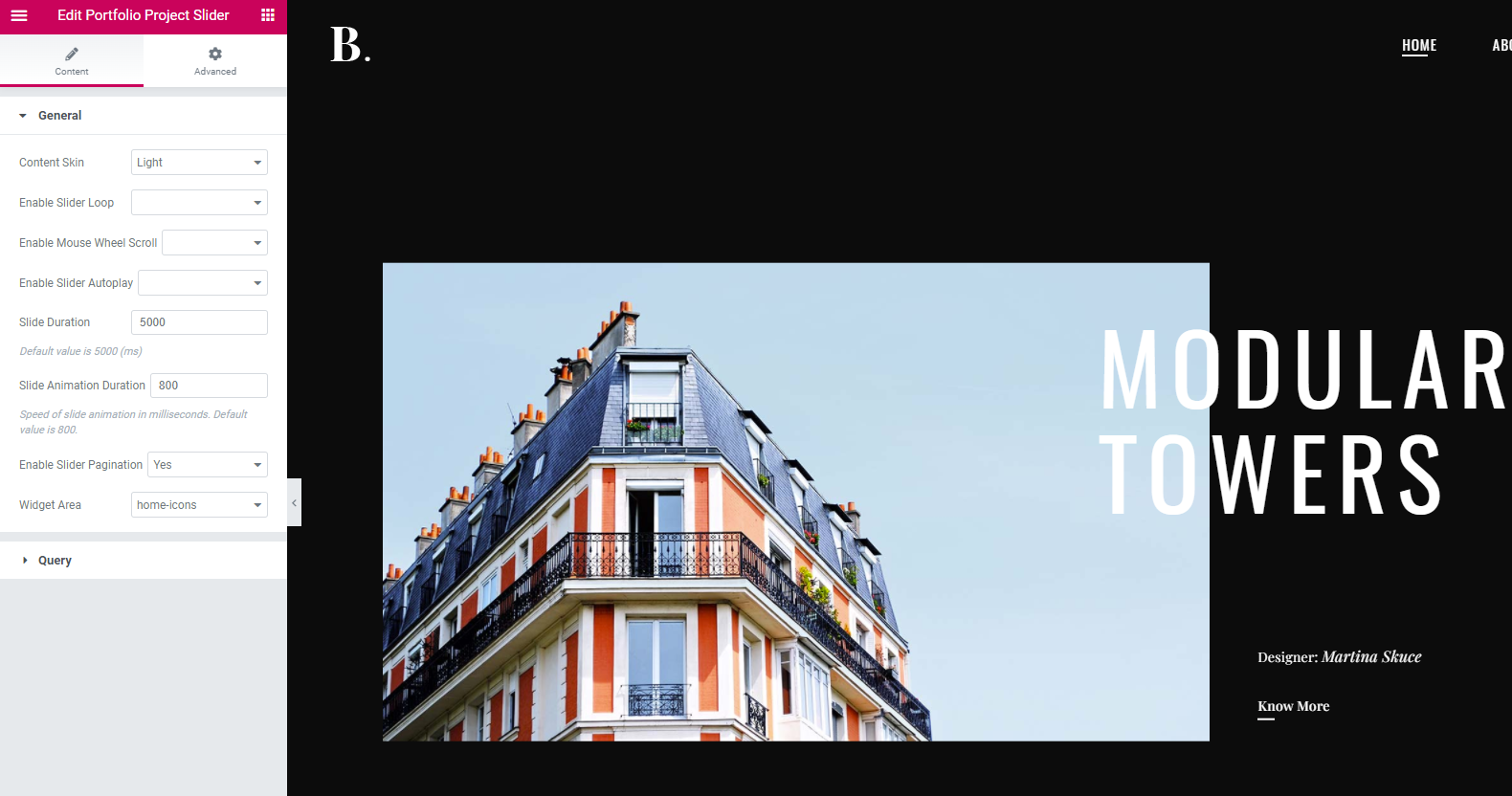
The slider on homepage is added using the “Portfolio Project Slider” shortcode (please see screenshot). So, it is necessary to edit portfolio single pages and you can find more info in the documentation in this link.
Since author’s dashboard is meant for general inquiries and pre-sale questions, we would appreciate if you could please submit a ticket to our Help Center, include your website URL, and one of our support agents will gladly help you.Don’t forget to sign up for our newsletter and be the first to find out all the latest news.
Thanks!
There would be a few more questions.
1. Can the header image of simple pages be fixed or parallaxed?
2. On the home page, the titles of the slider images (eg MODULAR TOWERS) point to portfolio elements, can it be solved that they can be linked to simple pages and not only to portfolio pages?
3. On the home page, how can the titles of the slider images (eg MODULAR TOWERS) be scaled or aligned to the right or left?
I realized question 1.
Hi,
Please submit a ticket at our Help Center, include URL of your site, and one of our support agents will assist you further. To submit a ticket please follow instructions from this article – How To Submit A Ticket.
Thank you.Don’t forget to sign up for our newsletter and be the first to find out all the latest news.
Hello I am a photographer and I would like there to be a shop tab, is this possible? I’m not looking for a store alone, but a tab in the site menu that can allow customers to order portraits. Tks. Martine
Hi there,
Thank you for reaching us!
Bridge theme is compatible with WooCommerce plugin and you can easily add products and create shop page using this plugin. You can check these demos:
https://bridge356.qodeinteractive.com/ https://bridge307.qodeinteractive.com/Once you import demo content you will get all the pages and settings which you can adjust to your needs.
Do let us know if you have any additional questions.Don’t forget to sign up for our newsletter and be the first to find out all the latest news.
Hi,
I just updated my theme and my wordpress core. And now I have no access to the Qode options menu /wp-admin/admin.php?page=qode_theme_menu
Thank you for enlightening me on this.
Hi there,
Thank you for reaching us!
Please navigate to Appearance > Install Plugins and check if you’ve updated Bridge Core plugin to the latest version. After the theme update all of the bundled plugins with available update should be listed in Appearance > Install Plugins. Also, please check if your purchase code is registered in Bridge Dashboard. Theme options, shorcodes and meta boxes are now disabled if theme purchase code is not registered on live server.Don’t forget to sign up for our newsletter and be the first to find out all the latest news.