59209 comments found.

How do I download the Visual Composer/ WPBakery Version of the theme?
Please, write from your buyer’s account. We don’t support not official and nulled versions of theme. If you purchase or get theme anywhere except Themeforest, we recommend to check sites for malware because all not official versions of theme which we checked early have 0day virus
You misunderstood, Siam and I do not know where the long explanation is coming from. That is a presales question which means I am looking to buy.
Ok, sorry. Wp bakery is included in theme bundle and can be downloaded inside admin area
you are welcome. downloading
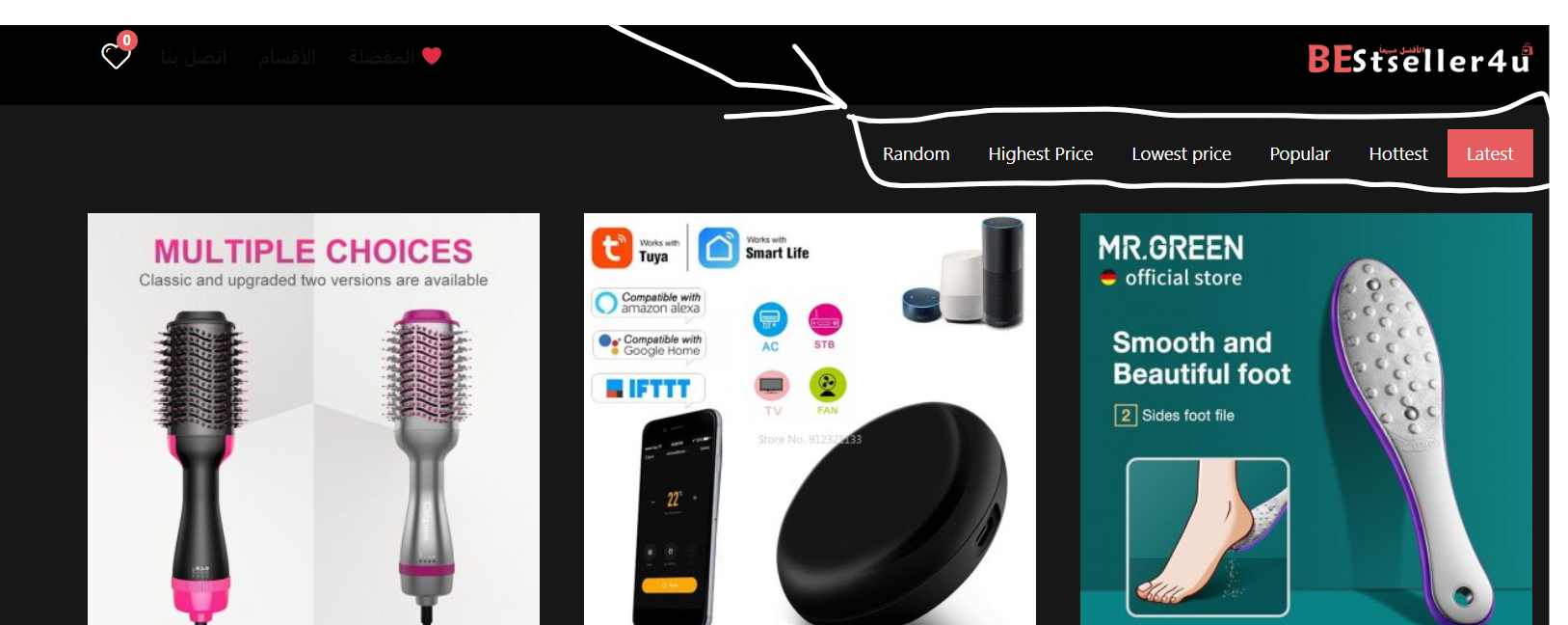
How do I hide these items Latest>Hottest>Popular>Lowest price>Highest price>andRandom
https://c.top4top.io/p_2404gvtqc1.pngI want to hide it
Thanks, but where do I put this code?
You can place in theme options – general – custom css
When I use the “WooCommerce List” Widget in Elementor when building a custom categories page, how do I get the “Featured” badge to show on the left corner of the list box. Currently, on this page: https://yeous.com/editors-choice/ it shows behind the Compare and Like hovering menu. Is there a CSS to move the “Featured” badge to the left corner? Thanks in advance. By the way, that last CSS to make the Widget Titles bold worked great!
it’s a bug. We will fix in update
Ive imported redeal theme and had 2 files on Homepage wich i cant find in elementor Layout.
pr_pattern-1.png and pr_pattern-2.png
Could you say how its included.
Currently I don’t understand what you mean. Please provide screenshots and links to page with issue
Hi, How i can disable social media share icons for mobile and tablets. I have already did it for the desktop version under Global Enable/Disable settings. But how i can disable it for the mobile version too. Can someone help me out?
Thank you!
Theme options disable them on all devices
Hi! Any help on how I can structure author profile link so that user can be redirected to his/her own author page when clicking on it? I want to add it as a user logged in menu element.
You already have author page and users can see it when he clicks on author link in post https://recash.wpsoul.net/author/u8tgk/
So it’s not possible to add such link as a menu element that automatically redirect user to his/her own author page where he/she can see her/his list of post, blog articles and comments?
This link is dynamic so it’s not possible to make it as static link for menu, this requires customization
Hi! the boxed version does not work for the footer on homepage. It works for the other pages when I click around, but not the home page. How can I fix that? Here is the link to my site: https://www.temporary-url.com/963C7A. (Please note that this is a temporary link to the actual website link wich I did not want to put on this forum, and you just need to click continue?
because you have unclosed tags or unfinished blocks. Remove all empty blocks from page or add content
Hi, I doble check and found no empty block, unfortunately…
Create new page, then add your blocks one by one and you will find it
As recommended I recreated a page and ad each block manually with no copy and past and I found that the issue is with the Rehub News Block block. It cause the same issue anywhere I put it on the page. You should take a careful look at it.
You have issue with this block because you have no posts
I am trying to redesign the product page using Elementor and have come across this plugin. Have you tried using this with Rehub? I want to know if there is anything in Rehub that would prevent me using it?
JetWooBuilder Plugin https://crocoblock.com/plugins/jetwoobuilder/Thank you
Yes, I know some developers from this company. I didn’t use but I know some good feedback about croco plugins
Ooh that’s good news I will give it a try  thank you
Hi there,
Sadly Croco plugin jet WooBuilder didn’t work using Rehub: I tried creating a new product page template and selected a pre build one but this is all I saw https://prnt.sc/emvpAE0fDRyB
I temporarily changed my theme to Astra and it worked fine.
I would love to use the Jet WooBuilder and it has a lot of features that your customers would love. If we were to pay would you be able to help us by making Rehub compatible?
Many thanks,
Karen
Currently it’s not clear what you did and how so I have no chance to test
Please, create topic according to guidelines, with all information, links, screenshots. This will allow us to understand your issue and give you a better and fast answer.
https://sizamtheme.support-hub.io/articles/how-to-write-to-support-if-you-need-technical-helpSo sorry, I am going to post a ticket on your site for this one as will need to give you admin log on details and a password to access the site as we’re not live yet.
Will also be easier to track our conversation if you are able to do this as a paid piece of work.
Thank you,
Karen
Ticket number is #36370 thank you very much
Hello,
I want to remove the sold by vendor block here: https://prnt.sc/p2bqz2AECOL8 and instead just have ‘By: vendor store name’ like this: https://prnt.sc/bRfWwaqOXcLlHow do I do this?
Many thanks, Karen
You can’t replace it easily but here is how to remove whole block https://rehubdocs.wpsoul.com/docs/rehub-theme/snippets/how-to-disable-vendor-blocks/
Is there a way to then just add the store name? Thanks
I don’t think so but better to ask support of vendor plugin which you use if they have such option
https://prnt.sc/qHDr2NetG09R
Hi, I just wanted to ask you that I want to reset my website and then I will have to re upload and re active the theme for the same website domain, do I need to do any steps before reset the theme and re install and registration
Hello I have custom font that I have uploaded to Elementor and can use my font when using the page builder, however, the custom font does not display when selecting Rehub theme options. What am I doing wrong? Many thanks, Karen
Nothing wrong. Theme options and custom font in Elementor are totally different parts of site
Is there a way I can add the custom fonts so I can select them in Rehub setting? Many thanks
Maybe you can try next https://rehubdocs.wpsoul.com/docs/rehub-theme/how-to/custom-font-in-theme/
But I don’t know why you need to select it in theme if you add it in Elementor. Why do not select it in Elementor?
ooh that looks complex! Could you tell me where to find the root folder and I’ll see if I can get it to work? I’ve added my custom font to Elementor as you can upload custom fonts to it, but when I select in Rehub theme options title/body font etc my custom font isn’t displayed in the drop down. Not all my pages are using elementor so I need to be able to set the custom font in the theme. Thank you
Better way for you is to copy css from documentation which I sent
Don’t I still need to upload the font I have purchased to the root folder?
No, if you did this in Elementor
Hi sizam,
I made some changes in dealwoo.php in the plugin folder rehub-framework. Is it possible to include these in the child theme, so that they are not overwritten with an update?
Best regards
No, this will not work in such way, so you need to update file on each update
Ok this is of course not a good solution. The best thing would probably be to do it not with the widget but directly via html.
WooCommerce Product Carousel layout does not have the Market Grid design. Will this be added?
Hi. Please, write from your buyer’s account. We don’t support not official and nulled versions of theme. If you purchase or get theme anywhere except Themeforest, we recommend to check sites for malware because all not official versions of theme which we checked early have 0day virus
Don’t worry, I purchased and have been using Rehub since 2016, and have the latest version. Just couldn’t find the Market Grid design in the carousel but it exists in the other layouts
Hi, After updating the theme my social icons just disappear from the post page. I can see the color boxes but there is no icon showing. Someone help me to sort out this issue.
https://drive.google.com/file/d/1-BnmOYt6ZfUc2i9lsBN1pdDGUOcxa42j/view?usp=sharing, https://drive.google.com/file/d/1D86Vr9QW9vxzWsRWv5ouky7wPi9XQc34/view?usp=sharingUnfortunately, we have no chance to test sites by screenshots
Is it possible to make the Widget Titles Bold? Specifically the ones in the Post Sidebar Area. I tried custom CSS in both Theme Options and in Customize but no luck. Thanks in advance.
.widget .title{font-weight:bold !important}
Theme options-general-custom css
Hi, Can I have a category base for my blog/news post? I tried changing in Permalink. It updated the deal url but the blog url is not updating
I need the blog/news url in the following format
crezeal.com/health/post1 crezeal.com/food/post2
I don’t think that Wordpress allows this because it’s reserved for posts. You need to use regular posts for this
I want to remove this license from any of the sites it is linked to at this moment. And only use it on boldprices.com. Can you tell me where to do this, or can you do this for me?
Wich js file is for loading the menu on rehub?
js/custom.js
How can I change the value color on the store page?
print: https://imgur.com/a/TbVCvhA
You can change it in customizer. Check end of video
https://youtu.be/WPkKx6D5POcthanks!!
I couldn’t find where I can change the color of the price, could you tell me better
I already wrote – in end of video. Also video has contents in description