59208 comments found.

Tiny suggestions for your optimized full width template (currently I adjust after every update myself):
1. the floating panel with h2 structure on the left has scoped css, where all titles are set to bold (font-weight: 600). Would you consider removing it permanently from helper-functions.php (line 903), because it overwrites the feature to highlight only the title where I read right now.
2. The floating panel is visible above a screen size of 1500px only. Would you consider setting it lower. I changed it to 1280px, so I can see it on my laptop.
3. Something I failed to implement myself: a tiny widget area below the list of contents in that panel. As far as I remember, I failed because it didn’t show, when no h2 headings were set. However, my final idea was, that there would be either a featured product, the current product if there are multiple woocommerce product boxes or a featured coupon code floating. Maybe you like the idea 
1. We don’t have plans to remove inline styles. You can overwrite them via css with proper classes and !important state
2. It’s floating once description is reached. There is no sense to show early because user can see regular button in this time
3. Floating panel already has global custom code area
Hey, I meant another floating panel: the narrow on the left-hand side, that is only available in template “optimized full width” that shows table of contents.
1. no, not remove inline styles in general – just the “font-weight:600” for the table of contents in floating panel in line 903. I cannot overwrite it, because then all headings are “thin” and the current one isn’t highlighted anymore. You implemented the alternating font weight, so I suppose it’s only a mistake that it is set to “bold” in scoped style.
Here is a comparison of what I mean: https://i.ibb.co/4MVDzqq/bold.png
Please, reconsider answering 2 & 3 with the “other” floating panel. Thanks
2. The panel is fully shown above 1500px window width. Below it is a trigger with 3 dots only. But it fits well on slightly smaller screens. Then it also offers a nice space for a small widget below. In that template there is no sidebar, what I like, but a little extra would be nice.
1. My answer is the same. You can overwrite it if you know how to use css or consider to update support if you need customization help
2. We don’t have plans to do this because 1280 is resolution of some netbooks and small laptops. In such resolution, floating panel can overflow content
OK, Thanks. I stick to remove it to save on CSS lines. But could you just clarify, if it’s too much effort to remove the font weight or is the setting intended for a specific reason? I don’t want to overlook anything.
Because this part is very small and can be unreadable with normal weight
Absolutely relatable. Thank you so much for explaining.
How to enable Rehub Search box to search for all types of posts? like post, stores, blogs & categories. More like a global search. Right now it is limited to selecting just one.
Theme options-header option
Sure, but I am talking about other Search box which is not on header, the options available there only enables only 1 post type.
This option affects all core search on site. Also you can enable only post types and not taxonomies. If you need complex searches, you can find search plugins on Wordpress.org
It seems I am not able to communicate clearly, I am trying to enable search on body of my page and not header, check here https://www.couponzania.com/, the problem is; the search box only lets you to add a single post type but I want it to search everything there like pages, post, blog & categories
Ok, clear, but my answer is the same. There is no option to show everything in search, also it’s technically has no sense because each post type has another search result page
Hello! I use wholesale prices with the wholesale suite plugin. 1) When I add products to compare, at the sidebar I see the products with their regular price.
They also have a feature to hide the prices if you are not logged in. 2) When I am not logged in and put products to compare, at the sidebar I see the products with a price and it is the regular price.
Can you please help me? Thanks! https://choice-creation.gr is my site.p.s. Do you have a feature to hide the prices for logged out users?
I opened your site but can’t find any prices
Also, you need to change product layout in theme options – shop settings – design for archives
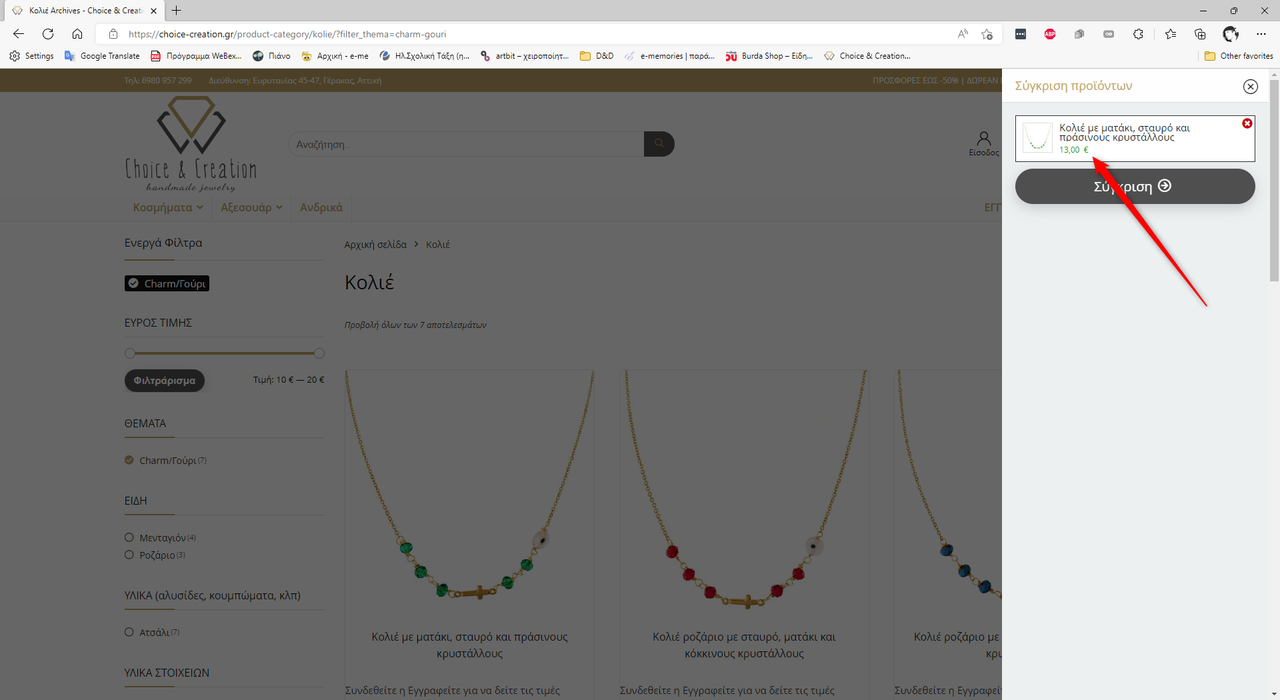
Hi, did you put any product to compare? Did you see that in the sliding panel you can see the prices? If you do, you ‘ll see the prices. And you shouldn’t see the prices. This is the problem.
Yes, I put products to compare. Your products have no prices, please send link directly on comparison page with prices
The compare page works fine. The slide sidebar is the problem.
Please provide link
1. Visit this link (https://choice-creation.gr/shop/) 2. Add a product to compare. 3. Click on the floating button (compare button) to bring out the side bar with the added product. 4. See the product if it has price. It shouldn’t have price.
yes, this is what I have made. And I didn’t find any product with price in comparison
Also, I tried today and I see that all scripts are blocked on your site. You need to whitelabel ajax request in your security plugin or proper configure it
Thank you
.re-compare-item .greencolor{display:none}
you can place this in theme options – general options – custom css
Hello Sizam,
Envato notified me through email that there is an update for the Rehub theme but when I go to my site I do not see any update notification and I am running 18.1 and I know you just updated the theme to 18.2.
It has been a few days and I still do not see any update notice on my site.
Can I just upload the theme 18.2 zip file without any issues?
Regards.
Because you didn’t install and activate Envato Market bundled plugin
I installed it and it was activated and it still didn’t tell me there was a new version.
So again I ask – can I just upload the new version in the zip file and there will be no issues. Specifically like losing all the changes I made.
Regards.
Which changes did you make and how?
theme settings, css changes
how did you add css changes?
I’ll back up my CSS changes and my function.php changes. Can I just upload the zip file and it will not affect the changes to the main settings of the theme?
Thanks but I know that already. Can I just upload the new theme version without any issues? A manual update. Because for some reason the envato plugin and the automatic theme update option in WordPress is not working.
Perfect thank you for your time.
How do I move the Paypal buttons so they are below the Add to Cart button. Paypal plugin I am using is WooCommerce PayPal Payments by WooCommerce.
I don’t think that plugin has option to select place, but you can ask support of plugin
How do I hide the Wishlist icon that appears after the Add to Cart button it has selector ”.wishsuite-button”.
I am using product layout “reviews with blocks”
Theme options-global enable and disable wishlist
Nope that disables the button at the top and not the one above paypal buttons
This option disables wishlist completely.
Hi, I purchased the theme long back but wasn’t able to use it for the last few months, exploring it now. Is Redigit a multivendor setup? Can sellers create an account, upload their products and sell? The registration page in the demo throws 404 so couldn’t find out from the demo. Thanks in advance!
Each demo can be used for any purpose
https://rehubdocs.wpsoul.com/docs/rehub-theme/child-themes/how-to-combine-functions-from-different-child-themes/how to change preloader ? i want a gif image for loading https://drive.google.com/file/d/12aLH0GVcz1qjQdqaXp48WtkA7id65VtO/view?usp=sharing
There is no option to add own Preloader except customization. More easy will be to find plugin for preloaders
Hi Loved the greenshift gutenberg block with endless possibilities. 1) Is there a plan for PRE MADE BLOCK LIBRARY like Kadence have? 2) The table of content block is always OPEN, there is no option for to set DEFAULT status as CLOSED or OPEN. 3) In table of content, what if I want to include headings upto H4, currently i can choose only one heading and one sub-heading.
1. It’s already available in top right corner
2. It’s in todo list
3. We will add up to 3 headings but not more
how can I make the store page (merchant page) like this https://wpsoul.com/wp-content/uploads/2019/05/shoppage2-1536x975.png
Envato purchase code is invalid, please contact support!
I cant active this code. soloved. Didnt realize that is themeforest name.
Please use your own proper username
Hi guys I just made customised dynamic comparations with adjusted filters and customised pages for certain category groups and everything looks fine for those in setup with the syntax “432,378,21;Mobile Phones;624” I made different setups for laptops, speakers, drones…etc. However, I want to make one generic template page for comparing all other products other than those in specified groups with the aforementioned syntax is there any wild card like ” * or 1-10000; All Others;1498 ( generic page [wpsm_woocharts] ) I can use to catch all categories and maybe exclude those already assigned to other templates something like – exclude_432,378,21;*; All Others;1498 ? Thanks in advance, Stevan
There is no such option. You can compare groups or compare all (if you remove groups)
Thanks for prompt response. If I set parent category ID will it automatically include child categories on page search, or i have to add all children IDs?
Must be added also child Id
I discovered way to include Parents with chids in dynamic comparations So if someone else needs something like that syntax like child_of=2579,37,799… (parents IDs-will include child categories);compare whatever;6555 (generic [wpsm_woocharts] page) All the best!
Hi, interested to buy to create a price comparison website like your ‘recompare’ demo but what else will be needed to scrape the data etc? or is it all included? Thanks
It’s depending on your needs. Most often, you will need Content egg pro also
By default, Dokan places a “Become a Vendor” link in the My-Account page. For some reason, it is missing in Rehub theme. How do I restore the Dokan “Become a Vendor” link so regular users do not have to re-register to become a vendor?
Theme has no customization for my account page. I recommend to ask support of plugin how they inject this notice to page
hey, I’m Kumar, I recently purchase the rehub theme, and when I’m editing my privacy policy page then on the right sidebar it’s showing rehub themes ads…. I don’t know why?
Because you didn’t add own widgets after demo import. Appearance-widgets
I have a problem with them option when I make a change like in the header section and click on save he doesn’t save my work.
the design for them option is not good.
and also when adding icon to the menu is not work.
Please, create topic according to guidelines, with all information, links, screenshots. This will allow us to understand your issue and give you a better and fast answer.
https://sizamtheme.support-hub.io/articles/how-to-write-to-support-if-you-need-technical-helpHi. Please make a demo for NFT marketplace 
Please send link to your page
.single_custom_bottom .rh_price_wrapper{display:block !important}
you can place this in theme options – general options – custom css
Thank you. One more thing I would like to ask can we show related articles in masonry grid layout style?
it’s not available
ohh okay then can you tell me how to remove price from related articles i would like to show it just picture and title
.related_articles .rh_price_wrapper{display:none}
you can place this in theme options – general options – custom css
[Re:Deals] When you vote, the Fire icon disappears. Can i do something to continue to display it ? Thanks a lot
Currently it’s not clear what you mean
Hello, is it possible to add filters to a custom archive template? I can’t find any options for this. I am using greenshift with query loop widget. Thank you!
query loop has no filters now, but we are searching the ways to add them
Thank you for the answer. Is there a temporary way to accomplish this?
I combined the woocommerce archives sidebar and the shortcode containing queryloop into an elementor template, it seems to work.
Woocommerce filters are for woocommerce. They can’t work with query loop. Maybe you don’t use query loop
Yes you are right it doesn’t really work after a few tries.
Do you know any possible hack ? Queryloop is great but if can’t filter it’s annoying.
Query loop has no filters, but you can use other post blocks from theme, they have filter panel