1325 comments found.
I have a question about your cost calculator plugin, this doesn’t have a search bar. For internal searching?
Hello,
There is no such kind of option in the plugin by default. We will try to include new features in the future updates
Cheers
How to get the WPBakery Update? can’t activate the bakery stuff.
when clicking on pearl menu in the plugin tab I get this: Sorry, you are not allowed to access this page.
Hello,
Plugins like WP Bakery page builder are not free in general. We have bought those paid plugins from our end and included them in our theme packages as external plugins and they are active from the theme side, so you can use those plugins without any restrictions. All the updates we will include with the theme regular updates. So, the update of the plugins you will be able to get as soon as there will be the theme update
Cheers
i imported the “company” demo and it doesn’t looks like your page. there are other pictures and some pictures are even missing on about page. etc.
i want 1:1 the picture from the company demo. what’s wrong here.
Hello,
Please note, most of the images will be replaced due to the license. If you want to use the demo images on your site you need to purchase them separately from fotolia.com. Moreover, you can easily change them with your custom images via editing the page. Here is the notification on the item as well in the item details section on ThemeForest >>> http://joxi.ru/Grq39aXUz7v3b2
Cheers

I’m configuring the theme but the sticky header doesn’t work, only a small white bar is displayed but nothing else
Hello,
Kindly note, that the comments section is here for the pre-sale questions by default. If you have questions about the theme default settings and options, kindly create a ticket on our support platform and our managers will kindly assist you
Cheers
is there a way to hide header and footer on specific page?
Hello,
Yes, such kind of changes you can make with custom CSS. You can use custom CSS under the appearance > customize > CSS section. Kindly note, that the comments section is here for the pre-sale questions by default. If you have questions about the theme default settings and options, kindly create a ticket on our support platform and our managers will kindly assist you
Cheers
The Slider Revolution isn’t showing up on the front page. One slider working on another page. I’m using Pearl. It was working at first but then it disappeared.
Hello,
We recommend you test by deactivating all of your third-party extra plugins and recheck the templates of the slider once again. The theme doesn’t control the appearance of the slider templates. Kindly note, that the comments section is here for the pre-sale questions by default. If you have questions about the theme default settings and options, kindly create a ticket on our support platform and our managers will kindly assist you
Cheers
Hi team,
I have been using 7 elements of “Grid Builder” for 3 years and when I called them on my different pages, everything was fine.
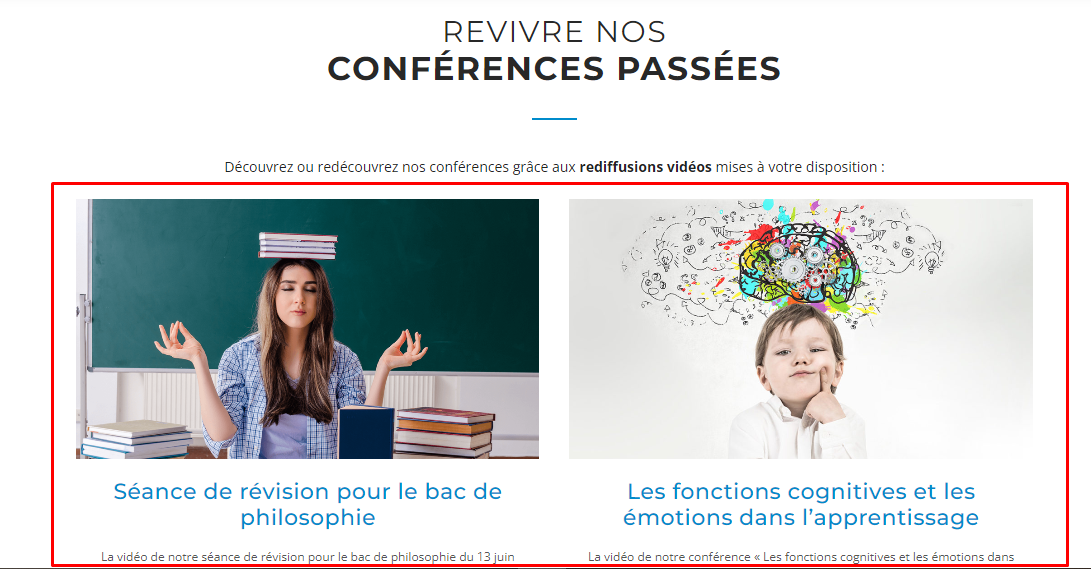
But since a few weeks, after the updates of your plugins, I could realize that there was a problem of display. For example, on this page https://soseducation.org/nos-evenements-conferences-colloques/#conferences-passees, before, we could see the previews of the “Projects” like here :
https://soseducation.org/wp-content/uploads/2022/09/projects-what-supposed-to-see.png
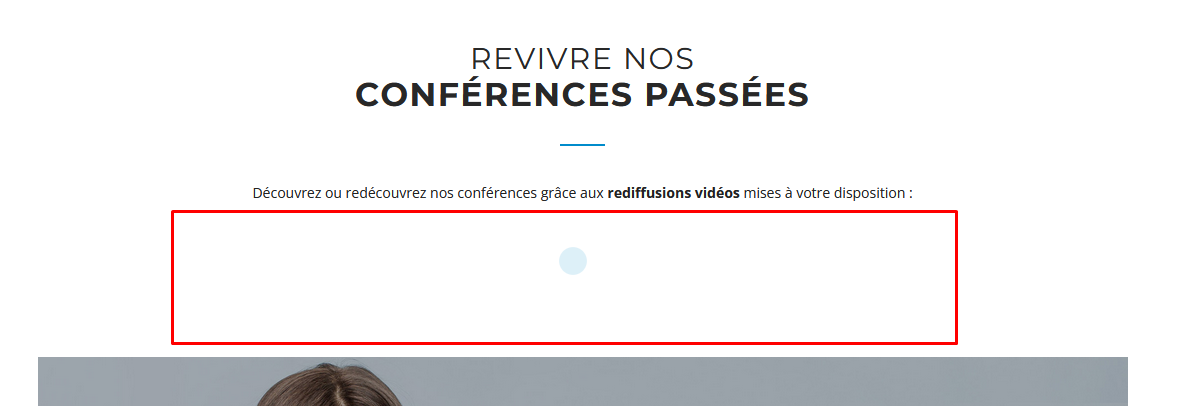
Now, we only see an animation (showing a loading) without the “Projects” appearing:
https://soseducation.org/wp-content/uploads/2022/09/projects-download-what-we-see.png
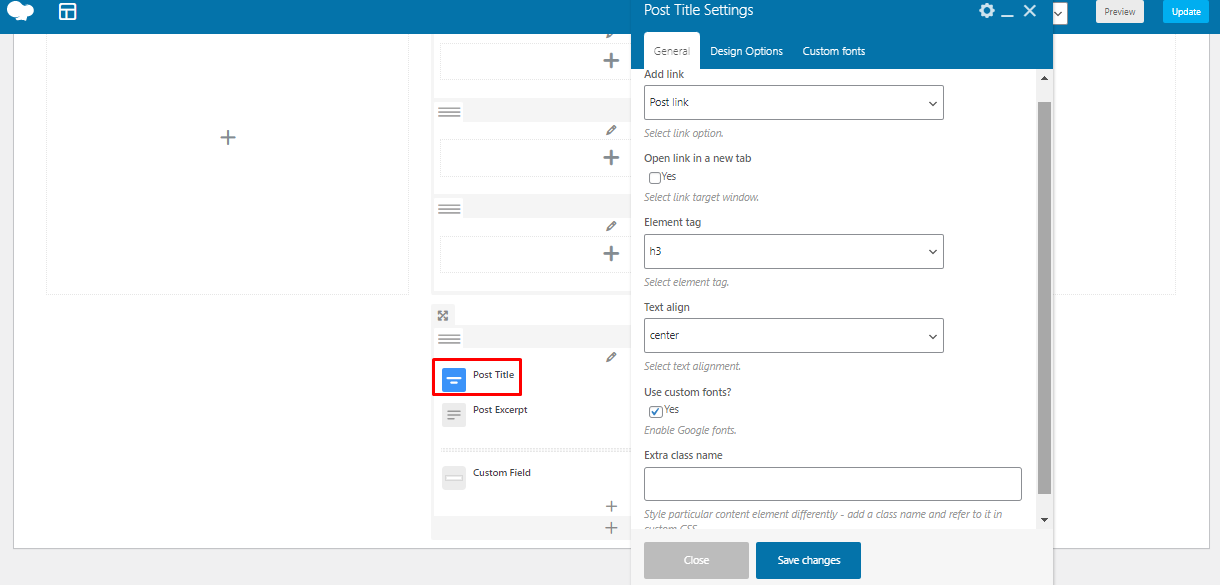
When I go to the settings of this “Grid Builder”, I can no longer select a setting to specify which element I want to call here. (“Projects”, “Post article”, etc.):
https://soseducation.org/wp-content/uploads/2022/09/projects-grid-builder-setting.png
I have the same problem with the 7 elements created with “Grid Builder” such as https://soseducation.org/ or https://soseducation.org/petitions-et-mobilisations-collectives/ for example.
For information, I only see the elements when I am connected to the back office. When I am not connected (as a visitor to the site), I only see the flashing blue loading dot.
Could you please help me?
Thank you very much if it’s possible 
Best regard,
Hello,
The recent updates were not for the elements. You can track the changes from the change log >>> https://docs.stylemixthemes.com/pearl-theme-documentation/extra-materials/changelog
We recommend you make back-ups when you are updating plugins. We are not able to provide suggestions from the comments section.
Kindly note, that the comments section is here for the pre-sale questions by default. If you have questions about the theme default settings and options, kindly create a ticket on our support platform and our managers will kindly assist you
Cheers
Hi there, after the last update of WordPress I get the following message on my website dashboard: The Font Awesome plugin caught a fatal error.
When trying to load Font Awesome, the plugin’s configuration was invalid. Try deactivating, uninstalling, and re-activating the Font Awesome plugin.
How do I deactivate it and reinstall it, as it does not show in Plugins?
Hello,
We are not authors of the Font Awesome plugin. We recommend you contact the plugin authors directly
Cheers
If you put a tel link in the header it does not work, it adds the domain to the link instead of allowing it to be click to call
Hello,
You can use the “Text with icon” element and insert the tag with the needed href For Call—> http://joxi.ru/KAxy7kosV0L8vr
Kindly note, that the comments section is here for the pre-sale questions by default. If you have questions about the theme default settings and options, kindly create a ticket on our support platform and our managers will kindly assist you
Cheers
Hi,
Images do not open in lightbox mode. Any idea why please?
https://onek.org.cy/6o-up-to-youth-festival-neon-2022/#1660306960790-adc9b81e-edd1thank you
Hello,
Kindly note, that the comments section is here for the pre-sale questions by default. If you have questions about the theme default settings and options, kindly create a ticket on our support platform and our managers will kindly assist you
Cheers
Hi,
Is there any way for the tabs to be vertical isntead of horizontal? I could not find such element or option.
THanks
Hello,
There is no such kind of option by default. The theme doesn’t include pre-build elements with a vertical design. You can order such kind of changes from modification for a reasonable fee >>> https://stylemix.net/?utm_source=themeforest&utm_medium=08_07_2022&utm_campaign=hire_us
Cheers
Hello, currently the Pearl theme is stuck with the version 6.7 of the plug-in ‘WPBakery Page Builder’. This plug-in is actually under version 6.9 for the rest of the users. Any estimates on when this plug-in will be updated for the Pearl installation? Thanks!
Hello,
The latest version of the WP Bakery page builder plugin will be included in the future updates of the theme. With the new version of the theme, you will be able to update all the theme pre-packed external plugins as well as soon as possible. Some fixes and improvements are taking more time than expected. Unfortunately, we can’t provide an exact release date.
Cheers
Ok, we’ll be waiting Thanks!
I am really having a bad experience with _StylemixThemesSupport I have purchased the pearl theme there is an issue in the home page slider on mobile phone, rather than fixing that issue, their support executive Mr. Stan keep asking me to go for paid support customization. This is the theme issue as it is not viewing properly in the mobile many times I have been raised a ticket, but the way Mr. stan reply is quit unprofessional. The issue has not been resolved. Again Mr. Stain he is keep saying that they are not supposed to fix the layout issue. He added the random css which not even corrected the layout of slider on mobile phone. And he asked me to raised ticket every time rather than replying on the same ticket, I asked for other issues and shared the screenshots many time, but it seems he ever look at those screenshots which are the basic issues, and that should be corrected within the free support, but its seems they are just wanted to making the money and keep pushing during the free support period that customization is not our job. I am not asking for customisaton I am asking the basic layout which should be on website. I am really annoyed we need to make the website live but their support disappointed us.
Hello,
Thank you, we do appreciate your kind diligence and feedback! Please note, that setting up already changed and custom slider templates are not the theme-related settings and options in general. We have checked the history of the ticket. You are using the Slider Revolution plugin for your Home Page. By default, the theme demo layouts come with the demo Home Page and with demo Slider Templates. You have already changed the default appearance of the demo layout from your end. The Slider option is a separate section and the theme doesn’t control the settings of the Slider Revolution plugin. So, you need to properly manage the responsive settings of your home page slider manually from your end. We recommend you to have a look at the following link below, where you will be able to find the section on How to make Slider Responsive >>>> https://stylemixthemes.com/wp/slider-revolution-the-ultimate-guide/
Cheers
Are you aware of the bug in stm-configurations of the pearl theme?
(DevTools failed to load source map: Could not load content for https://www.hightechstrategies.com/wp-content/plugins/stm-configurations/megamenu/assets/css/megamenu.css.map: HTTP error: status code 404, net::ERR_HTTP_RESPONSE_CODE_FAILURE)
Hello,
We didn’t detect any such kind of issue in our testing environment with the latest version of the theme and external pre-packed plugins. You need to make sure that you are using the latest version of the theme, and all the theme plugins should be updated in the appearance > install plugins section. In addition, you need to make sure that you set the site permissions and file permissions of the theme and plugins by contacting directly your hosting provider team, as the 404 issue comes on your site
Kindly note, that the comments section is here for the pre-sale questions by default. If you have questions about the theme default settings and options, kindly create a ticket on our support platform and our managers will kindly assist you
Cheers
Hi,
is it normal that I’m not able to access the “Plugins” section in the main menu of “My Pearl”? I always get a “Sorry, you are not allowed to access this page.”
Thanks for helping!
Hello,
Yes, it is normal. When there is no need for the pre-packed plugins to be updated/activated/installed, the section will be closed
Cheers
Hi,
I would like to make changes to my current pages by taking elements from other demos. I know the theme does not allow importing template elements but only whole pages. The problem is that the page import function offers very few themes! For example, I wanted to work on “BUSINESS TWO” but it is not available. As my site is currently online, I don’t want to import the whole demo, but only certain pages without breaking my site. Do you plan to update the “import page” module with all Pearl demos?
Do you plan to update the theme soon to have the latest version of WpBakery for example?
Thanks
Regards
Hello,
The Motors theme is a multifunctional WordPress theme and by default, the theme includes multiple demo layouts. Each of the theme demo layouts is different with its own unique style/design and features in general. It needs to modify the theme and STM Motors Extends plugin templates in order to use different features in different demo layouts and combine two or more demo layouts features in one site. Please note that the customization does not part of theme support due to the ThemeForest policy. You can read more about the definition of support here (https://themeforest.net/page/item_support_policy).
Note that the comments section is for pre-sale questions by default.
The update will be as soon as our developers and managers will be ready to update the theme, we are not able to provide with approximate date from our end.
Cheers
Hi
Thank you for your answer but I think you misunderstood my question. I’m not asking you to work on the personalization of my site, I’m not asking you to fix a bug… I just wanted to know why in the “import page” function it is not possible to have the choice among all the demos visible on theme forest?
Thanks
Hello,
Thank you for the details and clarification, we do appreciate your kind diligence! We will notify our developers to include new pages in the pages importer tool for future updates. Note that, this is not a bug, it just needs to include more extra pages for the import tool step-by-step
Cheers
Hello, i have instaled theme, all plugins activated and updated, but i dont have a sidebar in left manu to edit.
Hello,
Pages and sidebars are editable and you as admin of the site can manage them manually. For details kindly check the theme documentation >>> https://docs.stylemixthemes.com/pearl-theme-documentation/setting-up-your-website/sidebars
Kindly note, that the comments section is here for the pre-sale questions by default. If you have questions about the theme default settings and options, kindly create a ticket on our support platform and our managers will kindly assist you
Cheers
Hi! I’m running two websites on the same webhost, both made with Pearl. I want to update the server’s PHP version from 7.4, but on one of the websites that causes an error:
“Warning: The magic method Vc_Manager::__wakeup() must have public visibility in [...]/wp-content/plugins/js_composer/include/classes/core/class-vc-manager.php on line 202 Fatal error: Unparenthesized `a ? b : c ? d : e` is not supported. Use either `(a ? b : c) ? d : e` or `a ? b : (c ? d : e)` in [...]/wp-content/plugins/js_composer/include/classes/editors/class-vc-frontend-editor.php on line 673”.
I was thinking this looks like a problem with the Page Builder, and I see that on that website I have version 6.0.5, and on the other (where PHP 8.1 is not a problem) I have version 6.6.0. Both sites are on Pearl 3.3.3.
I don’t get prompted to update the Page Builder, though, and it also doesn’t update automatically. How can I get the latest version for both sites?
Hello,
We recommend you use the php 7.4 version with the latest version of the theme. The recommended php version is 7.4. If you are using the php 8 version, you need to downgrade to 7.4 by contacting your hosting provider team
Cheers
Hi! I am on 7.4 now, that works for both sites. But my question remains: How can I get the latest version of WP Bakery Page Builder?
Plugins like WP Bakery page builder are not free in general. We have bought those paid plugins from our end and included them in our theme packages as external plugins and they are active from the theme side, so you can use those plugins without any restriction. All the updates we will include with the theme regular updates. So, the update of the plugins you will be able to get as soon as there will be the theme update
Regards
This is the category list page and I want to change or remove the “Subtitle Text” from the breadcrumb but I couldn’t do it. can you help me https://ibb.co/ZmZRXW5
Hello,
You need to check the Breadcrumb plugin settings, the theme options do not control it by default. In addition, you can try to remove with custom CSS as well that you can insert under the appearance >>> customize >>> CSS section
Kindly note, that the comments section is here for the pre-sale questions by default. If you have questions about the theme default settings and options, kindly create a ticket on our support platform and our managers will kindly assist you
Cheers
Hello, I am interested on your theme to make a nice view Furniture Corp. website. But On mobile view there is some visual problem like grid not shown good. Please see below link. Is this kind of problem solved or…?
https://i.ibb.co/q0HNnVx/2022-06-27-14-28-12.pngHello,
Thank you for the info provided, we have notified our devs teams and it will be checked and fixed in the coming updates of the theme as soon as possible
Cheers

This item was featured on ThemeForest

Power Elite Author
Contact the Envato Market Help Team