59228 comments found.
Hi There,
For some reason, my input fields are doing something very strange:
I have disabled every plugin and still th,e problem persists, would you be able to help?
Please look at the search bar: https://www.yourlocalmusician.com/ And for another look, here is a second form: https://www.yourlocalmusician.com/sound-label-registration/you have plugin which changes core assets. Maybe it’s on hosting. Remove all script optimization plugins or proper configure them

How, how to show the position number of each post (rank_count) on the category page? see screenshot: https://speed-up.info/top10/screen.png
thank you 
Theme options-general-Archive layout. You will find there several list layouts, one of them has numbers
“Simple news list” is fine but on desktop only. You can check on mobile, the numbers are missing: https://speed-up.info/top10/category/top10antivoris/
because no place to show them on mobiles
You can use also Listing builder. But this will require additional Query addon to replace category pages
bonjour, je dois reconstruire le site, j’ai réinstallé le thème. est-il possible de me desactiver le thème de l’ancienne installation cdlt
Hi, I can’t find where to modify the button “add to compare” for translation and icon change. Could you please advise?
thanks! it’s very helpful, but can I upload an icon and use it instead of current one?
No, you can select from predefined. Or I can write you location of file if you want to make customization
Please write me the location of file, I just need to add one compare button, thanks!
And what’s the icon format? svc or png are both fine?
it’s in inc/compare.php
Thanks, what I need to replace is “rhi-shuffle” but I can’t find it from the php file… and should I upload the icon to media library?
I just uploaded my icon in png format and expect to replace to shuffle one, thanks.
just icon, in shortcodes/shortcodes.php
you can find it by search in file
Not sure if its a bug but related deals shows expired items
I am using WPBakery. By setting the number of columns (Post Grid in columns) there, changes are only made when viewing the page on a computer.
There are always 2 columns horizontally next to each other for the mobile device.
How to set the mobile devices to always display only 1 column Post grid in columns?
Need to give some CSS?
Hi. Currently I can’t help with wp bakery, we don’t use it on our demo sites, you need to contact with author
Hmm, what’s best to switch to something else? Will I use the same with GreenShift? Is this a better alternative? The page will be lighter
If so, what are the names of those blocks that are called Grid Post in WPBakery
Yes, Greenshift is good. Theme has many post blocks for Gutenberg
For grid builder, there is Query Loop block
You said this block was a Query Loop block, but it doesn’t look the same as Grid Post in WPBakery.
Only the Simple Post block looks similar, except that I can’t turn on the Buy now button there, i.e. ( Offer url) from Rehub. How do I add it to these blocks?
Query Loop is Constructor. You can make it to look as any design https://www.youtube.com/watch?v=gksGsf1VEBs
For this I think I need Greenshift Query, and nowhere can I find it in this installed theme
No, it’s not required. Query addon can add premade designs and patterns, but you can build them by yourself also
You were right , I’m slowly understanding how it works.
I even added an Offer Button to the column.
But how should this button be placed at the very bottom of the column?
By default, it is right after the header (and different columns have strings of different length). I would prefer it to always be at the very bottom of this column
as I wrote, it’s working as constructor, you need to study how Gutenberg editor works, where block navigation, how to order blocks, etc
We have purchased your theme and using it on amiyanandy.com but can’t set up the page amiyanandy.com/blog we have created the page using the post editing in elementor pro but not showing any posts. Please help to set up our blog page.
Hi! I sent you a message asking for license reset but I got nothing… Any help, please!?
Thanks for your reply. But this is not just about the development environment. I installed my licenses to sites I decided to drop. I don’t have access to those sites anymore. So I need you to just reset the 2 licenses I bought so I can start over, installing them on new sites. Where can I send them to you so you can reset them for me, please?
Please read carefully my link above and you will find information how to migrate
Ok. Got it, thanks. But now I am on theme V18.3, while the latest is V18.4. I don’t have an update notification. I am using a theme with a child version… what do I do?
I have added a standard Content Egg element to your Rehub theme: [content-egg module=xxx Products products=”xxx” template=custom/bigcart]
It’s on page: https://www.zwartinhuis.nl/dressboy-zwart/ Google Search Console shows now that the page is not mobile friendly anymore with the following errors:- Font too small to read
- Clickable elements are too close to each other
- Content wider than screen
How to solve this?
Google doesn’t show any problem with mobile page https://search.google.com/test/mobile-friendly/result?id=Alw11rHGr5u0rNtUx6ZBUg
My GSC shows me something else…. It’s in Dutch but it gives the explained warnings regarding mobile. https://snipboard.io/vRZVMB.jpg
You need to check your cache, SEO and any kind of hide Wordpress plugins which usually disable mobile styles from indexation
Unfortunately I can’t help because your site doesn’t show me any errors
I have purchased the Rehub theme in February this year and have stopped editing the TEST page that starts https://torreznofreak.com/. I would like to recover my license for the Re-hub theme to install it on a new page https://ovejanegrapunto-zero.com since I am trying to enter the license key and this message appears “The license is incorrect or this license has not been assigned, please contact support!” My email is fabiodrc2013@gmail.com but you can also write to me at the following email ovejanegra.zero@gmail.com
which username do you use?
hi
1 . how do we remove the “related posts”.
>> https://snipboard.io/H0xjNF.jpg
2. how to customize specific blog post for each post
please, update your support for customization help first. Thank you for understanding that our time has price
https://www.vectapack.com/wishlist/
WP Version 6.0.2
Rehub Theme framework Version: 17.1
Rehub themeVersion: 17.9
Error only displays when items placed in wishlist – Standard text ‘there are no items in your wishlist’ when empty.
It’s outdated and not supported version of theme and Rehub framework
I have envato market plugin installed and logged in to theme forest, No updates showing in WP admin
You need to logged in Envato market plugin
https://rehubdocs.wpsoul.com/docs/rehub-theme/theme-install-update-translation/updating-theme-and-bundled-plugins/Thank you, Sorry, fairly new website and I had not entered the Envato API Personal Token.
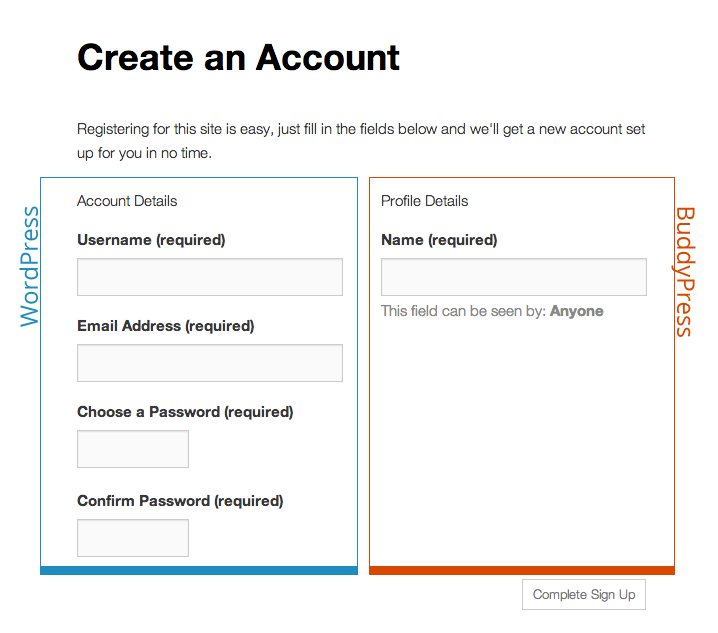
Quick question, using buddypress with redeal. Is the registration form supposed to look like this? No formatting and pushed over to one side?
https://i.imgur.com/g7cZxTV.jpgAs this is what it looks like on the buddypress site :
https://buddypress.org/wp-content/uploads/15/2013/10/reg-form-wp-vs-bp.pngIts the same for when you activate an account, the activation page is the same
Thank you
Sorry my link didn’t work, this is the one
https://imgur.com/g7cZxTVUnfortunately I am not able to test sites by screenshots. Links are required
OK its under development so I will wait until its ready then send you the link. When is the next sale as will renew my support then, was going to do it recently but then the price changed.
On Black Friday
Hi, I can’t seem to load or display any Amazon Native Shopping Ads via the ad zone. I also tried using Ad Inserter plugin but that too didn’t work. Any ideas about the cause of this issue? The other type of Amazon ads (using iframe) is working via the ad zone.
You use ads blocker or Amazon didn’t index site yet so doesn’t know which ads to show
Hi, I would like to custom a page, https://woke.hantam.co.id/?s=&post_type=post&cat=—> this is the link. Where should I go to edit the page?
Thank you.
This is link to search page, you can’t edit it. You can create new page in Pages – Add new and add posts or blocks which you want
You can change search layout in theme options-general
is it possible for me to edit the layout for each product preview? I want to use very simple rating, not star, but like “Recommended” and “Avoid” ... how can I changed it?
You can change search layout in theme options-general
If you want to customize loop, render files are in inc/parts/…
Okay… so I directly edit/add custom to the parent folder? is it possible to make one in child folder?
I don’t recommend to touch core files if you have no skills for this https://rehubdocs.wpsoul.com/docs/rehub-theme/child-themes/how-to-customize-your-theme/
You can change search layout in theme options-general
Hallo, ich habe wohl einige Einstellungen falsch eingestellt. Plötzlich funktioniert die Anzeige bei mobilen Geräten nicht mehr. https://x-koffer.com also die Startseite wird nicht mehr angezeigt, alle anderen Seiten funktionieren einwandfrei. need help pls
can you explain more? What is not working? Because I don’t see problems
If you disable tags in Global enable/disable will that hide tags from search engines as well?
technically – yes, because you will not have links on site to tags, but in most scenarious, search engines still index them. you need to use SEO plugins and hide them in settings
Thank you
Hello,
I saw in the comments over a year ago that you’re planning on launching a grocery demo, how’s it going, will it launch soon?
yes and we decided to make wholesale demo instead (which is the same as grocery because functionality is the same). It was released https://remart.lookmetrics.co/
Trying to save my product
Item ID: 7646339
Item Purchase Code: 68dd5cd9-235d-4169-b584-13fe48631258
Purchase Date: 2018-09-09 21:14:29 UTC
always recive this message
Server is unavailable at the moment, please try again.
also when trying to connect to evanto to update the theme
what to do please advise
thank you for your quik reply thats why i like this theme but also when try to insert elementor pages from library i recive this message :cURL error 7: Failed to connect to my.elementor.com port 443: Connection refused
Because you hosting doesn’t allow remote connections, I recommend to write to hoster and show them your error code
When i’m trying to make Page attributes (my account) i cant find the parent of (system page)
There is no parent page for this. It’s not clear what you mean
Please, create topic according to guidelines, with all information, links, screenshots. This will allow us to understand your issue and give you a better and fast answer.
https://sizamtheme.support-hub.io/articles/how-to-write-to-support-if-you-need-technical-help