13817 comments found.
Hi Yeet, other thing: with reference to this post https://kriesi.at/support/topic/enfold-color-section-background-image-resizing-on-tablet/#post-1366112, I confirm that even with version 5.3 the problem persists. Now my site is online and maybe you can do some checks. If you want (tell me where) I can send you detailed screenshots. Lion
Hi Lion,
Could you please post temporary admin logins in the thread so I can try to fix it using browserstack? 
Regards, Yigit
I think topic is closed…show me: You cannot reply to this topic.
How can I help you solve this problem?
???
This problem has not been fixed in version 5.4
What do you need to verify this thing? Do you want to do a parallel installation with admin access for you?
function remove_title_tooltip_mansory_gallery(){
?>
<script>
jQuery(window).load(function(){
jQuery('a').removeAttr('title');
jQuery('img').removeAttr('title');
});
</script>
<?php
}
add_action('wp_footer', 'remove_title_tooltip_mansory_gallery');
but this remove title from lightbox image also.
Is there a way to remove title only in grid?
Thanks in advance
Lion
Hi Lion,
Thanks for contacting us!
Please replace the code with following
function remove_title_tooltip_mansory_gallery(){
?>
<script>
jQuery(window).load(function(){
jQuery('.av_masonry a').removeAttr('title');
jQuery('.av_masonry img').removeAttr('title');
});
</script>
<?php
}
add_action('wp_footer', 'remove_title_tooltip_mansory_gallery');
Regards, Yigit
This code doesn’t work for me. My code remove title tooltip on hover in grid and title at the bottom of the lightbox image, this not remove nothing. I need to remove only tooltip on mouse hover in grid…

My license code is not working. I can’t update the theme automatically, I always have to update it manually.
Hi,
Thanks for contacting us!
Could you please try using Envato Market plugin – https://www.envato.com/lp/market-plugin/ and check if it works with the plugin? Also, please make sure that all required permissions are enabled – https://kriesi.at/documentation/enfold/theme-registration/#how-to-generate-a-envato-personal-token
Regards, Yigit
Thanks Yigit, It has been updated without any problems.
I will create wl-carousel owl-services help me please
Hi,
Thanks for contacting us!
Enfold already has responsive sliders and if you want to use Owl Carousel, you can try using this plugin – https://wordpress.org/plugins/lgx-owl-carousel/.
If that is not what you need, could you please start a thread on our support forum – https://kriesi.at/support and elaborate?
Regards, Yigit
I have a license and I have a login for the support forum. I don’t see anywhere to post a question. So, I’m asking here…
I need to make some minor adjustments to the woocommerce checkout page, but a little more than just turning fields on and off. Is there a recommended plugin or method that works well with Enfold?
Hi,
Thanks for contacting us!
You can register to our support forums using your purchase code and after logging in, start new threads under Enfold sub forum
We have not tested such plugins with Enfold therefore I cannot really recommend a plugin but depending on what you need, we may be able to help you using hooks. Please start a thread on our support forum and post a screenshot showing the changes you would like to make. You can upload your screenshots on imgur.com and attach the links
Regards, Yigit
Thank you. I just posted in the support forum.
Dear Developer After version 5.1.1, the template has problems with different versions of the Yoast SEO plugin and an error is received in the avia_Builder.js and avia_analytics_js files. Please fix this in the new update. best reguards
Hi,
Thanks for contacting us!
Could you please update Enfold to the latest version 5.2.1 and check if that helps?
Regards, Yigit
How can support be so slow? I asked for a refund, no one is answering.
I bought 2 (two) licenses.
I just wanted 1 (one)
please respond!
Hi,
Thanks for contacting us!
Refund requests are processed by Kriesi. We will notify him
Regards, Yigit
Still no word from you or Kriesi…
This is very bad support. Still no word from you or Kriesi…
Hi guys, hope you are well. My site crashed due to php issues. I downloaded the latest version of enfold and reinstalled it and it fixed the site. But now I have problems activating my plugins. I getting these errors:
Warning: require_once(/home/khandafi/public_html/flower.org.za/wp-content/plugins/easy-property-listings/lib/compatibility/wp-functions-compat.php): failed to open stream: No such file or directory in /home/khandafi/public_html/flower.org.za/wp-content/plugins/easy-property-listings/easy-property-listings.php on line 173
Fatal error: require_once(): Failed opening required ’/home/khandafi/public_html/flower.org.za/wp-content/plugins/easy-property-listings/lib/compatibility/wp-functions-compat.php’ (include_path=’.:/opt/alt/php74/usr/share/pear’) in /home/khandafi/public_html/flower.org.za/wp-content/plugins/easy-property-listings/easy-property-listings.php on line 173
Please help
Hi,
Thanks for contacting us!
The issue seems to be related to easy-property-listings plugin. Plugin might not be compatible with your PHP version. If there is an update available for the plugin, please update it. If there is not, please contact plugin authors
Regards, Yigit
No, its all of the plugins?
Hello guys, hope you are well. I really need some urgent assitance. My site has gone down and I cant login to wordpress. When I debug I get this error:
Warning: require_once(config-wpml/config.php): failed to open stream: No such file or directory in /home/khandafi/public_html/flower.org.za/wp-content/themes/enfold/functions.php on line 29
Fatal error: require_once(): Failed opening required ‘config-wpml/config.php’ (include_path=’.:/opt/alt/php74/usr/share/pear’) in /home/khandafi/public_html/flower.org.za/wp-content/themes/enfold/functions.php on line 29
Any suggestions? Your assistance will be greatly appreciated.
pls ignor this request
Hi,
Glad you figured it out!
Let us know if you have any other questions and enjoy the rest of your day
Regards, Yigit
When the next update fully compatible with wordpress 6.1.1?
Hi,
Thanks for contacting us!
Yes, it will be. Current known issues are CSS related and you can fix them by adding following code to bottom of Quick CSS field in Enfold theme options > General Styling
/* To fix underlined links */
a:where(:not(.wp-element-button)) {
  text-decoration: none;
}

/* To fix increased margin in Masonry */
figure {
  margin: 0;
}
Regards, Yigit
hello, I updated to wp 6.1.1 and Enfold 5.2.1 but I have some issues: some sections are not visibile and I have errors in console. Please help! https://imgur.com/a/gu5JwlZ
Hi,
Thanks for contacting us!
Could you please clear cache and check if that helps?
If it does not, please start a thread on our support forum – https://kriesi.at/support and attach temporary admin logins in private content field so we can look into it
Regards, Yigit
Hi, I purged all types of cache and it did not help. I logged in the support area, I can see my profile and all my topics started but I cannot find a way to submit a new topic. Maybe because my support has expired? thanks.
Hello, please can you help without renewing the support license? I have that right to get Enfold theme updated without issues. Thank you.
its really annoying and the demo doesnt work
there is “trojan” error when i upload theme file in virus total website. what should i do?
Hi,
I cannot see purchased badge on your comment. If you have downloaded the theme from illegal sites, that definitely could be the case and that is certainly not the case with the version on ThemeForest
Regards, Yigit
I purchased the theme by my another account. please check the theme on “virus total website” by yourself. and please let me know if there is a solution.
Hi!
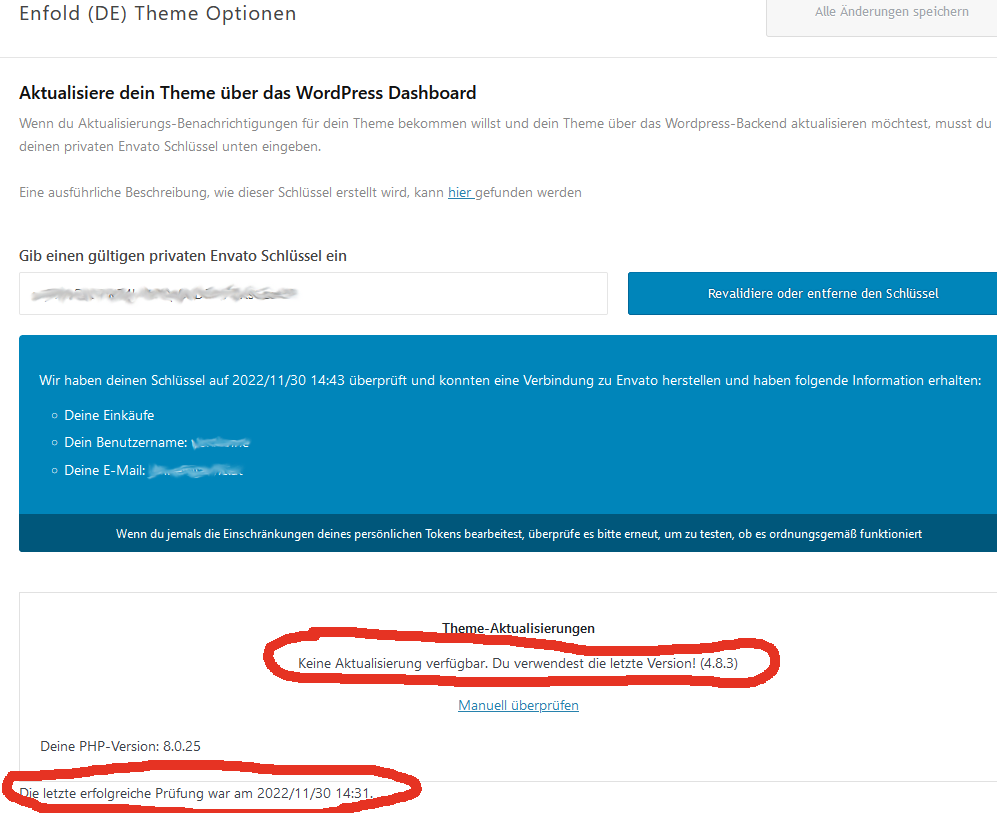
I also have problems updating. I am not using a child theme, I am connected to Envato, and it says I have the latest version (“4.8.3”) – see screenshot here: https://www.med4women.at/wp-content/uploads/2022/11/no-update-available.png
I have had this site for years, and in my notes I have written that I once updated the theme via a plugin called “Update theme and plugins from zip file”, and another time I just uploaded the newest version via the “upload zip” button in the themes panel. In both cases I’d have to manually check if there’s a new theme version, and manually download that version from themeforest. I would really like if it could just say “please update the theme” in the WP dashboard, and then I just click on a link in the themes panel – as it is with all other themes I use on other sites. Why isn’t that possible here?
Thanks!
Hi! Any chance you could get back to me on this today? Cheers
Hi,
I am sorry for the late reply, I must have overlooked your comment.
Could you please try adding your personal token into Envato Market plugin – https://www.envato.com/lp/market-plugin/ and check if it works?
Regards, Yigit
Yes, now I got a note in Enfold – Theme Options – Theme Updates that there is a new version available, and a button to click and update. Thanks!
When will the new version of enfold for wordpress 6.1.1 be available without bugs or errors? I’m reading the comments and I don’t trust
Hi,
We are going to release Enfold 5.3 soon. WP 6.1.1 related issues are CSS issues only and can be fixed by adding following code to bottom of Enfold theme options > General Styling > Quick CSS
/* To fix underlined links */
a:where(:not(.wp-element-button)) {
  text-decoration: none;
}

/* To fix increased margin in Masonry */
figure {
  margin: 0;
}
Regards, Yigit
Hello, in Contact Form, why the first value of the element with option is selected. The user must select a value. But unfortunately the first value is selected. It wasn’t like this before. Can you fix this with an update? See: https://www.dmrlook.com/urun-cekimi/#iletisim
Merhabalar
Thanks for contacting us!
Our devs have fixed the issue and it will be included in upcoming version.
If you would like to apply the fix on your installation, please edit /enfold/framework/php/class-form-generator.php file in Appearance > Editor and replace the content with following one – https://raw.githubusercontent.com/KriesiMedia/enfold-library/master/temp_fixes/Enfold_5_2_1/framework/php/class-form-generator.php
If you would like us to update the file for you, please start a thread on our support forum – https://kriesi.at/support and attach temporary admin logins in private content field
Regards, Yigit
Thanks, Yiğit kardeşim
mi pantalla se ha quedado en blanco, desactivé plugins y no es ahi el problema, pero cuando desactivo el tema, el sitio se puede visualizar como puedo solucionar este problema con su tema?
Hi,
Thanks for contacting us!
Please make sure that you are using the latest version of Enfold which is currently 5.2.1. If you are using an older version, there might be compatibility issue with your PHP version
Regards, Yigit
We are facing an issue with resetting a new password. I cannot connect so that resolving an issue with a theme. Please let me know
Hi,
Thanks for contacting us!
Could you please start a pre-sale question thread – https://kriesi.at/support/pre-sale-question/ and attach your purchase code in private content field so we can help you reset your password?
Regards, Yigit
NEXT ISSUE
Before the last Update an image vanished from a masonry gallery when it was deleted from the media library.
Now it is still in the gallery but as a “not available” placeholder.
This doubles the time a user needs to spend when he wants to delete images.
Enfold was such a good theme – a long time ago
- Added a Masonry Gallery
- Added several images
- Display in frontend – correct – https://imgur.com/a/JWzLbs4
- Deleted an image from media library only
- Frontend – correct deleted is missing (no placeholder)
- in shortcode deleted image id is still there, but also not displayed any more in backend – https://imgur.com/a/sz8bnEP