5512 comments found.

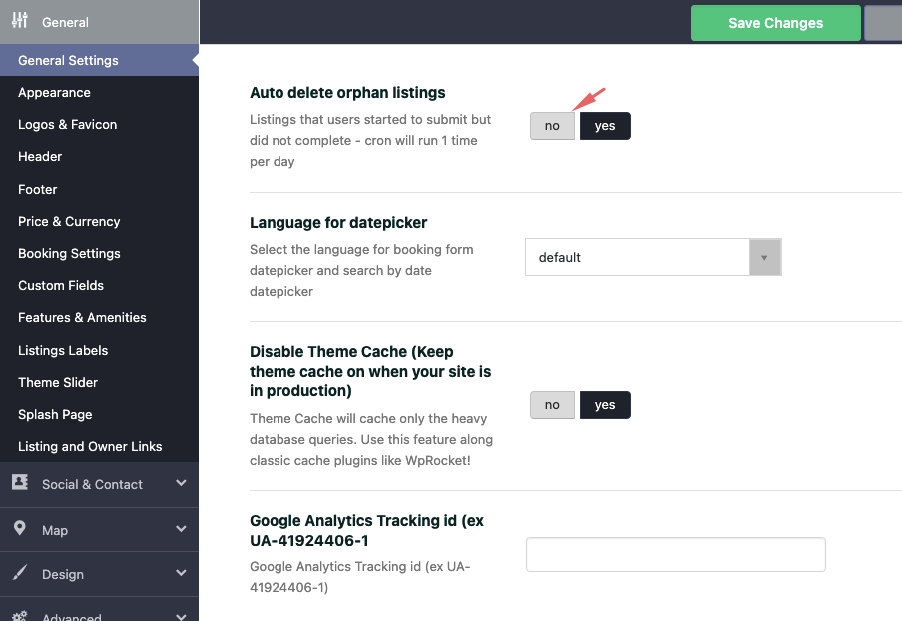
Hi, were can we add the Google TAG for analyctics?
Hi. You do not need the tag. We upgraded to analytics 4 in latest theme. You just add the ID https://help.wprentals.org/wp-content/uploads/2015/10/Screenshot-at-Apr-22-09-29-47.png
Thank you
i dont have the last theme yet, i have Version: 3.6.1 will it work?
Hello. The new analytics demanded new code. Only a theme update can work for analytics 4. Thank you
ok so how can i add google tag on the old theme?
Hi. It would not be possible to know this answer here. Development could not help update on an old version, but they can offer you the existing code based on latest theme version. However, you would need to see how you could update your old theme version. Please open a ticket in support for latest theme version support. Thank you
Hey, Does object rental only comes with WP BAKERY page builder?
Hello. The demo created for ski rental is based on bakery (the homepage). But you can create your homepage with elementor.
If you need further info or want to test our theme, please send a message from here https://themeforest.net/user/wpestate
Thank you
Hello, I have updated the theme to the latest version and my users are now getting this message when trying to book:
“The number of guests is greater than the property capacity – 0 guests”
How can i disable the guests option globally across the site? The theme is being used for hiring land for events.
Thanks
Hi
Thank you for the comment.
Please use our client support https://support.wpestate.org/ if you need further help. This is also a private support where you can send us your site details (url and wp-admin access).
Thank you
Hi. This message shows if you actual have 0 guests and try to select more. Please open a ticket in support to check your setup.
We have help too disable guests here – https://help.wprentals.org/article/how-to-manage-guest-options/
Thank you
A question about the checkout flow on the Kamini Villa demo site (https://solo2.wprentals.org).
On the ‘Checkout > Order received’ page, there is a prominent button labelled ‘Return to My Reservations’, linking to https://solo2.wprentals.org/my-reservations. However, since I never logged in to make the purchase, there is no My Reservations page. This page is super important since the user has just spent a lot of money and needs reassurance. A dead link is far from reassuring. Can this bug be fixed?
Also, in general this page looks very drab at the moment. It would be a nice touch to have a beautiful image of the property on this page, in anticipation of the user’s upcoming holiday. Maybe with customisable text like “We look forward to welcoming you to Kamini Villa”. Just a thought : )
Thanks!
Hi. Thank you for the comment.
When you pay you are registered as well. It is part of WooCommerce functionality. But we did not allow uses to register in the demo. We activated now https://prnt.sc/9K10CR-LXQVF and you can test https://prnt.sc/OI2tLMACtXt6
The page redirects user to dashboard https://prnt.sc/yDiw572gtUqv
The theme works without woo commerce as well. Users need to register in order to pay with theme merchants (stripe, paypal)
We have this on checkout https://prnt.sc/Ntoy-Zqwe0Iz but was disabled. I put it on to test as well.
Please look over our demos to understand what the theme can do and let me know any question you have. I can answer and clear any question before making a decision.
If you need further info or want to test our theme, please send a message from here https://themeforest.net/user/wpestate
Thanks for the speedy response and for making those changes to the demo site.
It all works beautifully when the user is logged in.
However, it’s arguably a better user experience to avoid the login / signup step, as it makes the flow shorter and easier, and maximises conversion.
So if we use instant booking with WooCommerce there is no login step, which is great, but the ‘Return to My Reservations’ button is still there on the ‘Checkout > Order received’ page. Can this button be removed when the user is not logged in? It seems like the sensible thing to do. Thanks again.
Hi. We need user to register to be able to know information about the booking request. The button is needed for user to check the reservation. I am afraid this cannot be changed.
Thank you
So just to be clear, if using WooCommerce with Instant Booking, then be sure to tick “Allow customers to create an account during checkout”. If you fail to do this then when the customer reaches the ‘Checkout > Order received’ page, they cannot visit the My Reservations page, since they are not logged in.
Hello. Yes, that is correct. You can see the woo commerce setup directions in our help – https://help.wprentals.org/article/install-woocommerce-and-use-woocommerce-payments/
If you need further info or want to test our theme, please send a message from here https://themeforest.net/user/wpestate
Thank you
Can we enable the booking without creating account? Now when we will click on instant booking its going to login/register page. do we have a option where we can disable login/register. user can do directly book like a guest checkout
Hi,
Thank you for the comment.
The theme default functionality requires login to be able to place a booking. There is a workaround when Instant booking is used with Woo Commerce payments, the login is bypassed but a user account will still be created on the Checkout step.
You have more details in the below help articles: https://help.wprentals.org/article/1-19-instant-booking/ https://help.wprentals.org/article/install-woocommerce-and-use-woocommerce-payments/Thank you,
Hi WpRental!
Loving the new Paphos theme.. I wanted to ask if the category icons at the top of the home page could be a “Carousel” on mobile (iPhone/ Android) instead of them being stacked on top of one another?
So, I want the category icons to slide from left to right like it does on Airbnb.. is this possible? If so, how can I get this done?
Here is a screenshot to see what I’m asking about..
https://prnt.sc/RXnrC6FKjBHTThank you, Winners!
Hello Winners,Thank you for the comment. I am glad you like our demo.
We cannot make categories carousel I am afraid. I checked the example, and I am afraid we cannot make it a slider.
thank you for the suggestion. I appreciate taking the time to write.
thank you
Hi WpEstate!
Thank you for your reply!
Can you please tell me what folder I can find the category files in? I have an idea of how to create the slider/carousel!
Thank you! Winners!
Hi. I do not understand. Please explain which categories. thank you
If I wanted to locate the folder or files where the categories section at the top of the page for the Paphos theme.. I’m trying to make the categories section at the top of the page into a carousel/ slider. Where can I find it if I need to FTP into it? I’m just trying to locate the folder where I can adjust the code for the categories section. What folder is it in?
https://prnt.sc/RXnrC6FKjBHTThank you for your response!
Best, Winners!
Hi
We can give more details in the support system.
Please use our client support https://support.wpestate.org/ if you need further help. This is also a private support where you can send us your site details (url and wp-admin access).
Thank you
Ok, thank you! I just sent the details using your support channel! 
Thank you, Winners!
Hi,
The ticket will be replied shortly.
Thank you,
Ok, thank you!
Winners!
Any news yet?
Thank you, Winners
Hi,
The ticket has been replied.
Thank you,
Hi, sorry asking, can u know is there any latest update on short term? Or estimate next update when?
Hi, Thank you for the comment.
The last theme update was 2 weeks ago, on June, the 6th. We cannot estimate yet the next theme release date.
Please use our client support https://support.wpestate.org/ if you need further help. This is also a private support where you can send us your site details (url and wp-admin access).
Thank you
Is there a way to change the hourly booking from a 24hr to 12hr am-pm format for users when they are trying to book?
Hi,
Thank you for the comment.
We do not have the option to change the date format for hourly booking.
Will add this to our wishlist for future review, but at the moment we don’t have this and it’s not an easy change to apply I am afraid, so we cannot guide you to make this yourself. If it were an easy one, we would have been more than happy to assist.
Thank you,
Thanks but I was not talking about the date. I was talking about the time format, from a 24hr time frame like military or world time to a A.M, P.M time format for booking hourly. I hope I was more clear this time.
Hi,
Unfortunately we do not have the option that you want.
Thank you,
hi, i am using stripe payment with woocomerce checkout, i can see that stripe has Apple Pay / Google Pay if i enable it at woocomerce > payments > Stripe will that work with wprentals?
Hi. Yes, any merchant from woo commerce will work. Thank you
fantastic i added it and notice that the Apple Pay / Google Pay is above the form not below were the other paymenst option is, any ideas how to add it below? see here https://ibb.co/sbc05Fz
Hello again I am glad it worked. About last question, I checked but there is no online documentation for how to change order of merchants on checkout. I assume it is not possible. Thank you
oh i see 
Hello. I need to show the contact/reservation form on the right only in some accommodations. Since I use custom sidebars for other hosting. But if I disable the contact/reservation form, I can’t show it in some accommodations. Can you provide me with a shortcode or code to implement in the sidebar of the accommodations where I do want to show your contact or reservation form? Thank you.
Hi, Thank you for the comment. We currently do not have a widget for booking form in wordpress sidebars/widgets. There is a widget can be added to elementor based pages as booking form elementor widget – but elementor cannot modifying only sidebar of a custom post type (property). I am afraid we do not have this option by default.
I am not sure how many listings you have. You can use a custom css with property post id to make custom css changes to specific properties only.
Please use our client support https://support.wpestate.org/ if you need further help. This is also a private support where you can send us your site details (url and wp-admin access).
If you wish my assistance to register in support please send a message from here – https://themeforest.net/user/wpestate
Please note that our standard office hours are Monday – Friday, 9AM-5PM Europe timezone.
Thank you
Is there a feature that I can add guest reviews because I don’t see it in the demo version?
Hello. thank you for your inquiry. We only have property review – which is shared by the user renting a property after confirmed booking ends. We do not have guest reviews. If you need further info or want to test our theme, please send a message from here https://themeforest.net/user/wpestate thank you
Dear Support Team, In submit payment section I do not have option to receive payment in AED UAE currecny can you guys help me how I can add that
Hi
Thank you for the message.
The list of currencies for payments will include the ones supported by Stripe and PayPal. I checked and your currency is not supported by Stripe: https://stripe.com/docs/currencies
In this case, you can add your currency as custom currency with a Wire transfer https://prnt.sc/zO2MuaxR_d3Y
HELP: https://help.wprentals.org/article/wire-transfer-payment-method/
Thank you,
Dear support team, i Have seen stripe documentation and United Arab Emirates AED is acceptable by stripe, just you guys didn’t not update in dashboard can you Please add AED. Please check stripe documentation.
Hi
Thank you for the message.
We will add the new currency, in the next theme version. If you need it sooner, please open a ticket in our support system and we will guide you on how to add the currency.
Thank you,
Dear Thanks, we do update our self, but kindly update in next version coz we when we update it will be disappeared and it is sensitive like if client suppose to pay AED 35 he will get charge USD 35. Please update in next version. Love your work and support.
Hi,
We will add the new currency in the next theme version.
We are glad that you like our theme and support.
Thank you,
Could you please explain how each host get paid on thier bookings through the website?
Hi,
Thank you for the message.
The theme supports payments only to admin. The payments for the owner need to be managed outside the theme.
HELP:https://help.wprentals.org/article/1-20-how-to-work-with-deposit-fee-and-service-fee/
Thank you,
Dear we have to include 3 fees in each booking – 7% Municipality Fee – 10% Service charge and 5% VAT , can you advice me with percentage how I can add above, currently I can see available option CITY FEE only this felid name we like to change to Tourism Tax. Please guide us.
Hi
Thank you for the message.
You can rename the City fee to Tourism Tax using the Loco translate plugin. The steps that you need to take are described in the below help article: https://help.wprentals.org/article/how-to-modify-theme-text-in-english-with-poedit/
The theme does not include a VAt fee, but this can be easily added with Woo commerce: https://help.wprentals.org/article/install-woocommerce-and-use-woocommerce-payments/
The service fee needs to be set in Theme Options: https://help.wprentals.org/article/1-20-how-to-work-with-deposit-fee-and-service-fee/
Thank you,
Dear I need help, there is issue in invoice section, Wire Payment Received – Activate Purchase, The Tab is not working. once you click nothing happen. can you Please provide me instant solution.
Hi,
Thank you for the message.
I am not familiar with the situation that you describe.
Please use our client support https://support.wpestate.org/ if you need further help. This is also a private support where you can send us your site details (url and wp-admin access).
Please note that our standard office hours are Monday – Friday, 9AM-5PM Europe timezone.
Thank you,
Is there any way I can use this theme to showcase long-term rental properties (monthly-based payment) among short-term rental properties?
Thank you!
HI
Thank you for the message.
The theme supports booking per night and per hour. Unfortunately, we do not support long-term bookings.
Thank you,
hi sir possible to add whatssap or any social media for book now instead check in check out
Hi,
Thank you for the message.
We have the option to replace the booking form with a contact form: https://help.wprentals.org/article/hide-booking-form-and-replace-with-owner-contact-form/ but we do not have the option to add a WhatsApp button.
Thank you,
Hello. Is it possible to change the booking summary currency to my local currency, Ksh?
Hi
Thank you for the message.
You need to set the currency for payment from Theme Options-Payments & Submit-SUBMISSION PAYMENT SETTINGS
You have details in this help artcile: https://help.wprentals.org/article/price-currency/
Thank you,
Hello, i am unable to add the number of guests and number of beds when adding a listing
Hi
Thank you for the message.
I am not familiar with this behavior.
Please use our client support https://support.wpestate.org/ if you need further help. This is also a private support where you can send us your site details (url and wp-admin access).
Please note that our standard office hours are Monday – Friday, 9AM-5PM Europe timezone.
Thank you,
Hello. I am unable to scroll using the arrow buttons on my desktop. Also, I am adding a property to my listing, but whenever I add bed sizes to my listing, it is not saved.
Hi
Thank you for the message.
Please make sure that you have the latest theme version installed on your site. https://help.wprentals.org/article/how-to-update-the-theme-and-plugins/
We are more than happy to check the above for you but we need to do it on your site.
Please use our client support https://support.wpestate.org/ if you need further help. This is also a private support where you can send us your site details (url and wp-admin access).
Please note that our standard office hours are Monday – Friday, 9AM-5PM Europe timezone.
Thank you,