23263 comments found.
Hi! How can I hide the size guide tab on the product page? Thanks and have a good night
Hello, @fvergara88,
Size Guide is the Custom Global Tab, If you want to remove it, you simply have to remove the block slug name from PORTO >> Theme Options >> WooCommerce >> Single Product, please refer to our theme documentation here: https://www.portotheme.com/wordpress/porto/documentation/how-to-edit-remove-rename-and-reorder-product-data-tabs/
Regards, P-THEMES.
Please join our Discord Lesson

Hi, I need to install a demo e-commerce site to test for internal use, if I buy the theme, may I upload a demo with all content available like I see in this preview (images, product pictures etc) and customizable with WP Bakery?
PS: I’m interested in import Shop Demo 3
Hello, @grisosky,
I would like to express my gratitude for your expressed interest in Porto WordPress. We appreciate your enthusiasm and are pleased to provide you with the necessary information.
Regarding your query about importing the demo onto your test/staging site for internal use, we are delighted to confirm that the process is straightforward. When importing the demo, all associated content, including images, products, posts, and other relevant elements, will be included.
For detailed instructions on how to obtain a license for your staging/test site, I kindly direct your attention to our comprehensive theme documentation, available at the following link: [https://www.portotheme.com/wordpress/porto/documentation/how-to-register-porto/]. The documentation will provide you with step-by-step guidance on how to register Porto and obtain the necessary license.
Should you require any further assistance or have additional questions, please do not hesitate to reach out to our dedicated support team. We are committed to ensuring your experience with Porto Wordpress is seamless and enjoyable.
Thank you once again for your interest in Porto Wordpress. We look forward to serving you and meeting your expectations.
Regards, P-THEMES.
Please join our Discord Lesson
Hi, on the single product page I can only use swatches or images for the variations. How can I use drop-down menu’s as well?
Hello, @dennygoosensen,
Sorry for the inconvenience caused. In order to modify the variations display to a drop-down menu, kindly follow these steps:
Access the Dashboard.
Navigate to Porto.
Proceed to Theme Options.
Click on WooCommerce settings.
Locate the Product Swatch Mode option.
Select the "Select Box" option from the available choices.
For visual guidance, you can refer to the following image: https://postimg.cc/RWFdLRm0
If you have any further questions or need assistance, please do not hesitate to reach out. Thank you for your understanding.
Regards, P-THEMES.
Please join our Discord Lesson
Hi, thanks. And what if I want to use both?
Hello, @dennygoosensen,
Unfortunately, Its not possible, you can not use both at the same time, there is no such possible option for it, so we suggest you to please write it as a feature request on our forum here: https://www.portotheme.com/forums/topic/feature-request/ so that our dev team will check and note it down for the future upcoming updates of the theme.
Regards, P-THEMES.
Please join our Discord Lesson
Hi Porto, regarding in the footer, where I can find the strings to translate to other languajes? Privacy policy etc…
https://candleartesoteric.com/de/esoterik-kerzenthanks
Hello, @Joaquim_,
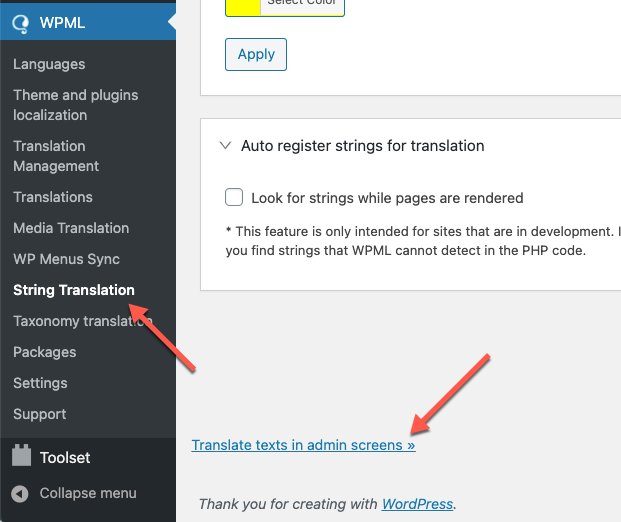
Please go to WPML >> String Translation >> Click the scroll to the bottom of the page and click the Translate texts in admin screens link. https://cdn.wpml.org/wp-content/uploads/2021/03/translate-texts-in-admin-screens.png
This will take you to a searchable list of admin strings. Find the Words that you want to translate and then select those words and add them to the string Translation then you will go to the WPML >> String Translation >> then find and translate them into other languages.
Regards, P-THEMES.
Please join our Discord Lesson
Hi Porto, I can’t see the porto string to translate to other languajes, regarding, the pop up “view cart or continue” when I add something to the cart.
thanks,
Hello, @Joaquim_,
Please go to WPML >> String Translation >> Click the scroll to the bottom of the page and click the Translate texts in admin screens link. https://cdn.wpml.org/wp-content/uploads/2021/03/translate-texts-in-admin-screens.png
This will take you to a searchable list of admin strings. Find the Words that you want to translate and then select those words and add them to the string Translation then you will go to the WPML >> String Translation >> then find and translate them into other languages.
Regards, P-THEMES.
Please join our Discord Lesson
Hi Porto I don’t see any string with that name: “View Cart” and/or “continue”. Can you suggest me where to find?
thanks,
Hello, @Joaquim_,
Ok then please contact us via our support system with your site WP Admin URL and Credentials so that we will check it for you on your site and help you out.
Regards, P-THEMES.
Please join our Discord Lesson
Hi, i can’t see the live customizer edit and not able to change the primary menu default color?
Hello, @akshaym52,
Let me try to explain it to you, when you save any changes from theme options, it rewrite those changes to the porto-styles folder files which are responsible for the site CSS to work. So sometimes because of file permission issue, sometimes server cache issue, sometimes site cache plugins issues, sometimes because of any server restriction issues, sometimes third party plugin confliction issue, that could be any reason from the above ones, the files under porto-styles folder does not update with the new changes from theme options, so that is why in that case, we recommended to delete that folder of porto-styles and then click on save changes button again from the theme options, so that it will create the same new folder with same files again at the same place but with new changes from the theme options.
Hope this make sense now and clear enough.
Regards, P-THEMES.
Please join our Discord Lesson
I need some help! I reinstalled the porto theme, and choose a template, then when I try to edit in elementor, it’s seems that elementor don’t recognize the sytles css. I’ve try uninstalling the theme, deactivate the license and activate again, delete all plugins, install again the plugins theme and nothing works, could you help me?
Hello, @sherweedone,
Could you please contact us via our support system with your site WP Admin Login details and with screenshot explanation of your issue, so that our experts will look into it for you and help you out.
Regards, P-THEMES.
Please join our Discord Lesson
Good morning How to display fontawesome5 icons in categories I put the code fa…. but nothing is displayed Thank you for your help
Hello, @philltana,
If you check the description under that option properly, it is clearly written that: “Input font icon class such as “fas fa-user”. This field is used for porto product categories element when you select “Media Type” option to “Icon” to display icon instead of category thumbnail.”
Regards, P-THEMES.
Please join our Discord Lesson
I get this error when trying to save changes in Theme Options panel: “There was a problem with your action. Please try again or reload the page.”
Hello, @ebenadvertising,
Please try to use the Live Theme options Panel and check the result: https://postimg.cc/FdsQ8rYQ
Regards, P-THEMES.
Please join our Discord Lesson
I use demo 35 grocery. Images of products imported from the demo are displayed in categories as rectangles. My images added in the same resolution 1200×1200 already as squares… What should I change?
Hello, @Wodymineralne,
Would you please contact us via our support forum: https://www.portotheme.com/forums/forum/porto-multi-purpose-woocommerce-theme/ by creating a topic and describe your issue in detail with sharing your site admin access in the private content area. So that one of our customer support team member will be able to check your issue on your site and assist you further accordingly with a proper solution.
Regards, P-THEMES.
Please join our Discord Lesson
Hello, I got this notife when using Porto Products widget in Elementor: This widget was deprecated in 6.3.0. Please use Posts Grid widget instead.
The style tab for this widget is blank in Elementor.
Hello, @titanmartae,
Yes, we suggest you to please use the Porto Posts Grid widget and set it as per your requirements, the old element was deprecated and no longer in use now.
Regards, P-THEMES.
Please join our Discord Lesson
Hi, I am trying to update Porto Functionality but it’s showing UPDATE FAILED. I am unable to import demo as well.
Hello, @icedoutbuffs,
Please navigate to Porto >> Dashboard and un register the theme from there and then again register the theme with the same purchase code and then try to update the Porto Functionality plugin from Appearance >> Install Plugins, we hope this helps.
Alternatively, please contact us via our support system with your site WP Admin URL and Credentials so that we will check it for you on your site and help you out.
Regards, P-THEMES.
Please join our Discord Lesson
Does the current theme and included plugin support MySQL 8 my host will be updating in October?
Hello, @cagolfcenter1,
Yes, our theme is fully compatible with MySQL version 8 as I am using MySQL version:10.3.39-MariaDB-cll-lve on my test site and it is working perfectly fine for me.
Regards, P-THEMES.
Please join our Discord Lesson
thank,s
Hello, @Joaquim_,
Unfortunately, there is no such possible option to auto close it and it requires extra Customization, OR you can request it as a feature request as well by writing it here: https://www.portotheme.com/forums/topic/feature-request/ so that our dev team will check and note it down for the future upcoming updates of the Theme.
Regards, P-THEMES.
Please join our Discord Lesson
Hi, I have tried to update to latest Porto version but getting an error. any ideas?
Fatal error: Uncaught Error: Call to undefined method PortoBuildersType::get_instance() in /var/www/html/wp-content/themes/porto/inc/admin/theme_options.php on line 298
Call stack:
{closure}() wp-includes/class-wp-hook.php:308 WP_Hook::apply_filters() wp-includes/class-wp-hook.php:332 WP_Hook::do_action() wp-includes/plugin.php:517 do_action() wp-settings.php:623 require_once() wp-config.php:105 require_once() wp-load.php:50 require() wp-onyx-login.php:3
Hello, @davidpellett,
Please make sure that you have also updated the Porto Functionality plugin as well to the very latest version after the update of the Theme.
Alternatively, Please contact us via our support system with your site WP Admin URL and Credentials so that we will check it for you on your site and help you out.
Please join our Discord Lesson
Regards, P-THEMES.
I have emailed support and used the online support popup. But i am getting no reply? how can i get help with this update? The support portal will not send email password reminder. I have paid for the support.
Hello, @davidpellett,
Please share your theme purchase code PDF file with me via my email: aizazawan.blackpearlspro@gmail.com so that I will check/verify and create the new support account for you.
Regards, P-THEMES.
Please join our Discord Lesson
Can I customize the loading overlay in my child theme (class=”bounce-loader” under class=”loading-overlay”)? I want something other than the bounce – how do instead use what they have here (id=”loader-wrapper”): https://allelectrical.ca/
Hello, @Robert_ITman,
That loading overlay has been created using the Custom CSS and JS, and there is no option to change it except turn it ON/OFF.
So if you want to change it you have to Customize it as per your requirements, in Child Theme.
Regards, P-THEMES.
Please join our Discord Lesson
Any hint you can provide as to what file I need to edit / add to child theme – will be much appreciated – I will post my full solution here when I get it working.
Hello, @Robert_ITman,
I would like to provide you with some clarification regarding the bounce effect in the loading overlay.
The bouncing animation you see is not created using images or icons. Instead, it is achieved by utilizing empty div elements. The desired visual effects such as transition, color, border, and shadows are applied to these div elements using CSS styles. Check this: https://postimg.cc/rzSwPr58
To modify the appearance of these bounces, you can add your own custom CSS code. To do this, please follow these steps:
Access the theme options by navigating to [Theme Options].
Proceed to [Skins] and select [Custom CSS].
At the bottom of the black box, you can input your custom CSS code.
However, if you wish to modify the bounce effect itself, you will need to configure the “header.php” file. This file can be found at the following location: [PORTO/inc/functions/layout/header.php]. At the end of the “header.php” file, you will find the relevant code. To assist you further, please refer to this image: https://postimg.cc/kBmF0KZw
It is important to note that once you have made the necessary modifications to the “header.php” file, it is recommended to create a child theme and copy the customized file into it. By doing so, your customizations will be preserved even when updating the parent theme.
If you require any additional assistance, please do not hesitate to reach out.
Regards, P-THEMES.
Please join our Discord Lesson
Ciao, ho fatto l’aggiornamento al sito qualche giorno fa e ora si verifica un’anomalia per l’inserimento dell’immagine in evidenza in pagine e articoli. Vedo il campo ma non c’è l’opzione per caricare l’immagine.
Hello, @danilofrizzi,
Please make sure that you have Installed and Activated the Dynamic Featured Image plugin to your site under Appearance >> Install Plugins.
Alternatively, please contact us via our support system with your site WP Admin URL and Credentials so that we will check it for you on your site and help your out.
Regards, P-THEMES.
Please join our Discord Lesson
Fino a qualche settimana fa funzionava tutto senza nessun plugin, l’anomalia si è verificata dopo l’aggiornamento del tema. Attualmente il plugin Dynamic Featured Image non è compatibile con la mia versione di WP e l’ultimo aggiornamento è di 2 anni fa. Come posso risolvere senza plugin?
Hello, @danilofrizzi,
Please contact us via our support system with your site WP Admin URL and Credential’s so that our experts will check it for you on your site and help you out.
Regards, P-THEMES.
Please join our Discord Lesson
Hi Porto, I don’t remember if I placed tue query before but: Can you give me details how to fill in tag cloud widget the parameters? I have to fill the tag as always in wordpress tag product, and later the tag cloud is a kind of filter?
thanks,
Hello, @Joaquim_,
First of all, you have to assign the tags to your products by following this: https://themeforest.net/comments/29740763
And then you can set the products tags cloud widget under Woo Category sidebar and it will pick the tags by default and will filter the products based on those tags.
Regards, P-THEMES.
Please join our Discord Lesson
Hi Porto, In my web I have placed a link in the wordpress editor, with other colour. But when I pass the mouse over it in the back end, there is not the typical line underneath to indicate that it is a link.
any suggest ? thanks,
Hello, @Joaquim_,
Could you please contact us via our support system with your site WP Admin URL and Credentials and also with an explanation of your issue with a screenshot, so that our experts will check it for you on your site and help you out?
Regards, P-THEMES.
Please join our Discord Lesson
Hi Porto,
This page is repeating 2 x H1. Please any code to avoid this duplication? Before happened the same with products and Porto provide me a code to solve the duplication.
https://candleartesoteric.com/esoteric-candles H1: Esoteric candles is duplicated 2 times. https://candleart.es/duplication%20H1.JPGthanks, Joaquín Candle Art
Hello, @Joaquim_,
The heading block you have used is set to be as h1 tag, so please edit that heading block and change the tag from its setting https://postimg.cc/jCWZpYDD , alternatively, please contact us via our support system with your site WP Admin URL and Credentials, so that our experts will check it for you on your site and help you out?
Regards, P-THEMES.
Please join our Discord Lesson
Hi Porto , in which widget area I have to add a filter for product ? thanks
Hello, @Joaquim_,
You can insert the filter for products under widgets, “Woo Category Sidebar” OR “Woo Category Filter” as per your requirements.
Regards, P-THEMES.
Please join our Discord Lesson
I have to find widget Appearance -> Widgets and find AAPF Filter Single widget. but is not existing with this name. any idea?
thanks, is with other name BeRocket nut not appearing in fornt end. Can you tell me if Porto is compatible with BeRocket product filter?
In case not, cna you provide any way to filter by tag product with Porto?
thanks
Hello, @Joaquim_,
Unfortunately, we have not tested the BeRocket product filter plugin with our theme officially, so we are unable to suggest you on it, if it not working for you, then that might be the conflict and requires extra Customization.
Porto WordPress is fully compatible with Yith WooCommerce Ajax Product Filter plugin which you can find pre packaged with the theme.
And to filter by product tags, we suggest to use the “Product Tag Cloud” widget in sidebar on your site. Please refer to this screenshot: https://postimg.cc/3WD3TPdL
Regards, P-THEMES.
Please join our Discord Lesson
Hi Porto, yesterday I spend all the day testing lots of filters. Thanks for your recomendation. Then, YITH WooCommerce Ajax Product Filter if is pre – packaged means is free ?
thanks,
Hello, @Joaquim_,
Yes its free and you can install it from Appearance >> Install Plugins.
Regards, P-THEMES.
Please join our Discord Lesson