23263 comments found.

Does it have bottom content section on product category pages? I need to insert content at the bottom section of the product categories
Hello, @webratna,
First of all, thanks for showing your interest in Porto WordPress 
Yes you can put the content to the bottom of the product category pages easily, our theme provides multiple options to do this.
1. Simply edit the product category page and insert the block slug name into the content bottom option.
2. You can create your own layout for the product category pages and place any content any where as per your requirements using Porto Template Builder.
Regards, P-THEMES.
Please join our Discord Lesson
Hello Team, we purchased Porto Theme. Add to Cart was working fine in the beginning but it is not working any more. I tried all possible codes as well but its not working like it does in your demo. Can you please help? Our website is https://realbeautyusa.com
Hello, @anasq2,
If you are using any third party plugin to see the prices on your site, then please disable it for a while and try to check the functionality of the theme again, if the issue persist then please remain all the third party plugins deactivated on your site and share your site WP Admin URL and Credentials with us via our support system so that our experts will look into it for you.
Regards, P-THEMES.
Please join our Discord Lesson
No we are not using third party plugin. Email sent with logins, please check it.
Hello, @anasq2,
Ok Now, please be patience, once your support ticket will be resolved you will get the reply to your support ticket accordingly.
Regards, P-THEMES.
Please join our Discord Lesson
Hi, I tired to install the demo content, but it massed up, what should i do.
yesterday day i tried to install demo, it show ssl wrong. now i can intall the demo, but it seems it still dont work well
here’s the screenshot: https://prnt.sc/ZaSAduABxtFA
Hello, @cmtendency,
Well, I saw your provided screenshot, and the issue you are facing is the SSL certificate issue on your site, please read and follow the instructions written in our theme documentation here: https://www.portotheme.com/wordpress/porto/documentation/faq/site-distort-because-of-mixed-content-ssl-certificate-issue/
I am confident that it will solve your issue.
Regards, P-THEMES.
Please join our Discord Lesson
after configuring speed optimize wizard, my products images on homepage doesnt show. I ve disabled Lazy Load Images and other plugins that might cause this problem
Hello, @ebenadvertising,
If you are using any third party plugin or the cache plugin then please disable it, because most of the times the cache plugin conflicts with our Speed Optimization Wizard functionality, so please try to use the one at a time.
And also try to disable the Lazy Load from Speed Optimization Wizard as well, and check back to your site after clearing the cache of the browser.
If the issue still persist then please contact us via our support system with your site WP Admin URL and Credentials so that we will check it for you on your site and help you out.
Regards, P-THEMES.
Please join our Discord Lesson
Good morning, when I still had the support you had me enlarge the logo of the shop because it was displayed too small. the result was satisfactory. but since yesterday’s update, the logo has become small again! and I don’t know the manipulation you preferred to do so I don’t know how to enlarge it again…
Hello, @audreyanakayan,
Have you purchased the Porto WordPress theme? If yes, then please contact us through your theme purchase account to get the free support for Porto WordPress theme.
Regards, P-THEMES.
Please join our Discord Lesson
Hello,
I would like to know how to add the information about discount, ... (https://prnt.sc/t5tuzNA8g_6N) to the post type for Content type PRODUCT (https://prnt.sc/AkYNUFGrCZ9X)?
Hello, @gorecwp,
You have to turn ON the “Show Product Badges” for the featured image element and it should solve your issue.
Please refer to this screenshot: https://postimg.cc/0M70nRLg
Regards, P-THEMES.
Please join our Discord Lesson
Thanks.
You’re Most Welcome!!
Kindly fixed cURL error 60: SSL certificate problem: certificate has expired
Hello, @ggd108,
Sorry for the inconvenience but it is the issue with our internal server activation engine which we are trying to fix with a hosting company, our dev team is desperately working on it, so please be patience, we will fix it soon and will inform you here… Thanks for your understanding.
For temporary fix:
Please try to add this code in the functions.php file under wp-content/themes/proto and try again
add_filter('https_ssl_verify', '__return_false');
Regards, P-THEMES.
Please join our Discord Lesson
Hi, I want to remove the overview under members when using Porto Post Grid in Home page but don’t have the choice to remove it, image: https://postimg.cc/Z0JVWk46 . Please help me!
Hello, @trcnam,
Well, you can create your own layout using Porto >> Template Builder >> Post Type.
And then you can choose that layout to show for Members by using the Porto Post Grid element.
Please refer to these screenshots:
https://postimg.cc/VJv48MPN
https://postimg.cc/hQ7zsSkc
https://postimg.cc/ctxcCt26
We hope this helps.
Regards, P-THEMES.
Please join our Discord Lesson
I see that your SSL is down. I did try the “add_filter(‘https_ssl_verify’, ‘__return_false’);” in the functions.php that worked but now I need to rest my license. did they give you a time frame of when the SSL maybe fixed. Thank you
I am trying to reset my license key.
Hello, @frtaz,
I have reset your purchase code, now you can use the same purchase code for activation of your theme.
And the SSL certificate will be sorted out soon.
Regards, P-THEMES.
Please join our Discord Lesson
Thank you
You’re Most Welcome!!
Hi,
cURL error 60: SSL certificate problem: certificate has expired :(((
When I checked, your certificate at https://sw-themes.com/activation/porto_wp/ has expired as of today. For this reason, I could not activate the theme. However, define( ‘PORTO_API_URL’, ‘https://sw-themes.com/activation/porto_wp/' ); I corrected it from the file.
I guess you can update the certificate.
Hello, @larusreklam,
Sorry for the inconvenience but it is the issue with our internal server activation engine which we are trying to fix with hosting company, our dev team is desperately working on it, so please be patience, we will fix it soon and will inform here… Thanks for your understanding.
For temporary fix:
Please try to add this code in functions.php file under wp-content/themes/proto and try again
add_filter('https_ssl_verify', '__return_false');
Regards, P-THEMES.
Please join our Discord Lesson
Hi, I´m working on my home, and I want to know If there is any way to put the logo on the sticky header, as you can see in this screenshot: https://snipboard.io/mYikQF.jpg So when the user scroll down through the website, he can always see the company logo. Thanks!!!!
Hello, @pablo_elequipo,
Have you purchased the Porto WordPress theme? If yes, then please contact us through your theme purchase account to get the free support for Porto WordPress theme.
Regards, P-THEMES.
Please join our Discord Lesson
I am so happy to built my site with your theme. This is one of the best theme. Thank you so much.
Hello, @sinin,
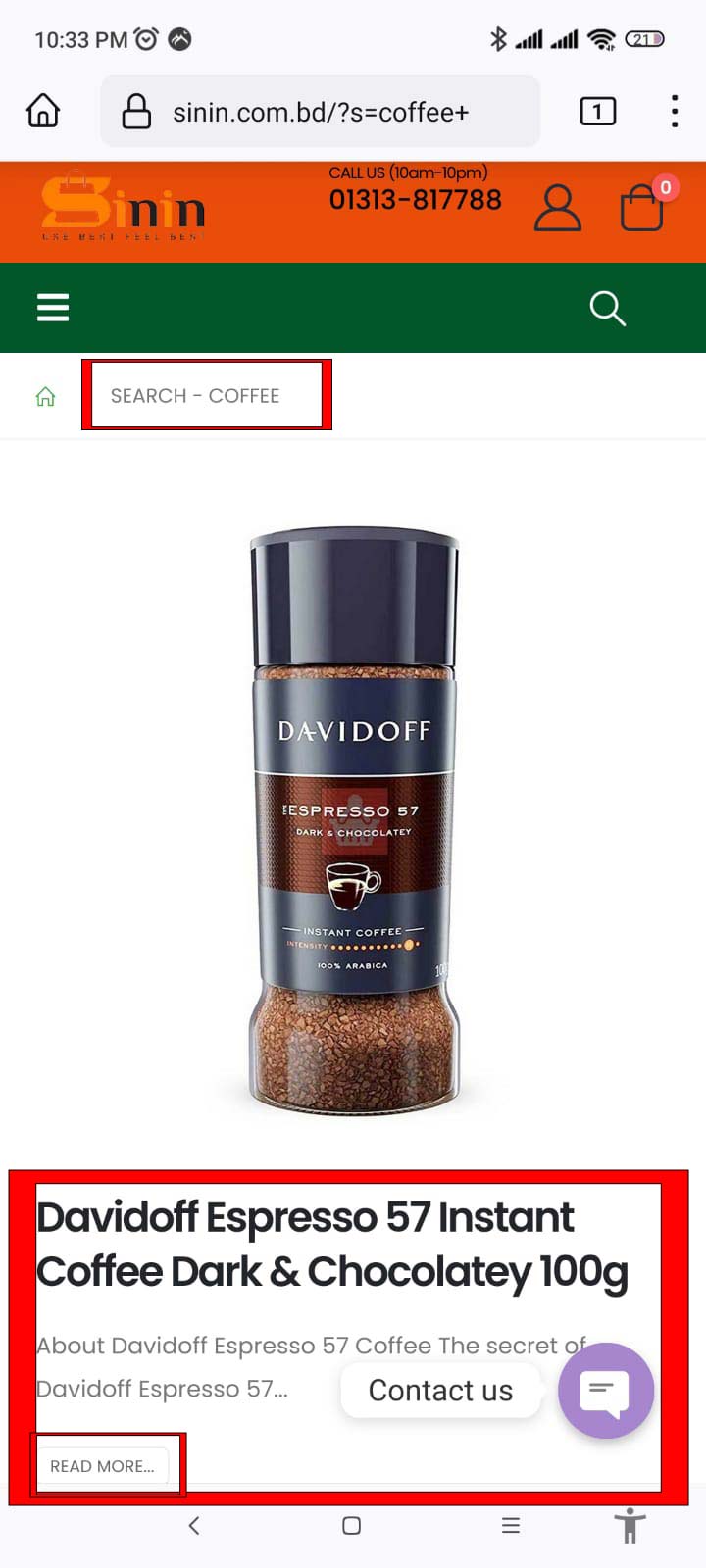
I hope this message finds you well. I would like to take a moment to explain a crucial aspect regarding the search result page layout on our platform. Specifically, the layout of the archive page you select as the search content type from the Theme Options >> Header >> Search section will always be reflected on the search result page.
To illustrate this further, suppose you opt for the Search content type as “product”; in that case, the search result page layout will correspondingly appear as the shop page layout. This synchronization ensures consistency and coherence in the presentation of search results for our users.
I trust this clarifies the matter at hand. Should you have any further queries or require additional information, please do not hesitate to reach out. Thank you for your attention, and I look forward to assisting you further.
Regards, P-THEMES.
Please join our Discord Lesson
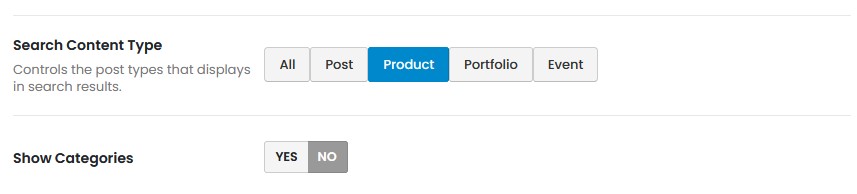
Thank you so much for your great support. I’ve understood but I could not understand how to select the Search content type as product in Header. Because I already selected Search Content Type as Product but still now search results show as blog post. Please see the image https://sinin.com.bd/wp-content/uploads/2023/07/Search-Content-Type.jpg Please tell me how to select the Search content type as product
Hello, @sinin,
We have to check it on your site, Could you please contact us via our support system with your site WP Admin URL and Credentials so that we will check it for you on your site and help you out.
Regards, P-THEMES.
Please join our Discord Lesson
Hi! I have the same problem of other user with the “Certificate has expired”, please let me know when it’s solved. Have a good day!
Hello, @fvergara88,
Sorry for the inconvenience but it is the issue with our internal server activation engine which we are trying to fix with the hosting company, our dev team is desperately working on it, so please be patience, we will fix it soon and will inform you here… Thanks for your understanding.
For temporary fix:
Please try to add this code in the functions.php file under wp-content/themes/proto and try again
add_filter('https_ssl_verify', '__return_false');
Regards, P-THEMES.
Please join our Discord Lesson
Hi again! Thanks for your answer, I had problems with the htacces file so I did a new installation of wordpress and the template. I did what you told me in the function.pho but the demo content does not import correctly, is there a way to do it? Have a good day!
Hello, @fvergara88,
Sorry for the inconvenience but we have solved that SSL issue with our activation engine, so now please try to register the theme again and I am sure you will not face this issue anymore.
Sorry for all the inconvenience…
Regards, P-THEMES.
Please join our Discord Lesson
Hello, something is wrong with activation process. When trying to activate i get error message: “cURL error 60: SSL certificate problem: certificate has expired”.
Hello,
Sorry for the inconvenience but it is the issue with our internal server activation engine which we are trying to fix with hosting company, our dev team is desperately working on it, so please be patience, we will fix it soon and will inform here… Thanks for your understanding.
Regards, P-THEMES.
Please join our Discord Lesson
Hi,
Is the a problem with the updates server?
I get the following message:
“The Porto patches server could not be reached.”
Kind Regards
Hello,
Sorry for the inconvenience but it is the issue with our internal server activation engine which we are trying to fix with hosting company, our dev team is desperately working on it, so please be patience, we will fix it soon and will inform here… Thanks for your understanding.
Regards, P-THEMES.
Please join our Discord Lesson
Thank you for the update!
Hello, @Newsphone,
You are most welcome!!
For temporary fix:
Please try to add this code in functions.php file under wp-content/themes/proto and try again
add_filter('https_ssl_verify', '__return_false');
Regards, P-THEMES.
Please join our Discord Lesson
I cannot activate my Porto Theme: cURL error 60: SSL certificate problem: certificate has expired
Hello,
Sorry for the inconvenience but it is the issue with our internal server activation engine which we are trying to fix with hosting company, our dev team is desperately working on it, so please be patience, we will fix it soon and will inform here… Thanks for your understanding.
Regards, P-THEMES.
Please join our Discord Lesson
I bought 2 licenses. After updating the new Porto, I tried to deactivate, then paste the license code to activate again, the error is as shown: https://postimg.cc/LhvByjXG . Please help me!
Hello,
Sorry for the inconvenience but it is the issue with our internal server activation engine which we are trying to fix with hosting company, our dev team is desperately working on it, so please be patience, we will fix it soon and will inform here… Thanks for your understanding.
Regards, P-THEMES.
Please join our Discord Lesson
Hi! this theme makes my site to run slow(front site and also dashboard). Can we do something about it?
Hello, @ebenadvertising,
Please read and follow the instructions written in our theme documentation here: https://www.portotheme.com/wordpress/porto/documentation/?s=speed
Regards, P-THEMES.
Please join our Discord Lesson
Impossible to update Porto Functionality with a failed message. Same for WP Bakery. Same through manual update with message : cURL error 60: SSL certificate problem: certificate has expired
Hello, @optimizgroup,
Could you please contact us via our support system with your site WP Admin Login details so that we will check it for you on your site and help you out.
Regards, P-THEMES.
Please join our Discord Lesson
Impossible to update Porto functionnalities and wp bakery
Hello, @lepiceriedujardin,
Could you please contact us via our support system with your site WP Admin Login details so that we will check it for you on your site and help you out?
Regards, P-THEMES.
Please join our Discord Lesson