6357 comments found.

Theme is supposed to be at 8.20 according to the changelog https://help.us-themes.com/impreza/changelog/ However, when I download from Envato, it’s version 8.19 still.
Hello,
We just updated the version on Themeforest, you should be able to download the latest one within half an hour.
Hi, once the landing page is finished, is it possible to backup and upload it if I install the same plugin on another website? Thank you Raffaele
Hello,
This is a complicated question, please create a ticket with a detailed description on the Support Portal. Our support team will help you with the answer. Thanks in advance!
Hi, how can I put a counter like this in the page?
https://www.formazioneprofessionaleturismo.it/wp-content/uploads/2023/12/counter.jpgThank you Raffaele
Hello,
Unfortunately, there’s no built-in solution for it. Consider searching for 3rd-party plugins providing such functionality.
If it’s essential for you, you can create a feature request on the Support Portal, we’ll consider implementing this feature in one of the next updates.
Hi. I want to wrap the sidebar in an aside tag, but I cant seem to find a way to do it. I tried wrapping it with custom HTML and raw HTML elements, but it just combined the two into an empty aside tag. Is there any way for me to do this?
I was able to do it by going into classic mode, text window and wrapped the shortcodes in an aside tag. Is there a way within the builder to do it?
Unfortunately, that solution broke.
Hello,
I tried adding the Custom HTML element, with the example code: <aside class=”my-sidebar”> Some content goes here </aside> and it worked this way. Is that the behavior you need?
Hey. Thanks for getting back to me. No thats not what I need actually. I want to wrap a sidebar with aside tags. That sidebar is a reusaable block. So in the builder, I have a reusable block in one of the columns and I want to wrap either the column or the reusable block in an aside tag.s
Hello,
This is a complicated question, please create a ticket with deatiled description of the desired behavior on the Support Portal and provide your WP admin credentials via private reply so our support team could investigate. Thanks in advance!
hello, the First your theme is great, I love it! second a little question… I have a popup gallery in grid/lisitng container When I scroll through a popup gallery on mobile, is it possible to scroll through the images with my finger instead of using the arrows? becaus there is not settings for “open lightbox” option. Thanks!
Hello,
Thanks for your feedback! This is a complicated question, please create a ticket on the Support Portal and provide your WP admin credentials via private reply so our support team could investigate. Thanks in advance!
Hello, sir,
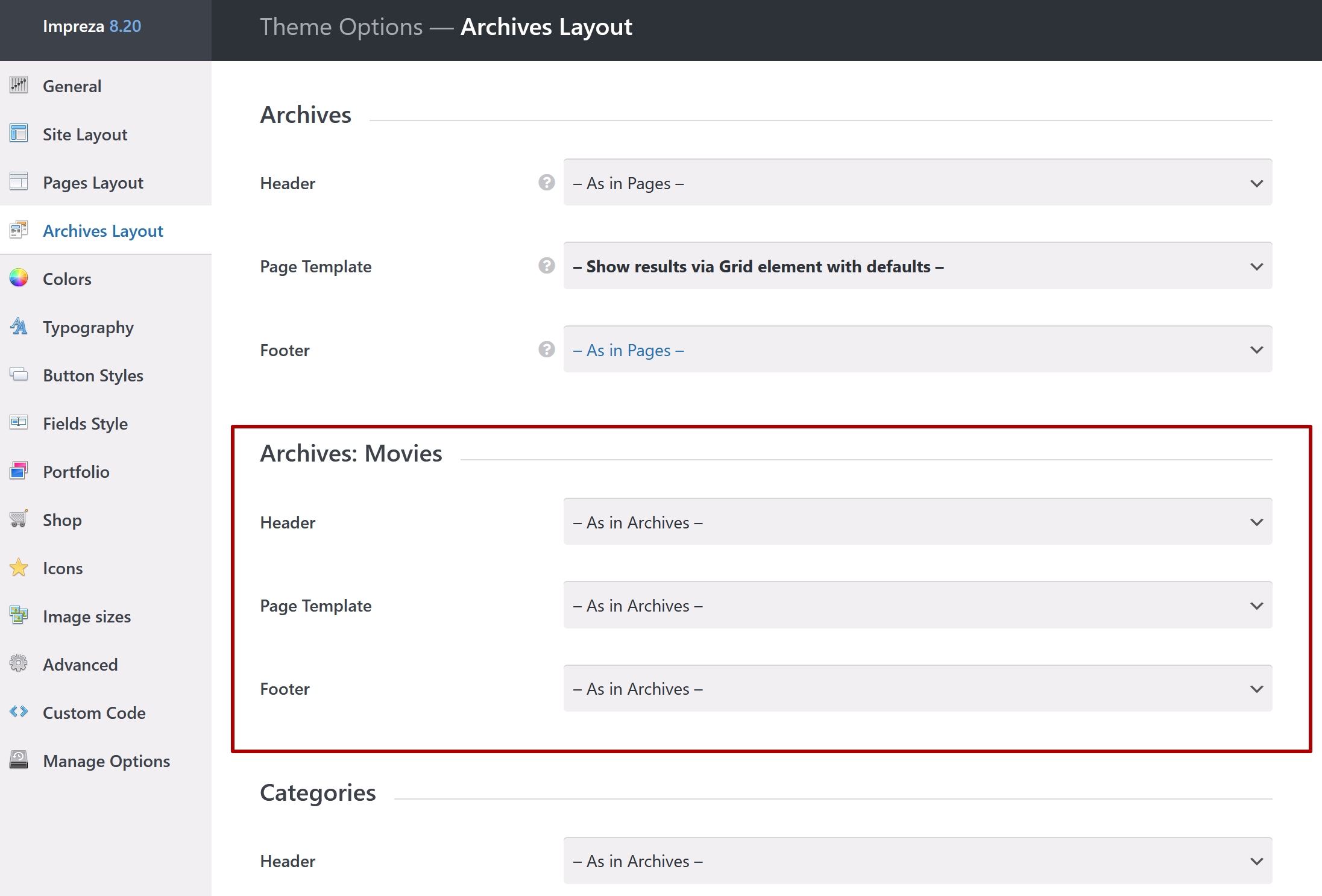
It seems that is a problem with interface of Impreza 8.20 > Archive: Movies
https://help.us-themes.com/uploads/attachment/5134-5KFJRe.jpgMissing: https://prnt.sc/wCTY762s-knE
Hello,
Please check the custom post type settings. Its parameter “has archive” should be set to “true”. If it’s not – setting it this way should resolve the issue.
If you need further assistance, please create a ticket on the Support Portal and our team will gladly assist and guide you.
I think I don’t get it. https://prnt.sc/AuuZfwXjk1vr
“custom post type settings” where? ( Archives Layout has a global settings, right? )
Thank you!
The “Movies” seems to be the custom post type. You can create custom post types via the “Custom Post Type UI” (CPT UI) or “Advanced Custom Fields” (ACF) plugins. If you use CPT UI, the setting that adds an archive is at “Add Archive” > “True”. If you use ACF, the archive setting is at Post Type > Add Post Type > Advanced Configuration > URLs.
Dear Sirs, how can I put buttons with anchor link in the same page? I need to create a button that from the top of the pages go to a section of the landing Thank you Raffaele
Hello,
Edit the section (Row) that you wish to scroll to and in its Design settings specify the ID, for example, “scrollhere”. After this, if you add a link ”#scrollhere” to the button, it will scroll the page to the beginning of the section.
If you need further assistance, please create a ticket on the Support Portal and our team will gladly assist and guide you.
I tried but it breaks the landing.
This case needs more data to investigate its reason, please create a ticket on the Support Portal and provide your WP admin credentials via private reply so our support team could investigate. Thanks in advance!
It works, I did the page again, but sometimes the page breaks and duplicate the html code in the footer, and the page must be done again.
Hello,
To investigate the issue, we’ll need to be able to check your site. Once the issue occurs, create a ticket on the Support Portal.
Hi! Recently acquired site using Impreza 7.4.1 if I update it, will everything function normally? As I understand 7.4.1 is a pretty old version of the theme.
Thank you!
Hello,
It should be working fine after the update, but we always recommend creating a backup before the update, in case of unexpected issues.
Read the relevant article on update for details.
Hi. Something is going on with the theme: can’t switch in settings – https://ibb.co/XY5S9MF , templates separately – https://ibb.co/cFxrG9Z , in the text block properties are turned on by themselves and can’t be turned off, they reappear – https://ibb.co/xzBq3SQ , icons are not shown – https://ibb.co/YL5L1qh How can I fix it? Thanks.
Hello,
This case needs more data to investigate its reason, please create a ticket on the Support Portal and provide your WP admin credentials via private reply so our support team could investigate. Thanks in advance!
I can’t create a ticket on the portal. It says: You can’t create tickets because your support for Impreza has expired (check your Licenses page). If you have any urgent issues please contact us via ThemeForest contact form.
Please use the contact form to share your site login and password, so we could take a look at the issue.
i’m going to buy this Theme , so i need more information. is it possible to check this and answer me to continue the buy process. 1. i need a Right to left website , is it supported? 2. the specific font is requred , can i change the contetnt font ? 3. the appointment for visit is must important , is it support or have any section to register the patent and ask to visit a doctor ? so he/she must search the calneder (persian hijri) and check if the doctor is available and the time is free and ask the appointment and recive the recipt by email or SMS.
Hello,
Yes, Impreza supports RTL languages and custom fonts. As for the appointment calendar – such a feature is not provided out of the box, you’ll need to search third-party WordPress plugins providing such functionality.
The good part – you can Test Drive Impreza for free and check how it works before you invest anything.
I am creating the website for a customer on my server, once I activate Impreza in the momentary url, can I use it on the final url of my customer? I have to develop the landing page on my server and after copy it on the server of my customer.
Thank you Raffaele
Hello,
Each license you have allows activating one site for development purposes and one site as “production”. Check the relevant article.
So you can use both dev and production activations accordingly, or re-assign a production site after you finish the development stage.
it states big autumn discount 33% on this site but there is no discount available when trying to purchase?
Hello,
The sale is over by now. You can sign up here https://us-themes.com/theme-sales/ to get a notification once the next one starts.
https://help.us-themes.com/sign_terms/ support page and theme activation down. get a blank page when attempting to activate newly purchased theme. Please help
Hello,
Thank you for pointing out the issue. It should be working correctly now, please give it another try.
If I want to modify the file within “plugin/us_core/templates/us_grid/listing.php”, do you have any filter to be able to do that via a custom plugin? Something in the way that woocommerce has with their filter “woocommerce_locate_template”. Thanks!
Hello,
We do not recommend modifying the theme or UpSolution Core plugin files, because it is not update-safe. With that in mind, you can create a copy of this file in the Impreza-child theme, with such path: Impreza-child/templates/us_grid/listing.php and make your changes there, theme will use it instead of us_core/templates/us_grid/listing.php file. Please note that on each update you will have to make sure that your changed file matches the original files (i.e. transferring all the changes we applied during the update). If you need further assistance, please create a ticket on the Support Portal, and our team will gladly assist and guide you.
Thank you once again for your fast response, you guys are amazing. Please keep it up like that.
This is still related with this comment: https://themeforest.net/comments/30142106
We used the hook “us_grid_listing_query_args” and we could almost make it work, I say “almost” because then we tried to apply a very specific query and it did not worked the way we wanted so we needed to do a custom query and the only way to achieve that, is to adapt that file unfortunately.
By the way, do you have any suggestion on how we can compare an array with user roles to a serialized array in the database also with user roles? Because that’s basically our only problem to make this work!
This is a complicated question. Please create a ticket on the Support Portal and provide your WP admin credentials via private reply so our support team could investigate. Thanks in advance!
Please FIX ASAP your envato activation api is broken I cant activate my theme through the envato sign in when i approve its just goes to a blank page and it cant complete the activation. Please FIX
Hello,
This case needs more data to investigate its reason, please create a ticket on the Support Portal and provide your WP admin credentials via private reply so our support team could investigate. Thanks in advance!
I’ve missed that 39$ offer, is there any upcoming offers?
Hello,
You can sign up here to get a notification once the next sale starts.
Are there any upcoming offers in the next few days? I need to buy a theme, and if there are no discounts available, I might have to consider another theme.
Hello,
Unfortunately, no. This is technically impossible, as Envato prevents starting discount sales for the items for 30 days from the previous sale.
ah ok will see
any update?
Hello,
Please subscribe here to get a notification once the next sale starts.
Hello I just purchase the theme when I try to import the demo from the theme build in auto importer I get this message An error has occurred. Please reload the page and try again. an well it fails I can import any of the themes
Hello,
This case needs more data to investigate its reason, please create a ticket on the Support Portal and provide your WP admin credentials via private reply so our support team could investigate. Thanks in advance!
Just wanted to let you know the the link to the Multi-Purpose demo is currently broken with a database connection error. https://impreza.us-themes.com/
Hello,
Thank you for pointing out the issue. It should be working correctly now, please check.
Good day, I have a question: when I show a list of data from posts or portfolio using the grid element, how can I prevent access to the post by it’s url (for example mywebsite.com/post-title/)? I want to use the posts and grid just to show data, without the post pages.
Hello,
You can create a custom Grid Layout (or export and modify the existing template) at Templates > Grid Layouts. You can exclude/disable all links leading to the Post and use this Grid Layout in the relevant Grid/Listing element (in its Appearance settings).
If you need further assistance, please create a ticket on the Support Portal, and our team will gladly assist and guide you.
In a grid with products how can I create a button to open product page in popup? If I select in the grid options the link to open post page in popup – it works, but the whole grid element becomes a link. And in the grid I have a button “add to cart” and it stops working, when the whole grid becomes a link. As I think there are two options: 1. Make the button “add to cart” somehow to work (maybe changing z-index in the css). 2. In the grid create a button with a link to open product page in popup (and in the grid options have the link turned off). But I there isn’t such an option in the settings. Maybe It can be a javascript action.
Hello,
This feature is not available out of the box. We already have a similar feature request, vote for it. We’ll consider implementing this feature in one of the next updates.