59107 comments found.

Hello. What would be your best theme to use so I can have a marketplace with these 3 functionalities; 1. my Content Egg products with my affiliate links 2. multi vendor marketplace using WC Lovers-selling products 3. shopping feed uploaded by users, without option to sell products, more like shopping comparison engine Would you suggest Woocommerce to handle all these 3 different type of products? Isn’t it better if shopping feed items are not part of woocommerce, but a separate post type?
I don’t think that you should use multivendor site and affiliate site in the same time. yes, you can do this technically, but there are two absolutely different strategies and mixing them will fail both
I had purchased theme, but while activating license on WordPress. it shows Envato purchase code is invalid, please contact support!
Please check
Please use own username when registering
Hello dear sizam team i want disable shopping features ( buy buttons etc, shopping cart etc. ) i want use only directory. How can i do ? Thanks Regards
Set products as external and don’t add prices. Or use posts
How to remove website name on search results.
You can install any seo plugin, for example, Rank Math and add description which you like for site. Or change site name in Settings – general
Hello sir i have problem i am designing rehub rewise theme for price comparison but on the front page where the categories are located in rewise when i add sub categories in the categories it also shown on the front page my problem is i have lot of sub categories and when i add them into the parent categories on the front page of rewise hight width of categories are look awkward i just need that there is only shown parent categorie , picture of categorie i dont want sub categories on front on front
this is my website check it out https://www.gizmowaves.com/ on home page categories and look at phone categories i just add random subcategories in phone section how do i hide these subcategories
You can select other type of design for this block. It’s also possible to disable child categories for rendering in option of block
I get an error when clicking on add review I also do not see RH frontend as a plugin that I can selected to install [wpfepp_submission_form form=”1″]
It’s in Rehub – plugins section in your admin panel
Customizing ▸ Theme Options Header and Menu / Top line content – Add custom content to top line.
I’ve added text to the top line content area but it is aligned to the right, I’ve tried adding centre alignment html code but is hasn’t changed it. How do I align the text to the CENTRE in this top line content area?
send me link on page
it is techtrifle dot com (site is normally in coming soon mode while in development but I have opened it for you to please check)
issue only showing on desktop mode
.top-socia{margin-right:auto}
theme options – general – custom css
Good morning.
How do I adjust the font size of the filter panel?
Thanks
?
please enable your support if you need customization or setup help
Hi Sizam,
Quick question. For our main menu we would love to keep the ‘hand-cursor’ without using a # link. Is there somehow css for the menu items which keeps the ‘hovering hand’ while removing an actual link? I actually don’t want to use the ’#’ to keep the hover effect on the menu? I acn’t figure out what would be a good solution.
Hope to hear from you,
Best,
Jan Willem
check available https://developer.mozilla.org/en-US/docs/Web/CSS/cursor
- is best solution, without this, your link will be invalid
hello I’ve a licence but when i try to enter my licence in my new site I get such a message;
License is already active on maximum allowed product instances, please deactivate this license from active instance(s) and try again!
Can you please cancel all the active instances. thanks
I tried your form but with no response for 2 days
The form: https://wpsoul.com/extended-license-request/My domain was https://shihapp.com
You said:
“we don’t provide any forms or deactivations, you can deactivate license by yourself on the same page where you register it”
But what about this massage (note : I lost access to my old sit)
License is already active on maximum allowed product instances, please deactivate this license from active instance(s) and try again!
One license can be active only on one site. If you want to deactivate license, you need to install theme on NEW site. Then, use your license key as usual. You will see a message about the License limit and form below where you can deactivate the license. License deactivation can be made only from a NEW site to prevent bad scenarios when you lost access to the old site
You can use extension packs to add more sites. After purchase, please, use this Request form and provide list of purchased licenses which you want to extend. Please, note that all your purchased licenses must be activated on sites before sending request for bonus pack
Please provide me screenshot from page where you see
“License is already active on maximum allowed product instances, please deactivate this license from active instance(s) and try again”
I’ve the same problem with scroll down automatically until the middle of the product page.
Any ideas?
hi, i don’t see scroll on your site.
Anyway, you have Rocket cache plugin as all other users with the same issue. So, try to deactivate it and check. Then write to support of plugin, looks like they added some kind of click on first woocommerce tab
hi, i´ve Perfmatters and LiteSpeed Cache plugins.
I’ve tried to deactivate them but it still happens.
I think it’s a problem with the new version of Rehub because before updating it did not happen.
but we didn’t add any changes in last updates, we will investigate, it looks like Woocommerce bug which activate first tab automatically
Hello,
Bug report.
Deal Grid block – when selecting posts manually, includes sticky posts on the rendering (post view, not in the editor).
Note: To allow sticky posts, we use `’rh_module_args_query’` hook with `ignore_sticky_posts` to 0.
Example: - Editor: https://i.imgur.com/gVz3mAa.png - Post: https://i.imgur.com/5bh698k.png
Thanks!
it includes*
Also, it seems you need to open the image in a new tab; otherwise, you get a 403. Let me know if you have issues with the images!
That’s odd. Are you manually selecting post names?
You can see that post here https://zuzu.deals/230956/aliexpress-sale-shoppong-list/ ; it consists of several Grid Deals blocks. You can check the HTML.
The first Deal block contains only the sticky post (it’s selected in the editor).
The other Deal blocks don’t contain that sticky post (it’s NOT selected in the editor); I am unsure why it’s included on the post view. When you select specific posts in the editor, it should show only the selected posts.
Also, on a side note, “ignore_sticky_posts” should be irrelevant when selecting specific IDs.
You can see in the editor: https://i.imgur.com/CAY2jiF.png https://i.imgur.com/8FieGoH.png This is what we are using to allow sticky posts:
add_action('rh_module_args_query', 'filter_rh_module_args_query');

function filter_rh_module_args_query($args) {
    if(!is_archive()){
        $args['ignore_sticky_posts'] = 0;
    }

    return $args;
}
Looking at your code, that means we overwrite “ignore_sticky_posts,” and that’s why the sticky post appears in the first Deal block. So far so good, the post is actually selected.
However, it doesn’t explain why that sticky post appears in the other Deal block when it’s NOT selected.
Do we miss something?
If the image doesn’t work,here a video of the editor: https://zuzu.deals/bug.mp4
function filter_rh_module_args_query($args) {
    if(!is_archive()){
        $args['ignore_sticky_posts'] = 0;
    }

    return $args;
}
this code means that you enabled sticky posts everywhere except archives. So, it’s working as expected
Are you saying that, in the Deal Grid blocks, the posts that you MANUALLY SELECT will include any sticky posts, even though it’s NOT selected? I don’t understand; honestly, this doesn’t make sense.
I mean, it does make sense if you generate a list (like the latest deals, which implies you include anything), but if you use “Manual Select and Order”, I expect to see ONLY those post IDs I selected. Am I wrong? That’s the whole point of this option.
It’s confusing:- The option title “Manual Select and Order” doesn’t match the expected final result.
- Editor view and view post doesn’t match.
How can we fix this?
Right now, it’s complicated to differentiate valid usage (generated list on the homepage, or in a post), but I don’t see how you can filter the blocks with selected posts and when sticky posts don’t make sense to be included here.
If anything, could you please add an option to not include sticky posts please? That would be helpful.
Thanks for your time.
No, sticky posts are disabled by default in custom queries. But you added code which will enable it back for all queries. Remove your code and try
Hello also our shop starts to scroll down automatically until the middle of the product page… (until div class=”mt24” ) That only happens when you are logged in.
www.blackroundtwelve.com
hi, i don’t see scroll on your site.
Anyway, you have Rocket cache plugin as all other users with the same issue. So, try to deactivate it and check. Then write to support of plugin, looks like they added some kind of click on first woocommerce tab
scroll happens only, when a product is in cart and/or a user is logged in. we turned off wp rocket, same issue.
But I didn’t add product to cart and I am not logged. But I see some other users have the same. Investigating this now
any update on that? we still face the same issue
it was fixed month ago
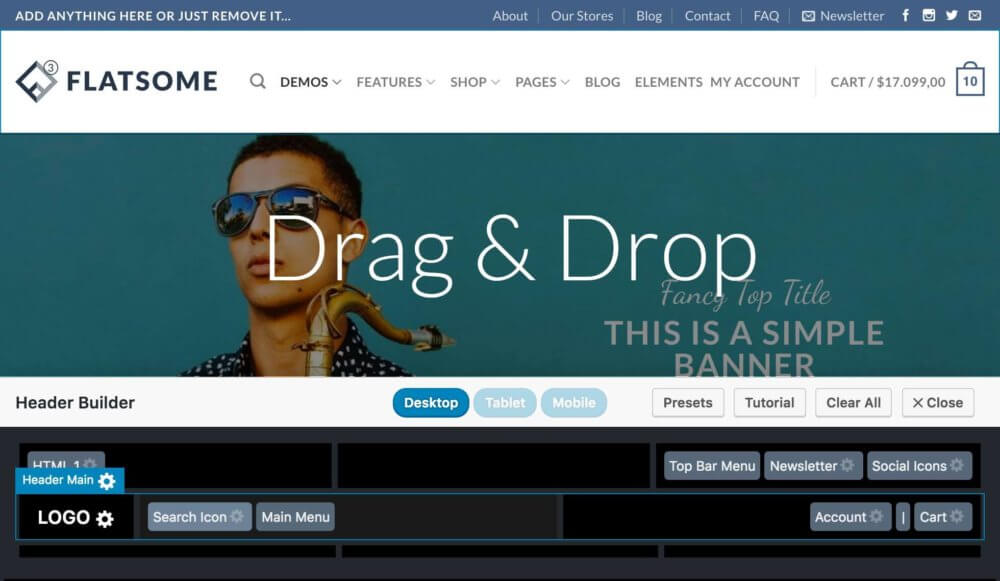
Is there any posibility regardings updates to implement a builder for header/footer like Blocsky, Flatsome or other themes have? Will be also a great future that will allow users tu build their website as they want.
this was added years ago https://rehubdocs.wpsoul.com/docs/rehub-theme/basic-settings/how-to-add-custom-header-or-footer/
Hi! I see that. I was thinking for something more easier like this one if is possible – https://flatsome3.uxthemes.com/wp-content/uploads/2016/09/header-builder-1000x581.jpg 
no, we don’t plan to make customizer section, our solution gives much more possibilities because you can use absolutely any block instead of predefined set of sections and I don’t see that it’s something very complex. We can create some ready patterns if this helps
I have weird problem with “Custom badges” the color i choose shown only for signed members other users see other color
please see pics:
logged in – https://ibb.co/pwb6wBn
other – https://ibb.co/M1nT82J
thank you
because you didn’t clean cache on site
i did now. didnt help
disable cache plugins and check
dont work. i also see many sites the badge color changes between logged and non-logged members. it wasnt like this few days ago
we didn’t have any changes in badge system.
Please share screenshot of your settings and link on page
did you checked?
you use third party plugin for removing unused css so it’s removed also “used” css
what do you mean? i notice it happen only in home page, not in search and not in category
please explain what is “removed also “used”?
please help
I already explained. You use third party plugin for css generation and it removes theme’s styles. I see this from code of your page
I dont use nothing new. as i said before i follow more sites and i see they also have same issue this is a theme bug
you can see this site https://zuzu.deals/ and this: https://dealshaibuy.com/and more…..
ok it fixed by itself now,,,,dont know how, thank you anyway
it happen again with diffrent badge. i didnt change anything…. can you help please
sorry, your site is cached so I can’t test it, I already wrote you that you have issue in cache plugin and in unused css option. Disable cache temporaly, then I can check it
please send me link on page
Hi,
I want to build a community like slickdeals where people that will open the site to add products/discounts and so on (I think I want something like a UGC website). For the products I have on the 2 affiliate platform in Romania a Javascript for footer that will automaticaly change the link to an affiliate one.
My questions are:
1. It is possible that submit deal works like for slickdeals without singup/login? I want the users just send promo and myself to aprove them to pe posted. 2. It is possible somehow to track this products prices so they are up to date for products and also in somehow if the offer uploaded by people, added by me to be deactivated if expires? 3. For such type of project do I need Woocommerce to be activated and also to spearate blog posts from the deals?
Thank you!
1. You will need extra plugins for guest postings. Not recommend this as it’s security risk
2. You can track own added products, but not user’s products
3. I think no, posts should be enough
I have question, i want to add a attribute on the disclaimer of a ‘Advanced Query Listing Builder’ but when i use this shortcode (with the right name of the attribute) it doesnt show anything: [wpsm_custom_meta field=”bonus” type=”attribute”]
try pa_bonus instead bonus
Doesnt work, but also when i use other attributes name it doenst work or show on the disclaimer.
send me screenshot how you added shortcode
I just add it to a page, with an “Advanced Query Listing Builder” element and then I go to “Data Settings” and then I add it to “Disclaimer meta key”.
The code I add is as follows “[wpsm_custom_meta field=”pa_bonus” type=”attribute”]” and I add the property to properties and then use the slug pa_bonus
There isnt a way to have contact faster, with skype or something?
please share me screenshot, I want to check how you added shortcode
you can use any free screenshot maker, monosnap, screencast, etc
This is the full shortcode i have added there [wpsm_custom_meta field=”pa-bonus” type=”attribute”]
And, this is the attribute:
ok, it’s wrong. You should use proper parenthesys
you can simply remove them
[wpsm_custom_meta field=bonus type=attribute]
also I wrote you to try pa_bonus and not pa-bonus
Unfortunately it doesn’t work either, I cannot change the slug to pa_bonus then I get the message that bonus already exists. I think he’s ignoring the underscore. But, shouldn’t it just work with a slug like a bonus or something like that? I have converted it now but it doesn’t work either with [wpsm_custom_meta field=bonus type=attribute]
In this docu the shortcode is with the parenthesys: https://rehubdocs.wpsoul.com/docs/rehub-theme/advanced-tips-and-customizations/custom-field-attribute-getter/
Any idea how to fix this?
“then I get the message that bonus already exists” – where did you get this message?
At the property section when i want to add pa_bonus then the message show up. But strange thing is, the only property is bonus, and when i make another one with pa_bonus the message show up
I still don’t understand. Shortcode can’t show such message, please provide me screenshots
No, its while im add a new property with the slug pa_bonus while i have the bonus property allready. See screenshot what im doing then: https://ibb.co/D1bZPsM
I don’t know why you do this. You asked me about shortcode, did you use shortcode which I wrote to you in other places of listing?
Yes i did, the shortcode is now: [wpsm_custom_meta field=pa_bonus type=attribute] but doesnt work at all..
Is there a way u login to check or something?
There isnt any other support option, like skype or a faster ticket support?
I wrote you to use
[wpsm_custom_meta field=bonus type=attribute]
did you use? Did it work in shortcode area field?
Yes we use it now; [wpsm_custom_meta field=bonus type=attribute]
But doesnt work at all.
See this img; https://ibb.co/M5nSZwX
U see i add the shortcode, but no result or disclaimer
And again.. is there no other way to communicate? I have to wait 1 or 2 days for an answer..
link on screenshot which you sent goes to 404 page.
Anyway, I rechecked your question and I want to inform you that disclaimer field doesn’t support shortcodes. But no worry, it will be added in next update soon
Okay when is the update u think bro?
today, it’s available
Okay i dont see an update, how can i update it? So i can use the shortcodes in the disclaimer
Okay did the update, but still not working at the disclaimer meta key: [wpsm_custom_meta field=bonus type=attribute]
did you update Rehub framework plugin also?
Yes offcourse i did, i use version 19.4 now, and i updated the theme with Envato market plugin. Please can u fix it? Im allready 18 days waiting..
ok, first of all, check
[wpsm_custom_meta field=bonus type=attribute]
inside product content to be sure that it’s work
second, use
[rehub_title link=post]
in this disclaimer field to be sure that shortcodes are working in field
let me know results
The first shortcode works for the product page, the second shortcode [rehub_title link=post] does not work for the disclaimer. However, another shortcode does work with the disclaimer, namely; rehub_review_overall_score
Can you share shortcode which is working? Because we have no “ rehub_review_overall_score” shortcode
See this code is working, and even working at the disclaimer section
We are discussing shortcode in Disclaimer area. Your screenshot doesn’t show me this. So, let’s back to question. Do you have ANY shortcode which is working in disclaimer area?
I checked again and I see that developers added it https://monosnap.com/file/uiAMcKDW2yfpEo2cMPw4rNlxkngO0y
Okay but i tried the [wpsm_custom_meta field=bonus type=attribute] shortcode but that doesnt work at all.. So tell me what i have to do. Also, why u dont login so u can check it by yourself?
I need to know answer on question. Is any shortcode working in area or not?
Tell me which shortcode i could try.
I already wrote you shortcodes. What do you have when you insert it?
I tried this one [wpsm_custom_meta field=bonus type=attribute] but no response, no disclaimer showing or something..
this also not working [rehub_title link=post]
maybe we are talking about different things.
Did you paste shortcode inside disclaimer in your Post offers or in Listing builder. It must be added in post offer section of your posts. Disclaimer area inside Listing builder supports only meta keys, you must put meta key there where you store disclaimers. In rehub offers, it’s rehub_offer_disclaimer
If you want to use shortcodes in content area, there is shortcode area field.
omgg.. yes it is in Advanced Query Listing Builder, how can i get a attribute under a product in disclaimer section of Advanced Query Listing Builder
You can’t because Disclaimer section is not available in products. So, you need to use plugins like ACF, then create section in each product as meta panel, place there shortcode for attribute render, then in listing builder you can use key for disclaimer field. More easily will be using shortcode in shortcode area instead disclaimer
I cant place it in shortcode area because i want a list like this; https://ibb.co/mGSyNyS
then you need to build own list layout via Query Loop block or via Query builder block. Or wait our update which will have possibility to use direct shortcodes there
When u think the update will be done?
soon
Great thank you!
I use the Re:Pick theme but the title images in my articles are irregular but large and small. please just help me.thanks
please provide direct link if you need fix for site.
Import Failed Whoops, there was a problem importing your content.