6410 comments found.

Hi how to disable crop imagem on main image posts? its crop head’s people on image.
Hi revistaalternativa,
thanks for reaching us, but sorry unfortunately we didn’t have the option to disable image crop on the post module, We have several module options with different image sizes, and the image size on the module is adjusted to the module design, but you still have the option to show parts of the image that you want on the module by cropping the image at the position according to your need using the plugin below
If you have any further questions or need further help, please create a support ticket using the link below
Click Here To Get JNews Support
Our technical support team will try to help you
if your support license expires, please try to extend or renew your support license.
Thank you
Hi, one more question, the option “Make this post sticky” doesnt work properly on using this theme? How to make it work?
Is there a way to display current date and time of visit, in place of publish date?
Hi 247naijabuzz1,
thanks for reaching us, but sorry unfortunately we didn’t have the option to show the current date and time of the visit in our post module, our post module has an option to show published date or modified date
Thank you
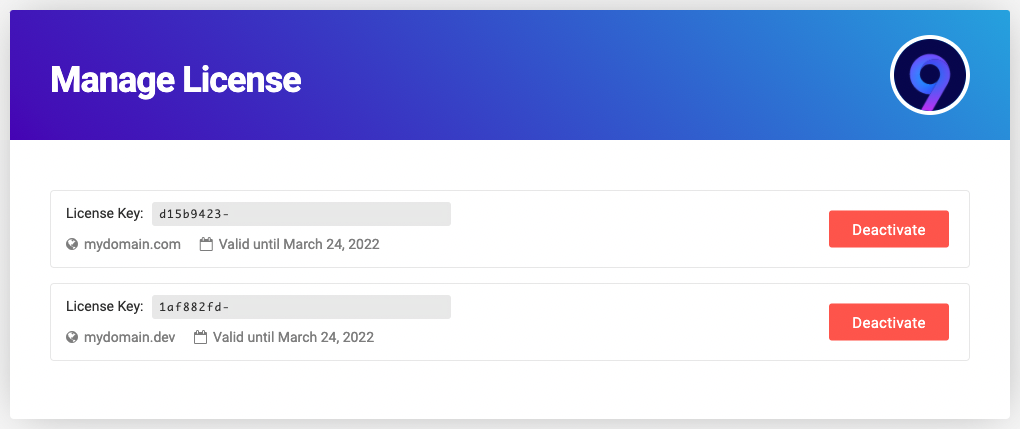
Hi. How do I know how many licenses I use and on which sites?
Hi MassimoUAm,
to check how many license that you have you can check it from our support forum in the link below
you can login to our support forum from the link below
You can still log in to our support forum, even if your support license expires, you just can’t create a support ticket if your support license expires
to check in which site your license used, it will be shown when you activate the theme, please check the screenshot below
Thank you
pliz add Hide Ads when user is logged in to WordPress in the comming versions
Hi mahmoudegypte,
Thank you for taking the time to share your thoughts and suggestions with us. While we truly value all user feedback, it’s important to note that implementing new features involves careful consideration and prioritization. Our development team is dedicated to enhancing the theme’s functionality, and we carefully assess each feature request based on its impact and feasibility. Therefore, we can’t guarantee the immediate implementation of every suggested feature, but rest assured that your input will be added to our feature request list
If you have any further questions or need further help, please create a support ticket using the link below
Click Here To Get JNews Support
Thank you
Does this theme create a directory (folder) “fonts” in public_html directory?
Keep getting warning from Wordfence.
Hi Perce2,
Our theme does not create a fonts folder in the public_html directory, maybe you can check the third-party plugin you are using.
If you have any further questions or need further help, please create a support ticket using the link below
Click Here To Get JNews Support
Thank you
I bought the theme from you 2 years ago. I enter your site with my registration, but it does not tell me the license of the theme. Why is the theme not working on mobile devices? Does not open the main menu, as well as the search engine and dark mode from mobile devices. Very incorrect on your part, and you supposedly update the topic, but nothing! I can’t even open a ticket from your official site because you don’t report my license anymore.
Hi jenskisviat,
to activate the theme please follow the documentation below
JNews Activation documentation
if you still have a problem activating the theme, please contact us through the link below, our support team will try to help you to activate the theme
https://themeforest.net/user/jegtheme#messagewe checked the main menu and the dark mode on mobile devices it is still working on our side, please let us know which mobile system operation and browser you are using, please also attach a screenshot or screen record of the problem
Upon reviewing your account, we have found that your support license has expired. The support license for our theme is separate from the theme license. To continue accessing our support forum and submitting tickets, we kindly ask you to renew your support license.
Thank you
Hello, we are interested in your theme, are you planning to release v12 this year? What new will this bring?
Hi Marianc97,
Thank you for your inquiry about the release date and features of the upcoming version of our WordPress theme. We appreciate your interest and enthusiasm for our product.
At this moment, we are diligently working on the next update to enhance your experience and provide valuable additions to the theme. While we understand the anticipation for new features, we are unable to provide a specific release date or a detailed list of the updates included.
when our update is released you can check our item details page for the features that included in the update
Thank you
Where can I download or buy the plugin separately JegAI Assistant?
HI seok80,
Thank you for your interest in JEG AI Assistant, you can purchase the JEG AI Assistant in our official website in the link below
Thank you
I’ve already registered on the site. I have my profile. But there is no link to download the plugin there. https://prnt.sc/jhnbyTQg0YMZ
Hello, is there a way to change the order in which the subcategories appear, in the left column of the megamenu, now they appear in alphabetical order. Thanks
Hi ornet40,
sorry, unfortunately, currently we didn’t have the option to reorder the subcategory inside the Megamenu, Currently subcategories in the mega menu can only appear in ascending alphabetical order
Thank you
Can’t activate theme, says “Unable to connect”
Hi Perce2
when activating the theme please make sure that account that currently login on Themeforest is the same as the account that you use to buy JNews, please also check that The WordPress Address (URL) in Dashboard > Settings > General is the same as Site Address (URL) please check the screenshot below
Wordpress Addresss URL and Site URL need to be the same
if the problem still persis please submit a ticket in our support forum
Click Here To Get JNews Support
our technical support team will try to activate the theme for you
Thank you
the theme have poroblem with amp and dont support amp thats bad news
Hi mahmoudegypte,
our theme supports AMP in reader mode, below is an example of AMP in our theme
to activate the AMP on JNews please follow the documentation below
if there’s a problem with the AMP feature on your site, please try to deactivate third-party plugins that are not related to JNews for a while to see if there are any plugin conflicts or not
if the problem still persists, please submit a new ticket to our support forum
Click Here To Get JNews Support
if your support license expires, please try to extend or renew your support license.
Thank you
I had recently bought 4 licenses and activated 3 of them. Within just a couple of weeks, all of the 3 websites got completely hacked. This theme is super buggy. Spent one full day to try clean at least one website, reset passwords across admin and databases, but zero luck. Now it has crossed 30 days, so I can’t refund, and am forced to do a clean install and recreate my website with Astra or similar stable and secure theme. Sadly, this was a waste of my money buying 4 licenses. I see people also had complained even 3 years back about the hacking problem.
Hi hmansoori,
Thank you for reaching out to us and expressing your concerns about the security, It’s disheartening to hear about your challenges with website security, However, it’s important to note that website security is a multifaceted issue, and there are several factors beyond the theme itself that could contribute to a site being compromised, such as
Server Security
Ensure that your hosting provider has robust security measures in place. Weak server security can make your site vulnerable to various attacks.
Password Strength
Verify that your passwords, both for your WordPress admin accounts and your hosting account, are strong and unique. Using a combination of uppercase and lowercase letters, numbers, and special characters is recommended.
Plugin and Theme Updates
Regularly update not only our theme but also all plugins and WordPress core to the latest versions. Outdated software can expose your site to security vulnerabilities.
Third-Party Plugins
Evaluate the security of third-party plugins you have installed. Sometimes, vulnerabilities in plugins can be exploited by attackers
It’s crucial to investigate and address these aspects comprehensively. Without concrete evidence linking the theme to the security breach, it’s challenging to determine if the theme itself was the root cause.
We understand the frustration you’ve experienced and appreciate your willingness to provide feedback. If there’s anything specific you’d like assistance with or if you have additional information about the security incidents, please share it with us. We are here to help and are committed to improving our products based on user feedback. you can contact us through our support forum in the link below
Click Here To Get JNews Support
Thank you
I have been in the IT and security industry for several decades. I am also well-versed with WordPress and so there is no need for you’ll to elaborate on generic WordPress topics to me. I have already requested refunds for all four licenses, as I realized I’m still within the refund window. Please expedite the processing of my refund requests. It is not productive for me to spend more time troubleshooting with slow email support that takes three days to reply. All my business plans on all 3 websites are totally impacted and can’t be fixed, especially when the issues require a complete rewrite of the theme using industry-standard OWASP secure coding practices before they can be resolved.
Even after almost half a dozen reminders, this seller blatantly and intentionally chose neither to respond nor to refund. All my sites were hacked and crashed, thanks to the buggy theme. I had purchased 4 licenses and I lost 100% of my money. This was a pure theft of money by this seller, and should be blacklisted for their malpractices. Stay away from them.
Hi hmansoori,
Can you send me an example of the problem and prove that the issue is related to the theme?
Thank you
I don’t want to deal with you, nor have to waste my time to prove you. I just need refund. I wrote that several times, and you bothered not respond to any of that. Not refunding money is 100% stealing. Do you have an intention to refund? Will you refund? If you wont, you would prove you stole $236 from me. I’ll wait for 3 days to see if you are sincere or a thief.
Hi hmansoori,
If the issue is not related to JNews and you also can’t prove that the issue is related to JNews why we should give you a refund?
Thank you
SO THIS CONFIRMS JEGTHEME STOLE MY $236 AND HAVE NO INTENTION TO RETURN. ALL BUYERS, BEWARE FROM THIS FRAUDSTER PERSON OR COMPANY. EVEN THOUGH I’M IN REFUND WINDOW, THIS GUY JUST STOLE MY MONEY AND BLATANTLY CONFIRMS HE IS A THIEF.
WHEN ANYONE BUYS THEME FROM THIS FRAUDSTER, YOU WON’T GET A REFUND. PERIOD. THIS PERSON IS A THIEF.
IF HE HAD ANY MORALS OR SINCERITY, HE WOULD HAVE APOLOGIZED AND REFUNDED. BUT HE DID NOT CHOSE TO DO SO. IN OPEN PUBLIC CONVERSATION VISIBLE TO EVERYONE, HE SIMPLY REFUSED TO REFUND. JUST STOLE MY MONEY. IF ANYONE IS PLANNING TO BUY, BE AWARE, YOUR MONEY WILL ALSO BE STOLEN LIKE MINE.
THIS THIEF AND FRAUDSTER MUST BE EXPOSED ACROSS ALL SOCIAL MEDIA SITES.
I’m thinking about buying a second license for a new website. Because of size and pagespeed I will split different parts of the website in subdomains, so that certain plugins run only on certain subdomains. I understand that I can install the theme with the same license on different subdomains. My question is: Is it possible to import different demo content to the different subdomains? With the attached plugins? Thank you very much for taking your time to answer my question. Kind regards, Patrick
Hi pierazzoli,
Thanks for using JNews, yes you can import different demo and use different plugins on your subdomains
If you have any further questions or need further help, please create a support ticket using the link below
Click Here To Get JNews Support
Thank you
I activated theme, but I cannot import demo data… it says invalid license. What can I do?
I already clicked activate button, but to troubleshoot, where in the hell can I find the area to manually enter API key? Is that what I need to do? Support expired, but I expect it to work, what I paid for. This is a bug on your end
Hi SocialPatterns ,
to activate the license you don’t need to enter the API key, you can follow the documentation below
If an invalid request error occurs, but your license is actually valid, usually this is due to server setting related to Referrer Policy, maybe when your site requested to our server it didn’t send the referer on the request header or it sent a different domain as referer, sometimes there are server setting that sent the hosting domain as referer instead of the actual domain the website use
on your server please ensure that the Referrer Policy set to strict-origin-when-cross-origin
if the problem still persists, you can contact us through the link below
https://themeforest.net/user/jegtheme#messagewe will help you to activate the license
Thank you
I bought the theme from you 2 years ago. I enter your site with my registration, but it does not tell me the license of the theme. Why is the theme not working on mobile devices? Does not open the main menu, as well as the search engine and dark mode from mobile devices. Very incorrect on your part, and you supposedly update the topic, but nothing! I can’t even open a ticket from your official site because you don’t report my license anymore.
Hi atanasovuk85,
to submit the ticket in our support forum, please login to our support forum in the link below, please login using the Themeforest account that you use to buy JNews Theme
we saw the current account that you use to write this comment didn’t have purchased label, There should be a purchased label next to your nickname if there is a JNews license on your account
if you already login to our support forum with the Themeforest account that have jnews license in it, you can create support ticket in the link below
Click Here To Get JNews Support
we checked the main menu and the dark mode in mobile device it is still working in our side, if it not working on your site, you can submit a ticket in our support forum and please attach your site url and please let us know which mobile system operation and browser that you are using in our forum, our technical support team will try to check your site
Thank you
OK, my API key had expired, but I linked it to the site again.
To use the view counter, do I have to use a counting plugin?
Hi rapelista,
for the view counter we have built in plugin, you can install the JNews View Counter plugin from Dashboard > Install Plugin > JNews – View Counter
you can check the documentation about JNews View Counter in the link below
Thank you
Hello, does this theme support Apple and Google pay?
Hi christopherrawlings1991,
our JNews Paywall support Paypal, Stripe, and WooCommerce subscription plugin so any payment supported by WooCommerce is supported by the paywall.
Thank you
Hello there! I just downloaded your theme but when I try to upload it to my Wordpress site the upload is failed and I get this notification: “The theme is missing the style.css stylesheet.”
Hi marijola,
if you got “The theme is missing the style.css stylesheet.”, please make sure you are uploading the correct theme file, after downloading the theme file from ThemeForest you will go zip file, first please unzip this file, after you unzip the file you will get a folder, inside the folder there are jnews-theme.zip file, please upload this file to your WordPress, please check the screenshot below
for the complete documentation on how to install the theme, please check the screenshot below
JNews Installation Documentation
Click Here To Get JNews Support
Our support team would be happy to help you.
Thank you
Hello jeg_nanda, I have a (hopefully) small wish for an update.
Is it possible you make all your plugins compatible with Loco translate?
Loco Translate is a pretty easy to use plugin to translate themes and plugins. I know, your theme has frontend translations, but this covers not every string, even not every frontend string (easy example: the edit post on post images in most modules).
Loco Translate creates a folder in the languages folder and placed all translations there. This is really great because translations placed there will not be overwritten when a plugin or theme is updates.
I tested it for the main theme and it works. But plugins will only show translated strings when translations are placed in the plugins translation folder.
Maybe you can check the free Loco Translate and make your themes compatibel. I am pretty sure its only a matter of very very view code lines.
Best wishes Buddy
Hi BuddyHoli,
Thank you for taking the time to share your thoughts and suggestions with us. While we truly value all user feedback, it’s important to note that implementing new features involves careful consideration and prioritization. Our development team is dedicated to enhancing the theme’s functionality, and we carefully assess each feature request based on its impact and feasibility.
It’s crucial for us to focus on features that provide the most significant value to the majority of our users. Therefore, we can’t guarantee the immediate implementation of every suggested feature, but rest assured that your input will be added to our feature request list
If you have any further questions or need further help, please create a support ticket using the link below
Click Here to Get JNews Support
Thank you
Tech template isn’t working </stong> When I try to install Tech template which is next to default template. it says “Failed! Purchase code is not valid! Please check your license” How to solve this problem?
i tried installing default version and it is working fine. But the tech is not working. please help
Hi dkhosilov,
sorry for the inconvenience, If an invalid request error occurs, but your license is actually valid, usually this is due to server setting related to the Referrer Policy, maybe when your site requested to our server it didn’t send the referer on the request header or it sending different domain as referer, sometimes there are server setting that sent the hosting domain as referer instead of the actual domain the website use
to troubleshoot this issue, please ensure that the Referrer Policy set to strict-origin-when-cross-origin
If you have any further questions or need further help, please create a support ticket using the link below
Click Here To Get JNews Support
our technical support team will try to help you
Thank you