9447 comments found.

Hello am trying to import some bulk listing data into my website and came across the recommended plugin in the comment thread as ” Realhome addon for WP All Import” but when i check under plugins you provided/listed this particular one is not among them. please can you advise what i should do in order to import data.
Hello,
Thanks for reaching out to us.
The WP All Import and RealHomes Addon for WP All Import plugins are not our products, so they are not listed under the RealHomes → Plugins section.
If you like to install them, kindly find them in the WordPress repository.
If you need further assistance or have questions, please create a support ticket using the link below, and our support team will gladly assist you.
Click Here to Sign Up for InspiryThemes Premium Support
We look forward to helping you.
Regards
Some agents/agencies may want to list properties with full or limited details on my website and at the same time redirect visitors to view the same and that particular property on their own website after the visitor clicks on a button in the property detail page. can you please explain how to achieve this?
Hi,
Thank you for reaching out to us.
Agents and agencies should omit any details they prefer not to disclose. This allows for properties to be listed with or without specific information, as desired.
Additionally, agents can include a button or link within the Description area of the property listing. This link can redirect users to their website when clicked.
If you have any further questions, please let me know.
Best regards
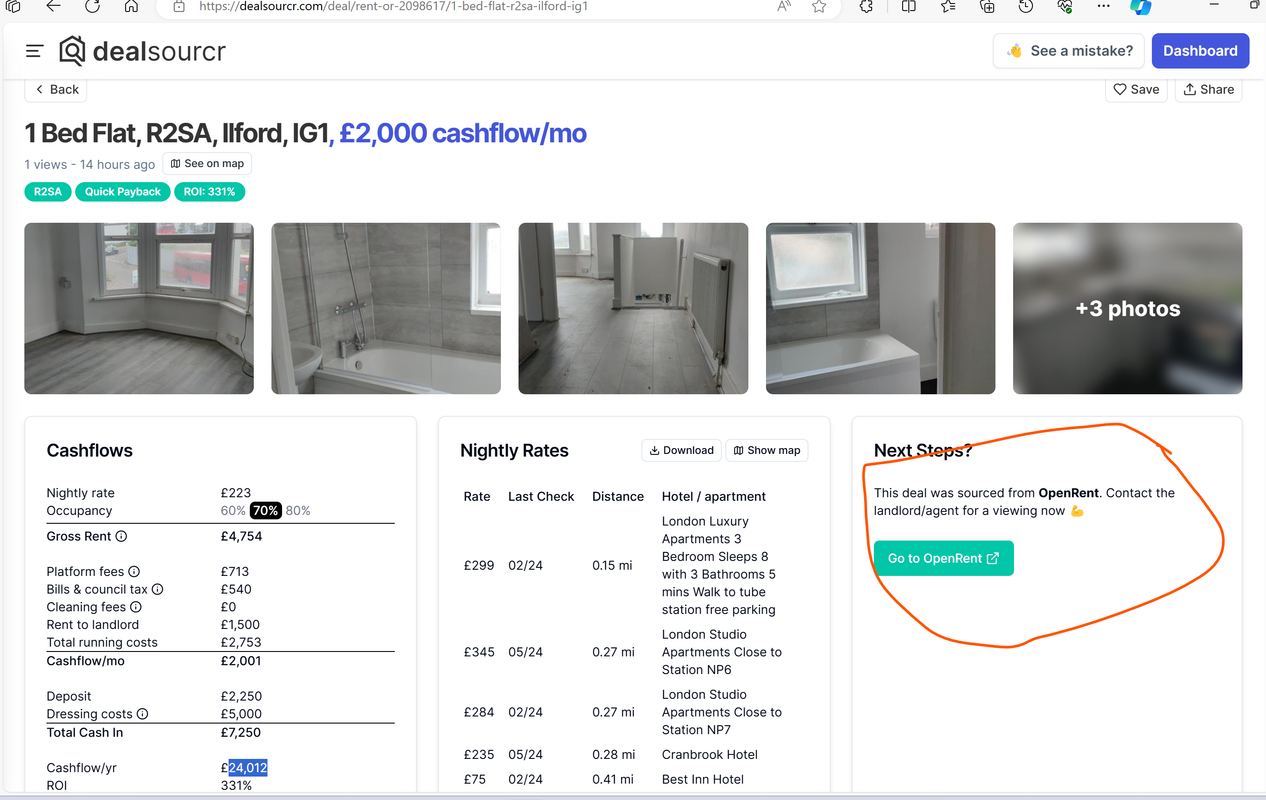
Thanks for the reply but am sorry my request not fully addressed. If a button should be provided to visitors to click to redirect to the specific property, it is not possible for the agents/agencies to provide that on my website, first they dont have admin access to be able to create buttons individually and business wise too it is not feasible. This is strictly a task for the website owner to carry out. so please can you show me how i can set up the button to look like the example in the link below where OpenRent agency listed their properties on Rightmove.co.uk with Rightmove.co.uk providing button redirecting visitors to view the particular property on OpenRent: https://i.postimg.cc/25tCXZgb/propertydeals-Detailedpage-Agent-Agencies-Landlord-Website.png
Hi,
Any user can add a link to the Description section of the property using the following code.
<a href="https://google.com">Go to OpenRent</>
</a>
We can also stylize it like a button using custom CSS. So, it is quite possible to add a button even from the frontend user dashboard.
If you would like to have a proper button field, it would require some code-level changes. For any further assistance or questions, please create a support ticket using the link below, and our support team will be happy to help.
Click Here to Sign Up for InspiryThemes Premium Support
We look forward to helping you.
Regards
Hello, I have owned this theme for a while and have noticed that the theme has not been updated for quite a while. It is currently running version 3.7.1. When purchased I thought you received updates for life? Looks like I need to pay for support to get an answer. Is that correct?
Hi,
Thank you for reaching out and for being a valued customer.
Yes, you are entitled to lifetime updates for the RealHomes theme. You can always download the latest version from your Envato (ThemeForest) account.
Regarding customer support, it requires a valid support period. This is because we provide premium support services, which entail significant costs to maintain a high standard of service.
Please let me know if you have any further questions or need assistance with the theme updates.
Best regards
Hello, I really appreciate you replying to my question. Whilst I understand that I can download the latest version my question is can the existing theme be updated or a new install required which will mean reloading existing listing and content? If I can upgrade I have no problems renewal my support. Looking forward to your reply.
Hi,
The latest downloaded version of RealHomes can be updated into an existing installation. However, we recommend that you always take a full backup before updating any theme or plugins in WordPress.
To update RealHomes on your website, kindly follow the helping guide.
How to Update RealHomes:
https://support.inspirythemes.com/knowledgebase/how-to-update-realhomes-theme-to-the-latest-version/
Please let me know if you have any other questions.
Thanks & Regards
Hi,
Long time user of these theme.
While upgrading from PHP 7.4 to 8.0 / 8.1 the following PHP error are showing up.
I’ve already removed and reinstalled the theme and associated pluigns.
This happens on both the server and my local environment.
Any advice?
—————————
Warning: Array to string conversion in /wp-content/themes/realhomes/functions.php on line 657
Warning: Array to string conversion in /wp-content/themes/realhomes/functions.php on line 666
Warning: Array to string conversion in /wp-content/themes/realhomes/functions.php on line 675
Warning: Undefined array key ”” in /wp-content/themes/realhomes/framework/customizer/google-fonts/google-fonts.php on line 223
Warning: Trying to access array offset on value of type null in /wp-content/themes/realhomes/framework/customizer/google-fonts/google-fonts.php on line 225
Warning: Trying to access array offset on value of type null in /wp-content/themes/realhomes/framework/customizer/google-fonts/google-fonts.php on line 225
Warning: Undefined array key ”” in /wp-content/themes/realhomes/framework/customizer/google-fonts/google-fonts.php on line 223
Warning: Trying to access array offset on value of type null in /wp-content/themes/realhomes/framework/customizer/google-fonts/google-fonts.php on line 225
Warning: Trying to access array offset on value of type null in /wp-content/themes/realhomes/framework/customizer/google-fonts/google-fonts.php on line 225
Warning: Undefined array key ”” in /wp-content/themes/realhomes/framework/customizer/google-fonts/google-fonts.php on line 223
Warning: Trying to access array offset on value of type null in /wp-content/themes/realhomes/framework/customizer/google-fonts/google-fonts.php on line 225
Warning: Trying to access array offset on value of type null in /wp-content/themes/realhomes/framework/customizer/google-fonts/google-fonts.php on line 225
—————————
Hi,
Thanks for reaching out to us.
Please consult the following guide to fix the mentioned problem.
How to Fix Warning about Google Fonts:
https://support.inspirythemes.com/knowledgebase/how-to-fix-google-fonts-error-after-updating-realhomes/
For further assistance or questions, please create a support ticket using the link below, and our support team will gladly assist you.
Click Here to Sign Up for InspiryThemes Premium Support
We look forward to helping you.
Regards
That worked. Thanks!
Good morning, Sorry y was conected whit an other account. I am using the REAL HOME template and we are having problems with some translations. We are using POLYLANG and some words in the template are not displayed by the Plugin. Especially on the front page \”INDEX\” words like \”Habitaciones\” must be Bedrooms… etc… Where we can modify those entries ?
Thank you very much!
Andres
Hi,
Thanks for reaching out.
Please complete the setup according to the provided guide. This will register all the strings into the Polylang Strings Translation section.
Setup Polylang:
https://support.inspirythemes.com/knowledgebase/how-to-setup-multilingual-website-with-polylang/
If you need further assistance or have questions, kindly create a support ticket using the link below, and our support team will gladly assist you.
Click Here to Sign Up for InspiryThemes Premium Support
We look forward to helping you.
Regards
Hello I would like to test the process to upload a home, where can I do it and with which credentials?
Hi,
I appreciate your interest in our product.
To test the property submission process in any RealHomes demo, please log in using the username “demo” and the password “demo”. Once logged in, click on “Submit Property” to proceed.
Please feel free to reach out if you have any further questions or need assistance.
Best regards
Hi, I’m testing this layout https://sample.realhomes.io/modern02/list-layout/. I managed to login but don’t see and option to upload properties
Good morning, I am using the REAL HOME template and we are having problems with some translations. We are using POLYLANG and some words in the template are not displayed by the Plugin. Especially on the front page \”INDEX\” words like \”Habitaciones\” must be Bedrooms… etc… Where we can modify those entries ?
Thank you very much!
Andres
Hello,
PURCHASED tag is not showing with your name.
So, if your client purchased this theme, then ask him for purchase code and use that to communicate with us on our support site.
Click Here to Sign Up for InspiryThemes Premium Support
We look forward to helping you.
Thanks & Regards
Do saved searches email notifications alerts also trigger when properties are uploaded using wp all import or only when adding properties individually?
Hi,
Thank you for reaching out to us.
We haven’t tested it with the WP All Import plugin yet. However, it should notify you of any properties submitted through either the backend or frontend dashboard.
If you have any other questions, please let me know.
Best regards
can you clarify what you mean by front end and back end dashboard?
I feel like this would be a very important thing to test, considering how many users probably use your preferred import provider
may i know whether there is paid customization and premium support services.
Hi,
Please sign up at our support website and ask your question over there and we will assist you properly.
Thanks & Regards
Hi, Did the property card label that said For Sale or To Let on the property card get removed in the last update?
We are using the Modern 05 Theme.
How do we get them back and is it possible to assign different colours to each label?
We need labels for:
For Sale To Let with hex colour background: #1B93DD Sale Agreed with hex colour background : #01DCDC Sold with hext colour background: #00D44F
I look forward to receiving your reply and advice.
Thank you
Hi John,
Thank you for reaching out to us.
The Property Status isn’t removed, it is just moved down in the card above the price. We have also added Property Type to the card, that’s why we had to move it down.
For any further assistance or questions, please create a support ticket using the link below and our support team will be happy to assist you.
Click Here to Sign Up for InspiryThemes Premium Support
We look forward to helping you.
Best regards
After creating a new ad with title X, and if I wanted to change or edit title X to Y, the URL is not changing to Y automatically, what needs to be done for it to work?
https://prnt.sc/SCB0v0jfpe2hEvery time a change is made it is necessary to manually change the slug URLs! This makes the experience bad for the visitor!
Hi,
Thank you for reaching out.
The URL slug must be updated manually due to the way WordPress functions. This is not specific to RealHomes but is a standard process within WordPress.
If you have any further questions or concerns, please let me know.
Best regards
Hello,
The saved search button does not appear more than half the time.. What triggers need to be in place for it to appear?? Is there a certain number of items I need to set in the search box for it to appear? I need to test the email notifications but cant get a damn saved search to save… .
Hi,
Thanks for reaching out to us.
When you get zero results, you should see the save search button so that you can save the current search criteria to get notifications later.
Could you please share the URL of your website so I can take a look?
Best regards
fixupflips.com , I installed the ultra demo and built from it. does this mean the correct pages that needed to be created are already created. ie , dashboard
Also, why does it log me out when I click the dashboard logo and still none of the dropdown options show up of modules that are set to active for the profiles.
Hi,
We haven’t received any similar reports, so we must debug it thoroughly. Please create a ticket at our support platform to it further debugged.
Thanks & Regards
So i have to pay $50 dollars for a basic feature to work???
Hi,
The mentioned issue isn’t occurring on our side, so it is only happening on your specific website. So, that’s why we must look into it thoroughly.
You can also contact us through the contact form located on our profile page here: https://themeforest.net/user/inspirythemes
Thanks & Regards
Pre-Sales Inquiry Hello Sales Team, 1. Fractional Property Sales: Can the site owner list properties to be sold in fractions, allowing customers to specify the percentage they want to purchase? For example, if a customer wants to buy 20% of the property’s value.
2. Disable Property After Full Purchase: Can the property be disabled for further purchase once it is 100% sold?
3. Member Dashboard**: Does the theme provide a dashboard for each member to track the current property price and their ownership percentage?
Please let me know if these features are supported. Thank you in advance for your response. Best regards,
Hi,
Thank you for reaching out to us. We appreciate your interest in RealHomes.
RealHomes does not currently support Fractional Property Sales.
You can easily disable any property by assigning it the “Sold” status.
RealHomes provides a comprehensive frontend user dashboard.
If you have any further questions or concerns, please feel free to ask.
Best regards
Hello, how do i add membership Pricing packages as main menu items so that when non registered user who select a plan will be asked to register first before proceed with the selection of the plan and then complete the process?
Hi,
Thanks for reaching out to us.
The Membership packages can’t be available for non-registered users. A user must sign up to access their pricing. However, we have it in our to-do list to create a template to display the Membership packages in a future update.
For any further assistance or question, please create a support ticket using the link below and our support team will be happy to assist you.
Click Here to Sign Up for InspiryThemes Premium Support
We look forward to helping you.
Best regards
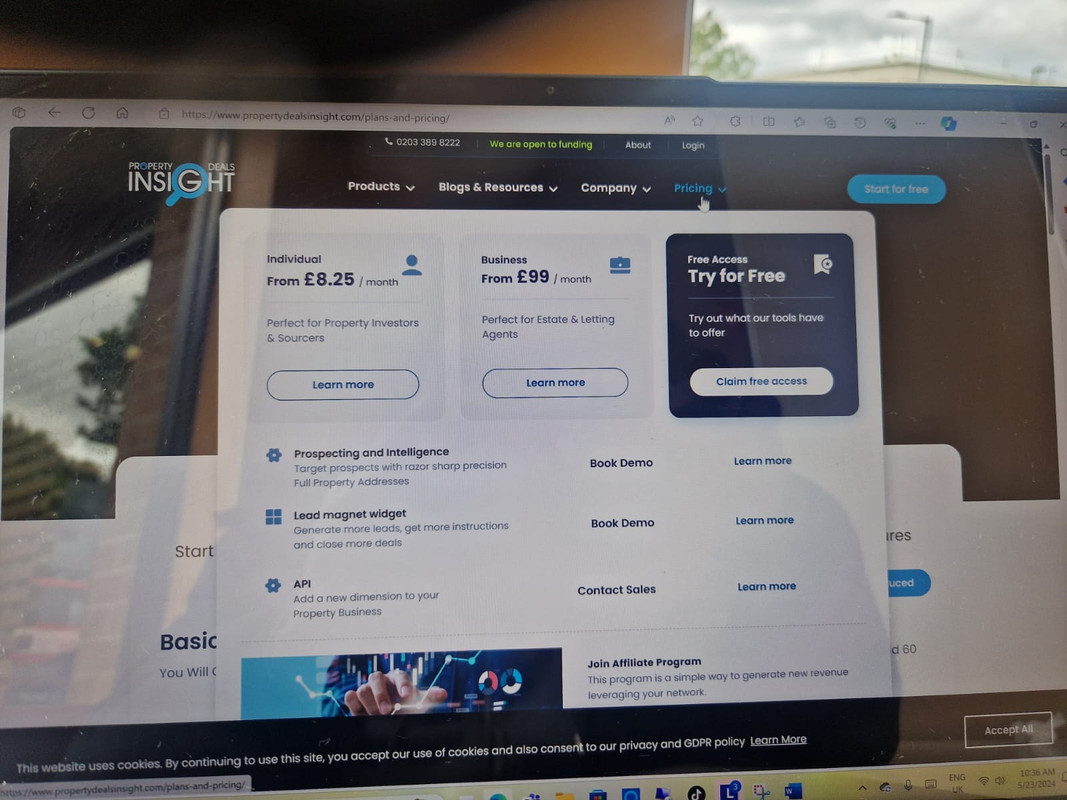
I dont know whether i made myself clear enough in the previous message. But am simply asking what many other ecommerce websites do by displaying their prices on the homepage main menu for visitors to view and review affordability first before even registering and subscribing, some even offer free trial as shown in this link: https://i.postimg.cc/2yCHV1qf/Whats-App-Image-2024-05-23-at-10-37-08.jpg
I would like my homepage to have my logo as the featured image, when I upload my logo file it shrinks the image. How can I have the full logo appear
Hi,
Thanks for reaching out to us.
Please share the URL of your website so I can have a look and assist you with your concerns.
Best regards
Hi,
Please use the following CSS code in the Additional CSS box ( Dashboard → Appearance → Customize → Additional CSS ) to adjust the size of the logo.
.rh-ultra-logo {
    display: contents;
    max-width: 225px;
}
.rh-ultra-logo {
    width: 225px;
}
For any further assistance or questions, please create a support ticket using the link below and our support team will be happy to assist you.
Click Here to Sign Up for InspiryThemes Premium Support
We look forward to helping you.
Thanks & Regards
Hello, I am setting up the Memberships on my page but I have a bit of a problem connecting it to Woocommerce payments. I have installed RealHomes Memberships and activated it and enabled Memberships, (also created one membership) Woocommerce plugin and RealHomes WooCommerce Payments Addon but in the instructions when I install all of this there should be Woo Payments Settings in the Real Estate Menu in the backend but it doesn’t appear and I can’t finish settings to show membership packages in the user Dashboard. Can you please assist? Thank you.
I show a related thread in comments, how did you solved it? Thanks
I just found that it’s conflicting with RealHomes Memberships. If I disable RealHomes Memberships then RealHomes WooCommerce Payments Addon it’s working.
So Memberships and WooCommers Payments are not working together?
Hi,
Please sign up at our support website and ask your question over there and we will assist you properly.
Thanks & Regards
If there is an actual solution to the above bug then I will renew my support and proceed. So please let me know if that’s the case
Hi,
If you have configured RealHomes Membership plugin with RealHomes WooCommerce Payment Add-on plugin, then the only step left is to configure WooCommerce payments via Dashboard → WooCommerce → Settings → Payments as guided here.
Please let me know if you have any further questions or concerns.
Thanks & Regards
The Let Us Call You CTA on the Ultra theme leads to nowhere when it is clicked. What suggestions or examples do you have for this link trigger?
Hello,
Thank you for contacting us.
You can link the “Let Us Call You!” button to the Contact Page or any other relevant section on the home page. This allows customers to provide their contact details and request a call from your business.
If you have any additional questions or concerns, feel free to let us know.
Best regards
Trying to understand how to connect my client’s MLS to this WordPress if I get this theme.
Hello,
Thank you for considering our product.
At present, the RealHomes theme seamlessly integrates with the iHomeFinder Optima Express IDX plugin, enabling you to connect to the MLS service.
If you have any additional questions or concerns, please don’t hesitate to reach out.
Best regards
hello, i am interested in buy this but iwant to try a demo? and i am wondering if am i supposed to buy the regular license or the extended once. if my business module is commission-based transactions (commission-based transactions will be handled manually not throughout the website)we’ll charge a commission upon successful property transactions, collected via local IBAN transfer from sellers/renters but the visitors( Seekers) won’t incur any fees.
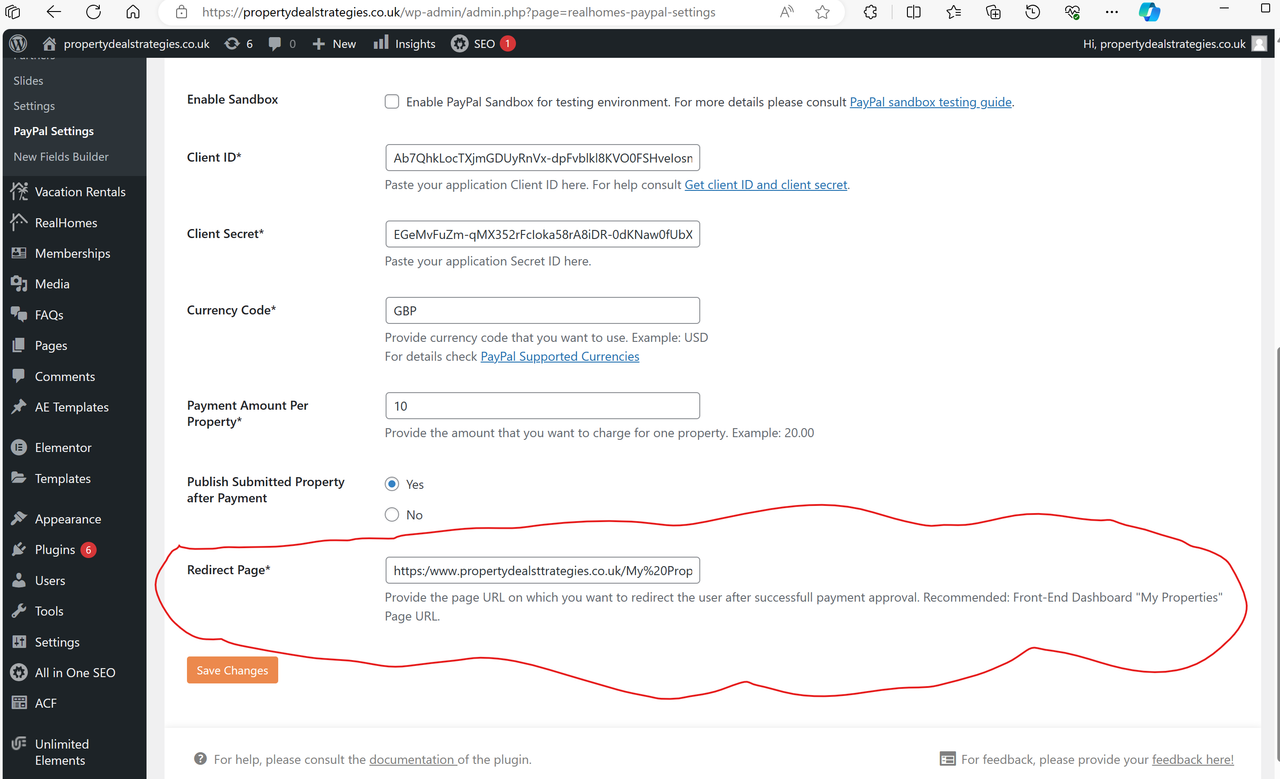
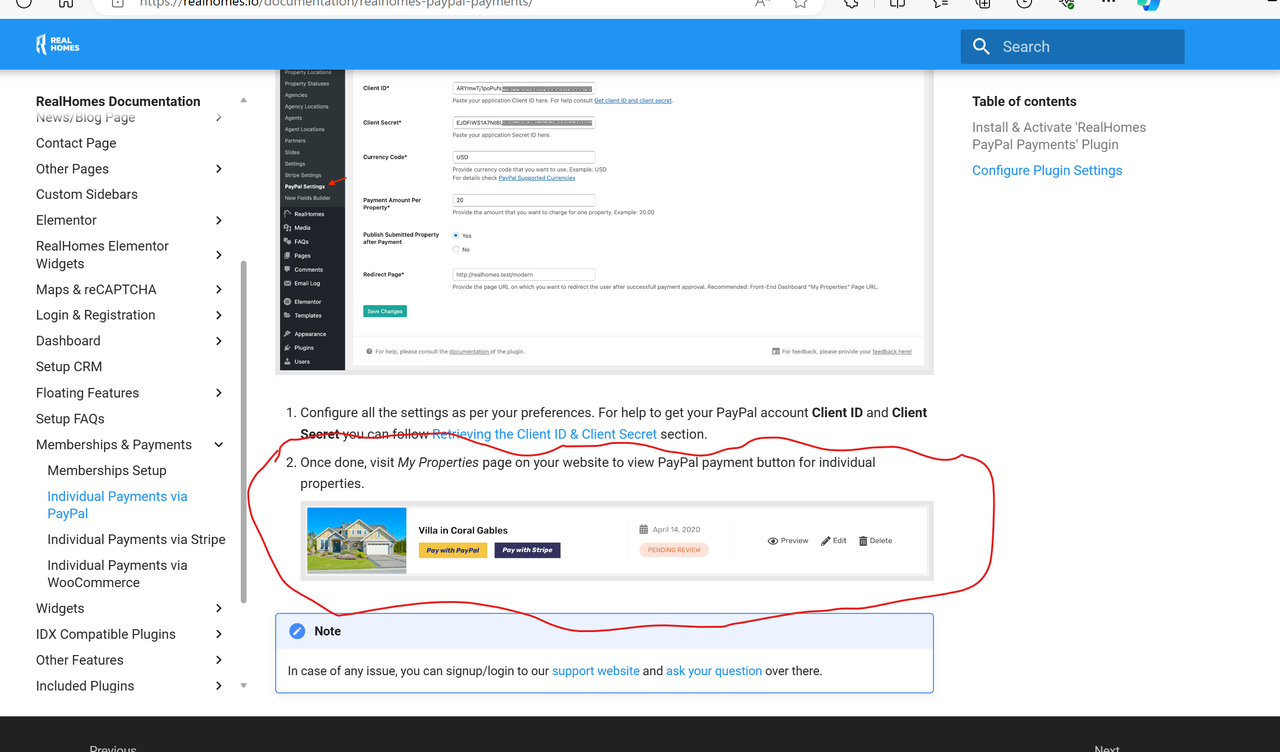
1. i have setup paypal payment option according to the instructions in the documents as in the link below: https://i.postimg.cc/T2BddNfz/Paypal-Redirect-Page.png
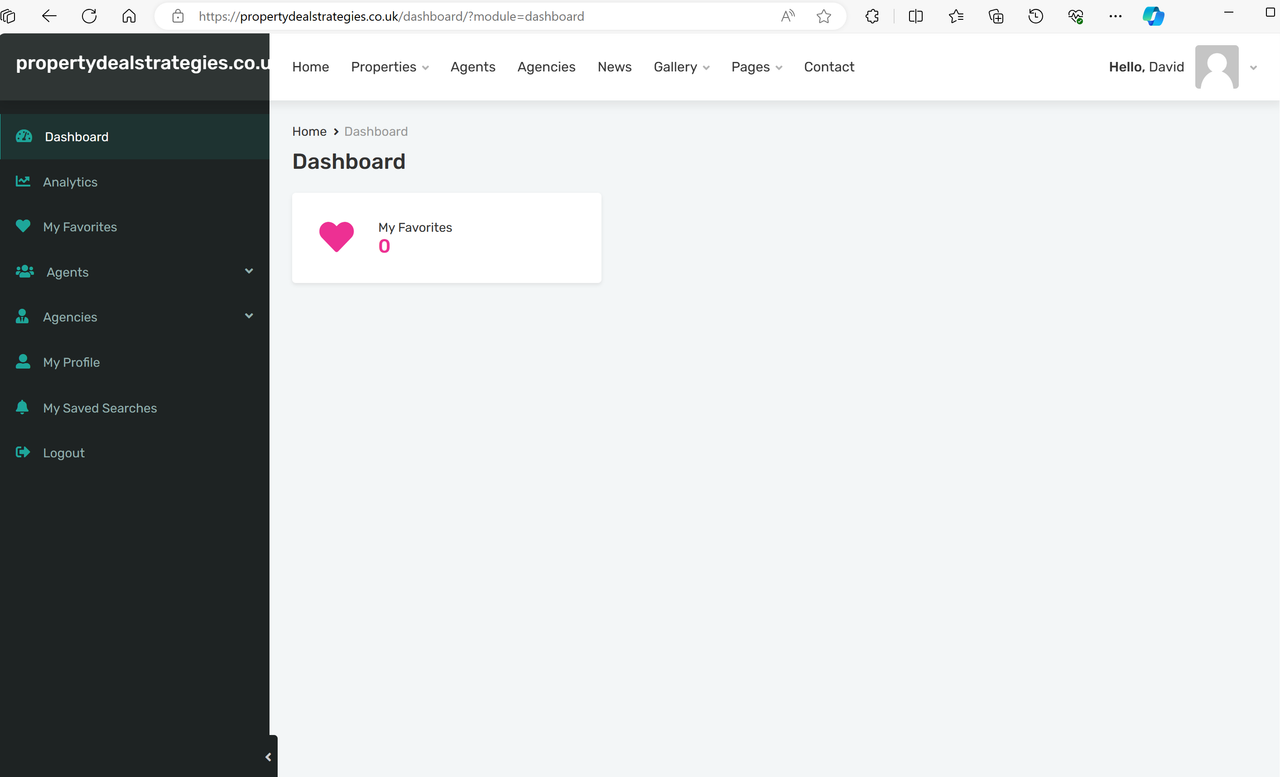
But in the user dashboard there is no paypal button, and the entire dashboard shows nothing in relation to subscriptions, and even how the user can add new properties from the frontend is not provided: https://i.postimg.cc/TYQtjF1S/User-Dashboard.png https://i.postimg.cc/XJVZgHpH/Paypal-Payment-Button.png2. I have also setup WooCommerce but confused how users can choose it as option for subscription or payments.
Hi,
Please sign up at our support website and ask your question over there and we will assist you properly.
Thanks & Regards
Hi thanks for the reply, i have already asked these questions on the support website, but no response that’s why i published them here too.
Hi,
Our support team is already communicating with you, so please allow us to get back to you asap.
Thanks & Regards

This item was featured on ThemeForest

Power Elite Author
Contact the Envato Market Help Team