6409 comments found.

I just tried updating to the recent update of this theme and my site broke. Have you had any other users with the same issue? I’m not sure why a theme update would break it but maybe you might know.
Hi cancasa,
I’m sorry to hear about the issue you experienced after updating to version 11.6.0. To assist you better, could you please share the system status from the JNews dashboard? You can find this information by navigating to Dashboard > JNews Dashboard > System Status.
Additionally, it would be very helpful if you could provide us with more PHP error logs. You can share the information privately by contacting us through the link below
https://themeforest.net/user/jegtheme#messageThank you
Hello,
Your update to the latest version 11.6.0 : 1 August 2024 just broke my sire Fatal error: Allowed memory size of 268435456 bytes exhausted (tried to allocate 12766656 bytes) in /var/www/techcratic.com/public_html/wp-includes/class-wpdb.php on line 2344
There has been a critical error on this website.
This is no good when you have a production site.
Regards.
Fatal error: Allowed memory size of 536870912 bytes exhausted (tried to allocate 57344 bytes) in /var/www/techcratic.com/public_html/wp-includes/class-wpdb.php on line 2315
There has been a critical error on this website.
Learn more about troubleshooting WordPress.
Fatal error: Allowed memory size of 536870912 bytes exhausted (tried to allocate 20480 bytes) in /var/www/techcratic.com/public_html/wp-content/plugins/elementor/includes/autoloader.php on line 295
I have reverted back to using Version: 11.5.4 until this is fixed, why is it doing this?
Hi techspecx,
I’m sorry to hear about the issue you experienced after updating to version 11.6.0. To assist you better, could you please share the system status from the JNews dashboard? You can find this information by navigating to Dashboard > JNews Dashboard > System Status.
Additionally, it would be very helpful if you could provide us with more PHP error logs. You can share the information privately by contacting us through the link below
https://themeforest.net/user/jegtheme#messageThank you
related to the issue, We have released JNews version 11.6.1 to fix this issue.
Please update your theme to the latest version
Thank you for your patience and continued support.
With NEW UPDATE: Critical error. Please upload previous version theme, I can’t find it.
PHP Fatal error: Allowed memory size of 268435456 bytes exhausted (tried to allocate 20480 bytes) in public_html/wp-includes/class-wpdb.php on line 2315
Memory limit, PHP limit and Number of Processes – 100 %. All website down.
Hi zinlt,
I’m sorry to hear about the issue you experienced after updating to version 11.6.0. To assist you better, could you please share the system status from the JNews dashboard? You can find this information by navigating to Dashboard > JNews Dashboard > System Status.
Additionally, it would be very helpful if you could provide us with more PHP error logs. You can share the information privately by contacting us through the link below
https://themeforest.net/user/jegtheme#messageThank you
related to the issue, We have released JNews version 11.6.1 to fix this issue.
Please update your theme to the latest version
Thank you for your patience and continued support.
I think your latest update broke something with the editor. As of now, I no longer see the options below the block editor, i.e. where you switch article type such as Post/Video/Gallery. Granted, I have some customizations on my WP backend, but it shouldn’t break this section as it was working fine prior to the latest update.
Also, using your plugin to update the theme causes issues for people like me who have a Child theme. The theme update will do its job, but switches the theme to the main one. This is frustrating as I had to redo widgets. From now on, I’ll only update from WP’s theme page unless you fix this issue.
Thanks!
Hi Abasalom,
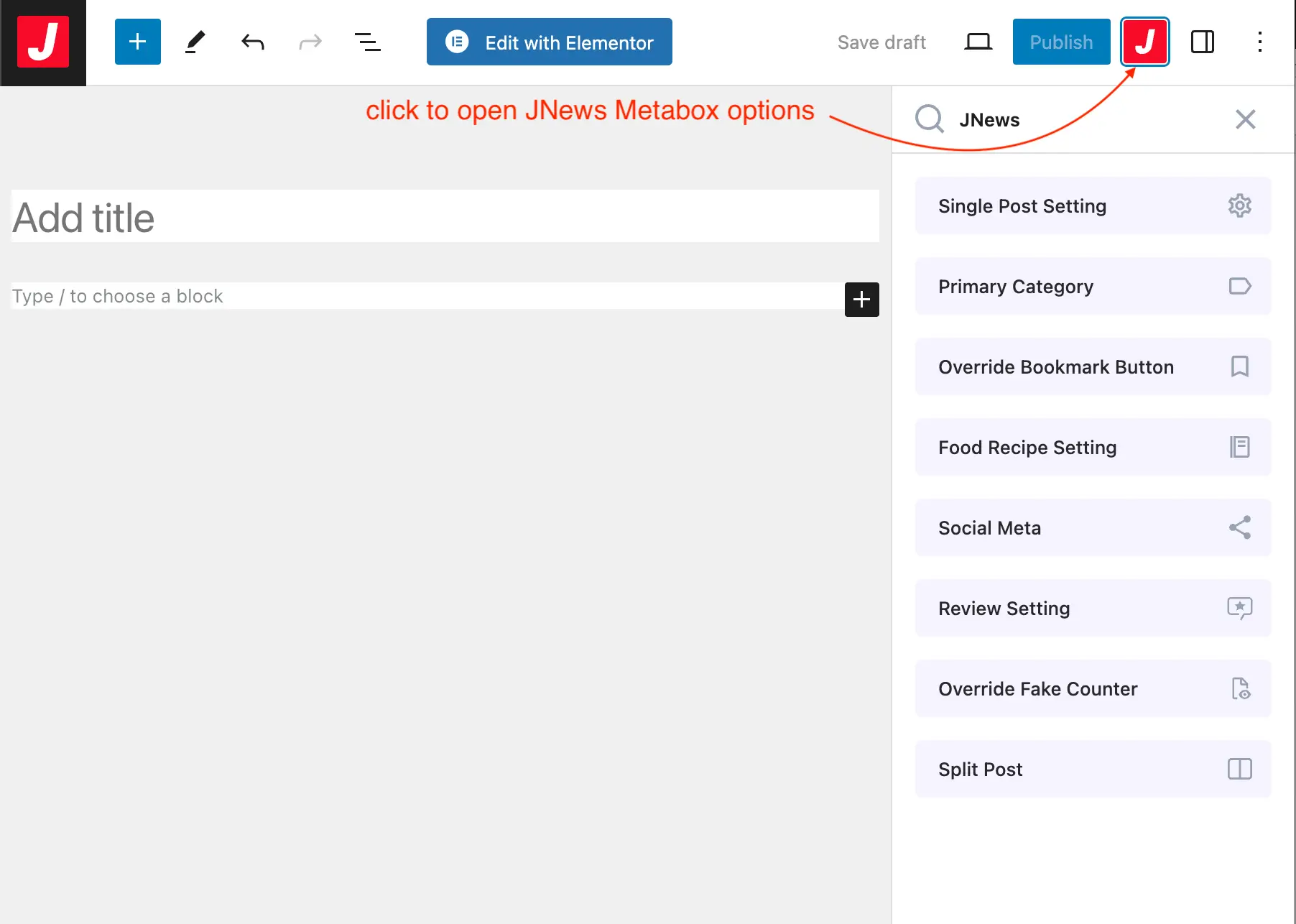
thanks for reaching us, on the latest update we are moving the option under the block editor to the sidebar please check the the screenshot below
we also updating our documentation
for switching the child theme, we recommend the user to use the import and export widget plugin, please check the documentation below
JNews child theme documentation
If you have any further questions or need further help, please create a support ticket in our official support forum using the link below
our team will help you
Thank you
I see. Thanks for the quick reply!
after the version published today everything is slow, we doubled the vm resources just to keep it up and running. We have notifications for JNews Plugin Updates Required, in the plugin list appear as install, we click install, still notified for updates.
Hi bruzli,
Thanks for reaching us, To assist you better, could you please share the system status from the JNews dashboard? You can find this information by navigating to Dashboard > JNews Dashboard > System Status.
Additionally, it would be very helpful if you could provide the PHP error log. You can share the information privately by contacting us through the link below
https://themeforest.net/user/jegtheme#messageThank you
system status sent, php error_log is empty for today
related to the issue, We have released JNews version 11.6.1 to fix this issue.
Please update your theme to the latest version
Thank you for your patience and continued support.
after 11.6.1 update all is back to normal, thank you
Even if the Jnews open graph data is disabled, it still shows and it overlaps with the one from Yoast. So there is the double structured data with. What can we do about this?
Hi erzrzrzr,
Thanks for reaching us, if you are using Yoast Plugin please try to disable Jnews meta header, please also try to clear cache of your website if you are using caching plugins or CDN caching please also try to clear it, if the problem still persists, please try to open a new support ticket on our forum. Our support team may need further information about your website based on your problem.
if your support license expires, please try to extend or renew your support license.
Thank you
Same Here Critical Error, please post a link to download the cvesion before this actualization ASAP
Pls i have a media website down, i have a backup but there has been almost 100 posts after
Hi Nicnacweb,
I’m sorry to hear about the issue you experienced after updating to version 11.6.0., regarding this please contact us through the link below
https://themeforest.net/user/jegtheme#messageThank you
Already did hours ago
An excellent theme that I have been using for a long time and have several licenses. This is the first time I have had such problems with this topic. When updating to 11.6.0 the site stops working. I had to restore backups and stay on the old version. Error “critical error”.
Hi mensby,
I’m sorry to hear about the issue you experienced after updating to version 11.6.0. To assist you better, could you please share the system status from the JNews dashboard? You can find this information by navigating to Dashboard > JNews Dashboard > System Status.
Additionally, it would be very helpful if you could provide the PHP error log. You can share the information privately by contacting us through the link below
https://themeforest.net/user/jegtheme#messageThank you
related to the issue, We have released JNews version 11.6.1 to fix this issue.
Please update your theme to the latest version
Thank you for your patience and continued support.
Hy first of all just to say that your theme is working great.
But today I clicked on update theme (to version 11.6.0.), and as soon as the theme updated I got message “A critical error has occurred on your website” and I couldn’t even enter a dashboard…nothing… (‘Till today I always did this update on staging site, but today I just clicked and hoped for the best, and of course this time everything crashed)
The only way that I could make dashboard working is to rename folders in “public_html/wp-content/themes” to something else but then of course the whole site was crushed and displaying only web banners, so everything was out of order.
Luckily I had previous version of JNews installed on some other testing site and I copy/pasted that folder from testing site to this live one and now everything works fine but now the theme is on the 11.2.1 version.
Debuging says “Deprecated: File Theme without header.php is deprecated since version 3.0.0 with no alternative available. Please include a header.php template in your theme. in /home/*/public_html/wp-includes/functions.php on line *“
So I have 2 questions: 1. Why this happened, and how can I fix this? 2. Is there somewhere a previous versions of Jnews to download for situations like this when new update crashed whole site to go back to previous one?
tnx
Hi LookaZD,
I’m sorry to hear about the issue you experienced after updating to version 11.6.0. To assist you better, could you please share the system status from the JNews dashboard? You can find this information by navigating to Dashboard > JNews Dashboard > System Status.
Additionally, it would be very helpful if you could provide the PHP error log. You can share the information privately by contacting us thorugh the link below
https://themeforest.net/user/jegtheme#messageThank you
related to the issue, We have released JNews version 11.6.1 to fix this issue.
Please update your theme to the latest version
Thank you for your patience and continued support.
Tnx for quick fix
Hi,
Despite using a CDN and caching plugin my site is very slow. I am not using most of JNews plugins and do not have any unnecessary plugins that would add extra load. However the initial response time is still very slow. While my other sites on the same server load at lightning speed it can take up to 8 seconds for JNews to load. wp-login.php page takes about 2 seconds to respond. My support period has expired but I am seeking assistance because I believe this is an issue with the theme.
Thanks.
Hi burakbabursah,
Thank you for reaching out. I understand your concerns regarding the slow load times, If the wp-login.php page takes about 2 seconds to respond, this is indeed unusual and may indicate underlying issues.
1. Check Access Logs: Review your site’s access logs to see if there are any excessive or unusual access patterns. This can help identify if there is an abnormal load on your server.
2. Check PHP Error Logs: Look at your PHP error logs for any errors or warnings that might be affecting the performance. These logs can provide valuable insights into what might be going wrong.
3. Plugin Conflicts: Disable all plugins that are not related to JNews temporarily. Sometimes, conflicts between plugins can cause significant performance issues. Once disabled, check if the load times improve.
4. please try to switch to the default WordPress theme for a while to monitor the performance
if the problem still persists, please try to open a new support ticket on our forum. please share your server log and the system status from the JNews dashboard in our forum, you can share it privately thereby checking set as a private reply below the reply section, please also let us know when this issue started
Thank you
Hi, we emailed yesterday and didn’t get a response. We are having an issue in Activating our Theme license, it keeps looping us around to the same page after logging in to envato. Thanks!
Hi davidk310,
Our team has replied to your email. Please check your inbox.
Thank you
Hello, my website (arisecambodia.com) isn’t counting views and shares. I’ve tried everything, but it’s still not working. I can set the initial count (fake numbers) and they work, but it’s not counting afterwards. The counter was in place for some of the old articles before I installed Jnews, and there are no new views or shares being counted after I installed it. I even tried generating extra views and shares, but they’re not being counted. Is there something I’m supposed to do that I’m not aware of? Could there be a setting that I’m missing? Thanks!
Hi dolife-graphic,
Thanks for reaching us, we visited your website and we saw that there are 500 internal server errors on Ajax requests, regarding please try to disable some plugins that are related to JNews for a while to see if there are any plugin conflicts or not, please also try to check the PHP error log on your website to get more detail about 500 internal server error
if the problem still persists, please try to open a new support ticket on our forum. Our support team may need further information about your website based on your problem.
if your support license expires, please try to extend or renew your support license.
Thank you
Hi, I tried troubleshooting the plugin by disabling all plugins except for news, but it’s still not working.
Hello. I need to transfer the license from my old domain to the new one, but the red “Deactivate website” button just doesn’t work and doesn’t respond to clicking. Please help me or write me how you can remove the license from the old site? Thanks
Hi ameretatam,
thanks for reaching out to us, first please try to reset the license in your old domain by visiting this URL
yourdomain/wp-admin/admin.php?page=jnews&path=jnews&action=reset-licenses
remember to change the your domain in the link above with your actual domain, after resetting the license on your domain, please try to activate the license on your new domain
if the problem still persists, please try to submit a ticket, in our official support forum in the link below, we will help you to migrate it
you can share the information privately in our support forum
Thank you
Halo Tim Jegtheme, saya mau menanyakan ada beberapa error di tampilan mobile di website yang pasang themes JNews. Yaitu 1) Tombol next di home tidak jalan jika diklik 2) Kolom Search di Home tidak bisa diketik dan klik untuk menjalankan pencarian 3) Klik menu di tampilan home tidak bisa diklik
Plugin dipakai W3Total cache, wordfence, speed booster pack Mohon bantuan dan arahannya
Hi iqbalujang,
Terima kasih telah menghubungi kami, terkait dengan hal ini, mohon coba nonaktifkan plugin yang tidak berkaitan dengan JNews dan bersihkan cache di plugin yang anda gunakan dan juga pada CDN seperti cloudflare jika anda menggunakan layanan CDN
Jika masalah tersebut masih ada, mohon membuat support ticket di official support forum kami, pada link dibawah ini:
Jika support license anda telah expired, mohon untuk perpanjang support license anda
Terima Kasih
Can you check out WP Bakery on WP 6.6.1 ? When editing a page – all of my columns are completly on the left of the page so it’s hard to edit the page internally.
Hi bananatree88,
Thanks for reaching out us, we’ve checked the WP bakery on WP 6.6.1 and it still working properly, to troubleshoot the issue, please try to disable some plugins that are not related to JNews for a while to see if there are any plugins conflicts or not, please also try to clear the cache on your website
If you have any further questions or need further help, please create a support ticket in our official support forum using the link below
if your support license expires, please try to extend or renew your support license.
Thank you
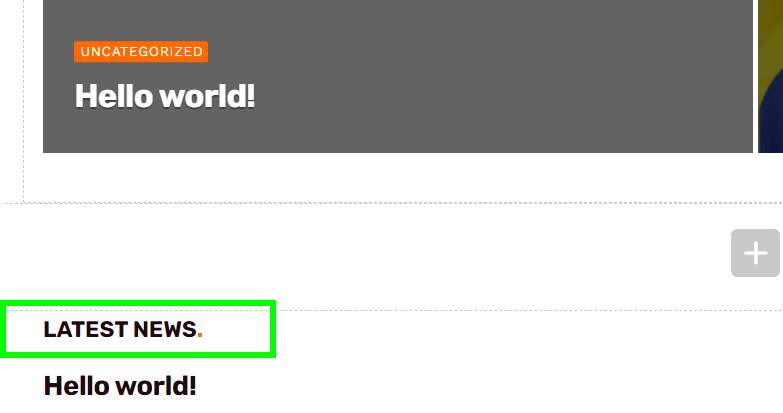
Where do I change the translation of Latest news in the Jnews theme to the viral theme? https://i.postimg.cc/0NK3J39R/screenshot-450.jpg
Hi Martos82,
Thanks for using JNews, the Latest News text that you mention is a header of page loop, to edit this header you can edit the front page on the post editor and then find JNews : Page Loop Metabox > Page Loop Header > Latest News , please check the screenshot below
If you have any further questions or need further help, please create a support ticket in our official support forum using the link below
Thank you
Thank you very much for your answer, your theme has so many options that I went crazy looking for it, you did an excellent job with this theme, sorry to put here the doubt, then I found the right place for it which is your support page.
Thank you very much for your service and your quick responses, I recommend this theme to everyone and I’m just starting to use it.
Thank you so much for your kind words and positive feedback! I’m thrilled to hear that you’re enjoying the theme and finding it useful. Your appreciation means a lot to us.
Headings The first heading is not H1
How to fix?
Hi uamassimo,
thanks for reaching us, please let us know which header you are referring to as the first heading. please let us know in our official support forum at the link below
if you are referring to the post title as the first header it is already using H1 tag
Thank you
I even have a portal that I’m customizing from another supplier, but it has some bugs like sending news from the front doesn’t work.
So the only thing I’m going to develop another one in phyton programming language with django because I need to integrate with AI.
When purchasing your theme I would have to customize it to have a personalized layout, not to mention that after I finish developing my complete project with Python, django, with my streaming service and mobile applications and for Smart TV.
My conditions at the moment are $35 USD if you have a lightning portion of two from Tuesday 06/30/2024 I compared your theme as long as it is within my financial conditions.
Here is the link to what I am already finalizing to launch my news portal.
https://drive.google.com/file/d/1jvV9XTDttgBdtCqRGSzwk1TOv3HAq2Yc/view?usp=drive_linkI really wanted to invest in your theme so I could develop my personalized project, using it but unfortunately my conditions are as stated.
Hi jornalistalazaroshekinah,
Thank you for considering our WordPress theme for your project. We appreciate your interest and the detailed explanation of your needs.
Unfortunately, we do not have any discounts available for this month. We believe that our theme provides excellent value at its current price, reflecting the quality and lifetime update we offer.
We wish you the best with your project and hope to have the opportunity to work with you in the future.
Thank you
Thank you for your feedback, I wish you success and growth in your sales.
If you do it for 45 USD, give me a discount coupon for 45 USD and I’ll buy your theme tomorrow.
because I need to customize my project, download it locally and then upload it to the hosting server.
I have a question about the membership paywall functionality. Does it support a “soft” paywall? i.e. restrict access to premium content while still allowing users to view a portion of it for free?
Hi jimwwright,
Thanks for reaching us, yes we are JNews Paywall has feature to allows visitors to view a portion of the premium article for free, you can check the demo of this feature in the link below
you also can adjust how many paragraphs to able to be viewed by free users, you can check the documentation for JNews Paywall in the link below
Thank you
When will there be a new pre-built website? There hasn’t been one for months. Is there any plan to release a new pre-built website soon?
Hi ranukadev,
thanks for using JNews, We appreciate your enthusiasm for our pre-built websites, and we have plans to add more pre-built websites in the future our current focus is on enhancing existing features
As such, we do not have an imminent release date for new pre-built websites at this time. Rest assured, we will announce any updates and new releases as soon as they become available.
Thank you for your patience and understanding