6406 comments found.

I dont have a Paypal Account and I cannot get one because of the country I am in. I have valid credit card and debit card I use for other site. I need an alternate way to purchase Jnews. Please let me know
Hello hafsolutions,
In which country are you currently?
The JNews theme is an exclusive theme only available on ThemeForest. If you’re experiencing issues with purchasing the JNews theme, you can try contacting ThemeForest/Envato support using the link below.
If you have a Visa or Mastercard credit/debit card, you can make a purchase on ThemeForest. If the payment fails, please ensure that your billing information is correct.
You can read more about purchasing in the ThemeForest documentation using the link below.
Thank You
I wish I could send you screenshots of the checkout page. It only has PayPal. I’m from Ghana.
Hello hafsolutions,
We are sorry to hear that. On our side, the payment appears as shown in the image below.
We also found a few forums on Envato where users have faced similar issues. However, it seems this might not be very helpful.
How can i buy a theme on Evanto whiles am in Ghana?
I am in Ghana and paypal is not supported here. I want to purchase some products but I can’t make pa
For a more precise solution, we recommend contacting Envato/Themeforest Customer Service through the contact link below.
Thank You
Below is the feedback from Envato support.
“I unnderstand that this may not be the most convenient option for you. However, at the moment, we do not have any alternative payment methods available, so I regret to inform you that you won’t be able to proceed with a purchase on our sites at this time.
Please note that any limitations on PayPal and credit cards, whether local or international, are beyond our control. As we do not directly manage your payment transactions, I am unable to assist with this particular issue.
We apologize for the inconvenience this may cause. We want you to be able to purchase, hope in the near future we have more payment options that we can offer. ” I refuse to believe in this day and age, that there’s no other way to purchase this. Kindly help out.
Hello hafsolutions,
We apologize, but we are unable to assist with this matter.
We recommend that you find a friend who can make the purchase on ThemeForest on your behalf to buy JNews.
We hope this answer helps.
Thank You
Hello. Is the top bar color changeable via the settings? Header – Top Bar Menu
I don’t see a setting for background color. It is black on desktop and mobile
Thank you
Hello watergirl_2,
You can change the Background Color option in the customizer or under the menu Appearance -> Customize -> JNews: Header Option -> Header – Mobile Option.
You can also find this setting in the menu JNews -> Customize Style -> Header Option -> Header – Mobile Option.
We hope this answer helps.
Thank You
Hi, when I set the Instagram feed I see this message: https://support.jegtheme.com/wp-json/jeg-meta-server/v1/undefined&error=Invalid+License If I lose my license, how can I set it? Can you help me? Thank you!
Hello micmacGraphic,
If the JNews license is not active or incorrect, you should receive a notification to activate the license in the JNews Dashboard. You can check this by going to the `JNews -> Customize Style` menu.
Suppose you do not receive this notification and the issue persists. In that case, we recommend contacting us via email as we may need some of your non-public data to investigate further the issue you’re experiencing. You can send us an email through the message box in the link below.
We hope you can provide more details about the issue like an image or video in your email.
Thank You
pre-sale question. can you tell me whether i can use razorpay or popular indian gateways in jnews? if yes. than tell me the process too. I am planning to buy that soon
Hello saikatsgallery,
Currently, we do not have Razorpay for payments. As an alternative, you can use WooCommerce Subscriptions instead.
Thank You
means i have to buy that too?
Hello saikatsgallery,
Indeed, payments in India are currently limited. As for Razorpay, we are still in the development phase and are unable to provide a specific release date for this feature.
We apologize for this inconvenience.
Thank You
The response is not a valid JSON response – when I try to install retail news demo
Hello danutz78,
You can try to meet the standard requirements for the JNews theme at the link below.
Standard Requirement JNews Theme
The most common issue usually arises when the memory usage has reached its maximum limit. You can try increasing your site’s WP Memory Limit to `512MB` to resolve this memory issue.
If you have further questions, we kindly ask you to create a new topic on our support forum.
If your support license has expired, you can try renewing it using the link below.
Thank You
I see that you can add the dark mode toggle from Dashboard > Appearance > Customize > JNews: Header Option Will this show the toggle in the uI.
I ask because none of the demos have a toggle. Maybe the feature is only ON or OFF controlled by us and not the user?
Thanks
Hello watergirl_2,
In the Header Builder in the Customizer, you can see the Dark Mode element that you can add. Please refer to the image below.
Please add that element to the desired Header layout. Additionally, we have some demos you can import showcasing the Dark Mode button, some of which are:
If you have further questions, feel free to open a ticket on our support forum. Our support team will be happy to assist you.
If your support license has expired, you can renew it using the link below.
We hope our response helps.
Thank You
Hello, last time I asked about this:
I need the id of the Video URL field, which is in the post format type – video. It would be ideal to also have the ids of the post subtitle, source name and source url fields.
I need the ids of these fields to be able to set up automation correctly in Make.com, without it I am not able to add a link to the video.
graphics; https://ibb.co/5xJzmxK Make.com graphics – https://ibb.co/1vymbs3
you said you would add it in the next update, did you add it today?
Hello marcinbiznesuk,
We apologize for the inconvenience. We didn’t add this feature in the previous update. We are working on it and will add it as soon as possible.
Thank You
Hi Jeg`s!
Is there an opportunity to hire you for complete the “playIt” template with more design and to extend some functions?
Kindly let me know.
Greets Thomas 
Hello Thomas,
You can visit the link below for custom change requests for your website.
Alternatively, via the link below, you can directly message us through our contact feature on ThemeForest. The relevant team will assist you further with your request.
Please note that your request may be declined due to some limitations. As an alternative, you may want to consider hiring a freelancer through sites like Upwork or Fiverr.
Thank You
Best Regards,
Fauzan Edris
Please are ads not showing on my embedded YouTube videos??
Hello afolabiot,
Regarding your question, please try opening a new support ticket on our forum. Our support team may require further information about your website based on the issue you’re facing.
Our support team will be happy to assist you.
Thank You
Can you just answer this one question, please?
My support has expired and I did not even use it at all. I just started using the theme since I bought it about 18 months ago.
Hello afolabiot,
We apologize for the inconvenience.
It seems that this issue is not related to the JNews theme. To confirm, you may want to create a test site using a different theme and embed the YouTube video there.
We also found a Google FAQ that may be related to your question. You can visit it at the link below.
Thank You
I know I no longer have support, but I have a small problem and I don’t know how to solve it. I try to change the date of the post, but I can’t. For example, I change the date of a post to April 4, 2024, but it still keeps December 26, 2024! If you can help me, I’d appreciate it, if you can’t, I’ll understand and thank you in the same way! Thanks!
Hello jpinheiro,
You can try adjusting the Post Date Meta option to Publish Date in the Customizer, under Appearance -> Customize -> JNews: Additional Option -> Post Date Setting.
We hope this solution helps.
Thank You
Perfect!!! Tks!!!!
You’re welcome, jpinheiro!
We’re glad we could help! 
Hi, pre-purchase 2 questions: 1. is it fully RTL. 2. I want to use only elementor. Dont’ want to install WP bakery plugin. I appreciate any help you can provide.
Hi Aksirob,
Thanks for reaching out to us, yes our theme is RTL compatible, and you also can choose between Elementor or WP Bakery, all of our demos are available for Elementor
if you have another question don’t hesitate to reach us
Thank you
problem with google chrome (latest version) and brave (latest version) upload / choose image button for ‘upload a video” or “submit post” do not work (nothing happens when we click. all works fine with firefox and edge. need to clean image in cache to work, but problem come back few minutes later
Hi kezeo,
Thanks for reaching out to us, if the frontend submit working when you clear the cache, the issue may realted to your caching mechanism, please try to disable the caching plugin and third party plugin that not related for a while to see if there are any plugin conflict or not
if the problem still persist, lease try to open a new support ticket on our forum. Our support team may need further information about your website based on your problem.
if your support license expires, please try to extend or renew your support license.
Thank you
I can’t find this one block on the entire site, and how can I change it? It’s not found anywhere, not in widgets or anywhere else.
screenshot: https://prnt.sc/LAvDWpPi1Nst
Hi infoermestv,
Thanks for reaching out to us, from the screenshots it seems you want to change the JNews – Ad Block in the default sidebar, you can change it from Dashboard > Appearance > Customize > Widgets > Default Sidebar JNews – Ads Block
If you have any further questions or need further help, please create a support ticket in our official support forum using the link below
if your support license expires, please try to extend or renew your support license.
Thank you
Hello team, 1- your support forum doesnt recognize I still have support while the account shoes it has still support in the Profile section 2- My issue is that in the posts, Thumbnail / Featured image has 1:1 aspect ratio which is very annoying and not respecting the images size which is 16:9 , I tried to add custom CSS to force it but it seem to not work. Please message me asap or give me your email
alright i fixed it, i added in custom CSS the following :
.thumbnail-container { height: auto !important; /* Override the existing height: 0px; rule / padding-bottom: 0 !important; / Remove the padding-bottom / overflow: hidden; / Add overflow: hidden / aspect-ratio: 750 / 375; / Set the aspect ratio to match the image’s aspect ratio */ }
 as a noob coder, here is the custom CSS i added :
https://codepen.io/Achraf-the-bold/pen/raBwjYJ
as a noob coder, here is the custom CSS i added :
https://codepen.io/Achraf-the-bold/pen/raBwjYJ
Hi deepmass,
thanks for reaching out to us, glad to hear that your problem is solved
we also checked your account in our support forum and we can confirm your support license is still valid, If you have any further questions or need further help, please create a support ticket in our official support forum using the link below
Thank you
GUYS impossible to find “movie review” demo, how to do please
Hi kezeo,
Thanks for reaching out to us, you can find the movie demo in Dashboard > JNews Dashboard > Import Demo & Style > Page 3, please check the screenshot below
If you have any further questions or need further help, please create a support ticket in our official support forum using the link below
if your support license expires, please try to extend or renew your support license.
Thank you
Don’t know about you all, but new users are finding it, difficult to register and login to my site after successfully setting up the theme..?
HOW DO WE GO ABOUT THIS …?
Hi Z0D,
Could you please elaborate on what you mean by “difficult to register”? This will help us understand the issue better
To allow users to register on your site, please ensure that the “Anyone can register” option is enabled. You can do this by following these steps:
1. Go to Dashboard > Settings > General.
2. Under the Membership section, check the box for “Anyone can register”.
If you’ve already done this and the issue persists, please try to open a new support ticket on our forum.
if your support license expires, please try to extend or renew your support license.
Thank you
My top priority is to collect email subscribers. Is it possible for me to set up a free paywall that allows users to unlock my content by providing their email addresses?
thanks
Hi onlineabc,
Thanks for reaching out to us, we JNews subscribe to the download feature that you can use to collect user email
but unfortunately at this point, we don’t have the option to unlock the Paywall by only providing an email
if you have other questions don’t hesitate to reach us
Thank you
Hello.
There is a problem with “Disable Ad (Don’t Display ad on this post.) ” option, specially with: jeg_ad jeg_ad_article jnews_content_inline_ads . That option does not work anymore. News -> Single Post options -> Disable Ad (Don’t Display ad on this post.) I tried disabling cache and everything, and is not that..
Hi argenti,
Thanks for reaching out to us, we checked the disable ads options and it is able to hide the ads in the single post including the inline ads
to troubleshoot the issue, first please make sure that you are using the latest version of JNews, please also try to disable third-party plugins that have not been related to JNews for a while
if the problem still persists, please try to extend or renew your support license.
Thank you
Thank you for your reply.
Hello again.
I have tried everything I disabled everything (except main jNews plugins), remove css, remove java, everything.. Nothing seems to work.
The problem is that when I enter “Customizer” the ad is hide (as it should) but when i view the page normal, the ad is there.
This is a page where the Ad should be hidden: https://focuspress.ro/incendiu-puternic-in-piata-matache-din-capitala/
Thank you
If your ad is hidden in the Customizer but still visible on the front end, this issue could be related to caching, which may prevent changes from appearing immediately on the front end.
To address this, please try clearing your browser and site cache. Additionally, if you’re using a caching plugin or CDN caching, you might need to clear or temporarily disable it to see if it resolves the issue.
If the problem persists, please try to open a new support ticket on our forum. Our support team may need further information about your website based on your problem.
if your support license expires, please try to extend or renew your support license.
Thank you
Hi guys! I have a problem, I’m trying to change the color of the links in a single post in dark mode, but it doesn’t work, because when I try to do it with CSS, the color of the future categories captions in the block posts also changes.
I am trying to change it with this code */ body.jnews-dark-mode a { color: #e7bd3b !important; }
I am waiting for your response and help, thanks!
Hi infoermestv,
thanks for reaching out to us, to change the color of the links in a single post you can use the CSS code below, you can add it to Dashboard > Appearance > Customize > Additional CSS
Change links color in single post
If you have any further questions or need further help, please create a support ticket in our official support forum using the link below
Thank you
the problem was solved with your help.
thanks
Hello. Why is DJNews Customize Style not showing?
I look under Dashboard > JNews Dashboard and the Customize is not there. I can only access the basic WP Customize under appreances.
I know I am out of the support period but this should not be disabled, correct?
Thank you for your help
Hi watergirl_2,
Thank you for reaching out Yes, you should still be able to access the Customize option under JNews Dashboard, even if your support period has expired.
If the Customize option is not showing, I recommend troubleshooting the issue by following the steps below
1. please make sure you have activated the theme license, please follow the steps below to activate the theme, please make sure you are using the same Envato account that you use to buy JNews when activating the theme
JNews activate license documentation
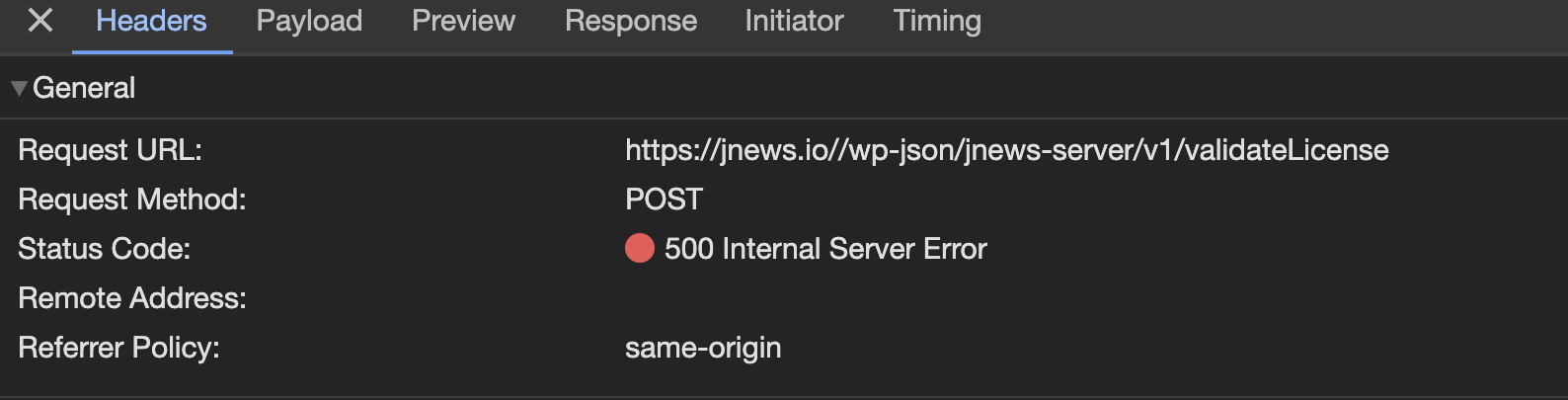
2. Make sure you are using strict-origin-when-cross-origin in your Referrer Policy setting. This is necessary for your server to make requests to the JNews server when accessing the JNews Dashboard, validating licenses, and installing JNews Plugins & Demos. Alternatively, if the Hypertext Transfer Protocol on your website is using HTTPS, you can use strict-origin in your Referrer Policy setting. You can change the Referer Policy setting in the Apache config or Nginx of your site. If your server is managed by a server administrator, you can contact your server administrator.
if the problem still persist, please contact us through the link below
our team will try to help you
https://themeforest.net/user/jegtheme#messageThank you