22369 comments found.
Hi! How is everything going? I need to create a private page for some users. IE: Users created by me could log in and access a page where they find their documents. That page and those documents (ideally created using total templates/modules) are available only to each user, so any of those users who log in and click the X link in the menu are directed to their unique page. Do you have any recommendations (plugins?) to achieve this that work fine with Total? Thank you!
FYI. Found out the user login link in your base demo is not working 
Hi,
I hope you had a nice weekend.
What you are asking for is a fairly complex functionality. It’s simple if you know what you’re doing, but if not, it can be quite intricate. I would do this by creating a post type called something like user_docs. Each post in this post type would be named after the corresponding user. For example, if you have a user with the username john-cena, you’d also have a post with the slug john-cena.
Then you can restrict access like this:
// Restrict access to user_docs posts so users can only access their own
function restrict_user_docs_access() {
    if ( is_singular('user_docs') ) {
        // Redirect to home if user is not logged in
        if ( !is_user_logged_in() ) {
            wp_redirect( home_url() );
            exit;
        }

        global $post;
        $current_user = wp_get_current_user();

        // Compare post slug with current user's login name
        if ( $post->post_name !== $current_user->user_login ) {
            // Redirect unauthorized users to homepage (or another location)
            wp_redirect( home_url() );
            exit;
        }
    }
}
add_action( 'template_redirect', 'restrict_user_docs_access' );
For your link you could create it dynamically like this:
// Shortcode to generate link to current user's user_docs page
function user_docs_link_shortcode( $atts ) {
    // Only show to logged-in users
    if ( !is_user_logged_in() ) {
        return '';
    }

    $current_user = wp_get_current_user();
    $username_slug = $current_user->user_login;

    // Get post by slug and post type
    $post = get_page_by_path( $username_slug, OBJECT, 'user_docs' );

    if ( ! $post ) {
        return ''; // user post doesn't exist
    }

    $url = get_permalink( $post->ID );
    $link_text = isset( $atts['text'] ) ? esc_html( $atts['text'] ) : 'My Documents';

    return '<a href="' . esc_url( $url ) . '">' . $link_text . '</a>';
}
add_shortcode( 'user_docs_link', 'user_docs_link_shortcode' );
Shortcode usage: [user_docs_link text=”Go to My Docs”]
My Total demos login is locked behind my IP address for security reasons, so unless you are using my static IP address you won’t be able to log into my demos and you should see a 403 server error if trying to access the login page.
Not sure why you are trying to log into my demo
- Aj
ps: Those snippets were created with chatGPT.
ps: I am available for hire if you want me to code something exclusively for you email me at wpexplorer [at] gmail dot com – depending on what you want, you may want to setup some advanced custom fields as well for the post type for defining the user docs and then displaying them automatically – rather then having to build each page with a page builder.
Thank you! It is good to know that you are available for hiring! About the login, it was just a click on the “user login” link at the top bar of the demo. I thinnk i wanted to know if a front end login form would appear 

Hello. I have the following issue wehn creating posts in my blog:
The permalink generated does not include the “www” prefix, only the slug. https://www.steel-tec.es/blog/How can this be fixed? Thank you
Hi,
This is AJ the theme author. I hope you had a nice weekend.
I think the issue you are having is with your custom card, which when I inspect I can see a couple issues: https://a.cl.ly/8LuEWOrD
1. The other link on your card appears to be created from the title. 2. Your custom card has links inside on the image and read more link.
So first, when creating custom cards if you want links inside like on the image, make sure your custom card link type is set to None like this: https://a.cl.ly/d5ukQ7PJ
Now, I have no idea why the outer link is not correct. It’s impossible to know just looking at the site, my only guess is that either you are using the “Link Custom Field Name” and your custom field is not actually returning a URL or you are using the redirection or custom link field incorrectly: https://a.cl.ly/8LuEWOkz (these 2 fields override the default card link).
- AJ
Thanks a lot for the input AJ
Were you able to fix the issue? If so, what was it? Thanks!
- AJ
Yes! The link URL in card settings was incorrect as you suggested. Removing it entirely solved the issue. Thanks!
Glad it was an easy fix, thank. you for letting me know!
- AJ
Hi AJ
Another Post Types Unlimited question.
Is it possible to set a default within a Taxonomy? I mean, if a post is saved without the author selecting a Taxonomy, can it automatically default to one? As it stands you can save a Post and leave the Taxonomies blank.
Screenshot. I am using a Taxonomy with Just Events. The options are “yes” or “no” which I then use to decide whether the event is shown on a homepage card or not: https://ibb.co/CpSKwKtzI can save the Event with them both unchecked, and they remain unchecked. It would be good if it could default to “Yes” when saved, if they are left blank.
(This is a “nice to have” since I have the card query set to exclude “no” which means “blank” behaves like “yes” – which is OK).
Standard WP Posts have the ability to allocate a default Category. Settings > Writing > Default Post Category.
Could it be achieved with a code snippet if not in the UI?
Like I say, a “nice to have” not a priority.
Thanks
James
Hi James,
There is no built-in way in WordPress to set a default taxonomy value, it would require custom code. But it’s not something I would recommend, especially not with what you are doing.
What you are trying to do isn’t what taxonomies are intended for.
In your case, it would make more sense if you had a taxonomy “Event Categories” that you use to organize your events and then you have a specific category named “Hide from Homepage” (or whatever). Then you exclude that category in your homepage query.
This yes/no functionality just doesn’t make any sense as a taxonomy. If you specifically wanted to have the user select yes or no, then you would use a custom field: https://totalwptheme.com/docs/how-to-add-custom-fields/ – and it would make more sense as a single checkbox “Hide from Homepage” and then your homepage query would exclude that custom field like such: https://a.cl.ly/NQum9BOX – assuming your custom field is a checkbox named “exclude_from_home” and when checked the value saved is 1.
In general when working with a database you want to avoid saving useless data. For example, if the default is “yes” there is no point to save that value into the database. It makes more sense to only save “no” values into the database. Otherwise you not only bloat up the database with default values (which are assumed, you don’t need to store them) but you also create a lock in effect, where in the future if you want to change the default you then have to manually edit every post.
- AJ
Thanks for the great advice, AJ!
Hi AJ,
Long time ago. I hope you are doing well. I am trying some new stuff on one of the websites I maintain. What I would like to do is create some ‘fancy’ menu. I was thinking about a main menu item with a collapsible mega menu. In the mega menu I would like to use a dynamic template in which I can use all kinds of standard elements.
In the past I have used Uber menu for this but it created a lot of bloat on the website. Is there a way to get this done using ‘plain’ Total theme? Maybe with the use of some snippets/hooks.
-Bjorn
Hi Bjorn,
It has been a long time! I’m doing great, I hope you are as well.
It’s actually quite easy to override any dropdown item using a little code:
add_filter( 'walker_nav_menu_start_el', function( $output, $item, $depth, $args ) {
    if ( isset( $item->classes ) && is_array( $item->classes ) && in_array( 'megamenu-template', $item->classes, true ) ) {
        return do_shortcode( '<div class="wpex-no-renaming">[wpex_template id="TEMPLATE_ID"]</div>' );
    }
    return $output;
}, 50, 4 );
Where “megamenu-template” is the classname added to the dropdown item (so the item added under the parent menu item. There should only be 1 item under the parent since you are creating the layout with a template. And of course you don’t need to use “megamenu-template” – you can use any unique name you want. The whole purpose of the class is just so the code knows which menu item is being replaced with a template.
See the docs on creating and using dynamic template parts if you are unfamiliar – https://totalwptheme.com/docs/dynamic-template-parts/
In my example snippet I’m adding the “wpex-no-renaming” class to prevent the mobile menu from re-naming the classes used inside the template (only needed for the default sidebar mobile menu). Although I would recommend creating a separate “normal” menu for mobile without a mega menu, this is common practice and will render best.
Make sure you select 1 column for your mega menu style: https://totalwptheme.com/docs/creating-mega-menus/ – you still need to define the dropdown as a mega menu to ensure it renders accordingly.
Personally, I think using a plugin is going to be best for complex mega menus because there is a lot involved. I can’t guarantee the dynamic template will render perfectly inside a dropdown and it may require some extra CSS to make things work well.
If you try it out, let me know how it works out!
- AJ
ps: If you use the header builder – https://totalwptheme.com/docs/header-builder/ – the new Horizontal Menu & Off-Canvas Menu elements provide more flexibility and should be easier to work with.
ps: I wrote a little doc for this if you want to bookmark it: https://totalwptheme.com/docs/dynamic-template-mega-menu/
Hi AJ,
Wow, that is looking great.I will experiment with it and fihure out how to use it. This is giving a lot of options.
Thanks!
- Bjorn
I will also try the header menu’s. I never used it before but it is looking promising as well.
Hi AJ,
I’m having the same issue as Damien00100. I can’t get the mobile menu to work but to add to that I can’t get the home page hero image to be responsive BUT it’s responsive on every other page.
https://www.staging2.theaspiregroup.org/Hi,
I see you are using the header builder and the Off-Canvas Element for the mobile menu. When I test the site it works correctly, but you do have the setting enabled to display the mobile menu below the header via the “Display Under Header” toggle. Because of your site design this isn’t really recommended because it creates a strange effect: https://a.cl.ly/9ZuO9DPE
You also appear to be using an older visibility setting “Visible on Tablet” which means you are having to add extra rows with extra Off Canvas Elements.
When using the header builder and you are creating the desktop and mobile versions of the header you should generally just have 2 rows with opposing visibilities (Visible on Large Desktops and Hidden on Large Desktops, Visible on Desktops and Hidden on Desktops, Visible on Phones and Hidden on Phones…etc) – the visibility you choose depends on your design and when you want to make the switch from a horizontal menu to an off-canvas mobile menu.
In your case I see many rows with non-opposing visibilities and an extra row at the bottom with the visibility only added to the Off-Canvas element – https://a.cl.ly/xQumozD6 – this causes some layout issues and extra bloat.
I would recommend staring by removing all the visibility settings so you can see all your content, then deleting the extra rows that you don’t need (again keep 1 row for the desktop and 1 row for the mobile view) – then using opposing visibilities on those 2 rows to show/hide them.
Make sense?
Regarding the homepage image – you are also creating 2 rows here (one for desktop and one for mobile) – but they have the same content. In general you should never create different sections for different screen sizes, unless the content changes drastically (like the header builder). So you should update the homepage where you have the Hero image so it’s a single row without any visibility.
Additionally your hero section has a 200px padding on the left and right, which isn’t responsive so it won’t look good on small devices. In general you should never need to add left/right padding to your rows because by default all rows will respect your site layout width – https://totalwptheme.com/docs/customize-your-layout-widths/ – so if you add left/right padding the content won’t flow with the rest of your site.
But, if you must add a left/right padding for some reason to a row or section, make sure you use a responsive unit (not pixels) – for example you could use percentages or vw units.
That said, the padding appears to be added only in the second row that’s shown on mobile, which I’m recommending you delete. But I mention this for future reference.
- AJ
AJ,
Thanks so much for the detailed response and for taking the time to walk through the structure. I really appreciate the clarity, it helped connect a few dots I was missing.
I’ll be honest I had tried quite a few different things in an effort to get the hero image to behave responsively, so you definitely caught me mid-experiment!
If you’re open to it, I’d love to get your eyes specifically on the hero image section on mobile one more time. I’m aiming for a clean, responsive layout that doesn’t crop the image.
So, unfortunately there is no such thing as a responsive background image in web design. When you use an image as background it has to fill up the row, in order for there to not be any cropping the image would essentially need to have the exact same proportions as the row itself – which is going to be impossible for most cases.
Now, your image actually has all the text on it. Which means you don’t need to use a background. You can simply insert the image into a row and stretch the row. Like this: https://a.cl.ly/nOur7R62
The only time to use the image as a background would be if it’s just a background and any text is added as actual text on top of the background.
Now, because the text is on the image though, it could get a bit small for smaller screens, in which case you could consider making a mobile version of the image and inserting 2 images and have one display at “Hidden on Phones” and the other at “Visible on Phones” for smaller screens.
The alternative is to not use an image with text (that’s a bit outdated) and rather add the text directly on the site (you would need access to the font used for the image though so you can upload it to your site for use). The tricky thing would be if you want to have the picture of the guy in the exact position as you have it now as created by the whole image. This is nearly impossible, which is why designs generally move away from this sort of thing and rather you would position the photo of the man in it’s own column to the side, or as a full background where it doesn’t matter if it crops a bit, or on the bottom right in a way where wouldn’t matter if text goes over him.
While you can always add multiple rows and show/hide things, generally it’s best to try and focus on making your design “responsive” so you aren’t doing that – most modern designs allow for fluid layouts.
I’m currently working on making many new Total demos so I don’t have any good examples of using a person as a background image, but here is a good one on SquareSpace showing how you could use a person in the background but it looks good across all devices: https://bloom-fluid-demo.squarespace.com/ (it really comes down to the image itself)
- AJ
-AJ thank you so much for not only showing me how to fix the problem but educating me on it. Can I buy you a coffee, drink, or something?
You are welcome
If you ever come to Vegas you can buy me a drink for sure!
I would be very appreciative if you went to your downloads – https://themeforest.net/downloads – and give the theme a positive rating, that helps me the most out of anything. Even if you rated it before, leaving a new rating bumps it up to the top which is nice. Thank you!
And of course let me know if you need help with anything else,
- AJ
HI AJ,
Got a little problem with the Image Carousel element.
In this case, it is pulling the images in from an ACF Gallery field.
I have the Carousel set to “show arrows” (bottom centre) but they are not showing up. I also have it set to “infinte loop” however when swiping it’s not looping, it has empty spaces before and after the 4 images I have used.
The site is in dev but I have recorded a video. https://share.zight.com/2Nue8r4XHave I missed something?
Thanks
James
Hi James,
Can you share the URL? It’s hard to know what’s going on without inspecting the code. Perhaps you can share it privately? https://my.totalwptheme.com/
From what I can tell, it looks like you may not have enough items for the carousel to create a loop. For example, if you’re showing 3 items at a time and want it to loop, you typically need at least double that amount. This is because the carousel script needs enough content to ‘wrap around’ and create the illusion of an infinite loop.
Now, you are also using the “auto width” setting, which makes it so each item can take up as much space as it needs. This could cause some issues as well depending on the images and if they are lazy loading.
Personally though, I would recommend against carousels – https://totalwptheme.com/docs/why-you-shouldnt-be-using-carousels-on-your-website/
For your site a horizontal scrollbar may be best – https://totalwptheme.com/docs/horizontal-image-gallery-with-scrollbar/
- AJ
Hi AJ
You were right – when I added more images the arrows showed up and there was an infinite loop.
I will perhaps use the horizontal scrollbar, or just add more images.
Thanks
James
Hello, I’m having an issue with a purchased license no longer activating on the site, even though it’s correctly registered in Envato. The site address is still correct, but the site asks me to verify the license… when I enter my number, it tells me “This license is already in use. Click the “manage licenses” link below to log in with your Envato ID and manage your licenses.” Please take the necessary steps. best regards
Hi,
This is AJ the theme author.
Usually when this happens it’s because the site has switched from http to https which is technically a different domain. You can simply log into here – https://my.totalwptheme.com/ – click on “License Manager” and click the trash can next to any license to de-register it.
If that doesn’t work please let me know!
- AJ
Hi AJ, What plugin do you use for side cart of woocomerce? Thanks, M
Hi,
Do you mean the cart like on this demo – https://totalwpthemedemo.com/bolt/ ?
If so, this isn’t a plugin, this is a new cart style I added last year. If your theme is up to date you can select it in the Customizer: https://a.cl.ly/v1uzBdpJ
And you can find some customization options under Customize > WooCommerce (Total) > Off-Canvas Cart.
It’s actually the default cart style for new installs as well.
- AJ
Oh great. and is there some sort of customization for user dashboard, login, etc? Thanks
Hi,
Are you referring to the WooCommerce user account page? If so, there isn’t any theme options to modify this because if the theme changes the way the WooCommerce account page works it can break 3d party plugins so it’s best for themes to not change that.
What were you looking to modify?
- AJ
Im looking to customize login page as well as register. I will have 2 different register pages for different types of users. One type of users sets up events via eventon which you recommended and the other is regular buyer.
Can you share a link so I can see the pages?
Also when you say “customize” this is a pretty broad word – are you looking to change the design (colors), the layout, add extra fields, add extra text, etc. What do you want to change exactly?
Depending on what you want to change, like if it’s just the design of the forms (colors) you may be able to do that via the Customizer – https://totalwptheme.com/docs/styling-forms/ – but if you are looking to make changes to the actual forms, such as adding extra fields this would require custom code (assuming the Eventon plugin allows for this).
- AJ
Hey anyone had any problem with total theme not being able to display a menu on a mobile (small screen device) though the menu might have got to big so tried a small menu of just a few pages and the same thing happens
https://www.stpatricksbrockworth.org.uk/thanks for any pointers
Hi,
This is AJ the theme author.
I hope you had a nice weekend, thank you for your patience.
I had a look and your site is showing the default mobile menu on small screens like this: https://a.cl.ly/xQumQGro
Did you fix the issue, or is it not working like this for you?
- AJ
Hi AJ
Re PTU
Is there any way to enable the taxonomy filter, which appears to be missing from the list of posts.
I can click a taxonomy from the column, which has the same effect, but it’s not as easy as it being part of the filter at the top.
Thanks
James
Hi James,
I assume you mean from a custom post type created with the Post Types Unlimited plugin?
If so, by default WordPress doesn’t have the ability to enable the filters by default when registering a taxonomy – it requires extra code. I could look into adding a setting to the plugin for this as I’m sure others would find it useful.
If you want to add a snippet for the meantime or just curious on how you would do it see this example: https://developer.wordpress.org/reference/hooks/restrict_manage_posts/#comment-2173
- AJ
Hi AJ
Yes – PTU.
I couldn’t get that snippet to work though. It added the drop down and filter button but it didn’t do anything when clicked.
Not to worry, it was a nice to have.
Thanks
James
I’ve put it on my todo list for the next plugin update I’m trying to figure out if it should be automatically added always or something you need to enable on a per-taxonomy basis via a new setting.
Great thanks – it would be really helpful. I can’t see a reason for it to be optional, it’s not optional on standard Posts after all. Thank you!
The reason for making it optional would be because if you have a lot of taxonomies it can get overwhelming. For example if you have a custom shop and add taxonomies for color, brand, gender, size, condition, age group, dimensions, availability…etc And these are all automatically added to the admin dashboard, it could break the layout and significantly slow down the admin page.
I know most people will likely be working with 1-2 custom taxonomies, but I need to think about every case scenario.
- AJ
Hi AJ
I’m using a custom card with a three column carousel layout. Works fine, but when there are fewer than three items it doesn’t look great as it leaves a gap where columns 2 and 3 would be.
See screenshot: https://ibb.co/nqWJwPjnIs there a solution whereby fewer than 3 items could be centered in the row?
THanks
James
Hi James,
In web design when you have columns in a grid there is no way to ‘center’ them because technically the empty columns still exist and they take up that empty space.
To do what you want is only possible using a flex container, which you can do with the Post Cards element: https://a.cl.ly/GGu9ywJB
But flex containers, because of how they work they will stay at the same columns for all screen-sizes. If you want them to stack you will need to target your grid with custom CSS, example:
@media (max-width: 600px) {
  .your-custom-grid-class .wpex-post-cards-entry {
    flex-basis: 100%;
  }
}
Where ‘your-custom-grid-class’ is a custom class added to the Post Cards.
I will put on my todo list to add an option where you can select a breakpoint for the items to stack (or ability to select columns at different breakpoints) but it’s much more complex than you can imagine.
- AJ
Hi AJ,
Thanks as ever for Total. It’s such a great theme to work with.
I’ve come across a peculiarity with the Flexible Container element.
I put an Image element and an Icon Box element inside a Flexible Container, then set the Element Width (Flex Basis) in the container with a comma-separated string to target each inner element.
It worked fine until I adjusted some of the settings on the inner elements (e.g. applying a border radius to the image). That created inline style tags preceding both the figure element and the icon box div.
The Flex Basis values are targeted to nth-child(1) and nth-child(2), but unfortunately nth-child(1) is now a style tag! The figure element received the nth-child(2) setting and the remaining tags got nothing.
Once I spotted this, I removed all the settings from the inner elements and applied them with custom CSS; the inline styles disappeared and all was well. In fact, I then set the flex-basis with custom CSS too, using custom classes, just to be safe.
Have you come across this issue? I imagine people will be changing the settings of inner elements of the Flexible Container quite regularly, which would render the flex-basis setting almost redundant.
Thanks,
Charles
Hi Charles,
Thanks for the heads up! This wasn’t a concern before because inline styles were aded inline using style=”” but this didn’t allow for hover styles, which required extra javascript. So I wrote a new PHP class that can handle inline styles in a much better way and with a lot less code then before. This also allows me to define inline styles right in the params array like such – https://a.cl.ly/llub8w4b – slimming down code and keeping things DRY. But it does mean that now inline style elements are added before the element with the target element CSS.
Just sharing incase you are curious…
This does mean I need to revisit how the flex container flex-basis works so it doesn’t target those inline style tags. I’m surprised this bug hasn’t been reported before, I’m thinking not many customers are using that element. In fact, I think a lot of Total users are moving to Elementor instead of WPBakery which uses flex containers for their general “rows/columns” so there is no need for the extra element.
I will see how I can fix this for the upcoming update, thanks for the heads up!
- AJ
I’ve updated the flex container so it can grab all the inline style tags and move the code outside of the flex container so it’s all in one place like this – https://a.cl.ly/yAuRn4qL – this will keep the inner HTML cleaner and prevent issues with the :nth-child selectors.
If you want here is the updated file – https://a.cl.ly/Kou5NQpl
You can unzip and replace via FTP under plugins/total-theme-core/inc/vcex/templates
If you try it out and have any issues let me know and thank you again for reporting the bug!
- AJ
Thanks, AJ. That’s a really elegant solution. And so quick! C
No, thank YOU for reporting the bug!
Hi! I recently updated the theme to the last version (I update my live website every 6 months), and the menu disappeared. I fixed that live disabling W3 Total Cache CSS minify.
Just for info, maybe some peoples had the same issue. I tried different method but is still not working.
If you know a fix to enable CSS minify, let me know.
Hi,
This is AJ the theme author.
This is a bug in their plugin that I reported over 5 years ago, I guess they never bothered fixing it. Please see here: https://totalwptheme.com/docs/w3-total-cache-css-minify-issues/
By the way, all of the theme’s CSS and Javascript as well as that of most plugins are already minified by default. I can’t think of any modern WordPress theme or plugin that doesn’t offer their scripts already minified. By using a 3rd party plugin to minify already minified scripts, just creates duplicate copies of your files, uses up server resources and can introduce issues (if the plugin is incorrectly coded as is this case). So for the most part you should never have to enable minify functions.
Also some plugins include options to “combine” scripts and I want to mention this incase you are using those functions…combining scripts is an outdated practice which actually slows down your site. So if you are combining your CSS/JS you should disable that as well.
- AJ
ps: Actually the theme has code that’s supposed to automatically exclude the files mentioned in the article above, from being minified. So either W3 Total Cache changed how their plugin works (I will double check to see if I need to update the code in the theme) or there is a different bug in their plugin. I”m looking at it now. Either way, minifying the already minified theme scripts is completely useless as mentioned previously. So you should actually exclude the entire theme’s CSS and JS from w3 Total cache’s minify functions.
I had a look and I do need to update the code used to automatically exclude the theme files from the W3 Total Cache minify function and I’ve patched the file for the upcoming 6.4 update – https://totalwptheme.com/docs/upcoming-update-changelog/
Thank you for bringing this to my attention!
Hi AJ
I’m having trouble with the “hide if empty” setting on Rows.
An empty repeater field element appears to be causing the problem.
Here’s a screenshot of the code:
https://ibb.co/gFbDnZ8BIt seems to fulfil the criteria for a row to be considered empty:
“The row will not display on the page if the inner contents are empty. To determine if a row is empty all HTML tags are removed except images and plain text, if the end result is an empty string the row is considered empty.”
I wonder if the inline CSS is considered “plain text”?
If I remove the ACF repeater element then the row is hidden, so it’s definitely that empty element causing this.
Any ideas? Maybe shifting the CSS to the Customizer would fix it?
Thanks
James
Hi James,
I was able to recreate the issue and I’ll patch it for the next update.
For the meantime you can set your bottom padding using utility classes – https://totalwptheme.com/css-framework/padding/ – so you can add the classname “wpex-pb-20” for a bottom 20px padding instead of using the custom CSS tab.
Thank you for reporting this!
- AJ
Here is the patched file: https://a.cl.ly/xQumER97 – if you want you can extract and replace via FTP under plugins/total-theme-core/inc/vcex/templates – this prevents the ACF element from outputting any code if there aren’t any fields or a fallback. The issue was that it was previously spitting out the inline CSS and main div even if there was nothing to show.
Thanks AJ !
Hi AJ, Over the past 3 weeks I’ve had the entire custom CSS file vanish from 2 different websites. This happened also about a year ago on a site. Then I thought my client simply screwed up. But now it happened on 2 more websites (one of which is my own company site. Did you ever come across this issue before? What could it be?
HI,
There is no “custom CSS file” – are you referring to the Custom CSS panel at Theme Panel > Custom CSS?
If so, this is actually part of WordPress core, which can be found at Appearance > Customize > Additional CSS. I just have a separate panel added inside the theme which makes it easier to use since it’s a much larger field and you don’t have to load up the whole customizer to add a little CSS.
The WordPress custom CSS function works as a custom post type and it’s “attached” to the active theme.
So if for example you rename your child theme or switch from the parent theme to a child theme it would seem like this is ‘lost’ but really it’s just not being pulled from the database, switching back to the previously active child theme or theme name would “bring it back”.
This is the only reason I can think of for “losing” the CSS.
Do you remember perhaps renaming the theme, changing to a child theme or renaming your child theme?
If you didn’t, I have no idea how it could get deleted (there is no theme function that would delete it). But if you have backups of your site (which you should), you should be able to locate the old CSS inside one of your database backups as WordPress stores this inside the wp_posts table as a custom_css post type.
Now, I haven’t had any other customers report this issue before. But if it’s something that’s happened to you and you are worried, for your peace of mind it may be best to place your custom CSS inside a child theme’s style.css file instead and disable the Custom CSS panel. This can also keep your site a little slimmer and working with a style.css file also means you can open it with your favorite editor via FTP (I use Visual Studio Code) so there are some added benefits.
- AJ
Hi! I already said that the italian translation of the backend and visualcomposer is really bad 
Hi,
Unfortunately the translations for WPBakery are files located inside the WPBakery plugin itself, so this isn’t something I can modify from inside the theme. Unless you are specifically referring to translation of settings for theme elements which would exist inside the Total Theme Core file.
You didn’t ask any question, did you want to provide an updated better translation?
If you speak English and find the Italian translations aren’t up to your standards, you can always log into WordPress and go to your profile edit page and from here you can change the language for the WP admin.
Or, if you prefer you can create your own Italian translation for your site using a plugin like Loco Translate – https://wordpress.org/plugins/loco-translate/ – this way you use your own translations and not the ones provided for you by WordPress, plugins or the Theme.
- AJ
How are you? I hope you had a good holiday weekend!
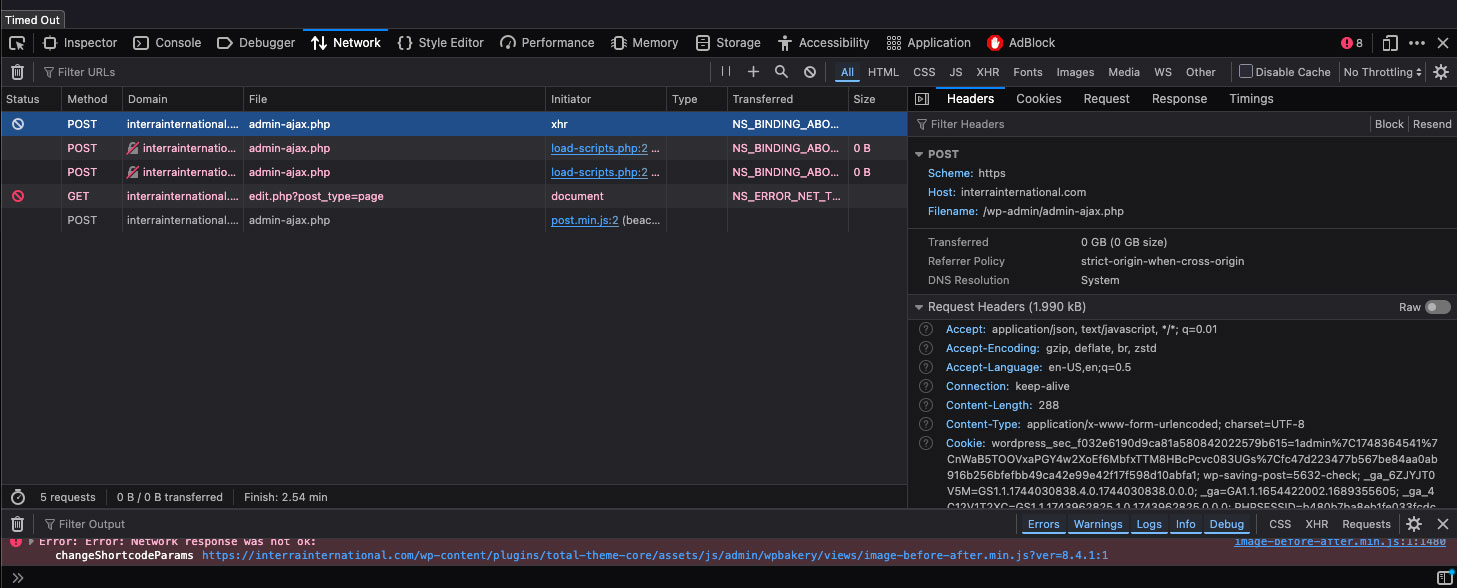
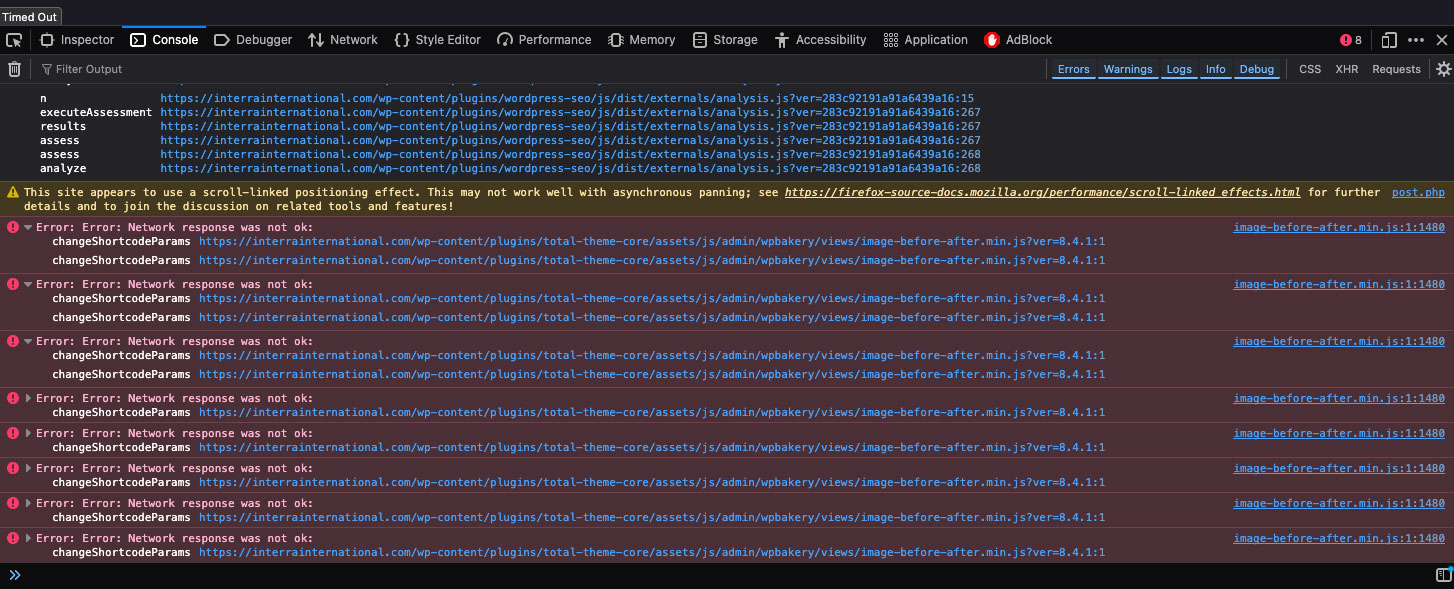
I am having an error with the preview showing up properly on the homepage of the site. I’ve been trying to debug without success. Whenever I try to load elements (like editing a text block), save it, or otherwise, it will often lose connection. When I try to preview the page, the preview is entirely wrong and broken. I check out the page in the browser using developer tools and see this:
https://interrainternational.com/wp-content/uploads/2025/05/devconsole_2.jpg
https://interrainternational.com/wp-content/uploads/2025/05/devconsole_1.jpg
As far as I can tell, this is only happening on this page which uses that image-before-after in wp bakery. Should I not be using that?
Thanks! J
Hi,
I did, thank you. I hope you did as well
It’s hard to know what’s going on with these screenshots.
The Before & After Element sends an AJAX request so it can grab the images and display them in the backend for easy reference: https://a.cl.ly/NQumpWAp (which you can see should be working without errors)
It sounds like your server is either blocking the request or there is some sort of error causing the request to break.
Can you first try clearing your browser cache? Unfortunately WPBakery doesn’t use proper version control on these files so they use the WordPress version at the end of the file which can cause caching issues if you update WordPress and then update the Total Theme Core plugin and these files have changed at all.
If clearing the browser cache doesn’t work, can you check your server error logs to see if anything is recorded in there that can help troubleshoot the issue?
- AJ
Hi AJ – yes I’ve cleared caches. I’m working on troubleshooting this and checking for error logs. I’ll get back to you when I find something. Thank you.
Keep me posted!
ok – I cleared browser cache, I can find nothing in the logs and tried with different browsers. On the homepage I use the ‘Tour’ element which is vertical tabbed content. If I click on the text block in that tabbed content, that’s when I just spin into oblivion. Any ideas?
Typically when the WPBakery element just spins indefinitely it means there is a PHP or server error. These should be recorded in the logs. If they aren’t being recodded in the logs, then it isn’t a PHP error and it’s going to be a server issue.
Is your site hosted on Godaddy by any chance?
You may need to add this fix to your site if so: https://totalwptheme.com/docs/fix-backend-issues-on-godaddy/
I see your support license is expired so you can’t submit a private ticket, but I can send you a direct email if you want me to log in and have a look. I had a look in Helpscout (which we use for tickets) and found several old tickets from your username are you still using the email formatted like such: jxxase@xxxxxxnsterxxxia.com ? I’ll send you email there if so otherwise if you want to provide me a different email address I will contact you that way.
- AJ
Hi AJ – thanks so much. Yes that is my email. I checked my .htaccess file and it already has:
# BEGIN Line too long fix
<IfModule mod_substitute.c>
SubstituteMaxLineLength 10M
</IfModule>
# END Line too long fix
It’s only happening on that one area with the ‘Tour’ element. Super strange.
I will check the logs again later to see if I can find anything.
Thank you!
I’m sending you an email right now if you want to share logins so I can look.
- AJ
Hi AJ
I’ve loaded a menu into one of the sections on the homepage – it’s just below the 3 audio options here: uantumleapgolf.com
I tried various of the Total menu elements that we have avaiolable. But i’ve not really been able to find what im looking for and the menu looks a bit basic/poor.
If you look here, you’ll see a contact button that i copied from one of your Total section templates: https://quantumleapgolf.com/contact/ – looks great
Question: 1. is it possible to create a menu made of buttons the same as the one on my contact page? 2. if not can you recommend another option that will look better? And behave well in mobile format.
Thanks for you help again. I trust all is welll with you and look forward to your reply.
Thanks Tony
Hi Tony,
The horizontal menu element (which you are using) is intended primarily for header style menus where you wouldn’t have items that all look like buttons. If you want all the links to look like buttons you have a couple options:
1. You can use the Navigation Bar element which allows you to select the button style like such: https://a.cl.ly/xQumEEPZ
2. If you rather have multiple single buttons you can use the flex container and insert your buttons, but then you will need to style each one separately. With this setup you will have a little more control over the layout though: https://a.cl.ly/o0ulJJbr (although in the upcoming Total 6.4 I have some new options coming to the Navigation Bar element for stacking buttons on mobile)
- AJ
Thank you AJ. Option 2 = perfect!
Hi Aj,
i think we’ve found a bug in the following file: Path: wordpress/wp-content/themes/Total/inc/deprecated.php Line: 1439
The function wpex_excerpt() causes layout issues on blog posts unless we wrap it with a condition to check if totaltheme_post_excerpt() exists. Here is our adjusted version: function wpex_excerpt( $args ) { if (function_exists(‘totaltheme_post_excerpt’)) { echo totaltheme_post_excerpt($args); } }
Without this conditional check, the blog post layout breaks and displays incorrectly. Could you please confirm if this is a known issue?
Thanks and BR
Hi,
Sorry for the troubles!
It should be “totaltheme_get_post_excerpt” not “totaltheme_post_excerpt” that’s the issue. I’ve patched this for the next update, thank you for letting me know!
But, the real issue is that in your child theme you must be overriding a file that is using the deprecated wpex_excerpt function. Because of how Total is coded you should never have to override files via a child theme. If you want to let me know what modifications you were making I can help you with a solution that doesn’t require overriding the file, this way you never have to worry with theme updates.
When you override files in your child theme, you should compare each overridden file with the latest version from the parent theme whenever the theme is updated. This ensures you catch any changes and update your version accordingly. However, this process can be tedious and time-consuming, which is why overriding theme files is generally discouraged. Instead, it’s recommended to use hooks and filters whenever possible so you don’t have to do this.
- AJ
Thanks Aj, i’ll check that out. 
Hi Aj,
could it be that code?
wordpress/wp-content/themes/Total-child/partials/blog/blog-single-related-entry.php
Line: 78
<?php
    // Display post excerpt
        if ( wpex_validate_boolean( get_theme_mod( 'blog_related_excerpt', true ) ) ) : ?>
            <div class="related-post-content wpex-clr">
                <div class="related-post-title entry-title wpex-mb-5">
                    <a href="<?php wpex_permalink(); ?>"><?php the_title(); ?></a>
                </div>
                <div class="related-post-excerpt wpex-text-sm wpex-leading-normal wpex-last-mb-0 wpex-clr"><?php
                    wpex_excerpt( array(
                        'length' => get_theme_mod( 'blog_related_excerpt_length', '15' ),
                    ) );
                ?></div>
            </div>
    <?php endif; ?>
    <?php endif; ?>
We dont want to show the excerpt on related-entry. Thanks
Hi,
If you just don’t want to know excerpts on the related items you can simply go to Appearance > Customize > Blog > Related Posts and scroll to the last setting “Excerpt Length” and enter “0”.
So, if the reason you were copying that file to the child theme was just to hide the excerpt, you can use the customizer setting instead then you can delete the file. I recommend renaming it to something like blog-single-related-entry-BACKUP.php – just incase there were other mods you forgot about and you need to put it back to do more checking.
- AJ
Hi AJ,
I have the following issue with editing pages in WPBakery Page Builder on one of my sites.
When editing in the backend, the window only shows a portion of the existing content. If I switch to the frontend mode, the entire content is displayed.
How can I fix this error? It is important for me to edit pages in the backend.
If you have a pricing element on the page, this is a known bug caused by the last WPBakery update.
Even though it’s a bug caused by WPBakery I was able to patch my Total Theme Core plugin. The fix is in the upcoming Total 6.4 update, but you can actually just log into WordPress and go to Plugins and delete the Total Theme Core, then go to Appearance > Install Plugins and re-install/activate the Total Theme Core Plugin. I’ve patched the live version so you can easily get the fix and not have to wait for the official update.
If you have any issues with that please let me know.
Sorry for the troubles!
- AJ