59155 comments found.
Pre-sale question. Why is your reveal coupon button’s affiliate site opens in new tab on left side instead of right? and then it opens in right tab when click on go to website on popup.
https://redeal.lookmetrics.co/Any options to make affliate link not open in left new tab but just open when click on “Go to website” button instead?
That’s correct, this logic is on all coupon sites because it gives guarantee that user get cookie and you get comission. There is no other possible way to ensure this

How to Install Updates by wordpress
How do I remove the excessive white space that is showing up on the product listing?
https://ibb.co/XfXj6f8dthis space is reserved, You can use other product design for loops. You can change them in theme options – shop settings – design for archives
hi,i want to purchase rehub:multivendor theme so iam new to this woocommerce iam learning from this,please give some discount for buying this theme.
Hi, you need to wait Black Friday deals
hello im not able to register the product i just bought. i got this error any time i try cURL error 7: Failed to connect to lookmetrics.co port 443: Connection timed out
You need to ask your hoster to open remote connections, at least to lookmetrics.co
hello here is the hosting reply, i tested via PHP curl.php and didnt work. In relation to your request on the Curl calls from webdeal.uk we would like to inform you that in general the service is active, curl calls are possible with the file_get_content or wget function via the OVHcloud shared hosting. Please note, however, that the shared hosting uses a firewall that is managed by OVHcloud and cannot be customised. It could therefore be that this request is intercepted and blocked by our firewall, in which case it is not possible to make an exception. Alternatively, the problem may be the recipient’s server that may have blocked incoming connections from OVHcloud hosting. For example, the Hosting outgoing IP may be blacklisted, and the receiver blocks these requests because they are suspicious. In this case, we suggest you contact the recipient of these web calls and make a verification. Also, it is recommended to use curl via a PHP script using a URL, for example: https://mydomain.com/curl.php. This approach is allowed and allows you to use the cURL function without domain restrictions.
try now
sorry still not working
you can send admin access privately
Is there any option to create Affiliate Stores and Deals in Bulk? Like an option to upload it via Excel Sheet?
after install you theme and import demo content in WooCommerce cat page and checkout page not showing header & footer menu. is it have any guide?
it’s correct, you can change page template in page attributes when you edit cart page
Hello, thanks for your guidance. I found the Page Attributes option after switching from Block Editor to Classic Editor, and now the header and footer are displaying correctly on the WooCommerce pages after setting the default template.
However, I’m facing another issue. I reset WordPress, enabled Multisite, and re-installed the theme. When I enter my Envato username and license key, the theme does not register. It shows this error:
“cURL error 28: Connection timed out after 10003 milliseconds”
I tried multiple times and also tested without Multisite, but the same error appears. Interestingly, the activation works on localhost, but not on my live site.
My site domain: https://noorwork.com
Screenshot: https://prnt.sc/s1nkCBl7cG9I
Could you please help me resolve this issue?
Thank you.
try now
I am using the Greenshift table. In this left/right text alignment is not working, but other features are working fine, like case upper/lower case.
https://snipboard.io/xHR2Xo.jpgyou must add design to cell, not to text itself
Why there is lack of support? I asked for support multiple times and some of my questions regarding support hasn’t been answered and sitting at 7 days now…
Please, do not post tens of ticket requests, we can’t handle them at once, wait when ticket will be in work
I need help to set up my homepage of the ReHub website to show exactly as the your demo theme, I have downloaded the demo them, but I don’t know how to edit it, do I have to do it in Elementor, or just use the default wordpress editor? please advice. thanks, Omar www.zimbabox.com
It depends on demo that you used. Usually it has two version: Greenshift and Elementor
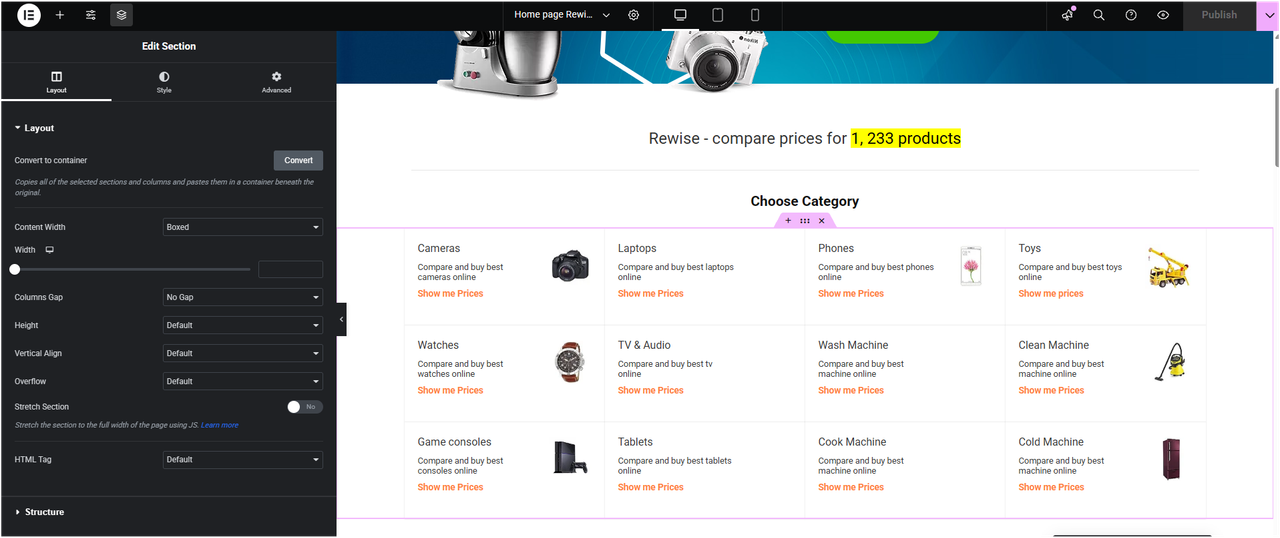
https://rehubdocs.wpsoul.com/docs/rehub-theme/page-builder/But, you I don’t know what you mean by that (Greenshift and Elementor) I have Elementor installed on my Wordpress, and what is Greenshift ? Do you have video tutorials on how to edit the homepage, product page, and the shop page? for example I don’t how to edit this box of the Categories as, they came with the theme, I didn’t create them! https://i.postimg.cc/j2ZFhw8q/Screenshot-2025-11-08-221702.png
You can check my link above. it has all information. If you want to use Elementor
https://rehubdocs.wpsoul.com/docs/rehub-theme/page-builder/how-to-select-elementor-pages-on-demo-import/I have multiple “Homepage – Elementor” pages showing up (see screenshot: https://imgur.com/ur89xxQ
Even when I open the active homepage in Elementor, I still can’t edit the block that contains the categories. https://i.postimg.cc/j2ZFhw8q/Screenshot-2025-11-08-221702.png
Honestly, it would be much easier if you could create a short video tutorial showing how to edit any ReHub demo homepage using Elementor — that would save us a lot of confusion!
what exactly you can’t edit? It’s predefined block and it shows data from product categories on your site
I need to edit those three places of the homepage: https://postimg.cc/BLtbThfg
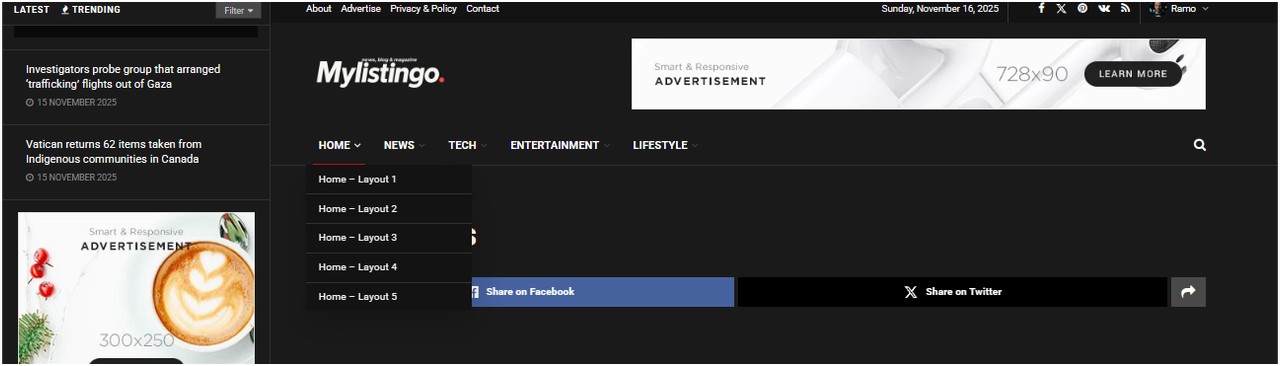
And I need to know here to edit this menu on home page https://i.postimg.cc/6QzHTC6V/Screenshot-2025-11-16-220509.png
You can edit menu in Appearance – Menus
You can edit homepage when you open it in page builder and then click on section that you want to edit
Hello, how filter author on deal grid, list and news block in recash, for example for show only admin posts?
there is no option to show only admin posts. You need to modify file taxonomy-dealstore.php for this. You can ask chatgpt and feed content of file
I am unable to register my Rehub WP theme with Username: VijayPravin and Purchase code and got the below error
Envato purchase code is invalid, please contact support!
please use own username
Hello, I can’t register, says to me : cURL error 7: Failed to connect to lookmetrics.co port 443: Connection timed out.
Thank you very much for your help
Andreas Papazian
is it working now?
How do I rearrange these pros and cons blocks into two columns below the category ratings? I want the ratings to take the whole row and move both pros and cons below into two columns.
https://ibb.co/DsMzD6VPlease send link
This product is using Rehub directory listing layout.
.single-product .wpsm_pros{clear:both:width:45%} .single-product .wpsm_cons{width:45%} .single-product .pt20.pb20.floatleft.wpsm-one-third{width:100%}
Insert code in theme options – general – custom css
The “Featured section” block uses smaller thumbnails not 16:9, as a result it zooms in on the 16×9 images used as the featured image for posts which makes the images look absolutely horrible on this block. Anyway to manually change the images? Or to set it to pull a specific image? It makes all images look blurry.
function that is responsible for rendering is
wpsm_featured_function
in shortcodes/module_shortcode.php
Another clipping off the top of text in product review section for product in the WooCommerce shop. Please assist me with finding solution to get rid of the text clipping on the top.
https://ibb.co/99Mvt4cLStill awaiting for support to resolve the clipping issue that this theme has on text for both product review section and single post with title inside big image template.
Resolved, figured it out on my own.
In this sing page “videoblock” we have a trigger the catch the featured image post, when we click it loads the video embedded…
See https://canaljms.com/usei-ray-ban-meta-gen-2-1-semana/
How should I change this to show the video and not the featured image as a trigger to click and reclick after…
you need to customize file inc/post_layout/video_block.php and there is no quick code that I can share with you for doing such logic
OK
How do I fix the clipping on the top of the text in the single posts? I am using Title Inside the Image blog post type and these text has their top clipped.
https://imgbb.com/Still awaiting for support to resolve the clipping issue that this theme has on text for both product review section and single post with title inside big image template.
Resolved, figured it out on my own.
Hi
I tried to register the theme with the Licensor’s Author Username & Item Purchase Code, but got the below error message
Envato purchase code is invalid, please contact support!
please use own username