38438 comments found.

ready!, home – basic + nectar shorcodes
ciao!
Glad you found the answer 
Cheers!
Hi, Excellent work guys.
Just one quetion: how can i do my home with the “home – portfolio eye candy” style?
it´s an theme option?
thanks
Hey juanenenvato, you can add that portfolio through the shortcode generator
Cheers!
Hello!
Please take a look on the site http://nylegends.se.preview.citynetwork.se/For some people the letter A is bigger than the rest letters? Do you know what it can be?
Regards Johan Nilsson
Hey Johan!
I can’t see the letter “a” being any bigger than the rest – does it happen in every occurrence of that letter or in a specific location?
Cheers
Would this theme home slider video still work on iphone, android?
Hey jinjodesign, yes just check it out on your mobile device – http://themenectar.com/demo/salient/home/home-basic/
Cheers
Hey snapsort, without getting a URL to see that happening it would be pretty hard to say the cause of – have you already checked for plugin conflicts?
Cheers
Is this only for WS ? or HTML ? has well
Thanks P.S Very nice
Hey Flame19, Salient is only available for WP at this time.
Cheers!
Hi, Do you have a tutorial on building the home landing page, I don’t want to upload the dummy text, but I am looking for a way to build that recent work carousel that has no gaps between the thumbnails? Thanks
Hey lynton-fox,
if you just want that one page’s shortcode setup open a ticket on the support forum and i’ll give it to you
If you’re just wondering how to get the full width carousel at this point, all you need to do is open your shortcode generator and select the checkbox for fullwidth + make sure you have the alternative project style selected. If you don’t have options for that, make sure you’re on the latest release of the theme.
Cheers
Hi, i need to use the h1.light, h2.light, ... in the page form, but don’t work correctly. Do you help me please?
Hey ygesit, please share a URL where the classes are not working so I can see what you mean
Cheers
Sorry, my english is bad.
Example to use CSS style: http://www.yges-lab.com/screen/screen-contact-form.png The CSS style i need to use: http://www.yges-lab.com/screen/screen-style-css.pngThx for your support Davide
This is how you use a css class:
<h3 class="light"> Light text! </h3>
Cheers
I have another question: see the file. You can see the accented letters.They do not appear in light.
http://www.yges-lab.com/screen/preview-font.png
You’re welcome!
In Salient -> Typography Options -> check the box for “Load Ext. Characters in Default Font”.
Cheers
Yeahhhhh!
I like this template, compliment! I have to ask you another question: i need to: 1. insert icon/image-icon before title (ex.: a tavola) of toggle; 2. to up size font title (ex.: a tavola) of toggle.
Screen to example: http://www.yges-lab.com/screen/screen-toogle.pngYou can help me? 
Hey again!
1. You can try switching to the text tab on your editor and using an img tag in the title attribute like[toggle title="<img src="your-img-src.jpg" /> Toggle Panel"]
2. You can add this to your custom css box to effect the size:
body .toggle h3 a {
   font-size: 16px!important;
}
Cheers
Stumbled into a little problem with the portfolio page, I changed the Items Per Page to 6 and enabled portfolio pagination and numbers but when I test it on the updated page, when clicking page 2 it goes to a 404 page instead of displaying the remaining items.
Hey BeyondTheMurk,
If you’re using the extended pagination option and have a custom permalink structure, you must enter in a slug in the portfolio options tab to anything other than “portfolio”. e.g “work” or “projects” would be fine. Once you’ve done that just head over to settings > permalinks and resave your permalinks to finish it up.
Cheers
Congratulations on an elegant and beautifully designed theme. I am a beginner so please excuse the questions if the information is available elsewhere. You have provided a nice selection of customised icons but is it possible to also insert custom designed icons? Also, is it possible to insert a ghosted wallpaper image on the main white panel background?
Thanks a lot angel15!
1. If you want to use your own, just use image icons which can be inserted into your editor through the add media button or through an image with animation shortcode.
2. Yes, but it would require custom css – if you need more help with that please open a support ticket here: http://themenectar.ticksy.com/
Cheers
HI..First of all your THEME is really great!!!
Wow!!
I have a little question about the blog main page..even if I have set it to show just a part of the article with a sidebar..the result is that there is no sidebar and It shows me full articles..how can I do to solve this problem? Thanks a lot!
Fabio
Thanks a lot Fabio!
Have you selected a sidebar layout in your blog options tab inside of the theme options panel? If you can share your URL it would be easier for me to troubleshoot your problem
Cheers
Yes..for the sidebar now it’s ok! Thanks..but I still have a problem with the “full article” in the blog main page instead of a resume..This is the link
http://www.magenta-lab.com/blogThanks a lot!
Fabio
Hey Fabio!
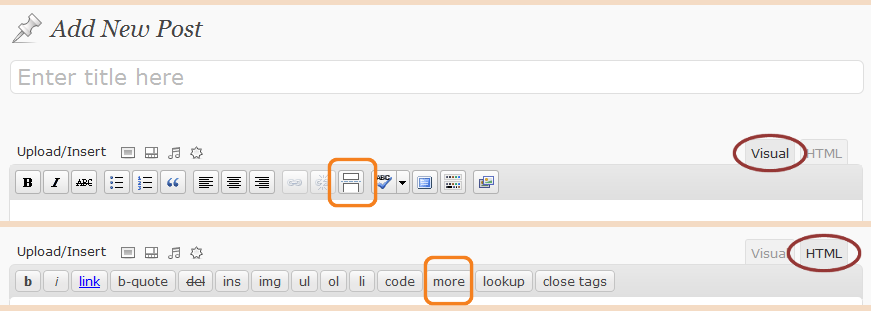
you have three ways of accomplishing that.
- By inserting a “more” tag into your post http://www.connexins.com/wp-content/uploads/2010/12/read-more-tag.png
- By filling out the excerpt box.
- By enabling the auto excerpt option in the blog options tab in the theme options panel.
Cheers
Thanks a lot! With more tag now it works :))))))))
Great to hear!
Hi, are progress circles included in the shortcodes? And can demo content be added in the page builder? Thank-you.
Hey BlueSkyAhead, there’s no progress circles – just progress bars. Also the dummy content is included as an .xml file to import is you choose
Cheers
Hi, is it at all possible to change the paramaters on Vimeo so that they adjust to the full width of the slide? I have attempted to change the width and height to no avail . . . is there any way you can assist me? It’d mean the world to me. Looking forward to hearing from you. Cheers!
Hey jeremydarko!
Are you trying to make your embed expand the full width of the container (max width of 1100px) or scale to the entire browser window width? The latter will require a little more css.
Cheers
I just wanted to know if it is possible to embed the entire video how you have it displayed in the Salient demo.
Hey again,
the only fullwidth videos displayed in the Salient demo are the ones in the Nectar Slider, which are not from video emebeds, but from self hosted uploads – there’s no way to have a Vimeo embed span the full width of the screen by default without custom mods.
Thanks for your swift reply. Perhaps if I was to rip the video & convert it then it would be possible if not then can I use an After Effects project?
You’re welcome
If you can download the video from Vimeo and convert it to the required filetypes (mp4 & webm) then yes, it will work the way you need it to.
Cheers
Hello,
I’m wondering why my portfolio eye candy isn’t showing up on my home page? Any thoughts? http://lousbrewcafe.com
Thanks! Daniel
Hey Daniel, are you using v2.5.1? I’m seeing some markup that suggest you’re not on the most recent release which contains the new portfolio shortcode.
Cheers!
Yes I am using 2.5.1 any ideas?
If the nectar_portfolio shortcode is not processing, than your shortcode-processing.php file must be outdated. Can you try to delete your current theme completely and upload a freshly downloaded one?
Cheers
I uploaded the dummy data. Here is the “Home – portfolio eye candy page” http://lousbrewcafe.com/?page_id=669
It is acting very strange. If I delete the theme and reupload it will I lose all of my Posts?
Check out the original link again too. The short code is gone, but none of the items are showing up.
In the original link, the shortcode is still there and not processing but hidden beneath the slider – you can see it in the code when inspecting the source.
If you delete your theme you will not lose any of your content, you’re supposed to be deleting the theme every update before uploading the new.
Cheers
The video is not playing in the Nectar Slider. I followed your PDF guide and watched the video for both. I added the videos and the placeholder image and its still not playing.
I even tried videos that are working on another site I did and they are still not playing. What should I do? Thanks.
Hey liquidmindcreative, please supply me with your URL where they are failing so I can see what your issue is
Thanks
Hello! Is there any way to put the parallax slider in the pages of portifolio?
Hey animapix!
Yes, you can use it both on the main portfolio page or single projects pages. If you want it on the main portfolio page, just create a new page, drop the nectar slider shortcode in and then place a portfolio shortcode right underneath it
Cheers!
Hi,
Why if I set my Portfolio to full width and Project Style to Meta on Hover – I don’t get the Project title displayed on iPad or iPhone – if you touch the project thumbnail it takes you directly to the project so you have to second guess what the project is about…
Am I missing a setting? Same happens on Recent Project slider on Home Page – no hover functionality on mobiles.
Cheers
Hey b1b,
that’s how it functions by default since hover events are ignored on mobile. I’ll look into possible alternative solutions for the future releases though
Cheers
I assumed that much however I was hoping you had some tricks up your sleeve:) The new wide screen layout is so neat without gaps between the thumbnails but clients need to see some basic info – they care less about the pretty pictures and perfect outlays :((( anyway I’ll watch this space to see what you’ll come up with.
Yeah i’ll have to play with the javascript and see if there’s any good way to solve it – if you’re interested in a css only mod maybe see if your client would like the titles to display all the time over the images on mobile and maybe have the hover color slightly showing as well to make the titles always legible.
Cheers
...one more question: Is it possible to add a “read more” hyperlink to the post-preview widget?
Hey again,
if you’re referring to the actual widget and not the shortcode, than that would require modding as well.
Cheers
Hi, is it possible to deactivate auto-play for videos in the slider?
Hey lifeofbenschi, the video backgrounds are meant to be used as a design element rather than an informational video so that is not an option by default and would require customization. If you have an informational video, the nectar slider supports opening them in a lightbox link via button or the home slider allows embedding of a player right in a slide.
Cheers
Hey, I have one question. Is it possible to have the google map colored so that it fits better to the rest of the page: take a look at this: http://theretailer.getbowtied.com/demo/pages/contact/
this would be great!
Hey benzrecordings, right now that would require some additions to the map script, but it’s completely possible if you’re comfortable coding a bit
Here’s the documentation on it https://developers.google.com/maps/documentation/javascript/styling and you would implement that into the map.js file inside of the js folder.
Cheers