6674 comments found.

How do I add benefit items to the membership options? As in what they can/cant get (outside of the default items).
Hi, please see this topic: http://seventhqueen.com/support/forums/topic/membership-levels-price-page
Hello SeventhQueen,
Before I buy your nice theme  , can it run together with UberMenu ? because I need it for sub sub menu.
and with also work with search and cart icon/animation?
, can it run together with UberMenu ? because I need it for sub sub menu.
and with also work with search and cart icon/animation?
Hi, If you use ubermenu it will probably replace the search and cart info.
Hi,
Quick question – is it possible to use raw html code with this theme or via Visual Editor? I am looking to use various html code but want the actual code to display and not the rendered version.
Many thanks,
NP
Hi, if you want the code to display instead of being rendered then wrap it in pre or code tags
What is the theme of storage space and all the plugins. My hosting does not allow to install the whole package, writes that this rpevyshaet 64mb
and another where can I find the license number
Hi, the theme has around 15MB. Other plugins could have around 40 MB.
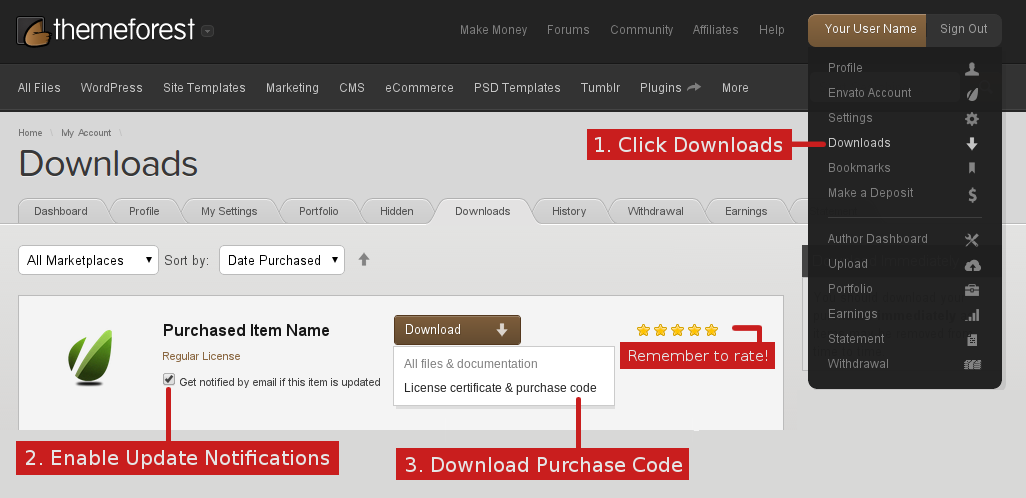
The license number is in your Themeforest – Downloads section. See http://seventhqueen.com/support/files/purchase_code_800.png
Hi. Is there a way to limit Wordpress memory (RAM) usage when using your theme? Our hosting provides only 64M (by means of the memory_limit option in php.ini) and this seems to be not enough.
Depending on the plugins used the ram memory consumed increases. get rid of some plugins if you want to stick in that value
how can i show activity of a certain member by shortcode??
Hi, right now that is not possible but it seems like a good idea and we will take it into consideration.
Hi,
One question, the portfolio is collective? I would like users to take the portfolio profile, it is possible?
Thanks
Hi, the portfolio right now is only for admin. You could allow other users to create portfolio entries using a front-end submission plugin
This would be very interesting. there is this plugin you said? Where to purchase this plugin? I need that all users can create your portfolio. Temporarily I had to turn the blog into portfolio … is the only solution I’ve found.
I can’t figure out the Google Map on the Contact Page. I click on the link that takes me to Maps Engine but then I get stuck.
Do I search for my location? Then what? This is no “Share” option on this page. Your documentation needs updating.
Hi, you just put the link that you get from google maps -> embed map: http://cl.ly/ZEO9
You copy the whole <iframe code
The link in the instructions of your theme take you to a google maps developer page and not the public maps.google.com. FYI
Sorry for the late reply. It works now? what instructions, where do you mean?
The link underneath where you put the iframe code. https://www.dropbox.com/lightbox/home/Public?select=Edit_Page_%E2%80%B9_Ukiah_Photography_Club_%E2%80%94_WordPress.png
I need some help.
I modified the homepage but when I update it, it will rename the page name to something else. Do you know why this is so?
Hi, maybe there is another page with that name. Check also in trash
Thanks. I found that the page is still in the trash.
Hello, I have a problem . The portfolio is not displayed 404 Erorr . What can this be? Or what that can be? W3t Plugin ?
The site: https://apfel-stiel.de/ Portfolio test site: https://apfel-stiel.de/apfel-stiel-portfolio/
Cheers, Michael Fertig http://apfel-stiel.infook , sorry, I solved the problem . There was an error in the link structure . You may not custom permalink on , but on
Cool
Hi.
How do I edit the CSS without install the Kleo Child theme. Its like it is not working very well with Kleo Child. I Have a lot of trouble on my site Legatbogen.dk. Some of the CSS code I have written in Kleo Child does not work.
Can I upload a stylesheet to the Kleo on FTP or would that be a bad idea?
Hi, you can add your custom css in WP admin – Theme options – General – CSS
How I can turn off posts animations?
Hello, if you want to disable post grid animations you can edit this template page-parts/post-content-masonry.php and remove the following classes: “animated animate-when-almost-visible el-appear”
Hope that helps 
I’ll purchase this theme if it had a Load More button on Masonry Blog final and if I could change the the post-meta view on single. You may be available this in future updates? Thanks!!
Hi, we will consider adding this in future updates. Right now post meta can be disabled globally for single
Wow, this thing is not easy to setup. How do I import the Community site into mine so that I can then modify to to my needs?
Hi, you have the 1 click install functionality in WP admin – Appearance – KLEO Demo data.
Hello. Is it possible to create custom content for the registration page? Like adding text and images before the content?
Hi, that is possible only by editing this template under kleo/buddypress/members/register.php
Can a member create an actual post and even into a specific category etc or can they only post to an activity stream which I don’t find very useful. Having them post news items and articles is much more powerful and visible.
Thanks
Hi, You can try and use Social articles plugin
Thanks
Hi guys – 2 questions:
1. I tried what is shown in your support documentation, to get live notifications. They work. But the bubble doesn’t come up showing a notification (like it does on iPhone/Facebook etc). It is supposed to show isn’t it? If so – how do I get it??
2. How do I get the activity feed to show Updates by default? Rather than everything?
Thanks!
Ash
Hi, 1. There should be a bubble if you have unread notifications
2. To show other by default you should search some buddypress related resources, maybe the buddypress site
I know there should be a bubble – I’m asking why it wouldn’t show as it’s not coming up on testing.
I have done a search and can’t find anything, hence asking you to see if you have any answers anywhere.
Thanks.
Can someone please advise?? None of these things are happening.
Also – for some reason my users aren’t able to create their own groups. I can’t find the functionality to make it happen. Can you advise on this too??
I think I’d be happier giving you a test log in to check and fix if it’s easier. Let me know what is best.
Thank you.
OK, so the bubble looks like this if you have new notifications, if you don’t then no bubble: http://cl.ly/ZECE
If you enabled it for your users from Settings – Buddypress – Settings then here is the link: http://cl.ly/ZENE
I know what it should look like. But they’re not showing up. This is the problem. I am testing and have two accounts so I can give myself new notifications and am checkin g when clicking that they’re showing on the drop-down section. But the bubble is not showing when I have notifications…...
Also, I know what groups look like so didn’t need that image – I need to know what the section where the setting looks like. I’ve been to settings>buddypress>settings and changed everything that looked relevant, multiple times, but no such luck.
Please help and advise how to fix, not what they should look like when fixed. Thank you!
Hello – I’m looking for a theme for a sports club and this one is top of the list I just have a question regarding memberships.
We would want memberships to be free as we take payment a different way – yet to catch up with the times haha – but I suppose we would have two types of free members:
1. being a general visitor not yet accepted as a club member therefore restricted pages and, 2. a full member, access to all pages.
Could this be done via your theme and paid membership pro? I just see different payment levels at the moment.
An alternate way to doing this I suppose is by having an ‘invite code’ that’s required to let people sign up, then we could restrict the sign ups to only current members.
I look forward to hearing back and hopefully making a start. Thanks!
Hi, this could be done but I don’t think PMPRO has a functionality to accept a member. You could have one membership only where you let access to it and it will restrict the access to members not having that a membership. If you find a better membership plugin to suit your needs, you could use that.
Cheers
Hi, thanks for your response. For the benefit of others who want something similar, I found what is called a ‘discount code’ in the Payment Pro Add Ons which does my alternate method which works okay
Great. Thanks for sharing
Can you guys help me change the font color and background color on the buy button in the shop?
I know its possible to change colors in Styling. However when the font color is not changed with the background color, it looks a bit weird
The color of the buy button has a big effect on sales – strangely enough
li.product figcaption .shop-actions > a {color: #fff !important;}
.woocommerce ul.products li.product figure figcaption {background: #333 !important;color: #fff !important;}
That code changes the bar that appears under the products on archive pages.
well yeah. what add to card button you want? print screen please
The one on the single product page.
.single_add_to_cart_button.button {
    background: none repeat scroll 0 0 red !important;
    color: #fff !important;
}
Another question: The email social sharing option currently sends the entire text of the post within the email. Is there a way to default that to only send the link?
Thanks!
hi, you will need to edit this template and adjust it by removing the body attribute: wp-content/themes/kleo/page-parts/posts-social-share.php
Hello, I was wondering how to remove the left and right arrows on the blog single post page. You know those arrows that go to the next and previous post.
Thanks!
.pagination-sticky {
    display: none;
}
thanks!

This item was featured on ThemeForest

Power Elite Author
Contact the Envato Market Help Team