3273 comments found.

Hi,
Great theme. How do I make the revolution slider Caption loop, as the feature is stated in their website. I would like it to loop this way.
http://themeforest.unitedthemes.com/wpversions/brooklyn/business/Of course, that is not a Rev slider. I would like to do that effect with Rev slider in my Webpage using this theme, as this 1 provides full width.
Please advice. Tq.
Hello! I have an issue with on sale products. I use the product shordcode [sale_products per_page=”12”] but the scripts and styles loads inproper. I also used product carousel – the same result. Have a look at the page: http://alza.az/for-sales/
Could you help me with this?
Hi
The woocommerce shortcodes are not supported by our themes, you can use our own developed Products Shortcode or Products Carousel to select On Sale products:
http://cl.ly/aFmm
Arlind
Products shortcode helps. Thanks!
Great 
Hi,
Thank you for the thème, it’s great ! Please, could you answer to my different questions ?
> SHOP - How could I order the products by newness by default ? - When I clic on cart icon, at the very top, I’d like to traduce “view cart” “checkout” and “cart subtotal”. Is it possible ? - How can I chage the titles of pages “Shopping Cart” and “Checkout” ?
> FOOTER - I’d like to add social icons + Paypal logo on the same level as footer menu. Is it possible ?
> WISHLIST (YIT plugin) - Is it possible to allow no-logged user to add products to his wishlist ?
Hello,
1. The product are ordered by newest ( you can read more on WooCommerce documentation site )
- The cart icon on header of the page is used only to show minimal information, and i’m afraid that is not possible.
- To translate or change theme strings please install Codestyling Localization plugin which allows you to change theme strings without modifying the code. So go to Plugins > Add New, search for Codestyling Localization then install and activate it.
After you install this plugin, go to Tools > Localization, choose Themes tab and click Edit (if there are no words in list, click Rescan and then click again Edit), search for the words you need to change and click “Edit” write the translation and click “Save”. After you finish changes then click “generate mo-file” button and your translation will be applied.
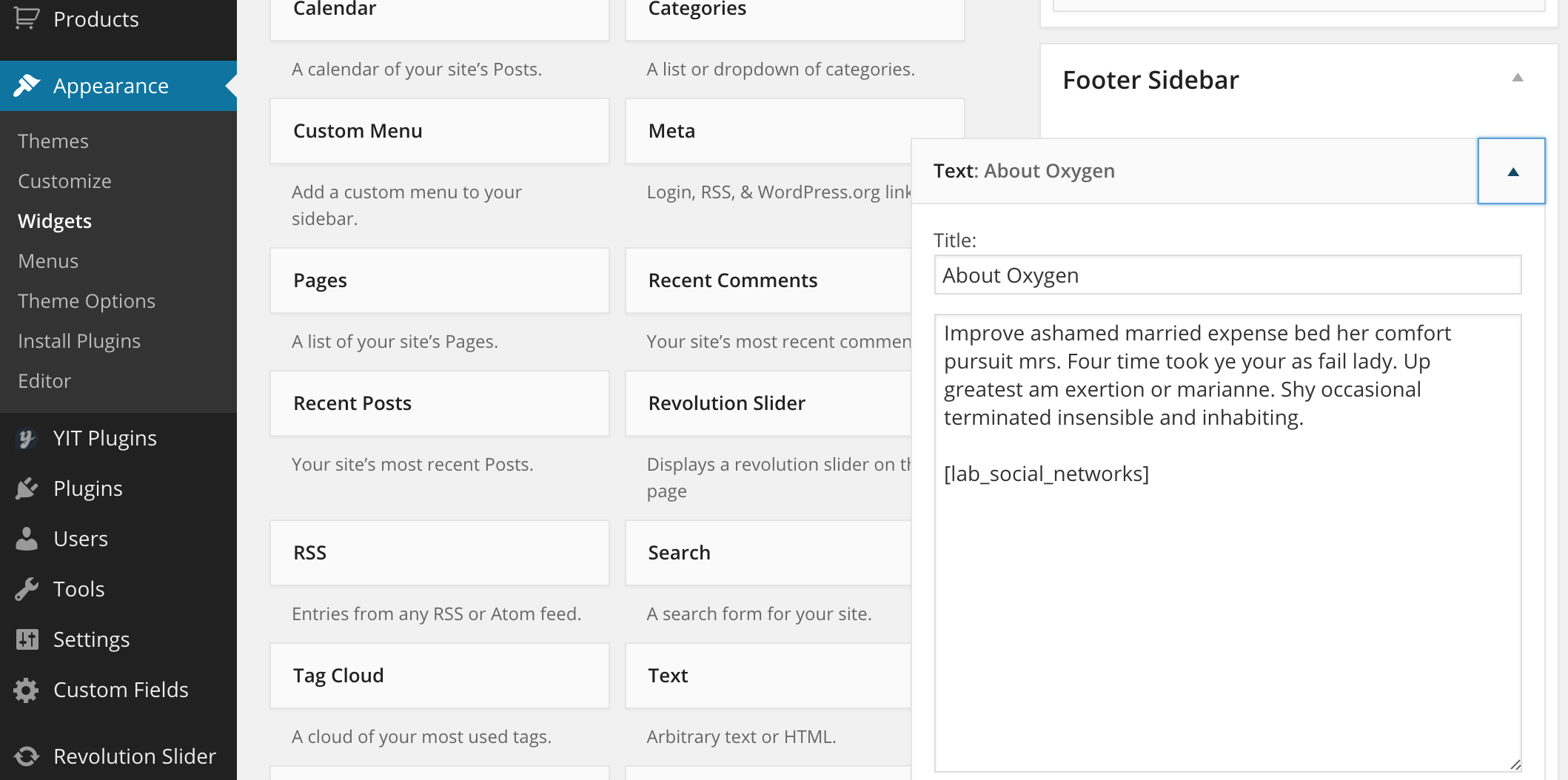
2. To add social icons go to Appearance > Widgets, and add a Text to Footer Sidebar section, on the box just add [lab_social_networks] shortcode, (this image will help you to understand that)
You can ad paypal logo by going to Laborator > Supported Payments.
3. That is possible by default
Kind Regards,
Ylli
Hello, I installed WP 4.1.1 after that do all steps from guide. When I try to import content I receive error that ‘THIS PAGE DOES NOT EXIST’.
I can’t import demo content 
Any Idea about this ?
Hi
Please try using One-click demo content installer located in Laborator > Demo Content Install, and before importing the content please check “Download attachments” box. This way it should work.
Arlind
‘The server closed the connection without sending any data.’
try to connect to : wp-admin/admin.php?page=laborator_demo_content_installer&install-pack=oxygen-demo-site&
and i retiv ‘THIS PAGE DOES NOT EXIST!’
Hi
Can you please send me the WP Credentials (username and password) so I will examine your issue and try to find where is the problem and the fix for it.
You can send your info via email using the contact form in our profile page here.
Please do not forget to include details of issue you are encountering, because we receive a lot of emails and I cannot remember each of them.
Arlind
done
Hi again
I’ve received your email and tried for an hour to import the demo content but unfortunately it was impossible without getting the 404 error.
You must contact host provider and tell them about your issue, this is common issue and saw some relate articles:
https://wordpress.org/support/topic/404-error-after-importing-wordpress-online https://wordpress.org/support/topic/error-404-wp-adminadminphpimportwordpressstep2
Arlind
Hello. Thanks for all your hard work!
I was hoping you could help me with a few issues.
1, I tried to edit the number of columns shown in mobile view from 1 to 2. I edited the code and it seems to follow bootstrap convention by assigning the product div a “col-xs-6” but they do not stack neatly as they should (http://beautyelixirs.net/shop). But if you look at the related products on a single item ( http://beautyelixirs.net/product/peace-deodorant/ ) in mobile view, you will see they stack just as I want, 2 per row.
Any chance you can help me fix this to where they stack properly on the shop page?
2 If I want to use the visual editor to add a slideshow below my shop page content (instead of stacked on top of it) how would I accomplish that?
3 When I add something to the wishlist, it says it is already there even though it isn’t (not a big deal, just wondering if this issue has been brought up and if there is an easy fix to it).
Thanks for the awesome theme and Excellent Service!
Hi nolaandy,
Can you please be more specific about your problem, and don’t forget to write us your site URL here.
And thank you very much for your kind words
Kind Regards,
Ylli
Thanks for your quick reply. Sorry it’s taken so long for me to get back to you.
http://beautyelixirs.net/shop is the website.I want the products to have 2 columns when on a small viewport (col-xs-6). The css appears proper for Bootstrap to stack right but a blank space is inserted.
Hi nolandy,
Please add the code below to Custom CSS
@media (min-width: 768px) {
  .shop-product-env .clear {
    clear: none !important;
  }
}
Cheers!
—Ylli
I have updated the site this way but it doesn’t seem to work. Any more ideas? Below is a screenshot of the saved code in Custom CSS. Screenshot at http://andy504.com/ss.jpg
The user is also able to scroll horizontally by a few pixels on a smaller viewport. Any help with that would be great too because I just want them to be able to scroll vertically.
Hi nolaandy, please add the code below to Custom CSS
.laborator-woocommerce .items .product {
  min-height: 500px;
}

@media (max-width: 768px) {
  .shop-product-env .clear {
    clear: none !important;
  }
}
As for the second problem, can you please add this code on Custom CSS:
@media screen and (max-width: 767px)
div[class*="col-"] .spread-2 {
  margin-left: 0px !important;
  margin-right: 0px !important;
}
it will do the trick
Cheers!
—Ylli
Hi Guys, one of the example page here has the social icons on the top menu. How can I do that? https://www.chalkedthreads.com/ Thanks
Hi
This user has modified theme files to achieve that. Here are directions for you to do the same thing:
Open wp-content/themes/oxygen/sidebar-menu-top.php and on line 164 add this code:
<?php
echo do_shortcode('[lab_social_networks]');
?>
Arlind
Fantastic, thank you!
2 more questions if you don’t mind:
Can the “Centered” header be sticky like the other ones? If so, I would be one of the happiest
The other question is can the social icons to be shown on the top left corner (just opposite of the CART ribbon) when using the centered header?
Thank you
Hi marouwing, that is not possible for the moment but it will be on pur to-do list for future updates
Kind Regards,
Ylli
Laborator,
I am getting this error on the wish list page
Parse error: syntax error, unexpected ‘endif’ (T_ENDIF) in /home/dnltoytr/public_html/wp-content/themes/oxygen/woocommerce/wishlist.php on line 1
here is the link http://dnltoytrains.net/wishlist-2/
thanks.. -Anthony
I am Also getting this notice on the site “Your theme has bundled outdated copies of WooCommerce template files. “
oxygen/woocommerce/cart/cart-totals.php version 2.3.0 is out of date. The core version is 2.3.6,
-thnaks
FYI : Oxygen version installed is 2.9.5
Hi Anthony
Yes we know these notices are appearing in the newest version of WooCommerce so we are working in the new update to release.
To fix the wishlist issue please download this file: http://cl.ly/aEal and repalce in oxygen/woocommerce/ folder.
Arlind
Hi, I get the following warning in the Wishlist page:
Notice: get_share_links is old since version 2.0.0! use share.php template instead of in /home/..../public_html/wp-includes/functions.php on line 3378
Thanks
Hi there, are you using latest version of Oxygen (currently 2.9.5), and Woocommerce 2.3.6 and YITH WooCommerce Wishlist 2.0.4?
If you are using latest version of the theme and plugins above and you still have problem, then please send us your site URL, and we will inspect that problem.
Kind Regards,
Ylli
Hi, everything is up to date. I’ve sent you a private message with the link. Thank you.
Hi Adrian
I’ve sent you the files. Please check your email
Arlind
I got this message when updating plugins: “An error occured when updating WPBakery Visual Composer: To receive automatic updates license activation is required. Please visit Settings to activate your Visual Composer.”
When i go to settings there is no option to activate your Visual Composer… What do i do now?
Hi
We will release new version of Oxygen containing the latest version of Visual Composer, because it is not possible to update VC automatically but only when we release new update.
Ok that’s clear. Thanks for your Ultrafast response!
i am having problem at openging the website i think there is something wron in plugin, i am looking for someone help
Fatal error: Class ‘Vc_Sort’ not found in /home/faheem/public_html/wp-content/plugins/js_composer/include/classes/core/class-wpb-map.php on line 185
this is my webstie link http://seleneclothing.com/Hi athernawaz,
Do you have the Visual Composer plugin installed on your site?
Kind Regards,
Ylli
Have you disabled your plugin and tried if this fixes the problem? If yes then send us an e-mail from the profile page on the right side and I will send you the files you need to replace.
Kind Regards,
Art
i am facing problem like Fatal error: Class ‘Vc_Sort’ not found in /home/faheem/public_html/wp-content/plugins/js_composer/include/classes/core/class-wpb-map.php on line 185
in opening website kindly suggest me something Regards, Faheem
Hi there, can you please post with the account you bought the theme, this way we can verify that you’re a real customer as we do not offer support to users who doesn’t have “Purchased” badge.
Hello, I just updated Woocommerce but now seems some of the files related to the theme are out of date. This is what was shown:
oxygen/woocommerce/cart/cart-shipping.php version 2.1.0 is out of date. The core version is 2.3.0,
oxygen/woocommerce/cart/cart-totals.php version 2.1.0 is out of date. The core version is 2.3.0,
oxygen/woocommerce/cart/cart.php version 2.1.0 is out of date. The core version is 2.3.0,
oxygen/woocommerce/checkout/form-checkout.php version 2.0.0 is out of date. The core version is 2.3.0,
oxygen/woocommerce/checkout/review-order.php version 2.1.8 is out of date. The core version is 2.3.0,
oxygen/woocommerce/emails/email-header.php version 2.0.0 is out of date. The core version is 2.3.0,
oxygen/woocommerce/emails/plain/customer-reset-password.php version 2.0.0 is out of date. The core version is 2.3.0,
oxygen/woocommerce/global/breadcrumb.php version 2.2.0 is out of date. The core version is 2.3.0,
oxygen/woocommerce/myaccount/form-lost-password.php version 2.0.0 is out of date. The core version is 2.3.0,
oxygen/woocommerce/order/order-details.php version 2.2.0 is out of date. The core version is 2.3.0,
oxygen/woocommerce/single-product/add-to-cart/variable.php version 2.1.0 is out of date. The core version is 2.3.0,
oxygen/woocommerce/single-product/product-thumbnails.php version 2.0.3 is out of date. The core version is 2.3.0,
oxygen/woocommerce/single-product/rating.php version 2.1.0 is out of date. The core version is 2.3.2,
oxygen/woocommerce/single-product-reviews.php version 2.1.0 is out of date. The core version is 2.3.2,
Hi there, please make sure to update theme first, the latest version of Oxygen currently is 2.9.5, and the latest WooCoomerce is 2.3.5, so please update those two and you will be fine
Kind Regards,
Ylli
please can you tell me about the mega menu?? did you have an update abou this ??
Hi there, we haven’t officially implemented the UberMenu in this theme, you can use it but we’re not responsible for any bugs caused by the plugin.
Kind Regards,
Ylli
Hi!
I would love to see the dropdown in widget area for sorting attributes have the same dropdown JS css as under a product.
Hi there,
can you please write again what you want to do because I couldn’t understand your question.
Kind Regards,
Art
Hello,
I’m having an issue with cart, and here is the description:
Let’s say i have 3 items in the cart, if i try to remove on of them, then the whole cart appears empty. What can i do about that?
Thank you in advance.
Hi nicoz, hmm that is strange, can you please write us here your site URL, we will check what’s the problem and get back to you
Kind Regards,
Ylli
Hello, my site is under construction, how can i send you a private message with username and password for the wp installation?
Please make sure that you are using latest version of Oxygen, and the last version of the plugins that are required by Oxygen.
If you don’t know how then read this link.
And after you do that, if it still don’t work then you can send us email from Profile on themeforest, on the right side you will see “Email Laborator” box, please don’t forget to explain the problem again and send us your WP credentials.
Kind Regards,
Ylli
I’m using a child theme with Oxygen 2.9.5 and i have all the latest plugins but i get the message: “Your theme has bundled outdated copies of WooCommerce template files”.
Hi nicoz
The latest update of WooCommerce introduced these notices, so we are working in the new update to fix it. You’ll get notified via email (if enabled in Downloads area) when new update is available.
Arlind
I need help changing the font colors of “FEATURED ITEMS – OUR FEATURED PRODUCTS”, same for the LATEST ITEMS and the BLOG.
I’m working on an all black site so I just need to turn the font to white, but I can’t seem to find where it is…
Hoping to hear soon.
Hi natsv, can you please send us your site URL where do you want to change them, we will check that and give you the exact code.
Kind Regards,
Ylli
Here it is- http://vertical.ph/ just wanna change the font color inside those separators.
Hi natsv, please add the code below to Custom CSS
.vc_separator h4 {
  color: #fff;
}
that will do the trick
Kind Regards,
Ylli
Perfect. It works great. Thanks for the fast response Ylli!
Glad to hear that
Ylli
Hi,
1. I didn’t find a function to add pagination into visual composer with the help of Laborator elements. Is it possible to add navigation?
2. A translation of the words “Feautured”, “Showing 1-12 of 48 results” is not working. I translated them into Russian in the localization file but they are still in English
Thank u.
Hi there,
1. I don’t know if we’re talking about the same element, but the pagination cannot be added via the Visual Composer, it will be added from the Laborator > Theme Options.
2. Search within the “oxygen” domain, and try to translate it there to see if it works.
Kind Regards,
Art
2. I found them in
/oxygen/woocommerce/loop/quick-view.php /oxygen/woocommerce/loop/sale-flash.php /oxygen/woocommerce/single-product/sale-flash.php /oxygen/woocommerce/loop/result-count.php
__( ‘Featured’, ‘woocommerce’ ) _e( ‘Out of Stock’, ‘woocommerce’ ) __( ‘Sale’, ‘woocommerce’ ) _e( ‘Showing the single result’, ‘woocommerce’ ) __( ‘Showing all %d results’, ‘woocommerce’ ) _x( ‘Showing %1$d–%2$d of %3$d results’, ‘%1$d = first, %2$d = last, %3$d = total’, ‘woocommerce’ )
And when I replaced ‘woocommerce’ to the ‘oxygen’ translation did work. But in the next update my changes disappear…
You need to use a child theme if you don’t want to loose any of the files you changed, there are a lot of tutorials on the web that teach you how to use the child theme.
Kind Regards,
Art
Hi
My client would like to know if it’s possible to move the search from the main-nav to the top-nav.
http://apluskdesign.net/celanojewels/Thanks again for all your help.
Allan
Hi apluskdesign, for the moment that is not possible, but we will consider that on the future.
Kind Regards,
Ylli
Hello, I’m loving this theme, so elegant.
My problems are:
(1) the +/- next to the “Add to cart” button (single product page). The +/- isn’t visible, therefore as a client i’m forced to manually modify the quantity and push enter. But not all clients know this trick. Please help me correct this error.
(2) the “Add to cart” and quantity buttons are’n aligned.
(3) there seems to be a conflict between Akismet plugin and WooCommerce. I had to delete the first in order to make WC work. Do you have any advice in this matter?
My website (naen-soap.com/magazin) config is WP 4.1.1 / WC 2.3.5 / Oxygen Theme 2.9.5. Thank you for any help!
Hi there,
the problem is that in the last version of WooCommerce, they have removed the + and – increment buttons, you can now add them with a plugin:
https://wordpress.org/plugins/woocommerce-quantity-increment/screenshots/Regarding the Akismet issue with WooCommerce, we haven’t had this issue before, can you ask the WooCommerce team if they previously had any issue that conflicts this.
Kind Regards,
Art
Thank you!
I still don’t know how can i resolve my alignment issue (2-nd question).
Hi elenanetea, please add the code below to Custom CSS
button.single_add_to_cart_button.button.alt.btn.btn-default {
  margin-top: -29px;
}
Kind Regards,
Ylli
Thank you, both, I’ve added a property in the Oxygen.css and it’s perfect.
Hi elenanetea, that is a great news
P.S: Don’t forget to put the CSS on the Custom CSS area, because when you update Oxygen the core theme files will revert to original.
Also it would help us a lot if you could rate Oxygen on themeforest from your Downloads tab, if you don’t know how just open this link
Kind Regards,
Ylli
Hi,
When can we expect a new release update of Oxygen. I had to disable my coupon code plugin, as it didn’t work after updating to Oxygen 2.9.5, WP 4.1.1, WooCommerce 2.3.5. I really need asap a workable coupon code integration or at least a workaround for my customers.
Thank you in advance for any help!
Solved after I updated the plugin, however it shows even at log in Coupon code applied successfully message and at SHOPPING CART page I would like to hide checkout icon as I use only paypal check out. Thanks in advance.
Hi discopedia, great news ... as I understand you want to remove Coupon from the Checkout page, if so then please add the code below to Custom CSS
.checkout-page-coupon {
  display: none;
}

.checkout-login-form {
  width: 100% !important;
}
that will do the trick
Kind Regards,
Ylli