8582 comments found.

Hello i purchase your theme but i don’t see any theme options where i can change logo or make settings Where i can set navigation menu and static home page
Hi There,
Welcome! You control things like the logo and menu in the Customizer under Layout & Design and Header.
We also have several tutorials on using all aspects of the theme on our Knowledge Base, however if you need anything from there, a member of our development team will be happy to assist in our forum. If you have not done so already you can register here.
Cheers!
I really expected more from this theme. Don’t get me wrong, its nice with some handy plugins, but it falls short on customization.
For example, I really like the overall look and functions of Integrity-7, in fact I purchased the theme because of that demo option. Prior to buying I did inspect the demo closely and while I liked the overall design of integrity-7, I did not like the blog pages or archive page in the demo because I require the use of sidebars in blog sections. However I have worked with WP for years, and dozens of theme, maybe hundreds, and they always allow customization to the archive pages and sidebars using Visual Composer, so when looking at the theme demo before buying I was under the assumption that the full width blog could easily be selected to add right column from the admin, like is common throughout most WP themes now. I was wrong, there is ZERO option to customize the archive or single post pages with this theme. It really is very odd that so much time and thought has been put into this theme but this very common (and often mentioned problem in these comments) issue has not been addressed.
You will be happy with this theme if blogging isn’t central to your website. If blogging is important, please look at the blog page in each demo. I am kind of stuck with archives and blog pages that I don’t like only because I like the rest of the overall look. CMS has come a long way and being stuck between choosing between a good design or good blog layout should not even be an issue any longer.
All other sites I work with I create a page (example ‘Food’), then in visual composer I add my 2 columns. In the left column I choose to display my blog archives, select the category of ‘food’, choose how many to display per page, choose excerpt length, read more options, and pagenaiton. Then in my menu I link to the ‘Food’ page that is a custom page built in Visual Composer for that particular blog topic where my right sidebar can be custom to that topic. It is really simple and when I saw this theme used Visual Composer I just assumed the display blog archive in page would be an option like it is in dozens of other sites I work with.
So the customization actually leaves little to be desired even though it seems like the sales pitch is its versatility, but that isn’t really true. I want Integrity-7 with a right sidebar in the archives and single post pages, that shouldn’t be too hard…. right?
Hi Ian,
Thanks for writing in and for sharing your comments! As always, we greatly appreciate hearing from our users. I thought I’d take a moment to clarify a few misconceptions that have been stated here to ensure that everything is on the same page. I also see that you just registered within the past few hours so you may have simply not gone through our Knowledge Base yet, but in the future that is a great place to learn about and how to use/customize features in X (as well as using our forum for posting any questions you may still have that our developers can clarify – since you are new to the forum, you’ll want to check out this thread for the run down on how everything works).
- There may be some slight confusion between a true WordPress archive page and what you appear to be describing in your second to last paragraph. A true WordPress archive page would be something like this, which is dynamically generated by WordPress. The method you’re describing in your second to last paragraph seems to indicate that you’re sort of crafting these pages from scratch utilizing shortcodes, which is of course something you can do, but I just wanted to make sure that is clarified. Additionally, you seem to be referring to your columns in the content as a “sidebar” and “content.” It should be noted that this is all content to WordPress. A true sidebar in WordPress would be an area like you see in the example listed above to the right of the main content area. These are true “sidebars” in the context of X.
- You can definitely have unique sidebars utilized throughout your site. To do this, you must first ensure that a layout that includes a sidebar (i.e. “Content Left, Sidebar Right” or “Sidebar Left, Content Right” is selected in the Customizer; if you have “Fullwidth” selected you cannot add back in a sidebar, but you can always take them out if needed). Once you have added your sidebar globally, you can then update them in the site. Specific to the Integrity 7 demo you referenced, you simply click one button in the Customizer and the sidebar will be there (In the Customizer under Layout & Design > Content Layout).
- You can easily add unique sidebars in X via the “Sidebars” menu under the “Appearance” menu. You can assign these sidebars to the sidebar areas in X to any page or post and apply any widgets to these areas under the “Widgets” section as needed.
- While it is true that you cannot apply a unique sidebar to an archive page in X in these areas, you could easily get around this by doing the method you’ve listed out in your second to last paragraph, so there shouldn’t be any conflict there especially if that’s the way you prefer to do things.
You will see when browsing our customer showcase that there are virtually limitless ways to customize the blog and all aspects to X. Keep in mind these are just 200 or so of the best ones we’ve seen, there are thousands of other potential iterations. Also, each Stack has different unique features and if using Ethos for instance, you have unique controls over blog presentation as that particular stack is focused for news/magazine/blog oriented sites.
Should you need anything further, a member of our development team will be happy to assist in our forum. Excited to have you on board…
Cheers!
I registered 24 hours ago, not that it is important, but if someone cannot find out how to add a sidebar to a blog within 24 hours they should be able to ask a question without an attempt to belittle them and only say it can be done but not provide any insight as to how, then encourage the person to have the discussion in a private area where people who are looking for other user experiences before purchasing cannot read what actual users find problematic, whether the problems have resolutions or not, for each customer it’s a real problem to them and should be treated as such.
There is no shortcode that can be used in a page that will display posts in the same manner a default archive.php handles them in most wp themes. For example, this page is done completely in Visual Composer http://www.newyorkfashionhunter.com/fashion-blog/, the list of recent posts, the creation of a right column, or side column, the name isn’t important as long as we all speak of the same things.
If I am wrong, don’t spend a bunch of time arguing with your customer over the terms they use for columns, sidebars, archives, and pages, just answer the question. Now we both have wasted more time than is needed.
I did find how to add a sidebar to the site, but of course building them as right columns per page in visual composer is the ideal solution so each blog category can use a different right column of information.
I pretty much know what I am doing, I am far from a rookie, perhaps I use different terms than you, but it doesn’t make me uninformed. When a customer asks you for help, don’t reply to them telling them they are wrong, not offering a solution, and arguing their use of terminology. It’s bad business.
Hi Ian,
I’m sorry you feel that way as we were simply trying to answer your multi-part question/comment while addressing some misunderstandings about how things work in X (wanted to make certain we were talking about the same things as the answers vary based on what we are talking about). We were also trying to give a solution for how to activate the sidebar (see point #2). Our apologies if any of that came across as belittling – was certainly not our intention – just wanting to be thorough 
Visual Composer is meant to be extended on a theme by theme basis based on the needs of the theme and the purposes for which they are integrating it, so one themes’ integration of VC may be different than another. This can be a drawback to VC as experiences can vary, however several releases ago we made an option where customers can effectively turn off our Shortcodes and use the native VC ones if they wish. There may still be some unique use cases, and we have a detailed article on this here related to our integrated VC.
Cheers!
I already posted in the forum. https://theme.co/x/member/forums/topic/customizing-blog-layout/
Maybe my forum topic will be more clear about what I am trying to find out. Honestly, so far I have been told that I am wrong and the theme can do what I want, but no where has anyone offered the solution. I have been told to just read the entire forums and knowledge base for my answer.
I feel like I just walked into wal-mart and asked the greeter if they sell Zepherhills bottled water, and they just said ‘yes, just look around the store until you find it’, when normally we would be expecting something like ‘yes, it’s on isle 10’.
I am in the tech business and I get very frustrated when people don’t want to read manuals or instructions, they just want me to do the simplest of tasks so they act like they have really made an effort. So I know that is frustrating, I have to really do deep soul searching to ask for help because I feel like an idiot. So if I ask for help I would like that to be take serious and not handled as if I just didn’t bother looking.
But it’ in the forum now, so perhaps there can be a solution. What I am proposing in the forum is really a new element in VC along with the codes, I just need help implementing them. And this element is very useful for people who want more control of their blog list / archive layout that could become valuable to many of your customers if we can work together to make this a new element in the themes.
Great…one of our developers will be happy to assist just as soon as your thread is up.
Hi X Visual Composer is not working for me (your bundled version). Any content inside your containers doesn’t work, but other VC extensions do – any known issues? Thanks Glennyboy
Hi Glennboy,
No issues and it is definitely working. If you’d like one of our developers to take a look, they’ll be happy to assist in our member forum. Sounds like it may be an issue with a 3rd party plugin you have or customization.
Cheers!
I’ve only just started with the site and have also deactivated all other plugins so I’m not sure what the deal is. It’s a local development site but I can provide dynodes link to developer. I’ll post via members area.
Great, we’ll see you in there!
Actually sorted. Either a permissions issue or the fact that I had not activated the main X theme shortcake add-on…
Glad to hear
I can’t believer there is no way to create Page Section or Row in the visual composer integrated in this theme. Can somebody explain this or guide me? THIS IS EXTREMELY FRUSTRATED
Hi There,
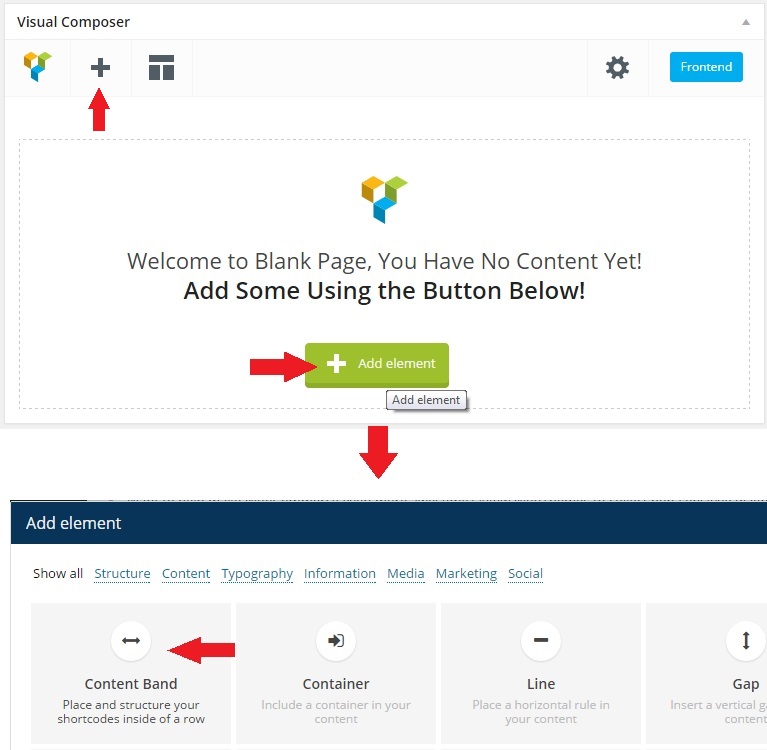
You can definitely add rows as that is how all other elements are added. Please check out this screenshot. Please also refer to our Knowledge Base, and at the bottom of the page you will see 3 columns that say Shortcodes (Visual Composer Tutorials) where there are individual video tutorials for each of our Shortcodes in VC.
If you need anything further, a member of our development team will be happy to assist in our forum. If it is your first time to use the forum, this thread explains how to post, search, and use the forum.
Cheers!
Hey there,
After comparing competitive themes I had just recently purchased X | The Theme (a few hours ago). Haven’t done anything yet except for downloading it.
I was reading through some of the more recent comments and you had mentioned v4 that will be coming up. When you do release v.4 would it be available for those that have purchased the theme?
Thanks
Hey there,
Thanks for writing in and for your purchase! You can always get the most recent version of the theme from here on ThemeForest when it is released, or you can validate your product to setup automatic updates (you can read about this in our member center Knowledge Base).
?If you happen to have any further questions, don’t hesitate to let us know by opening up a new thread in the forum for our member center as this is where all official support is handled. One of our staff will be more than happy to assist you there should you need it.
Cheers!
The custom headlines on my Ethos home page are not responsive. The class has resp-h mvs in the field, but the titles don’t reduce when I shrink my screen or view on mobile.
Same for the images on my home page.
What do I need to do to make the text and images responsive?
Thanks.
Hey there,
Thanks for writing in! This is because text by its very nature in web design is not responsive. Text is only responsive when using it in conjunction with our [responsive_text] shortcode. That article will give you a walkthrough on it and explain how to set it up if needed. If you haven’t done so yet, we highly recommend that all new users of X take time to run through the Knowledge Base as it helps get things up and running quickly and explain practically anything you might have a question about during this setup time.
?If you happen to have any further questions, don’t hesitate to let us know by opening up a new thread in the forum for our member center as this is where all official support is handled. One of our staff will be more than happy to assist you there should you need it.
Cheers!
Thanks, I looked at that video and tried it on my home page, but no luck. So I just tried adding new custom headline & responsive text element on a NEW page and it worked!
I really don’t want to have to rebuild my home page, so is there anything you can suggest as to why this isn’t working on my existing page and how to remedy it?
- Peter.
Hi Peter,
It seems to be something specific to that page itself if it is working elsewhere. If you’d like one of our developers to take a look, they’ll be happy to assist in the forum.
Cheers!
Ok, thanks.
My pleasure.
X-Theme really responsive / mobilefriendly?
Hi i am looking for a mobilefriendly / responsive theme and so i checked some URLs of the your Demo with the Google Speed-Tool and Google mobile tester.
As the results of Google Speed Tool is more relevant i would like to know if you gonna solve this:
“Should Fix: Eliminate render-blocking JavaScript and CSS in above-the-fold content”
See here (and other URLs of your demo):
https://developers.google.com/speed/pagespeed/insights/?url=http%3A%2F%2Ftheme.co%2Fx%2Fdemo%2Fintegrity%2F1%2Fshortcodes%2Fresponsive-slider%2FHey there,
Thanks for writing in! While these speed tests can be a good indicator of things in general, there are certain aspects of their testing that we as theme authors have no control over.
For instance, they might convey that “all scripts should be moved to the bottom of the site” (i.e. “eliminate render-blocking JavaScript,” et cetera) — however, we do not necessarily have control over this for numerous reasons:
- Some scripts and libraries are loaded in specifically by WordPress and we have no control over their placement. For example, WordPress loads its bundled jQuery library in the <head> of the site, and since it is a bad practice to remove this and move it elsewhere, this must be left in place.
- Plugin authors include their own scripts and styles and we have no control over how this is handled. Some authors might include multiple files for their plugin at once, which will make these systems say “you have too many HTTP requests, please reduce them”, but again, we have no control over this.
- Regarding deferring the parsing of JavaScript, we avoid inline script tags whenever possible, and utilize HTML data attributes extensively to keep JavaScript in their own files, but still have access to data from PHP. Our recent short-code JavaScript overhaul in v3.0.0 of the short-codes plugin significantly reduced the amount of inline <script> tags, providing large gains in this area.
- Similarly to our first point, some scripts due to the nature of their functionality must be loaded <head> and there is simply no way around this. However, we do all we can to keep these scripts as small as possible (by combining and minifying their output into one file) and only load the few scripts we as theme authors need up there. The rest are placed in a separate combined and minified file near the bottom of the site.
Hopefully this gives you a little more insight on this matter to understand the nature of these items and that we have done and will continue to do all we can to make X as efficient as possible in handling these types of items while still operating within WordPress’ best development practices.
Don’t hesitate to let us know if you have any further questions about the theme. Cheers!
Hello,
I seem to running into an issue where embed code (both from Soundcloud and YouTube), is no longer working in blog posts. I’ve tried doing a search and coming up empty. Has this been seen yet?
I’m on WP 4.1.1 and using the Integrity Dark Child Theme 3.2.3.
Dear ThemeCo team,
I would like to buy a license but I have some questions first.
1. Could you please tell me if it´s possible to build a basic one page company site with disabled scroll bar. Basically I want the site to look more like an app. Here´s a good example of something similar to what I would like to do. http://www.ilcorsaronero.it/progettienvato/SiteParallax/ParallaxSite/siteJenny/index_white.html
2. When I buy the license for the theme, may I use the theme to first test the features locally using for example InstantWP or will I have to buy a separate license for that?
Cheers, Lucian
Hey Lucian,
Thanks for writing in! Something like the example you’ve provided would require a bit more custom development to implement, so you would certainly need to look into hiring a developer to accomplish something like this if you were needing this specific look based on the specialized functionality of the homepage.
As far as the license is concerned, if you’re just using it locally, you can definitely use the theme there as well as a live site. However, for product validation which unlocks automatic updates and Extensions, you would need two separate licenses since it’s in two places at once (or you could validate your local copy, put the installation on version control, and push up changes to your remote site, this is the easiest if you know how to manage this type of setup). This is necessary because our validation is per domain and there’s no way of determining local installations. Keep in mind this only has to do with automatic updates and extensions, so you could still update it manually both locally and remotely, and install extensions manually, but you wouldn’t be able to update them automatically in both spots. This is only for a local/remote setup. If you had two live sites, you would definitely need a second license for the second domain.
Cheers!
4 columns not working on phone. I am using ICON. On the home page I have a slider then below I have 4 columns. I would like them on the phone to go all the way across the phone not just one column 1/4 the width. They could be buttons but I can not seem to get buttons to be able to change color and not have shadows, outlines, and go all the way across on the phone either. The site is visiblyinnovative.com
Hey there,
Thanks for writing in and we’re sorry to hear that you seem to be running into some issues. The columns as expected on our demos and local installations. If you’ve made any modifications to your site this could play into why things are not displaying properly. Unfortunately, we cannot look into things in detail here. ?If you’d like, don’t hesitate to open up a new thread in the forum for our member center as this is where all official support is handled. One of our staff will be more than happy to assist you there.
Cheers!
Dear ThemeCo,
I am having an issue with adding featured images to products on the renew stack. When ever I add a featured image it automatically scales it to 100px width and 9999px height… I assume its supposed to make the height auto scale instead of fixing it to 9999px… ideally I want the featured images to be 450px by 450px… I couldn’t find the code for the featured images in the functions.php and am not sure where else to look. I am hoping you can point me in the right direction.
Thanks in advance!
Tony.
Hey there,
Thanks for writing in! Yes, that is definitely not how it’s supposed to function, so it sounds like there’s something going on with your particular installation. If you want to look into modifying things, you can copy over the x_setup_theme() function from /functions/global/admin/setup.php into your child theme’s functions.php file and modifying the image dimensions in there; however, as stated earlier, this certainly sounds like something erroneous is occurring with your installation. As we cannot look into this in detail here, ?if you happen to have any further questions, don’t hesitate to let us know by opening up a new thread in the forum for our member center as this is where all official support is handled. One of our staff will be more than happy to assist you there should you need it.
Cheers!
Thank you for your quick response! That seemed to have fixed my issue with the featured images. Now I can properly add all of the images.
Thanks again!
Tony
My pleasure!
Dear ThemeCo,
I’m having issues registering/activating my product code.. Because the purchase code isn’t working I cannot write anything on your forums.. (Bit weird huh? Having a support forums for post-sales, but first it needs to work before you can post something)
I hope you guys can leave me a reply so you can help me activate my product!
Greets.
Mark.
Hi Mark,
Sorry to hear you’re having trouble. Could you send us an email with your purchase code? We can look into why you can’t access the account. You can use the contact form on our profile page.
Hello guys, I saw a video review of your theme made by Charlie from HotTips! and I must saw your theme looks simply amazing!
I was wondering one thing and it is if your theme is compatible with this plugin: https://www.wpbeaverbuilder.com/
As you can see, it is a plugin that allows you to change the content of your website DIRECTLY from your website (so it is the real WYSIWYG) which saves me and my clients a lot time in making small tweaks when needed.
Or maybe you have thought about making something like this by yourself? That would be really fantastic!
Looking forward to your reply, thank you!
Carlos
Hi Carlos,
Let’s just say you’ll want to see our 4.0 release coming out at the end of the month
ho ho ho! Xmas will come early this year!  I can’t wait!
We can’t either
Well… indeed I couldn’t wait… and I became your customer already a week ago, and I’m loving my X-Theme! Now I just got your video teaser for 4.0…. Exiting!!!!
Great to hear, looking forward having you as a loyal customer!
Hello,
1. Can this theme use Dokan plugin ( http://goo.gl/TxBAQy ). PLease try and see if it works.
2. Is it possible to allow vendors/seller to display their details of company, profile picture, google map, address, contact number/button, social networks and their products. Something like this ( https://flic.kr/p/rtTsbp )
3. Is this theme capable of digital products.
4. Can this theme be used for auctions like ebay. Will be using this plugin ( http://goo.gl/cYkdYY ) Pic ( https://flic.kr/p/rrHmZ9 )
If you have any examples of sites using the theme x along with dokan plugin please share.
Depending on the reply more questions to follow.
Thank You.
@themeco – you’ve been telling theviewer1985, myself and many others that AJAX Cart and other woocommerce improvements were coming since I first bought this plugin a year ago.
Can you PLEASE make this more of a priority or simply remove it from your theme because it’s, with all due respect and seriousness, NOT helping your claim that this is the best over-all theme in themeforest.
Thank you for considering how important this is to ALL of your ecommerce theme users.
Hey there,
Thanks for writing in and voicing your concern and we completely understand where you’re coming from. This is definitely something we’ve been eyeing for some time as you’ve mentioned; unfortunately, due to the nature of our flexible development timeline we’ve had to bump it a few times in lieu of additional features that were more pressing at the time. After our release of v4.0 of the theme coming up which will feature an incredibly powerful update to how things are handled in the theme, we can assure you that this is top priority after that. We apologize for the delay for this particular feature as we absolutely take into account all of our users’ requests and try to work them in as quickly as possible when we can. Please stay tuned for our releases following v4.0 and thank you for your continued support!
Cheers!
Thank you for the fast response and I look forward to seeing what you have in store for us. I also look forward to being able to use the theme to bring my vision together for a pretty cool ecommerce site concept that I’ve been toying with. Best regards!
You’re welcome! We look forward to seeing it.
...I can’t do something as simple as install this theme. Could you please help me fix this or issue me a refund? Thanks.
Hi Stacey,
Please refer to our theme installation video on our knowledge base, then if you need anything further a member of our development team will be happy to assist in our forum.
Cheers!
Thank you so very much for a VERY quick response!
<3
My pleasure
“How To” really should be included in your knowledge base. Just a suggestion.
Thanks!
It is in several parts of the Knowledge Base as you can see on the link above. It is also broken down by categories.
I bought this a few days ago and am trying to get it running on a domain I no longer use so I could practice there.. There is a few questions I have there to get going. I got part way but ran into road blocks. I put it on http://www.secrethomeshopping.com So where do I go for buyers questions. I have a buyers code. Next I want to put it on its real URL. I figured something would happen. So I didn’t want my website down any longer than I had to.
Hi There,
You can register for access to our member center here. Once logged in, this thread explains how to use the member center, forum, and knowledge base.
Cheers!
Hi there,
Is the theme available in German? If not – how can I change the language?
Thank you very much!
Hi There,
We are compatible with WPML and provide a base .po and .mo files for customers to take and translate into the language of their choice. While this is outside the scope of our support, many customers do this, and the language files help kick start the process.
Cheers!
Hi Guys Can I confirm that sites built on the existing Theme Version will be easily up-datable to the new incoming one? Thanks Glennyboy
BTW your member area is very slooooooow right now…
Hi Glenn,
Anything built now will be fully compatible with the upcoming version. X 4.0 will have some features that if you wish to include in your site, will require you to make a few changes to incorporate them, but we’ll be sure to explain everything when 4.0 is out…it is going to be an incredible update!
The member center is loading fine for us and other guys on our team. May have been a short term connectivity issue.
Cheers!