6680 comments found.

I have translated all,but the page like http://seventhqueen.com/themes/kleo/members/kleoadmin/ sitll show English,how to translate them
Please note that each plugin that use should have it’s own translations files, and translations file locations. In this case you should search some information about “how to translate buddypress”.
A few more infos about bp translations can be found here: https://codex.buddypress.org/translations/
Cheers
Can I paginate the results of the ajax search bar? When searched for a particular tag, they Currently list one below the other . Can I paginate or make it ‘Load More’, in the divisions of 10 results per page?
No, but there should be a “View More” button which will take you to a full search page …
Let me know if I can help you with anything else. Cheers
I want to paginate the Full search page results page. Ex. if for a tag ‘x’ I get 20 results, I want them divided in 10 results per page on the Full Search Results Page
And I have one more query regarding resizing website LOGO. My logo was appearing small and I wished to make it a bit bigger.
You can change the default number of items to show on a page from “Settings > Reading > Blog pages show at most”
And about your logo size, I’ll have to see your page in order to know what it can be done with your logo, so please share a url so I can give a look at it.
Cheers
Hi, I’m trying to make the default font Open Sans, in the font section I have it as a body default but it’s not available for any of the other options (H1, H2 etc), looked through the documentation but I see nothing about this.
Thanks
Please take a look in your wp admin area at the “Theme Options > Fonts” settings page, the place from where you can style them.
Cheers
Hi Am am not sure but i think the new buddypress update last night has broken user profiles.
http://vgmods.net/members/zenin/Fatal error: Cannot redeclare _bp_strip_spans_from_title() (previously declared in /home/vgmods/public_html/wp-content/plugins/buddypress/bp-core/bp-core-filters.php:552) in /home/vgmods/public_html/wp-content/plugins/buddypress/bp-core/bp-core-filters.php on line 552
Please could you check this
Thanks, Amit
Hello, Just checked with BuddyPress and it is an issue in the latest update. See their posted fix here: https://buddypress.org/support/topic/fatal-error-after-update/
Thanks so much!
Hi.
My Facebook log in isn’t working. I did the needful by setting up an app on Facebook but still I could not get it to work. What could be the problem? Please assist. Thanks.
The facebook login only relies on setting up a good app key. Please double check it to be correctly set up.
Cheers
How do I set the member profile cover to be the full width of the browser? I set all layouts to “Full width”, but that did not work. I also tried using Visual Composer, but I’m getting a “Catchable fatal error..”
Thank you in advance!
Having the “BuddyPress Cover Photo” installed and activated, then you can go to “Theme Options > BuddyPress > Enable Full width Profile Header” and turn it on.
Cheers
That worked! I can’t believe I didn’t see that option, lol. Thank you very much 
Where can i find shortcakes to use please? I need to create log in / register on a page. Thanks
shortcodes*
For login/register forms you will probably need to use an additional plugin which gives you such features.
Cheers
What plugin do you recommend? How can i set up the default member register/signup for for the theme? I’ve searched your forum and can’t find any useful answer. Will really appreciate this. Thanks
From “Settings>BuddyPress>Pages” you’ll have to assign a page for the Register section. Please note that firstly you’ll have to enable site registration from your main wp Settings page.
Cheers
Hi, Thanks for the good work! I’m experiencing 2 strange things: 1. Can’t see the Log Out function for “My Account” on mobile devices. 2. The Members sections seems to display like half of the members first. If I refresh, I can see it all. This not happen on mobiles.
Thanks!
Hi,
I will kindly ask you to open a topic on our dedicated support forum pointing out your issues. Someone from our support team will assist you as soon as possible. http://seventhqueen.com/support/Thanks
Hi.
I would like to take statistics about my website using Google Analytics. Where in your theme can I include the code generated from Google Analytics that will take those statistics? Thanks in advance.
Hi,
You can paste the tracking code in your wp admin area, under “Theme Options > General Options > JavaScript code”
Cheers
Hello.
I have two questions.
1- I created a page with the template 404, but the page that appears when a page does not exist on my site is the 404 page default theme. What I can do to make page 404 shows that I created?
2- I would use counter posts for a particular category. How could I tell the accountant posts showing the number of posts for one category?
Thank You.
Hi,
1. Here are all the informations needed about making a custom 404 error page: https://codex.wordpress.org/Creating_an_Error_404_Page
2. Unfortunately the post count shortcode will only count the total amount of a certain post type.
Let me know if I can help you with anything else. Cheers
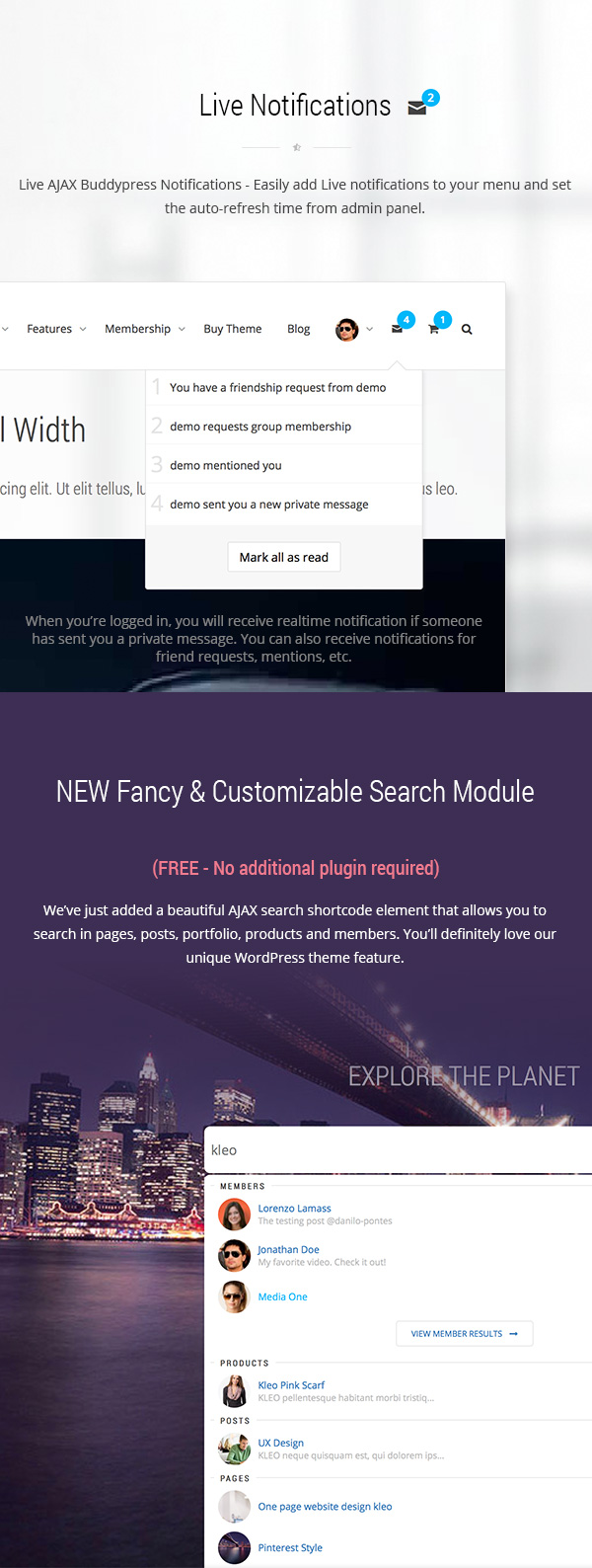
Does this theme contains Pop-up window with member notifications (New messages, New friend requests, etc…)???
Hi, we have a popup where we list all buddypress notifications, like in the following image: http://seventhqueen.com/tf-profile/kleo/kleo_features_page_02.jpg
Let me know if I can help you with anything else. Cheers
Hi, Congratulations for your theme.
On my website, each member have to register themself, and during the registration they fill several fields (about age, job, ...) . All those informations will be shown on their profile.
I want to prevent members to change those informations by themselves, directly on their profile page. (they will have to contact the administrator if they want to do so)
Is there a way to remove the possibility of modifying profile’s informations for all users except the administrator ?
Thank you for your reply.
Hi, unfortunately there is no easy, out of the box option to do so, but if you have a developer available he will be able to do it.
Cheers
Hi
I was wondering how can show the real or dynamic results for Portfolio Items, Featured Articles and Daily Searches on Pinterest Home Page banner section ?
Thank You Regards.
Could you please tell me to what are you referring with “real or dynamic results” ?
Cheers
I mean showing the exact number of Portfolio Items, Featured Articles and Daily Searches and not fake numbers. Is there any way to do that ? How I can change the number ?
Thanks.
Oh, I see, unfortunately you can’t get a real number of daily searches or featured articles, about posts or portfolio posts, you can count them using the following shortcode:
[kleo_post_count type=post|page|portfolio]
Cheers
I see , but how I can modify and change the numbers for Portfolio Items, Featured Articles and Daily Searches on Pinterest Home Page banner section ?
Also I have a major problem : every day I’m getting around 2000 spam user and group submission from spam users and for some reason the WordPress process of my website is using 100% of CPU usage for my server and killing all the resources how I can fix those two problems ??
Thank you. Regards.
Hi, you can modify those from the visual composer element settings, for each element in part.
And for your spam issues, please install WangGuard plugin.
Cheers
Hi. Will Kleo work on a fully-SSL WP install? Thanks.
If you have properly activated ssl on your wordpress site then our theme will work without any problems.
Cheers
Thanks very much. I am aware that some themes have issues with external elements built into the theme, so it is reassuring to know before I buy.
We have customers using it with full ssl, so it shouldn’t be any problem, and if it were to be, we’ll fix it in no time.
Good luck with your project. Cheers
hi there, great theme. It appears that the padding below my sliders has been reduced or removed causing the drop shadows to remain hidden behind the next section. Do you know where i can update the padding above or below the sliders? thanks!
Thanks.
Are there any plans to introduce a smaller icon set and possibly different styles for the user profile page (activity, profile, orders, sites, notifications, messages, friends, etc)? Thanks.
Cheers
Hi Kleo, I’m looking to buy your theme for my current project, just want to ask few questions.
1. Can I remove “Activity” feature on profiles?
2. Can I remove “Public Message” button feature on profiles?
3. Can I make the profile picture clickable?
4. Can I lock out non-members, so they cannot see registered members profiles?
Thanks!!!
Hi,
1. Yes, Activity Streams can be turned off from BuddyPress settings.
2. & 3. would require some customizations, because they aren’t directly supported, but someone with the right knowledge can build that very easy
4. Yes this is achievable trough membership levels.
Let me know if I can help you with anything else. Cheers
Hi, thanks for your reply
forgot to ask one more thing, registered members can delete their profiles from front end, correct? I do not see see that feature in the demo version
Yes they can, this is an option provided by the buddypress plugin.
Cheers
I have constant error. Rtmedia upload does not work. Users cant upload any images on activity page. At profile page, media tab shows constant 404 error.
Updating permalinks doesn’t help. Any ideas?
http://seventhqueen.com/support/forums/topic/cant-upload-media-and-media-tab-404-errorSomeone from our support team responded to your topic. Let me know if you need help with anything else. Cheers
Can I show list custom members in the members grid (buddypress shortcode). [kleo_bp_members_masonry type=”newest” number=”12” rounded=”rounded” class=”“] It currently shows only the newest or the active members. But I want the specific member to list in that.
Could you help me with this?
You will have to edit a template file, but this will require some programming knowledge, because you’ll have to change the members loop query to look after certain user ids.
Please let me know if you can handle this by yourself and I will point you to the files which you’ll need to edit.
Cheers
Please point me to the desired files, I’ll let my developer know about this
wp-content/plugins/k-elements/shortcodes/templates/buddypress/kleo_bp_members_masonry.phpinto the following location ( taking in mind that you should have installed and activated the kleo-child theme ), and modify the user query params from the start of the file, your developer should understand it very easy:
wp-content/themes/kleo-child/k_elements/buddypress/kleo_bp_members_masonry.php
Let me know if I can help you with anything else. Cheers
Hi Kleo, Its a pre sales question. I am working on a project . We intend to add the features where Our enrolled modeling students should be able to upload their photographs(multiple), they should be able to view other members photographs, Then their are talent hunters who can check the models profile and then can contact them and vice versa. Now I have already an e-learning theme ready and want that the users who have enrolled in our courses should get access to these features. Can I achieve all these requirements with your theme ?
Thanks and Regards.
Unfortunately there are for sure a lot more details in the middle that the ones you are pointing out, and probably some things work in different ways between the two themes.
Let me know if I can help you with anything else. Cheers



This item was featured on ThemeForest

Power Elite Author
Contact the Envato Market Help Team