38434 comments found.

Hi Mr Theme Nector
Brilliant theme, thanks. I note that eventbrite recently released an updated plugin. I would love to get it working on our site but it doesnt look great with the theme. Asking alot, but it there any chance support could be built into a future update?
https://wordpress.org/plugins/eventbrite-api/Thanks
Hey conordog89, I’ve noted that idea on the wishlist 
Cheers
I wish you would sell your custom version of Visual Composer- it’s so clean and easy compared to other versions. Any plans or possibility to release this or purchase it?
Hey – unfortunately there are no plans for that but thank you for your kind words
Hello,
Thanks for the theme ! I have a columns display problem in the portfolio, when I open the page of a project for the first time (for exemple “cuisine”, the two columns are not displayed. Only when I refreshed the page both columns are displayed correctly. I use Salient Visual Composer to create my pages. Here is the link to my site : www.francoismorelsarl.fr
Thanks for your help.
Hey sarahguillain,
Please try changing the page transitions method to the standard setting instead of using the AJAX one in your theme options panel
Cheers
Hi, how can I change the icons for each ligne in the fancy unordered list? thx for your help.
Hey,
As of now you can only have one per list unfortunately
Cheers
Hi! Thanks for a great theme.
A short question: how do I remove the shadow around header + main site outer in boxet version? I need a flat design
Hey, add this into the custom css box located in your Salient Options panel:
#boxed {
  box-shadow: none!important;
}
Cheers
Hello, I have a few issues with the theme. I don’t understand how I can make the Google maps element span 100% width. And for some reason it is always red unless I select dark theme. If I don’t select dark theme and I use the option for extra coloring nothing happens it is still red. What’s wrong with it ? Thank you in advance and great product!
I found out how to set the width but I still cant get it to color in anything besides red.
Hey,
could you please open a ticket in regards with your admin credentials so I can take a look at what’s going on themenectar.ticksy.com/
Cheers
Hi, ThemeNectar! Thank you for your theme, but i have one problem with menu – don’t work top navigation menu on the mobile devices: only secondary menu and logo.
What could be the problem?
Hey,
Could you please share your URL in regards so I can take a look?
Cheers
Yes, please: http://contact-ing.ru
Hey – could you kindly confirm that no plugins are causing this?
Cheers
It was the first thing I checked, but the menu does not work on mobile devices
Could you kindly open a ticket in regards with your admin credentials so I could take a look? https://themenectar.ticksy.com
Hey there, there seems to be a bug in your current VC, that makes it unable to save some information. wpbackery says, that this is a known bug in the VC from an older version. When do you plan to update the VC? I have several Extensions that do not work. thanks
Hey aovivo,
Could you kindly provide a bit more information on this – what kind of data isn’t saving for you? Could you link me to where wpbakery mentioned this as well so I could investigate?
Cheers
I am not sure how deep I can go, but there are some responses of authors that design extensions:
1) “I assume you are using WP 4.2.x? If so, please ensure that you are using a Visual Composer version of at least 4.5.0 as the bug with not storing links is related to VC itself, when usde in WP 4.2.x, and was fixed in VC 4.5.0. Tekanewa (from VC extensions)”
2)”Hi, it’s a known bug of previous version Visual Composer, please try to update to the latest one which have fixed this problem. Sike (from (VC extensions all in one)
3)”Hi aovivo, The issue is because you are using an older version of visual composer. Please update it to the latest version which is 4.5.1. Kindly check.Thank you, Rohan Khandeparkar (from WPbakery)”
So basically some extensions that should work with the VC have a problem to save data – f.e. links that CTA…
sadly I need those extensions to work. In addition I could provide my details for WP… but since I had no luck with my tickets – I am not sure what to do…
regards
Hi Friend.
1- Can you tell me how to do this hamburger menu “Slide Out Widget Area” to look that way like this menu
http://bit.ly/1bvvozO
What should be replaced by this CSS?
http://bit.ly/1cjHBsK
2- When the menu is open, I want him to be more than 300px. and the text to be big and be centered horizontally. as in the above example. Is there any CSS code?
3- How do I remove the vertical line of the header that separates the lens from hamurger menu?
Regards.
Hey SS3,
1. It would take all of that css and the markup to match which would need to be placed in the header.php file
2. Unfortunately this would take modding to the init.js file located in the js folder
3. Could you share your URL in regards so I can see what options you have active?
Cheers
http://bit.ly/1AHmdmL
1- This is obtained (a), I want to get this (b)
http://bit.ly/1IRaiJH
Please write me the correct CSS code here
http://codepen.io/pen/
and tell me where to put them? Which code must change or put in header.php?
2- Which code must be replaced / change in init.js if you can tell me?
1-2- after the change I would like these 2 files (header.php / init.js) to put them in child theme, how can this happen?
Thanks Friend!
Can you have an outlined button in the navigation bar?
Hey mariellacinquegrani, that would take some custom css or adding it into the header.php file as of now
Cheers
What lightbox does your portfolio use and is it 100% mobile friendly? My theme currently uses PrettyPhoto and it looks terrible on cell phones.
When creating a page, there is an option in Visual Composer to add the most recent blog posts. Is there a way to select the most viewed posts without a 3rd party plugin?
Hey,
1. It also uses prettyPhoto, could test it out in the theme demo on mobile if you’d like: http://themenectar.com/demo/salient-frostwave/portfolio-fullwidth-style-three/
2. Yes
3. This would indeed require a plugin
Cheers
hi there!
a couple of pre-sale questions for you please:
1) i need to create 3+ portfolio pages, e.g. 2015, 2014 and 2013. each of these will have the same categories of portfolio items, e.g. Illustration, Installation, Painting. i want these portfolios to be stand-alone for each year, but i also want an aggregated portfolio overview of all the years / categories. is this possible?
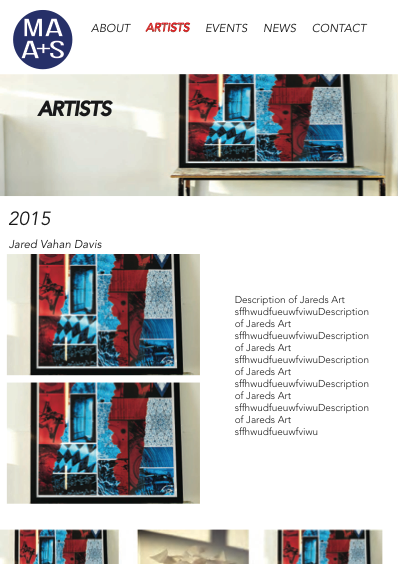
2) do any of your theme’s portfolio styles work as follows… (for my question, i am using a mock-up design hosted here.) when a user clicks on an item in the portfolio, (in this example, the user clicks on Jared’s name,) the item expands downwards, showing some text and some more images relating to this particular portfolio item. each of these images, when clicked, pop out in lightbox. and the rest of the portfolio items have not disappeared from view (i.e. you don’t have to click back to see them) – they are just sitting below. so in this instance, when the user is finished with Jared, they can click on another portfolio item (artist’s name) below.
let me know if my questions aren’t clear. and thank you in advance!
Hey,
As of now these items would require some custom development as of now unfortunately
Cheers
can you please be more specific in relation to first question?
i.e. if it is indeed possible to have more than one portfolio pg (& i have seen you advise others to this effect), surely then i can name each of the individual portfolios by year (e.g. 2015, etc.)... is it just the last step i mentioned – having another portfolio pg that aggregates all of the different years’ portfolio items – that would not be possible without custom coding?
thanks.
oh!
and is it possible to use an animated gif as logo?
Hey,
1. You could make separate portfolios like that but it would require some custom css to get the nested categories to display depending on the setup you’re after – assuming you’d have subcategories for each year
2. Yes you could use an animated gif
I use Wordpress 4.2.1 with The7 theme, and Visual Composer doesn’t work. Can you help me?
Hey,
The Salient Visual Composer is only meant to work with Salient
Cheers
I dont understand can you please help me.
I need to have a portfolio with multiple projects displayed and then when you click on each project i need to have multiple images appear with examples of that project
Hey yaelslasky, please see my response to your other comment in regards
Cheers
hello
I’ve not got the visual composer showing when I try to create a page. At the top of the top there is this message:
This theme requires the following plugin: Salient Visual Composer.
How can I activate this?
Thanks
Hey stsw,
There should be an option to activate it in the plugins sections of your admin panel – if you don’t see that please open a ticket in regards with your admin credentials so I can take a look: https://themenectar.ticksy.com
Cheers
Hi Guys,
The mobile nav isn’t displaying on our theme. I’ve read through the comments and have added the code below in order to view it however the burger seems to be out of shape, also I can’t get the 3 lines to display.
header#top #toggle-nav i, header#top #mobile-cart-link i { }
background-color: red!important;can you advise?
see url: http://marketingnetwork.ie/bp/
Hey Marketingnetwork,
Could you verify that no plugins you have active are causing this behavior?
Cheers
Hi,
We’re using the “WPBakery Visual Composer” plugin (as it provides flip box animation http://dental-care.ie/ ) which seems to causing the nav issue. Do you know if there’s a possible workaround for this?
Try opening your functions.php file and changing these two lines:
 wp_register_style('font-awesome', get_template_directory_uri() . '/css/font-awesome.min.css');

wp_enqueue_style('font-awesome');
to this:
 wp_register_style('font-awesome2', get_template_directory_uri() . '/css/font-awesome.min.css');

wp_enqueue_style('font-awesome2');
Hi, I need to add a simple text BUTTON color on the text field any help? from demo I haven’t found any typography examples 
Thank you
Mark
Sorry I have found the solution from the “code generator” in the text page! thanks anyway…
Glad you sorted it
Cheers
Hi! I’m using a “Centered Menu Alt” with a logo on the top. Is there a possibility to just make the navigation fix? So when you scroll down the logo disappears and the navigation get fixed.
Hey,
Add this into the custom css box in the Salient options panel:
#header-outer {
  position: absolute!important;
}
Cheers
Hi, thanks for the quick answer. It’s almost perfect. The navigation isn’t fix and there is lika a gap on the right side. You can see it here: http://goo.gl/iFoNbN
Hey, change it to this:
body #boxed #header-outer {
  position: absolute!important;
  width: 100%!important;
}
Hi,
I am facing issue with mega menu. Please suggest. Please check the same at http://www.webaspiration.com
Hey – did you mod the stylesheet at all? Specifically at this section:
.sf-menu ul {
  position: absolute;
  top: -999em;
  width: 25em!important;
}
hey, I checked, its same as above. No change.
By default it shouldn’t have that !important in there, I was pasting the style as I saw it on your site though – could you kindly try changing the value to just 25em
yeah I know, I added that !important after your reply and tried changing value now..but its still the same…
Removing the !important from that line in the browser clears the issue – I’m still seeing it there in your file, could you please remove it again and allow me to check?
yeah thanks….what if I require to update the CSS of Mega Menu Section. I want to add border and reduce the width. Please suggest.
Hi there, How do I add background colour to individual columns within one full-width section? Thanks!
Great, thank you!
You’re welcome