

8337 comments found.
Hi, I have Kalium v1.1.5 and everything works ok. Now when I try to update to v.1.4.1 (including by Envato plugin) the theme breaks up – no correct home page is visible, no navigation etc. What can I do to update the theme? What workflow for this case do you suppose? Thanks.
Hi alexschneider,
Just go to Appearance > Install Plugins to update all your premium plugins to the latest version and the site will work perfect 
Kind Regards,
—Ylli
This is screencast of update process http://clip2net.com/s/3lkEDRm
As you can see there are no plugins requesting update and the site is broken after update. Please help.
Hi alexschneider,
Can you please send us your WP and FTP (In case we need FTP) credentials on our email, and we will check what the problem is.
Kind Regards,
—Ylli
I send info through contact form on your page here. Thanks on advance.
Hi alexschneider,
I just updated your plugins from the Appearance > Install Plugins and the problem now disappeared
Remember to update Kalium every time an update is out, and don’t forget to update plugins also
We want you to experience the best we have to offer while keeping your site safe.
Staying updated is the way to do it!
Kind Regards,
—Ylli
Thanks a lot guys! You are the best and here is the evidence: on this moment as many as three your themes (Kalium, Zinc and Oxygen) was purchased by me!
Thanks a lot guys! You are the best and here is the evidence: on this moment as many as three your themes (Kalium, Zinc and Oxygen) was purchased by me!
Hi alexschneider,
Wow, such a huge statement. Thank you very much for your kind words and we hope that our themes have server you well for your projects
P.S: It would help us a lot if you could rate Kalium on themeforest from your Downloads tab, ( if you don’t know how, just open this link )
Kind Regards,
—Ylli
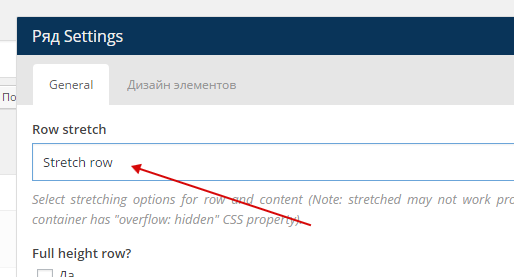
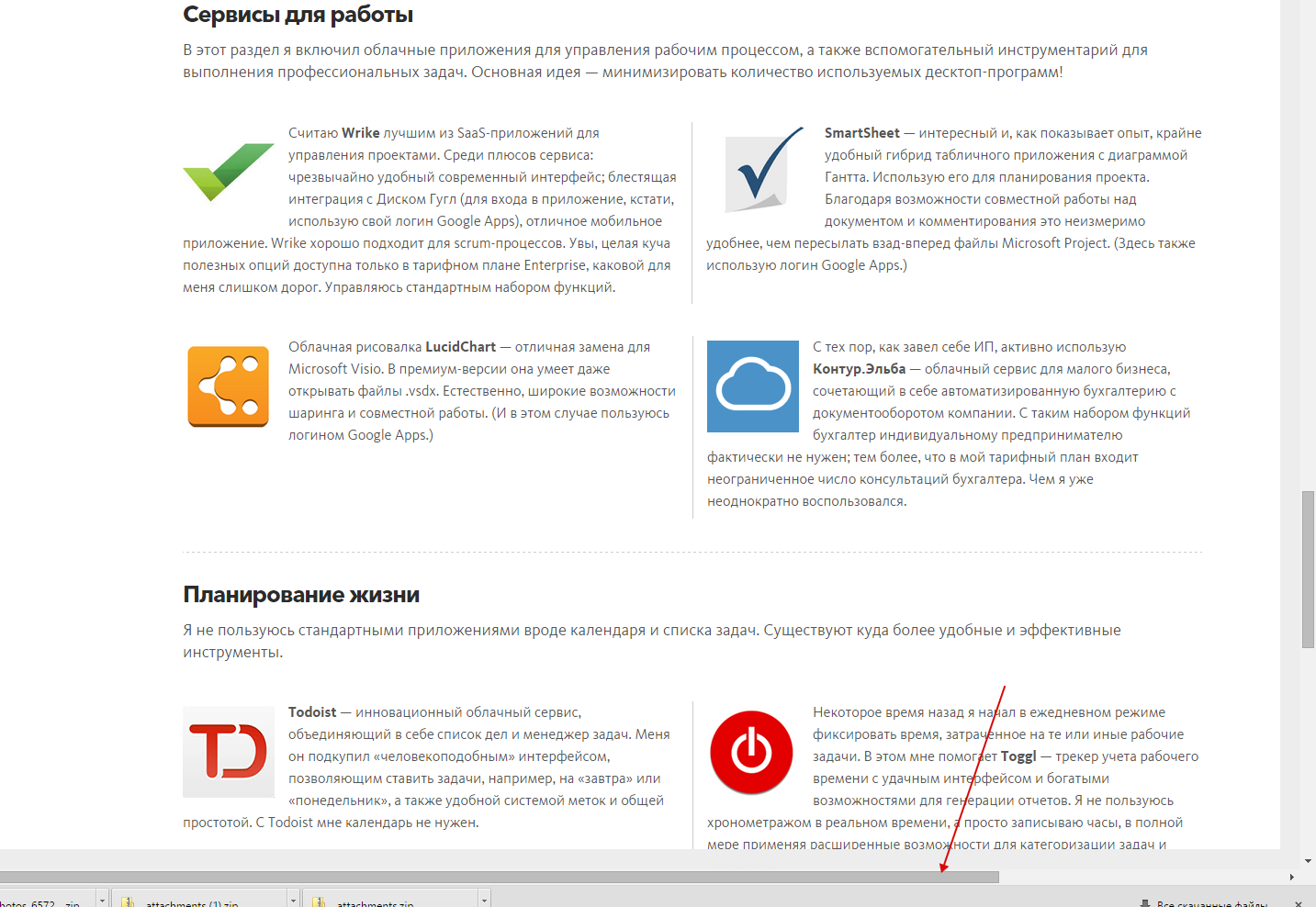
I noticed another problem after update. I am using Visual Composer for blog post. In previous version I set this parameter http://c2n.me/3llbA9A.png and got right width of the main column. Now VC stretches column and in result there is scrolling on the same page http://c2n.me/3llbXBB.png
How to get rid of it? Thanks.
The link to the post is http://kalium.zzkk.ru/2015/07/my-cloud-services/
I’ve just replied to your other thread regarding this issue, please email us your ftp+wp credentials so I will check how to fix it. Do not forget to include the issue description in the email
Arlind

Hi guys, I love this theme and I’m glad I bought it. I have a couple of very minor problems though, and I was wondering if you could help. My site is http://willholm.es if you need to take a look.
I’ve noticed that a page looks great when loaded up, but when the page is refreshed the spacing at the top of the site is greatly reduced. Refresh again and it goes back to normal. Refresh again and it shrinks…
The other point is very small. When the info page is viewed on mobile (or you zoom in on your computer browser) the second column (stalk me) is indented slightly. I have removed all the padding, but it still seems to be a little niggle. if you guys can let me know how to fix these I’d be very grateful. Great theme all round.
Hi willstuff123,
Thank you for your kind words, they keep us motivated
1. I just checked your site with all the mayor browsers, but i didn’t notice any problem there. I’m sorry but i can’t reproduce your problem.
2. Can you please send us a screenshot of this problem?
P.S: You have managed to do a great site with our theme, i like projects too, congrats
Kind Regards,
—Ylli
Thanks Ylli, you’re too kind. Here are those screengrabs for you:
This is a standard site load: http://willholm.es/wp-content/uploads/2015/07/Screen-Shot-2015-07-28-at-13.03.07.png
This is when the site is refreshed: http://willholm.es/wp-content/uploads/2015/07/Screen-Shot-2015-07-28-at-13.03.16.png
(Notice how the space beneath the header has shrunk)
And this is the slight indent on the info page when viewed on iPhone (in this ase I just zoomed in on my browser): http://willholm.es/wp-content/uploads/2015/07/Screen-Shot-2015-07-28-at-13.03.36.png
Thanks for any help mate.
W
Hi W,
1— I talked with Arlind (our backend Developer) and he said that he is aware of this, and that happen only on the first load for the new users, and that happen only on the sticky menu, because the script is loaded when the page finishes loading, and on the next reloads it will save that on the browser cache.
2— You must go to VC, and choose to remove left border on “Stalk Me” section on the mobile layout.
Kind Regards,
—Ylli
Thanks Ylli, all good on this end! Take care.
Hi, after having updated to Kalium 1.4.1 I get the following error:
Call to undefined function vc_map_get_attributes() in … vc_row.php on line 21
I see a lot of people having this problem. Is this now fixed ? In one of the comment you advise to replace all vc_templates files with these located here
http://drops.laborator.co/1aZJqI did that but it doesn’t work. Thanks for helping on this issue
Pietro
Ok, apparently solved after updating the other plugins !
Hi Pietro,
Glad to hear that
Kind Regards,
—Ylli
First of all, congratulations on developing such an awesome theme! I’m a total noob so bear with me. I have two issues.
- The first one would be the logo and menu on the home HEADER. I uploaded a white version of the logo to contrast from the darker background. When I go to any other page, the logo and menu disappears because of white background. I saw that in your demo, the logo changes to a dark version when you have a white background, and I couldn’t find the option to upload two logos. Could you help me out with this?
- In the portfolio submenu, there are all the categories and the word “ALL” to englobe all of the categories. Just so happens that I’m from Brazil and would like to change that word to Portuguese. How do I do that?
I’m not sure if I made myself understood, but any assistance would be greatly appreciated.
Cheers!
Hi nelsonshimada,
Can you please write us your site URL here on comments first? We need to investigate your site and then get back to you with possible solution
Kind Regards,
—Ylli
Hey Ylli!
The website is in working progress and is temporarily in the following address: http://www.lilyberry.com.br/gsa. I thank you in advance for your help!
Cheers!
Hi nelsonshimada,
The first problem that you’re talking is solved on the 1.4 update.
You are using an old version of our theme (1.3.1) and the latest version for the moment is (1.4.1), please update theme first.
The easiest way to update our themes is if you use Envato Toolkit. On this link How to update Themes and Plugins
you can learn this easy step-by-step procedure
There can be some problem on your site, to fix them just go to Appearance > Install Plugins to update all your premium plugins to the latest version that we support.
The site then will work perfect
Kind Regards,
—Ylli
Great! Thank you so much for your help and for such a quick response! Cheers!
Will do!
Hi nelsonshimada,
Thank you very much for your kind words on the review
Kind Regards,
—Ylli
Hello Laborator,
Kalium is just wonderful ! your theme is very accesible for a novice like me in wordpress. However I have a problem: In the Main Menu (see “Projets”), I created a carousel with layerslider. I would have the same design for this carousel with your nice arrows you use in portfolios. how can I do ?
My WebSite : http://reperages-design.com/wordpress
thank you Best regards. Reg.
Hi LeBras,
I don’t think that this carousel supports arrows.
Kind Regards,
—Ylli
thanks for your answer Ylli. There is another way to create a carousel with Kalium design outside portofolios? I have another question: the main menu is locked in the iPad format, it operates in normal mode and iPhone mode. How can I make it active ?
thank you —Reg.
Hi Reg
There are plugins for Visual Composer that allow to create specific carousels but I am not sure how they work with Kalium. Also LayerSlider is fine if you want to use it.
Can you please illustrate how this happens in iPad? I cannot figure out what is wrong with the menu, we have fixed some of menu issues in ipad with 1.4.1 update.
Arlind
Dear Arlind,
Thank you… finally I changed the design for this page, now I have several images in a Mansory grid media here (http://reperages-design.com/wordpress/?page_id=4405), I would like the images are fixed (not clickable, I don’t want the link and the new window to “SHARE YOUR THOUGHTS” Maybe there is a better way to create a Mansory (in a page) with a short presentation? (I tried with Mansory portfolio but failed to understand how to add images)
Cheers!
Hi LeBras,
Can you please add the code below to Custom CSS
.vc_gitem-zone {
    pointer-events: none;
    cursor: default;
}
Kind Regards,
—Ylli
Hello!
1) How could I fix rotating tweets bug on mobile (https://dl.dropboxusercontent.com/u/3603439/IMG_1239.png)? 2) How could I put analytics to run?
Any help? Regards
Hi raphaeldjazz,
1. Can you please write us your site URL here on comments first? We need to investigate your site and then get back to you with possible solution
2. If you are talking about Google Analytics, you can paste your GA code on the Laborator > Theme Options > Footer > Custom Javascript box.
Kind Regards,
—Ylli
Is it possible to have Architecture layout with menu similar to Blogging layout, to slide out from left side.
And submenu to expand/collapse.
Hi wrathyimp,
For sure that this is possible
Kind Regards,
—Ylli
Hi!
I’m trying to update the theme but it doesn’t work.. I get this error code:
Download failed. Could not open handle for fopen() to C:\Users\IU74FF~1\AppData\Local\Temp/kalium.zipAWSAccessKeyIdAKIAJYG5ROGJ6X7Z3M6QExpires1437993715Signaturegr3iQVOvRxvf0cCfMNp3FHzXZkM%3Dresponse-content-dispositionattachment%3B-filename%3Dthemeforest-10860525-kalium-creative-theme-for-professionals-wordpress_theme.tmp
Do you know how to fix this?
sorry forgot to mention: I tried to do this with the envato toolkit on this website: www.hetproces.com
Hi kaberson,
Can you please check what version of ET are you using?
Kind Regards,
—Ylli
Hi Ylli,
I’m using version: 1.7.3
Hi kaberson,
This is very interesting problem, you are the first user that is reporting this. Can you please send us your WP and FTP credentials on email, and we will try to check and find what is causing this.
To send us email use this link and please write us your request again, because we receive a lot of emails on daily basis and we unfortunately can’t remember all customers requests.
P.S: Please note that we usually do not respond to emails that request support, because here is our primary support forum. We use contact form just for sending sensitive information.
Kind Regards,
—Ylli
Hi,
I am having big troubles installing the demo content, always getting internal server errors.
I double checked that your php requirements are set, I even increased the file sizes to 200M and Memory to 256M. Is there anything I am missing? Are the requirements higher for the demo content?
Thanks Michael
To be more precise, the installation fails for: main demo > wordpress content media files & woocommerce files
Here is my ini: [PHP] engine = On short_open_tag = On date.timezone = “Europe/Berlin” precision = 14 y2k_compliance = Off output_buffering = Off output_handler = unserialize_callback_func = zlib.output_compression = implicit_flush = Off allow_call_time_pass_reference = On safe_mode = Off safe_mode_gid = safe_mode_include_dir = safe_mode_exec_dir = safe_mode_allowed_env_vars = “PHP_” safe_mode_protected_env_vars = “LD_LIBRARY_PATH” disable_functions = highlight.string = ”#CC0000” highlight.comment = ”#FF9900” highlight.keyword = ”#006600” highlight.bg = ”#FFFFFF” highlight.default = ”#0000CC” highlight.html = ”#000000” expose_php = On max_execution_time = 360 memory_limit = 256M error_reporting = 32759 display_startup_errors = track_errors = Off variables_order = “EGPCS” register_argc_argv = On post_max_size = 256M gpc_order = “GPC” magic_quotes_runtime = Off magic_quotes_sybase = Off default_mimetype = “text/html” doc_root = user_dir = enable_dl = On file_uploads = 1 allow_url_include = 0 asp_tags = On allow_url_fopen = Off display_errors = On log_errors = Off error_log = register_globals = Off magic_quotes_gpc = On auto_prepend_file = auto_append_file = include_path = ”.:/usr/local/lib/php” upload_max_filesize = 200M extension_dir = ”./” zend_optimizer.enable_loader = On zend_optimizer.optimization_level = 15 zend_extension = ”/usr/local/php5/ZendOptimizer.so”
[mail function] SMTP = “localhost” sendmail_from = “me@localhost.com”
[SQL] sql.safe_mode = Off
[ODBC] odbc.allow_persistent = 1 odbc.check_persistent = 1 odbc.max_persistent = -1 odbc.max_links = -1 odbc.defaultlrl = 4096 odbc.defaultbinmode = 1
[MySQL] mysql.allow_persistent = Off mysql.max_persistent = -1 mysql.max_links = -1 mysql.default_port = mysql.default_socket = mysql.default_host = mysql.default_user = mysql.default_password =
[PostgresSQL] pgsql.allow_persistent = On pgsql.auto_reset_persistent = pgsql.max_persistent = -1 pgsql.max_links = -1
[bcmath] bcmath.scale = 0
[Session] session.serialize_handler = “php” session.gc_probability = 1 session.referer_check = session.entropy_length = 0 session.entropy_file = session.cache_limiter = “nocache” session.cache_expire = 180 session.use_trans_sid = 1 url_rewriter.tags = “a=href,area=href,frame=src,input=src,form=fakeentry” session.save_handler = “files” session.save_path = ”/tmp” session.use_cookies = On session.name = “PHPSESSID” session.auto_start = Off session.cookie_lifetime = 0 session.cookie_path = ”/” session.cookie_domain = session.gc_maxlifetime = 1440
Hi there,
We have released Kalium 1.4.1 recently
Can you please download theme again, and try to install it, you should not have problems.
To make it easier for you we have made some videos that can help you Getting Started
Kind Regards,
Art
Hello!
I just did the update to version 1.4.1. The update ran through, but now my page is broken, there is no content on the “home” site and on many other ones like on “contact”. You can view this here: http://www.martin-schulz.photography
Would be geat if you could have a look at that!
Thanks so much, best! Martin
Hi Martin,
Can you please go to Appearance > Install plugins, to update all your premium plugins to the latest version that we support.
That will fix your problems
Kind Regards,
—Ylli
Hi Ylli,
awesome, like everytime you helped me fast and great out of my selfmade trouble
Thanks so much!
All the best! Martin
Hi Martin,
Glad to hear that the site is now up and running
Kind Regards,
—Ylli
Hey Laborator team,
After many trial and errors and several issues since the beginning, my site is nearly complete and I am digging it.
Just three issues:
1. I used your services layout and noticed that when on mobile version the images are not in correct order, and the images are bleeding off the screen with no default margins.
2. When I edit the Auto Type settings for my home page, then press ‘Update’ it defaults back to theme settings and my text disappears. I can’t get it to keep my text. It only disappears after you hit the ‘update’ button after saving your edit.
3. Where and how do I add content above the rule in the footer? Either footer.. There is no way to edit it.
One more thing, I was glad to see the new SoundCloud link in the social media section. Where to I add the URL, it’s not listed?
My site is allenayler.com
There are also several style changes I would like to do but cannot figure out how to create a class or id and reference it in css. It’s not exactly your job, but maybe you can point me to a resource that explains how to do it (style a particular element differently)?
UPDATE:
I finally figured out how to add text above the footer rule.
There are two issues remaining that I would appreciate help on.
Update about the home page Auto Type: When I do not use the ‘span class=block’ tag everything is fine. However when I add that code in all my text deletes and it defaults back to the “this is kalium, etc…” as soon as I hit the ‘Update’ button. Can you also help a poor rookie out and tell me how to change the main page auto type font to a larger lowercase inconsolada font? I’ve tried updating what was added in the CSS by Art but It does not work, even if I put !important.
And last, the service content pics/text are not stacking in the correct order (pic, text, text, pic, pic, text), and the images have no margin and bleed off the screen.
Hi there,
I don’t know which version of the theme you’re using but if you’re not using 1.4.1, I would suggest you to update it as soon as possible because there are too many bug fixes and your issues may be fixed with this too.
Kind Regards,
Art
Yes I am using 1.4.1
I updated the day it came out…
The mobile order of the services content is an issue with your theme. It is the same on your agency demo.
The Auto Type was the main reason I got this theme. Any ideas on how to make it work like it should???
Hi AllenAyler,
1— I just checked it on mobile, and i don’t think that this is a issue, they appear as it should.
2— I think that you are doing any syntax error there, can you please send us your WP credentials on email please? We need to investigate your site and then get back to you with possible solution
To send us email use this link and please write us your request again, because we receive a lot of emails on daily basis and we unfortunately can’t remember all customers requests.
P.S: Please note that we usually do not respond to emails that request support, because here is our primary support forum. We use contact form just for sending sensitive information.
Kind Regards,
—Ylli
Hi, Thanks for the reply.
I’m not sure what you’re looking at. This is what I am looking at http://cubeupload.com/im/AllenAyler/ScreenShot20150729at.png
It’s picture, text, text, picture, picture, text. Both on my services page and on your services page.
I would also like to edit the Auto Type so help with that would be great, too. I cant seem to change anything via the custom CSS.
Hi AllenAyler,
This is how Visual Composer works, this is how it handles the rows on mobile, and i’m afraid that we can’t do anything about this, if you want you can a Divider there, and it will be easy to understand which text is coming with the image
What problem do you have on Auto-Type please?
Kind Regards,
—Ylli
Yikes…. not good.
I am trying to put the box around the animated words as it is in the demo. When I do not use the ‘span class=block’ tag everything is fine. However when I add that code in all my text deletes and it defaults back to the “this is kalium” as soon as I hit the ‘Update’ button.
It deletes all my text when I try to add the span class=”block” code in. I have also been trying to change the font to lowercase, inconsolada font, and bigger to balance out on screen, pretty much like it is in the demo.
Anything or am I getting ignored again?
Hi AllenAyler,
Can you please send us your WP credentials, we will check that for you
To send us email use this link and please write us your request again, because we receive a lot of emails on daily basis and we unfortunately can’t remember all customers requests.
P.S: Please note that we usually do not respond to emails that request support, because here is our primary support forum. We use contact form just for sending sensitive information.
Kind Regards,
—Ylli
You’ve already asked for my credentials. I’ve already sent them last week…...
Hi there,
I managed to fix your issue, could you re-check if it’s working fine.
Kind Regards,
Art
Hi,
No it did not work. I put in the block code and it just deleted it all.
Would it be too much trouble to get you to style it the same as the demo?
To fix the issue with AutoType:
1. Please download this file:
http://drops.laborator.co/2yoP+And replace it in this directory:
wp-content/themes/kalium/vc_templates/
2. Then download this file:
http://drops.laborator.co/1c8nA+And replace it in this directory:
wp-content/themes/kalium/inc/lib/vc/lab_text_autotype/
Kind Regards,
Art
OK, it works for putting the block in and it didn’t reset everything to default, but now I cannot control where my line drops to.
I need to know how to change the styling. Do I change the styling from the custom CSS that you already added in the Custom CSS, or do I create a create an ‘Extra class name’ in the AutoType settings and refer it to the Custom CSS?
I have tried editing the Custom CSS to change the font but did not work.
Hi there,
You can create a new class or just replace the “block” class but remember that you need to add !important rule to overwrite the values.
Kind Regards,
Art
Sorry but I do not understand what you mean by “replace the block class.”
I have tried adding:
”.auto-type-element {
font-size: 70px;
font-family: “Inconsolata”, cursive !important;
line-height: 90px;”
But it does not work. Obviously I am not doing something right, but I do not know what.
Hi AllenAyler,
It looks that you have added wrong code, I added this code to your Custom CSS:
.auto-type-element h1 {
    font-size: 70px !important;
    font-family: 'Inconsolata' !important;
    line-height: 90px !important;
}

.auto-type-element span.block {
    background: #000 !important;
    color: #fff !important;
    padding: 5px 10px !important;
}
and it works now
Kind Regards,
—Ylli
hello, I have one question. I want to post the picture sns(facebook, instagram etc…) both(only one click. or simply). Is it possible? Or should i edit something?
Hi hanna8523,
I’m afraid that i can’t understand your question, can you please be more specific?
Kind Regards,
—Ylli
Just bought the theme. Looks pretty good. Went to add my Soundcloud to the social links and discovered that there’s no input field for it (even though I can enable it at the top of the options panel).
Hi there,
We’re sorry about this, it seems that we have missed this and it will be fixed immediately in the next theme update, we’re sorry about it.
Arlind
Hi,
I sent a question two weeks ago but get no answer. Could you please check this again?
Kind regards, Dominique
Hi Dominique,
We’re sorry for missing your question, I replied your other comment, the Photography demo will be available soon but we don’t have any ETA on this.
Arlind
Love this theme. Everything is so well designed, thank you.
I am using it here: http://www.every-coast.com
My header nav drawer looks great until I bring the browser size in, at which point the 4 columns split into 2 rows of 2, with the second row falling behind the main content. How can I fix it so the header height automatically increases to make room for the responsive row change?
Hi there,
If you could please turn off your Coming Soon mode so we can check the site and your issue.
Kind Regards,
Art
Sorry ‘bout that- it’s public now!
I am also having another issue. When I set the gallery type to full background, the images load with space between them, then it disappears, then when I hover it reappears and sticks. This is in Firefox. http://www.every-coast.com/portfolio/stephanie-snyder-yoga/
Hi
Can you please add this Custom CSS and see if it will fix the issue in firefox:
.single-portfolio-holder .gallery .photo {
 clear: both;
 display: block;
}
Arlind
Hi Arlind- that did not fix the gallery page issue. Any thoughts on my original issue?
Thank you
I check for the gallery page issue in Safari, and it maintains the proper space between images, but does not sit at the top of the page, as it should, unless I resize the browser and then it immediately jumps up.
Hi everycoast,
I just checked the link that you have send us and your *bug that you’re describing is not happening to us on Firefox or Safari, can you please check it, maybe that appears only on the first load of the page.
Kind Regards,
—Ylli
Yes, it happens repeatedly.
But I am more concerned about my initial issue, in my first comment. Can you please address that?
Should I email support directly? Thanks
Hi there,
Is this issue happening in your iPad or any device or only when resizing the viewport, the problem is that you only get this problem once and then it doesn’t appear again.
If you’re not experiencing this in the iPad then you don’t have to worry about it appearing in the desktop devices.
Kind Regards,
Art
hello, I got the theme Kalium and am finalizing my customization but I’m having a little problem, my thumbnails do not appear in the home:
http://medeiros.cc/However in the portfolio page http://medeiros.cc/portfolio/ they work, you can help me solve this problem?
I’m waiting, thank you.
Hi there,
I see you’re using an outdated version of the theme, it is better if you stay updated with it, the latest version is 1.4.1 and you’re using 1.1.5.
If after the update it still doesn’t work then I will login into your site and fix that it manually, the problem is with the Revolution slider.
The easiest way to update our themes is if you use Envato Toolkit. On this link How to update Themes and Plugins
you can learn this easy step-by-step procedure
Arlind
Hello Arlind, updated my theme as you said, however after installing the pages of which I had custom disappeared.
In addition to the menu does not work in the home.
= /
Hi bruno_medeiros,
Please go to Appearance > Install Plugins to update all your premium plugins to the latest version that we support.
That error is happening because you are using an old version of Visual Composer, when you update Visual Composer to the latest version 4.6.1 theme will work well again
Kind Regards,
—Ylli
even with the updates made the thumbnails are not visible on the home of my site http://medeiros.cc/
Besides the menu also does not work in the home = /
how can I solve this problem? please.
Hi Bruno,
We think that we know what your problem is
Can you please send us your WP credentials on email?
To send us email use this link and please write us your request again, because we receive a lot of emails on daily basis and we unfortunately can’t remember all customers requests.
P.S: Please note that we usually do not respond to emails that request support, because here is our primary support forum. We use contact form just for sending sensitive information.
Kind Regards,
—Ylli
Okay, just send your request by e-mail: D Thank you very much.

-
Thank you  Five stars for your work.
Thank you very much Bruno
Kind Regards,
—Ylli
Hi
I would show subtitles below the titles, in each portfolio thumb … how can make it … what is the php page where is this code?
Thanks
Hi there,
There is no option for subtitles in portfolio items, you can only show the portfolio categories below the title.
Kind Regards,
Art
It is not necessary below the title, is possible inside the portfolio items as TEAM page items? Above the title, or in other place?
Hi there,
As I said above, the portfolio item shortcode does not let us tweat too much with it.
Kind Regards,
Art
Hi! Really like this theme. I would like to change the style/customise the look of the burger button. Could you point me to where I can change this.
Sorry, Not just the color, but the replace with a different image.
Hi there,
Unfortunately this is not possible, the burger menu cannot be changed as it is built with many elements and not just a single one, maybe in the near future we will add this option to choose between the icons.
Arlind
Hi, I have the same problem of blank border left in revolution slider. Like pganastassopoulos and yougeen. And I didn’t find yet where is (I think ) this padding-left:15px .
Hi JPE,
Can you please send us your WP credentials, and we will check that for you
To send us email use this link and please write us your request again, because we receive a lot of emails on daily basis and we unfortunately can’t remember all customers requests.
P.S: Please note that we usually do not respond to emails that request support, because here is our primary support forum. We use contact form just for sending sensitive information.
Kind Regards,
—Ylli
Sorry but I did’nt install the new version theme on line just on local but is the same problem that pganastassopoulos and yougeen customers (comments page 48)
Hi JPE,
Go to Revolution Slider see which slider you’re using and click on Slider Settings, there scroll down and open the Custom JavaScript and paste this:
jQuery(document).ready(function(){
  jQuery(window).resize();
});
Kind Regards,
—Ylli
Hi Laborator team, Since the latest update the Absolute Headers have gone crazy again: http://i.imgur.com/PZNwvJY.png
Never mind guys, it changed the Header Spacing to 0.
Glad you fixed it, and thanks for sharing it with us.
Arlind

This item was featured on ThemeForest

Power Elite Author
Contact the Envato Market Help Team






?)

