

9289 comments found.

Hi Anna, I’m very close to purchasing, and would just like to look around the backend of the demo, but when I tried to login, I got this message: “Please edit your profile page from site interface.” and could not see the normal Wordpress backend. I tried on the demo5 site, but don’t really care which one I look at. Can you help me get in so I can play with it before purchase?
Thanks! Rebecca
Hi Rebecca
Thank you very much for the interest in our theme.
There is no public admin access offered on our presentation site. That is the front end user dashboard test account.
For admin preview – please send me an email at annapx0909@gmail.com I can help you with access to a test site we have. Demos are all created with wp-admin options (same backend for all).
Thank you, Anna
Is there a way to globally turn off sidebars for both future properties AND previously uploaded properties?
Thanks!
Hi IdeaAssociates
Thank you for the comment.
What you wish can’t be done from theme options. For new properties submitted in front end submission you can set sidebar control in theme options – appearance. The Blog/Archive sidebar position applies for properties as well – http://help.wpresidence.net/assets/images/appearance.jpg (we made this happen in a theme version update.
To make a global change you can do from code. You can add a
else{ before-
in sidebar.php
Don’t forget to close it after
Thank you Anna
I don’t know if in email you see the code. But here I can’t make it show. If you wish I can send it again on Monday via our private support ticket system – support.wpestate.org
Thank you Anna
Hello
Is there a way to remove add property button from front end for all users but admin/Editor ? Only them will add property no other users.
Please let me know ASAP.
Regards Plaban
Hi Plaban
Thank you for the comment. To my knowledge, there should be a PHP function to condition the display of certain page templates just to certain wordpress users. Please open a ticket in our private support system and will ask my colleagues if they can guide you more http://support.wpestate.org/
Thank you Anna
question, efore you buy – how to translate template into another language? – Are there any tools? solutions?
Hi samzobacz
Thank you kindly for the comment.
WordPress default tool to translate a theme is POEDIT. And we have the instructions for that here – http://help.wpresidence.net/#!/translation
Some fields we let clients set directly in theme options. They are explained in help and those you edit/translate directly in wp-admin.
Thank you, Anna
Hi Anna. 
I imported everything from the demo5 but the “advanced search” won’t appear. I wanted this exact same homepage http://demo5.wpresidence.net/
Here’s my site http://clientes.trigenius.pt/twoline/
Thanks a lot
Hi Trigenius
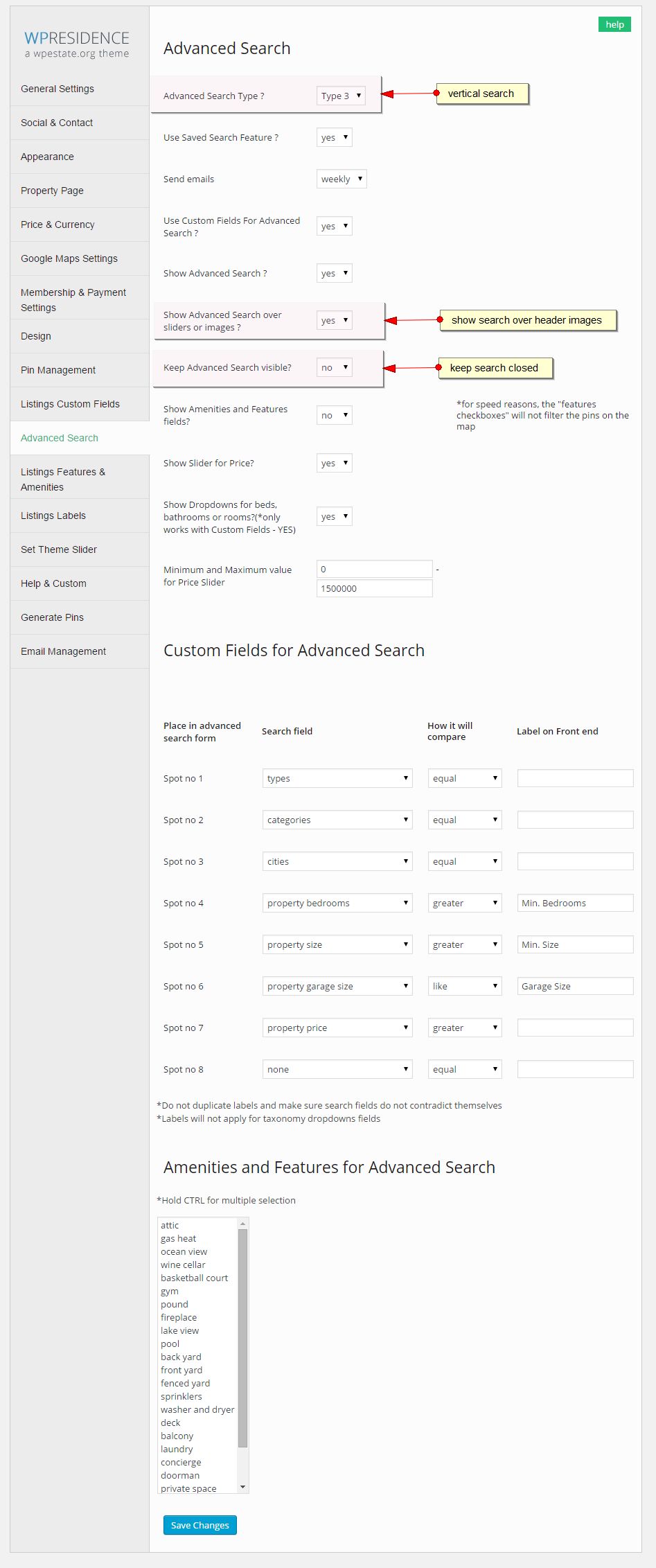
Thank you kindly for buying our theme. These are the Advanced Search settings you must have in theme options http://wpestate.org/wp-content/uploads/2015/05/demo5-search.jpg
If you wish us to do them for you, please open a ticket here http://support.wpestate.org/ and give us wp-admin access. We offer support for demo content setup.
Thank you Anna
Hi Anna, do you have any solution : - to upload a floor plan ad a pdf file (usually floor plans comes in pdf format) - to extend the number of available custom fields
Thank You Maurizio
PS. good theme, good support
...sorry, take care just about first point…
Hi Maurizio
Thank you for the comment and feedback You can upload PDF and it shows after description as an URL. Floor plans are something separate and they are just images.
Help – http://help.wpresidence.net/#!/property
See also 2 video tutorials:
http://wpestate.org/wp-residence-how-admin-and-user-add-floor-plans/ http://wpestate.org/wp-residence-admin-user-attach-pdf-file-property/Thank you Anna
hello, our website very very very slow and i’m updating to theme today. what could be the problem? www.firstclassgayrimenkul.com
Hi Banaman
Thank you for the comment. I don’t know if it’s related, but you should check this – on homepage http://www.firstclassgayrimenkul.com/ – you have properties list template. Go in edit page and save the options for what properties to list so the filters are filled in on home display. This is because in v 1.11 update we created a new option for properties list filters and you need to save again the properties list options.
Speed tips are posted here http://wpestate.org/forums/topic/web-mobile-site-speed/
If you need us to check the tips against your settings – please provide wp-admin credentials in our private support system here – http://support.wpestate.org/
Thank you, Anna
Hello. For some reason, the theme won’t leave wide layout, even when I switch it to boxed view. I had it in boxed view for most of development, and switched it to wide to test something – only to be surprised when it wouldn’t let me set it back. The settings say it’s in boxed view, but it’s certainly not showing that in-browser.
Hi vdonahue,
Thank you for the comment. The behavior is new to me. We never experienced this with our themes or any other client theme install. Perhaps you have a cache plugin? And that’s the reason why the layout doesn’t change.
If you wish we can look at your wp-admin.
Please provide wp-admin credentials in our private support system – http://support.wpestate.org/.
Thank you, Anna
Nevermind, figured out the issue. It was just a dumb mistake on my end. :-/
Hi vdonahue
Thank you for the follow up. Happy to hear the good news. Have a good day, Anna
Dear annapx, is it possible to make the features panel not visible if no features are selected. it doesnt look so nice if the panel ist shown and nothing below, looks more like an error and confuse the user because its clickable. thank you in advance
Hi priomedia
Thank you for the comment. We have this functionality available:
- If no features are set in theme options, the toogle or tab for features doesn’t show.
Thank you, Anna
How can i enable this function? Because the tab is shown even no features are set.
Hi priomedia
You must update to latest theme version. This was added in 1.11.
I just tested and for sure works with latest theme version.
Update help – http://help.wpresidence.net/#!/updatetheme
Thank you Anna
Is it an easy edit, and on which files, for the Property Details page to load with the Google Street View opened by default, without having to select the Street View button?
Hi wdwmkr
Thank you for the comment.
I don’t know if this can be done via code – will need to check with my colleagues to be sure. Please open a ticket in our private support system – http://support.wpestate.org/ to be able to follow up with you after talking to them.
Thank you Anna
Thank you I have submitted a ticket. It looks like the toggle calls a function that then creates a DIV over top the current map to display the Street View with z-index: 1. But for the life of me I cannot find where in the theme files that function is so I can enable it instead of using the toggle.
Hi wdwmkr
Thank you. I got the ticket. My colleagues will reply as soon as they can. Anna
Hello there! This is great theme for real estate, thanks. I have 1.11.2 v. but there are many graphics not optimised for retina display, property icons, pins, share and fav icons as well doesn’t 2x resolution.
Hi Bordo
Thank you for the comment. Property PINs on infobox will not load over retina because retina cannot load images retina ready via JS (this is based on what we have researched so far).
The other images (icons in property unit, share and fav) – we made the images ready BUT after releasing 1.11.2 we made some more research on how the retina script we use now works and it seems this script has some specific code rules and adding just the image is not enough. We need to review the code where these images are asked for and do tests according to new documentation.
Will need time to follow up after we do some research and tests on residence core. If we can offer a solution sooner than 1.12 release, we will. If you wish to stay in touch with us on progress made please open a support ticket here http://support.wpestate.org/
Thank you,
Anna
Thank you for your prompt reply.
Good, will wait when you issue it.
Check this please – http://lamangavacations.com/property-search/ I guess there are retina pins, how is it works ?
Hi Bordo,
Thank you for the follow up. My colleagues will check again if the new retina script has something special that could work for how we manage pins.
The link you sent to me seems to me they used the same pin which perhaps is defined in theme images as default pin.
We use Pin Management. We let every client add the pins they want from admin – Pin management, for every category, action or action + category. Pins on map are displayed via Google Maps JS from the uploads folder. As far as we researched to date, the retina scripts cannot read the images returned as our theme does for pins, but as said above we’ll research to see if anything has changes since we last looked into this.
Thank you Anna
PATHETIC SUPPORT. BEING DAYS WITH NO REPLY TO MY TICKET !
Hi socialgeckos
I apologize for the inconvenience. I read the ticket. My colleagues couldn’t enter wp-admin on Friday but we’ll finish demo setup this morning because we could login.
Over weekend we’re out of the office, but we’ll help asap and update the ticket as soon as we’re done.
Thank you, Anna
Hi socialgeckos
The ticket is updated. Demo setup is done.
Thank you Anna
Hi again
Almost done with all the translations. Just have a few more questions:
1. Properties “listing labels” in the wpresidence options like “address label, details label etc.” have no translation option? Right now I have Chinese + English on one line. Can they be translated individually?
2. When I am editing a property I can only edit the “property status” and “country” of the Chinese property. When I try changing the property status or country on the duplicated English property it doesn’t save. What causes this?
Example property with wrong translations: http://www.hifychina.com/en/properties/summit/
Many thanks in advance!
Regards
Rob
Hi Brian
Please see my reply below:
1. Properties “listing labels” in the wpresidence options like “address label, details label etc.” have no translation option? Right now I have Chinese + English on one line. Can they be translated individually?—> These custom text labels are registered with a special function provide by WPML and they show in STRING TRANSLATION. You should be able to set translation in there.
2. When I am editing a property I can only edit the “property status” and “country” of the Chinese property. When I try changing the property status or country on the duplicated English property it doesn’t save. What causes this?—> In WPML translation options you have 3 checks for every field. It’s very possible you have set copy or do nothing for these – and that’s why they don’t do anything.
—> Choose translate and then go in String Translation to translate STATUS. And the Country is translatable starting 1.11 – should be in .po if you have translate from .po
Thank you Anna
Hi Anna,
1. Only 1 of the 3 is visible in WPML STRING TRANSLATION. How can I see the other 2?http://www.hifychina.com/wp-content/uploads/2015/09/example21.jpg
2.. In WPML translation options I only have these settings: http://www.hifychina.com/wp-content/uploads/2015/09/example1.jpg
3. Sorry I’m not sure which “translate” I choose from where?
appreciate your help!
Regards
Rob
Hi Rob,
For 1 – I never used that filter system. The string translation we have is like this http://i.imgur.com/IBYaOJE.png And I just look for a label (for example Property Description) and looks like this http://i.imgur.com/5lSUhWN.png
If you can’t see custom fields in string translation, I can recommend these steps based on my experience: a. update WPML b. Rescan c. Search And if these don’t work please open a ticket with WPML to check your settings in case something is missing. For me the above work without anything extra.
—
2 You must look at the Translation Management for custom fields – http://i.imgur.com/iRNTbC4.png
Status field name is property_status – it’s set in wpml-config.xml to copy. If you wish to set something else and be able to set different status in every language you must delete the field from wpml-config.xml (which is available via ftp in wpresidence theme folder) and then edit in Translation Management. Set to “Translate” only and see if that is allowed. I believe Don’t Copy will not work (but not sure since I didn’t have to test that particular option). So must be tested.
Country field name is property_country – http://i.imgur.com/l8KNaox.png . It’s also set to copy in wpml-config.xml. You change the same as above.
Thank you Anna
Hi Anna,
1. I used poedit for few months before using WPML so I’m a bit confused how to use string translation in this case. In string translation I uploaded the .po files from wpresidence/languages folder. Didn’t find the Listing labels in there.
2. Works like charm. Thanks for the detailed explanation – couldn’t have done it without that .
I have a few theme files like /libs/property.php and now the wpml-config.xml that I have edited. I put them in my themes/wpresidence-child folder but it doesn’t overwrite the parent file. Got any tips for that?
Thanks!!
Hi Rob,
You’re welcome for 2.
1. I used poedit for few months before using WPML so I’m a bit confused how to use string translation in this case. In string translation I uploaded the .po files from wpresidence/languages folder. Didn’t find the Listing labels in there.—> In WPML translation options you have the setting to load from .po the translation and the rest from string translation.
Custom Fields can be translated ONLY with string translation. These are normally fields you add in theme options so only this string translation plugin can manage them.
The words you have translated in po can be loaded from po with WPML options.
—
2. For property.php See this topic http://wpestate.org/forums/topic/change-permalinks-in-wp-residence/ , Wolfram’s reply and check also this child theme codex instructions – http://codex.wordpress.org/Child_Themes
For wpml-config.xml, I honestly don’t know Please see if there is anything relevant here https://www.google.com/webhp?sourceid=chrome-instant&ion=1&espv=2&ie=UTF-8#q=change%20wpml-config.xml%20in%20child%20theme And if not, please open a ticket with WPML to answer this one.
Thank you Anna
Hi Anna
First I wanna say wpresidence has the best support on themeforest if you ask me. I rate it 5 stars easily.
1. I give up on finding those 2 listing labels No idea how to import them
2. Wolfram’s solution works require_once ('libs/property.php'); in functions.php
Moving or renaming wpml-config.xml from the parent works perfectly. WPML documentation: When using a parent child theme the wpml-config.xml file of the parent theme will need to be renamed or deleted and the wpml-config.xml file of the child’s theme will be taken into affect.
Thanks!
Regards
Rob
Hi Rob
Thank you very much for the rating You are very kind. I am really happy I could be of help.
Regarding 1 – Listings labels are these http://i.imgur.com/Np79Zoj.png
I have these settings in WPML – http://i.imgur.com/gwEeLAz.png but you can use the 2nd option (Don’t use string translation for theme and plugins). That refers to loading the .po for the theme translations (not custom fields, but the text in code)
And with these settings the WPML should just register the custom fields automatically (but make sure you have the option to register strings on. I use this http://i.imgur.com/rvcrGJ5.png)
Next do a search by Address (for ex – the first in listing labels) and you get like this http://i.imgur.com/ExD9xiy.png
Do a search for open house – and you get like this – http://i.imgur.com/4w094Ip.png (one is for admin, one for front end).
And that should be all.
BUT, I had a very long conversation with WPML after they launched 3.2 They had a bug in the release regarding the icl_function which they told us to use to register the custom fields as string. It didn’t work. They fixed it in latest release. So update the plugins as well.
Hope this helps.
Thank you Anna
Hi Anna,
Excellent!
In WPML>String Translation>I had to select “Auto-register strings only when logged in as an administrator”. Then save a property so I can see the listing labels in string translation
Thanks for the detailed explanation! Couldn’t have done it without it.
Thanks
Regards,
Rob
Hi Rob Happy to know my instructions helped to find the setting you were missing. Hope all goes smooth with WPML from here. Thank you, Anna
hi, anna meet a problem, old member can not login in front page , it return “undefined”.? and new user cannot regist ,it return”-1”? thanks.
Hi sheng2015
Thank you for the comment. From the description this happens with a caching plugin on that doesn’t clear cache ever. Clear cache and try again. That should be the quick solution.
As prevention. I don’t know what you use, but if you use Fastest Cache you have the option to clear caching every x period. Choose every 15 minutes.
If you use a different plugin see if you can set to clear cache regularly from settings.
If you need further assistance please open a ticket in our private support system here – http://support.wpestate.org. Give us wp-admin to check plugins and to do a new registration test.
Thank you Anna
Hi again Anna, in mobile version, i get a white logo on a black background. In theme options, all backgrounds are set on “white”. Do i have to change that background changing css? Thank You Maurizio
Hi Maurizio
For mobile we have a dark background header (for contrast) and the logo can be added in admin – theme options for mobile version.
If you wish to keep a white header, yes, you must add a custom css because this color is not in design yet.
Please see the topic here http://wpestate.org/forums/topic/change-mobile-menu-color-wp-residence/
The change can look like this if you go for a white background and black icon:
.mobile_header {
  background-color: #ffffff;
}

.mobile_header i {
    color: #000000;
}
Thank you Anna
Perfect
Hi Anna, i’m looking at my the website and i see that, ion a smartphone (vertical or horizontal is the same) in the properties box (in grid mode, not list) the price overlaps the short description. How can i resolve that problem? Thank You Maurizio
Hi Maurizio,
For this answer I must see your URL. Normally the height in responsive is a max fix height set in px. If this happens, means excerpt or titles are too long the height must be adapted to your content. But, because there can be a grid layout or a list layout, and because the height is different based on your content, I must see the url.
Please provide your website url in our private support ticket system here http://support.wpestate.org/ and we will assist with the css for your site.
Thank you, Anna
I have this problem using default values and demo content…
Hi Maurizio
I understand, but please confirm if this is the url or if it’s a different one http://wpresidence.net/
In responsive the unit shows ok http://i.imgur.com/SE1NcrW.png
Thank you Anna
Yes, i’m checking out wpresidence.net on my samsung S4, anche some properties are overlapped, also on your demo. In example Lovelace Road greenfield and Family House in Hudson and many others…
Hi Maurizio
I don’t have the actual phone, but I can test with simulators. There is this responsive simulator and for homepage – the properties you mention are not overlapped. Please check here – http://quirktools.com/screenfly/#u=http%3A//wpresidence.net/&w=320&h=640&a=38&s=1&p=1
One of the properties you mention in your comment looks like this http://i.imgur.com/ZjnKPO2.png and as you see there is no overlapping.
Please make me a screenshot from your phone or with this tool if I am looking at the wrong page. I am more than happy to help asap, but I need to be able to replicate on my end.
Thank you Anna
Hi Maurizio
I found a galaxy s3 with android 4.3 and I still can’t replicate the screenshot. I also tried to look online for any tool or info that could help understand why you have this. I found nothing. I found that there is a text zoom control in android browsers. Perhaps you have that enabled on your phone? I am asking because it’s the first time this was ever reported and I strongly believe that if this were to be an issue from there side, there should be several complaints.
From CSS point of view – you can make this css unit change height @media only screen and (max-width: 640px){ .property_listing { height: 400px; } }
BUT – this increases unit height on all devices with screen resolutions smaller than 640. There is no CSS based on the browser / device you have.
Thank you Anna
Hello. How is it possible to show property category (type) in the block “property_location”?
Hi blessingway555
Thank you for the comment. Unfortunately I don’t understand the question very well. Please provide a screenshot to understand where you wish to show property category and be able to advise.
Thank you, Anna
OK. I mean this https://yadi.sk/i/6_CnUK8oivJBy
OK. I mean this https://yadi.sk/i/6_CnUK8oivJBy
Hi,
Thanks for the screenshot.
In that location you need to know how to add with new php code.
In code we have php commented for showing City/Area (http://wpestate.org/forums/topic/add-city-area-property-unit-wp-residence/)
You must adapt that code to the category php code.
This is something that needs some php knowledge from your end to make this change.
Thank you, Anna
thank you very much
What am I doing wrong? I feel like making any changes with this theme results in something else breaking.
Hi IdeaAssociates
First of all, thank you for the comment and I apologize for any inconvenience. To be able to help make the settings work, I need to see how you set Advanced Search custom fields (wp-admin access) There are fixed rules for each type of field you can add. A wrong setup can lead to wrong results. That’s the 2nd place to look (after checking titles and slugs) which I understand is ok. Help – http://help.wpresidence.net/#!/advsearchfieldscustom
Please open a ticket in our private support system here – Will look asap and advise on what’s causing this. I can advise best after we go over all the settings in wp-admin.
Thank you, Anna
Thanks for the reply. It seems to have fixed itself. I think anytime I make a change that effects search or maps, it takes 30 minutes to actually work. I just need to be patient. 
Hi IdeaAssociates
Thank you for the follow up. That is strange Never had such timing problems, unless you have some special caching options enabled.
If you meet with any search issues, the previous reply stands. The private support system is here – http://support.wpestate.org/ I see the url didn’t copy in my previous reply by mistake.
Thank you Anna
Do you have any plan for putting Google Get Direction option to this theme? I want to buy it but get direction is very important to me.
get direction between ’’My Location’’ and Property location on the map
Hi rezaradmehr
Thank you for the comment. Unfortunately we don’t have any plans for this feature.
Thank you, Anna
Hi Anna, If I want this feature can you do it for me? and in which price?
Hi rezaradmehr
Thank you for the follow up. Unfortunately we’re not available for custom development and we don’t know when this will change. Really sorry. Anna
Hi
I’m adding a new language(english) to my existing website.
I have category “County / State” in my advanced search. It seems that the category has no translation option. So it shows in the “advanced search” on both languages. What’s the best solution for this?
website: http://www.hifychina.com
Many thanks
Regards
Rob
Hi Rob
Thank you for the comment. When I look at your website I see search in 2 languages. Since I am not sure if you already solved the problem (based on what I understand from your website), please advise if you still need help, and if yes, please send me more details.
Here is what I see
English version http://i.imgur.com/8QxJXW5.png
Default language http://i.imgur.com/NfTN1bq.png
Thank you Anna
Still have the problem
I have 40 properties in Chinese, and only 1 (kauai island) in English. Since “county / state” is not translatable it thinks it has 41 properties in both languages in the advanced search.
On a WPML website with your theme, how do you normally distinguish property language for the advanced search?
Thank you!
Hi Brian
How we do it in WPML to make sure translations are added to translated taxonomies is this:
a. Translate taxonomy (make sure titles/slugs match in each translation
b. translate properties
And with this done, the translation of the taxonomy is attached to the translation of the property.
This is the wpml help we made http://help.wpresidence.net/#!/WPML
If you have WPML and you need settings assistance please open a ticket and will look at the settings to compare with those we have on our test site with wpml.
Thank you Anna
Ah yes, I add county state to translation in wpml options Didn’t know I had the choice of enable that. Default it’s off
Thanks again for the great support!
Hi Brian,
Thank you for the follow up. I am happy to hear you found the settings easily. Best, Anna






)


