7855 comments found.

I had the problem with google maps, i just updated at 4.4.2 and i have the same problem. i read the notes that it should be fixed. Any tip?
Hi,
We have patched a fix for this requirement in the latest version of Page Builder and Theme and the update is available for download. You need to update the Page Builder as well to latest version 4.4.2 and place the Google API key in the option under OSHINE OPTIONS > GLOBAL SITE LAYOUT AND SETTINGS.
Thanks, Swami
Hello, is it possible to disable the share options in the gallery?
And is it possible to disable “right-clicking” on photos?
Greetings!
Hi,
To disable the share icons in the Single Portfolio pages, you can use the custom CSS below -
.single-portfolio .portfolio-share{
    display: none;
}
You need to paste the code in the custom CSS section under OSHINE OPTIONS > GENERAL SETTINGS.
Although the option to Disable Right Click is not available in the theme, you can find many 3rd plugin to add this feature on. One such plugin is – https://wordpress.org/plugins/right-click-disable-orignal/ .
Thanks, Swami
Thanks a lot for the replay and the plugin works perfect!
But when i paste the code in my CSS section nothing happens. Is still have the option to share and download the images when i click on them. :/
Greetings!
Hi,
Apologies I gave you the wrong css code. I thought you were referring to something else. Kindly use the code below instead,
.pswp__share-tooltip a.pswp__share--download {
display: none !important;
}
Kindly paste the code in the custom css setting under the “General” section of the options panel. Kindly ensure that Options Panel cache is NOT turned on.
Thanks, Swami
Hey Swami, this works, thanks a lot! Is there also a way to completely hide the share button in the gallery?
Do you have any advice on how to disable the mouse 4 button (clicking on the mouse wheel)? Now you can open images with mouse 4 in a new tab when you are in the gallery overview. I couldn’t find something on the wordpress forum.
Greetings!
Hi,
Here is the code to remove the entire “Share” menu from the gallery -
.pswp__button--share{
    display: none;
}
Kindly paste the code in the custom css setting under the “General” section of the options panel. Do ensure that Options Panel cache is NOT turned on.
I am not aware of a plugin for Disabling the Mouse Wheel click right away. I will however let you know of one if I am able to find a suitable plugin for this purpose.
Thanks, Swami
Thanks a lot for the help!! =)
Hi, i always get this warning on my site since a week: ” Warning: unlink(/www/htdocs/w00aacb2/eli/wp-content/themes/oshin/ReduxFramework/ReduxCore/inc/fields/typography/googlefonts.php) [function.unlink]: Permission denied in /www/htdocs/w00aacb2/eli/wp-content/themes/oshin/ReduxFramework/ReduxCore/inc/fields/typography/field_typography.php on line 945 “
What can i do or is there an update coming to fix this? The last theme update fixed this but now it is back.
Greetings!
Hi,
Basically the framework, fetches the list of fonts from the google api and writes it to a file. As you can see, the warning indicates that the framework is unable to access the file. Its either a file permission issue or the the apache user does not have “Root” permissions ( read & write files ). Its most likely the latter. Either ways, this is a server issue and you will have to get in touch with your hosting provider and ask them to look into the folder/file permission.
Thanks, Swami
Hello ! Am I the only one facing issues when using Woocommerce? I have the latest theme version and latest WP/Woocommerce versions, but when using Oshine, all account/cart/checkout are empty. Only product pages are showing 
Switched to other themes just to check and everything works fine…
What can I do?
Hi,
It is likely that you have added the Woocommerce Shortcodes in the Wordpress Content Editor while the theme by default pulls content from the BE Page Builder. To use the WP content editor, you need to enable the “Disable Page Builder” checkbox in the page and click on Save Page Builder button. Alternatively, you can add the Woocommerce Shortcodes in the BE page builder itself using the Plugin Shortcode modules.
Thanks, Swami
hiya, can I see an example f your ‘split screen’ section on your live previews? Also how do I find the theme template of how to set this up, what version do I need?
Hi,
Yes you can view the preview in the following pages, to name a few -
http://brandexponents.com/oshin/v21/about/ http://brandexponents.com/oshin/v21/contact/ http://brandexponents.com/oshin/v22/about/ http://brandexponents.com/oshin/v24/about/To create this page, you need to choose the Page Template option as “Split Screen Left” or “Split Screen Right” . The image that you upload in the Header Hero Section will appear on one side, and the content that you add in the Page Builder will appear on the other.
Thanks, Swami
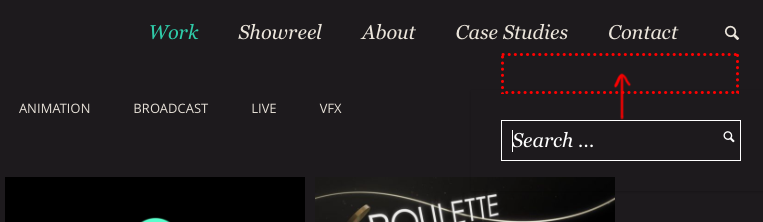
Hi. Thanks for the great theme! I was wondering, is there a way to reposition the search box that appears in the header search widget? It is very low down and overlaps the main content page. More like this: http://www.fishnorfowl.com/images/share/searchbar.png
Also, there appears to be a black shadow around the outside edge of the search box that appears, which looks like an error. Can that be removed? Let me know if you need me to post an example.
Thank you! 
Hi,
The Search Bar will float below the Header Bar in your site. You can reduce the height of the Header, and there by push the Search bar up, by decreasing the Logo Padding value under OSHINE OPTIONS >LOGO.
I am not able to locate a shadow behind the search bar in the image attached. If you could give access to your site, I can check and assist accordingly.
Thanks, Swami
Hi Swami, thanks for your reply and help – much appreciated
There isn’t any padding on the Logo (set to zero), but the search widget still overlaps the main body: http://www.fishnorfowl.com/images/share/zeropadding.png Is there another setting that could be increasing the height of my header?
Here’s a better screengrab of the shadow that appears around the search widget: http://www.fishnorfowl.com/images/share/searchshadow.pngYou can see what’s happening on your demo theme v4: http://brandexponents.com/oshin/v4/
The search box has a drop shadow. When you set the background colour of the search box to transparent, it still draws the drop shadow.
Hi,
Kindly use the css snippet to remove the box shadow effect.
.search-box-wrapper { box-shadow: none; }
Kindly paste the code in the custom css setting under OSHINE OPTIONS > GENERAL SETTINGS. Kindly ensure that Options Panel cache is NOT turned on.
Thanks, Swami
Perfect! Thank you Swami – that fixes the shadow
Did you have any solution for the position of the search box? As you say, it appears under the header, and has a large bounding box which makes it appear a long way away from the search widget.
Is it possible to move the search box so that it appears within the header, instead of over the main content?
Hi,
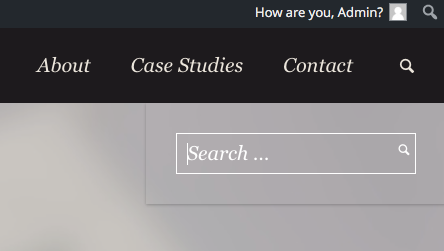
You can use the CSS code below to adjust the position of the Search Box. You might have to change “top” value according to the size of your header.
.search-box-wrapper{
    position: absolute;
    top:70%;
}
Kindly paste the code in the custom css section under OSHINE OPTIONS > GENERAL SETTINGS.
Thanks, Swami
Thank you so much Swami – that works perfectly.
Really loving the theme – great work. And just about all of my questions have been answered by searching this comment section, so thank you for taking the time in answering everyone’s queries
Hi,
Kindly show your support for our theme and service by taking a few moments of your valuable time and rating us with 5 stars in themeforest.
Thanks, Swami
Hello,
My BE Page Builder is currently running version 4.0.2. I read through the comments and there is an updated version of 4.4.02. I’ve attempted to update the plugin, but it does not show that an update is available. Please help!
Please disregard. I spoke too soon.
Great theme! I do have one request: Is the one column portfolio option coming within foreseeable future update’s? I really need this for my homepage, so i can easily highlight one of my portfolio projects on my homepage.
Hi,
We do have this feature in the Pipeline for our future releases. However, unfortunately, i will not be able to assure a time by which this will be available, as we are working on a number of features for the theme and will be prioritising them dynamically. Appreciate your patience.
Thanks, Swami
Awesome theme. I’m using v14, the single page. Is there a way to reduce the amount of space between the lines in an unsorted list (bullet points) ? I remember doing something with margins in the past but in this theme I can’t find where to access the CSS.
Is it possible to add my own additional icons? I wanted to have icons for the numbers 1, 2, and 3. Right now, I’m using the animated numbers, instead, but it seems like overkill.
How can I change the position of the single page navigation dots on the right side? Currently, they’re at the same position as the Slider Revolution’s arrow to click slide forward, which gets users clicking the wrong link in error.
Hi,
Thank you for your kind words, i am glad you like the theme.
1. You can use the custom CSS code below to adjust the margin of the Unordered List -
ul li{
    margin-bottom: 10px;
}
You need to add the code in the custom CSS section under OSHINE OPTIONS > GENERAL SETTINGS.
2. Apologies, there isn’t an option to add custom Icons in the theme.
3. Do you mean to switch the navigation dots to the left? If so, you can use the CSS code below -
.single-page-nav-link:hover span{
    right:auto;
}
.single-page-nav-link span{
    left: 50px;
}
.single-page-nav-link:hover span:after{
    border-right: 20px solid black;
    border-left:none;
        left: -20px;
    right: auto;
}
body.single-page-version .single-page-nav-wrap{
    left: 15px;
}
You need to paste the code in the custom CSS section under OSHINE OPTIONS > GENERAL SETTINGS.
By the way, I am not able to see the “Purchased or Supported” tag beside your account name here. Kindly contact us via the account that you purchased the theme from, so we can validate your Purchase and Support entitlement. Thanks for understanding.
Thanks, Swami
I’m unable to find the shortcodes in the builder screen. When hitted, the module button in the column section, shows me a blank text field where to insert the shortcode but no list is shown beside him. It seems the shortcodes aren’t imported but under appareance/import demo data I haven’t the option to import primary content.. Maybe I do something wrong but I can’t understand what..
Hi,
We have received your ticket regarding this issue and have responded back with the required details and screenshots for illustration. If you continue to have issues, kindly reply to the email back with login URL and WP admin credentials so we can take a look.
Thanks, Swami
I love this theme but I’m wondering if it’s possible to add a scrollbar to this horizontal image gallery? I think it would allow people to scroll faster if they needed to find something quick http://brandexponents.com/oshin/v2/
Duplicate post. Responded to the older thread.
Thanks, Swami
I love this theme but I’m wondering if it’s possible to add a scrollbar to this horizontal image gallery? I think it would allow people to scroll faster if they needed to find something quick http://brandexponents.com/oshin/v2/
Hi,
I am glad you like the theme and about the question that you have – there is an option to add a “thumbnails bar” to the slider, in which all the images in the carousel will be shown. The user can use the thumbnail in the bar to navigate to the image as per your need. Here is a sample of the thumbnail bar from another gallery in the demo -http://brandexponents.com/oshin/v2/portfolio/overlay-carousel/ . Hope this is in line with what you are looking for.
Thanks, Swami
Hey there,
Great theme – and I recommend all to buy it!
Quick question, the animation charts and “scroll to” (without the scroll to section box ticked) seem to be broken, and the charts don’t load. Is there a way I could fix this?
Thanks, Ed
Hi Ed,
Thank you very much for your recommendation. I really appreciate it and glad you like the theme.
The animated charts seems to work fine in our test and demo sites. Could be please give me a link to the page in which the charts and scrolling do not work in your site, so I can quickly check what might be causing this?
Thanks, Swami
Hey there, Swami.
Here you go:
http://vedicmeditation.de/courses-for-beginners/Also, I’ve noticed that it won’t let me update the theme. It goes to update, then it talks about “permissions”. Then it fails and I have to delete the ”.maintainance” file to free it up.
Thanks for your help!
Hi,
Yes i notice that the Charts are not working in your page. It is likely due to a conflict with any other 3rd party plugin that you are having in your site. Kindly disable the plugins to see if that fixes the issue. However if you are unable to identify this, do email us your URL, wp-admin id and password via the Private Message form in the Support Tab so we can look at the Charts and the “Update” issue that you are facing.
Thanks, Swami
Thanks to these guys. Once again – brilliant support and very helpful, sent an email and got a reply and a quick fix without any trouble or confusion.
Definitely recommended this theme and the people who work on it!
Thanks a lot for your kind words eddie, kindly rate the theme with 5 stars and write your review there so that prospective buyers and other theme users can access the feedback easily
Ok, will do. Thanks!
Hello there,
I love this theme so far! However, I am having an issue with the font awesome icons. I would like to insert them into a text box underneath some text, and be able to adjust their size. Right now, they come out very small and I am not able to align them so that they appear on the same line. Is that an option with this theme?
Thanks! -B
Hi B,
I am glad you like the theme.. To add an Icon module in the Text Block, you need to copy the Icon module by clicking the Copy Icon in the Top Right corner of the Module and paste it in the Text block. You can choose the size of the Icon while creating the Icon Module itself.
To align the Icon within the text block, please switch to “Editor” module in the and add a “div” around the icon shortcode and add the alignment styling css inline in the div.. So you icon shortcode will look like this -
<div style="text-align: center;">[icon name= "icon-facebook" size= "tiny" style= "circle" bg_color= "#000000" hover_bg_color= "#af9f66" color= "#ffffff" hover_color= "#ffffff" border_width= "" border_color= "#000000" hover_border_color= "#af9f66" alignment= "none" href= "http://www.facebook.com" new_tab= "1" animation_type= “fadeIn"]</div>
Let me know if you need further instructions.
Thanks, Swami
Thanks for the instructions! The copy/paste into the text box works, however, I still am not able to align multiple icons in one row. They still stack in a column. Do you know how to fix that? Thanks!
Kindly share your wordpress admin url, ID and password with us via the form in this link https://themeforest.net/item/oshine-creative-multipurpose-wordpress-theme/9545812/support and we will investigate the issue and align the icons in one row for you, at the earliest.
Thanks, Swami
Hello, I got a little problem with the portfolio section, for no reason since aa few weeks portfolios pages are 404 and on the wordpress platform I have an empty page when I try to modify or create a new portfolio page.. I’ve just reinstalled the theme but the problem is still here. Thank you
Hi,
The 404 problem looks like a permalink issue. Kindly go to SETTINGS ->PERMALINKS in your backend and set the permalinks to default style. Save the settings and then subsequently set it to POST NAME and save the settings again. This will refresh your htaccess file and will resolve any permalinks issue.
Thanks, Swami
Thank you so much!!
By the way, it looks like your free support period has expired. Kindly renew support by purchasing an extension from themeforest in order receive timely responses to your support requests.
Thanks, Swami
Hello BXPT Team,
Can you explain me how to reproduce this page template : http://brandexponents.com/oshin/lightbox-portfolio/
Also, do you mind sending me the .xml file of this page (export tools) as a dummy content.
Sorry to be pushy, but I have kind of a rush situation here Thank you
Hi again,
How can I easily modify portfolio and gallery shortcode ? I want only one column to display (both gallery and portfolio options starts at two columns)
Again thank you
I have come to understand that I just need to enable lightbox on be image slider items.
Hi,
I have responded to your support email, earlier today with the necessary instructions to create lightbox gallery portfolio items. With regard to your subsequent questions,
1. Unfortunately we do not have a one column option for Portfolios & Galleries. But this is something we are definitely considering as an option for a future update.
2. Again there is an option to enable lightbox on BE Slider images.
We will providing a lightbox image module in the page builder in one of our upcoming updates.
Thanks, Swami
Thank you Swami,
"2. Again there is an option to enable lightbox on BE Slider images."Can you explain me where ? because I spend 36Hours in 2 days on your framework and didn’t figured out how ? Again thank you
Apologies, it is a typo, I meant “there isn’t” an option.
hehe I know i m not crazy
Thank you very much for this one
1. One Column Portfolio and Gallery addedIn a next update, it would be great to have the ability to display only 1 picture at the time within 1 column Gallery and hide the rest of the gallery in Photo Swipe mode. For now, if I set the option to 1 column and upload 9 pics to the gallery, they’re displaying below in the column.
Again thank you, I managed to do the trick using 1 column portfolio instead.
And sorry for my poor english
Cheers
Hi,
I am glad you like the new feature. Using the one column Portfolio is the best alternative, in case when you need just one image to open in Lightbox. We will incorporate the single image option in Gallery, provided it is technically feasible.
Thanks, Swami
That’s a 5 stars support ! Thank you Bxpt
Which Demo Content is for this particular theme? http://brandexponents.com/oshin/parallax/
Hi,
This page comes as a part of the v1 demo sample content. I am assuming you are using the latest version of the One Click Import plugin, because an earlier version did not have this page included in the v1 demo data.
Thanks, Swami
Very nice theme! Hi. I am using the V2. How to make the arrows ‘< >’ in the galleries a bit bigger? Here: https://www.dropbox.com/s/y4akws6dv9h0xtq/problem1.jpg?dl=0 (Please notice the red boxes in the picture.) Thank you!
Thanks for your kind words. Apologies it is not possible to increase the sizes of the lightbox arrows as they are images and not font icons. That’s how it comes with the photoswipe plugin.
Thanks, Swami
Where can I find the activation code for Slider Revolution?
Hi,
As theme authors, we have an extended license for the Master Slider & Revolution slider plugin and an exclusive purchase code that allows us to include the plugin with theme and allow theme buyers to use the plugin for free. Unfortunately you cannot use the Oshine purchase code for activating & automatically updating included premium plugins. The activation option is exclusively for those users who have purchased a license for the plugin directly from code canyon. The oshine purchase code can only be used for one click updates of the theme. For updating BE Page Builder you don’t need any verification and updates will be available automatically.
Premium Paid Plugins such as Master Slider & Revolution Slider, bundled with the theme are not eligible for auto-updates ( Not just our theme but its the same case with plugins bundled in other theme. ), but we will be periodically updating the plugins along with the theme updates so that you stay current. You do not have to Activate the License in order to be able to use the plugin.
Instructions to manually update the plugins, in available in our knowledgebase here.
http://www.brandexponents.com/oshine-knowledgebase/knowledge-base/update-plugins/Thanks, Swami
Homepage video browser compatibility
Hi, I have Oshin homepage video on my website. However, the video doesn’t play automatically when browsing with IE and Firefox. I have to click on “Home” button for it to play. The video automatically on when browsing with Chrome. How to make the video compatible with all browser?
Hi,
The video html5 tag which is used for displaying videos has the attribute set to autoplay the video. We have tested this in firefox, safari and IE and the autoplay does work fine.You just wait for the video to load. Probably its already cached in your chrome browser that, which is why it probably seems to play instantaneously.
Thanks, Swami
Hi. Nice looking theme. However, is it optimized for SEO? I really want to use this theme for my next website but looking at the page source code I see a lot of inline css styles… and checking with Google PageSpeed Insights I see low scores for page speed re: Eliminate render-blocking “above-the-fold content”... I checked for template v9. User experience comes up with an excellent score btw. Do you plan to eliminate page-inline css for this theme?
Hi,
Thanks for interest in purchasing our theme and I am really glad you like our design.
The theme uses external stylesheets for almost all its styling, but also uses inline styles. Let me clarify your doubts about why it does so in selective cases and how it actually is better for performance and thus seo. Only the dynamically generated css from the Options panel settings are included in the <head> section and then module level styles are used as inline styles. The most performant way of including dynamic css is by actually including it in the head section. Dynamic css is just a very small portion of the overall styles ( like typography & colors ) and only adds a few kbs to the page’s size, whereas if you were to include it as a separate file, basically there is a file write operation in the server ( apart from problems in shared servers with write permission restrictions ) there will be an additional http request which is a more expensive operation compared to loading just an additional couple of kb’s with the initial page load. Google’s AMP ( Accelerated Mobile Pages) spec doesn’t allow you to include external stylesheets for the reasons I stated above. So I am not sure why there is a misconception that inline styles are bad for SEO. What counts for a search engine is textual content, it will filter out everything else. The only counter argument is that loading all your css files as inline styles will affect the initial load speed and thus SEO. But we load only the dynamic styles which at a modular level are only applicable to elements in that page ( for example a button color in that page or section background in that page ), while the bulk, almost all, of the css ( layout.css , shortcodes.css , style.css etc ) is loaded as external files that can be minified, concatenated & cached. So instead of using a blanket approach, we have arrived at this two fold way of handling css after a lot of consideration about performance. Infact other popular themes use this approach as well. You may not see a lot these external css files by inspecting our demos in the browser, because we have used a caching plugin to concatenate and minify our css files. With regard to the “Render Blocking Scripts” in google page speed score, some javascript libraries like jQuery and Modernizr, used by almost all the themes, have to be included in the header. Except of JS libraries and ones included by 3rd party slider plugins, all theme related scripts are included in the footer. Also we are working on ( for theme version 5.0) asynchronous loading of scripts, on demand which will make the theme even lighter and faster inspite of all of the powerful features. The low score is also because we use a lot of high resolution imagery in our demos and though they have been compressed, google page insights almost always says the images can be compressed further. It infact suggest such compression that the images become pixelated. We have to design websites for end users and not bots and given that our demos are catered to a creative audience, we prefer to ignore the score as our sites load real fast and our conversion rates are very good. Infact we do really well in search engine results as well.
Checkout our demo performance when tested via pingdom and you will see that it loads real quick and faster than 79% of all tested websites. Here is the proof. https://cl.ly/3U1d3a0f3i44 . We will provide with tips and pointers to optimize your site’s performance after you complete setting up your site.
Thanks, Swami