8686 comments found.

Not sure if this is bug or not, but Chrome is not paying nicely with equal height rows. Firefox works as expect, but with Chrome we end up with white space top and bottom on some of the column container and sizing the window makes it worse.
http://leapzonestrategies.com/meet-our-team/Is there a theme or plugin update? Currently on Version: 1.6.3
Hi and sorry for delay! The problem is caused by the last update of Chrome 63, please check here the quick fix: https://support.undsgn.com/hc/en-us/articles/214092169-Patches-Fixes
Hi,
I’ve just done run the update and visual composer has broken. The text block doesn’t load any content when you edit it. I have the latest updates for everything installed?
My support has expired so I can’t get in touch through the uncode support but it’d be really helpful if I could get some help with this since I’ve never used the support and this doesn’t seem to be an error I have caused..
Have you got any recommendations for trying to fix this please?
Thanks
Hi! We are sorry for the problem you have but other users are not experience this issue so we don’t have a pre-made fix for you. Since this is a big update (both VC both WP) are you sure to have cleared your browser cache? Moreover try to deactivate all extra plugins, maybe some plugins create the issue with the new version of VC etc. In case are you able to upload a screenshot of a page with the error with the Chrome Developers Tools opened?
Hi there,
Thank you for the speedy response!
Ah that’s a shame, I was hoping it would be a simple fix.
Yes please see the attached screenshot with the console opened. There are a few errors showing, but I’m afraid I don;t understand them!
https://snag.gy/u3UKhs.jpgAny help would be really appreciated. Please let me know if this link does not work.
Thanks
No sorry, if this is a recurring issue after the update you should see thousand of message reporting this problem here. Anyway I see you still have extra plugins, please deactivate them all and purge cache for cache plugins and browser, have you updated the Uncode Core plugin and WP to version 4.9?
It happens multiple times that icons are not loaded and template appears with rectangles all over the site. What can be done?
Hi toshthakkar! It’s not easy to debug just in words if you have a so odd issue, anyway if you never seen the icons the problem can be a setting in the htaccess file, otherwise if this issue is random (sometimes you see and other time no) it’s up to the server (when an issue is random it’s a server issue). Anyway don’t worry, if you need dedicated support is offered in our Help Center, there we have a completely dedicated support team, please submit a ticket so we can support the solution privately! Thank you! 
https://support.undsgn.com/hc
How do I make the menu switch from dark to light skin when a user scrolls down?
Hi hcbecker! The automatic menu color change is applied when you have an header with a different skin than the default one: https://support.undsgn.com/hc/en-us/articles/213459749-Transparent-menu-skins
If you have any needs setting up this or you need dedicated support is offered in our Help Center, there we have a completely dedicated support team, please submit a ticket so we can support the solution privately! Thank you!
https://support.undsgn.com/hc
HI
I can not see any theme options, bacause they are not showing up in stead it is showing system status, where it shows some red mark and some green mark. Not sure of what it is, and why not the theme options not showing  ?
?
So weird but it is suddently showing up !
Hi Noura123, sorry for delay and thank you for confirm! Anyway if you need dedicated support is offered in our Help Center, there we have a completely dedicated support team, please submit a ticket so we can support the solution privately! Thank you!
https://support.undsgn.com/hc
How to dissapeared main blog and signs of prev and next at end of post
and how to write a description over post grid like this website https://travelaway.me/ when he wrote a description MY PICS FOR YOU
Hi! If you need support is offered in our Help Center, there we have a completely dedicated support team, please submit a ticket so we can support the solution privately! Thank you!
https://support.undsgn.com/hc
I have been asked by a few people to request this. Could you please add a Like/Unlike (Click an icon to like and click again to unlike) functionality for posts and custom post types. Every vote should be limited by users IP and a Cookie and have an option to select members only and/or visitors.
Hi Hot-Shot and thank you for suggestion! If you have any requests please send from here so we have in our features request database when we evaluate features for next updates: https://support.undsgn.com/hc/en-us/articles/213714949
I went to the supplied link and have submitted the “Like/Unlike Vote functionality” suggestion in more detail. Since I have not received a reply, I am not sure if it went through.
Hi! Yes we received and it’s now in our database feature requests to be evaluated within other suggestions when we plan next update features.
Hi Visual composer drops to the bottom of the page every time i edit a block. Its really frustrating. Can you help? Is there a patch for this?
Hi, here you are: https://support.undsgn.com/hc/en-us/articles/115005686945
.
hello team,
q: is there a way to make single post/portfolio pagination area fixed? i mean always visible at the bottom of page (regardless user scrolling)
thxxx
Hi tasoskouk! How is going?
This is not a native option but you can try to paste this code (http://undsgn.d.pr/7qM6e/5ficFbe6):
.single-portfolio .row-navigation {
    position: fixed !important;
    bottom: 0px;
    z-index: 9999;
}
Hi tasoskouk and thank you for confirm!
i want to change color of text name page from white and when scroll down the menu text to appear black
Hi dritanleka! How the page is designed? Sorry but without knowing the actual status of the page is not easy understand the correct settings. To apply the menu color change you can follow more infos here: https://support.undsgn.com/hc/en-us/articles/213459749-Transparent-menu-skins
Basically you need to modify the header skin to apply the menu color change: https://support.undsgn.com/hc/en-us/articles/213459749-Transparent-menu-skins#&gid=1&pid=2
Anyway if this doesn’t help and you need dedicated support is offered in our Help Center, there we have a completely dedicated support team, please submit a ticket so we can check privately! Thank you!
https://support.undsgn.com/hc
Hello and thank your for this theme !
I have a quick question though, as im a little lost : Is it possible to have two different images for the header of a portfolio page and the thumbnail to access it?
I use the ‘feature image’ to customize the thumbnail on the home page but it also change the page’s header. So, is there a way to add a picture in a portfolio header which is not the ‘feature image’ or another solution?
I hope that my question is understandable.. thank you in advance !
Hi! Yes absolutely you can do this. What type of header are you using in you portfolio page? Anyway you just need to go in Page Options of this page and set the Header to be Basic or apply a Content Block Header, with these methods you can redefine the page Header. I hope this make sense and helps.
Anyway if you need dedicated support is offered in our Help Center, there we have a completely dedicated support team, please submit a ticket so we can support the solution privately! Thank you!
https://support.undsgn.com/hc
Oh i get it now, it’s working perfectly. Thanks a lot for your quick and clear answer !
Hi Albatros_N and thank you for confirm! 
Hi, I want to ask for help. I’m having this problem with my website once I updated to Wordpress 4.9.1: Uncaught ReferenceError: UNCODE is not defined. Do you know how can I fix this and why it happens? thank you very much!
Hi Juli_Lou! After the WP 4.9 update there are known problems for any themes that use Visual Composer and you can find more infos here: https://support.undsgn.com/hc/en-us/articles/115005686945
Anyway, as you can see, this is not one of the known problems. Have you deactivated all extra plugins? In case please share your site preview since it’s really not easy understand what can cause this only in words.
Otherwise if you need dedicated private support is offered in our Help Center, there we have a completely dedicated support team, please submit a ticket so we’ll to support the solution!! Thank you!
https://support.undsgn.com/hc
Hi, thank you very much. I’m going to deactivate the extra plugins. This is my website: http://nearme.com.co/ thank you again.
Hi and thank you for confirm! It seems the problem is created by this plugin “optimize-javascript”. It’s possible you need to refresh cache for the plugin or there are possible problems after the update of WP with this plugin. If you want some suggestion for a possible good cache plugin please follow this: https://support.undsgn.com/hc/en-us/articles/115004168269
Thank you very much, you saved me!!!! thank you. Have an awesome day!
Hi Juli_Lou and thank you for confirm!
Hi there,
I’m considering recommending this theme to a client but I have a couple of functionality requirements. Could you kindly confirm the following:
- Is it possible to have a full-screen YouTube video as a hero section and/or as the background of a row?
- My client wants to showcase 12 of his projects in the form of a grid. This grid would display the featured image of each project, then when you click on one of the images it opens up a lightbox gallery of other images within that specific project (instead of the other 11 images in that grid). I believe one of the sites built with Uncode, http://www.simiancoates.com/, features this kind of functionality but can you just confirm that this functionality is included within the theme, i.e. no custom code required?
Many thanks in advance for your help.
Hi marianneciara and thank you for interest!
1. Yes you can, confirmed.
2. This seem a lightbox but when you click the thumbnail it opens a new page (black page) where there is only a Slider Revolution slider (included in the theme). Yes you can create this but it’s a bit “manual”. What you ask will come in next Uncode update (open an independent gallery from just 1 thumbnail), this is just ready but we are now closing other features.
Let us know if you need more infos!
Hi there, thanks so much for your prompt reply! Approximately when you do you think the next update will happen?
Hi marianneciara, we cannot release deadlines but probably 3-4 weeks. What you search for is a gallery inside a gallery (it’s really not common feature for multi-purpose themes).
Hello!
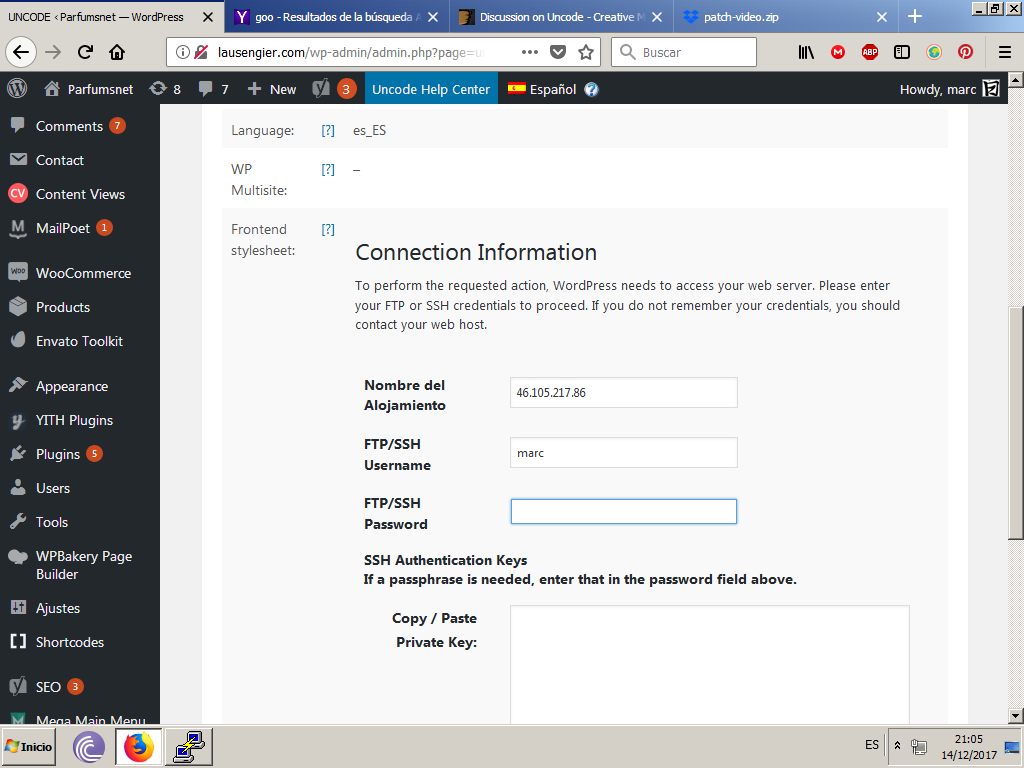
I have a terrible problem with Uncode and in the System Status, the theme needs to have access to ’/library/css’ directory. But it doesn’t!
There it begs to me credentials: https://snag.gy/Ls4D0P.jpg
And when I give it it says me, not found!: https://snag.gy/zZxe2U.jpg
How can I fix this? it shos the FULL PATH to the library. And uses get_template_directory() Do you know why it happens?
Please is very critical because I am inside a very strech timing.
Thanks!
Hi! We are sorry for this issue but here you have serious server side issues (or restrictions), as you can see you are even not allowed to preview files and folders that are on your server. The System Status should appear like this: https://support.undsgn.com/hc/en-us/articles/214000785-System-Status
If you have access to your FTP, open the file wp-config.php and after the debug declaration paste this code define('FS_METHOD', 'direct'); otherwise you should ask your host why a popular theme like Uncode fails on their service. If you are in hurry we can only offer a refund but I’m pretty sure you are going to have similar issue also with other themes.
PS: Anyway if you need dedicated support is offered in our Help Center, there we have a completely dedicated support team, please submit a ticket so we can support privately! Thank you!
https://support.undsgn.com/hc
Hi, Oh my God! But if I put debug mode on it appears the next error: this:https://snag.gy/tx7kSn.jpg
Is this related about my installation? And if is a server problem what I could be?
The define() method you said… brokes the page.
I don’t understand nothing!!
Yes it’s normal you have a fatal error, nothing is working on your server. I hope you can understand that this is not a problem of a top seller theme like Uncode: as told you have serious server issues. You can ask our team for a refund (even if you should ask your server why you have this problem) or open a ticket in our Help Center and insert complete logins (both FTP both WP).
Wow! Wait. Finally, the next one: define(‘FS_METHOD’, ‘direct’); it works! You can check it now!: https://snag.gy/pIzF7f.jpg
Now it is fine? Thanks a lot!
Yep it’s working! Now I don’t know if you can have other problems (it’s odd the problem you had), in case open a ticket so we can check privately or otherwise send as a refund request, this is not a problem!
HI, i have a pre-purchase question!
I’m looking for a wordpress theme that allows me to create a grid on the homepage with countdowns divided into different categories, with the ability to click the various filters of the categories.
Every single countdown must have a background image, shareble on social like facebook, twitter ecc. and give the opportunity to visit a post or a page within the website.
Is this the theme for me?
Thanks in advance for your help!
Hi De1art and thank you for interest!
I’m sorry but it’s not properly easy to understand your needs, have you a raw screenshot? You can have grid designs, countdowns and categories too but it’s not easy to confirm something that we don’t understand properly.
Yeah sorry! I mean something like this: https://ibb.co/ezAj4m
Is totally a mess, but this is the general idea. Let me know!
Hi! Ok now make more sense. Yes it’s possible to create this layout, this is just an similar example (even if here there is an odd grid): https://undsgn.com/uncode/homepages/creative-event/?style=lateral
The Uncode’s countdown have this layout (different from yours): https://undsgn.com/uncode/features/counters-countdown/
What you cannot have is the icon with socials (you can create social icons but not that share any specific block only). I hope this helps.
So i can’t share the countdown in any way but i can link the block to a specific page? And for the background image under the countdown and the title is possible?
What about the portfolio style categorization for these countdowns instead? (filters: all, movie, games, tv series ecc.)
Thank you for your help!
Yes you can insert a link for any blocks and both the background image for any sections. Not properly understand what you mean about portfolio categories but if you need this design they must be columns.
Hello
A quick question…
I noticed that in one of the templates I was looking at you had a page title in the content (header in visual composer) that had the text “page title” and then the page title was automatic appearing in this heading element. I’m pretty sure you had some code behind there, but could you explain to me how I can make this happen?
I would like to setup a row for subpages as a content block that shows the current page title in it.
Hi Flashdesigner-81! If I understand you correctly the feature is named Automatic Text, is the option you have above the main text area in the Heading Module, this option applies the page title (I don’t know if this can be used also in your scenario): https://support.undsgn.com/hc/en-us/articles/214003665#&gid=1&pid=1
Anyway if you need dedicated support is offered in our Help Center, there we have a completely dedicated support team, please submit a ticket so we can support the solution privately! Thank you!
https://support.undsgn.com/hc
What’s the proper way to include custom php coding between or in content blocks in Uncode? Do I have to make template pages from scratch?
Hi mattforn! There is not some special way different from other themes, the problem is that you cannot use PHP codes inside the WordPress editor or inside the Page Builder text module, I know there are some plugins that make this possible but never tested personally, maybe the best is to hack core files.
Thnx for a swift reply! Yeah I just need to connect a few forms to external sites and also make a few calculations, so I didn’t want to make a whole template just for that. But mayb now I have to. I’m still working out how to include pure php within the content blocks.
Hi, if the forms are external it’s not better use an iframe and a bit of JavaScript?
Yeah, the forms I’m not too worried about, for ‘Contact Form 7’ there were a few plugins that might help. I do have to integrate some animated calculations within content a block. That’s where I got stuck. Basically inserting php in the blocks.
Ok, when it comes to animation (if intended as transitions) I think it’s better use JS, but probably I don’t have the point on your specific needs.
Yes, the animations use js but the data is collected via php. Basically, I know how to make a template for the whole page, just not how to intersect the building blocks to put php in or between them! I’d like to pupulate progress bars and also use some ajax functionality. Thnx for taking your time to answer!
You can add “uncode/vc_templates/uncode_block.php” to your child and try to modify to your needs.
Ah, so I can use uncode blocks as I use template files (sort of)? Amazeballs, that might be the route to take. That or shortcodes, I’m thinking.
Hello,
I have a issue for my customer. When I edit the content with Uncode Visual Composer and save, the code is formated with p tags before and after shortcode.I try disable wpautop in functions.php but no success. How to fix it please ?Code in simple editor
<p>[vc_row][vc_column width="1/1"][/vc_column][/vc_row]</p>
Thank you.
As you can see everything is fine unless you don’t switch the editor to Text mode (everything is fine when you are in Visual mode). The super odd part is that if you switch between the editor modes the p tag is removed: http://undsgn.d.pr/bF9I6j/4CBFcwkr
We report this issue to WPBackery team now (maybe they know about this problem).
Thank you for your feedback. I see your comment in WPBakery Team.
Thank you for confirm! By the moment remind to not use the Text mode or switch with Visual, anyway I’m pretty sure they know about this minor issue.
Two tests to isolate the issues for Uncode Theme :
1 – I try to disable text editor and use only Visual Composer as default.
2 – I re-activate the text editor and remove all p manualy and save.
Result :- Test 1 : When I edit the content and save, the p tags is added automaticaly.
- Test 2 : When switch editor and save, no p is added but if I edit the content with Visual Composer, p is added automaticaly.
- The p or br tags are added automaticaly when we change the content with Visual Composer.
Thank you.
Yes exactly and it only happen when you are in Text editor mode. Waiting for the official WPBackery reply, it seems a possible issue with the new version of the composer.
Hi,
How can I make the “menu” header accompany the page on mobile devices?
Thanks, Regards.
Hi! What does this mean sorry? Our demos is fully of headers that perfectly fits also in mobie view.
Hi,
sorry for my English.
I want the menu that is in the header to be visible as the page goes down. Let the menu always be seen. And when the page goes down it does not disappear.
Regards!
Hi molaunfleje! Ok make sense, please navigate to Theme Options > Menu > Animation > Sticky mobile menu (please note that this feature is available only in recent versions of Uncode).
Hi,
Thank you very much, it has helped me a lot!
Regards!
Hi molaunfleje and thank you for confirm!