21578 comments found.
If I buy and setup license in subdomain. And I want change to main domain then have lost license? ex: demo.mydomain.com to mydomain.com
Hello,
According to Envato license 1 site = 1 domain: https://themeforest.net/licenses/standard
Sometimes you need to purchase multiple licenses for subdomains (when sites on subdomains are logically different) sometimes you don’t (when you have e.g. different languages on subdomains). Please get in touch with Envato directly to clarify your particular use-case: https://help.market.envato.com/hc/en-us/requests/new
I mean want purchased the theme, I will designing using this template on a sub-domain demo.citystd.com before releasing on the main domain citystd.com, Im worried that if I register license the theme on the sub that I will then not be able to register license the theme on my main domain. Please advise?
Ah, got it 
This is perfectly fine. Just don’t forget to re-register the demo.citystd.com before moving the site to citystd.com.
Alternatively we can enable subdomain usage of theme for your citystd.com domain. This way you’ll be able to have the theme active simultaneously on demo.citystd.com and citystd.com (in this case it is allowed because your main domain and subdomain are effectively same one site).
Ok. Now i want rename folder dt-the7 to other name. So can do that?
No. You’ll be cut off updates this way.
Hi, do you have plans on releasing more demos / page layouts?
Hi,
We are currently finishing an update that required quite a bit of time of our designer. As soon as we’re done – we’re getting back to creating more content 
Thanks for the update!

Can i create custom sidebar in one page and apply on all pages only with select page with sidebar?
Hi,
Yes, sure. Here’s the user guide article to get you going: http://guide.the7.io/user-guide/individual-widget-areas/
I like your theme very much. I will use this theme at https://steamrehberi.com/ nearest time.
Hi,
Great. Hope you’ll enjoy the theme.
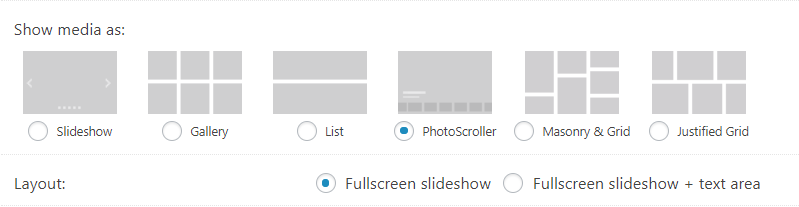
Hi, I’d like to change on how Galleries are displayed on Mobile and Desktop devices. I’d like to use Grid mode for Mobile and PhotoScroller for larger screens. https://i.gyazo.com/4b764a86df2d12661b72714cd9c33075.png
Is it possible to do that?
Hi,
Theoretically this can be done. But it requires considerable amount of customization which is, unfortunately, far beyond the scope of theme support 
Please consider hiring an experienced developer for assistance.
Hello, in my actual version v.5.6.1.2 there are no permalinks/ slugs in the benefit postype
Hi,
1. Install “The7 Elements” plugin under The7 > Plugin interface.
2. Enable “Team” post type under The7 > My The7 in the Settings block.
P.S. The newest version of theme is 6.0.1. Don’t forget to back-up (just in case) and update.
Hello, it says there are ‘team carousel’ shortcodes, but I don’t see any. How do I make a team carousel?
Hi,
1. Install “The7 Elements” plugin under The7 > Plugin interface.
2. Enable “Team” post type under The7 > My The7 in the Settings block.
Hellow, can i configure a full screen home video with sound with your theme? something like this your example, but with theme: http://yogaunioncwc.com/
Hi,
If I’m not mistaken, there IS such feature in Slider Revolution. However it’s not a good idea in terms user experience. So I have to recommend strongly against it.
Hi just to give you the heads up on this: got the “white text + missing buttons in text editor” error today. With all plugins disabled, including VC, the error persisted. With all refreshed WordPress install and cleared cache the error still persisted. Could it be there is an error in the theme?
Hi,
There are no similar reports as of this moment. So it does not look like a general bug.
Please, submit a request via our online help-desk http://support.dream-theme.com – we’ll get back to you ASAP and take a look what is wrong.
Thanks!
The Ultimate addons for Visual Composer plugin requires Visual Composer version 3.7.2 or greater.
Hello,
Current version of WPBakery Page Builder (formerly Visual Composer) that comes with the theme is 5.4.5. Ultimate Addons is 3.16.20.
You are using an outdated version of theme..
hi there a question … it’s possible that with the new version 6.0.1 in my admin area i don’t have a menu theme options? i saw it only in top bar ??? ideas?
ops sorry i found a button to check .. sorry ..
Hi,
Thanks for letting know
HI, Happy New Year to you all,
Quick question, Can you tell me how to hide the prices from the sidebar as seen here https://gyazo.com/12e91ee1f005b98d00d7bb8b7d9bb157
Kind regards
Hi,
Please, submit a request via our online help-desk http://support.dream-theme.com – our guys will get back to you ASAP and consult you about it.
Thanks!
No problem, Thanks for the swift reply.
Any chance that you could have support look into this for me as soon as possible I sent them an e-mail.
Regards
Hi, i would like to change my portfolio URL/Slug from ”/project/” to something else… how to? My Portfolio Archive needs to be a “product archive”.
Hello,
The7 > My The7 in the “Settings” block.
Important! Don’t forget to re-save permalinks afterwards.
Holy sh*t you guys answer fast. It worked. Thanks!
...One additional Question: How to customize the Header & Body (Content) of my remaning “Portfolio Archive” ?
Awesome work so far. Love your Theme for serval years now
Even more 

My Breadcrumb output is: “Start -> Portfolio Project -> Name X” Should be “Products” here as well ^^
I’m afraid here I’ll have to ask to get in touch with our support at http://support.dream-theme.com – our guys will get back to you ASAP and consult you about it.
Thanks!
Got anyhting by now?
Hello, if i check or uncheck “Show theme options in sidebar” in settings page, the options still show in sidebar. Can i change this in other option?
Hi,
Not sure I understood correctly what the issue is.. Is “Show theme options in sidebar” not working? In which way? Please be a bit more descriptive. Thanks!
Hi, by default, the option is deselected, but the options are seen in the sidebar. Check or uncheck this option does not produce any change. Thanks
This sounds strange.. Have you tried to clear the cache?
Yes, I have also tried in different browsers, without changes
Then please submit a request via our online help-desk http://support.dream-theme.com – we’ll get back to you ASAP and take a look what is wrong.
Thanks!
Your theme is nice and was looking forward to it when I bought it however it comes with a lot of error and since I bought it I am not able to go forward to do anything because its been from one error to the other. A bit disappointed in the performance of the theme on the building stage.
Hi,
“lot of error” are not the words people usually use to describe The7..
Please, submit a request via our online help-desk http://support.dream-theme.com – we’ll get back to you ASAP and take a look what is wrong.
Thanks!
theme design not compatible with latest version of woocommerce, the cart and checkout pages are really messed up
Hi,
Works fine on our demos though
Jokes aside, can you please report your WooCommerce and The7 versions? Thanks!
WP Version 4.9.1, WooCommerce Version 3.2.6, The7 Version Version: 6.0.1. All bundled theme plugins are also up to date.
On the Cart page and the Checkout page (which are both set to full width/no sidebar in page settings) the woocommerce sidebars that appear (e.g. cart-collaterals) are showing up as miniscule width (would be 0 if it had nothing in them) and are pushed below the main section on the page (e.g. shopping cart or billing/shipping details)
I am using a child theme but no woocommerce templates are copied over to it (except one email template).
When I upgraded WooCommerce to 3.2.6 it gave a warning that the theme (The7) has outdated template files.
Hmm.. Thanks for letting know. Forwarded your report to our dev team.
Hi,
A quick follow-up.
Our guys were not able to reproduce the issue..
Please, submit a request via our online help-desk http://support.dream-theme.com – we’ll get back to you ASAP and take a look what is wrong.
Thanks!
Hello. Purchased another license. Downloaded and launched them, only to find there are no longer TABS offered within the Page Builder. Did I miss something along the way??? Please advise asap. Thank you. I love your theme.
Hi,
1. Make sure you have “The7 Elements” plugin installed.
2. Enable tabs under The7 > My the7 in the “Settings” block.
I checked in the support portal to see if there was any info there but found nothing. Is it possible to add an image to the background of the Mega Menu or maybe a widget? Not a big deal just looking at making a few adjustments for the new year.
Thanks and have a great 2018.
Brad
Hey Brad,
There’s no option for it. However it can be done with a bit of custom CSS. You can get in touch with guys from our support at support.dream-theme.com – they may be able to suggest a solution for you.
Cheers!
Bundling The7 Convert Plus to the theme adds 2 seconds, TWO SECONDS to the load-time, that is more then the whole page time should have for everything. I deactivated it, no plugin is more important then page speed. Proof https://d.pr/R2ByGJ
Still not the fastest theme I have, sadly.
Hello,
Yes. Convert Plus adds quite a bit of styles, scripts and consumes some additional server resources. As each and every plugin.
That’s why though we ship the Convert Plus with the theme, we do not use it on our demos.
Bundling The7 Convert Plus to the theme adds 2 seconds, TWO SECONDS to the load-time, that is more then the whole page time should have for everything. I deactivated it, no plugin is more important then page speed. Proof https://d.pr/R2ByGJ
Still not the fastest theme I have, sadly.
Hello,
Yes. Convert Plus adds quite a bit of styles, scripts and consumes some additional server resources. As each and every plugin.
That’s why though we ship the Convert Plus with the theme, we do not use it on our demos.