26988 comments found.
Hi Guys! Does this theme support infinity scroll for posts?
Hello raduntc,
Sorry but our theme does not support this functionality for posts, sorry!
Thanks for your understanding!
Catalin L.

Hi there—am I correct in understanding that this theme will no longer be supporting visual composure updates? Thanks.
Hello kaitlinamalthea,
We will continue with support the Visual Composer but notice that we promote our page builder which is TD Composer and which is more powerful.
Thanks for your understanding!
Catalin L.
Dear Catalin, thanks for such a fast reply! The reason I ask is that Newspaper used to bundle the newer versions of VC plugin in the theme updates, but I’m no longer seeing them, and the documentation specifically says to use your version. Have you changed the way you roll out VC support? Or are you just no longer updating? TD Composer may be more powerful but it’s less a migration than effectively rebuilding the website to use it, unfortunately.
Hello,
We still provide updates to VC and the theme can be used with visual composer just as before. The VC update was released after we released our theme update so we did not get the chance to include it. We will include the new update for VC in the future theme update.
Thank you! Bogdan B
Check out what our customers feel about using Newspaper!
Goodmorning we have a problem with pagination. When we are in a page dedicated to a specific wordpress category, when we use pagination, at the second page wordpress category is lost and we see all articles (also ones not of this category) To understand what we are speaking about you can: 1. go to this page: http://piemontevda.lnd.it/alessandria/ 2. go to the bottom of this page and use next, prev button of pagination (all articles with title like Cu_… aren’t of the category chosen for this page).
Can you help us?
Hello,
If the post shows up in the block, then most definitely one of the post categories is one that is filtered to the block. This issue usually happens when having multiple categories set to a post. The post will show up everywhere one of it’s categories is specified.
Thank you! Bogdan B
Hello, In this case it happened also with post that have only a category assigned. It is shown also in categories that aren’t right. Can you help us?
Please contact us on our email address at contact@tagdiv.com and provide a link to your site and wp-admin (login information and admin rights) so we can login and investigate. Please also include a link to this conversation.
Thank you! Bogdan B
Perfect theme but how come the homepage post title does not stay in the image and have the same font after I save it in the tagDiv editor?
When I’m editing it should look like this: https://www.screencast.com/t/EblVxAhYMnQ
But when I finish and save it looks like this: https://content.screencast.com/users/NatuMyersAlterma/playlists/New%20Playlist/media/8575b208-358f-449a-9e57-264e76fd8f10/Screen%20Shot%202018-03-13%20at%201.55.40%20AM.png
I did as instructed by the tutorial in updating the home page.
Hello,
The 2 screenshots are identical. What are you trying to do? Please open a new topic on our official support forum at http://forum.tagdiv.com/forum/newspaper/ and provide more details to what you are trying to achieve.
Thank you! Bogdan B
my images auto resize… ex: xxxxxxtills-46-1.jpg?resize=696%2C464 and .jpg?resize=747%2C420
How to solve this problem? like this https://demo.tagdiv.com/newspaper_animals/wp-content/uploads/2015/11/p1.jpg
Hello,
Our theme does not resize images. Please check your plugins and image optimization tools. Our theme creates thumbnails of the images, so it does not resize them.
If you have any further questions please open a new topic on our official support forum at http://forum.tagdiv.com/forum/newspaper/ The comments section here is destined for presale questions.
Thank you! Bogdan B
Thank You Sir…..! My Problem Solved..!
I upgraded to version 8.7 and 8.7.2 but the problem is the sharing buttons of every post are not showing. How is this possible? Please see screenshot: https://snag.gy/qlK5pH.jpg
Hello,
Please open a new topic on our official support forum at http://forum.tagdiv.com/forum/newspaper/ and provide a link to your site so we can inspect it.
Thank you! Bogdan B
Hi,
We’ve activated the theme properly.
But the problem is here- http://prntscr.com/iqf30k my client is unable to fix it. How to we can get the ‘Facebook Access Token’? Our theme version is 8.6. We’ve 132 likes on our FB page and it’s public page, but we see there zero likes on our website.
We are using the 4.2 version of the social counter plugin- http://prntscr.com/iqf2ia
I think we’re using latest theme and plugin. How do we can solve the problem?
If you can give us the solution, my client will leave a 5-star rating.
Thanks.
Hello,
Please contact us on our email address at contact@tagdiv.com and provide a link to your site and wp-admin (login information and admin rights) so we can login and investigate. Please also include a link to this conversation.
Thank you! Bogdan B
Hi Bogdan,
Please check email. Email title is- “Facebook Access Token”
Hope that you’ll solve my problem ASAP.
Thanks.
Poppins is a Google font, so it should usually work even without uploading a woff file, correct? Please tell us which file in the Editor to edit to add it to the drop down menu. Thank you
Hello,
The “Poppins” font is already available among the theme fonts so you can simply select it from here: https://www.screencast.com/t/hi6pWtFuF THe main menu as well as the top menu element fonts can be found in the theme fonts section.
Thank you! Bogdan B
Hi, is there an option to disabled responsiveness of the theme and remain with the desktop layout on mobile devices.
Hello,
Sorry but our themes do not have any options to remove responsiveness. On mobile devices you can request the desktop version from the mobile browser if you wish but the theme cannot provide any setting in this regard.
Thank you! Bogdan B
Hi, I am using block 11 but I dont know how to change the next/prev color buttom thanks https://ibb.co/iJBNnn
Hello,
The next/prev button color is grabbed from the block title color. The block title color dictates the general hover color for that block as well: https://www.screencast.com/t/Rbm9tpGKoIf you have any further questions please open a new topic on our official support forum at http://forum.tagdiv.com/forum/newspaper/ The comments section here is destined for presale questions.
Thank you! Bogdan B
Hello,
That is a zip archive you see in the url. The test mentions it cannot access the url. A zip archive cannot be ‘accessed’ by any test and any browser. Please remove the zip archive fro myour themes folder as an archive is not supposed to be there. Unzip the archive and delete the zip file afterwards.
If you have any further questions please open a new topic on our official support forum at http://forum.tagdiv.com/forum/newspaper/ The comments section here is destined for presale questions.
Thank you! Bogdan B
mucha gracias:voy a eliminarlo☺
Hi,
Thank you for creating this great theme, you’re awesome!
I would like to know 2 things, please…
1. How can I add a white logo on that black footer background?
2. How can I reduce the length/height of the header bar without messing spaces around the logo, navigation menu, etc?
Regards,
Hello,
Thank you for your appreciation. The logo and footer background can be changed from the theme panel so you can set any logo and any color you want in the footer. Please check the footer section of the theme panel. As for the header spacing, it comes from the font line height. You can change line height in the fonts section of the theme. Change the line height on the main menu elements.
If you have any further questions please open a new topic on our official support forum at http://forum.tagdiv.com/forum/newspaper/ The comments section here is destined for presale questions.
Thank you! Bogdan B
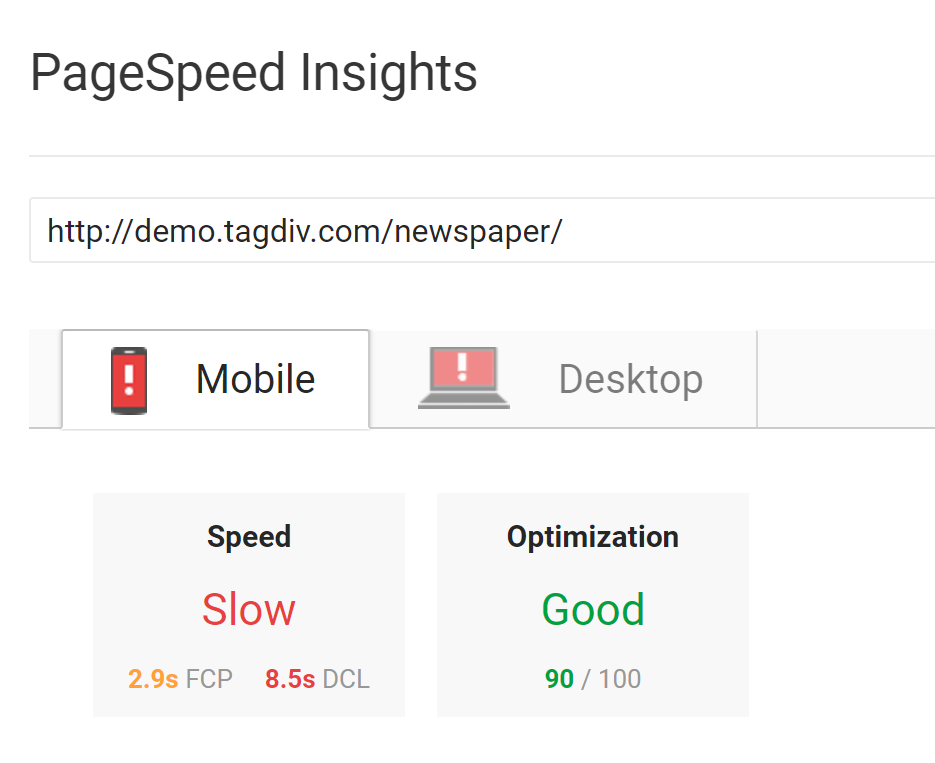
Hi, another presale question. I clicked on the pagespeed isights for the demo theme and it scored very poorly: https://i.gyazo.com/7d79c5334b6477ae400bf0199d144d90.png
Speed is something very important to me – could you please comment on this?
Thank you, Chris
Hello Chris,
Our demo went through some changes and did not get optimized afterwards for page speed. The score you see on the demo is not relevant to your own install. Page speed is a very personal issue and the host that you use counts for more than 80% of the page speed. Please use this guide to make the proper server configuration: https://forum.tagdiv.com/how-to-make-the-site-faster/
Thank you! Bogdan B
(Pre-Sale Question)
Hello, it looks like this theme fails some pretty serious security tests: http://themecheck.org/score/wordpress-theme-newspaper-v8_7_2.html
Hello csburdick ,
Base64 encoding was used on demo data (the one which can be installed from Theme Panel) and it doesn’t contain any security treating code. The rest of the warnings have no point. Notice that the most theme has these warnings and alerts which does not matter a lot. You are free to test and other themes and check the results.
Thanks for your understanding!
Catalin L.
the truth is that you do not deserve to have 58,316 sale.They deserve to have more than 200 thousand venta, since this is the best theme with the best designs. I hope they have many sales. you have the best designs. God bless all the team thx TADVI
Thank you very much for your appreciation!
why when I open my site on mobile just show last article in home page and in another page not found article but on desktop its normal
Hello,
This is most likely because of the mobile theme plugin. Please read this guide: https://forum.tagdiv.com/the-mobile-theme/
Thank you! Bogdan B
I used the flex block, but it shows the pictures at real size. I want you to bring me 320×160? http://prntscr.com/ipzp6i – http://prntscr.com/ipzp9z
Hello,
There are 3 sizes available for the flex block. The smallest size is 696 px. Unfortunately there is no setting to select a smaller thumb for the flex block besides the ones you can select from the image size setting.
Thank you! Bogdan B
Check out what our customers feel about using Newspaper!
The Links to the Sub Categorys (child Category from a Parent Category) have no own site and redirect to a post, who best matched the words in the permlink. How can i create a own side for sub categorys??
Hi,
Sorry but I do not understand what you mean. Please open a new topic on our official support forum at https://forum.tagdiv.com/forum/newspaper/ and provide more details to your request.
Thank you! Bogdan B