26866 comments found.
Good morning, we purchased the theme in January and never installed it nor asked any support question so do we have to pay now extra for support? We wanted to know if we can use RSS feed on this theme? We have a number of people that have their own blogs so do they need to post again on our news website or if we can use RSS so their blog automatically appears including tags and categories? Thank you for your time. Best regards, Nicolas
Hello Nicolas,
The theme support is limited by a certain period of time (6 or 12 months) no matter if you use the product or not. However we did not implement any limitations in this regard yet.As for the feeds, unfortunately the theme does not offer any feed options. Feeds are handled by WordPress or plugins.
Thank you for understanding. Bogdan B
Thanks Bogdan for your reply and for 6-12 months limited support. We are pretty savvy with WP so hope not to ask many questions if any at all. Looking forward playing with the theme  thanks again, Nicolas
If you have any further questions please open a new topic on our official support forum at http://forum.tagdiv.com/forum/newspaper/
Best of luck on your project
Bogdan B
Thanks B Best, N

Hi, I would like to suggest photographer credits and legends inside the pictures
Hello,
Thank you for your suggestion. i will add this to our list but please note that this request has to become more popular in order for us to consider implementing it. We have to prioritize requests based on popularity.
Thank you! Bogdan B
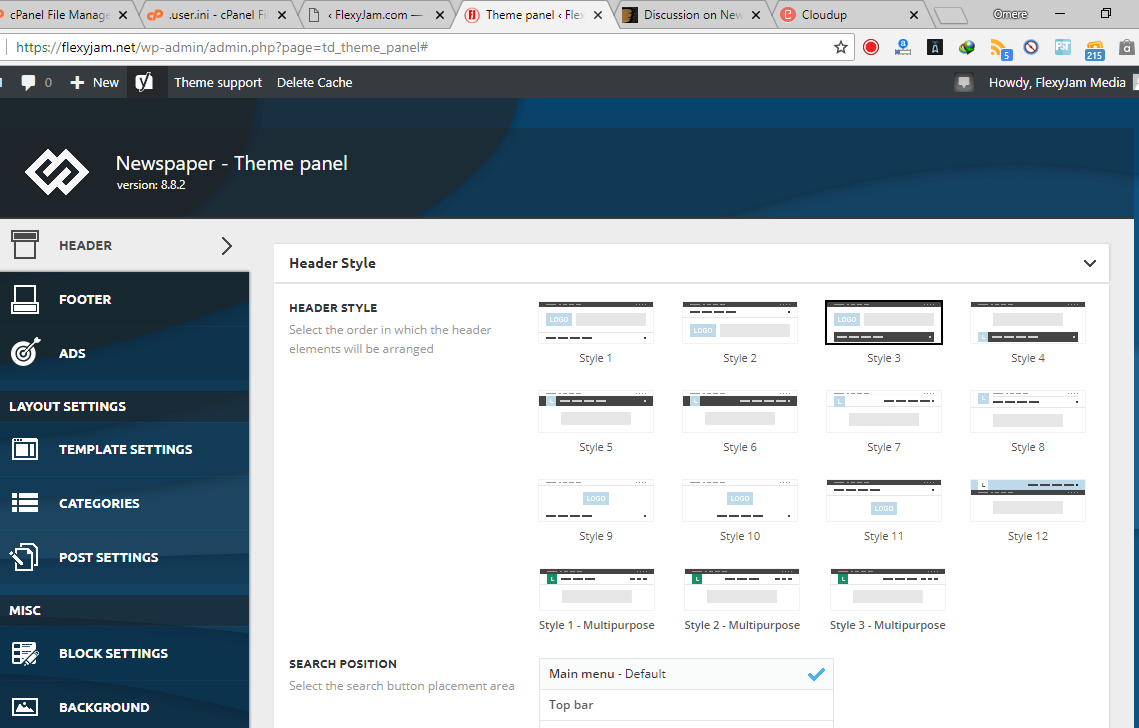
the theme panel is not working properly, everything un-clickable
https://cldup.com/2sZMlWX6NJ-3000x3000.pngHello,
This could be a plugin conflict so please disable all plugins except the page builder, clear cache and reset cdn files if you use it. Please also check any custom code you might have added to the theme panel or the theme files. If you use a child theme, please switch to the main theme to make sure it does not affect the proper functionality of the theme.
If the issue is still there please contact us on our email address at contact@tagdiv.com and provide a link to your site and wp-admin (login information and admin rights) so we can login and investigate. Please also include a link to this conversation so we can identify you.
Thank you! Bogdan B
Hi,
Can your theme handle user reviews?
I have seen alot of comments about this and that it may be introduced in the future. Is it introduced yet?
Hello,
Sorry but user reviews are not part of our plan for future updates for the moment. You can find plugins that can offer such implementation. If you have any further questions please open a new topic on our official support forum at http://forum.tagdiv.com/forum/newspaper/ The comments section here is destined for presale questions.
Thank you! Bogdan B
Hi, i am working on my clients website who have this theme… so my client needed a background color change so i did it using the code .td-main-page-wrap { background-color: #color; }
but the problem is the footer’s color also changed and now i cant change the color of footer even tho i tried changing it from theme panel yet it doesn’t work unless i remove the custom code used to change the background of page.
kindly help me here i want to keep the background of page while keeping footer to its original state.
Hello,
Please open a new topic on our official support forum at http://forum.tagdiv.com/forum/newspaper/ and provide a link to this page as the code you provided does not change the footer background and it should not d so on your client’s website.
Thank you! Bogdan B
I can’t open the link on the forum since I don’t own the activation code…
Ok,
Please contact us via email at contact@tagdiv.com but we will still need an envato purchase code in order to provide support. We cannot offer support without it. Sorry.
Thank you for understanding. Bogdan B.
I understand I will email you with the activation code and thanks
Hi! Love your theme! Am looking forward to using it on other sites as well. In the meantime, I changed the background of a block to black, but the post titles don’t change color (to white, for example), even though I have all the post colors set to default. You can see here (in the black block, no post titles except on hover). Thank you for helping me to fix it. http://bullfighting.animalsvoice.com
Hello,
The text color will not change on blocks automatically if you change the background color . You have to change the text color as well. You can use this css code.
.td_block_15 .td_module_mx4 .td-module-title a{
color:white;
}
If you have any further questions please open a new topic on our official support forum at http://forum.tagdiv.com/forum/newspaper/ The comments section here is destined for presale questions.
Thank you! Bogdan B
Thank you so much for the prompt reply. Just for clarification then: every time I change the background color of a block, I have to use CSS to change the text color? Meaning, there’s nowhere in the Theme Panel where I can do this when customizing a block? Just need to know. Thank you so much for this great theme!
Hello,
Unfortunately there is no option to change the article titles colors so it can only be done with css at the moment. Thank you for understanding.
If you have any further questions please open a new topic on our official support forum at http://forum.tagdiv.com/forum/newspaper/ The comments section here is destined for presale questions.
Thank you! Bogdan B
Hello. The block font size is not changing even after changing the value in the theme panel. I’m changing the correct block but even then nothing happens, what can it be?
Hello,
I tested the fonts again and there are no errors on our end. The fonts work properly from the theme panel or from the tagdiv composer for each block in particular. Please check the modules changed again and make sure you change the correct one: https://forum.tagdiv.com/theme-blocks-modules/If you have any further questions please open a new topic on our official support forum at http://forum.tagdiv.com/forum/newspaper/ The comments section here is destined for presale questions.
Thank you! Bogdan B
Thank you for the response. I can give you access to my site so you can take a look. I’m sure I changed the values in the correct block but nothing happens.
Sure. Please provide the credentials via email at contact@tagdiv.com and we will take a look. Thank you! Bogdan B
Hello. Please check the provide email. Subjetc: Newspaper support: Blocks not changing
Thanks again!
Hello, my HTTPS is not working because the theme loads this in wp_header:
http://192.168.0.208/wp_011_test_demos/wp-content/uploads/2017/05/4.jpg How to remove this link?Thank you in advance
Hello,
Every image loaded by the thee is found in the theme panel. Please check your mobile menu or mobile search background sections and remove the image from there.
If you have any further questions please open a new topic on our official support forum at http://forum.tagdiv.com/forum/newspaper/ The comments section here is destined for presale questions.
Thank you! Bogdan B
category filter not working when using flex block … custom post type … please fix this … i need it very badly..
here you can see a screenshot for better understanding >>
http://tinypic.com/r/t80xtf/9also please help me disable search in mobile view …i managed to disable from the theme panel,,but still shows the icon in mobile …
thanksHello,
I just tested the category filters on the flex blocks again but I could not see any errors on our end. The Flex block works properly. if you have trouble with the flex block on your end, please contact us on our email address at contact@tagdiv.com and provide a link to your site and wp-admin (login information and admin rights) so we can login and investigate. Please also include a link to this conversation so we can identify you. As for the search on the mobile menu it can be removed by adding this custom css to the theme panel-> custom css box
#td-header-search-button-mob{
display:none;
}
If you use the mobile theme plugin, the code will have to be added to the mobile theme css section.
Thank you! Bogdan B
hi, remember this is a custom post type
see screenshot >>> http://tinypic.com/r/2ibp11t/9
Hello,
Indeed if this is a custom post type, the the category filters will not work. If you use a custom post type, you will not be able to filter the blocks based on the “category” because a custom post type does not share the standard post taxonomy. Sorry.
Thank you! Bogdan B
i have question
1. can tagdiv composer create caroussel block in mobile version? like big grid 7
2. why can not my web load images simultaneously? What should I do http://prntscr.com/k6as3t http://prntscr.com/k6asku
my website : https://malangtoday.net/
Hello,
1) You can use the tagdiv composer to create specific content for mobile devices, or any device using the media tabs: https://www.screencast.com/t/9EKLISwY You nca create a big grid 7 and choose to hide it on any other device except mobiles
2/ The image issue happens because your site uses the full image instead of a thumbnail of that image. if an image is very large, it will take significantly longer to load. This is why using thumbnails is recommended. Please use the “force regenerate” plugin to regenerate all your thumbnails.
If you have any further questions please open a new topic on our official support forum at http://forum.tagdiv.com/forum/newspaper/ The comments section here is destined for presale questions.
Thank you! Bogdan B
Hi I’ve raised this issue earlier as well but you said it will be fixed with a theme update but I’m having major issues with the mobile menu on my site https://bossbabenew.wpengine.com the menu does not appear when the menu icon has been clicked. Please look into the issue and help/guide me to fix it ASAP as I need to launch the site in 2 days time
Hello,
This could be a plugin conflict so please disable all plugins except the page builder, clear cache and reset cdn files if you use it. Please also check any custom code you might have added to the theme panel or the theme files. If you use a child theme, please switch to the main theme to make sure it does not affect the proper functionality of the theme.
A plugin conflict is the most common issue regarding theme elements not working properly. There is no theme issue to fix. The menus and the whole theme works properly as it was thoroughly tested. The issue only happens on your end. It is not a theme bug. If it were, it would also be present here: https://demo.tagdiv.com/newspaper/ but this is not the case.
If you have any further questions please open a new topic on our official support forum at http://forum.tagdiv.com/forum/newspaper/ The comments section here is destined for presale questions.
Thank you! Bogdan B
Facebook like count is showing 0. I’ve set up the api, app and token but nothing is showing for likes.
Hello,
Please make sure you use the latest version of the theme and plugins. Please use these guides to properly update: https://forum.tagdiv.com/how-to-update-the-theme-2/ https://forum.tagdiv.com/newspaper-how-to-update-a-plugin/ Also make sure you clear cache afterwards.If you still have trouble with the counter afterwards, please contact us on our email address at contact@tagdiv.com and provide a link to your site and wp-admin (login information and admin rights) so we can login and investigate. Please also include a link to this conversation so we can identify you.
Thank you! Bogdan B
hola como ponga una descripción en la etiquetas: como se muestra en esta fotos. https://www.screencast.com/users/eishventura/folders/Default/media/a8ff2d55-1dae-4b31-824a-7fa35f9960e2
Hi,
You can do it if you use the cloud library plugin and create a custom post template for your posts. https://forum.tagdiv.com/tagdiv-cloud-library-plugin/ You can create the template to your liking after you import it using the tagdiv composer page builder. You can add a column text element on the post template above the tags.
If you have any further questions please open a new topic on our official support forum at http://forum.tagdiv.com/forum/newspaper/ The comments section here is destined for presale questions.
Thank you! Bogdan B
vale, muchas gracias.
I use Advanced Ads a lot on my sites, but the hooks don’t always work within Newspaper theme. How can there be compatibility between the plugins?
Hello,
Unfortunately we have not tested “Advanced Ads”. Our theme has it;s own ad system: https://forum.tagdiv.com/ads-adsense-overview/
The only tested and recommended plugins to use with our theme are these ones:
WP Super Cache- caching plugin Contact form 7- used to make contact forms bbPress- forum plugin BuddyPress- social network plugin Font Awesome 4 Menus- icon pack, supported in the theme menus Jetpack- plugin with lots of features *it may slow down your site WooCommerce- eCommerce solution WordPress (Yoast) SEO- SEO plugin Wp User Avatar- Change users avatars WPML – multilingual plugin
Anything beyond this list is not tested and I cannot say for sure if it will work or not.
Thanks. Bogdan B
Hi, Is there a way to use this theme without Visual Composer? My preference is not use a site builder at all, but if it requires one, a free one like Site Origin or similar, that doesn’t require licenses for every installation. TIA!
Hello,
You do not need to use Visual Composer with our theme. It indeed needs a page builder for the theme blocks and modules to work properly but we provide our own ‘light’ page builder: https://forum.tagdiv.com/tagdiv-composer-tutorial/
Thank you! Bogdan B
Hi, do you offer a developer license for unlimited domains?
Hello,
The licenses are created by envato. Please check both possibilities here:
https://themeforest.net/licenses/standard https://themeforest.net/licenses/terms/regular https://themeforest.net/licenses/terms/extendedThank you! Bogdan B
Hi, I reviewed those, but none of them provide me a license for unlimited domains. Do you offer a license outside of Themeforest so I can use it on unlimited domains of my own?
Hello,
Sorry but unfortunately Envato creates the licenses, not the theme Authors. The licenses above are the only ones available unfortunately.
Thank you! Bogdan B
Hi, do you offer any purchase options outside of Themeforest then? Or do you offer any bulk licensing discounts?
Hello,
Sorry but our themes are envato exclusive and we cannot sell them outside the platform. As for discounts, we can only provide discounts for everyone at once on envato sale campaigns.
Thank you for understanding! Bogdan B
I plan to buy this theme, but i want to make it sure. I have single domain but 3 databases for the domain, for example: mydomain.com, mydomain.com/subdirectory, mydomain.com/subdirectory2.
Can I use this theme for all site (single domain) if buy only 1 license?
Thank you
Hello,
Thank you for your interest in our theme. If your subdomains are part of the same project and not different websites with different content, then you can use a single license as it will be considered a single end product. For more information on the heme licesing on envato, please check follow this link: https://themeforest.net/licenses/terms/regular
Thank you! Bogdan B
Thanks for the answer
Hi, is there a way to have category sections header with the sub category dropdown menu show on the mobile theme? As it is now the mobile theme does not show all the categories corresponding to the parent category while the desktop responsive counterpart does.
Hello,
If you use the mobile theme plugin, you can create a separate menu specifically for mobile devices and add the categories and sub-categories directly in the menus section of WordPress. For more information on the mobile theme please check: https://forum.tagdiv.com/the-mobile-theme/
Thank you! Bogdan B
Hi, i know about creating wp-nav menus and assigning to mobile.
What i’m asking is about the category screen, creating a menu for wp-nav defeats the purpose since the mobile-theme category header can show the category in a list format can it be made to do the same as the desktop theme on category pages with the dropdown?
Hi,
Sorry but the mobile theme does not share this functionality. if you want to have the same implementation as the desktop theme on the mobile theme, you will have to disable the mobile theme plugin and use the standard responsive version. Please read this guide to learn about the mobile theme functionality: https://forum.tagdiv.com/the-mobile-theme/
Thank you! Bogdan B
Hello tagDiv,
I have tested your demo website for pagespeed and mobile friendly layout, however, there are 14-page resources couldn’t be loaded (see: https://search.google.com/test/mobile-friendly?id=mmvlDYiqfRaMgaRFT-kmcg) which is not good for search ranking signal as per the google – https://webmasters.googleblog.com/2018/01/using-page-speed-in-mobile-search.html
The Web Page partially loaded instead of Completely rendered. Check this snapshot: https://prnt.sc/k5yyhl
As per pagespeed insights, scores are also very bad -https://prnt.sc/k5z0qu
I am interested to buy this theme but this problem really matters for a website. None of the blogs can rank without fixing it.
Hope your team will soon resolve it.
Hi,
That may happen on resource heavy pages, I believe the test simulates the loading of the website on a bad connection. You can see that even the Google search page has issues loading resources if you should test it
- https://www.screencast.com/t/dpq77NOy
Also the results seem to be different each time a test is made with the same website URL. Draw your own conclusions. Also be sure to search more online, there are many topics in the matter.
We will try to optimize our theme demo more if possible.
Thank you! Simion C.
Hi how this theme works, is there a page builder or not? Ty
Hello,
Yes, indeed there is a page builder. Please check: https://forum.tagdiv.com/tagdiv-composer-tutorial/
Thank you! Bogdan B