8686 comments found.

Hi, how can I reduce size of product images in product listings? Thank you
Hi duy87! Not sure what product listing do you refer, we have only in our demo more than 10 shop layouts, please share your site URL so we can check.
I am talking about a page that is showing list (grid) of products
What I mean: http://wollem.com/ Down in the website section called “Favorite jewels” are list of products with images that are way too big. I need to reduce the size of the images/thumbnails so that the website wont load that long. BUT in product detail, the size should remain the same = right now 1800×1800px
How can I achieve that?
Thanks
Hi, not sure without access your website but it seems you are not using the Adaptive Images: https://support.undsgn.com/hc/articles/213455909
Hi there, if I make any changes to the global single page theme options it deletes all the widgets except the sidebar. Any idea why this is happening? It’s very furstrating as I have to import the whole demo again to get it back.
Hi TinyDigital! We are sorry for this issue but as known it can only be related to a Max Inout Vars requirement not respected (I suppose this is a new installation), please verify: https://support.undsgn.com/hc/articles/214000785
Anyway if you need support is offered in our Help Center, there we have a completely dedicated support team, please submit a ticket so we can support the solution privately! Thank you! 
https://support.undsgn.com/hc
You guys are awesome! That was it, thanks for the assitance.
Hi TinyDigital and thank you for confirm! In case let us know!
Hello, is it possible with CSS to put the submenu closer (higher)? Thank you for your effort!
Hi therivergroup, you can try this code, if not works for you please share your site URL so we can create the code based on your settings:
.menu-horizontal .menu-smart ul {
    margin-top: -20px !important;
}
Is there a way to slow down Ken Burns effect?
Hi 30Flux! You can try this code (if not works please share your site so we can create based on your settings):
.main-container .row-container.with-kburns .background-inner.uncode-kburns, .main-container .row-container .with-kburns .background-inner.uncode-kburns {
    -webkit-animation: kenburns 25s ease alternate forwards;
    -moz-animation: kenburns 25s ease alternate forwards;
    -o-animation: kenburns 25s ease alternate forwards;
    animation: kenburns 25s ease alternate forwards;
}
Thanks. Looks like it doesn’t … Here’s a page, Im using this in many places all over the website. http://www.50hzphotography.ie/new/portfolio/interior-photography-ventura/
Hi, use this one instead:
.main-container .with-kburns .header-bg-wrapper .uncode-kburns {
    overflow: auto;
    -webkit-animation: kenburns 65s ease alternate forwards;
    -moz-animation: kenburns 65s ease alternate forwards;
    -o-animation: kenburns 65s ease alternate forwards;
    animation: kenburns 65s ease alternate forwards;
}
Nice, thank you!
Hi and thank you for confirm! 
Found a few bugs on your demo site, as well as on my test site. 1. On the Portfolio Lateral page (full-width and boxed layouts). On the mobile phone (in the horizontal position of the screen) every second heading and a short annotation are not displayed. iPhone 7+, Safari. In the vertical position of the phone, on the tablet and PC, everything works correctly. 2. On the Portfolio Digital Designer page, as well as on other pages with slide scrolling, on the mobile version of the site after the last slide, a gray bar appears instead of the footer. I hope you fix this in the next updates.
Hello Andriy!
Thank you for the heads-up, however we don’t see any issue so maybe we’re missing something. Are you able to provide some screenshots and, if I may ask, what browser do you use on what device please?
Thank you in advance, best.
Thank you for fast reply. I don’t know how to add screenshots here. Could you give me email address I can sand it or I can use external site to publish it. As I told I use iPhone 7+, Safari.
Hi AndriyGusak! Yes you can use any external service to upload a few screenshots (please create the screenshots from our demo), you can also upload to Dropbox.
Please watch this short video about bug https://mega.nz/#!159zDI5a!RHlSHvuFtHSH9nwJ3dpLh7gjkVNY1ZYHTjCKLapVvxk Hope everything is clear and it will help. After watching replay me. I will delete it.
Hello Andriy!
Thank you so much for the video, I’ll let you know something ASAP.
Thank you again for the heads-up,
we’ll fix the issue in the next update. Meanwhile I can suggest this CSS snippet to add to Theme Options -> CSS/JS -> CSS>
.tmb-content-lateral-right.tmb-content-lateral.tmb > .t-inside .t-entry-visual {
    float: right !important;
}
Let me know, best
Hey guys,
Having some issues with the following error message appearing when I use the site:
“This is required to enable file writing for js_composer”
Any ideas why this is happening and how I fix it? I just updated the Uncode plugins so it may have something to do with this maybe?
Cheers, Henry
Hi hjbrydon! No sorry this is really the first time we have this report, searching on Google I found this message on the official Visual Composer page and it seems you have some server permission issues (https://codecanyon.net/item/visual-composer-page-builder-for-wordpress/242431/comments?page=259&filter=all#comment_7477002). Can you please check?
Hi. One of my clients needs to have the web in two languages. In Spanish (native) and in English, but do not want to have to duplicate all the content, because the web is updated every day. To avoid having to change the same information in both versions of each language, you would like to have a way to have the web in two languages and that when you update in one language, it will be updated in another automatically, or that when you change the language the web was updated as if it were the Google translator. As I have seen plugin as Polylang or WPML they need to duplicate all the content and update in both languages, thus duplicating the work. And the Google translator plugin does not work very well and the design is very bad. I would like something similar to the functioning of the Google Chrome translator, but it works in all browsers, of course. Thanks for your help.
Hi celediaztristan! I’m sorry but if the most popular WordPress plugins are not working for you, Uncode cannot help too much with this, you need to find a solution that sweet your needs and then in case test compatibility with the theme.
Hello there, is there any option to achieve the following: i want to have a background-image and a simple text above this (i managed to achieve this). Now i want the background to be “stable” and the text just scrolls over the background. Is there any option to do so?
Thank you really much.
Hi DanMae! In the background option you need to choose “fixed”: https://undsgn.d.pr/z2SBYV
How to add social icons to mobile menu – I added the socials from Theme Options so they are all good they show up in the main menu but they do not show in menu on mobile. Please advise I tried every possible way.
Hello!
With some menu layouts, social icons are hidden by default. Could you provide your site URL please? Otherwise, if you prefer, contact our Help Center, there we have a completely dedicated support team, please submit a ticket so we can support the solution privately (in the ticket please insert a reference to this message)! Thank you!
https://support.undsgn.com/hc
Hi It is the Classic Studio and using the Horizontal Menu Center Split – can you give me a code to modifiy the menu in mobile so it will show the social icons
Hi egonkilin! Do you mean you need the icons outside the menu next the burger icon that open the menu or you don’t see them when you open your mobile menu? Can you send the link to your installation so we can check?
??
Hi egonkilin and sorry for delay! Developers were checking this and they confirm this glitch and it’s not possible to show social icons actually with this menu layout, they’ll have in the list for next update.
No worries it happens. I need your help with customizing the social icons. Can I make them bigger can you give me the social code? When I use menu Justify the social icons will show up in mobile but they are not in line is there a way to have it all on horizontal?
Hi egonkilin, use this code to make the header social icons bigger:
@media (min-width: 960px){
body[class*=hmenu] .menu-icons i:not(.fa-dropdown), body.menu-overlay-center .menu-icons i:not(.fa-dropdown) {
    font-size: 40px;
}
}
Hello Is there a way to control the previous and next button on the single product page? For example if the category items are sorted by title use the same sorting for previous/next (so you can navigate in the same order… when your on item “B” you go previous to item “A” or next to item “C”)? Thanks for your help!
Hi MicheleForsterPhotography and sorry for delay! No sorry this is a default from WooCommerce, the next and prev buttons loops the product in the order you have inserted in the database, in case you need to change the date manually to reflect the custom order you have.
Hello,
I have just purchased the theme – are there any installation instructions? thanks
Hi leo16983! In our Help Center you can find the complete documentation and video tutorials: https://support.undsgn.com/hc/en-us/articles/214000625
Then if you need support is offered in our Help Center, there we have a completely dedicated support team, please submit a ticket so we can support the solution privately! Thank you!
https://support.undsgn.com/hc
Hi, my Oembed videos have suddenly stopped working
Hi androostain! What you mean exactly? Can you please articulate? Is the issue in the admin or in the frontend of the site? If your videos are not visible in the frontend the only known issue can be related to the Chrome autoplay policy changes (https://developers.google.com/web/updates/2017/09/autoplay-policy-changes) but there is a fix in the new version of Uncode. If you refer that something is not working in the admin please try disable extra plugins or ask your host if they see some error, it’s not possible a theme broke itself without any actions.
The videos that are embedded on my website via Oembed can no longer be seen on the front end, there isn’t even a placeholder there anymore. I have version 1.9.1 installed and the issue is across all browsers:
www.roo-films.com
Hi androostain! This happen in this website from scratch (is this a new installation?) or this issue happened over time (this is an old installation that now is mysteriously broken?).
It suddenly happened yesterday, the site has been fine for a few months. I updated the theme to see if that was the issue but nothing changed
Hi androostain! A theme doesn’t broke itself without any action, please contact your host and ask if they have changed something (it seems they have worked on some settings). Apart verify if you have some Memory Limit issue we don’t have other similar reports and from here it’s not possible help more, sorry.
Hello, I have a pre-order question which I would like to ask.I want to use adsense in some positions of you site, like on grid posts between the category posts (with a plugin) or at the sidebar of each category (different banners per category). Is this possible, with some plugins of course?
Hi MarChris, sorry for delay and thank you for interest!
You can insert AdSense in any position with the page builder but you cannot insert between posts (for example in a blog every x posts). For the category I think there are some plugins but unfortunately we don’t know about them.
Thank you!
About blog-magazine template: 1. the first post is the latest published post? 2. can i use that layout 3 or 4 times for different categories in one page? 3. how does the masonry gallery crop the images per post?
Hi MarChris! 1. Yes it’s the last post. 2. Yes you can also repeat the layout for any categories you have in the same page. 3. You have different ratio options to choose from as well use the natural upload size.
Hi! I know certain customizations don’t always fall in the realm of support, but I could use some help. If you’d rather me file a ticket, please let me know.
Is there a way to change the color of each individual social media icon I’m using within my footer but NOT have it affect the monochrome scheme I have on the social media icons that are part of my menu navigation?
I use LinkedIn, Instagram, and IMDb icons within my footer and I’d ideally like them to all be different colors whether they are being hovered over or not.
Are you able to assist? I’d really appreciate some help.
Hi sblueitt! Don’t worry, if you need support or help with small customisation is offered in our Help Center, there we have a completely dedicated support team, please submit a ticket so we can support the solution privately (in the ticket please insert a reference to this message)! Thank you!
https://support.undsgn.com/hc
Thank you. I appreciate it. I’ve submitted my ticket!
Hi sblueitt and thank you for confirm! One of our agents should have replied you.
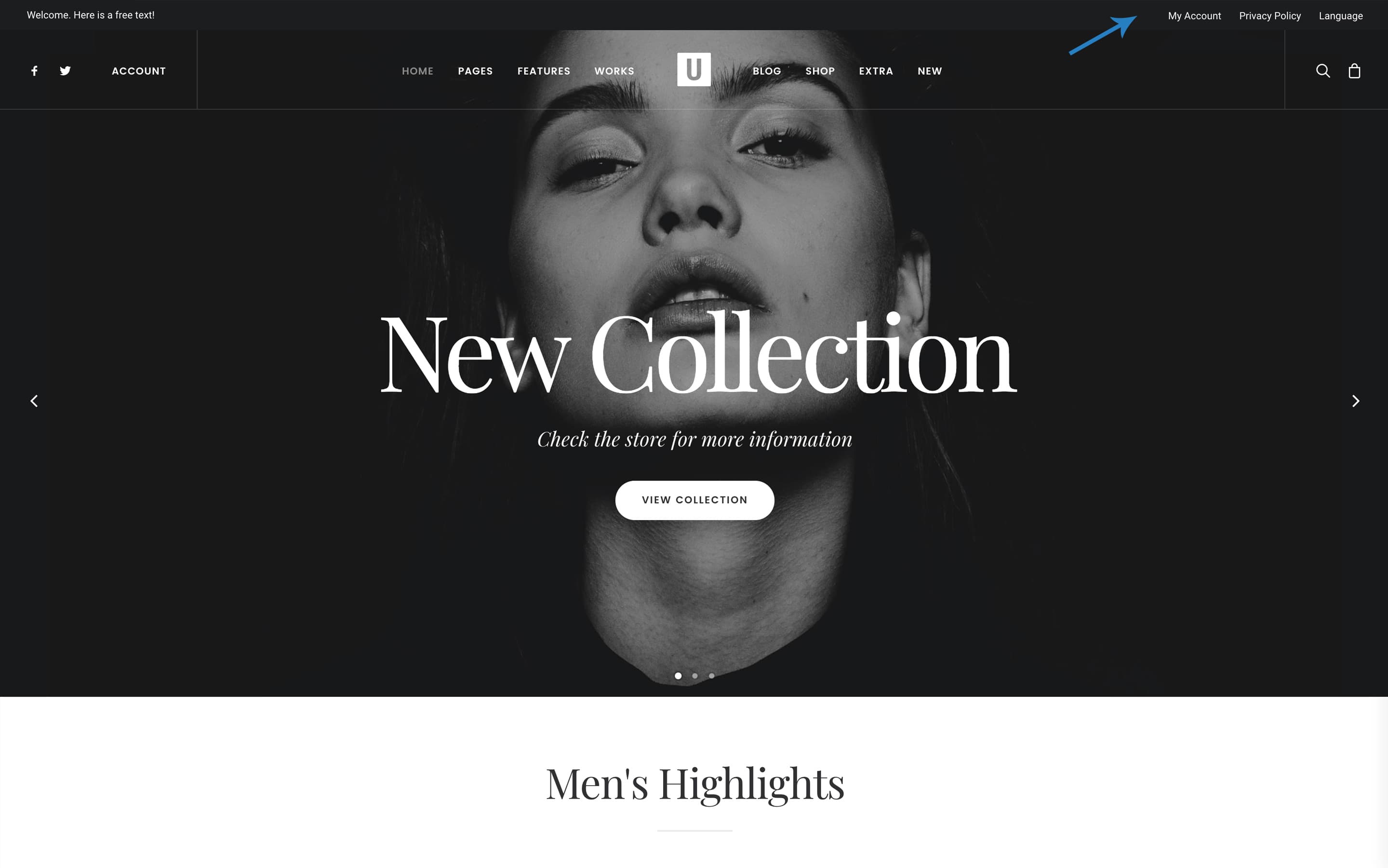
Is it possible to have MY ACCOUNT on top of the menu bar, next to SEARCH? I can’t find the setting to do this. You have this in the demo. https://support.undsgn.com/hc/article_attachments/360000178898/doc-top-demo-min-2.jpg
But in the demo you have it on the left size.
I don’t mean the secondary menu bar on top. I mean the primary menu.
thanks
Hi SilvestreEtienne! What menu type are you using?
Justify
Hi SilvestreEtienne! You can use the the Call to Action menu position (https://support.undsgn.com/hc/en-us/articles/213457169) and create something like this (https://support.undsgn.com/hc/en-us/articles/213457169#&gid=1&pid=1).
Hi there,
My Slider Revolution is not ‘linking’ videos (like vimeo and youtube) to the slide. I don’t know what’s happening but it’s like it’s not functional and the videos are not appearing after putting their ID. Would you have any suggestions?
Hi okgeorgestudio! It seems odd your Slider Revolution has this problem and it’s really not easy understand without a check to your site. What version of the plugin you have? Try also to activate the native WP theme to test but I’m pretty sure you’ll have the same issue. In case send a link to your site.
Hey! The version I have is 5.4.7.1. My website is www.okgeorgestudio.com Where can I send you the access info?
Hi okgeorgestudio! What theme version do you have? Try ti install the new theme version that is packed with the 5.4.8 version of SR. If you need info how to properly update please follow this: https://support.undsgn.com/hc/articles/214001205
PS: Anyway it seems too odd Uncode is causing this, please try to activate the native theme and tests.
I did update to the new theme a few weeks ago: UNCODE Version: 1.8.1. If I give you my website login, can you kindly investigate?
Hi okgeorgestudio, the last version of Uncode with the last version of the plugin is 1.9.1 not 1.8.1. Have you tested what happen with the native WordPress theme (I’m 100% sure this issue is not related to Uncode)? Unfortunately we cannot accept your login here, this is a rule from Envato, otherwise there will no need of support expiration and 40.000+ users should expect we support privately also with support expired, pretty sure you can understand. We can support privately only via Help Center: https://support.undsgn.com/hc
I just uploaded the latest Uncode theme file (from Envator’s download button). This is what the Slider Revolution is showing: https://www.dropbox.com/s/bspq1iu98jz2117/Screen%20Shot%202018-10-18%20at%2011.27.18%20PM.png?dl=0 It’s inactive. Is this normal?
Hi! When you buy an item on ThemeForest that is packed with a premium plugin you are free to use this plugin but you don’t have your own license unless you buy it, please read more here: https://support.undsgn.com/hc/articles/213454629
So the plugin Slider Revolution perfectly works but you cannot register it or use reserved features unless you buy your own version.
Would you be able to send me the latest Slider Revolution file by email? That’s time we had a problem like that and it worked when you send me a replacement file for me to update via the FTP
Hi okgeorgestudio! The last version of Slider revolution is Version 5.4.8 StarPath released in 20.06.2018 and it’s packed with the actual version of Uncode: https://support.undsgn.com/hc/en-us/articles/213454129
My theme version is up to date indeed: https://www.dropbox.com/s/jmyofruodlys9hb/Screen%20Shot%202018-10-19%20at%2012.13.04%20PM.png?dl=0
But my Slider Revolution didn’t update when I replaced the file in the FTP https://www.dropbox.com/s/23ky8r8fdl61jbt/Screen%20Shot%202018-10-19%20at%2012.12.52%20PM.png?dl=0Correct? How can I update it?
Have you check in the Uncode > Plugins? https://support.undsgn.com/hc/en-us/articles/213454589
Beautiful! I updated them as such, but same problem. Slider Revolution isn’t linking vimeo and youtube. Perhaps I should clear cache? If so, how do I do that?
Hi okgeorgestudio! I get back to my first suggestion of 7 days ago, have you activated the native WordPress theme to verify if it’s Uncode that is causing this issue? At this point I’m thinking you have some server problems since not other users have problems with this, please test.
What does “the native WordPress theme” mean?
The standard WordPress theme or activate another theme to test if the problem persists.
But other themes don’t have Slider Revolution with them…
You have SR and this can be installed with any theme, sincerely you even don’t need to deactivate, once you have it you can use with any theme.
Hi, I want to upgrade my theme to the new version but I can do it, it doesn’t show the option in the upgrades section and the Envato Toolkit down show any option, t I have an old version of the theme, what do I need to do to have an upgraded version?
Hi , as suggested please find all the info at this page, please note the “Update to Uncode 1.8 (or later versions) from an earlier version”: https://support.undsgn.com/hc/articles/214001205
Hello, I just bought your theme. It seems as the page is not displaying. I installed demo content, Plugins, menus and everything. Is there anything else I am missing?
Hi VolumeMaker! Don’t worry, if you need support is offered in our Help Center, there we have a completely dedicated support team, please submit a ticket so we can support the solution privately! Thank you!
https://support.undsgn.com/hc
Hey Uncode,
Quick question. When using the post block to display the most recent 20 posts in the system, my client has asked whether we are able to manually override the output to feature specific stories within those most recent?
For example, say there is 4 columns with 5 rows of posts. Can I override the story that appears in the third column on the first row to put a specific story that might have been published 6 months ago in that spot?
Many thanks Andrew
Hi MetalPotatoUK! Do you have a layout the show exactly 5 posts, something like a row of posts or you are using an big loop (like masonry layout etc)?
here is a screenshot of our post block. So my client is asking, is it possible to pick the story that appears in one of those boxes (lets say the large top one on the right), and all the other posts are the most recently added to the system. Meaning we can feature a story in the top right without affecting the way new stories appear in all the other boxes.
https://drive.google.com/file/d/1x4NKHPN_qjObeZqnDxTnMKyycYhDLpZl/view?usp=sharingHi MetalPotatoUK! Ok understand but there is not a method to alter the query and insert a specific element in the loop.
Im trying to make a page with “Slides Scroll” but I can’t find the the Page Options to activate it or design it
Hi sebastian727! This option is available from Uncode 1.7, maybe you are using an old version, in case you need to update the theme please find here more info: https://support.undsgn.com/hc/articles/214001205