6201 comments found.

Hi, I bought your them and it’s cool!, but I install Elemento page builder and some link don’t work. How can i do? Thank you
Hi there,
Thank you for choosing our theme!
Please note that our demo content is built with WPBakery, we provide support for it and it comes bundled with our theme.
Since Elementor is a 3rd party plugin, we can’t guarantee about it’s compatibility with our theme and it falls out of our support scope.
If there’s anything else, please submit a ticket on our official support platform: https:/select.ticksy.com and one of our agents will assist you.
Support
Select Portfolio part of
Qode Interactive
Don’t forget to sign up for our newsletter and be the first to find out all the latest news.
hi! love this theme but today i have a problem, you can see here www.asuites.it
last version of wp and of stockholm, but nothing want work. can u help me please? i can’t see the wp bakery backend interface when edit a page.
Hi there,
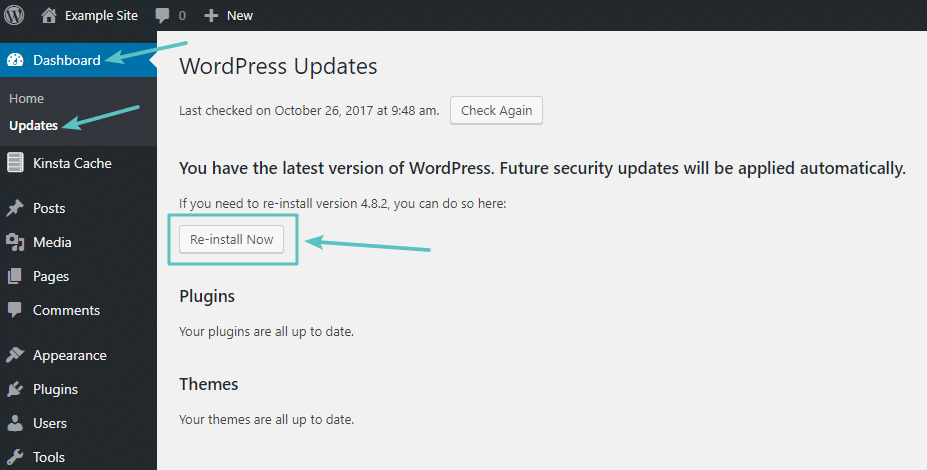
From the inspection of your website we could see that there’re some 3rd party scripts that are causing your elements not to appear. Therefore, we would suggest turning off ALL 3rd party plugins you may have installed after theme purchase. If that doesn’t work, we suggest re-installing WordPress from Dashboard > Updates.
If even that doesn’t work, please get back to us.
Support
Select Portfolio part of
Qode Interactive
Don’t forget to sign up for our newsletter and be the first to find out all the latest news.
I am trying to install layerslider demo content but .xml for stockholm22 is not importing anything how to get this work? thank you :))
Hello,
Thank you for reaching us!
Since author’s dashboard is meant for general inquiries and pre-sale questions, we would appreciate if you could submit a ticket to our forum and include your website URL along with wp-admin access and one of our support agents will assist you.
Support
Select Portfolio part of
Qode Interactive
Don’t forget to sign up for our newsletter and be the first to find out all the latest news.
Once you install a demo your’e pretty much limited to the width of the page and can’t alter it via CSS so easily without it having a huge effect on all elements leading to responsive steps not working properly any longer. We’ve got this theme installed 3 times, but in one case we need the width to be wider than what is the standard, so we changed it via CSS to 1280px a standardized size, but now everything responds different and not in the way it should. It would have been good to have a choice in the backend to just decide yourself under what width you want the theme to run and have the theme be coded in a way that all other elements respond to this change and adapt themselves accordingly. Great pity!
Hi there,
We are really sorry because of this customization is not part of our theme options. Please, note it will require a lot of changes in js for our shortcodes that are demanding calculation using javascript. So, we cannot provide you with just one hint in order to get desired width, but it could be done with some custom coding. You can choose between full width and 1100px width. If you need anything else, please, reach our support team at http://select.ticksy.com and our professionally trained agent will assist you with anything that could be done using Stockholm.
Support
Select Portfolio part of
Qode Interactive
Don’t forget to sign up for our newsletter and be the first to find out all the latest news.
Hi, I would like to use a Google Font called DM Sans, but it is not an option. Is there a way to use this font without having to upload and edit CSS?
Hi there,
Please take a look at this article: https://select.ticksy.com/article/9635
Support
Select Portfolio part of
Qode Interactive
Don’t forget to sign up for our newsletter and be the first to find out all the latest news.
Hi! The “Connect with Instagram” functionality is not working anymore. On Instagram side it says the permissions have being granted but Select Options > Social Share > Connect with Instagram, It only shows that button and that’s it, if I click again it just refreshes the page. This really looks like a bug, please advise on how to solve this problem. Thanks, Karen
Hi there,
Please provide a link to your site so we can investigate on this.
Support
Select Portfolio part of
Qode Interactive
Don’t forget to sign up for our newsletter and be the first to find out all the latest news.
hello .. i woul like to get a css code to hide categorys from every products list on main woocommerce archive/shop/store page. I just would like to show the products with price and title. I already enablet it on woocommerce theme options “Disable Product Category”  it doesn t work … probably a conflict with other woo plugins that i m using. A CSS code plz to make an workarround? THX
i m using the “elegant” option as a product List Type
Hi there,
Have you tried disabling categories on the product list element itself, like in the screenshot? http://prntscr.com/ochqm4
Support
Select Portfolio part of
Qode Interactive
Don’t forget to sign up for our newsletter and be the first to find out all the latest news.
hi … thx 4 y answer … i m not using elements from none page builder … is a simple page, without builder blocks, assigned as woocommerce main shop default on woo settings and on right side bar page option it is assign as default template. The only thing i realy and need to setup .. was in template options, tab woocommerce. On template woo options, we have 4 options (default, standart, simple and elegant) to display products on main shop page where all products from store are listed …. and i selected the option “ELEGANT” from “product List type”. On same template woo options tab, i disable view categories. Didn t work … already tryed everithing we got to try … i m without solutions … I just need a CSS to force disable the categories display near/inside product resume/square on main store page … i just wanna display the title and the price nothing more than that, everyting else will be display on product page itself. I beleave the only way to fix it is with CSS code or with code on function child theme. CSS will be easy to apply. Thanks 4 y time and patiente.
Hi again,
You can use this code:
.post-type-archive p.qode-product-list-category {
    display: none;
}
Support
Select Portfolio part of
Qode Interactive
Don’t forget to sign up for our newsletter and be the first to find out all the latest news.
thx a lot … it works .. i just add ”!important”
.post-type-archive p.qode-product-list-category { display: none !important; }
You’re welcome!
Support
Select Portfolio part of
Qode Interactive
Don’t forget to sign up for our newsletter and be the first to find out all the latest news.
Good morning I’m trying to set up the shop page. I would like to show the products in a vertical list with photos on the left and title on the right, but I can’t do it. can you help me?
Hi there,
Please submit a ticket on our official support platform: https://select.ticksy.com and one of our agents will assist you.
Support
Select Portfolio part of
Qode Interactive
Don’t forget to sign up for our newsletter and be the first to find out all the latest news.
Hi I’m stucked to WPBakery Visual Composer version 5.0.1 and do not manage to update to the newest version. I tried to disactivate, uninstall and re-install but Nothing changed. What else could I do ?
Hi there,
Please provide a link to your site so we can investigate on this.
Support
Select Portfolio part of
Qode Interactive
Don’t forget to sign up for our newsletter and be the first to find out all the latest news.
thenaks for your answer ! Here you go : https://lesblesverts.fr/
Hi again,
You are running an outdated version of our theme. Please update it and theme plugins to the latest version.
You can update your theme manually by performing the following steps:
Download the latest theme zip file from ThemeForest Extract it and locate stockholm.zip Extract stockholm.zip and locate the stockholm folder Copy/Replace content of the stockholm folder to the /wp-content/themes/stockholm folder of your web site.
We introduced the stockholm core plugin recently, don’t forget to activate it.
To see how to update WPBakery, please take a look at this link:
https://themeforest.net/item/stockholm-a-genuinely-multiconcept-theme/8819050/faqs/21716
Support
Select Portfolio part of
Qode Interactive
Don’t forget to sign up for our newsletter and be the first to find out all the latest news.
Hello, WPbakery doesn’t want to updates, says to activate the copy even tho it was supposed to go with the theme? The demos import is’nt working it’s missing things, carousel doesn’t work it’s a big mess. I only purchased the theme few hours ago and I’m fighting with it I can’t build my website it’s ridiculous :/
Hi there,
Thank you for choosing our theme!
The plugins that you got after the purchase are called bundled and we, as a theme authors, have purchased an extended licence for them. That means you don’t have to activate them and they’ll work for you regardless of that.
In the following text we’ll explain how the bundled plugins work:
Bundled plugins offer the same core features and functionality as the standalone version of the item on CodeCanyon.
Some plugins may ask for a purchase code for registration/activation once installed, however, you can simply ignore these messages as bundled plugins do not require activation or registration. The plugin will still work as intended with the theme once the theme has been activated/registered.
When a plugin is updated, the theme author will include the latest version of the bundled plugin with their next theme update. So you can easily update the bundled plugin when you next update your theme.
You can read more about this here: https://help.market.envato.com/hc/en-us/articles/213762463-Bundled-Plugins
About the demo import, you probably don’t have sufficient resources. Please take a look at this article: https://select.ticksy.com/article/12623/We tested the carousel and it works normally.
Please submit a ticket on our official support platform: https://select.ticksy.com and one of our agents will assist you.
Support
Select Portfolio part of
Qode Interactive
Don’t forget to sign up for our newsletter and be the first to find out all the latest news.
Hi, if I look at my page on a 4k screen, the (parallax) sliders title for example stop at 1920px width. How can I make them go full width?
Hi there,
Please submit a ticket on our official support platform: https://select.ticksy.com and one of our agents will assist you.
Support
Select Portfolio part of
Qode Interactive
Don’t forget to sign up for our newsletter and be the first to find out all the latest news.
Is it possible to define the grid width in Stockholm? The default is 1100 and I want it to be 1440px. Surely that’s possible but I can’t see the option anywhere.
Hi there,
Unfortunately, there are no options for this within our theme. You can enable/disable boxed layout in Select Options >> General, like in the screenshot: http://prntscr.com/o9lihu
Support
Select Portfolio part of
Qode Interactive
Don’t forget to sign up for our newsletter and be the first to find out all the latest news.
Hi,
As you can see in the 2 images I added. The full width on the first one works like it should. That was on the old backup. For some reason the site now displays this as in the second image. in a grid (width: 1100px). But we did not change anything here. Everything is still on full width but it just don’t displays like full width. Any idea from where this is coming?
https://ibb.co/ZSYq72f https://ibb.co/FxJ8vQYThanks
Kind regards,
AboveSecond
Hi there,
Please submit a ticket on our official support platform: https://select.ticksy.com and one of our agents will assist you.
Support
Select Portfolio part of
Qode Interactive
Don’t forget to sign up for our newsletter and be the first to find out all the latest news.
Hi there, I have set up a website with Stockholm theme on behalf of a friend. She has in total 8 pages of blog posts. But after the latest update, the last 3 pages of her blog posts are empty (13 posts). In the backend all posts are set to “public” and I cannot see why they should not be visible anymore. I hope you can help? See the page here: http://www.resoubo.dk/blog/nyheder/ (empty from page 6-8)
Thank you! Best, Kristina
Hi there,
Please navigate to Settings >> Permalinks and click on the ‘save’ button. If the issue still persists, please reach our support team at https://select.ticksy.com/ and include your site url and your wp admin credentials and our support team will investigate on this further.
Support
Select Portfolio part of
Qode Interactive
Don’t forget to sign up for our newsletter and be the first to find out all the latest news.
Good Day,
I have inherited a client and their site is currently running your Stockholm version: 3.1. I would like to update them to the most up to date version. I would most likely need to buy another licence of the theme as the previous developers are no longer contactable. How would be the best way to update without losing any content or settings?
Best Regards, Mike
Hello there Mike,
Thank you for taking interest in our theme.
You could purchase your own Stockholm theme licence and do the update. On this way, nothing will be lost, and here are instructions for theme update https://stockholmlanding.select-themes.com/documentation/#getting_started_updating_stockholm
best, Select
Hello:
I have a client’s site that, after the last update, the Select Slider refuses to work properly. It refuses to show up at all. Can you advise? The site is islandbath.com
Hello there,
There is error in console log that is related to server issues since some files cannot be loaded: https://www.screencast.com/t/1iCUKtJICj3F But, also, you didn’t update our Stockholm Core plugin. Please, go to update Core plugin and then check if this is resolved.Best, Select
Hi! I want to purchase Your theme, just wondering if You can mix and match demos?
Hi,
Thank you for taking interest in our theme. Yes, you are able to mix and match all elements from different demo websites.
Best, Select
Hi I am currently fcing this problem after installing the theme and trying to activate it:
” Fatal error: Uncaught ArgumentCountError: Too few arguments to function stockholm_qode_edit_walker(), 1 passed in /home/artnotes/public_html/wp-includes/class-wp-hook.php on line 286 and exactly 2 expected in /home/artnotes/public_html/wp-content/themes/stockholm/framework/modules/nav-menu/qode-menu.php:61 Stack trace: #0 /home/artnotes/public_html/wp-includes/class-wp-hook.php(286): stockholm_qode_edit_walker(‘Menu_Icons_OBFX…’) #1 /home/artnotes/public_html/wp-includes/plugin.php(208): WP_Hook->apply_filters(‘Menu_Icons_OBFX…’, Array) #2 /home/artnotes/public_html/wp-content/plugins/themeisle-companion/obfx_modules/menu-icons/init.php(250): apply_filters(‘wp_edit_nav_men…’, ’’) #3 /home/artnotes/public_html/wp-includes/class-wp-hook.php(286): Menu_Icons_OBFX_Module->check_conflict(’’) #4 /home/artnotes/public_html/wp-includes/class-wp-hook.php(310): WP_Hook->apply_filters(NULL, Array) #5 /home/artnotes/public_html/wp-includes/plugin.php(465): WP_Hook->do_action(Array) #6 /home/artnotes/public_html/wp-admin/admin.p in /home/artnotes/public_html/wp-content/themes/stockholm/framework/modules/nav-menu/qode-menu.php on line 61 The site is experiencing technical difficulties. Please check your site admin email inbox for instructions.”“
My site admin does not have an email.
Hello there,
We managed to find ticket with the same topic on our support forum and it is answered by our support agent. Please, check whole response on ticksy.
Best, Select
Hi, how to make the select slider responsive on mobile devices? You can see my images cutted off the screen at www.giomathaircare.it.
Tnx in advance for your help.
Hello,
We have just checked your website on mobile and it looks everything is responsive already https://www.screencast.com/t/sggB38unnGkk
Anyway, in Select Options > Select Slider you are able to set desired height for smaller devices https://www.screencast.com/t/VpbZFhW7
Best regards, Select
The image banner is cutted, i want to adapt the image horizontally.
Hello,
Please, note that it depends on image proportions, since image is set to cover almost full width. So, maybe you could consider images with different aspect ratio in that case.
Select
Thanks
Have fixed it by adding custom line height to stylesheet.
Hello,
Glad to hear this. Thank you for the update.
Best, Select

This item was featured on ThemeForest

Power Elite Author
Contact the Envato Market Help Team