

23249 comments found.

1. I hope you can test the updated theme file. 500 error occurs when the theme is updated. I had to recover three times.
2. Is there any way to set “Post Options>> Media Type>> NON” for all posts?
Hello, @sclass123,
1. We have tested the latest Theme many times, and hundreds of thousands of our customers also using updated Theme but no one reported the issue, please turn ON the debug mode of your site and the error will appear on your site, and then contact us via our support system with your site WP Admin and FTP or CPanel Login details so that we will check it for you.
2. You simply have to un-check all the Media Type Options from Porto >> Theme Options >> Post >> Media Type as showing below:
Furthermore, you will find all the Single Post Options under Screen Options and check/uncheck anyone as per your requirements as showing below:
Regards, P-THEMES.
In single product page,I just try my best to custom the paypal button.But it can’t show more wide,can you help me custom css to show the red line in the next look like (responsive).
Hello, @fenghuizhuo,
Can you please share the page URL on which that button appears so that I’ll check and help you out if possible.
Regards, P-THEMES.
Hello, @fenghuizhuo,
Please copy and paste the below-given CSS code to Porto >> Theme Options >> Skin >> Custom CSS and check your site after removing the browser cache.
@media(min-width: 768px){
.product-summary-wrap .single_add_to_cart_button {
    display: block !important;
}
#zoid-paypal-button-8401428ee2 > .zoid-outlet {
    display: block !important;
    min-width: 180px !important;
    max-width: 180px !important;
}
.single-product .angelleye_button_single.single_add_to_cart_button {
    padding-left: 0 !important;
}
.paypal-button:not(.paypal-button-card) {
    height: 45px !important;
    min-height: 45px !important;
    max-height: 45px !important;
}
}
If this will not work for you then please share your site WP-Admin Login details so that we will check it for you via our support system.
Regards, P-THEMES.
there are 5 star-reviews,but why it show 4 star?
Hello, @fenghuizhuo,
I have just tested your site now and it is working perfectly fine at my end, please see this screenshot: https://ibb.co/f4qRhKj
It must be the cache issue at your end nothing else, please try to clear your browser cache.
Regards, P-THEMES.
After I have purchased the template, can you help me in coordinating the tab for my website so that it appears as on my other site? In addition to helping me if it does not respond to the Arabic language? thank you
Hello, @9maitr,
First of all, thanks for showing your interest in Porto WordPress Theme.
Those tabs are the default Tabs of the Porto WordPress Theme, And the one you show in your screenshot “old” was not the Theme default Tabs element, it was from any third-party plugin like Ultimate Addon for WP Bakery.
Porto WordPress Theme is fully translatable and you can translate it in any language as per your requirements, you can watch this video:
https://youtu.be/z_X4mELtYDM
Regards, P-THEMES.
Is there a preview of the template tap?
Hello, @9maitr,
You can check all the possible designs of the Tabs element here on this page:
https://www.portotheme.com/wordpress/porto/shortcodes/tabs/
Regards, P-THEMES.
hi
still no success im trying to make the logo be on the right and the search cart and my account icon be on the left. im using side menu, the header builder for some reason dont work for me cause i change it there and stil not working. so how can i do it?
Hello, @IMAGIN6,
Have you purchased the Porto WordPress theme? If yes, then please contact us through your theme purchase account to get the free support for the Porto WordPress theme.
Regards, P-THEMES.
Hi guys,
I think the checkout page could be optimised to look like this:
https://www.storeapps.org/wp-content/uploads/2019/02/woocommerce-direct-checkout-example.pngCan you please think about adding something like this as a third option?
best regards Adrian
Hello, @Mosqk,
Thanks for sharing the suggestion/feature request with us, I am forwarding this to our development department for considering to add it in the theme, but I am not giving you the guarantee for that because please note that a theme cannot satisfy all requirements as it may occur theme heaviness. Sometimes it may require your own customization. So if the development department finds it fit with the theme environment then surely they will look through it.
Regards, P-THEMES.
I change the font-size from there,but it looks like don’t work well? https://www.newoop.com/refund-policy/
Hello, @fenghuizhuo,
I have just tested your site now and it is working perfectly fine at my end, please see this screenshot: https://postimg.cc/yDkynyN0
It must be the cache issue at your end nothing else, please try to clear your browser cache.
Regards, P-THEMES.
I import the demo(SVG Icon Boxes with popup window) and I want to change the icon of it.How to change it
Hello, @fenghuizhuo,
Please watch and follow the instructions showing in this video I have created for you.
https://streamable.com/lulun4
Regards, P-THEMES.
perfect
emmm…It will support for long time(raw html content)?
Hello, @fenghuizhuo,
Yes, It will support a long long time 
Regards, P-THEMES.
We have set the woocommerce shop as our front page and it is not showing the “Woo Category Sidebar” even after updating the page. The url is https://anissharmoury.com/. My page settings and theme options are as shown in these screenshots – https://postimg.cc/gallery/rRR2LPG Please help.
Hello, @gopikalyan,
You have to set the sidebar Widgets under Appearance >> Widget >> Woo Category Sidebar and it will work for you as showing below:
And also could you please purchase support extension to get further support? Your 6 months of support period is expired from 06/08/2019. According to Envato support policy, renewing support is required for further support.
Thanks for your understand.
I like the top one.But I want move the reviews to center just like below.
Hello, @fenghuizhuo,
I am not able to see your provided screenshot, Please upload it again and explain your issue more clearly.
Regards, P-THEMES.
just remove reviews to center like show quantity input
Or remove all(title/reviews/price) to center
Hello, @fenghuizhuo,
Please copy and paste the below given CSS code to Porto >> Theme Options >> Skin >> Custom CSS and check your site after removing the browser cache.
ul.products li.product-col .product-content {
    text-align: center !important;
}
ul.products li.product-col .rating-wrap {
    display: inline-block !important;
}
Regards, P-THEMES.
Can you tell me what means about !important? Then I will know whether add it when I custom myself.
Hello, @fenghuizhuo,
That !important will override the CSS of the Theme and Plugin files.
Regards, P-THEMES.
1.Change the icon here, sometimes it will show a package, sometimes it will show an arrow, can it be unified?
my can’t edit
3.I want to modify the “offer ends in” to another text.How to deal it.thanks
Hello, @fenghuizhuo,
1. Not some times, but it shows the basket on Single Product and Arrow on Variable Products and this is the default functionality of the Theme, you can not change it.
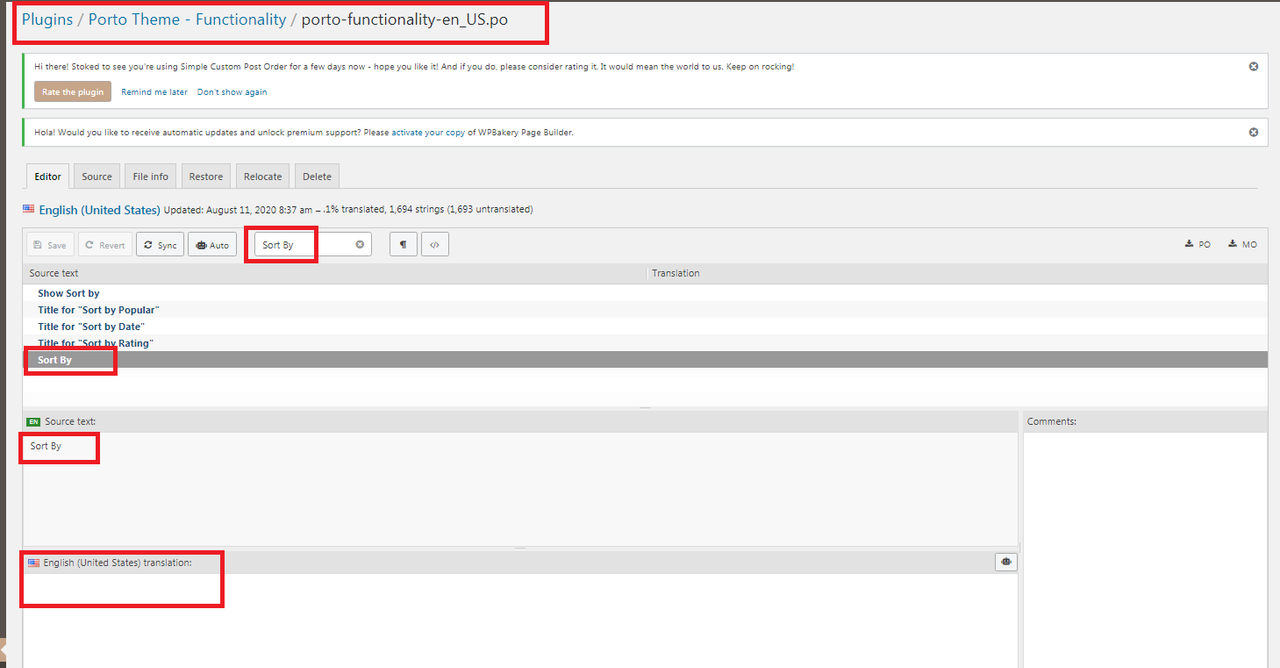
2. You have to Install the Loco Translate plugin and then you have to change the word in the particular language file of the Porto Functionality plugin which you are using on your site, here is the plugin link:
https://wordpress.org/plugins/loco-translate/
If you will not be able to do it then contact us via our support system with your site WP-Admin Login details and the word translation you want, so that we will check and solve the issue for you on your site.
3. You have to translate it into the Theme language files as per your requirements.
If you will not be able to do it then contact us via our support system with your site WP-Admin Login details and the word translation you want, so that we will check and solve the issue for you on your site.
Note: Please try and understand this platform is only used for presale questions and small queries not for such large issues, please always contact us via our support system.
Regards, P-THEMES.
I have enabled Cash on delivery but it is not showing on checkout page. www.choicemart.pk
Hello, @zubairrana,
Can you please make sure that you have set up the payment option correctly, please read and follow the instructions written in the official documentation of the WooCommerce, I am sure it will help you in solving your issue.
https://docs.woocommerce.com/document/cash-on-delivery/
Regards, P-THEMES.
Hi! i would like to know when you are going to release the latest version of Revolution Slider, because i update the theme and all the plugins but the revolution slider said that I had installed de 6.2.2 version. Thanks
Hello, @possumussrl,
Please delete the old version of the plugin from your site and download the latest version of the plugin from the below given article and Install and Activate it on your site, it will work for you.
https://smartwave.freshdesk.com/support/solutions/articles/12000007851--12-latest-wp-bakery-visual-composer-and-ultimate-addons-for-visual-composer-and-slider-revolution
And also could you please purchase support extension to get further support? Your 6 months of support period is expired from 15/04/2020. According to the Envato support policy, renewing support is required for further support.
Thanks for your understand.
In single product page.The typesetting is terrible.How to fix it by myself?
newoop.com
Hello, @fenghuizhuo,
Please copy and paste the below given CSS code to Porto >> Theme Options >> Skin >> Custom CSS and check your site after removing the browser cache.
.single-product .angelleye_button_single.single_add_to_cart_button {
    background-color: transparent !important;
}
Regards, P-THEMES.
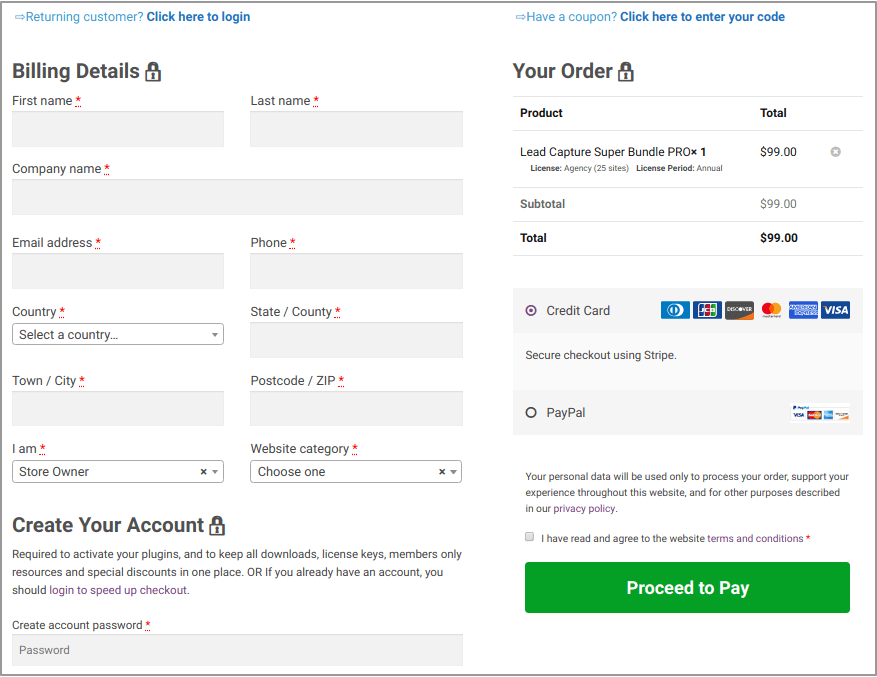
Cart page can’t show checkout button when integrating PayPal payment
[url=https://postimg.cc/Z958Jvmp][img]https://i.postimg.cc/Z958Jvmp/1.png[/img][/url]
[url=https://postimg.cc/Z958Jvmp][img]https://i.postimg.cc/2542FnXc/1.png[/img][/url]
Hello, @fenghuizhuo,
1. This is because you have added the Custom CSS code in Theme Options >> Skin >> Custom CSS or in Cart Page Custom CSS option as shown in this screenshot: https://postimg.cc/QVVCRf2y
You have to find and remove that Custom CSS and it will solve your issue: https://postimg.cc/CB2hhV36
Regards, P-THEMES.
I din’t custom myslef.When I remove the paypal-payment.It normal again.How to fix it ?
Hello, @fenghuizhuo,
Please contact us via our support system with your site WP Admin Login details so that we will check and solve the issue for you on your site.
Regards, P-THEMES.
Hi, I had previously installed Porto on one of my sites and subsequently decided to not use it there as the feature would work perfectly on a different one of my site. As i try to enter the purchase code into the new site, it tells me the code was already used. The theme is not active or even installed on that original site. How can I activate my purchase on the one site that i intend to use it? Thanks.
Hello, @aportuesi,
I have reset your purchase code, now you can use the same purchase code for registration of your theme.
Regards, P-THEMES.
Hi, Since the wordpress update, 5.5 I can’t add block from Porto Studio. i have the message “Security issue found! Please try again later.”
My theme is up to date with Porto 5.4.3.
Hello, @109c,
Please go to Porto >> Theme License and deactivate the Theme from there and then again activate the Theme with same purchase code and then try to use Porto Studio, I am sure you will not finds this issue anymore.
Regards, P-THEMES.
Hello, Thanks for your answer. I desactivated the theme as you said. But now I can’t activate because I have the error msg “Your ip address is blocked as spam”. So now, how can i fix that ?
Hello, @109c,
Can you please contact us via our support system with your site WP Admin Login details and with Theme purchase code PDF file so that we will check and solve that IP Blockage issue for you on your site.
Regards, P-THEMES.
Thanks for great support. Soo fast and very kind.
Thanks for Sharing your Experience with others , That is exactly what Porto and this team are all about, we do our best to be the best..
Can you please suggest me best plugin to zoom in
Hello, @rushi99,
Sorry to say that but we have not tested any of the Zoom plugin with the Theme officially yet, so we are unable to sugest you on it, you can try with any third party plugin which better meets your requirements.
Regards, P-THEMES.
Hello,
Please help.
I have tried to import the Shop Demo 21 in my localhost, AWS server, Lightsail and couple of other servers but keep getting the message the it is failing and to check the server requirements. I even tried the alternative mode. I have simply tried everything.
If I import one checkbox by one then it is failing at Import dummy content
All my servers are fully compatible with any theme because we have enabled the max on everything.
If I import any other shop/site demo then it works. I have tried to import almost all of them and worked, but just the shop number 21 doesn’t work and I really want to use that.
Please see video of the fail and also below the screenshot of my system status which has all required enabled.
https://monosnap.com/file/qnwpUsWbsZZCI5A0G8DrY7NjZGEooX https://monosnap.com/file/8bKXfGOje7SoVaLz5t7bomSTw0ZXoxPlease advice
Thank you.
Hello, @naarwebz,
This may be because of any restriction from your local server which does not allow your site to communicate with our internal server for downloading the content, so I suggest you to please make your site live on a test server and contact us via our support system with your site WP Admin Login details so that we will check and try to solve the issue for you on your site, This is not the Theme issue but the incompaitability of the server or any restriction.
Regards, P-THEMES.
Thank you for your reply. But we have tried with many hosting, local and on others as explained. All other demos work, except the 21.
But yes I will upload a blank template online and create a ticket requesting the import of the demo 21.
Thank you
I have just submitted the ticket, please check. Thank you.
Hello, @naarwebz,
Please be patience now, once your support ticket will resolved you will get the reply of your support ticket.
Regards, P-THEMES.
Thank you.
You’re Welcome!!!





![https://postimg.cc/Z958Jvmp][img]https://i.postimg.cc/Z958Jvmp/1.png[/img][/url]](https://postimg.cc/Z958Jvmp][img]https://i.postimg.cc/Z958Jvmp/1.png[/img][/url])
![https://postimg.cc/Z958Jvmp][img]https://i.postimg.cc/2542FnXc/1.png[/img][/url]](https://postimg.cc/Z958Jvmp][img]https://i.postimg.cc/2542FnXc/1.png[/img][/url])