8685 comments found.

I installed the Theme successfully, i add in Frontend a wireframe block where default media is inserted – if i want to add another media at the ”+” no functions – cant add another media. Doesnt matter which block i insert – i cant insert another image ?!
Hi davidotec! Unless you have other problems, we cannot evaluate from here, probably you have this issue, you need to use the latest version of the theme and be sure to have cleared any kind of cache (be also sure to remove extra plugins to test if the issue is related to them): https://support.undsgn.com/hc/en-us/articles/360011829858
Anyway, if you need support is offered in our Help Center, there we have a completely dedicated support team, please submit a ticket so we can check your installation and support the solution privately! Thank you! https://support.undsgn.com/hc
Dear Support
First. I love UNDSGN and the UNCODE Theme. I have 3 licens for this theme and it just keeps on giving. But now I have an issue, a major one – my host dosnt support more execution time (one.com), and they don-t want to open this for customeres who wish this. So now I can’t use UNCODE Theme’s new WIREFRAME, and this makes me sad. I could move all the 3 customers sites, but that is a bit of work – so, just to ask. Is it in any way possible to make a patch or something I could install to activate WIREFRAME?
When I try to activate I get this critical error:
Fatal error: Maximum execution time of 50 seconds exceeded in /customers/7/9/f/marcobygmann.dk/httpd.www/wp-includes/class-wp-image-editor-imagick.php on line 354
Hi Cini and thank you for appreciate Uncode! We are sorry but we cannot create a patch for this, this is an error form the server. What you can do is to avoid the import of the placeholder images (this is the root problem), please try to use the hook you find here at the bottom of the page in your functions.php of your Child Theme, I’m pretty sure this will help on your server: https://support.undsgn.com/hc/en-us/articles/360001634157
You can use the hook to block all placeholder or assign your own.
Hello, is there a way to flip “hover” to a different image for products?
Hi EmpireMarketingDesign! Not actually, but this will be part of the next version of Uncode (sent yesterday to the Beta Testers). So you have a to wait a few weeks for the public release.
With the latest slider revolution update the template is not longer functioning because of the plugin will there soon be an update to the template to fix the issue?
Hi walshmsw! Can you please explain better the issue you are facing? The latest version of Uncode the Slider Revolution work together like a charm.
Slider Revolution has updated once more from .21 to .22 and with this update the slider revolution has made the entire back end of wordpress not allow edits to any posts, portfolios, etc. I also received an email from wordpress about the issue: “Since WordPress 5.2 there is a built-in feature that detects when a plugin or theme causes a fatal error on your site, and notifies you with this automated email. In this case, WordPress caught an error with one of your plugins, Slider Revolution.”
at least that is what I had found when trying to discover why I was having issues
Can you please explain better? What is “the entire back end of wordpress not allow edits to any posts, portfolios, etc”? You are right that they released the .22 but this introduces just minor fixes. We tested both and they work as they should. Can you please specify the error you have? What version of WordPress and Uncode do you have?
The template is version 2.2.8.4, wordpress is version 5.5.1. When I go to create a blog post the only way to create one is visual and text. Slider revolution is just box on the right with a button to “unlock all features” that lists a slider to blank template to on or off a drop down for default slide template and the version number I have vs the latest. When I try to work on a portfolio post and change the media under the Media section by clicking the select media button it just jumps to the top of the page and nothing occurs. I am looking into updating my php version but am unsure if that will have any affect with these issues.
From the description it seems that you have the “classic” WordPress 5.5 issue and you have not flushed the cache (browser, server or possible extra services like Cloudflare), even if you have the latest version of Uncode you need to clear any kind of cache: https://support.undsgn.com/hc/en-us/articles/360011829858
If this doesn’t help you can try to install a plugin named jQuery Migrate Helper but it’s just a workaround you can use a few days time the cache flushes.
Hey there! How do I remove the ’’Ready to start your next project?’’ section at the bottom of this page please?
https://prizetopia.win/I can’t see that element in the front-end editor.
Thank you in advance,
Hi christianharris! Please check the Page Options > Footer > Content Block, at the bottom of your Backend page editor.
sorry, found it eventually. Footer content block option…..
Thank you for the confirmation! 
Hhhhmmm, actually, I still have a slight issue. The content has now gone just fine on desktop and mobile portrait mode, but on mobile in landscape mode there is still a big grey area. Any thoughts?
No sorry, this is what we see: https://undsgn.d.pr/F2jTfq
Anyway, if you need support is offered in our Help Center, there we have a completely dedicated support team, please submit a ticket so we can check your installation and support the solution privately! Thank you! https://support.undsgn.com/hc
Right, okay, again I managed to fix that with a footer setting, but the Social Links at the bottom right of the page disappear on mobile portrait mode. Can that be fixed?
We are sorry as for screenshot we linked above we see them on portrait mode: https://undsgn.d.pr/F2jTfq
I think that’s landscape mode?
That’s definitely a landscape mode: https://undsgn.d.pr/F2jTfq
Yes, landscape mode is fine – as per your screenshot. It’s portrait mode I’m having the ‘issue’....
You have the class “mobile-hidden”, please check the visibility settings of the column container: https://support.undsgn.com/hc/en-us/articles/214003585#&gid=1&pid=9
Thank you, but I have all settings set to ‘Visible’
... or should I say, ‘Yes’
Please verify all columns since it’s visible in the code: https://undsgn.d.pr/TR5W1b
Yeah, my only options are: Desktop / Tablet / Mobile / Inverted Device order. All are set to ‘Yes’ in the Responsive settings.
If you started from the Demo Contents it’s here: https://undsgn.d.pr/bxKeEH
PS: Kindly note that we cannot know if you create this layout your own or if you have modified it someway, so in case you need to open a ticket as suggested: https://support.undsgn.com/hc
Hi – I’ve been using Uncode on a client site for the past 2 years. After the ‘Edit Front End’ update, I can’t update anything. URLs on buttons simply don’t work – nothing happens when I click ‘Select URL’. And all text shows up as code. There is no way to edit in the ‘Front End Editor’ and just type in and apply your heading styles. What is going on? I can’t edit my client’s site and it’s making me look bad. All themes and updates are current. PLEASE help. This was a totally unexpected update and it’s not working.
Hi marieclairehill! Probably your installation automatically updated to WordPress 5.5, and nw you need to update the theme, and plugins as well (note that is super important you clear any kind of cache after the update: browser, server and possible extra services like Cloudflare): https://support.undsgn.com/hc/en-us/articles/360011829858
Then, if you need support is offered in our Help Center, there we have a completely dedicated support team, please submit a ticket so we can check your installation and support the solution privately! Thank you! https://support.undsgn.com/hc
Hi Guys. With the latest update, the page builder is no longer visible. When I go to edit a page, all I see is the page code. I can’t edit my pages anymore. Any help?
Hi anareginagarcia! This is a problem you can expect if you update WordPress, the latest update of Uncode fixes this problem, please find all the info here: https://support.undsgn.com/hc/en-us/articles/360011829858
PS: Be super sure to clear any kind of cache, from browser cache, server, and possible extra services like Cloudflare. Otherwise, you can momentary install a plugin named jQuery Migrate Helper (but it’s just a workaround).
Hi Guys, Thank you for your rapid response. I am running the latest version of Uncode (2.2.8.4) and I have cleared cache, but unfortunately, still no page builder 
This can only be related to cache (as told server, or extra services like Cloudflare), other users got this problem, and after a week the cache flushed. Try to use this plugin but note that is a temporary solution (try to disable next days): https://wordpress.org/plugins/enable-jquery-migrate-helper/
PS: note also that if you have also a single small extra plugin that uses jQuery Migrate (and it’s not updated, maybe the author has not published an update, this can create the issue you are experiencing).
Hello, I was recently updated to the newest version of Uncode. That’s when everything went south and now my site displays text and links only. I checked the inspect element and Noticed 4 errors. I don’t know if they are related to my issue, but they do exist.
My site is currently in maintenance mode. If you need to see it, let me know.
(index):12 Uncaught ReferenceError: UNCODE is not defined at (index):12
<script type="text/javascript">UNCODE.initBox(index):74 Uncaught ReferenceError: UNCODE is not defined at (index):74
<script data-cfasync=”false” src=”/cdn-cgi/scripts/5c5dd728/cloudflare-static/email-decode.min.js”></script><script type=”text/javascript”>UNCODE.fixMenuHeight();</script>
(index):91 Uncaught ReferenceError: UNCODE is not defined at (index):91
<script id=”script-369354” data-row=”script-369354” type=”text/javascript” class=”vc_controls”>UNCODE.initRow(document.getElementById(“script-369354”));</script><script type=”text/javascript”>UNCODE.initHeader();</script><article id=”post-57090” class=”page-body style-light-bg post-57090 page type-page status-publish has-post-thumbnail hentry”>
(index):91 Uncaught ReferenceError: UNCODE is not defined at (index):91
<script id=”script-369354” data-row=”script-369354” type=”text/javascript” class=”vc_controls”>UNCODE.initRow(document.getElementById(“script-369354”));</script><script type=”text/javascript”>UNCODE.initHeader();</script><article id=”post-57090” class=”page-body style-light-bg post-57090 page type-page status-publish has-post-thumbnail hentry”>
Hi ro7nyc! We are sorry but other users are not reporting the same issue, and this is something we need to check your installation (from the error it seems that one of the main Javascript file of Uncode is not found, are you using some cache plugins?).
Anyway, if you need support is offered in our Help Center, there we have a completely dedicated support team, please submit a ticket so we can check your installation and support the solution privately! Thank you! https://support.undsgn.com/hc
Hello I have encountered a problem.
When using container/row background image it does not display the image on mobile. when using developer tools and viewing the mobile version it displays the background, but not on the live site. Any help would be much appreciated.
Thanks
i figured it out, i was using .svg files instead of .png.
I have run into a different problem, i’m trying to make the padding on my mobile site to be less on the sides, from 36px to 25px. but the css i have added only seems to work for the homepage and not the rest.
@media (max-width: 959px){
.main-container .row-container .single-h-padding{
padding-left:25px!important;
padding-right:25px!important;
}
what am i doing wrong?
thanks
Hi si-design! Probably this is not the correct selector, but it’s not something that we can suggest from here since it’s based to the specific classed used by your design settings.
Anyway, if you need support is offered in our Help Center, there we have a completely dedicated support team, please submit a ticket so we can check your installation and support the solution privately! Thank you! https://support.undsgn.com/hc
Hello, a quick question: is it possible to change the speed of the back-to-top button and where? I would like to go up faster. Many thanks.
Hi CelicaMSM! Please find this in the Theme Options > Extra: https://undsgn.d.pr/t41B99
Anyway, if you need support is offered in our Help Center, there we have a completely dedicated support team, please submit a ticket so we can check your installation and support the solution privately! Thank you! https://support.undsgn.com/hc
Hello Team,
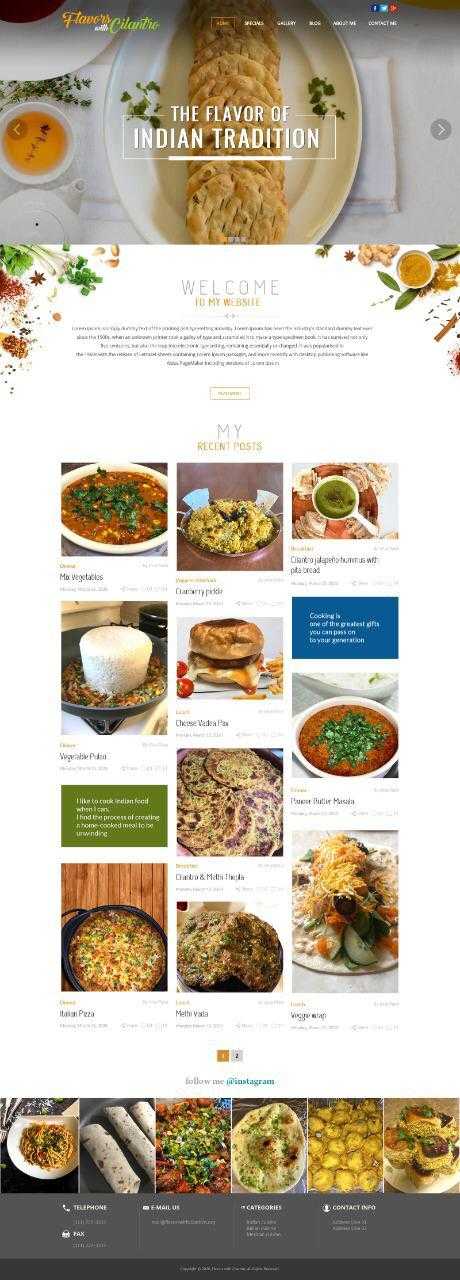
we want to start a food blogging WordPress website.
your required design is as below:
Page 1 : https://snipboard.io/oe4fkx.jpg page 2 : https://snipboard.io/4Lq82c.jpg
if there is any related design in your demo than we want to buy your theme.
Please suggest us your demo design link.
Thanks Pratik Patel
We don’t have an exact pre-made layout like this but if you browse the demo you can see that everything can be adjusted from existing layouts with the Page Builder to get pretty close. I paste here a few links but i suggest to have a check yourself:
https://undsgn.com/uncode/homepages/blog-simple/ https://undsgn.com/uncode/homepages/portfolio-classic/ https://undsgn.com/uncode/homepages/creative-studio/ https://undsgn.com/uncode/homepages/blog-magazine/ etc…
thank you, how to manage this portion: https://snipboard.io/CgbRLk.jpg
Hi, it’s not really different by something like this: https://undsgn.com/uncode/pages/about-grid/
Hi! First of all, I have used Uncode on my personal website for about 2 years now, and absolutely love it! I am starting to do some freelance website designing. I was wondering if I can purchase this Uncode theme, and use it for my client’s WordPress site? I realize I have to purchase a new license for every new website I design for a client, but are there are any other fees involved for this type of situation? Thanks!
Hi thomaspiano and thank you for appreciate Uncode! Yes this is correct, when you buy an item on ThemeForest you can use a Purchase Code to build only 1 final website, but there are no other costs involved: https://themeforest.net/licenses/standard
Let us know if you need more info!
Thank-you! Right now I am helping a client design a blog, and I am just providing ongoing design/consultation services when needed. If I understand the licenses correctly, I would just need the standard license for this situation, correct?
Yes only the standard license! Please only note that only the user who buy the theme can ask for support, so if your client buy the theme, then he is the only one that can access support services.
Ok, thanks! If I purchase through my ThemeForest account, then I can still access support, correct?
Hi thomaspiano and sorry for the delay! Yes exactly, if you are the user that will build the website, it’s better you buy the theme so you can access the Help Center services!
Hey Guys. Upgraded to latest version of WP, the theme and the plugins, but my page builder now seem to have broken. I rolled back with a back up, but what do I need to do to make sure the site works (and looks) like it is now?
Hi andredup88! You need to clear also any ckinfd of cache (browser, server and possible extra services like Cloudflare): https://support.undsgn.com/hc/en-us/articles/360011829858
Hi, thanks for the quick reply. Tried clearing browser cache and flushed the server cash, but the issue persist. The page editor gives the normal view but within the editor it looks like this – what else should I try?
column_width_percent="100" gutter_size="0" overlay_alpha="50" border_color="accent" border_style="solid" shift_x="0" shift_y="0" shift_y_down="0" z_index="0" medium_width="0" mobile_width="0" width="1/2" css=".vc_custom_1554457660994{border-bottom-width: 6px !important;}"]vc_row_inner row_inner_height_percent="50" back_color="color-xsdn" overlay_alpha="50" gutter_size="3" shift_y="0" z_index="0"[vc_custom_heading heading_semantic="h1" text_size="h1" text_weight="300" text_space="fontspace-781688" separator="yes" separator_color="yes"]Just so you know/vc_custom_headingWe ....Hi andredup88! We published this compatibility update on 10/08/2020 so I can give you for granted 100% that the problem is related to cache: https://support.undsgn.com/hc/en-us/articles/213454129
Try to install a plugin named jQuery Migrate Helper, and then try to remove in 1 week / 10 days (it’s just a workaround time your cache flushes).
Thanks, will give it a shot! many thanks!
Thank you for the confirmation!
Any info on how to hide post date, category and author when the CSS from your support page doesn’t work?
.post-info .date-info{
display: none;
}

.post-info .category-info{
display: none;
}

.post-info .author-info{
display: none;
}
Thanks
Hello,
please, replace any occurrence of .post-info with .uncode-info-box and let us know if it works. Example:
.uncode-info-box .date-info{
    display: none;
}
Best 
Worked. Super cool. Thank you 
Hi jimmyjam and thank you for the confirmation!
Welcome. Any idea how to hide the author box at end of post? Thanks
Try to remove from here: https://undsgn.d.pr/7x4d2w
Hi. I am interested in purchasing this item again to use on another site. Would it be possible to install the theme, and then transfer the site. How would I go about doing this with the license. Once its entered, am I stuck on whatever domain/hosting is attached or can it be moved when the site is moved with the theme install? Thanks.
Hi rstitch! When you buy an item on ThemeForest you can use a Purchase Code to build only 1 final website: https://themeforest.net/licenses/standard
Anyway, it’s possible to have a development domain. If you have any issue when moving to the final domain, you have precise instruction at the registration moment and you just need to contact us.
I think I have tried this in the past and it said I need to register the theme/enter license code in order to install the required plugins. It wouldn’t allow me to do it on another site. However, do you think is is because I still have the license registered to the precious site and all i needed to do was delete the license code?
Hi rstitch! If you have this error this means you have used also on another website (not only in the development and final website), and so you are trying to use the same Purchase Code too many times outside the ThemeForest copyright terms. Anyway, if you think there is an error we can check, you just need to send a message from here and include your Purchase Code: https://themeforest.net/user/undsgn
Ok I will give it a try and purchase another license. If I run into any problems I will let you know. Thank you for your quick response. You have great customer service. Cheers!
Hi rstitch and thank you for the confirmation!
Hey! New licensed work. i guess I just “deactivate” code from theme options and reactive it on the “Live” version.
Quick question: is there a way to add the down arrow for the submenu on mobile just like it is on desktop? maybe a ::after css thing or something like that?
Thanks.
Hi rstitch! You can try something like this:
@media (max-width: 959px){
body.menu-mobile-centered .menu-smart li:not(.social-icon) .fa {
    display: block !important;
}
}
Anyway, if you need support is offered in our Help Center, there we have a completely dedicated support team, please submit a ticket so we can check your installation and support the solution privately! Thank you! https://support.undsgn.com/hc
Amazing this worked! It shows for every menu item now though. Is there a way to isolate just the menu items with sub menus like the main desktop. I really appreciate your help. I figured I would post one last time here before going to the Support page. Thanks!
I’m sorry, not sure to understand, can you please share your site preview so we can tailor the code for your settings?
Basically, in the mobile menu now , all menu items now have an arrow beside them. I just want menu items that have submenus to only have the arrows beside them to indicate that there are submenus inside.
Ok but as referenced we need to check your setup. Please share the link to your site so we can help.
gotcha ok how do i send private since site is in private?
Open a private ticket in the Help Center: https://support.undsgn.com/hc/en-us
Hi there, when I go to use “Product Category” in the page builder it reverts to using owl carousel. I want them to appear in grid format. When I try using the posts part and Query the products and try entering the category. I get no joy. Could you explain how I get them to appear in grid format based on category?
Thank you
Hi Chezzo20! You can follow this link (then from the upcoming update this will be possible with native options too): https://themeforest.net/item/uncode-creative-multiuse-wordpress-theme/13373220/comments?page=304&filter=all#comment_24878155
Anyway, if you need support is offered in our Help Center, there we have a completely dedicated support team, please submit a ticket so we can check your installation and support the solution privately! Thank you! https://support.undsgn.com/hc
Hi there, I install the theme in latest wp version 5.5.1 and the Backend Editor button missing : https://prnt.sc/uamjwq
Hi HarryRD! Please be sure you are using the latest version of Uncode, and plugins (be also super sure to have cleared any kind of cache: browser, server, possible extra services): https://support.undsgn.com/hc/en-us/articles/360011829858
hi, I have a weird problem. In Uncode Child -> Theme Options -> Palette. The Colorpicker palette is missing, and i am unable to choose any color. Please help.
Hi hhhchamps! Unfortunately we don’t have this report from other users, what version of Uncode do you have? Are you using the latest version? And not extra plugins to verify that the issue is plugins related?
I am using version 2.2.3 and do not install extra plugins except those given by Uncode in the package.
Hi! Please be sure you are using the latest version of Uncode, and plugins (be also super sure to have cleared any kind of cache: browser, server, possible extra services): https://support.undsgn.com/hc/en-us/articles/360011829858
Hi! I have a weird problem about the editor element: media gallery. If I use two media galleries(for example galleryA & galleryB) in one page. When I click to show the lightbox view of one image in galleryA, the lightbox will show thumbnails of all images in both galleryA and galleryB. How can I set that if I click on image in galleryA, only show thumbnails of images in gallery A.
Hi yichu! Be sure you have different Widget ID values: https://support.undsgn.com/hc/en-us/articles/213456809#&gid=1&pid=2
Our Dev team is complaining to not be able to register with a purchase code getting “The Envato Purchase Code doesn’t seem to be properly formatted. Please double check it and try again” while the code seems to be correct
Hi JP_VA! What version of Uncode do you have? Anyway, if you have problems, you just need to ask the user who bought the theme to contact us from the form you find here: https://themeforest.net/user/undsgn
Thank you, sure, but it is pain for us as it is a different department.
We are sorry, but we are not the ones that created the Envato policies. Only the user who bought the theme can ask for support, these are marketplace’s rules to limit theme piracy.
My Manager bought the theme, and it is not going well, I am not sure he wants to be involved with the support, we have the theme we get a “Formatting issue” , can you help me?
I’m sorry, but we can’t provide support about the license if you’re not the owner of the license, as you can understand. However, let me ask you again: what version of Uncode are you running? ThemeForest discontinued the API method some years ago and maybe your version of Uncode still uses the old registration system. You should update to the new version of Uncode that uses the new Envato API. Just follow the info to update the theme available in this article: https://support.undsgn.com/hc/en-us/articles/214001205 (just skip the part saying “Automatic Update method”).
Thank you, trying this, I assure you I understand your position, I am in the middle of it.
Yes of course, thank you too!