8686 comments found.

Hello, I noticed there is a bug when two “Posts” blocks are on the same product page (woocommerce), and one uses the “Dynamic Query” => “Related” option. It seems to make both Posts sliders related instead of only one, creating errors.
Hi Malcom24! Please be sure to have the latest version of the theme, and to use a different Widget ID. If this doesn’t help please open a ticket so developers can check the details of your installation and of the possible issue (this is not something we can debug from here): https://support.undsgn.com/hc
I can’t download the theme because a virus was found. what can I do?
Hi inmotto! There is not any virus, this is a “false positive” from the Microsoft program you are using, as you can read in all popular themes pages, please follow: https://themeforest.net/item/betheme-responsive-multipurpose-wordpress-theme/7758048/comments?page=819&filter=all#comment_26550701
Try to download the “Installable file only” since this is the theme.
Anyway, if you need support is offered in our Help Center, there we have a completely dedicated support team, please submit a ticket so we can check your installation and support the solution privately or in case, install the theme for you. Thank you! https://support.undsgn.com/hc
Thank you for the quick help.
Hi inmotto, and thank you for the confirmation!
Hello there,
I was wondering if I could get an answer, or maybe some insights on a question I got.
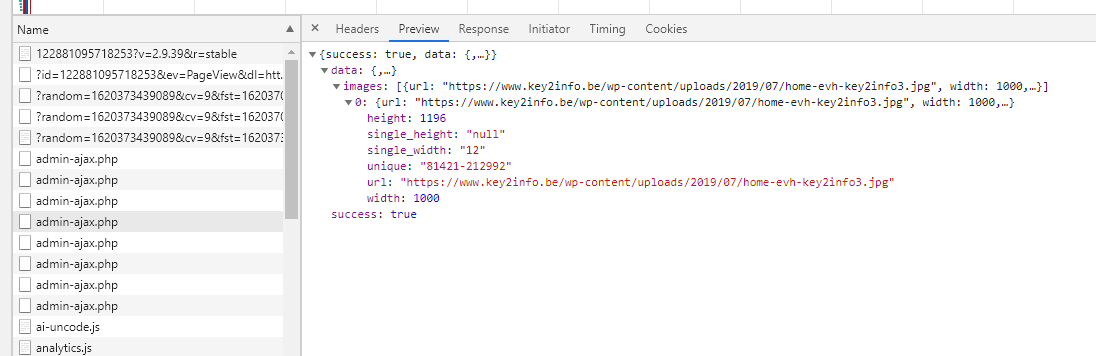
Lately some of our website have become slower then usual, after consulting our hosting firm they concluded that certain website which run Uncode theme put the hostings virusscan software in overdrive because of many admin-ajax calls happening when loading the theme:
Here’s an example of one of our websites: https://i.gyazo.com/5ae36633ff9ba142208fecb0b76869b9.pngIt’s seems like some kind of lazy-loading mechanism?
Is there a way to minimize the amount of ajax calls during load?
Hi brunodeneve! These are the Adaptive Images that need some Ajax calls to understand the resolution of the visitor’s monitor and provide the image of the appropriate size. It sounds to me more like a problem of host resources, or rather that they have lowered their limits to save resources on their own server. Apart from disabling Adaptive Images there is nothing you can do at the moment. From the next big update there will also be a new Adaptive Images system that will bypass this check but it’s not something we can pass on to you right now. I remember another user who had this problem and it was also related to extra plugins that were overloading Ajax calls (which wouldn’t have weight on their own).
Hello undsgn,
Thanks for your reply and your explanation. I can confidentely tell you that the resources are not the problem. We are renting a VPS which hosts only our own sites.
We also have full transparency with our host when it comes to the supplied resources.
Could you please eloborate how I can disable the Adaptive Images? This way I can check if it has something to do with the performance.
We’re continuing our investigation, thanks for your help!
Hi brunodeneve! We didn’t say resources were the problem but something did change if the problem happens as you said ongoing (“Lately some of our website have become slower then usual”). You can turn them off from Theme Options > Performances > Adaptive Images.
Hello there,
Thank you for the help, I’ll try disabling the adaptive images. Our host is also in the process of analyzing the issue. I will keep you posted of the progress! Thank you very much.
Hi brunodeneve! Ok let us know how it goes!
Hello, I am planining to start freelancing with wordpress , so i am interested in how many websites can i make with your theme license? Since i would be using this theme to develop websites for future clients. Thank you!
Hi darko1231, and thank you for the interest! When you buy an item on ThemeForest you can build 1 final website with 1 purchase code (this is the same for any theme you buy on the Marketplace, not only Uncode): https://support.undsgn.com/hc/articles/115000880409
Thank you!
Hi darko1231, and thank you for the confirmation!
I feel like I keep bugging you guys. I appreciate your responses, and hopefully it helps others with it. I’ve noticed parallax doesn’t work on mobile devices, when detected. Is there a way to allow this to work on them? Thanks.
Hi oberseite! Yes, this is disabled by default, most the users don’t like it (it’s better a simple experience), anyway, you can activate it using this hook: https://support.undsgn.com/hc/en-us/articles/360000874278#allow-parallax-effect-on-mobile
You guys are quick. Thank you!
Hi oberseite, and thank you for the confirmation!
Hi author, I have question #68841 about the Lightbox button. Your reply is highly appreciated as soon as you have the possibility, since we are running out of time her win our development process. Thanks a lot.
Hi mazyn! Support agents reply tickets in order received, each ticket is urgent, and each ticket is replied. In fact, your was replied 15 minutes ago, just 20 minutes after you opened it.
That is awesome! Thank you for this awesome support.
Hi mazyn, and thank you for the confirmation! 
Hello,
sorry I have a very simple question.
Can you tell me if there’s a way through the uncode options to show the top bar on mobile? I can do this via css, but I was not finding any option to show the topbar on mobile and I think you disabled it on mobile by default.
Thanks for information!
Hi NextConceptMilan! Yes, if you refer to the Secondary Menu, at the moment this is hidden by default on mobile view.
Hello;
first of all – uncode is awesome theme 
9 months ago you wrote about implementation of WooCommerce native breadcrumbs – did you manage to implement it? Or you’re still developing it.
Thank you for more informations. JM
Hello, I’m sorry, that the only behaviour available for the Uncode breadcrumbs, at the moment. We are working on a new module that allows to use WooCommerce native breadcrumbs as well (we’ll release it with the next “major” update), but at the moment the only way is to overwrite the function uncode_breadcrumbs() you can find in uncode/partials/elements.php.
Hi fbl33, and thank you for appreciate Uncode! Yes, there is an hook you can use: https://support.undsgn.com/hc/en-us/articles/360000874278#enable-woocommerce-default-breadcrumbs
Thanks you! You saved the day
Thank you for the confirmation!
Is it possible to set product page as a home page?
Hello and thank you for the interest.
WooCommerce and WordPress don’t allow to set a product page as the homepage directly, but you can create a page and use the WooCommerce modules provided by Uncode to display a single product.
I noticed there is a limit on the media gallery, as in how many images I can add. Is that normal behavior and is there a way around that?
Hello!
If you are referring to the Media Gallery module, we are not aware of any limits, at least not imposed by any theme function. We haven’t received any other reports about it, and we just tested it for safety. Maybe it depends on one of your plugin or, more likely, it could be an error with Memory Limit or server performances… we should check your installation in this case, I can’t be more helpful from here unfortunately.
Anyway, if you need support is offered in our Help Center, there we have a completely dedicated support team, please submit a ticket so we can check your installation and support the solution privately! Thank you! https://support.undsgn.com/hc
I am very interested to see your other products
Hi Naderpirhayati! Please follow this: https://undsgn.com/contact/
Hi, I had a few questions 1. Should I auto update wordpress? 2. What is the best way to update uncode? 3. Which should be updated first? wordpress or uncode? Thanks !
Hi Ikg21! Yes, you can autoupdate WordPress, please consider anyway to that if you do this it’s also suggested to stay always up to date with the theme too, since we generally release updates before the WordPress updates.
Please find here all the info about updates: https://support.undsgn.com/hc/articles/214001205
Anyway, if you need support is offered in our Help Center, there we have a completely dedicated support team, please submit a ticket so we can check your installation and support the solution privately! Thank you! https://support.undsgn.com/hc
Thanks! Last question, what should I update first? Should I update wordpress first, or the template? I’m asking because both of mine need updating and not sure which one to update first.
Hi Ikg21! There is not a defined order, it’s really more important to perform a backup as suggested in the documentation.
I’m not finding an option anywhere within your support pages. Is there a way to make a page-specific logo in Uncode? We have a commercial section that has a slightly different logo, and we’d like it to display them for the header of only that page, instead. Thanks!
Hi oberseite! Please find here a suggested solution: https://themeforest.net/comments/26192511
Hi there, just wondering how i would go about making the mobile menu disappear when clicked for an anchor menu system? I have a one page site, where when i click on a menu item, i have to manually close the menu to see the content. Thanks
Hi kieren263! We are sorry but without a link to your site is practically impossible to understand, this is a default of Uncode, so probably you have some issue.
Anyway, if you need support is offered in our Help Center, there we have a completely dedicated support team, please submit a ticket so we can check your installation and support the solution privately! Thank you! https://support.undsgn.com/hc
Hi, I have found 2 issues so far: the theme options get mixed up somehow from day to day, especially the colors. And 2nd: I have an image on the homepage that disappears on mobile view. What is happening? Thanks!
Hi creativemonkie! It seems pretty odd that colors got mixed just for you, if this would be a problem with Uncode here you should read hundreds of similar comments but it’s not the case. About the image probably it’s inserted inside a Row or a Column with hidden visibility on mobile (these are options). Anyway we cannot help from here without even a link to your site, sorry.
If you need support is offered in our Help Center, there we have a completely dedicated support team, please submit a ticket so we can check your installation and support the solution privately! Thank you! https://support.undsgn.com/hc
Hello,
I just discovered that the video background is not working when you are using Firefox (In the past it worked very well). With Safari or Chrome all is working perfect. Can you please help? Thanks.
Hi DrFrank! From here everything is working as expected, please check this video recorded from our demo and Firefox browser, probably you have something else that create the issue on your installation: https://undsgn.d.pr/OEISxe
Hello, I did not change anything. And in the past it worked pretty well with all browsers. And now it’s not working with Firefox. The video is starting, but after a moment a with screen appears. Please check: https://headfinders.com/
Hi DrFrank! Ok now makes sense, this seems to be a new issue of the Firefox render engine with the Blend Modes and video behind. This is a rendering problem of the browser, in fact if you resize the browser you see the video appears and this is also the reasons it works on other more stable browsers. Unfortunately, there is nothing we can do to contrast this. You should remove the blend mode, that anyway, for what we can see you have white with Multiply that is equal to noting since you are multiply white and is like “transparent”: https://undsgn.d.pr/IrN1CX
Thank you for your help. I totally removed the blend mode. And it works now. Thank you again.
Hi DrFrank, and thank you for the confirmation!
Hello team,
Is there a way to add auto-scrolling to Slides Scroll?
(like in “classic” sliders)
Thxxx
Hi tasoskouk! We are sorry but there is not an option to auto-scroll Slides Scroll, and there is not a quick trick we can suggest.
Hello,
I use a woocommerce plugin allowing me to choose a minimum, maximum quantity, on the minimum quantity the addition to the cart does not work regardless of the product. After having decastivated all the extensions and changing the theme, it is indeed a conflict with the existing theme. I have tried 4 different plugins the same problem occurs each time.
https://carbonnieux.com/product/chateau-carbonnieux-pessac-leognan-rouge-2017/merci
Hi christineperrin! Please understand that without even naming the plugin you use it’s practically impossible to help you.
Hello! My support for item has expired. It means I no longer can use the product? It says that I exceeded the maximum number of activations permitted for a single Purchase Code. But I haven’t yet published any website with the theme. I tried before, but deregistered the product. I would want to try this theme on my new website, if works out well then renew support. Would it be possible to deregister the product? How can I contact your support (it does not allow me to submit a ticket with expired support)? Thank you!
Hi 58agency! The “exceeded the maximum number of activations” has nothing to deal with support, this means that you have probably installed the product too many times (while you are permitted to run only one website with one Purchase Code). Anyway, as suggested next the error message you have you just need to write a private message from the form you find on that page and include your Purchase Code: https://themeforest.net/user/undsgn
You guys are just awesome! Thank you so much for reply!!
Thank you for the confirmation!
HI, suddenly one of Uncode JS does not work on my site. I see “Cannot read property ‘querySelectorAll’ of null” error on https://www.evolutionrehab.com/. Can anyone help?
Hi mrcoincidence, and sorry for the delay! We think you fixed in the meanwhile.