382 comments found.

Hi how to add new testimonial in brook theme
Hi,
Please go to Plugins > deactivate Insight Core plugin and reactivate it to make the Testimonials menu show up then You can edit the testimonials in admin dashboard here: http://prntscr.com/1tsvfceRegards,
TM
Hello,
I’d like to remove the blue part and replace it by a revolution slider provided by Brook theme. https://croissancepub.com/blog/numeric-pagination/
I’ve already done it there -> https://croissancepub.com/tarifs/
But I’ve forgotten how to…
It’s ok.
When I edit the page, I just have to put “Hide” in “Layout’, in “Page Title Bar”, in “Page Options”.
My preview didn’t make the change… WordPress should improve that.
Have you clear cached yet? If you still get the problem, please create a support request on https://thememove.ticksy.com
Hi! I’m loving the theme and would like to make two changes: 1. Having a button on the menu being different (inside of a box, for example). th e button that says “let’s connect” 2. having a banner at the top of the page like this page https://theblissfulstep.com/ with that same CTA
thank you!
Please contact our support team on https://thememove.ticksy.com and my team will send you the code for menu’s button and they will guide you set up the banner.
Hello, the theme comes by default in English and there is a url that is like this ”.com/portfolio/” is in English but I want it to be like this ”.com/portafolio/” in Spanish since the language of my country is in Spanish and the url has to be in Spanish language there is a way to update that url
I am attaching an image so you can see what is needed http://prntscr.com/20y2v44Hi,
Please add the code below to functions.php file of child theme:
add_filter('insight_core_portfolio_slug', 'brook_child_change_portfolio_slug');

function brook_child_change_portfolio_slug() {
    return 'portafolio';
}
Then, go to Settings > Permalinks > select Post Name type > Resave
Hi,
I’d like to duplicate the Expert template, as we can see it there -> https://preview.themeforest.net/item/brook-creative-multipurpose-wordpress-theme/full_screen_preview/22675741?_ga=2.11806324.1341570459.1637488823-988885468.1587046427
Could you tell me how to make it, please ? Elements, medias, ... Thank you.
Hello
If you want to duplicate the page, you can use this plugin:
https://wordpress.org/plugins/duplicate-page/Thanks
I meant : using Brook theme tools… Finally I’ve done it all alone (by the button Import / Export” in “Appearance -> Customize”).
Other question : how can I remove “Brook” on the left side of the homepage, still in Expert template ?
Hi,
I don’t get where Brook on left side. Do you want to talk about the logo? Please send me a screenshot to make it clear.
You can see it there -> https://croissancepub.com
It’s the slider, please edit here: https://prnt.sc/20gr0cu
Tkanks a lot… I didn’t understand the “Global layers”...
Other question : I’ve bought Brook theme, because it included Slider Revolution. But I don’t have the purshase code to use this plugin like I would (media library… object library…). How to get it ?
Hello
The plugins are just bundled with the theme, so, we are not able to re-distribute the licenses to our customers because of the copyright.
You can purchase your own plugin’s license to active them to use the Pro features.
Thanks
Ok.
How can I change this menu ? -> https://croissancepub.com/homepages/foodie
I want it like that. -> https://croissancepub.com
It’s header style, you can edit page to check custom header style: https://document.thememove.com/brook/page/page-options.html
And, then, go to Customize > Header to set default header for your site: https://document.thememove.com/brook/header/header-setup.html
Thank you very much. Good documentation.
Other question : how can I remove the “Buy Now” button, there ? -> https://croissancepub.com
We have mentioned it in the documentation also, you should go to Customize > Header > Header 19 to edit or remove that button (Because you are using Header 19 now)
Thank you for your support.
Now, how can I increase this row height “Une infinité de graphismes”, there ? -> https://croissancepub.com
Because visitors can’t completely see the “g”.
For all support requests, please open a support request at https://thememove.ticksy.com – my team will follow up to help you.
Hi.
In the home form, when it is sent the page is reloaded and it does not work correctly. The demo also fails https://brook.thememove.com/homepages/business-02/#section-contact-us
How can it be solved?
Thanks.
Hello
I can see the form is working fine there.
Can you describe more details of the problem?
Regards
The page is blank. I have tested it on chrome and firefox.
Thanks.
We will check and fix it soon.
Thank for your information.
Regards
Hi, any news? It is very important to have this issue resolved. Thanks
Our team is fixing it.
FYI. Thank for your waiting.
Hi the updated version is released Brook version 2.6.6 – please update now.
Hello, how do i add a login/register button on the navigation of the website, i have checked the different navigation layout but none allows me to add this. Also is the theme compatible with Paid Membership Pro plugin
You can use Custom Link to set up login/register menu item.
Also our theme does not support Paid Membership plugin yet.
Thanks
Hi Brook,
May I know why the below layout change after i Updated the theme file? https://prnt.sc/1wxwme7Best regards, Lim
Please send your admin credentials to frank@thememove.com then I can check it
Hi! Like the theme Brook very much! Just sent you an email with a question. Our demo import isn’t showing all the content. Hope to hear soon! Paul
Hello
please contact our support team at https://thememove.ticksy.com then we will help you check it.
Thanks
should we receive an update for the newest wordpress version? Thinking to buy support for the next year, but wondering is it worth it. Thanks for the reply btw
Hi, you’ll get update lifetime. You can check the changelog to find the latest version: https://changelog.thememove.com/brook/
This issue appears because of wrong choosing header style and page title mode. You should edit page and choose the right style in Page settings for Header and page title.
If you still cannot check it, please contact our support team at https://thememove.ticksy.com
Hello,
I had to ask you several times to notice a bug on the single page contact form. Now my support has expired and I cannot respond. I find it a shame not to have seen the bug directly to talk about it despite your efforts to respond quickly. You ended up telling me that the bug was fixed in an update in July. I see that the changelog of the August 23, 2021 version speaks about it, so I manually update but the bug is still present. Here is a direct link to access the form: https://www.newcolor.art/en/home/#section-contact
Have you a solution to add a menu to single page brook theme ? It’s strange not being able to access a specific section through a menu.
Thank you
Hi this issue is fixed: https://changelog.thememove.com/brook/
Have you updated to the latest version?
Yes I replace brook theme, I use now v2.6.3
Please share your site login details to linhdo@insights.is then i will help you check it closer.
Thank you.
Hi, how to click the parent item to dropdown the expandable menu in mobile? currently it only can click the arrow for the dropdown. thanks
Hello
What happen if your main menu item have link?
When you click on it, will it open the link or dropdown menu?
Regards
Hi, in the mobile version it won’t happen anything with #, becoz the parent i don’t want it linked to anywhere. However, in the mobile, once i click the parent menu, it also won’t dropdown the children menu. Can u advise?
So, you can write an email to linhdo@insights.is – he will help you. You should tell him that your account is “kally_chong” and you have already commented on ThemeForest.
Hi. “Brook Main” or “Brook RTL”. What is the difference in the import demo data? Thx
Hello
The Brook RTL option is RTL demo layout.
FYI.
Regards
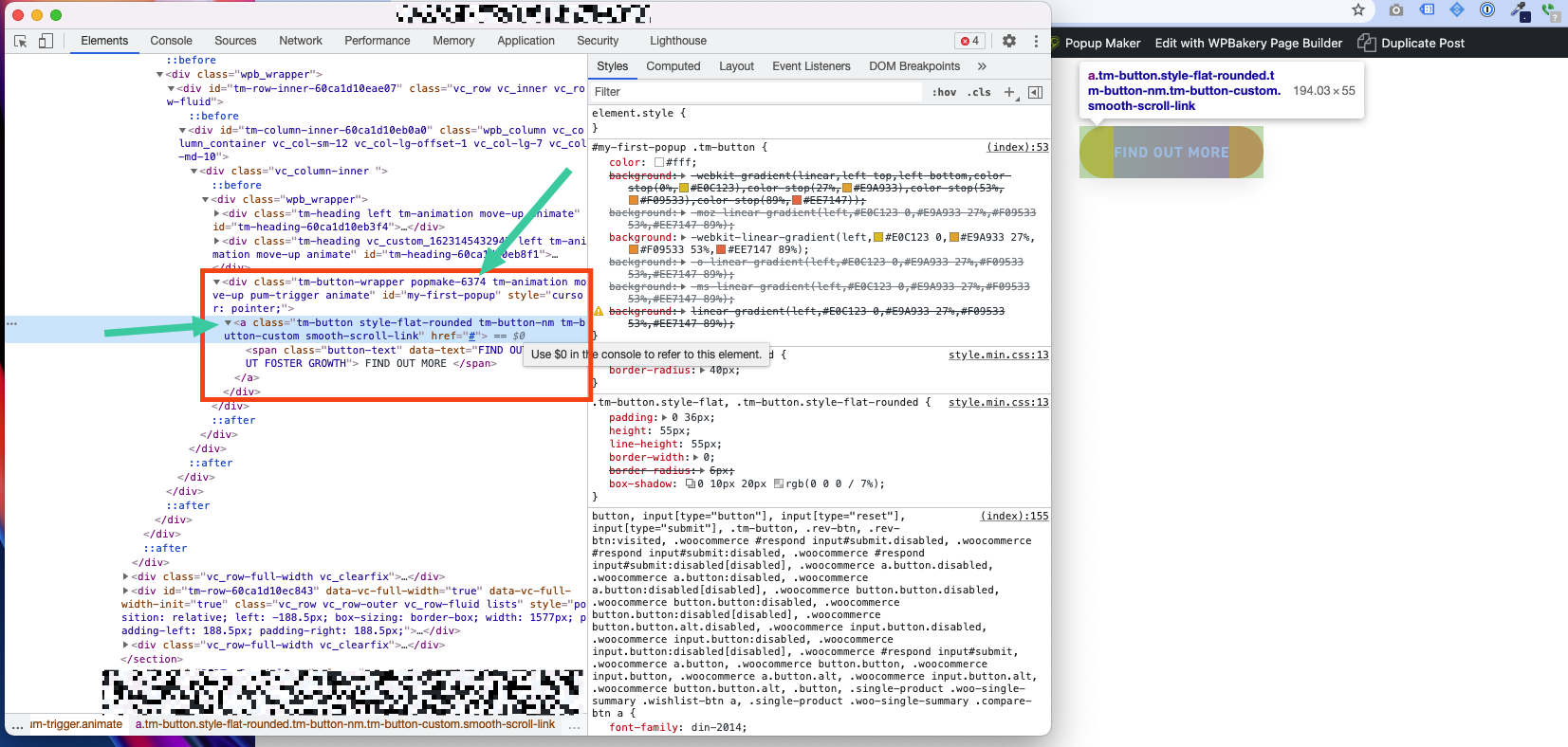
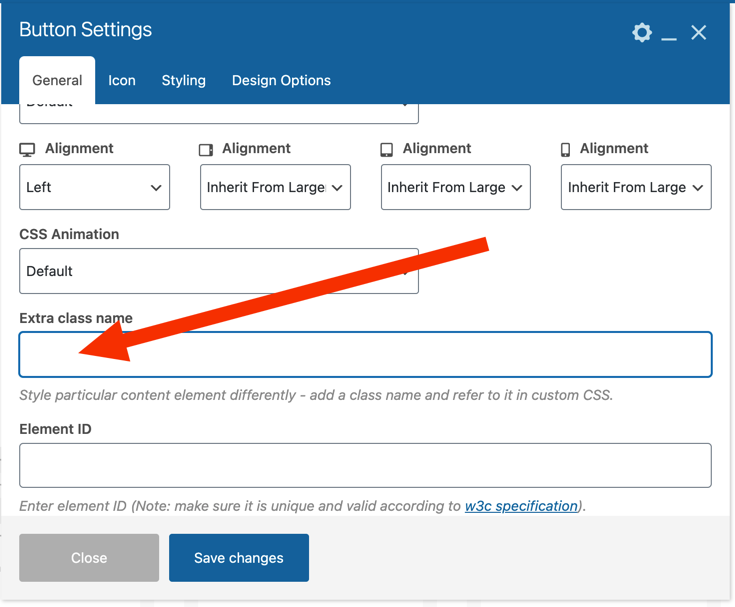
Button Class isn’t applied to the A tag. It’s applied to a parent DIV. Can I ask how to apply the CSS Class to the A tag?
Hi,
I don’t understand what you need for help, can you send me some screenshots?
Thanks. I did but the comment was deleted automatically I think because I used Zappy to add screenshot links. I’ll try again on the next comment.
You can see the class “popmake-6374” in the parent DIV of the A tag. https://cdn.zappy.app/4c1119f2cf11a10318014a70341b05eb.png
I inserted this class directly into the button settings: https://cdn.zappy.app/8be2745f0ea9f55267c37caae5ae06de.png
However the class did not apply directly to the A tag, it was applied to the DIV. So my popup trigger did not work (a 3rd party plugin, which uses classes on A tags to trigger a popup).
Hello, Demo content missing in every slider revolution item. Each demo page have a slider revolution as header. My system has all requirements ok.
I try to import 3 times demo content.
Tell me what to do. Thank you
I want to check your site, I also can send you sliders’ demo via our support site: https://thememove.ticksy.com
Thank you, it’s okay now, I don’t understand why !
I see. Have a nice day!
I recently updated my WordPress and Brooke theme to the latest release, and now I cannot access my portfolio in the dashboard, it only allows me to add tags and categories but, I cannot access the portfolio pages however, they are still displaying on the site. Any ideas?
Please send me your site’s admin credentials. I’ll check it. This is my email: thememovedotcom@gmail.com
Thank you… I emailed you from @fernandosenegal.com
I found your email but no login information there.
Hello. I have updated the WP to version 5.7.2 and now I cannot update plugins among other things. It gives this error: Uncaught TypeError: Cannot read property ‘aysDeleteUninstall’ of undefined And other errors.
I have used version 2.4.0
If I put another theme, it works. How can I fix it?
WPBakery Page Builder doesn’t work as expected after upgrading the last version of WP. Are you guys aware of that?
By the way, the issue (non-unique id #_ajax_nonce error) is happening with only Chrome (Version 90), it might not related your package.
Hello
Please install this plugin to fix it: https://wordpress.org/plugins/enable-jquery-migrate-helper/
https://prnt.sc/wcofplThanks
hello, following the theme update to 2.4.0 and wordpress update to 5.7, the main navigation dropdown menus aren’t working. Also in mobiles the slideout menu bar is not working
no worries it’s working fine now. Purged cloudflare cache
Thanks for letting me know.