26866 comments found.

A design with rounded corners, wich of your demos has that feature?
THANKS
Hi,
That is possible to do with the theme blocks, they have an option to set a border radius for the images. That option is used in this demo for example https://demo.tagdiv.com/newspaper_fitness_pro/ But basically any of the theme blocks can have a border radius. I will add this as a demo suggestion, it will be considered to be used for further demos. Let me know if you have more questions.
Thank you! Simion C.
Ok, thanks.
Do you need any php extensions for this theme? This theme can be used in only WordPress hosting or Apache server hosting is required.
Hi,
Thank you for considering our theme. The theme requirements are these https://forum.tagdiv.com/requirements-for-newspaper/ The theme works fine with WordPress hosting, apache or nginx servers. Please let me know if you have more questions.
Thank you! Simion C.
The images that I put in the background are blurred in the ANIMALS MAGAZINE PRO template
Hi,
I believe you have sent us an email, we can continue the discussion there. I have replied recently, let me know in the email and we can discuss further.
Thank you! Simion C.
Can someone please explain to me why in my template when I click on an entry many entries appear one below the other. I’ve been trying to remove this all day and I can’t … I’d like only one post to appear thanks Por favor alguien me puede explicar porque en mi plantilla cuando hago click en una entrada me aparecen muchas entradas una debajo de otra. Llevo todo el día intentado quitar esto y no puedo … me gustaría que solo aparezca una entrada gracias
Hi,
That is the theme infinite loading for posts feature https://tagdiv.com/infinite-loading-for-single-posts/ The infinite load for posts is optional, so it can be deactivated if you do not want to use it. To deactivate it, edit the post template you are using, for example from a post page https://i.imgur.com/TSxZUUj.jpg and deactivate it https://i.imgur.com/h7TvtwF.png It can always be reactivated in the future if you want to use it at some point. We can help when you have questions, the support forum is always available here https://forum.tagdiv.com/forum/newspaper/ Let us know.
Thank you! Simion C.
Muchas gracias soy casi nuevo … estaba con la versión 4 y no conozco estas nuevas funcionalidades … gracias
Hi,
No problem, we will always help when needed. Let us know, via the support forum or by email at contact@tagdiv.com Either way will be fine.
Thank you! Simion C.
Also I go to Newspaper – Theme panel and change, general theme color , I change the THEME ACCENT COLOR, but all text are still same color. please help
Hi,
The theme accent color will apply to most elements, but there can be color settings that override it. It depends. Please mention this as well in the forum topic, provide some examples from the website so we can help more.
Thank you! Simion C.
please I want to change HEADERS BACKGROUND COLOR, I go to Newspaper – Theme panel and change the HEADERS BACKGROUND COLOR, but this doesn’t work. please can you help me? thank you
Hi,
Customizing the header depends on what type of header is used. If it’s a standard header template then the theme panel options should work for it. If it’s a cloud header template then it must be customized in the composer, not in the theme panel https://forum.tagdiv.com/header-manager/ If you are unsure how it can be done, or you need help with it, please create a new topic in our dedicated support forum and provide a link to the website so we can check it https://forum.tagdiv.com/forum/newspaper/ Let us know.
Thank you! Simion C.
Once I make any changes in Theme panel and save settings, if i refresh the theme panel page it again revert back to old settings.
Hi,
If that happens, it could be some kind of caching that perhaps affects the backend. We could take a look and investigate, please send us an email at contact@tagdiv.com and provide a link to the website, admin login, also cPanel or similar if possible. We will try to help.
Thank you! Simion C.
I make a logo using AI. but when I upload and use on website with your theme, the logo seems to be blurry. How to fix this?
Hi,
Without actually seeing how it looks it would be hard to say why that happens. Maybe check the size in which you are setting the logo, when you are setting it https://i.imgur.com/EUh7WEE.png It could be that you are setting a thumbnail of the logo, and that may lead to low quality results. If that is not the case, I suggest sending us an email at contact@tagdiv.com and providing a link to the website, where the respective logo can be seen.
Thank you! Simion C.
How do I change the color of the line under the images in the posts in the ANIMALS PRO MAGAZINE template
Hi,
So in the post template of the demo, I believe you are referring to this underline https://i.imgur.com/RL1FvRu.png The color is set for each block from that post template. Edit the template with the composer, click on each block and check in the style tab, there the underline hover color can be changed. We can provide further assistance if you want us to, let us know. I suggest sending us an email at contact@tagdiv.com and providing a link to the website. Then we can continue helping to customize the demo.
Thank you! Simion C.
Hello. My Item Purchase Code is not working. my theme is not activated. what is the issue.
Hi,
We will take a look at it. Please send us an email at contact@tagdiv.com and provide a link to the website, admin login, and the activation code. Let us know as soon as possible.
Thank you! Simion C.
Thank you for your reply, and I’ve sent my details through email. Please find and resolve my issue. Thankyou again.
Hi,
The theme is activated on the website now. The activation worked fine the first time I tried. Please check as well. Let us know if you have questions, or if we can help in any other way.
Thank you! Simion C.
Hello, I use the ANIMALS MAGAZINE PRO template but when I enter from the mobile phone, I get the mobile version and I want only the AMP version to come out, I want to know how I do that. Thank you
Hi,
Are you using the mobile theme and AMP? If you do, then it depends on how you use them https://i.imgur.com/peu4G0u.png and also if maybe you are using this option from the AMP plugin https://i.imgur.com/2p1ikzH.png Depending on the configuration you are using, the mobile theme or the mobile theme + AMP version will be displayed on mobile. We can help in case you want to have a specific behavior on mobile, if it’s possible. I suggest sending us an email at contact@tagdiv.com and there provide a link to the website, admin login, also a few details about how you want it to be. Let us know.
Thank you! Simion C.
Ads not working after last update. background appears white in advertising spaces.
Hi,
Updating the theme should not affect the ads that were displayed on the website. Maybe something happened however. Please send us an email at contact@tagdiv.com and provide a link to the website and admin login, we will take a look. Let us know.
Thank you! Simion C.
I have a question regarding web hosting. I read the article here https://forum.tagdiv.com/requirements-for-newspaper/. My question is a litespeed server good for the newspaper theme? As the article specifies nginx and apache. Thanks
Hi,
That should work perfectly fine. If you would like to use a litespeed powered server for the website, there should be no problem as far as the theme is concerned.
Thank you! Simion C.
I used NewsPaper many years already and I cannot understand one important thing…. Why are you guys so not modern in technologies???
Many modern themes already has integrated popup windows with different triggers.
I cannot understand why I use top selling theme and have to buy additional plugin to run popups on my site.
Sorrry, but …...........
Hi,
I am sorry if the theme doesn’t have the features you require. We can’t add them all unfortunately. In time we will however try to add as many useful features as possible. All the suggestions from our users are added on a list and they are all considered, but they take time to prioritize, develop and add in the theme. Sorry for any inconvenience.
Thank you! Simion C.
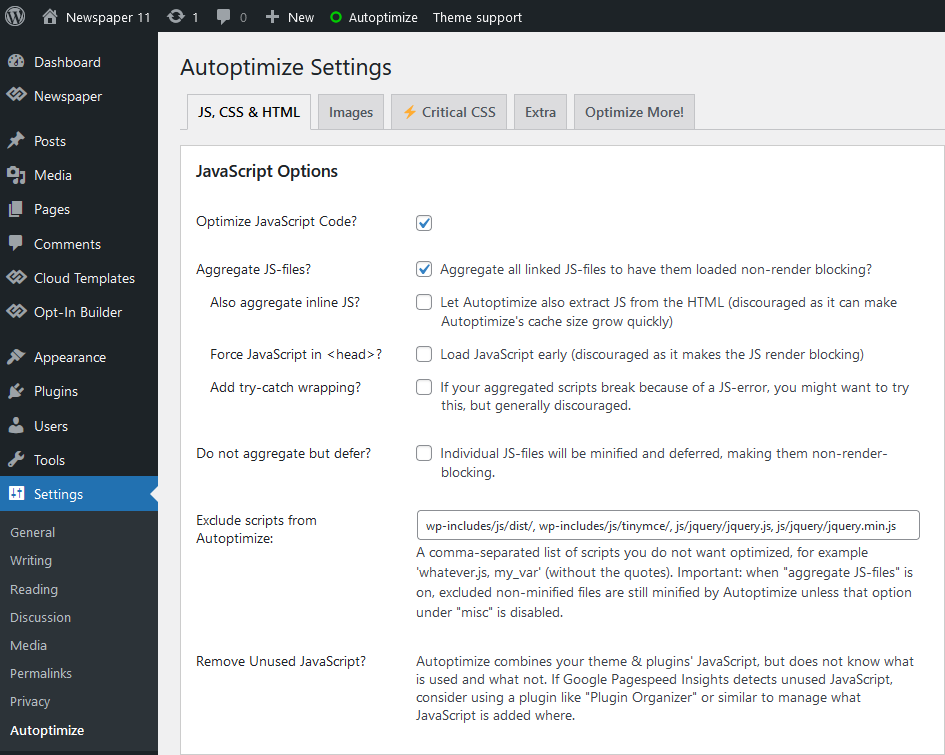
Hello, I am compressing javascript and css codes using “Autoptimize” plugin to optimize the theme. However, after this process, the mobile page I created is canceled and switched to the non-mobile version. I tried many plugins and they all gave the same result.
1. Mobil Homepage;
https://content.screencast.com/users/melihkotbas/folders/Capture/media/d760f296-ba8b-4d22-bcaa-8f898e74c602/LWR_Recording.png2. Settings
https://forum.tagdiv.com/wp-content/uploads/2021/09/autoptimize-javascript.png3. Broken;
https://content.screencast.com/users/melihkotbas/folders/Capture/media/7097c948-5f2d-4ec3-87e1-c4bbc21694de/LWR_Recording.png1.Wp Super Cache;
https://content.screencast.com/users/melihkotbas/folders/Capture/media/5049c19d-bdda-4a94-8b48-b8440b86422b/LWR_Recording.png2. Broken
https://content.screencast.com/users/melihkotbas/folders/Capture/media/dade9a03-bf22-4b12-be4e-e80cc7dace9d/LWR_Recording.pngI tried the plugins one by one and both disabled the mobile homepage I had created. The theme is not optimized and running slow as I can’t use these plugins.
Hi,
If I try the same on my test install, with the super cache and autoptimize, it seems to work fine in the initial tests. The mobile page is displayed on mobile as it should. Maybe some settings from the autoptimize plugin could interfere with this, if that is the case those settings should be disabled. We will take a look however, please send us an email at contact@tagdiv.com and provide a link to the website and admin login.
Thank you! Simion C.
Hello, I want to know if this topic allows several authors to publish articles without having to give it access to the wordpress desktop? That is, to be able to make publications entirely from the frontend.
Hi,
Thank you for considering our theme. The theme itself doesn’t have such a feature at this time. Maybe in the future it will be added. You could try a plugin for it, like this one for example https://wordpress.org/plugins/frontend-post-submission-manager-lite/ Please let me know if you have more questions.
Thank you! Simion C.
Hi, When I enter to edit Footer template I dont see the light blue button “TagDiv Composer”. What should I do? Thanks, Francisco
Hi,
The cloud footer templates are the exception, meaning they can’t be edited directly with the composer, from the cloud library dashboard. They can be edited from a page or a template where they appear. So for example if you have a cloud footer template set globally https://i.imgur.com/TLJu6Pu.png then edit the homepage with the composer https://i.imgur.com/Wi3k0ZG.jpg scroll down and there you can customize the footer https://i.imgur.com/HDcnNYD.jpg Or if you have a cloud footer template set for a specific page or template, edit them and customize the footer. Please try it. Let us know if you have questions or if you need help with anything else. The support forum is always available here https://forum.tagdiv.com/forum/newspaper/
Thank you! Simion C.
Hey!
I’m having a few problems with the Mobile Page, as it doesn’t seem to always activate? I’ve made a mobile page, but when I test it on mobile, it shows the regular mobile version of my website, not the designated mobile page (that I’ve edited). Any reason as to why I’m having this problem? I’ve read through the documentation, and I’ve done as described, but it’s not working as intended.
Much love, Erki B
Hi,
Usually such issues are caused by caching. Caching can cause problems with the mobile theme or mobile pages. I see you are using the super cache, please check if this option is active in the plugin settings https://i.imgur.com/jNT2Dl6.png If it’s not, activate it and then clear the cache, and check if this solves the problem.
Thank you! Simion C.
pre-buy question…Does this theme support frontend article or blog submission from multiple users???, if no, then how can i implement this feature… Thanks
Hi,
Thank you for considering our theme. At this time the theme doesn’t have front end post submission capabilities. Such a feature could however be added in the future. You could try a plugin, for example this one https://wordpress.org/plugins/frontend-post-submission-manager-lite/ It seems to work fine with the theme. Please let me know if you have more questions.
Thank you! Simion C.
I tested the theme with the litespeed cache plugin and it didn’t work very well. Are there any plans for the theme to support the litespeed cache plugin?
Hi,
The theme works well with most caching plugins. Perhaps some settings from them could cause various problems, then it is a matter of disabling those settings if possible. If you want us to try and help, please send us an email at contact@tagdiv.com and mention the issues that happen when using that caching plugin. Also provide a link to the website and admin login.
Thank you! Simion C.