59208 comments found.

(1) Is it OK to delete the One Click Demo Import plugin after importing the demo site? Will that affect anything on my site?
(2) In this post, it says that you had disabled default Google fonts: https://www.facebook.com/Wpsoul/posts/181190450422154But when I check my site on GT Metrix, it says that the three fonts I chose in the Theme Options – Fonts menu are being called from the Google Font API. Is there a way to keep those fonts without the external request?
https://gtmetrix.com/reports/padtoporch.com/ShiCPElP/1. you can delete
2. First of all, you should never use 3 fonts on site if you need good speed. Maximum 1
There is possibility to make custom local fonts https://rehubdocs.wpsoul.com/docs/rehub-theme/how-to/local-google-fonts-for-gdpr/
Love the plugin! But when I build a listings table with the Listings Builder, my images on the left side show in the Gutenberg editor as expected. However, out in production only the noimage gray png shows up.
https://earntrackinvest.com/free-stocks/Link which you sent goes to infinite redirection of many sites
Oh no, I’ll do a malware scan. It’s just a wordpress install so hopefully my server isn’t hacked or anything.
I’ve had thousands of users on my site and never had infinite redirection.
No malware or anything, I don’t know what could cause you to redirect since I’m not redirecting on desktop or mobile.
Strange, it’s ok now. But I recommend to check server for suspicious access. How do you add featured image to post?
Also, you need to update theme and Rehub framework
Rehub’s Content Egg blocks are very good. As a recommendation, could you make a block dedicated to Price History? You currently have the option to display it when clicking the button, but I think for SEO purposes it would be nice if it would appear directly in the post via a dedicated block.
Thanks 
Problem with this block is that it’s script related, so it’s better to use shortcode
I am using the grand child theme of rehub, my woocommerce my acccount page shows as below. When I inspected I saw style.css is overriding a inline style
https://snipboard.io/HF4APq.jpg ,The list-style is not being none
website nowlearn.lk
Sorry, but customization help is available only for users with active support
No I don’t need customization. please say me how to make that list style disappear. by any css or something
ok, they will be removed in update
Hi, one question. Greenshift has compability with Content Egg?
I’m thinking of switching from Elementor to Greenshit, but I use offers in the posts, so I wanted to know if I can implement it and still have the prices, discounts, etc., displayed.
Rehub theme has Content egg block for Gutenberg, it’s working the same as Elementor block
But I am referring to the “post blocks” that appear on the Home page.
Are there any plans on FSE/template support for Woocommerce pages?
This will be available in Query addon for Greenshift
So I’ve to purchase the query addon to get FSE/template support for Woocommerce pages or is it included?
FSE is available only in FSE themes. But in query addon, there is template replacement which can be used to replace common pages. It’s already possible to replace archives and categories. Single pages will be added in update.
check end of video https://www.youtube.com/watch?v=gksGsf1VEBs
Yeah, I watched the video indeed, tried it for Woocommerce pages, but it didn’t work. In this case I meant the Woocommerce product page
Yes, it’s not ready yet, but will be available in update on next week
Awesome, I can’t wait to try it out!
Hi sizam, I don’t know why but my single course page looks like https://prnt.sc/zGxdo2ULUYcv
but your tutor lms demo single course page is like https://prnt.sc/3WESTRfUjz3N
Please help me I want the course page to look same as your demo in https://tutor.lookmetrics.co/
Thank you
Plus another problem that, I have created a custom header using elementor as shown in one of your youtube video. It works fine on desktop but on mobile it shows the default header. How to solve this problem?
Please reply for the above two questions asap.
Thank you.
You missed to send link on page
1,2) This is a link for a course page, you can see the single course page issue as well as the header issue from here.
3) Another small help I need is, I added a social login plugin and integrated with the theme, The button is not center aligned in the popup (can you help me to center align and show it below the login form if possible). It looks little weird, you can see that too in the same website URL.
4) I am using the ReLearn theme subset, I don’t want the regular menu to be full width, can you also suggest me a way to achieve that too.(any css or something)
1. I think tutor LMS changed design of inner page. I like previous more, but you can’t change it from theme. Ask authors if they have option to choose old style
3. I see that plugin has option to set align. Currently, it’s set to left. Check options of plugin
4. Then, don’t use Relearn subset because it’s main difference from default is to set full width menu
1. Oh, you did not say me about the mobile header issue right. The default header is shown even when custom header is created.
2. For the ReLearn subset I want only to make menu default size, please help me if you can give any css to achieve that. ReLearn subset provides some good paddings and allignments.
3. I appreciate if you can provide more options for tutor lms also. because you can create templates for the theme by overriding the tutor lms templates. Some other premium themes provide some them unique features for tutor lms(Eg:- Add languages, more filters, theme layouts etc…). I bought your theme because it has very beautiful features, really optimised, fast and as well as integrated with tutor lms.
I hope you will consider my request and provide some unique features for tutor lms as well. Sometimes may be Rehub would one of the most integrated theme with tutor lms in future.
Thank you in advance.
1. Your site doesn’t use any custom header. I don’t see it
2. I see that you changed header layout
3. You can find additional options for tutor lms in tutorial https://wpsoul.com/how-to-make-learning-site-with-tutorials-on-tutor-lms-and-rehub-theme/
Unfortunately, developers of Tutor LMS are very unfriendly to theme developers, they are interested only in selling their own themes, so, we prefer to make unbreaking customizations without providing custom templates, because this can make incompatibilities with their updates. They even don’t want to provide fresh version for testing compatibilities.
yes as the header was little messy, I changed back to default. No Problem it also looks good, but 1 problem, in the mobile view the cart comes before user menu(avatar when logged in). can’t I change those two places. I don’t like keeping like that please help if possible.
Ok, If they do provide any help, please provide some features. but please don’t stop the integration with tutor lms or I will have to search for another theme again and setup everything from first. because I am also trying to move from elementor to greenshift which is awesome. So, please don’t stop integration with it.
You’re always the best and keep updating. All the best.
Please provide a solution for the above problem too
Cart is always last icon, in mobile and in desktop https://recart.wpsoul.com/
Slider Revolution Version 6.2.23 | By ThemePunch installation from Theme repository triggers critical error on WP. Everything worked fine until Elementor update. Anyone reporting same error?
I’m just curious, why was it necessary to create a separate post type (Blog Posts in the left menu) for the Reviewit demo? Why couldn’t those have been created in the regular Posts section using the Post Layout dropdown?
https://snipboard.io/aF8lMI.jpgYou can use posts if you don’t need separate post type
About a month ago, I disabled the separate post type for Blog Posts in the Theme Options menu.
But after that, I noticed the Post Offer option had disappeared from the bottom of the post editor in all my posts so I had to do a site restore. Do you know why that would happen?
Post offer section is not affected. You simply removed it in theme options-global enable – duplicate meta panels. Remove everything from there
I would like to remove some options from the theme. There are so much options in the theme which i don’t want to use. Can you please help me with that?
Theme options-global enable
How Do I customize or remove this Related product area From woocommerce. I cannot seem to find any option, even did several google searches. The only option is to delete it from the theme editor panel.
Can you provide a feature or suggestion on how to customize or remove this related product area?
Html code =
Image URL = https://i.imgur.com/v2p1poi.png
Website URL For Reference = https://hubprix.com/review/discord-com/
.related-woo-area{display:none !important}
you can place this in theme options – general options – custom css
Hi,
The post_views doesn’t seem to be working on the site, All posts views don’t increase. Our hosting company has checked your article and made the adjustments to try and fix it but no avail.
Link to our site: https://extremesavers.co.uk/10-off-25-spend-amazon-selected-accounts/
Article we shared with the host: https://rehubdocs.wpsoul.com/docs/rehub-theme/advanced-tips-and-customizations/how-to-fix-post-view-script/
Daniel
Yes, on some hostings, direct ajax file execution is not possible and I don’t think that hosting company will allow you to enable this.
https://extremesavers.co.uk/wp-content/plugins/rehub-framework/includes/rehub_ajax.php?postviews_id=3045&action=rehubpostviews&_=166073166this is example of custom ajax file which must be allowed to execute
Asked this in the comments – reply was needed support – so purchased another licence .. to get support – this was my question, can you assist please? -
Is it possible to inclue empty product categories in seach (by the category title)?
Can I modify the search or search form to include them. (any pointers appreciated)
Reason (im using the woo hiarachy as pages within themselfs) and at some point may add product models (as products) to the last level of the hiarachy at a later date.
So for now would appreciate being able to add them to search
file for customization
woocommerce/product-searchform.php
find code
<?php wc_product_dropdown_categories(array(‘show_count’ => 0, ‘parent’ => 0, ‘show_option_none’ => esc_html__(“All categories”, “rehub-theme”), ‘class’=> ‘rh_woo_drop_cat rhhidden rhniceselect hideonmobile’, ‘id’=>mt_rand())); ?>
replace
<?php wc_product_dropdown_categories(array('hide_empty'=>false, 'show_count' => 0, 'parent' => 0, 'show_option_none' => esc_html__("All categories", "rehub-theme"), 'class'=> 'rh_woo_drop_cat rhhidden rhniceselect hideonmobile', 'id'=>mt_rand())); ?>
You can drop this file in the same folder in child theme https://rehubdocs.wpsoul.com/docs/rehub-theme/child-themes/how-to-customize-your-theme/
Hi thanks, but this dosent work on live site? I have some redirects in place for the base of the shop category? and have removed the shop page from URL would this affect it working?
Shop URLS look like this
services = base of shop (been stripped from URL)
domain/services/device/first-category/
is now
domain/device/first-category
device => redirects to /repairs the base of the posts category
Original Question
“Is it possible to inclue *empty product categories * in seach (by the category title)?
Can I modify the search or search form to include them. (any pointers appreciated)”
thanks
this appears to search posts. by title I want to search by empty product categories
NB: with regard to last reply I Disabled any reditrects in Xampp instance to check if this was issue – dosent appear to be
I don’t know what you mean. You asked how to add empty categories in search form. This customization will add empty categories in search form in header. If you use other search form, provide details how you made it
it returns no results from any search
https://postimg.cc/tsgP63zxhiarachy
https://postimg.cc/kVgFMNkGBut if i put a product in a category the menu works as exspected (see screen shot below)
https://postimg.cc/bswdVz2Xthanks Lee
Please send screenshot how you added customization which I sent to you
thanks code in the file
https://postimg.cc/p9z35WFhLocation of code in child theme
https://postimg.cc/TK5f3X2Flocation must be the same as location in theme
woocommerce/product-searchform.php
you have
/product-searchform.php
Check the path in the image its in the woocomerce folder (its in the screen shot) above the folder
https://postimg.cc/VSGqBTbq/ arrow just denotes up one level on the server.
thanks Lee
then, send admin access on my email or on https://sizamtheme.support-hub.io/
I am looking for some help to remove old posts(older than one month) along with all the images. Is there any easy way to perform the cleanup?
Posts – all posts. Then you can sort posts by date, bulk select and remove
I have dowloaded the blank cjild theme and tried to overide tutor lms templates as said in tutor lms official doc in my child theme, but override is not working. How can I achieve this please help me
I recommend to write to support of tutor lms
Ok, i resolved it. some error from my side.
Can you please say me how to add frontend submit form, When I paste the shortcode shown in form page, it only shows the posts created before, there is no form to create a post https://prnt.sc/OzFymd68VsF2
Ok, I found it
Thank you
Hi, team how to disable default rehub footer? other than single page option, because I wanted to hide footer in products section too.
Theme options-footer option
Hi, I have three problems with the breadcrumbs / permalinks in the additional blog section:
1. breadcrumbs dont show up on categories: - https://smartphones24.org/deals - https://smartphones24.org/deals-und-gutscheine/computer
2. breadcrumbs still show text “Blog” instead of “Deals” - https://smartphones24.org/deals/notebooksbilliger-de-at-back-to-school-highlight-deals
3. “permalink slug for Blog” and “permalink slug for Blog Category” have to be different, right? - If I use “deals” for both, category links jump to last blog-post in category - if I use “deals-und-gutscheine” for blog and “deals” for blog category, the first breadcrumb link is broken
1. Blog categories have no breadcrumbs
2. How did you add Deals text in breadcrumbs?
3. They must be different
Hello, can you advice me , How i can set my custom thumbnail image for products ,
The problem is , > when template updated the custom thumbnail is overwrite
Currently it’s not clear which thumbnail you mean, how you add it, which template you mean
Please, create topic according to guidelines, with all information, links, screenshots. This will allow us to understand your issue and give you a better and fast answer.
https://sizamtheme.support-hub.io/articles/how-to-write-to-support-if-you-need-technical-helpThe template is ReCart.
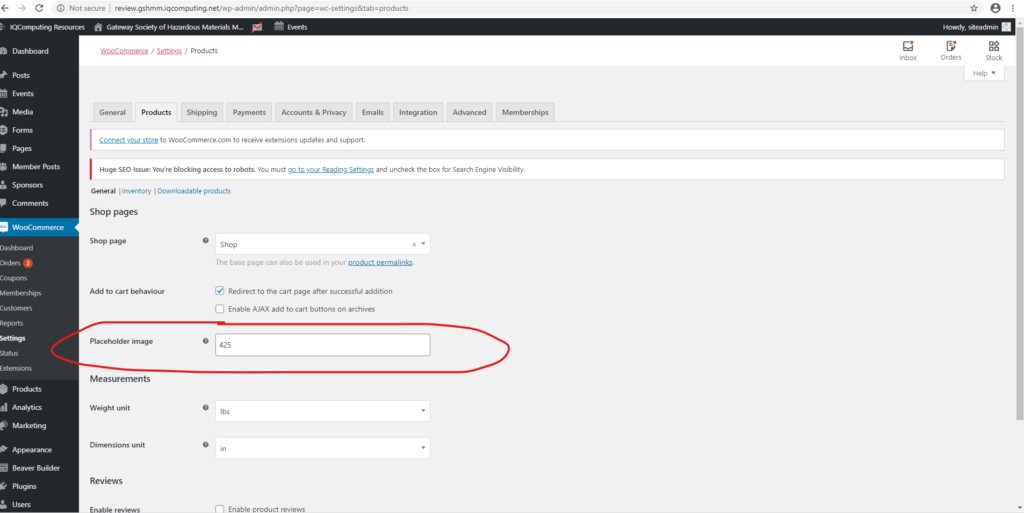
I would like to changing the WooCommerce default Product Image, see the image:
https://recart.wpsoul.com/wp-content/themes/rehub-theme/images/default/wooproductph.png and https://recart.wpsoul.com/wp-content/themes/rehub-theme/images/default/noimage_500_500.png This Method – to change placeholder image ID – not work. https://www.iqcomputing.com/wp-content/uploads/articles/7411/change-woo-commerce-image-1024x513.pngtheme option – global enable – fallback image – it’s for posts
For products – it’s required some customization, you need to have actual support to get access for customization help
Ok, thanks
Hi, I really like this theme and the blocks themselves in the page: https://remag.wpsoul.net/comparison-table-demo-post/ Questions:
1. Is it possible to look into the admin panel on the test site for this page before buying? I logged in, but there is no way to feel the possibilities: https://remag.wpsoul.net/comparison-table-demo-post/2. Is it possible to import a theme and edit imported posts, for example, modify a table a little?
3. Do I need additional costs to be like on this page (everything suits me there) https://remag.wpsoul.net/comparison-table-demo-post/?
4. Is this page https://remag.wpsoul.net/comparison-table-demo-post/ made in greenshift or elementor?
Hi, answered on email
Thank you!
you asked me to contact you via theme forest for customization details. You know how on some product layouts “Side Block” to be specific you have the product ranking for each category. The ranking is based off of regular Woocomerce reviews. Is their anyway to change it so it’s based off user simple star review?
Hi, I just checked this layout and I see that ranking in Side Block layout is already using _wc_average_rating which is based on user star rating. So, what do you want to change there?