38332 comments found.

Hi there, does this theme work with the plugin: WooCommerce Composite Products ?
Hey KemarMCaribTech,
I haven’t personally tested with that addon, but wouldn’t suspect there would be any issues. If you encounter any problems, feel free to open a ticket on the support forum in regards.
Hi, great theme!! I just want to ask you how can I change the h2 tags to h1 in the home page, by default it’s set up to be a h2
Hey WebmasterUees!
Can you share your URL so that I can see what elements you’re using in order to guide you to the correct settings?
Kind regards
Hi, sure, here it is: https://chicandlist.com/ On the hero slider I need to chage the H2 to H1.
Thanks in advance
Hey WebmasterUees,
You would need to override the “wp-content/plugins/salient-core/includes/vc_templates/recent_posts.php” template file in order to make that modification in the current release of the theme.
You can read about overriding a page builder element template file from your child theme in the documentation here.
Kind regards
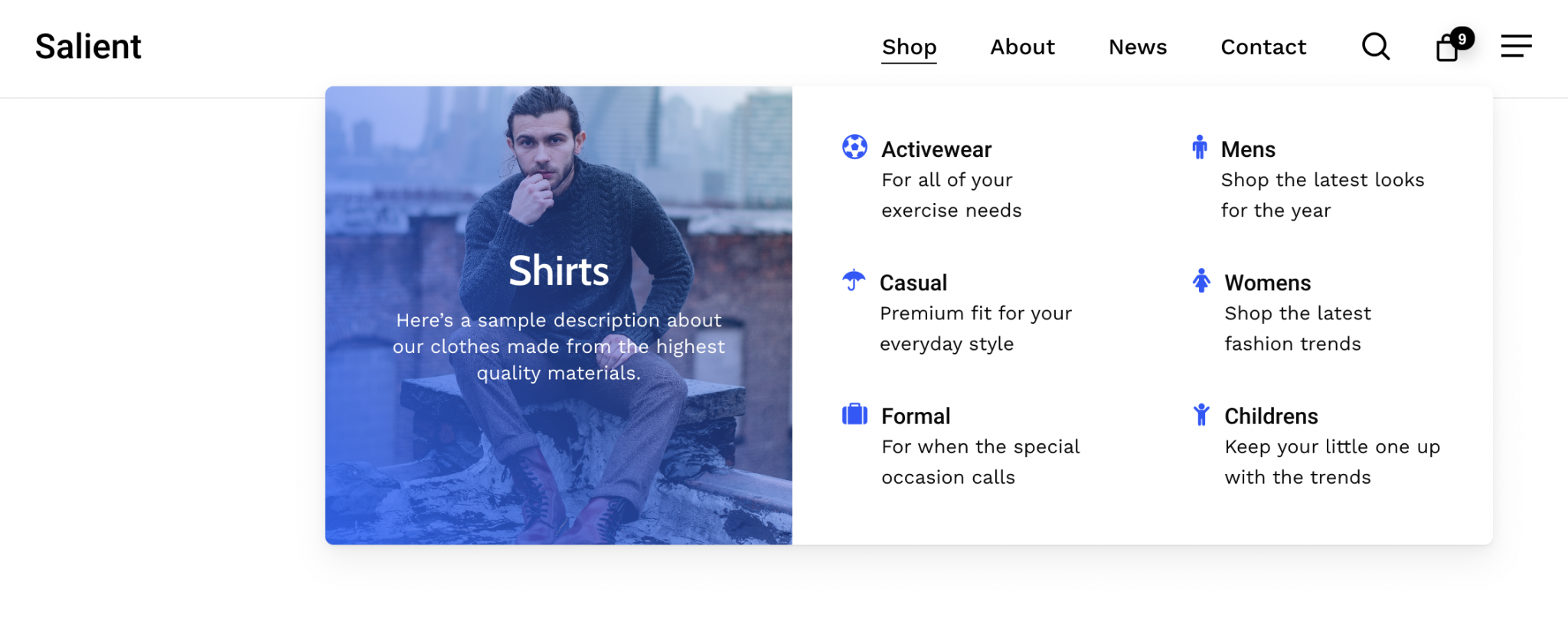
Is there a way to add a button to an area on where it says “shirt”? If so how to do it? https://themenectar.com/docs/salient/wp-content/uploads/sites/35/2021/01/Screen-Shot-2021-01-30-at-7.14.14-PM-2048x815.png
Hey juvengle,
The Salient menu options currently do not have a built-in option to add a button inside of a mega menu item. However, this option is indeed being added in the upcoming major release. If you’d like to test it out early, be sure to check back on the change log next week for when the beta becomes available: https://themenectar.com/changelogs/salient.html
Cheers
Can it be added by html? Tried doing it by using a button shortcode but to no avail.
Hey juvengle,
The menu items currently do not have the ability to parse shortcodes. However, I’ve noted that idea on the wishlist.
Kind regards
How can I change the woocommerce ATC button background color?
Thanks!
Hey Acquiring!
Are you trying to alter the main add to cart button color on your single product template or within your product grid? If you could share your URL so that I can see your current settings, I’d be happy to provide a snippet.
Kind regards
Yeah it’s the main add to cart button color on the single product template https://ibb.co/Y85kcXS
Thanks for clarifying Acquiring,
If you would like that button to display in a separate color from your defined theme accent color, you can add the following snippet into the custom CSS box located in the Salient options panel > General Settings > CSS/Script related tab:
#ajax-content-wrap .container-wrap button[type=submit].single_add_to_cart_button {
  background-color: #666!important;
}
Hi team
1. i would like to check how to turn off the “social app share to” icon floating on page when you with iphone. ( or how to change and add more of anyther socail share? like wechat, etc.. please guide)
2. how to change home page on bottom text: “read article”. i check every single page cant’t find it. from support page on themeforest, but very vague. i am begginer of wordpress. please guide with preper click of step.
theme: blog-magazine
big thanks for assist.
Hey jiangnan1031, I can see that the same questions were asked via the support forum and answered earlier today.
Kind regards
Hey there. Another question: How do I get a specific page to use a different logo? Can I do it by adding some custom CSS?
Hey marcfest,
It would be possible with CSS, an example that you could add to a specific page would look like:
#logo img {
  visibility: hidden;
}
#logo {
  background-image: url(YOUR-LOGO.png);
}
Kind regards
Thank you. Please take a look at the following link to see how the replacement logo get cut off to the right and on the bottom when scrolling down. How do I stop that behavior for that page only? https://elevatorspeechtraining.com/ai2-2/
Hey marcfest,
You could add the following additional rule:
#logo {
  background-size: cover;
}
Kind regards
That did the trick. Thank you.
You’re welcome, marcfest 
What would be the recommended way improve the layout a little bit? Is this build in within Salient or would I use custom code?
Thank you so much.
Hey dzineee,
Can you please share the actual page URL where that’s occurring so that I can see your layout/button settings to suggest a change?
Thanks in advance
The same issue occurs in cart and checkout page.
Hey dzineee,
You can add the following snippet into the custom CSS box located in the Salient options panel > General Settings > CSS/Script related tab to adjust that line height:
.woocommerce div.product form.cart .button,
.woocommerce a.button {
    line-height: 1.2;
}
Hi, in the “Architect” demo, I wanted to know how can I move the image higher (of the white table with light wood chairs) that scrolls vertically above another background image (behind)?
This block is named “Parallax Images and text” in Salient Template studio.
Basically I would like it not to be in the middle of the image below but starting 4 cm higher…I’m sure it can be done but what needs to be changed?
Thanks
Hey thebugbear,
You can adjust the field labeled “Top” within the inner row settings for that element: https://ibb.co/PF9rCNF To move the image higher, reduce that value e.g. “35%”
Kind regards
Hello. I’m using the “Portfolio” element in a specific page to list portfolio items. I would like to be able to list 5 in a row, but I’m not being able to do this. I’m using the “Fullwidth” layout of the element, but it always creates a 4 column layout (4 items + 1 in a second row). Is it possible to put 5 in a single row? Thank you.
Hey jaclerigo,
You can make that change by adding the following snippet into the custom CSS box located in the Salient options panel > General Settings > CSS/Script related tab:
@media only screen and (min-width: 1000px) {
body .portfolio-items .col.elastic-portfolio-item {
    width: 20%!important;
}
}
Kind regards
That worked perfectly! Thank you. One more question. Is it possible to center the items. They actually are aligned to the left. Best Regards
Hey jaclerigo,
Could you kindly share the page URL so that I can take a look at your settings to assist with that?
Thanks in advance
Hi, this is a dev url, not a finished project. https://canas.grifin.pt/mercados/nacional/#8
Thank you.
Thanks jaclerigo, unfortunately that seems to redirect to a login page. Can you kindly switch it to be public viewable?
Oh, so sorry, forgot about that. It’s available now.
Thanks, jaclerigo
That change would require the following CSS snippet: https://pastebin.com/ucrUW5jM
Thank you so very much! As always, a perfect 5 stars score for support!
Glad I could help, jaclerigo
Is it possible to disable transparent navigation on mobile for a specific page?
Hey MarcGarner, you could add this to your page CSS box for that change:
@media only screen and (max-width: 1000px) {
  body #header-outer[data-transparent-header=true].transparent {
     background-color: #212121!important;
  }
  body #header-space {
    display: block!important;
  }
}
Where can we see the roadmap for Salient v15.5? I’m excited to see what the next version has to offer.
Hey likeacat, we do not keep the roadmap public for competition purposes. However, once the beta is available (should be within the next week), you can opt in and see a full change log.
Kind regards
Hi, I hope you’re well. At https://elevatorspeechtraining.com/, what CSS do I have to add to a specific page to suspend the sticky header effect just on that page?
Hey marcfest
You could use the following snippet to accomplish that:
body #header-outer {
  position: absolute;
}
Kind regards
Perfect. Thank you, as always
Glad I could help, marcfest
Hi!
Is there a way that I can make the product page full width so it uses the whole page instead of it being in the center?
Here’s a link to the screen shot https://ibb.co/Cz4vm2N
Any help?
Hey Acquiring!
Adding the following snippet into the custom CSS box located in the Salient options panel > General Settings > CSS/Script related tab will modify that:
@media only screen and (max-width: 1000px) {
  html body .container {
    max-width: 95%;
  }
}
Kind regards
Thank you for the timely response!!
You’re welcome, Acquiring
Cant find an instruction to make menu items non-clickable and color changing like here – https://themenectar.com/salient/ – when you hover mouse to portfolio menu the portfolio element is non clickable and elements like Project Styles & Portfolio Demos are changing color on hover. And also is it possible to make mega menu 100% width not 100% but 80%?
And the description font size in mega menu are edited only through css? If yes – then fine
Hey raffess,
1. That’s achieved that by setting the following rule:
#header-outer .no-link {
    pointer-events: none!important;
}
You can then add the class name “no-link” to any menu item desired: https://ibb.co/NCR6zfx
2. The mega menu can be set to full width in the Salient options > header navigation > dropdown/megamenu tab via the “Header Mega Menu Width” option.
3. You can specify a custom description font size in the Salient options > Typography tab via the “Off Canvas Navigation/Dropdown Description Text” field.
Please use the support forum in the future when asking multiple questions.
Kind regards
I have a very old version of the theme, back when the Envato plugin wasn’t a thing, and I’d like to update. Only issue is, I still have Visual Composer with my Salient Theme, and I’d like to keep all my current pages the same, but utilize the new Salient with WP Bakery to build new pages and possibly customize existing ones.
1. Can I buy a new license and update Salient without losing any styling/data on my current site?
2. Will WP Bakery be able to customize pages that have Visual Composer components?
Hey evtezcan,
Your old pages should still render correctly after updating. However, if you’d done any child theme customizations, those will likely need to be reworked to utilize the latest Salient templates/functions. If not, it should be fairly straight forward to update. I would recommend- reading through this article before updating just so you’re clear on the major differences.
- Doing the update on a staging server before moving it live, just to see if you run into issues since you’re coming from a version that’s many years outdated.
Kind regards
Hi ThemeNectar,
I have successfully installed the Salient Theme on www.climatesolutionsparks.ca, installed and activated the necessary plugins but when I go to use the “Demo Importer” to upload the “Architect” demo it doesn’t appear to be working. I have let the demo installer run for over 2 hours and it remains at 1-3%.
See screenshot below: http://preview.themeforest.net/item/salient-responsive-multipurpose-theme/full_screen_preview/4363266?_ga=2.257317579.1758921289.1681229185-499441270.1678295293Am I doing something wrong, is there another way to upload the demo files? I have even install a new WordPress and still no luck.
Any help you can offer would be greatly appreciated. Many thanks.
Hey evermaven,
I would need to see what error is being logged to your server during the import in order to assist further. Can you please open a ticket on the support forum in regards with the relevant error being added to your PHP error log?
Kind regards
Hello! Im very interested in this theme. 2 questions:
1. If i buy this theme, get i this URL as demo? https://themenectar.com/salient/
2. https://themenectar.com/salient/woocommerce-feature-overview/#ajax-cart can i make a custom scroll image (i think it called scroll stocked or something) like you do in the section with “Advanced product ratings, Category grids and Advanced product search” that you get changes on images without go down until you see all images. Like Apple effect. Is easy to customize or what?
thanks!!!
Hey GuanacosEstudio
1. That is not an importable demo, however most of the sections from that page have been added to the Salient studio template library, which means it would be fairly easy to recreate.
2. Yes, that’s created using the included Salient page builder element, “Sticky Media Sections”.
Kind regards
Hello
Hello, damanagerltd
Hello,
How to create a menu that will be exclusively visible on mobile please ?
Regards
Hey algo90,
There’s currently no built-in option to specify a different set of menu items to replace your regular menu on mobile only. However, that option is indeed being added into the next coming major release. If you’d like to test it out early, check back on the change log soon for when we open up the public beta: http://themenectar.com/changelogs/salient.html
Kind regards
thank you very much for your fast answer. Great service
You’re welcome, algo90
Hey toolbox101,
Salient does not load that polyfill.
Kind regards