9249 comments found.

Hello 1. Can admin manage users from the front or or it only happens at the WP admin? 2. Can i customize this theme to my own currency? 3. Can an agent exist alone not tied to any agency, where they are able to submit property?
Hello. Thank you for your interest Please see my reply below
Hello 1. Can admin manage users from the front or or it only happens at the WP admin?
-> Admin manages agents/agencies/developer or new regular user account from wp-admin
2. Can i customize this theme to my own currency?
—> You can set your currency
3. Can an agent exist alone not tied to any agency, where they are able to submit property?
—> Yes, he can register alone and add properties
Please look over our demos to understand what the theme can do and let me know any question you have. I can answer and clear any question before making a decision.
If you need further info or want to test our theme, please send a message from here https://themeforest.net/user/wpestate
Thank you
Thank you so much that was very helpful. Is it possible to disable Paid Submission? Is your theme compatible with Paygate payment gateway?
Hi
-> You can disable Paid submission. You can choose the membership package instead or leave the submission to be free.
Is it possible to disable Paid Submission?Is your theme compatible with Paygate payment gateway?
-> The theme is compatible with Woo commerce that has an payment addon for Paygate.
Thank you,
Hi, where can I find 32 languages translated files? Also I found that your advanced search is not functioning with WPML.
I set each language as below.
mysite.com/es mysite.com/kr mysite.com/ru
How can I fix this issue?
Hello.
Theme languages are in plugins/wpresidence-core/languages and themes/wpresidence-child/languages. Help
WPML question is too general. I can share WPML documentation to check the settings
1. Check all WPMl settings are as in this help https://help.wpresidence.net/article/wpml-help/
This influences search https://help.wpresidence.net/wp-content/uploads/2021/01/wpml-language-settings.png
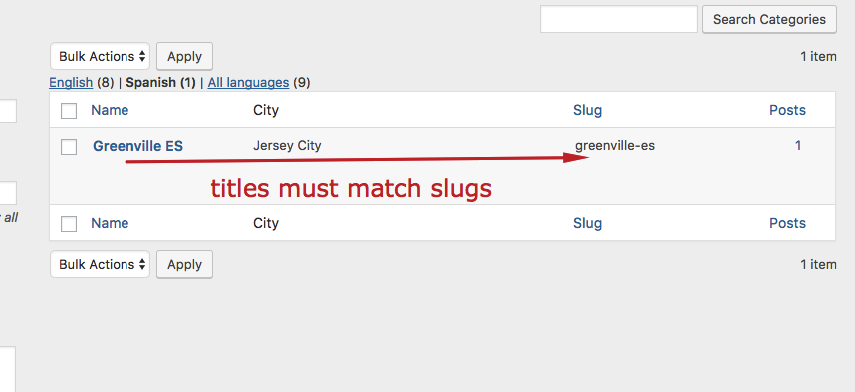
2. Check categories / titles in all languages. Same WPMl help – this sreenshoot https://help.wpresidence.net/wp-content/uploads/2015/12/wpml.png
These are standard options that WPMl plugin requires. We can double check the help settings are done in support, but if further assistance is needed please open a ticket with WPML support and they can investigate. For technical situation WPML compatibility department contacts us to make any necessary technical changes, but there is no known issue with search or any other theme function and WPML, so it is very possible the help will help make search work with WPML.
Please use our client support https://support.wpestate.org/ if you need further help. This is also a private support where you can send us your site details (url and wp-admin access).
If you wish my assistance to register in support please send a message from here – https://themeforest.net/user/wpestate
Please note that our standard office hours are Monday – Friday, 9AM-5PM Europe timezone.
Thank you
>Theme languages are in plugins/wpresidence-core/languages and themes/wpresidence-child/languages. Help
where should I locate thoses files?
my site is still showing only English on any languages
Thank you
I located .po/,mo files on ./themes/wpresidence-child/languages into ./wp-content/themes/wpresidence/languages and now it’s reflected, but I still have no idea where to locate .po/.mo files on ./plugins/wpresidence-core/languages to.
Thank you
Hi
The files can be found in Plugins in the theme core plugin.
Please use our client support https://support.wpestate.org/ if you need further help. This is also a private support where you can send us your site details (url and wp-admin access).
Thank you,
Hi. In the theme pack you have folder plugin. Inside you find wpresidenc-core.zip Unzip it https://prnt.sc/I6Kcm8e12InW – and go to languages folder.
thank you
Hi, I want to introduce a point system for subscribers. Is it possible to have a personalized service on your theme? how can i contact support with email ? thanks
Hello. Thank you for the comment. this is not possible as theme feature and we would not be able to custom development either I am afraid. Thank you
What is the price for personalized service ?
THANKS
Hello. We do not have custom development services I am afraid. Thank you
Hello, is it possible to see the backend of the theme as admin? thank you
Hello. Thank you for the comment. Please send a message from here https://themeforest.net/user/wpestate
Thank you
Hi, Is it possible when you Zoom In the Map so the property Grid showing on right side should show only property which radius is selected or zoom in on map?
Just like if I zoom in ABC Town of Network so in grid of property It should only which are available in this area.
Mean the filter based on map visible portion.
Hello. In WpResidence we have geolocation / radius search in all search forms.
We have it added to this demo search forms – without radius control https://orlando.wpresidence.net/
But you can add radius control too
Please look over our demos to understand what the theme can do and let me know any question you have. I can answer and clear any question before making a decision.
If you need further info or want to test our theme, please send a message from here https://themeforest.net/user/wpestate
We are on holiday until next week but I will answer as soon as I can.
Thank you
When you zoom in so at left side the property showing only which area is visible on screen and if I zoom in more so It again filter and show property which are available on map visible part as grid.
This is what I’m asking.
So is it possible in this theme?
Hi. That is a theme feature exclusive to WpRentals. It does not exist in WpResidence.
Thank you
Hello, how can add a language switcher (shortcode) to the header? I will use the Translate Press plug-in.
Hello.Thank you for the comment. We do now know this plugin.
The theme has top bar widget areas – some multi language plugin offers language switcher as widget you can add widgets in there.
And we have menu area. Some multi language plugin can add language switcher in menu.
if Translate press can do either, you can add the language in top bar or menu.
I looked online for this plugin documentation. I found this https://translatepress.com/wordpress-language-switcher/
Theme help to manage top bar widgets is here https://help.wpresidence.net/article/widgets-2/#a_wpestate_id
And menu is here https://help.wpresidence.net/article/menu/Please use our client support https://support.wpestate.org/ if you need further help. This is also a private support where you can send us your site details (url and wp-admin access).
If you wish my assistance to register in support please send a message from here – https://themeforest.net/user/wpestate
Holidays announcement – The company office will be closed for Easter Holidays as it follows: Friday (April 14th) – Saturday (April 15th) – Sunday (April 16th) – Monday (April 17th) – Closed. Schedule will be back to standard office hours (Monday – Friday, 8 AM – 5 PM Europe timezone) starting Tuesday April 18th. Happy Holidays!
Thank you
Hi,
I have a specific xml feed from a real estate company that is updated every 24h. Can the theme import an xml feed instead of mls data ? Can we set the theme to query automatically the feed so that we don’t have to import it ourself every day ?
Hello paulleon, Thank you for the comment.
The theme alone cannot import xml feeds. What our clients use is a 3rd party plugin.
WP ALL IMPORT is a 3rd party import plugin that works with xml and cvs. They also offer custom development services as well if you need a custom solution for your specific xml feed.
We know they also have a free addon for WP ALLIMPORT for WP RESIDENCE. Here is the help if you wish to see more on the plugin developer site - https://wordpress.org/plugins/wp-residence-add-on-for-wp-all-import/
Import of properties is very sensitive. A missing element in import can create issues and it’s very difficult to pinpoint the error – that’s why unfortunately we cannot offer support for third party import/xml. But they may be able to assist with what you need to do as we’ve seen these plugins work with other clients.
If you need further info or want to test our theme, please send a message from here https://themeforest.net/user/wpestate
We are on Easer holiday until the end of next week. We will send the test domain as soon as we can.
Thank you
How to put SVG logo?, i’ve installed the svg support plugin but not shows the svg logo
Hi casious,
You need to upload the logo in Theme Options-General-Logos and Favicon: https://help.wpresidence.net/article/wpresidence-logos-favicon/ The theme supports SVG icons as logo. Please use our client support http://support.wpestate.org/ if you need further help. This is also a private support where you can send us your site details (url and wp-admin access). Our standard office hours are Monday – Friday, 9AM-5PM Europe timezone. If you wish my assistance to register in support please send a message from here – https://themeforest.net/user/wpestate
Thank you,
Hello, SVG requires to save the SVG with the size you wish to use in header. If you put a very large logo, it will not be visible, even if uploaded.
Use Figma web editor to edit SVG size and export as SVG.That is what we usually use.
If you send the SVG logo in support we will check, but next week. We have the easter holidays now until next week and offices are closed.
Thank you
Hello This is a Pre-Sales question:
I need a theme and/or plugin for real state, that doesn’t list properties on frontend. I need all Buy requests goes to Admin AND all Sell requests goes to admin; and admin match them later over phone.
So its kind of common real estate website, but works on the backend by sales team not by individuals (C2B2C NOT C2C)
Can your product fit for my requirement?
Thank you…
Hi galwesh,
You can disable user login on front end and only your team will be able to submit properties. Also, you can create contact forms in homepage so the users can contact the admin.
Thank you,
Hi. You put the same question for WpEstate.
In WpResidence, same as in WpEstate, You can create an agent in admin and attach it to properties from wp-admin. All leads would go to the email of the agent attached.
In WpResidenc you can let users save favorites without login. And disable login / register entirely.
Please look over our demos to understand what the theme can do and let me know any question you have. I can answer and clear any question before making a decision.
If you need further info or want to test our theme, please send a message from here https://themeforest.net/user/wpestate
We are on Easer holiday until the end of next week. We will send the test domain as soon as we can.
Thank you
Hi, Please GeoLocation search is not picking the properties i have in search results. I have Los Angeles as a city for example, but when i search Los Angeles in the geolocation box and select the Los Angeles County Result it shows me no properties can be found. Is there a way to limit the search to only cities i have listings for i think thats how zillow handles it. Instead of using google sitewide search let city dropdown suggestions on search be only my available cities.
Hello eonyejegbu
Thank you for the comment.
Please GeoLocation search is not picking the properties i have in search results.
—> Please open a ticket in support https://support.wpestate.org/ to check the search fields configuration
—> We have a video that explains how the field must be set https://help.wpresidence.net/article/1-30-4-radius-search-for-half-map/
but when i search Los Angeles in the geolocation box and select the Los Angeles County Result it shows me no properties can be found.
—> Maybe the properties do not have the map location set to Los Angeles. We can check in support the property location too.
Is there a way to limit the search to only cities i have listings for i think thats how zillow handles it. Instead of using google sitewide search let city dropdown suggestions on search be only my available cities.—> The search goes to Open Street. You must select the address based on Open Street, but you can limit 1 country in theme options
If you wish my assistance to register in support please send a message from here – https://themeforest.net/user/wpestate
Please note that our standard office hours are Monday – Friday, 9AM-5PM Europe timezone.
Thank you
Hello, I want to buy a theme. but I have three questions. 1- is this theme support the price range for the property? for example, some of my properties have price ranges (from 1000$ to 2000$), and this price range for that each floor of the property has a different price and in the property list page price range must be shown 2- can I define some fields for the only renal property? for example, in renal property, I have a “MINIMUM STAY”, “SHORT TERM RATE” or “LONG TERM RATE” and those fields are only for rental property. 3-can I defined a template for the property based on category? (for example, I want different templates for rental property and sale property) Thanks
Hello, Thank you for the message.
We do not have a min and max price for properties. You can put default price or 2nd price
Search works based on default price
We do not have a rental booking form.
You can add custom fields (text, dropdown, number) but they apply to all properties. If they are not filled in, they do not show.
Property page template is for all properties or by property.
Elementor PRO has option to set a template by property category.
If you need further info or want to test our theme, please send a message from here https://themeforest.net/user/wpestate
Thank you
Hi,
is there any way I can add “phone number” field and add it as mandatory in registration form? I am talking about same phone number that is used for whatsapp and calling.
Hello. Thank you for the message. We do not have this option, but I added to wishlist to review the idea for the future. You can modify the code, but we do not have code directions. We can offer the theme current files in support
Please use our client support https://support.wpestate.org/ if you need further help. This is also a private support where you can send us your site details (url and wp-admin access).
If you wish my assistance to register in support please send a message from here – https://themeforest.net/user/wpestate
Please note that our standard office hours are Monday – Friday, 9AM-5PM Europe timezone.
Thank you
hi, if i click to filter city, i cant see any results but i have more than 5 properties published on same city. sme problem on other citys. what i do wrong?
Hello Web_cms, Thank you for the comment. I understand you need help to verify the search as you cannot find results even if you know there are properties in the category you search. What you describe is connected to how you set the search fields – we need to see the form to help correct the forms.
We have elementor form, theme options form – both must be verified. Our help is here for form builder https://help.wpresidence.net/article/property-search-form-builder-for-elementor/ and here for search fields https://help.wpresidence.net/article/adv-search-custom-fields-setup/
Please use our client support https://support.wpestate.org/ if you need further help. This is also a private support where you can send us your site details (url and wp-admin access).
If you wish my assistance to register in support please send a message from here – https://themeforest.net/user/wpestate
Please note that our standard office hours are Monday – Friday, 9AM-5PM Europe timezone.
Thank you
Hello,
Is it possible to have different templates for the properties based on their category ? For exemple, properties in the “restaurant” category would have a different template than those in the “house” catergory -because of course for example the number of bedrooms is not revelant in a restaurant…
This is just a pre-sale question, I do not need to know how to do this now.
Hello. Thank you for the message. The theme custom template system can be applied to individual property or all properties. The same template – with Elementor Pro extension which is paid separately – can set a template by property category.
But submission form is only one – so all fields will show as you add listing.
If you need further info or want to test our theme, please send a message from here https://themeforest.net/user/wpestate
Thank you
Hey Support Team,
i would like to buy and install you main demo version. But before i purchase, i want to ask if the functions of booking a vacation rental is included? Im not sure if i need to purchase also your other theme WP Rentals – Booking Accommodation WordPress Theme and connect it via sub domain? Please let me know, thank you very much! 
Hello Phil1990, Thank you for the message.
Booking as WpRentals is not included in WpResidence. The themes are independent, cannot be used together as functions.
Please look over our demos to understand what the theme can do and let me know any question you have. I can answer and clear any question before making a decision.
If you need further info or want to test our theme, please send a message from here https://themeforest.net/user/wpestate
Thank you
Hello, How can I display the complete title in the property card? The title is somehow limited to a certain amount of signs. thank you
Hi. Thank you for the comment. we will add control for this in next theme update. Meanwhile you can edit by code
wpresidence/templates/property_cards_templates/property_card_title.php
Change 44 to a larger number.
Please use our client support https://support.wpestate.org/ if you need further help. This is also a private support where you can send us your site details (url and wp-admin access).
If you wish my assistance to register in support please send a message from here – https://themeforest.net/user/wpestate
Please note that our standard office hours are Monday – Friday, 9AM-5PM Europe timezone.
Thank you
After updated the theme, Energy Class color bar is disappeared in the property page and Updated On date always shows February 24, 2022. I couldn’t update the current date. Could you please help me to find solutions? Thank you.
Hello. I answered in support. I think you need to check the theme update (plugins do not seem to be updated) We sent all the details in support. Thank you
After i update the theme and wp i see only block editor when i edit a property. Is possible to switch to classic editor?
Hi, Wordpress loads automatically the new editor. Install Classic Editor plugin from wordpress and you will see the classic editor in post, page, property. thank you
thank you very much for your help
You’re welcome!
Hi, I know my support expired, but the property featured image shown over the property map is not working correctly. When the image is missing it is supposed to show a placeholder image that is in fact located where the url indicates, but it doesn’t show it, it shows the link, but when the feature image exists it shows the image correctly. I updated everything and cleared cache, is this a bug? https://prnt.sc/2f-7EG8m2Gxt thanks in advanced
Hi, Thank you for the comment. It seems the image idxdefault.jog is not found in wpresidence-child/css/css-images folder
Go by FTP – create the folder in child theme exactly as in the screenshot https://prnt.sc/2f-7EG8m2Gxt and add the image idxdefault.jog
You can find it in the same location / same file name in the main theme
Please use our client support https://support.wpestate.org/ if you need further help. This is also a private support where you can send us your site details (url and wp-admin access).
If you wish my assistance to register in support please send a message from here – https://themeforest.net/user/wpestate
Please note that our standard office hours are Monday – Friday, 9AM-5PM Europe timezone.
Thank you
Hi! Can’t install 1 plugin: MLS Import. The system indicates the need to upgrade to version 5.5. But when you click “update” only version 5.3 is loaded. How to be?
Hello. Thank you for buying the theme. We would need to check wp-admin
Please use our client support https://support.wpestate.org/ and send us your site details (url and wp-admin access).
If you wish my assistance to register in support please send a message from here – https://themeforest.net/user/wpestate
Please note that our standard office hours are Monday – Friday, 9AM-5PM Europe timezone.
Thank you