39373 comments found.

Hello, I have a little question: If I deinstall the theme, the website could broke?
Hi
If you create content using the Avada builder then without the theme, the content will show as shortcode. Also Avada styling options will no longer be in effect so it will appear differently
If you require further assistance or have any further questions, please create a support ticket using the link below and our support team will gladly assist you
Click Here To Get Avada Support
We look forward to helping you!
Thank you, Shaminder
I am unable to change a background photo or container photo. If I click on a containers background tab or design tab, nothing happens. What could this be caused by??
Hello @mtnjason19
This is not a known issue, could be a conflict with some of your 3rd party plugin(s) so please try disabling those one by one and also please make sure that you are on latest version of Avada, if however the issue persists, please open a support ticket further and our team will check this for you.
Click Here to Get Avada Support
Thanks
-Ammar
I checked with tech support at my hosting company, they think its the builder plugin. I upated my version and its totally messed everything up. My support ran out, so now I have buy more in order to resolve this? I am a bit frustrated.
Hello There
You can reach us via our contact page and explain the issue to our team, https://theme-fusion.com/contact-us/
We look forward to helping you!
Thank you, Shaminder
Will do, thank you.
You are most welcome 
Hi Avada team, will you be updating the LayerSlider version to 7.7.1 in the theme updates soon? The LayerSlider online documentation states: Updating the bundled version in themes If you’ve received LayerSlider as a bundled item in your theme, new releases will be provided by the theme author through theme updates. If you want to receive new releases as quickly as possible, please consider purchasing a LayerSlider license. Thanks Steve
Hi
We would be releasing an update for this shortly.
If you require further assistance or have any further questions, please create a support ticket using the link below and our support team will gladly assist you
Click Here To Get Avada Support
We look forward to helping you!
Thank you, Shaminder
Hi there, does your theme works with membership plugins and wich one do you prefer?
Hi there,
We haven’t officially tested such a plugin with Avada but generally any good/properly coded plugin will work.
You can try a few popular ones and see if any of of those works best for you.
https://wordpress.org/plugins/wp-members/
https://wordpress.org/plugins/simple-membership/
You can consult the plugin’s documentation for setup / usage info as its a 3rd party plugin.
Thank you. – Abbas
Can I use this theme in my shopify website?
Hello @CG_Shiraz
Avada is a WordPress based website builder so you can not use it with any other platform, you will need a WordPress hosted site to run this.
Thanks
-Ammar
Hello, our website got affected by malware. Were able to clean it up and then it comes back again. Am i the only user having security issue with Avada ? Please advise.
Hi
We take security of our users quite seriously. We can assure you that Avada has no malware. Do ensure all plugins/WP core is updated to the latest version and kindly check with the host if you are having recurring issues
If you require further assistance or have any further questions, please create a support ticket using the link below and our support team will gladly assist you
Click Here To Get Avada Support
We look forward to helping you!
Thank you, Shaminder
I know that my support has expired, but your store page isn’t responsive and appears to cut out on other devises, like phones and tablets. This is only on the store page. We haven’t done anything different, and are just now noticing it.
Hello @lamorris01
Avada is completely responsive and there is no issue with the page being unresponsive on any device, please make sure that you are using an updated version of Avada that is 7.10.1 at this moment and also make sure that none of your custom CSS, 3rd party plugin or caching is causing this issue.
Thanks
-Ammar
Hello, everything is updated. Our support subscription just ended. We checked out theme, and nothing is in need of updating, and we don’t know coding so haven’t messed with any CSS or 3rd party. We’ve literally only launched the site for maybe like 3 months now.
Hi
You can reach us via our contact page and explain the issue to our team, https://theme-fusion.com/contact-us/
We look forward to helping you!
Thank you, Shaminder
Quite annoying that my tab section is displayed properly on the mobile version for years due to an extra css line. Then all of a sudden after some updates it all stopped working. In fact, you are simply forced to pay for support again. It would be nice if you could tell me how to get the tab section back to the top of the page on the mobile version. So not that the first tab is open and the rest ends up completely out of sight at the bottom due to the content of the first tab. I have now used this css because otherwise it was not visible at all, but how do I get it up? Actually, I just think that a theme like Avada should prevent these kinds of struggles right away. url: https://bosinfra.com/vacatures/ .nav { display: block !important; } .fusion-mobile-tab-nav { display: none !important; } .fusion-tabs.clean .nav-tabs{ text-align: center; } }
@media only screen and (max-width: 800px) {Hi,
As you can imagine, no software can stay static forever as new features/improvements require changes to the codebase eventually. So any customizations or CSS in this case would require some adjustments in the future at some point.
As the this area is meant for presale queries/generalities, for your issue you can reach us directly via the form on the following page (no support renewal needed) and explain your issue and we’ll take care of this for you:
http://bit.ly/2NJoU51Thank you. – Abbas
Is your template compatible with the “Back In Stock Notifier for WooCommerce” plugin? This is a plugin that allows you to notify the customer if there is stock. I want to use it with the template. In your template there are specified sizes that are missing and then it would be possible to use “Back In Stock Notifier for WooCommerce” plugin.
Hi,
We haven’t officially tested that plugin with Avada – however most properly coded WP plugins should work without issues with Avada.
As this area is not a support platform and is meant for pre-sale queries/generalities, if you still see issues, please create a support ticket with our team about this on the below page and we will get back to you as soon as possible.
Click Here To Get Avada Support
Thank you. – Abbas
Hello, Hope you are fine. There is a color issue of the fields while doing the checkout process. Screenshot link is given below. How can I change the text field Color, its almost invisible. Please let me know the steps in admin panel to change it. Thanks!
https://paste.pics/49107a57c8c0757e65e7561d82365bc7Hello @efaizi195
As the Themeforest comments section is meant only for pre-sale questions and generalities, we are not able to provide detailed support here. Please create a support ticket using the link below and our support team will gladly assist and guide you
Click Here to Get Avada Support
Thanks
-Ammar
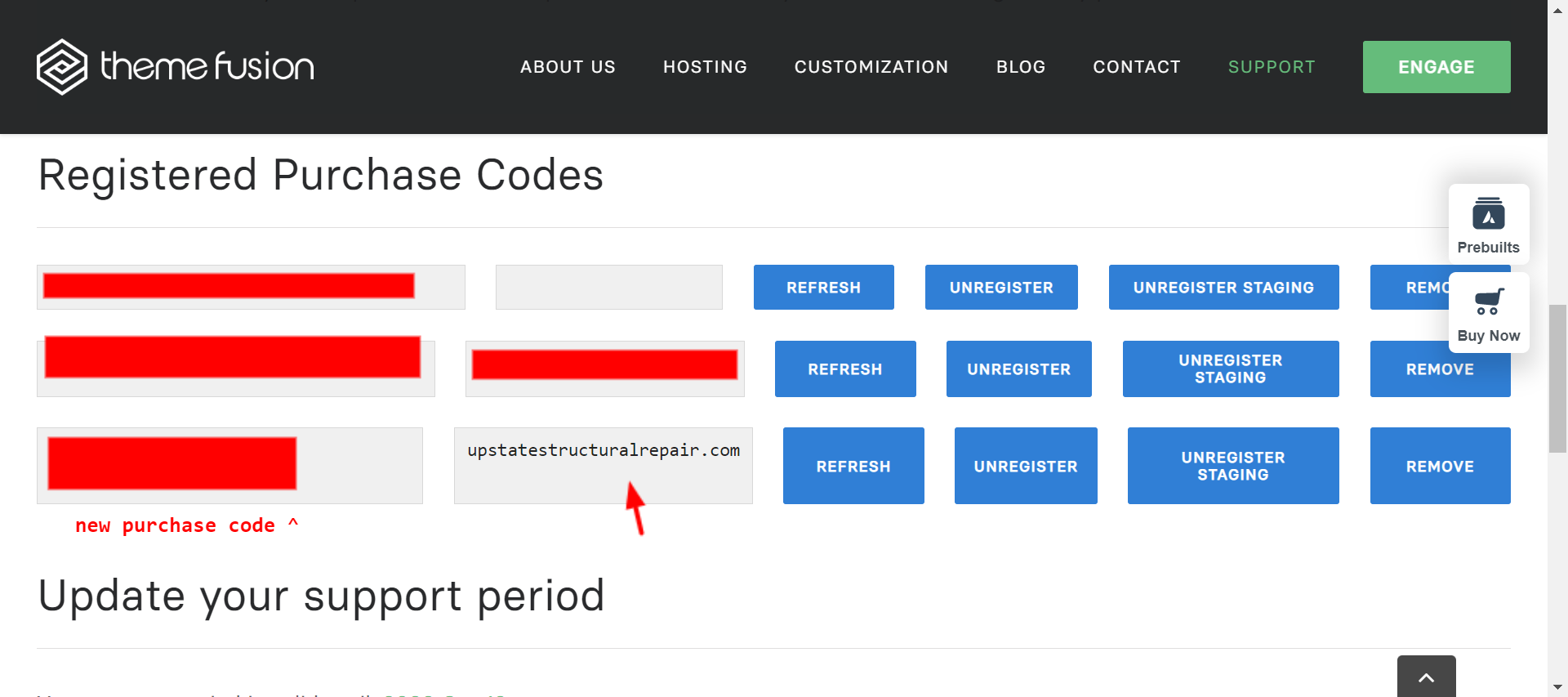
I purchased a brand new license and tried to register it on the backend of my website.
When I did that, it said the purchase code was already registered through another website.
When I went to register this purchase code, it showed that it was in fact registered to the intended site. https://static.md/8331ece216112f07aaf36c26819b6fa9.png
So why does the screenshot say it is registered but on the backend of that website, it says it is registered with another website.
This is a brand new code that I have not used on any other website.
Hi there
You can log into your support account, navigate to the “Purchase Code” tab and manage the sub-domains/domains there. If you have not already done so, please register a support account as explained here > https://theme-fusion.com/documentation/avada/support/how-to-register-for-avada-support/
Please make sure you have registered the purchase code within your support Dashboard as explained here > https://theme-fusion.com/documentation/avada/support/register-for-support/#registerenvatocode
Also, see our registration Q and A help file for more detailed information > https://theme-fusion.com/documentation/avada/support/avada-registration-and-licensing-faq/
Thank you, MB
That did not answer my question. I did register the purchase code – that is how I knew it was saying it was registered to the correct website. But it is still showing it is not registered on the actually backend of the website.
Hi,
I do see you have active support. As this area is not a support platform and is meant for pre-sale queries/generalities, if you still see issues, please create a support ticket with our team on the below page and we’ll sort this out for you ASAP.
Click Here To Get Avada Support
Thank you. – Abbas
I added my email in Avada forms notification settings but when i tested the form I’m not receiving any email notifications.
Hi
It would be difficult to assess/advise on the issue via the comments section. We would request you to please contact our support team to have your issue checked by them
We do see you have valid support. Can you please create a support ticket using the link below and our support team will gladly assist and guide you
Click Here To Create An Account & Get Avada Support
Thank you, Shaminder
Hello,
It’s probably just a setting issue for posts, but when I try to click on individual posts, they won’t open on to their responding pages.
https://www.thefishguyztv.com/category/recipes/Where should I start?
Thank you!
Hi
We would request you to please reach out to our support team as they would be able to assist you better with it. Please create a support ticket using the link below and our support team will gladly assist you
Click Here To Get Avada Support
We look forward to helping you!
Thank you, Shaminder
Excellent wordpress theme, I would add in the carousels to be able to control the speed.
Hello @rodrixt
We are glad to hear that you like Avada, regarding the carousel you should be able to change the speed from Avada > Global Options > Builder Elements > Carousel > Carousel Speed
If you need further assistance with this, please open a support ticket and our team will get back to you.
Click Here to Get Avada Support
Thanks
-Ammar
OMG thanks!!
We’re glad to assist.
Can i use this website builder for multiple domains?
Hello @Asmitha_kumar
Regarding your product licensing, you have to purchase/own a license for each publicly accessible domain install of the theme. Regardless of whether the installation domain is a sub domain or not, if it is publicly accessible, it requires a license.
If you are migrating to a different domain and you already have your product registered with your original purchase code etc, you do not need to purchase a new license; You can simply add your registered purchase information to the new installation’s product registration tab.
For more information please check the Envato regular license definitions here → http://themeforest.net/licenses/terms/regular
Thanks
-Ammar
hello my server was hacked and i have 2 LICENSE how to use them again !!!
Hello @saddem1990
I have responded you earlier regarding this, if you still have any queries on licenses please send us an email here => https://bit.ly/2J9DGTm
Thanks
-Ammar
hello i lost control to my server and i have 2 licence and i cant used again . : The purchase code is already being used on another domain.
Hello @saddem1990
With our registration system your domain is actually bound to the Purchase code, however if for some reason you want to unbind the domain or in scenarios where you need to test by installing Avada multiple times on the same domain, or you want to check different prebuilt websites after resetting Avada installation, this may cause such notification to come up, the solution to this is by simply going to our company site here => https://theme-fusion.com/ and then moving to Support > My Account Submenu > Register Purchase code and removing the domain from there => https://bit.ly/3W9xxbO also click on “Unregister” button on your Avada dashboard if the purchase code is still being used, more about this can be read here => https://bit.ly/3HJ0qr2
Thanks
-Ammar
I can’t believe they sold out to Siteground, I just had a bad experience with this service like most new customers. I congratulate you for the template but you have not chosen a good partner for this, it makes me sad and makes me doubt a little bit.
Hi,
We have a lot of customers on Siteground and haven’t received any such complaints with that host. This might be specific to your setup/installation. If you still have issues using Avada with SiteGround – as this area is not a support platform and is meant for pre-sale queries/generalities, please create a support ticket with our team on the below page and we will resolve any issues you’re seeing with this.
Click Here To Get Avada Support
Thank you. – Abbas
The anchor placed in the containers does not consider the height of the custom header and forces me to use the anchor element with a CSS Class that makes it rise… How can I avoid using the anchor element and only put the anchor name in the container?
Sorry, I meant to say: “CSS Class that forces it down”.
Hi
It would be difficult to assess/advise on the issue via the comments section. We would request you to please contact our support team to have your issue checked by them
As the Themeforest comments section is meant only for pre-sale questions and generalities, we are not able to provide detailed support here. Please create a support ticket using the link below and our support team will gladly assist and guide you
Click Here To Create An Account & Get Avada Support
Thank you, Shaminder
I have expired the support period and the renewal costs VERY EXPENSIVE.. sorry, thank you.
Hi,
The container also a separate menu anchor field which you can use instead of inserting the anchor element.
For hands on support, you do need to send a ticket though I’m afraid – as this area is meant for presale queries / generalities.
Thank you. – Abbas
Hi, I have been asked to make some changes to a website made with the Avada child theme, but the “Appearance > Themes > Avada child and Avada” section doesn’t show the update button. And if I want to install the new Avada theme over the old one, the operation is not successful because the Avada folder already exists. What can I do? Thank you! Valeria
Hi
I do see you have valid support. Our support team can provide better insight on this. As the Themeforest comments section is meant only for pre-sale questions and generalities, we are not able to provide detailed support here. Please create a support ticket using the link below and our support team will gladly assist and guide you
Click Here To Create An Account & Get Avada Support
Thank you, Shaminder