5511 comments found.

Hey, I rent out technical equipment. I have a device with different device numbers, it is possible to rent out the same device several times over the same product page and still get the device numbers differentiated in the back end?
Hello. Thank you for the comment.
We do not have a system that can rent items with stock / inventory. Our theme would not work for that.
If you need further info or want to test our theme, please send a message from here https://themeforest.net/user/wpestate
Thank you
Hello there Is it possible to have a transparent header with search on ALL PAGES. Also can you change the name of taxonomies like categories?
Hello. Thank you for the comment and for buying the theme.
Transparent header can be enabled for all pages – Help https://help.wprentals.org/article/transparent-header/ – But this option works well when you use hero header media like image or a revolution slider.
You can change the name of the taxonomies permalink – help https://help.wprentals.org/article/how-to-change-permalinks/
Any other text you see in English in wp-admin – Properties for categories can be modified from language files. We have a help here – https://help.wprentals.org/article/how-to-modify-theme-text-in-english-with-poedit/
Please use our client support https://support.wpestate.org/ if you need further help. This is also a private support where you can send us your site details (url and wp-admin access).
If you wish my assistance to register in support please send a message from here – https://themeforest.net/user/wpestate
Please note that our standard office hours are Monday – Friday, 9AM-5PM Europe timezone.
Thank you
Is elementor the requirement for proper functioning of this theme?
Hello. Thank you for the comment. You do not need Elementor. you can use bakery for shortcodes to create homepages. Widgets are different as elementor has more options, but we only have a few demos created with bakery (homepages created with bakery) .
Please use our client support https://support.wpestate.org/ if you need further help. This is also a private support where you can send us your site details (url and wp-admin access).
If you wish my assistance to register in support please send a message from here – https://themeforest.net/user/wpestate
Please note that our standard office hours are Monday – Friday, 9AM-5PM Europe timezone.
Thank you
seems like some pages are written in elementor, so elemntor is needed, your support says that elementor is not supported, so that contradicts what you saying
seems like you created webpages in elementor, but when installed elementor is breaking your setting and your support claiming that it is fault of elementor, sorry but that does not making any sense
Hi. I am not sure what error you have and where you got the message Elementor is not supported. Demos are created with Elementor. Those will need elementor to work. But you can also use Bakery. If you opened a ticket in support with all these details and wp-admin access, please send the ticket ID to check exactly the breaking behavior and advise. Thank you
I sent ticket to the support and they replied that it is my problem because I have elementor installed and it is not supported, so I think you should let people know that elementor will break this theme if they will use it
HI. I found the ticket. I am looking over to understand the discussion. Let me know what error you have now and I will help check that ,and then I will go over the ticket discussion to understand the context in where support said that. Thank you
Please explain to me how this works?, I bought the theme, when I was setting a homepage I have a choice of selecting few homepages there is a number of them some are elementor some are wpbakery, I have selected elementor and by doing that your theme is not working properly, what is my fault? since you provided elementor homepages ?
Hi. I checked the ticket
Support mentioned alignment was broken by changes made in Elementor plugin settings. Those are not related to theme options – but they are usually set manually by clients when trying to change global design. The screenshot shared to you was to help you check the settings made, knowing we cannot know what the purpose of the edit made by you was.
I can confirm I checked now and changed the settings made in Elementor and position of icons was restored to theme default look https://prnt.sc/ZD_ZJhaPLgVu
Elementor as editor is a powerful tool. Changes made in Elementor Settings overcome any design from theme as well. You do not need to use Global Elementor Settings either.
The theme demos are created with Elementor, but the settings you changed are not needed.
If you wish to continue using Elementor, let us know what you need to change and we will guide you how until you make the modifications needed.
Thank you
thank you, but I have not change or edit anything in element, simply installing elementor is breaking up the theme, I am still confuse about availability of pages designed in elementor since it is breaking the theme why are they available?, why dont you say and limit your pages to wpbakery since it is supposedly not causing so. many issues as elementor does, once again I have not change setting or edit any elementor setting, it is as it comes out of box installations with all the defaults
Hi, I understand the changes I reverted were not made by you, but we do not use those elements in any demo either so I am not sure why they were made and how. We made videos as we import each demo and edit it with Elementor https://help.wprentals.org/article/demo-import-video-tutorials/
We will do everything we can to replicate the same display as you by re-testing import. I do not know why settings changed if you did not change them in this case, but we will keep you updated if we understand how those settings could have been added in demo import.
We will wait for your follow up in the ticket.
Thank you
Hi, It is possible you had a different Elementor theme before using WpRentals and you added WpRentals with settings already made before you installed the theme. Please let me know if that could be the case. Thank you
Hi We have enabled twilio on our site but when we click on “VALIDATE OTP” button nothing happens? console shows this error “jquery.min.js?ver=3.7.0:2 POST https://.com/wp-admin/admin-ajax.php 500”
Hi. Please use our client support https://support.wpestate.org/ to assist with this situation.
If you wish my assistance to register in support please send a message from here – https://themeforest.net/user/wpestate
Please note that our standard office hours are Monday – Friday, 9AM-5PM Europe timezone.
Thank you
I use Loco translate for local translations, however I couldn’t find the po for translating the months. Where is it stored? For availability / calendar sections. Thanks
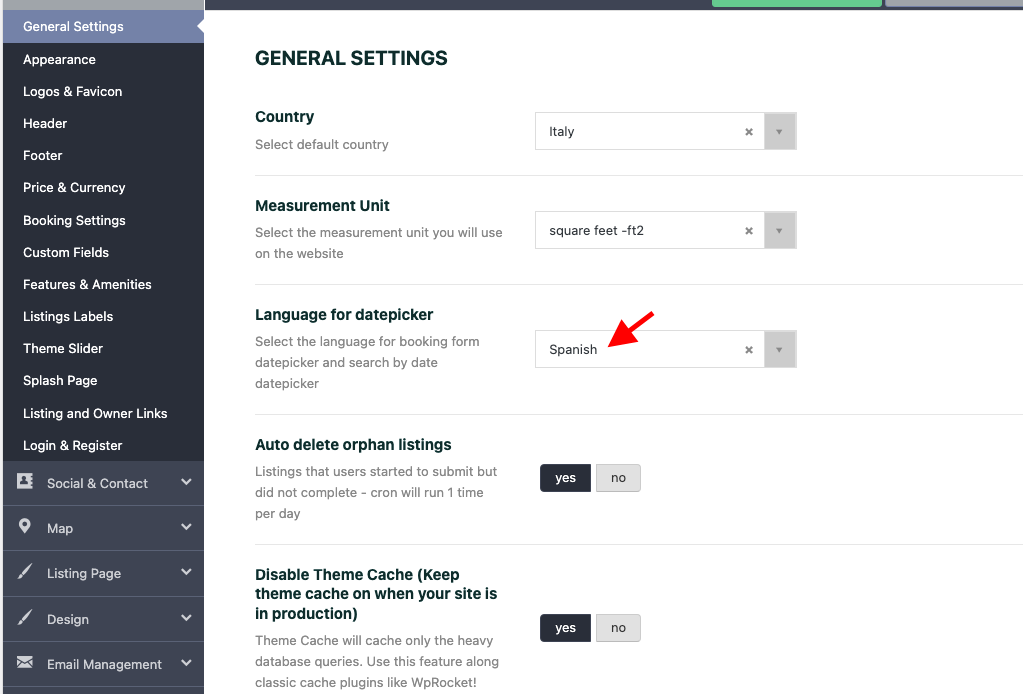
Hello. Thank you for the message. Calendar language is managed from theme options directly – https://help.wprentals.org/wp-content/uploads/2015/10/screenshot-rentals2.wpestate.info-2023.08.24-10_27_25.png
Please use our client support https://support.wpestate.org/ if you need further help. This is also a private support where you can send us your site details (url and wp-admin access).
If you wish my assistance to register in support please send a message from here – https://themeforest.net/user/wpestate
Please note that our standard office hours are Monday – Friday, 9AM-5PM Europe timezone.
Thank you
Hello,
Your product is wonderful. Question before purchase.
1) Is it possible for the customer to pay his reservation directly when booking? Payment via woocommerce payment method2) How is the seller payout? There is a page where the seller can see his income and make the payment request to the administrator?3) Have you planned a module for hotels? This will add a hotel with several rooms for rent. The customer must choose an available room when booking. ThanksHello. Thank you for your interest. Please see my reply
1. Admin can put 100% deposit and he will get full payment for booking to be confirmed. Deposit value is set by Admin and applies to all bookings.
2. We do not have payout. If you allow other users to register and add properties, please keep in mind there is no functionality built in the theme to support payments from user to owner or from admin to owner. Only to site admin (who can also be the owner).
3. No, we have not made plans to create a hotel booking theme. But I appreciate the feedback and suggestion. I do not know if this will exists in the theme future.
Please look over our demos to understand what the theme can do and let me know any question you have. I can answer and clear any question before making a decision.
If you need further info or want to test our theme, please send a message from here https://themeforest.net/user/wpestate
Thank you
How to fix search box, text on check in and check out fields is not lining up properly calendar icon covers it on both boxes
seems like header in homepage elementor v1 variation is not done in elementor but in wp bakery, there is no way of editing it besides adding title and subtitle and search type, seems no control over text in search entries
Hello. Thank you for the comment. I am not sure which demo page you try to edit. The pages from main demo are created with Elementor https://main.wprentals.org/ Maybe you edited an elementor page with bakery by mistake. That process can be reverted.
We can check and assist asap – with editing the demo page and understanding the alignment comment with search for which we would need a link to help answer.
We have a video for main demo here https://help.wprentals.org/article/demo-import-video-tutorials/#main and we have a video here for how to change the homepage with another variation from those offered with demo import – https://www.youtube.com/watch?v=tj2rSVUAToo but it will be faster for us to check your site and assist with both questions after we see the settings you have done so far.
Please use our client support https://support.wpestate.org/ to help further. This is also a private support where you can send us your site details (url and wp-admin access) to check the demo page you have set and what you try to edit.
If you wish my assistance to register in support please send a message from here – https://themeforest.net/user/wpestate
Please note that our standard office hours are Monday – Friday, 9AM-5PM Europe timezone.
Thank you
Your Demo is broken (and perhaps your theme). If you go to https://paphos.wprentals.org/properties/funchal-bungalow/ and select a begin and end date and number of guests, it fails with a message that reads “Please select the number of guests” even though the number of guests is selected.
Hi Jim. Thank you. There is no error, we forgot to select how many guests are allowed in that property. With vacation mode, guests must have a value different than 0. You can check now – we put 7 https://prnt.sc/1XvDimLfKGu3 and booking works. Thank you
Thank you for the update! Is it possible to use an external API to get availability and pricing and to reserve a booking instead of using the built-in functions for those things? Client uses a property management service that keeps up with her bookings at several different sites (Airbnb, VRBO, etc.) and exposes APIs that provide all of that information so that it doesn’t need to be added to the WordPress database or managed in two locations.
Hello Jim, I understand you need to sync prices from a 3rd party. As solution we have ical sync for calendar availability, but we do not have API support to sync other data. In this case the solution can only be done with custom development, based on the api documentation. I am not able to advise more in this comment thread. If you have the documentation available and what specific items you must sync from the documentation, please send a message here https://themeforest.net/user/wpestate
Thank you
Hi. I noticed when i created an account from the Sign up pop up and when the account has been created successfully and i want to Login to that same account on the Login Page, it says Wrong username or password! what could be the problem?
Hi. Thank you for the comment.
I just tested and it works correctly on our demo new account https://prnt.sc/At2wXYCNHOA3 login https://prnt.sc/MQmJyzPYNxx9 successfully logged in https://prnt.sc/j84LsDM_lgRk
Check any 3rd party plugins for login/register and disable settings or the plugin connected to login. Anything you enable in such plugins should be for wp-admin login, not front end.
Front end forms are already secured.
Please use our client support https://support.wpestate.org/ if you need further help. This is also a private support where you can send us your site details (url and wp-admin access).
If you wish my assistance to register in support please send a message from here – https://themeforest.net/user/wpestate
Please note that our standard office hours are Monday – Friday, 9AM-5PM Europe timezone.
Thank you
I added property and u followed video from the documentation, after approving the pending property, it doesn’t show in the search on the website, what could be wrong
Hi. Thank you for the comment and for buying the theme.
If the property does not show, but it is published, the search fields you check may not meet the property details. For example, you have guests field, you set compare to equal. You search without selecting guests (means 0 guest), but property has 1 guest. So search results will not include your property. You can change compare to greater instead of equal in this case in Search Form configuration.
We would need to see the property details and the search configuration to confirm the exact cause and guide you to the setting to change.
Please use our client support https://support.wpestate.org/ to send us your site details. This is also a private support where you can send us your site details (url and wp-admin access).
If you wish my assistance to register in support please send a message from here – https://themeforest.net/user/wpestate
Please note that our standard office hours are Monday – Friday, 9AM-5PM Europe timezone. We will help check this as soon as possible during office hours.
Thank you
Hello, I’m interested in buying your theme but I would like to know the following:
1. Is it possible to use the theme only to showcase multiple properties located in various cities/countries? This way all property listings would need to be added via admin.
2. Can each listing have only owner contact info displayed or only “contact owner” button? Does a user need to be registered to contact owner?
3. How compatible the theme is with the Polylang multilingual plugin?
Thank you
Hello. Thank you for the comment. Please see my reply
1. You can be single owner and add properties as admin (but you still use the admin front account). Help https://help.wprentals.org/article/use-wprentals-for-a-single-property-single-owner/
2. As admin you can choose to add just image / name and let only contact show. Contact is free, it does not need login
3. We have not tested the theme with polylang. I do not know if it works
If you need further info or want to test our theme, please send a message from here https://themeforest.net/user/wpestate
Thank you
Is it possible to provide two option for rental any apartment first option will be like from 2 pm till 11 pm on the second option from 2 pm till the next day 11 am? So the guest can only choose between two option only
Hello. Thank you for the comment. This is not possible. You can make available hours one time. Help to understand how it works is here https://help.wprentals.org/article/how-to-setup-hourly-booking/
If you need further info or want to test our theme, please send a message from here https://themeforest.net/user/wpestate
Thank you
I really like the theme but for my purpose I need the payments between customer and property owners to be made within my website.
This is the only thing that is preventing me from purchasing the theme, is there any solution with third-party plugins to carry out this type of financial transaction?
If you have any solution for this I appreciate your help
Thank you
Hello. Thank you for the follow up. I understand what you need, but we cannot offer this solution with the current functionality and I do not know if we will offer it in the future. There is no 3rd party integration you could use. And we recommend our clients to buy based on existing features, as we do not want to promise features we may not be able to deliver.
Thank you
Is there a way to change the single item rental time from a world time to an AM-PM time frame? For example, on the Ski Demo an Item Rental time is from 0-24hr but how can I change that to an AM-PM time frame
Hello. Thank you for the comment and for purchasing the theme.
In booking selection we do not have AM / PM https://prnt.sc/8Vs1KF6Kq6JL
In the availability calendar you can have AM / PM https://prnt.sc/SCzjTWC2xF_d depending on the language calendar – https://prnt.sc/nBhIaX4hYeSD
Please use our client support https://support.wpestate.org/ if you need further help. This is also a private support where you can send us your site details (url and wp-admin access).
If you wish my assistance to register in support please send a message from here – https://themeforest.net/user/wpestate
Please note that our standard office hours are Monday – Friday, 9AM-5PM Europe timezone.
Thank you
I do not know how to delete the Breakfast Tickbox option or change the Breakfast Price on the Demo Booking form for the SOLO Demo
Hi. You must edit property as owner and delete from edit property page in user / owner dashboard. Help to set owner in solo demo is here https://help.wprentals.org/article/demo-import-video-tutorials/#solo and help to manage extra options is here https://help.wprentals.org/article/1-20-add-extra-options-in-booking-form/
If you are a client, please use our client support https://support.wpestate.org/ to assist. This is also a private support where you can send us your site details (url and wp-admin access). Our standard office hours are Monday – Friday, 9AM-5PM Europe timezone.
If you wish my assistance to register in support please send a message from here with the buyer account – https://themeforest.net/user/wpestate
Thank you
Is it possible to add a multivendor system? For the property owner to receive payment directly through some payment method, and the website owner to keep a percentage
Is there this withdrawal management option?
Hi. Thank you for the message. This is not possible in WpRentals theme. Payments are processed to Admin merchants, and payment from admin to owner is not supported.
Thank you
Sorry, I didn’t quite understand how the financial relationship between the website owner and the advertisers works.
Does all booking money go to the website owner and is the website owner responsible for manually paying advertisers?
Hi, The theme can manage payments from users to admin. Owners are not paid in the theme.
A VENDOR system as you describe, that splits payments, is not integrated.
We do not have any feature that would allow admin to pay owners in the theme.
Admin can request deposit and service fee only, and let users handle the remaining payment outside the theme as well.
If you need further info or want to test our theme, please send a message from here https://themeforest.net/user/wpestate
Thank you
The main earning method I need on my website is “Earn money on every booking” “Earn a fixed fee or a % everytime someone confirms a booking on your website”
Can I see how this would work in practice?
https://paphos.wprentals.org/ I’m watching this demo, can you give me the login and password?Thanks
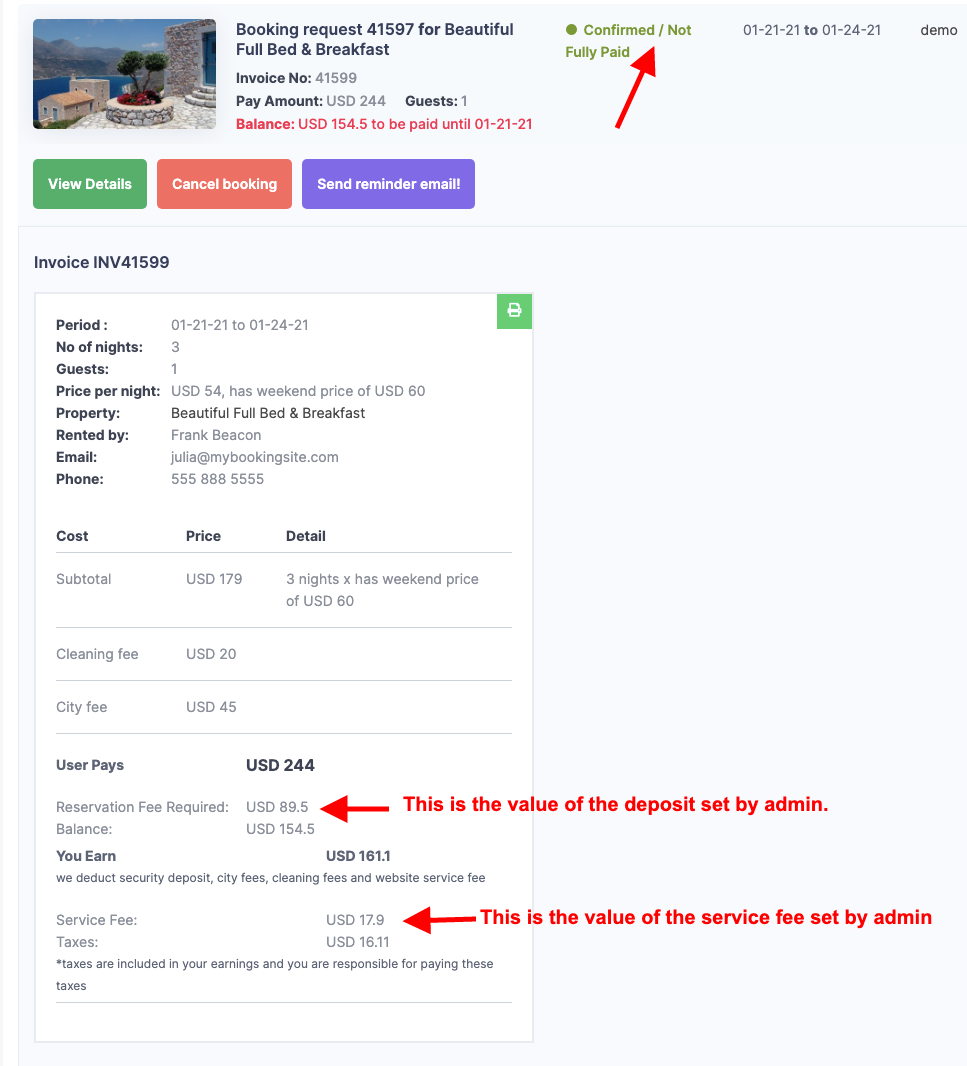
Hello. Thank you for the follow up. You need to set deposit and service fee as explained in our videos here https://help.wprentals.org/article/1-20-how-to-work-with-deposit-fee-and-service-fee/
We do not share admin access to live demos. You can register new accounts but your properties are not published.
But to manage a listing as owner – add admin payments – test booking – we would need to give you admin so you can setup the test you wish.
For wp-admin access on a test domain please send a message here https://themeforest.net/user/wpestate
Thank you
Hi, I have discovered what I think is a bug.
I have it so admin does not have to approve listings, and I also have some mandatory fields which means a listing should only go live once all required fields are complete. BUT I have noticed if a LOGGED OUT user completes property_description_first and does not complete the registration process that partial listing remains live on my site (i.e. it does not set as pending even though mandatory fields are not complete).
I know this is normally a short term event, but if someone wanted to they could flood my page with these incomplete listings.
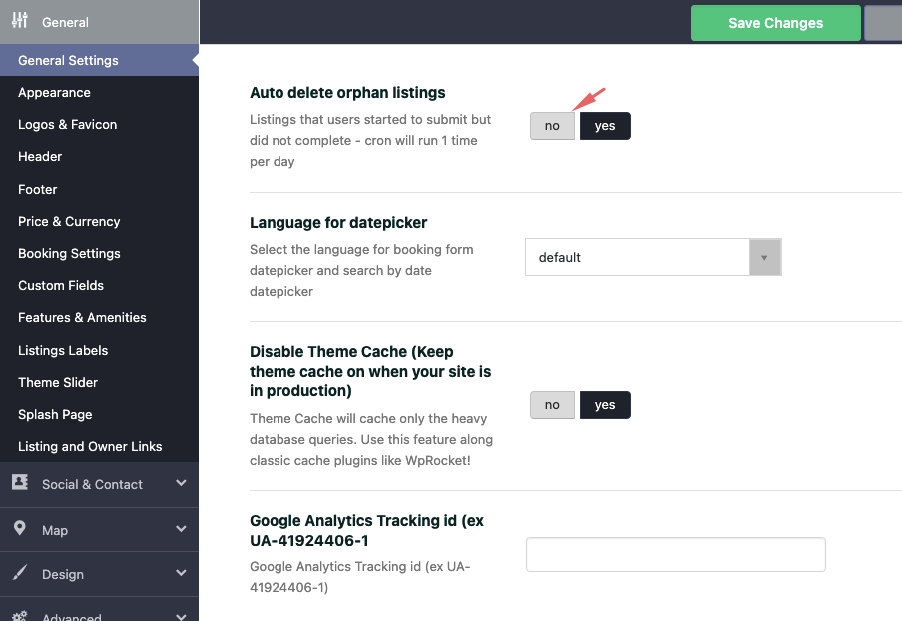
Hi, That is the correct behavior. Property saves when completing first step. For not logged in submission, if user does not register, the orphan listings (without user) are deleted once a day automatically and you control the cron that deletes from theme options – help https://help.wprentals.org/wp-content/uploads/2015/10/Screenshot-at-Apr-22-09-29-47.png
Thank you
Great, thank you that would explain it. Can you tell me specifically which cron, is it one of the following? wpestate_delete_orphan_lists() wp_scheduled_delete() delete_expired_transients() wp_delete_auto_drafts()
Also, is the same cron responsible for both deleting live listings performed by a user that never registered / logged it and for deleting listings by users that never completed all the mandatory fields?
Hi, The cron is only for listings submitted by users who never finish registration. Users who are logged in and add listings can only delete listings manually from My Properties. The cron name is prefix_wp_estate_delete_orphan_lists and runs daily.
Thank you
I booked a rental. It blocked the calendar, which good. But then I refunded the booking, but it did not unblock the calendar. How can I unblock the calendar?
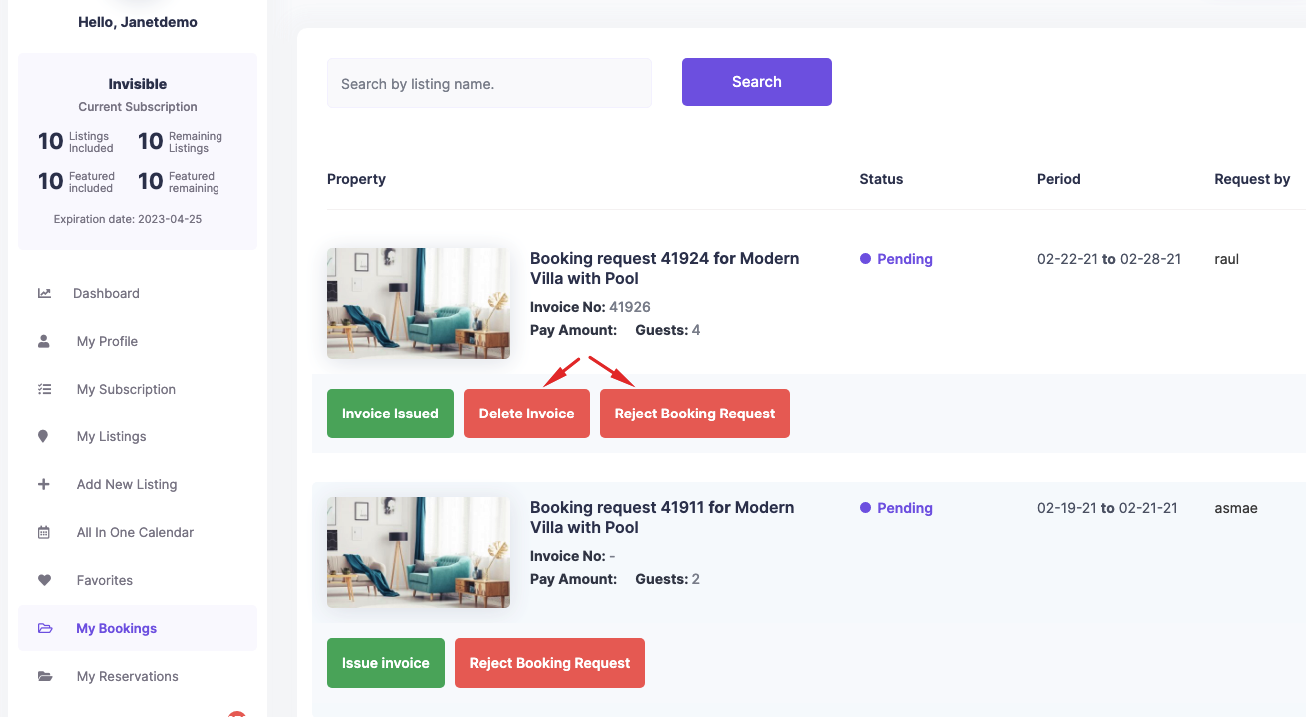
Hello, Thank you for the comment. Please login as property owner and cancel confirmed booking – from My Bookings – https://help.wprentals.org/wp-content/uploads/2015/10/pending-booking.png You will have the button with Cancel Booking – https://help.wprentals.org/wp-content/uploads/2015/10/confirmed-not-fully-paid.png Press it for the booking that needs to be canceled and it will be removed from calendar.
Please use our client support https://support.wpestate.org/ if you need further help. This is also a private support where you can send us your site details (url and wp-admin access).
If you wish my assistance to register in support please send a message from here – https://themeforest.net/user/wpestate
Please note that our standard office hours are Monday – Friday, 9AM-5PM Europe timezone.
Thank you
Is it possible to translate Email content under the redux options panel? How to translate emails?
Hi. Thank you for the comment. I am not sure I understand the question. You can put directly your text in your language in theme options – email management – email content – https://help.wpresidence.net/article/email-management/ That allows you to translate from english to your language -
Thank you
I want to clarify my question. If i use WPML and in frontend if user visits page with Spanish language and sends a booking request, can I translate the backend email content to also Spanish so he will receive the message in Spanish language? Thanks.
Hello. As far as I know about WPML, they allow to translate all admin options with WPML String translations. I think the WPML language switcher will send translated email.
If you need further info or want to test our theme, please send a message from here https://themeforest.net/user/wpestate
You will need the WPMl plugin to test, but you can install it on our test domain and make the tests you wish.
Thank you
Hi. I’m considering buying this theme, but can’t seem to be able to find login info. I was able to get user:1234 to work for one of the demo’s, but I’m wanting to check out the admin stuff. How can I get demo admin login?
Hello. Thank you for your interest. You can register a test account on all demos. No demo publishes submissions, but you can test the dashboard functionality. If you want to test our theme backend, please send a message from here https://themeforest.net/user/wpestate
Thank you