9273 comments found.

Hi, after updating in overview property lot size has “m2” TWICE when filled in. Have a look: https://decklusive.be/advanced-search/
Hi,
Thank you for the comment.
Please use our client support https://support.wpestate.org/ to help. This is also a private support where you can send us your site details (url and wp-admin access).
If you wish my assistance to register in support please send a message from here – https://themeforest.net/user/wpestate
Please note that our standard office hours are Monday – Friday, 9AM-5PM Europe timezone.
Thank you
Hi, I think you use card builder beta and you have the m2 added there as text https://prnt.sc/gv1jvZTIXqj8 We have the lot size with measurement by default when using custom card builder beta and that extra text should be removed from the card builder in theme options.
If you need further help please open a ticket in support.
Thank you
OK! Found it! Thanks a lot!
You’re welcome 
hi i have just purchased your theme. after installing it, all my page designs have gone from full width to boxed. i chaged the theme settings to wide and no sidebar. i also increased the main grid width and the cleared the cache but nothing changed. please can you advise how to fix this? thanks
Hi, Thank you for buying the theme. I am not sure what is boxed layout and how it was before. We can check and help further if we see the wp-admin.
Please use our client support https://support.wpestate.org/ to help. This is also a private support where you can send us your site details (url and wp-admin access).
If you wish my assistance to register in support please send a message from here – https://themeforest.net/user/wpestate
Please note that our standard office hours are Monday – Friday, 9AM-5PM Europe timezone.
Thank you
Hi,
is it a complete project that contains databases and script code (PHP or ..), or just HTML and CSS design?
https://detroit.wpresidence.net/Hello. Thank you for the comment. We have WordPress theme version of the theme.
Please look over our demos to understand what the theme can do and let me know any question you have. I can answer and clear any question before making a decision.
If you need further info or want to test our theme before you make a decision, please send a message from here https://themeforest.net/user/wpestate
Thank you
how do i activate the theme? with the purchase code it tells me its wrong.
Hi,
Thank you for the comment.
Please check our documentation to make sure that you add the correct license code: https://help.wpresidence.net/article/where-is-my-purchase-code/
If the license code still does not work, please use our client support https://support.wpestate.org/. This is also a private support where you can send us your site details (url and wp-admin access).
If you wish my assistance to register in support please send a message from here – https://themeforest.net/user/wpestate
Please note that our standard office hours are Monday – Friday, 9AM-5PM Europe timezone.
Thank you
How do I change the contact number at the bottom of the menu of the Seattle Demo home page?
Hi,
Thank you for the comment.
The footer widgets can be managed from admin-Appearance-Widgets. You can find more details in our documentation: https://help.wpresidence.net/article/widgets-2/
Thank you,
Please use our client support https://support.wpestate.org/ if you need further help. This is also a private support where you can send us your site details (url and wp-admin access).
If you wish my assistance to register in support please send a message from here – https://themeforest.net/user/wpestate
Please note that our standard office hours are Monday – Friday, 9AM-5PM Europe timezone.
Thank you
Hi, My client needs a Real Estate website where people can see different properties based on their membership. For example, agents or agencies can choose a plan that requires payment to post their properties on the site. This plan also gives them access to view other listed properties. The property posting and property access plans are combined, so when they pay, both options become active. Similarly, home seekers can access properties by paying for a property access plan. However, they don’t have the right to post any properties. I am looking forward to recommend your resources… Let me know if it’s possible with your Template?
Hi,
Thank you for the comment.
The theme has the option to add membership packages but only for property submission. HELP: https://help.wpresidence.net/article/membership-submission/
The packages do not have the option to limit access to other properties. All properties will be visible to all users.
Thank you,
Hello, the theme is very good. 2 questions before purchasing: 1) it is possible to create conditional custom fields according to the type of property (because there are fields that will be useful for renting but not for selling, for example) 2) is it possible for the agency role to add a blog tab in the frontend so that my client can publish from their dashboard without giving them access to the wordpres backend? thank you so much
Hi,
Thank you for the comment.
1) it is possible to create conditional custom fields according to the type of property (because there are fields that will be useful for renting but not for selling, for example) -> the theme does not have this option, but you can create custom property page template where you can add the elements that you want: https://help.wpresidence.net/article/create-a-custom-property-template-with-elementor/
2) is it possible for the agency role to add a blog tab in the frontend so that my client can publish from their dashboard without giving them access to the wordpres backend? -> We do not have this option in the theme.
Thank you,
How do you disable the CRM? Also, the mobile UI is horrible now.
Hi,
Thank you for the comment.
To disable the CRM option you need to disable the CRM plguin from admin-Plugins.
For the mobile UI, we are not aware of any issues, please use our client support https://support.wpestate.org/ if you need further help. This is also a private support where you can send us your site details (url and wp-admin access).
Thank you,
Hello. Thank you for the comment. Please send us more info about the issues you have in Mobile UI to understand how we can help and we will check asap. It is the first time we receive such feedback about mobile UI.
CRML can be disabled as plugin from wp-admin – plugins and the pages created with WpEstate CRM can be deleted from wp-admin – pages
Please use our client support https://support.wpestate.org/ if you need further help. This is also a private support where you can send us your site details (url and wp-admin access).
If you wish my assistance to register in support please send a message from here – https://themeforest.net/user/wpestate
Please note that our standard office hours are Monday – Friday, 9AM-5PM Europe timezone.
Thank you
Hi. I can’t find reset filter or clear filter button. Where to enable this function.
Thankyou
Another issue on search filter.
I founded problem with dropdown filter state (parent) and cities (child). For child didn’t show category when parent use another language.
Ex.1 London (parent)How can I fix this problem. Thankyou
I can sloved this problem. Thankyou
Hi, Thank you for the comment. We do not use reset search, but will save the suggestion for the future. I am glad you have managed to find the answer to your question related to dropdown.
Please use our client support https://support.wpestate.org/ if you need further help. This is also a private support where you can send us your site details (url and wp-admin access).
If you wish my assistance to register in support please send a message from here – https://themeforest.net/user/wpestate
Please note that our standard office hours are Monday – Friday, 9AM-5PM Europe timezone.
Thank you
Thankyou
You’re welcome!
hi, WpResidence Elementor Addon (elemnts) missing in my Elementor Pro to customize my pages.
Hi,
Thank you for the message.
We are not aware of this behavior.
Please use our client support https://support.wpestate.org/ if you need further help. This is also a private support where you can send us your site details (url and wp-admin access).
If you wish my assistance to register in support please send a message from here – https://themeforest.net/user/wpestate
Please note that our standard office hours are Monday – Friday, 9AM-5PM Europe timezone.
Thank you
Hi, Please check the add-on is installed (from Appearance – Install plugins). If WpResidence Elementor Add-on is installed, please open a ticket in support and we will assist further. Thank you
Can I use Loco Translate with this theme without issues? Thanks.
Hello. Thank you for buying the theme. Yes, you can use Loco translate. We have a useful video here https://help.wpresidence.net/article/how-to-rename-theme-words-with-loco-translate/
Please use our client support https://support.wpestate.org/ if you need further help. This is also a private support where you can send us your site details (url and wp-admin access).
If you wish my assistance to register in support please send a message from here – https://themeforest.net/user/wpestate
Please note that our standard office hours are Monday – Friday, 9AM-5PM Europe timezone.
Thank you
Cannot format number: ”,” or ”.” For example: total area: 142.5m2
Hi. I do not understand what format number means. You can control number forma for size and lot size from theme options https://prnt.sc/tHP02D1dwdcl
Please use our client support https://support.wpestate.org/ if you need further help. This is also a private support where you can send us your site details (url and wp-admin access).
If you wish my assistance to register in support please send a message from here – https://themeforest.net/user/wpestate
Please note that our standard office hours are Monday – Friday, 9AM-5PM Europe timezone.
Thank you
Are not. That’s thousands. Here I mean unrounded numbers: for example, 2.5 or 2.5 m2
Hi, In theme you have all these options https://prnt.sc/tHP02D1dwdcl
number of decimals thousand separator decimal separator
You have 2.5 control as decimal separator
Thank you
I set it up like that but the results don’t show up. For example: area: 132.6m2. It only shows 132m2
Hi. Please open a ticket to check. On our end it works ok https://prnt.sc/YllnB8G9XXob – https://prnt.sc/zbopaJ8cybTC
Thank you
I registered with a wrong email in support, how can i get support now?
Hi, please send a message from here https://themeforest.net/user/wpestate I will help create the support account with your chosen email or if you know the wrong email, i will help edit the account you created. I will help asap. Thank you
hi is it possible when i search by location to search more than one locations at the same time ?
or here https://prnt.sc/qqtvOOzVDSyU
Hello. Thank you for the message. Multiple select is not possible on our theme (for any search form field).
If you need further info or want to test our theme before you make a decision, please send a message from here https://themeforest.net/user/wpestate
Thank you
if i pay you to do it would you do it ?
Hello, We would not be able to help unfortunately. Thank you
I use the half map page, what should I do to change the map zoom level on this page? When I change the zoom settings in the theme, it has no effect! Did the fact that I set the header on Google Map and the properties are pinned on the map caused this? Can I change the code of this page, in which file is it located?
Hello. Thank you for the comment.
The half map layout shows the zoom based on found properties in map. It is an auto-zoom option to show all found properties. It is synced with properties in list and how many pins per page – we have a help here https://help.wpresidence.net/article/google-maps-settings/
In our help we have a technical direction for how to disable auto zoom for standard templates https://help.wpresidence.net/article/technical-how-to-disable-auto-zoom-of-the-map-in-properties-list-custom-template/ The code is the same, so doing a search through theme code by that function will get you the list of files where the code exists. Deleting the code should remove the functionality.
I hope this helps.
Thank you
When listing a house, can i have it set to where the title is the address by default? Having the custom titles can become a problem.
Hello, Thank you for the message. The title cannot be auto-populated with address automatically when you add a listing manually. You can add for title the text you wish, but it is a manually controlled field.
Please look over our demos to understand what the theme can do and let me know any question you have. I can answer and clear any question before making a decision.
If you need further info or want to test our theme before you make a decision, please send a message from here https://themeforest.net/user/wpestate
Thank you
Is there anyway to add that feature? it can become redundant when everyone who post a home is using titles like “Nice 4 bedroom home” and “Amazing 5 bedroom house”, etc..
Hi. It is not possible technically I am afraid. You can add manually what info you wish, but it is a manual controlled field. Thank you
Is it possible to make the sidebar sticky on pages other than the property page?
Hello Fahedqq, Thank you for the comment. We do not have sticky option set for other pages, but will add the suggestion to our wishlist. Is there a particular theme section to which you wish to add sticky sidebar, or all pages? Thank you
BTW what a great theme and support! in my case, I would like it to be sticky in the advanced-search page where I am using advanced-search form in the sidebar
Thank you for the feedback. I am happy you enjoy our theme and support services. I have saved the suggestion to wishlist.
Please use our client support https://support.wpestate.org/ if you need further help. This is also a private support where you can send us your site details (url and wp-admin access).
If you wish my assistance to register in support please send a message from here – https://themeforest.net/user/wpestate
Please note that our standard office hours are Monday – Friday, 9AM-5PM Europe timezone.
Thank you
I can’t get the product posting date (real estate)
How do I get the posting date?
Hi.
Regarding I call the agent phone fields. it doesn’t work ( i entered the value in profile.) https://prnt.sc/NdBD_MzA2Ksx
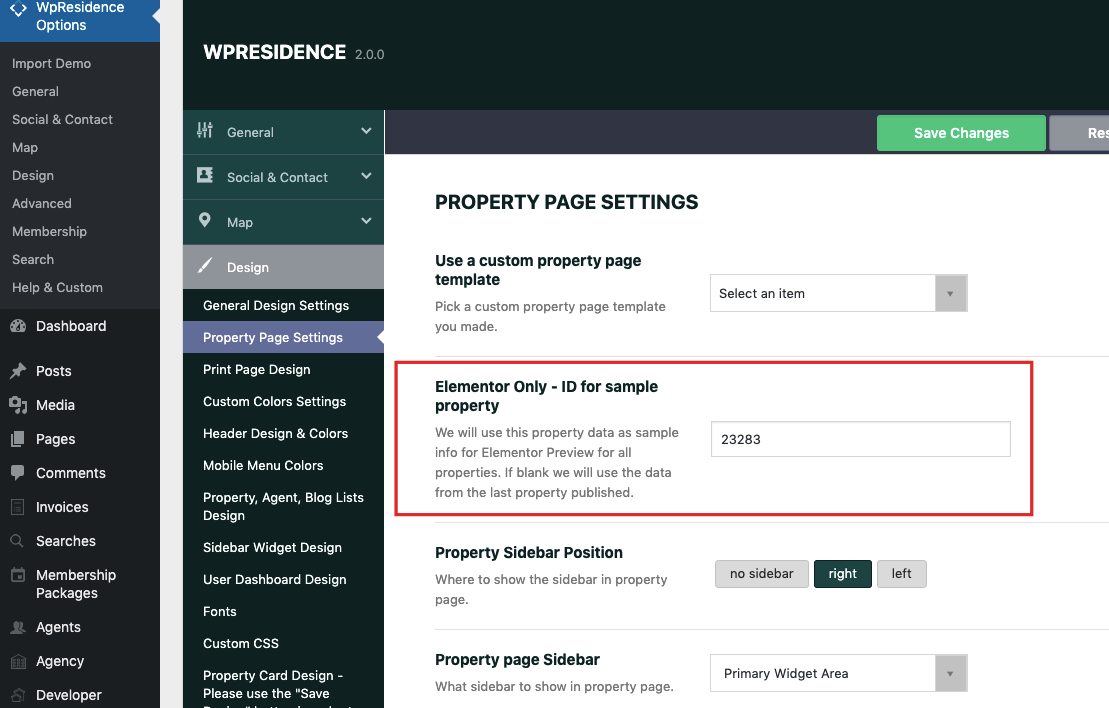
You do not have an agent in the preview property https://prnt.sc/NdBD_MzA2Ksx – To be sure you use a property with agent, go to theme options and add the property id you wish to see in preview here here https://help.wpresidence.net/wp-content/uploads/2019/11/elementor-custom-property-template.png
I can’t get the product posting date (real estate) How do I get the posting date?
We use last updated on date in overview and you can use that section to enabled/disable last updated date https://prnt.sc/Jrh5sCDly2Ja
Please use our client support https://support.wpestate.org/ if you need further help. This is also a private support where you can send us your site details (url and wp-admin access).
If you wish my assistance to register in support please send a message from here – https://themeforest.net/user/wpestate
Please note that our standard office hours are Monday – Friday, 9AM-5PM Europe timezone.
Thank you
We use last updated on date in overview and you can use that section to enabled/disable last updated date https://prnt.sc/Jrh5sCDly2Ja
Can I customize it? I don’t want it to show up in the overview.
Hello. You can use the option HIDE UPDATE ON https://prnt.sc/Jrh5sCDly2Ja and enable it. That will hide the update on date. Thank you
not so? i want to get format data like: “{title} “
Hi, I am afraid the question is not clear.
not so? i want to get format data like: “{title} “Please explain what you wish to do with screenshots – do you want to use property title? You have a single field for that in property elementor widgets and you can search it in Elementor widgets.
Please use our client support https://support.wpestate.org/ if you need further help. This is also a private support where you can send us your site details (url and wp-admin access).
If you wish my assistance to register in support please send a message from here – https://themeforest.net/user/wpestate
Please note that our standard office hours are Monday – Friday, 9AM-5PM Europe timezone.
Thank you
Hello, I just have a question, is it possible to modify the background color (brown) to another, from the control panel or from the properties of the Elementor page? thanks
Hello, Thank you for the comment.
I am not sure which demo you are interested an and which brown color, but as our demos show, theme colors can be changed. We do it from theme options https://help.wpresidence.net/article/design/ and in pages created with elementor, we use elementor style/color options
Please look over our demos to understand what the theme can do and let me know any question you have. I can answer and clear any question before making a decision.
If you need further info or want to test our theme before you make a decision, please send a message from here https://themeforest.net/user/wpestate
Thank you
Hello, I would like to know if there is any way to hide the advanced search on the property page (where you can see more photos, details, etc.) I used a CSS code to leave it activated in the properties section, but once you click on one specific property I would like it to disappear, I send the line of the code: @media only screen and (max-width: 768px){ #adv-search-mobile { display: block!important; } Thanks, the theme is amazing!
Hi ayoa-3, Thank you for the feedback about the theme. I appreciate that very much.
About the question, I am not sure what you need to hide – desktop search on property page or mobile search on property page.
Desktop search is disabled with this option – https://prnt.sc/Amq0siNc5-Gj
Mobile search on property page stays as for ux it may help users, and it is displayed in closed mode in some combination of settings (shows with hero header enabled)
To hide mobile search on property page, try this custom css
@media only screen and (max-width: 1023px){ .estate_property-template-default #adv-search-header-mobile { display: none!important; } }
Works in preview, but must be tested for a confirmation
Please use our client support https://support.wpestate.org/ if you need further help. This is also a private support where you can send us your site details (url and wp-admin access).
If you wish my assistance to register in support please send a message from here – https://themeforest.net/user/wpestate
Please note that our standard office hours are Monday – Friday, 9AM-5PM Europe timezone.
Thank you