26722 comments found.

After the latest upgrade to the 6.4.2 version, the cards Slider module in Visual Composer does not work anymore. I got this error in the browser console : t.swipe is not a function..
Hi there,
Thanks for writing in! Please try to navigate to your Qode Options -> Performance -> Third Party Scripts Loading Type and next to ‘touchSwipe’ Script Options set the Force Load option to Yes:
https://i.imgur.com/tLQhEbX.png We hope this will help! Please keep us updated.Don’t forget to sign up for our newsletter and be the first to find out all the latest news.
Yes that works good, thanks a lot !
Hi there,
We are happy to hear this!
Don’t forget to sign up for our newsletter and be the first to find out all the latest news.
Hi, I bought a license a few years back here on themeforest but I’m not using it so I wanted to start using it now. However, it mentions it’s already being used. I don’t have a clue where that might be. Is there a way to check this and to reset it? Thanks. I just found it through the qodeinteractive website using the profile/my products page. Problem solved!
Hi there,
Thanks for writing in!
Please note that that you should have deregistered the theme prior to installing it to a new installation, you can read more about it here.
You can always do it on your end from our help center
If you still need assistance, we would kindly ask you to send us a mail providing your purchase code in it and our team will help you with this.
Thanks.Don’t forget to sign up for our newsletter and be the first to find out all the latest news.
Import doesn’t work anymore. Breaks the header and serveral settings / content. https://pack-up.app
Hello,
Demo import is working correctly on our end.
As we do not have enough information in order to help you, and since author’s dashboard is meant for general inquiries and pre-sale questions, we would appreciate if you could please submit a ticket at our Help Center, include URL of your site, and one of our support agents will check this and assist you further. Thank you.Don’t forget to sign up for our newsletter and be the first to find out all the latest news.
I’ll recently updated the theme and now no settings from the Theme (Qode) Options is working correctly, including the logo appearing in the header. I extended my support so that I could leave a ticket (#249338) and still no answer after nearly 24 hour, not good.
Warning to everyone, don’t update your theme if it’s working, I wish I didn’t.
Still no response, how can I get a refund for the extended support I have just purchased?
Hello,
Please understand that our Help Center is closed during weekends. Our average response time is around 24 hours on weekdays and our support agents are trying their best to answer all of our users in this timeframe. Also, please note that our support management system is sorting requests by the latest requester update, so every time you send a new message in the same request, that request gets pushed down the queue.
We’ve checked and we see that your ticket has now been updated with response. In case you need further assistance please continue the conversation with our support team at the Help Center. Thank you.Don’t forget to sign up for our newsletter and be the first to find out all the latest news.
Thank you for replying, I’m not sure where it states the help center is closed during weekends? As I wasn’t aware of that.
I’ve just replied to my ticket, but I guess it goes back of the queue again?
Many thanks,
Hi there,
Thanks for getting back, we do see that your request has been answered so please continue the conversation with our support team if you need any further assistance.
Don’t forget to sign up for our newsletter and be the first to find out all the latest news.
WHY IS THIS NOT COMPATIBLE with WordPress 6.4? The update of the theme completely broke my site. What is Bridge doing about this? It’s been months since the 6.4 release.
Fatal error: Uncaught Error: Call to undefined function bridge_qode_get_icon_packs() in /var/www/wp-content/themes/bridge.bak/framework/modules/performance/options-map/map.php:45 Stack trace: #0 /var/www/wp-includes/class-wp-hook.php(324): bridge_qode_performance_options_map(’’) #1 /var/www/wp-includes/class-wp-hook.php(348): WP_Hook->apply_filters(NULL, Array) #2 /var/www/wp-includes/plugin.php(517): WP_Hook->do_action(Array) #3 /var/www/wp-content/themes/bridge.bak/framework/admin/options/qode-options-setup.php(41): do_action(‘bridge_qode_act…’) #4 /var/www/wp-includes/class-wp-hook.php(324): bridge_qode_admin_map_init(’’) #5 /var/www/wp-includes/class-wp-hook.php(348): WP_Hook->apply_filters(NULL, Array) #6 /var/www/wp-includes/plugin.php(517): WP_Hook->do_action(Array) #7 /var/www/wp-settings.php(621): do_action(‘after_setup_the…’) #8 /var/www/wp-config.php(102): require_once(’/var/www/wp-set…’) #9 /var/www/wp-load.php(50): require_once(’/var/www/wp-con…’) #10 /var/www/wp-blog-header.php(13): require_once(’/va in /var/www/wp-content/themes/bridge.bak/framework/modules/performance/options-map/map.php on line 45
Hello,
The current version of the theme is compatible with the latest version of WordPress.
When updating Bridge theme and bundled plugins we recommend following instructions from this article – How To Update The Bridge WordPress Theme And Bundled Plugins, and please don’t skip ‘10:34 – One final step after updating the Bridge theme’ part of the video.
After you update the theme all of the bundled plugins with available updates should be listed in Appearance > Install Plugins.
In case you need further assistance please submit a ticket at our Help Center and one of our support agents will gladly help you. To submit a ticket please follow instructions from this article – How To Submit A Ticket.Don’t forget to sign up for our newsletter and be the first to find out all the latest news.
Hello, I am trying to update to 30.1 and I get a ‘There has been a critical error on this website.”
I am trying to update manually using file manager together with the plugins to ensure everything has updated correct but when downloading the zip file and unpacking, I can only find two items in the plugin folder which are the class-tgm-plugin-activation.php and plugins-activation.php files.
Where can I find the core plugin etc to update those too?
Can you think of any other reasons why I might be getting a criticial error and how can I resolve it?
The critical error issue is coming from the template.php file on line 790 in the wp-includes directory and operation failed.
Hello,
Thank you for reaching us!
When updating Bridge theme and bundled plugins we recommend following instructions from this article – How To Update The Bridge WordPress Theme And Bundled Plugins, and please don’t skip ‘10:34 – One final step after updating the Bridge theme’ part of the video.
After you update the theme all of the bundled plugins with available updates should be listed in Appearance > Install Plugins.Don’t forget to sign up for our newsletter and be the first to find out all the latest news.
Hi. I think there is an issue with the video background on Qode Slider, not playing on mobile and breaking the layout and contents, not appearing at all.
Hello,
Not all mobile devices can playback HTML5 video properly, and in order to make the slider appear uniformly across all mobile devices, video playback is disabled in the JavaScript.
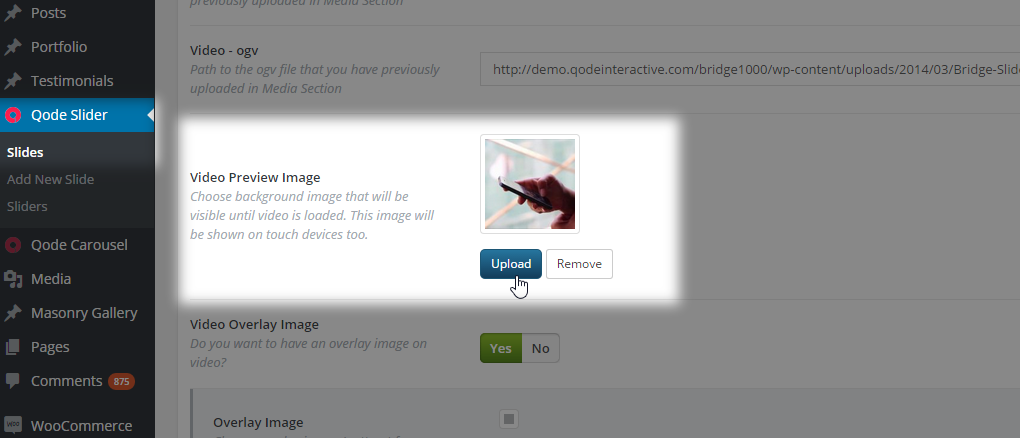
As a fallback you can use the Video Preview Image feature. Click on the Upload button next to the Video Preview Image label in the Qode Slide Video section. The standard WordPress media dialogue appears. Choose an existing file from the Media Library tab or upload a new image from the Upload Files tab in the Media library. Please see screenshot.
In case you need further assistance please submit a ticket at our Help Center and one of our support agents will gladly help you. To submit a ticket please follow instructions from this article – How To Submit A Ticket.Don’t forget to sign up for our newsletter and be the first to find out all the latest news.
Listening plugin= Listing plugin Sorry, my mistake.
Hello,
Thank you for reaching us!
The layout with the map shown in the url can be achieved. The map here is embedded map with multiple locations which can be achieved even without Qode Listing plugin, however, in case you need search based on locations, then we recommend using Qode Listing plugin.
If you decide to extend support you can then submit a ticket regarding any theme related question or about plugins included with the theme.
Do let us know if you have any additional questions.Don’t forget to sign up for our newsletter and be the first to find out all the latest news.
Thank you! I’ll try with that plugin and, in case, I will extend the subscription with you.
Hi there,
Please do so and let us know if everything is alright
Don’t forget to sign up for our newsletter and be the first to find out all the latest news.
Hi there, since the last update the theme does not take the Qode options for the font colors. Neither menu nor h1-6 nor normal fonts show the chosen color. So I wonder whats wrong with the update? Regards, Rupert
Hi there,
Thanks for writing in! Did you update the Bridge Core plugin to 3.1.2 as well as once the update is done do navigate to Qode Options > General and hit Save just so the settings can be adjusted.
We hope this helped and if you still encounter issues feel free to share your website URL with us.Don’t forget to sign up for our newsletter and be the first to find out all the latest news.
.
Hi,
Usually after update it is necessary to navigate to Qode Options > General and click on ‘Save Changes’ button in order to generate a new dynamic CSS file so all of the options set in Qode Options could apply.
As we do not have enough information in order to help you, and since author’s dashboard is meant for general inquiries and pre-sale questions, we would appreciate if you could please contact us through this email, include your purchase code in the email, and our support agents will check this and assist you.Don’t forget to sign up for our newsletter and be the first to find out all the latest news.
The version 30.1 update breaks the header so that the logo has disappeared.
I read through similar comments, and the suggested solutions don’t work.
Please check if you updated the Bridge Core after updating the theme
My Bridge Core version is 3.1.2 and the logo still won’t appear.
Once you update the theme you can navigate to Qode Options > General and hit Save just so the settings can be adjusted.
I did this several times and there is no effect, the logo still won’t appear. I even uninstalled and reinstalled Bridge Core. I hope this will be fixed in the next update.
Hi there,
Could you please provide us with your website URL so we can check this.
Thank you.
Don’t forget to sign up for our newsletter and be the first to find out all the latest news.
I was able to get the logo to appear thanks to papashivo’s comment using this code:
/*Force Logo*/
.q_logo a {
  display: block !important;
  visibility: visible !important;
  height: 50px !important;
}
However, another issue has appeared. Product descriptions do not appear on mobile devices. Also, there is a very large gap of over 1000px of white space between the product information and the “related products” section.
Specifically, content inside of this div class does not appear on mobile devices.
.q_accordion_holder.toggle.boxed.woocommerce-accordion.accordion.ui-accordion.ui-accordion-icons.ui-widget.ui-helper-reset
There are a lot of issues with this update. Is there a way I can have access to the previous version of Bridge until these issues are corrected?
I was able to get the product description to show on mobile by changing the Product Single “Product Type” setting to “Tabs on bottom.”
in case it helps with troubleshooting/updating: The problem I experienced with the white space & lack of product description on mobile appeared when using the “Default” product type setting.
However, another issue has popped up the “Cart Icon” no longer appears in the main menu. It’s disappeared.
I’ve searched the documentation for settings to enable or disable the cart icon in case I missed it, but can’t find anything. Is there a particular place where there is a setting to enable/disable the cart icon in the menu?
I’m trying really hard to work with this theme’s latest update but it feels like every time I fix one thing, another “button pops loose”, and a new problem appears.
Thanks for your assistance.
Hi,
When updating Bridge theme and bundled plugins we recommend following instructions from this article – How To Update The Bridge WordPress Theme And Bundled Plugins, and please don’t skip ‘10:34 – One final step after updating the Bridge theme’ part of the video.
After you update the theme all of the bundled plugins with available updates should be listed in Appearance > Install Plugins.
After the theme and plugins are updated it is necessary to navigate to Qode Options > General and click on ‘Save Changes’ button in order to generate a new dynamic CSS file so all of the options set in Qode Options could apply.
The cart widget can be added through Widgets, please see screenshot.Don’t forget to sign up for our newsletter and be the first to find out all the latest news.
Thank you, I’ve resolved all of my issues. I appreciate your time!
Hi there,
Glad we could help
Don’t forget to sign up for our newsletter and be the first to find out all the latest news.
Hi, I am thinking of purchasing this but need to do the following: 1. On the home page I need to have a video. 2. On the home page, instead of the menu bar sitting on the video, have it above the video. 3. Change the fonts of the menu and headers and text. 4. Change colors of fonts and backgrounds. 5 Add a bar above the menu bar with “FAQ | Call Us”. Are these things easy to do? If yes, how? Thanks.
Hi there,
Thanks for taking an interest!
1. You can add Video for sure.
2. If we understood you correctly, it is possible to have the header and then the content beneath.
3.& 4. Yes, you can within our Qode Options change any font to your needs. Both font family and color.
5. There is also an option to add a top bar so this is for sure possible.
Feel free to check our themes documentation: https://bridge.qodeinteractive.com/documentation/ as well as many video tutorials: https://www.youtube.com/watch?v=XvS7Hyqo35c&list=PLNypD600o6nLUrPPhlQXEBmNg1VzmnFMX
We hope this helped and let us know if you have any additional questionsDon’t forget to sign up for our newsletter and be the first to find out all the latest news.
How can I disconnect the theme from a website?
Hi there,
Thanks for writing in! Please note that that you should have deregistered the theme prior to installing it to a new installation, you can read more about it here.
You can always do it on your end from our help center
If you still need assistance, we would kindly ask you to send us a mail providing your purchase code in it and our team will help you with this.
Don’t forget to sign up for our newsletter and be the first to find out all the latest news.
I just updated for the first time in a while. Now my homepage is all ‘[masonry_blog order_by=”title” order=”ASC” display_time=”0″ display_comments=”1″ number_of_posts=”1″ category=”voeding”]’-code and my logo disappeared. Should I switch back to the older version of Bridge?
I also updated all plugins.
I found out you have to manually install the Core plugin after updating. That’s not good!
Hi there,
Yes, we have this covered in the tutorial on how to update the theme and its plugins as well as there is a notice that in the dashboard so you do not forget this.
We hope everything is sorted now.
Don’t forget to sign up for our newsletter and be the first to find out all the latest news.
when will there be an update with WPBakery Page Builder 7.3 ?
Hi there,
Thanks for writing in! As soon as the WPBakery team uploads the new version on Themeforest you will be able to send us a mail to our help center providing your purchase code in it and our team will provide you with the latest version, of course until it is updated and added to the theme.
Thank you for your patience.Don’t forget to sign up for our newsletter and be the first to find out all the latest news.
Hi i have a problem with my purchase code, is for change on a new domain, i need help. Regards
Hi there,
Please note that that you should have deregistered the theme prior to installing it to a new installation, you can read more about it here.
You can always do it on your end from our help center
If you still need assistance, we would kindly ask you to send us a mail providing your purchase code in it and our team will help you with this.
ThanksDon’t forget to sign up for our newsletter and be the first to find out all the latest news.
hi there, i have some problem about my theme. # 248342 my ticket number. Could you please reply urgently?
Hi there,
We do see that your request has been responded and if you need any further assistance feel free to continue the conversation with our support team.
Thank you.Don’t forget to sign up for our newsletter and be the first to find out all the latest news.
I go to import one of the demo sites and it hangs during the import process. I did everything one of your docs said to change the PHP values to what was needed, and it still hangs.
Hi there,
Thanks for writing in! If you are somehow having an issue with the demo import we would kindly ask you to check your resources as well as you can always try to import our demo content with our XML file
If you have any additional questions we would kindly ask you to submit a request at our help center and our support team will be happy to help.
Thanks.
Don’t forget to sign up for our newsletter and be the first to find out all the latest news.
Thank you for the feedback. I will try doing it through the XML
Hi there,
Please do that and feel free to contact our support team always. They will be happy to help!Don’t forget to sign up for our newsletter and be the first to find out all the latest news.
Hello, there seems to be an issue when updating to Bridge 30.1. My logo, product descriptions, and a product search box all disappeared. I have been using Bridge for a while and am familiar with the usual fixes (hit save, deactivate other plugins, etc.), but this is the first time I’ve experienced this issue. With my site details removed, it stated: warning: invalid argument supplied for foreach() in /public_html/wp-content/plugins/woocommerce/packages/woocommerce-blocks/src/blockpatterns.php on line 254. After some time, I finally just had to manually reinstall Bridge 29.9. Is there a fix in the works, and when can we expect the next version to roll out?
Hi there,
Thanks for writing in!
Please check if you have updated both the theme and the Core plugin since it is necessary to update the Core plugin and all bundled plugins. If you need instructions on how to update the theme and included plugins, you can refer to the following article: How To Update A WordPress Theme And Plugins.
If you still need assistance, we would appreciate it if you could submit a ticket to our Help Center and one of our support agents will assist you.
ThanksDon’t forget to sign up for our newsletter and be the first to find out all the latest news.
Hi. Please may I know what is the latest version number of this theme? I have inherited a project with this theme and the version they have is 13.3. Thank you!
Hi there,
Thanks for writing in! The latest Bridge version is 30.1 As you are using a very old theme you can follow the guidance on how to update the theme and its plugins here.
Also have in mind that Envato Toolkit is an outdated plugin. So, now you should use Envato Market and procedure is pretty much the same.
Please, just go to /wp-content/themes/bridge/framework/modules and remove whole folder envatowordpresstoolkit This is deprecated Envato Toolkit plugin that is replaced with Envato Market plugin.
If you are using child theme be aware of the following and the changes that needs to be done, you can read more about it here.
Because in Bridge 18.0 we had to change function names as per Themeforest request in order to meet their new coding standards, and child theme modifications must reflect these changes since 18.0 Bridge release. If you have modified functions via child theme, you’ll have to rename functions in the child theme in order your child theme to work after the update.
We hope this helped!
Don’t forget to sign up for our newsletter and be the first to find out all the latest news.
Logo gone after update theme. Not the first time that there are issues after update!
Hi there,
Thanks for writing in!
Please check if you have updated the latest version of the theme and its plugins. If you need instructions on how to update the theme and included plugins, you can refer to the following article: How To Update A WordPress Theme And Plugins.
We hope this helped!
Don’t forget to sign up for our newsletter and be the first to find out all the latest news.