7855 comments found.

I can not recommend oshine, as a client does have difficulties from the beginning, and even after 2 years same problems are popping up – now no update is working at all… confusing handling with third party plugins and never works smooth… many times contacting support and till today same problems after every update,.... Master Slider is a joke… says it is vulnerable please update, but there is no package available…
Dear Lohasscout,
Thank you for reaching out and providing your valuable feedback. To address the issue you’re facing with the theme, kindly submit a support ticket via https://help.expresstech.io/help/1720028511?envato_item_id=9545812. Please include your website login details along with a description of the problem you’re encountering.
If the issue pertains to the theme code of a relevant plugin, we will engage our developers to investigate further.
Regarding the update for Master Slider, we recommend customers attempt a direct update initially. Should this not resolve the issue, we suggest deactivating the plugin and updating Master Slider through the “Appearance > Install Plugins” section. Once updated, you can reactivate the plugin.
Should you require any further assistance or clarification, please don’t hesitate to let us know.
Best regards,
Hi, I’m having a problem on my website for which I purchased your extended support about a year ago (now expired), and now the problem is back. I think it would be unfair to ask me to buy the support plan again.
The website is cromo3d.com.
You’ll see that there are empty spaces in the gallery, as if the responsive feature isn’t working well.
Please, advice.
Thank you, Guido.
Hello,
Kindly submit a support ticket through the following link: https://help.expresstech.io/help/1720028511?envato_item_id=9545812
If the issue pertains to the theme, there’s no need for customers to renew support. We will address the problem for all users, regardless of whether their support period has expired.
Thank you.
I have a pop-up on my website and for some reason, the contents of the pop-up are only displaying at half the width. Now I understand that the pop-up is not in your area of support, but I believe this issue to be related to the theme.
Hi Michaelherr,
Kindly proceed to submit a support ticket at this link https://help.expresstech.io/help/1720028511?envato_item_id=9545812. Please include your website login information so that we can review and offer a resolution.
Regards, Sumit
Great theme, great support!
Hello, My logo appears to show blurry when uploading the file. Usually there was a code to fix it. However it is not working. I created 2 support tickets with no response. Can you please advise how to fix this asap? Thank you in advance.
Hello donna_pisani,
Kindly proceed to submit a support ticket at this link https://help.expresstech.io/help/1720028511?envato_item_id=9545812. Please include your website login information so that we can review and offer a resolution.
Regards, Sumit
Is template works correctly with 6.4.x ?
Dear Maateoo,
Yes, the theme is compatible with wp 6.4.x.
If you face any issues with it submit a support ticket at this link https://help.expresstech.io/help/1720028511?envato_item_id=9545812.
Regards, Sumit
how update this Your website is vulnerable due to Master Slider Pro
Hello lamstfan,
Kindly proceed to submit a support ticket at this link https://help.expresstech.io/help/1720028511?envato_item_id=9545812. Please include your website login information so that we can review and offer a resolution.
Regards, Sumit
I have added an SVG logo and for some reason it does now appear. The “normal-logo” class renders with a size of 0×0.
Hello Michaelherr,
Kindly proceed to submit a support ticket at this link https://help.expresstech.io/help/1720028511?envato_item_id=9545812. Please include your website login information so that we can review and offer a resolution.
Regards, Sumit
Portfolio Slugs are being generated with an extra backslash still. I sent you an email with images from the Portfolio object (with incorrect permalink) and from the Oshine options where I have the portfolio slug set with beginning and trailing backslashes. Details included in the email. (This is an open ticket from a while back that wasn’t resolved)
Dear johndattilio,
I apologize for any inconvenience you may have experienced.
Your ticket request has been received, and our support team will attend to it shortly. A support engineer will respond to your query as soon as possible.
Should you require any further assistance or have additional concerns, please feel free to let me know.
Regards, Sumit
Does this theme have rtl version?
Dear Mimkh995,
Hope you are doing well.
Thanks for reaching out to us.
Yes the theme is RTL supported. Let me know if you need more help.
Regards, Sumit
I don’t understand why those that have purchased your plugin need to wait 2 weeks to get an answer to something as basic as your plugin is showing the wrong logo for Twittter. This is not a “support” question, this is a flaw in the plugin. It is out of date showing an incorrect logo via the basic framework. I don’t see why multiple people need to submit a support request for a mistake and/or the plugin not being kept up to date.
How do you change the incorrect old Twitter logo to meet the proper requirements of the new X?
How do you change the Twitter icon to the new X logo? The social media share code does not seem to work as expected… [icon name=”icon-twitter” size=”tiny” style= “circle”...]
changing it to “icon-x” does not work.
How do you update this built-in feature?
Dear t_k_n_y,
Sorry for the inconvaince you have faced.
The new twitter icon is already included in the tatsu panel.
I request you to please update the tatsu plugin first and then check you will see the new twitter icon.
Here is the screenshot link for your reference.
https://snipboard.io/PC18sd.jpgLet me know if you need more help.
Regards,
this does not fix the “footer menu option” and “icon-name”
The new “X” icon will not show no matter what version of the short code we use: Examples that do not work:
[icon name=”icon-twitter” size=”tiny” style= “circle” color=”rgba(255,255,255,1)” border_width=”0” bg_color=”rgba(229,11,20,1)” hover_bg_color=”black” hover_color=”white”
[icon name=”icon-X” size=”tiny” style= “circle” color=”rgba(255,255,255,1)” border_width=”0” bg_color=”rgba(229,11,20,1)” hover_bg_color=”black” hover_color=”white”
Hi team,
How do I change the Twitter icon to the new X logo please? I’ve tried replacing your code [icon name=”icon-twitter” size=”tiny” style=”circle”...] with “icon-x” or “icon-twitter-2”, “icon-twitter-3”... but I can’t get the X logo to display.
How can I update this feature, please?
Thank in advance for your help.
Best regards
Hello A2_Line,
Kindly proceed to submit a support ticket at this link https://help.expresstech.io/help/1720028511?envato_item_id=9545812. Please include your website login information so that we can review and offer a resolution.
Regards,
Hi team,
I don’t have support in my subscription anymore so I can’t create a ticket. However, I’m just asking if you have an update code for this X logo instead of Twitter please?
Thank you in advance for your answer.
Best regards,
Dear A2_Line,
The new Twitter icon is already included in the Tatsu panel.
I request you to please update the Tatsu plugin first and then check you will see the new Twitter icon.
Here is the screenshot link for your reference.
https://snipboard.io/PC18sd.jpgLet me know if you need more help.
Regards, Sumit
Hi,
Thanks, but I need the name of the icon to insert it in the footer.
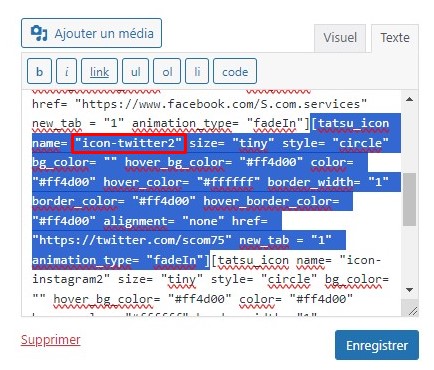
It’s a different code like here before: icon name=”icon-twitter2”
Screenshot: https://www.s-com.eu/wp-content/uploads/2024/04/footer-code-x.jpg
Hi,
Could you please give me an answer?
Hi, Could you please give me en answer? My initial request was 3 months ago! Thanks
Hi team,
This does not fix the “footer menu option” and “icon-name”.
So I’ll ask my question again: How do I change the Twitter icon to the new X logo in the widget footer code please? I’ve tried replacing your code [icon name=”icon-twitter” size=”tiny” style=”circle”...] with “icon-x” or “icon-twitter2”, “icontwitter-3”... but I can’t get the X logo to display.
Thank in advance for your help.
Best regards
What version of the Child theme is Oshine at? I recently updated my php to 8.2 and it caused everything to have a critical error and it was due to the child theme. I am having trouble finding information on whether or not there is a new child theme version or if it is just 1.0.
Hello brandonmphoto,
Kindly proceed to submit a support ticket at this link https://help.expresstech.io/help/1720028511?envato_item_id=9545812. Please include your website login information so that we can review and offer a resolution.
Regards,
Help, my menu wont show up… the burger menu didn’t do anything
Hello Sastramata,
Kindly proceed to submit a support ticket at this link https://help.expresstech.io/help/1720028511?envato_item_id=9545812. Please include your website login information so that we can review and offer a resolution.
Regards,
Hi. I’ve just set up my blog page and created a post with Tatsu. I can’t find the way to create a page break and a “read more” option so the blog page won’t show the entire post. Is there a way to get this done or should I use the Guthenberg for blog posts? Thanks.
Hello arielnovak,
Kindly proceed to submit a support ticket at this link https://help.expresstech.io/help/1720028511?envato_item_id=9545812. Please include your website login information so that we can review and offer a resolution.
Regards,
How do you change the Twitter icon to the new X logo? The social media share code does not seem to work as expected… [icon name=”icon-twitter” size=”tiny” style= “circle”...]
changing it to “icon-x” does not work.
How do you update this built-in feature?
Hello t_k_n_y,
Kindly proceed to submit a support ticket at this link https://help.expresstech.io/help/1720028511?envato_item_id=9545812. Please include your website login information so that we can review and offer a resolution.
Regards, Sumit
this does not fix the “footer menu option” and “icon-name”
The new “X” icon will not show no matter what version of the short code we use: Examples that do not work:
[icon name=”icon-twitter” size=”tiny” style= “circle” color=”rgba(255,255,255,1)” border_width=”0” bg_color=”rgba(229,11,20,1)” hover_bg_color=”black” hover_color=”white”
[icon name=”icon-X” size=”tiny” style= “circle” color=”rgba(255,255,255,1)” border_width=”0” bg_color=”rgba(229,11,20,1)” hover_bg_color=”black” hover_color=”white”
Still waiting for a solution to this. The new X logo is not available for footer widgets. This FAQ: https://oshine-knowledgebase.brandexponents.com/knowledge-base/how-do-i-add-change-icon-links-in-footer-bottom-widget-area-header/ describes how to add to the widget area but the new X logo will not show. Please help – This request has been submittesd by multiple people with no solution.
Hello, On the Portfolio Carousel Module, how do you dictate the aspect ratio of the image and gutter between the images?
Hello MJG009,
Kindly proceed to submit a support ticket at this link https://help.expresstech.io/help/1720028511?envato_item_id=9545812. Please include your website login information so that we can review and offer a resolution.
Regards, Sumit
The dynamic color change of the navigation menu text color according to the slide does not work. Options Panel->Global Site Layout and Settings-> Disable Dynamic Menu Color Change on Slider Revolution is unchecked. But it still doesn’t work. What am I doing wrong? Can you please help me?
Hello RAWdy,
Kindly proceed to submit a support ticket at this link https://help.expresstech.io/help/1720028511?envato_item_id=9545812. Please include your website login information so that we can review and offer a resolution.
Regards, Sumit
I can’t change the background color of the page or anything else. It’s really frustrating. Anyone can help with suggestion ? changing colors in the oshine menus has zero effect
Hello aram182,
Kindly proceed to submit a support ticket at this link https://help.expresstech.io/help/1720028511?envato_item_id=9545812. Please include your website login information so that we can review and offer a resolution.
Regards, Sumit
I have imported the MODEL AGENCY demo, and would like a fullscreen frontpage as in the FULLSCREEN PHOTOGRAPHY demo. Is it possible to import a demo, and after that import only the frontpage from another demo?
Hello,
Kindly proceed to submit a support ticket at this link https://help.expresstech.io/help/1720028511?envato_item_id=9545812. Please include your website login information so that we can review and offer a resolution.
Regards,