39369 comments found.

hi there, does the car dealership demo come with styled woocomerce? I see this template under shop-woocommerce but doesn’t seem to have an actual store.
Hello @trankitos
It is definitely using the WooCommerce and the cars you see are set up as product, however we are using our own layout builder to setup the single product pages 
Thanks
-Ammar
Ok but all the CTA link to the contact-us page, does this demo have a styled customer journey? If not, can you build it?
Hi,
What do you mean by a styled customer journey? We offer fulll integration with the WooCommerce plugin. So whatever product/services sale/store functionality WooCommerce offers, you will be able to utilize that with Avada.
Thank you. – Abbas
Sorry I meant purchase journey. Say the car listing in your demo is a different product instead, like a car mat, and has an ‘add to cart’ button. Would the next page be themed same as the car demo? Thanks for your time. Cheers.
Hello Trankitos
I am afraid we are not able to completely understand your requirements here, however Avada utilizes WooCommerce for all its ecommerce requirements so if something is possible with it, you should be able to do that with Avada
Thanks
-Ammar
Hi i cna create custom tabs for products as description, infromation, etc but add more? but made it in gutember editor?
Hello @analuzsandrea
The tabs are a part of WooCommerce itself and Avada has no control over adding additional tabs, that will require you to look for any 3rd party custom tab plugins in this case.
Thanks
-Ammar
1. Can the sidebar be customized to display different content on each property page?
2.Is it possible to show multiple locations on a single property page?
3.Can the structure and content of the property grid be modified to display customized information?
4.Are we able to replace or rename fields such as “Property Type” and “Year Built” with alternative labels and data types?
5.Can the content & buttons in the sidebar and scrolling navigation be customized to link to different URLs on each page?
6.Is a demo backend available for testing prior to purchase?
Hi
1) Using Avada layouts you can add different content to the content page. However you will need to make use of dynamic content to do this. ACF fields can be used for that
2) If you mean on a map, then yes, you can add more ACF fields to pull in locations dynamically into the open street map element
3) It would depend on what is the customized content but you dynamically pull in content form ACF fields and change the grid layout as needed
4) Yes
5) Yes
6) Currently, there is no option for a trial
You can read on how the prebuilt was setup in the link here
Thank you, Shaminder
I am currently evaluating the Avada Real Estate demo available at https://avada.website/real-estate and have the following pre-sale questions:
-Can the sidebar be customized to display different content on each property page? -Is it possible to show multiple locations on a single property page? -Can the structure and content of the property grid be modified to display customized information? -Are we able to replace or rename fields such as “Property Type” and “Year Built” with alternative labels and data types? -Can the content & buttons in the sidebar and scrolling navigation be customized to link to different URLs on each page? -Is a demo backend available for testing prior to purchase?
I would appreciate your prompt response to these queries.
Hi,
Thank you for your interest in Avada.
Yes, you can customize what info is shown in the sidebar/header/content area etc freely and adjust their styling as well.
The property grid uses our Post Card feature so you have full control on customizing the content/design of the individual item boxes there.
Field labels/types can also be changed as you need.
We don’t have a backend demo like that but you can check out our ~100 prebuilt sites by clicking the ‘prebuilts’ floating button on the right side to get an idea of the design prowess of Avada:
https://avada.website/real-estate/home-details/sophisticated-urban-living-house-in-lincoln-park/
Avada is a one time purchase good for use on a single website. You get free updates for life. You can use Avada on one site by using it on any good WordPress hosting (you’d need to buy your WordPress hosting). Avada also comes with ~100 prebuilt sites so you can import any of those and build from there.
- The Avada WordPress theme is purchased via the Themeforest marketplace here, and it is a one-off cost and not recurring > http://bit.ly/2HyNfIU
- You will also receive free theme updates for life
- You will gain access to all of the Avada prebuilt sites -> https://avada.com/prebuilt-websites/
- Avada Quick Start Guide -> https://avada.com/documentation/avada-quick-start-guide/
Thank you. – Abbas
THIS IS NOT WHAT I ASKED!
Hi,
Basically all the areas you mentioned can be freely customized.
To be specific:
- Can the sidebar be customized to display different content on each property page?
Yes, you can have propert/post/page specific content in sidebar.
- Is it possible to show multiple locations on a single property page?
Yes. But that will require a bit of adjustments. You can reach out to our support team to guide you about this if you have issues.
- Can the structure and content of the property grid be modified to display customized information? -Are we able to replace or rename fields such as “Property Type” and “Year Built” with alternative labels and data types?
Yes. I address this grid (post card) customization part in detail in previous reply.
- Can the content & buttons in the sidebar and scrolling navigation be customized to link to different URLs on each page?
Of course. You have full control to have a custom field of your choice so you can have different post specific URLs on each post/page.
- Is a demo backend available for testing prior to purchase?
No. You can preview the ~100 prebuilt sites to get in idea of design prowess of Avada.
Feel free to ask if you have further queries.
Thank you. – Abbas
Hi, I replicated the transaction in one of your demo shops https://avada.website/modern-shop/cart/ and it also did the same error as well. So it seems that the error is from your end. If you try to adjust the quantity on the shopping cart page, it will fail. You cannot increase or decrease quantity. You can only delete the quantity. Obviously that is an error. I tried to submit a ticket, but because my support expired I could not. This error should be supported regardless of support time because it is a critical error that needs to be corrected since it is a core issue.
And another demo failed as well https://avada.website/vape/cart/
I tried another demo and again it failed and here is the link as well: https://avada.website/vegan-store/cart/ however this shop did have the quantity show in the shopping cart numerically, but it would fail to adjust the changes of quantity updates in the shopping cart page.Ok I tried another one and even this one failed: https://avada.website/country-butcher/cart/ This one did have the quantity displayed right next to the shopping cart icon but fails to adjust the quantity on the shopping cart page.
This is usually overlooked and is serious error since it could hinder a good experience for the customers and reduce potential sales for website owner. Please correct this as a patch so all prebuilt sites could have this corrected. Thanks in advance,
In the latest update 7.11.10, the color for body typography is not working. Also, the icon selection is not functioning. Please test this better. Regards.
Hello @Alex_overman
I have checked both options are they are working fine for me, Icon selection as well as body font color both are working on my end, kindly make sure that the issue is not specific to your installation or 3rd party plugin.
If you need further assistance with this, kindly open a support ticket and our team will get back to you as soon as possible.
Click Here to Get Avada Support
Thanks
-Ammar
Hi, I have purchased the theme a while ago, but now it seems like there are issues with the cart. For instance the cart will not display a number indicating how many items are in the shopping cart. Next if you go to the shopping cart, it will not adjust the quantity if one wishes to increase/decrease the quantity. It will only delete the quantity but will not modify the quantity. Has anybody reported similar issues with your latest updates, since I did have automatic updates and now it is not working well. Thanks in advance.
Hi,
Please do test without 3rd party plugins active to see if they’re interfering with this functionality. Out of the box, the cart will work without any issues so what you’re seeing is definitely not normal behavior.
As this area is not a support platform and is meant for pre-sale queries/generalities, if you still see issues, please create a support ticket with our team on the below page and we will get back to you as soon as possible.
Click Here To Get Avada Support
Thank you. – Abbas
Hi, I tried to submit a ticket but this is the message I get :
Your support period has expired. To submit new support tickets, please renew support.
Hello @hamadata
The support license is valid for 6 months from the date of purchase, however if the period is expired you will indeed need to extend your support to submit a support ticket.
Thanks
-Ammar
Hello, can someone help me please? I still have 8 months of support, but I just can’t open a ticket in my Avada account. It is shown that this has expired. Although there were still two months left, the license extended and so it is eight months. The license is added and active. I updated the support license, but it always indicates that it has leaked and so I don’t get support.
Hi,
I’ve sent you a message from our ticket system. Please reply back there so we can guide you further.
Thank you. – Abbas
Hi there, Is there a possibility to import complete pre-build sites?
Hello @XIXDesigns
Definitely! you can import any of our prebuilt websites following the instructions here => https://avada.com/documentation/how-to-import-a-prebuilt-avada-website
We will be happy for you to be a part of this amazing Community
Thanks
-Ammar
hi, I d/l Version: 7.11.10 and my site has got completely affected.
On the back end it views correctly, when logged in as admin.
however, on the front end, when i am logged out as admin, it is completely incorrect
mobosportsarena.co.uk
Hello @mango_b
Seems to me like an issue with the caching, can you kindly clear your browser cache again once and check if the issue gets resolved, if not then we will need you to take a closer look into your website and for that we will need you to open a support ticket.
As the Themeforest comments section is meant only for pre-sale questions and generalities, we are not able to provide detailed support here. Please create a support ticket using the link below and our support team will gladly assist and guide
Click Here to Get Avada Support
Thanks
-Ammar
hi, thanks for response. I have cleared cache many times and still not resolved! 
Hi,
That sounds like a text book cache issue (broken when logged out, but fine when logged in). If you still see issues after disabling all cache plugins/cdn etc, please talk to your server admin/hosting company to confirm there are no caches from their side.
As this area is not a support platform and is meant for pre-sale queries/generalities, please create a support ticket with our team on the below page and we will get back to you as soon as possible.
Click Here To Get Avada Support
Thank you. – Abbas
Hello, I’m using the Avada theme on my WordPress site and I’m interested in knowing if there are any known issues or limitations when using the WP All Import plugin for bulk importing content. Has anyone had experience with this combination of tools? If so, what are your observations and recommendations?
Hello @Kehzar
We are glad to hear that you are using our product, regarding the plugin you mentioned we actually have a very detailed article already about it here => https://avada.com/documentation/how-to-migrate-your-website-with-all-in-one-wp-migration/
If you need any further assistance, kindly open a support ticket and our team will get back to you as soon as possible.
Click Here to Get Avada Support
Thanks
-Ammar
Thank you for your response. However, I believe there was a misunderstanding. I’m not looking for a website migration solution. I’m specifically interested in bulk importing posts using data that I will create (for example, through a CSV or Excel file).
I’d like to know if there are any known issues or limitations when using the WP All Import plugin for this purpose, while the site is running the Avada theme. If you have experience with this combination or can recommend another suitable plugin for bulk importing posts, I would greatly appreciate your advice.
Thank you for your assistance!
Hello @Kehzar
You do have a valid support with us, we recommend you to kindly open a support ticket with our team providing more details of your issue and our team member will further get back to you on this.
Click Here to Get Avada Support
Thanks
-Ammar
Hi, i understand you have image carousel in the element, but my image comes with short text description (so image + short text as 1 item) and i have several items for the carousel and would like each item to be linked to certain page. is this doable with avada?
Hi,
You can indeed link individual Images in our Image Carousel to different pages/URLs of your choice. You can enable captions to display a caption/description below each image with that.
Avada is a one time purchase good for use on a single website. You get free updates for life. You can use Avada on one site by using it on any good WordPress hosting (you’d need to buy your WordPress hosting). Avada also comes with ~100 prebuilt sites so you can import any of those and build from there.
- The Avada WordPress theme is purchased via the Themeforest marketplace here, and it is a one-off cost and not recurring > http://bit.ly/2HyNfIU
- You will also receive free theme updates for life
- You will gain access to all of the Avada prebuilt sites -> https://avada.com/prebuilt-websites/
- Avada Quick Start Guide -> https://avada.com/documentation/avada-quick-start-guide/
Thank you. – Abbas
but i don’t find it in the video demo. how does it look? is there any sample? because i need the text to always be shown below the image, not on hover.
Hello @karinasetiawan
The only thing being changed here is the content, the carousel layout remains same, in this case you can simply use post cards and attach them to any custom post type.
Thanks
-Ammar
Hi, but what if i don’t want to attach them to any custom post type and just have regular texts & buttons? Is there a way to not make it a dynamic content? Is it achievable?
Why the Global Options is having this error? https://prnt.sc/6kcxzlKR3xek I can’t make changes like logo and other information I need to change.
Hello @sophiamatics
This surely looks broken and can happen either due to broken installation or due to some 3rd party plugin compatibility issue, we will need to take a closer look into this to provide you with more details, can you kindly open a support ticket with our team regarding this further?
Click Here to Get Avada Support
Thanks
-Ammar
Got expired support.
Hi,
Active support is required to receive hands on assistance.
However, in this case, please see that you’re on latest Avada v7.11.10 and if issue persists, temporarily switch over to parent Avada theme (in case you have a child theme active) and also disable all 3rd party plugins temporarily besides Avada core and Avada builder and see if that helps.
If you require hands on support, and in accordance with Envato’s item support policy -> http://bit.ly/1RZmxrr you can renew your item support via your ThemeForest account
How to renew or extend item support -> https://avada.com/documentation/extending-and-renewing-envato-item-support/
If you any questions about item support or are having difficulty renewing your item support please contact Envato here -> http://bit.ly/1ExeJUl
Thank you. – Abbas
Hi, I’m using the https://avada.website/portfolio/ for a new website for my business. I really love the design but I’m struggling to get to grips with it in the back end. I’ve imported the above demo design on to my domain. It’s hard to know what to change to edit the side area on my mobile/desktop and how to make best use of global sections and layouts etc. But the main issue I’m having is when I make a change on the homepage content for example – it works on desktop but then breaks the formatting on mobile. I’ve no idea why and have had to restore the site three times from a back up so far. A fix would be great and any ideas on how best to operate in the back end to make changes work on both mobile and desktop would be great. Thanks
Hi
This would depend quite a bit on which content is being edited. The mentioned prebuilt has specific containers for mobile/tablet and desktop mode. I would request that you please reach out to support as they can help explain how each content section works and how it can be edited.
Please create a support ticket using the link below and our support team will gladly assist you
Click Here To Get Avada Support
We look forward to helping you!
Thank you, Shaminder
I have now had Avada for about 3 months, and im still not able to login or register for support
Account Verification Needed Check your email to verify your address and validate your account. Check your spam folder and also ensure that your email is correct.
The email never sends, and it is literally borderline impossible to contact anybody to do with this, every single possible ‘support’ section to do with avada sends you to that exact same page with the never ending loop of not sending confirmation – no twitter, no email, no telegram, absolutely impossible to contact them unless it’s through that support system.
Absolutely ridiculous, 6 months free support and I haven’t even been able to use it for half of it.
Hello @Northy09
I see you already have a support account with us and should be able to open a support ticket without any issues, I have now initiated an email from our end so we can get in touch with you, kindly check the email address that is associated with your account.
Looking forward to assist you.
Thanks
-Ammar
Hi there,
I’m impressed by the clean and user-friendly portfolio website design at https://avada.website/.
Out of curiosity, was this website built using WordPress? If so, I’d be interested in knowing which plugin you used to achieve the portfolio functionality.
Thanks
Hi,
The website is built using Avada and runs on top of WordPress. If you’re referring to the filtering on the Prebuilts page there, that uses a bit of custom functionality but you can use our Portfolio element within Avada to showcase your own projects in a slightly similarly fashion.
Avada is a one time purchase good for use on a single website. You get free updates for life. You can use Avada on one site by using it on any good WordPress hosting (you’d need to buy your WordPress hosting). Avada also comes with ~100 prebuilt sites so you can import any of those and build from there.
- The Avada WordPress theme is purchased via the Themeforest marketplace here, and it is a one-off cost and not recurring > http://bit.ly/2HyNfIU
- You will also receive free theme updates for life
- You will gain access to all of the Avada prebuilt sites -> https://avada.com/prebuilt-websites/
- Avada Quick Start Guide -> https://avada.com/documentation/avada-quick-start-guide/
Thank you. – Abbas
The Off-Canvas option is not available on my website. How to activate? Running the latest version of Avada.
Hello @lenneno
You will need to enable this from Avada > Global Options > Advanced > Post Type > Off Canvas
If you need any further assistance with this, kindly open a support ticket and our team will get back to you.
Click Here to Get Avada Support
Thanks
-Ammar
I have suggestions. There should be responsive margin padding for elements, that changes with devices just like you guys put for columns and containers. I think, rest you know better.
Hello mshakirtahir
Since we do have visibility and rendering options for the overall containers, in case you can simply use the visibility system to add a different element set if more customisation is required.
If you need any further assistance with this, we will need you to open a support ticket with our team further.
Click Here to Get Avada Support
Thanks
-Ammar
Hi, I bought this template but I could never register on my avada when I try with my Purchase Verification it tells me that it is already in use on another website, I need to be able to log in to my avada and disconnect the site that is in use and without permission. Could you help me with this to my email: ian@maatbrand.cl Thank you very much.
Hi,
For this, you can login to your support account on our website and navigate to the below URL:
https://my.avada.com/licenses/
There you will find out the domain for each respective purchase code. Screenshot here → https://share.getcloudapp.com/5zubpq1m (you can hit the refresh button to update this or (chain icon) unregister icon to free up that purchase code for use on another domain).
For more info, please see the FAQs here: https://avada.com/documentation/avada-registration-and-licensing-faq/
As this area is not a support platform and is meant for pre-sale queries/generalities, if you still see issues, please create a support ticket with our team on the below page and we will get back to you as soon as possible.
Click Here To Get Avada Support
Thank you. – Abbas
My problem is that I cannot access my envato account because when I want to create it, it tells me that it is already linked to another account.
Hi,
I believe you mean to say Avada Support account when you say ‘cannot access envato account’?
As this area is meant for presale queries/generalties, for your issue you can reach us directly via the form on the following page and explain your issue and we’ll get back to you as soon as possible: https://avada.com/contact/#contact
Thank you. – Abbas
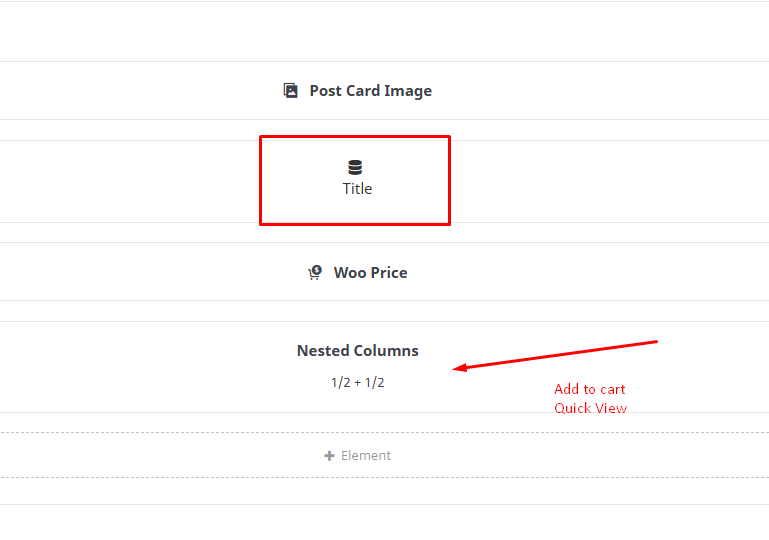
After the latest update, the WooCommerce Quick View stopped working. I’m 100% sure of this because I spent 5 hours trying to find the problem on one website, while it was still working on another. Then, I updated Avada on the website where Quick View was working, and now it’s not working anymore. How can I roll back to the older version?
Hello @vampireprincess
This is a known issue due to product title missing, we have now fixed this for our next update which should be out soon
Thanks
-Ammar
Hello @vampireprincess
We will need to take a closer look into your setup in this case to provide more information on this
Click Here to Get Avada Support
Thanks
-Ammar